DICloak continues to improve its browsing environment to make multi-account management more stable and easier to control. The latest update introduces WebRTC forwarding capability, helping browser profiles maintain more consistent network signals when proxies are used. By aligning WebRTC traffic with the configured proxy, users can manage profiles with better stability and fewer unexpected network mismatches.
Key Benefits of WebRTC Forwarding Capability
- Better IP Consistency
- Stronger Fingerprint Stability
- Reduced Risk of Detection
- Improved Proxy Compatibility
WebRTC Forwarding Capability in Fingerprint Setting
To help reduce risks such as WebRTC IP exposure and proxy mismatches, the latest DICloak update introduces WebRTC Forwarding Capability in browser fingerprint settings. This feature allows WebRTC traffic to follow the proxy configured in the browser profile instead of connecting through the local network.
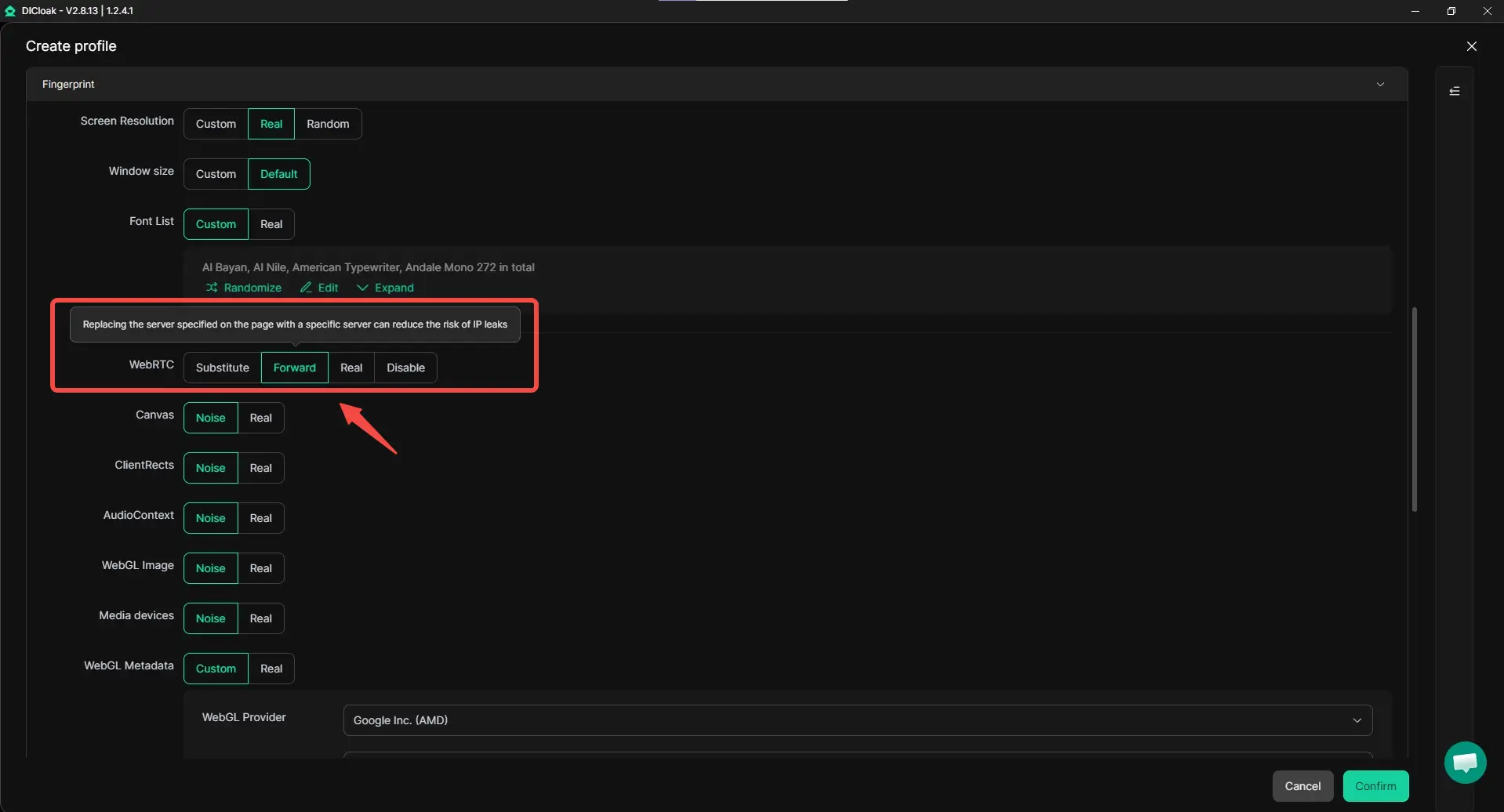
This update helps improve proxy stability by keeping WebRTC traffic aligned with the configured proxy. As a result, network signals stay more consistent with the browser profile, supporting better IP consistency and stronger fingerprint stability. For users who manage multiple accounts, this alignment can reduce signals that might link accounts and improve compatibility with proxy setups commonly used in multi-account operations.
Useful Tips for Better Stability
To get the best results, make sure each browser profile uses a stable proxy and keep profile settings consistent. Regularly updating your browser profile and testing proxy connections can also help maintain a more stable multi-account setup.
Get Started with the New Version
Update or download the newest version and give it a try. With WebRTC forwarding capability, WebRTC traffic follows your configured proxy, helping keep browser profiles more consistent and stable.
 Web Proxy Tools
 Free Tools
 Cookie Plugin
 UA Generator
 MAC Address Generator
 IP Generator
 IP Address List
 2FA Code Generator
 World Clock
 Anonymous Check
 WebRTC Leak Test
 UUID Generator
 Free Web Proxy Site
 Proxy Checker
 FB Ad Checker
 AI Web Scraping
 Free SMM Tools
 Twitter Shadowban Checker
 Instagram Name Checker
 UTM Generator
 Username Generator
 AI Hashtag Generator
 LinkedIn Headline Generator
 Social Media Image Resizer