What Is Google AdSense PIN: Core Definition & Purpose
What is Google AdSense PIN? It is a unique six-digit code Google uses to verify the payment address linked to your AdSense account. For most publishers, Google sends the PIN by standard mail after the account reaches the verification threshold, and you then enter the code in AdSense to complete address verification. Because the letter is sent to the address on your payments profile, it is important to check your name, street address, apartment or unit number, city, and postal code before verification starts. An old or incomplete address may delay the PIN or prevent it from arriving.
What Google AdSense PIN Actually Is
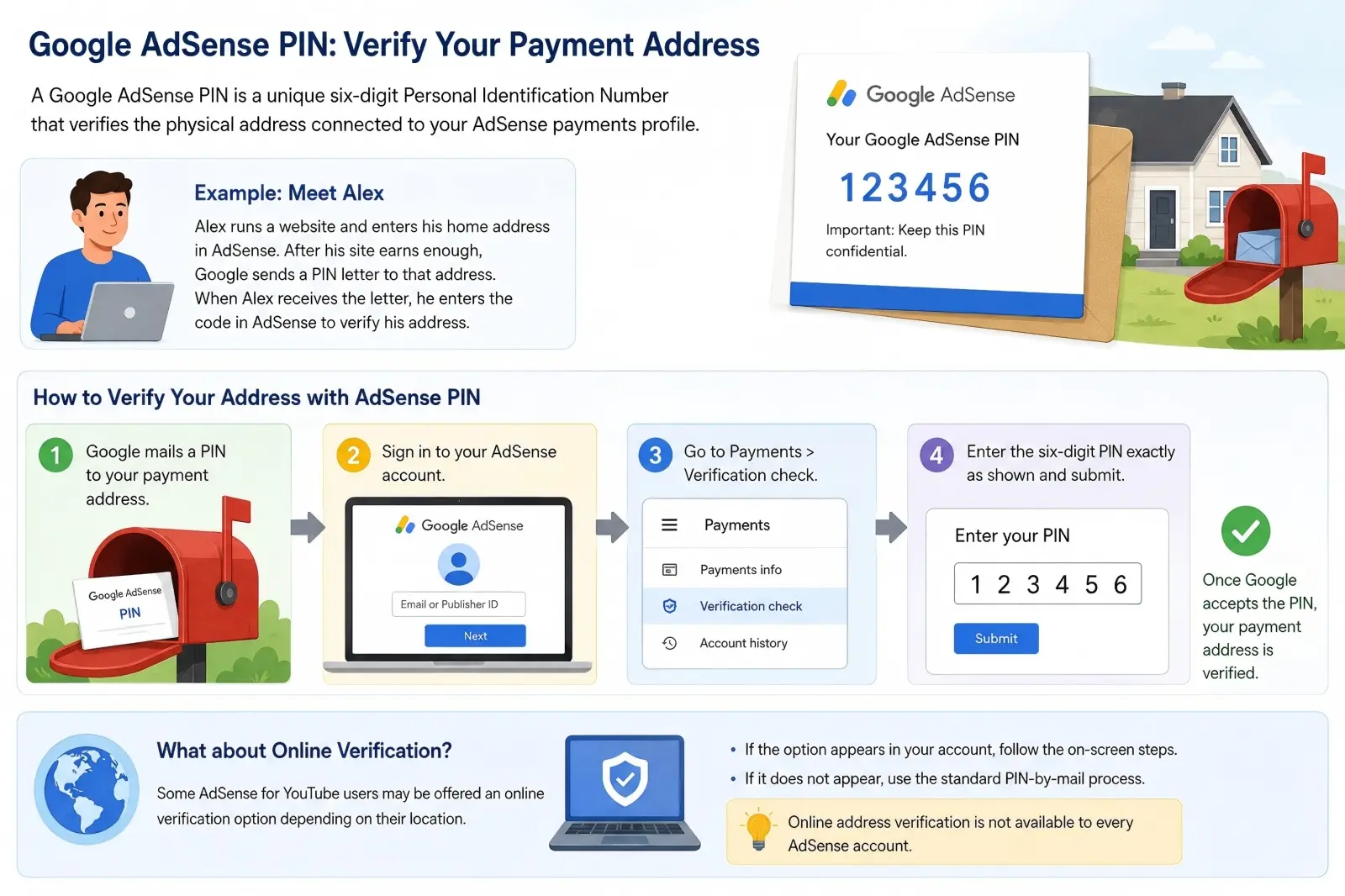
A Google AdSense PIN is not your account password, publisher ID, bank code, or login verification code. It is created for one specific purpose: verifying the physical address connected to your AdSense payments profile. Google currently describes it as a unique six-digit Personal Identification Number. When the PIN mailer arrives, you sign in to AdSense, go to Payments > Verification check, enter the six digits exactly as shown, and submit them. Once Google accepts the PIN, your payment address is verified.
For example, imagine a website owner named Alex has entered his home address in AdSense. His site begins earning ad revenue, and his account later reaches Google's verification threshold. Google sends a physical PIN letter to the address Alex entered earlier. Receiving that letter shows that the address is real and that Alex can receive mail there. He then enters the code in his AdSense account, which completes the address verification step.
There is also some confusion around Google AdSense PIN verification online. In the normal AdSense PIN process, the code is mailed to the payment address and then entered online in the AdSense account. However, Google says that some AdSense for YouTube users may be offered an online verification option depending on their location. If that option does not appear in the account, the publisher should follow the standard PIN-by-mail process instead. This means publishers should not assume that online address verification is available to every AdSense account simply because they have seen it mentioned online.
 Why Google AdSense PIN Is Required for Publishers
Google AdSense PIN verification helps Google confirm that the payment information connected to an account is valid. This is different from checking whether your website is approved for AdSense or whether your content follows AdSense policies. It is part of the process Google uses before sending money to a publisher. Google also separates address verification from other payment steps, such as identity verification, adding a payment method, and reaching the final payment threshold.
A simple example shows why this matters. Suppose a publisher creates an AdSense account but enters an address from an old apartment. The ads may work normally at first, so the publisher may not notice the problem. Once the account reaches the verification stage, Google sends the PIN to that old address. The publisher now has a payment verification problem even though the website itself has no issue. This is why checking the payments profile before reaching the threshold is much easier than fixing a delivery problem later.
The PIN also adds a useful layer between earning money and receiving it. Google states that an unverified payment address can place a hold on the payment process. After the address has been verified, the publisher can receive payment once the account also reaches the payment threshold, has no other payment holds, and remains compliant with AdSense policies. So, the purpose of the Google AdSense PIN is not to approve your content. It is to confirm a key part of the payment information that Google relies on before sending earnings.
When Google AdSense PIN Gets Triggered to Send
Google does not normally send a PIN as soon as someone opens an AdSense account. The PIN process starts after earnings reach the verification threshold. For accounts using U.S. dollars, Google's current verification threshold is $10. Thresholds can differ by reporting currency, so publishers outside the United States should check the payment threshold table shown by Google instead of assuming that the exact same amount applies to them.
There is another important step before the letter may be sent. If Google asks you to verify your identity, it will not send the PIN until that identity verification has been completed successfully. For example, a U.S. publisher may reach $10 in earnings and see a request to verify personal information first. Reaching $10 does not always mean a PIN letter will be placed in the mail that same day. If identity verification is still pending, the publisher needs to complete that step before expecting the physical PIN.
After Google generates and sends the PIN, it usually arrives in about three weeks, although actual delivery time can depend on the local postal system. Google sends PIN mail through standard mail and does not provide a tracking number. This is why a publisher who has just crossed the verification threshold should first check the account's Payments > Verification check area rather than immediately requesting another PIN. If three weeks pass and the mail has not arrived, Google allows the publisher to request a replacement PIN.
How Google AdSense PIN Works in the Verification Workflow
Once Google sends the PIN, the process moves from address checking to account verification. This is where understanding what is Google AdSense PIN becomes practical. The six-digit code is not something you use to sign in or receive money directly. You enter it inside AdSense so Google can confirm that the payment address on your account can receive mail. After that step is complete, address verification is removed as one of the possible blocks between your earnings and a future payment.
The process is simple when the address and PIN are correct, but small mistakes can cause delays. You need to use the PIN exactly as it appears in the letter, and you also need to make sure you are entering it in the correct AdSense payments account. This matters even more for publishers who manage more than one site or who use AdSense for YouTube. Knowing what happens at each stage can help you avoid entering the wrong number, waiting for a payment too early, or assuming that receiving the letter means every payment requirement is complete.
Step-by-Step Process for Google AdSense PIN Validation
After the PIN letter arrives, sign in to the AdSense account connected to the payment address. Go to Payments, then open Verification check. You will see a field where you can enter the six-digit PIN from the mailer. Type the number exactly as printed and click Submit. Google states that once the correct PIN is accepted, the payment address is verified.
For example, suppose Maya runs a food blog and receives an AdSense PIN letter after reaching the verification threshold. The letter shows the code 123456. She does not need to upload a photo of the letter or send it back to Google. She only needs to open the verification page in her own AdSense account and enter those six digits. If the code matches Google's record, the address verification step is complete.
Publishers should still enter the number carefully. Google allows only three incorrect PIN entries before address verification fails and ads may stop showing. If this happens, the publisher can request a replacement PIN to reset the verification limit. Replacement PINs use the same PIN as the original, so if the first letter arrives after a replacement was requested, the original code can still be used.
You may also see people searching for Google AdSense PIN verification online. For standard AdSense accounts, the normal process still involves receiving the PIN by mail and entering it online. However, Google says some AdSense for YouTube users may have an online verification option depending on their location. If that option appears in the account, the user can follow the instructions shown there. If it does not appear, the normal mailed-PIN process still applies.
What Happens After You Submit Your Google AdSense PIN
If the PIN is correct, Google marks your payments address as verified. You do not need to enter the same PIN every time you receive a payment. In most normal cases, address verification is a one-time step for that payments profile. You can check the Payments area of AdSense to make sure there are no other alerts or holds that still need attention. This is useful because a verified address does not always mean the account is ready for immediate payment.
For example, imagine Maya verifies her address when her balance is still below Google's payment threshold. Her PIN is accepted, but Google does not send her earnings right away. She must still reach the payment threshold and have an active payment method, and there must be no other payment or compliance holds on the account. Once those requirements are met, she can become eligible for payment under the normal AdSense payment schedule. This difference is important because Google AdSense PIN verification confirms the address; it does not replace every other payment requirement.
If the PIN is rejected, do not keep guessing different numbers. Check the mailer again and make sure you are not confusing the PIN with your publisher ID or another Google verification code. Google says three incorrect entries can cause address verification to fail and stop ads from showing. There is also a wider time limit: if the address remains unverified for four months, Google may stop showing ads on the publisher's pages until the issue is resolved. This is why it is better to deal with a PIN problem as soon as it appears instead of leaving the verification notice unresolved.
Common Troubles Related to What is Google AdSense PIN Delivery
If your Google AdSense PIN does not arrive, the first thing to know is that Google AdSense PIN tracking is usually not available because Google sends the letter by standard mail without a tracking number. Delivery often takes about two to four weeks, depending on your local postal service, so a short delay does not always mean something is wrong. Check the date the PIN was generated and make sure your payment address can receive standard mail before taking action. If at least three weeks have passed since the last PIN request, you can request a replacement. This is an important part of understanding what is Google AdSense PIN, since the code is entered online but usually delivered through the regular postal system.
What Is Google AdSense PIN Replacement Rule If Mail Is Missing
If your PIN has not arrived after three weeks, Google allows you to request a replacement. First, sign in to AdSense and go to Payments > Verification check. Before clicking Resend PIN, check that the payment address is complete, current, and able to receive normal mail. Google also recommends using an address format recognized by the local postal service and, where useful, entering the address in local language characters.
The three-week rule applies between PIN requests. If fewer than three weeks have passed since the last PIN was sent, AdSense will not normally let you request another one yet. After the waiting period, you can review or update your address and request a new mailer. One useful detail is that Google does not create a different code each time you click Resend PIN. Replacement letters contain a duplicate of the original PIN, so you can use whichever copy arrives first.
Consider a publisher who moved apartments shortly after the first PIN was mailed. The original letter may still be going to the old address. In this case, the better approach is to update the payments address to the new address, make sure the new location can receive standard mail, and then request another PIN after the required waiting period. The publisher does not need to wait for the newest letter if the original eventually reaches them, because both letters contain the same PIN. This is much safer than repeatedly requesting new PINs without first checking why the mail is missing.
Alternatives When You Cannot Receive Your Google AdSense PIN
If several PIN letters never arrive, start by fixing the delivery problem rather than searching for an unofficial PIN generator or verification service. Google suggests checking whether your local post office is holding or forwarding your mail. You should also confirm that details such as the house number, street, apartment or unit number, city, and postal code are correct. If the current address cannot receive standard mail, Google allows you to update the payments address and then request another PIN after the required waiting period.
There is also a formal next step for publishers who have already tried several mailings. Google states that if you have requested your fourth replacement PIN and it still has not arrived after another three weeks, you should use the official PIN troubleshooter. If four months have passed since the PIN was first generated and the address remains unverified, Google may stop showing ads on your pages. Google also provides a contact path for publishers who need help with the verification timeline, so it is better to use the options shown inside AdSense than rely on third-party services that claim they can bypass PIN verification.
You may also come across Google AdSense PIN verification online while looking for another way to verify your address. This option does exist in some cases, but it is not a universal replacement for mailed PINs. Google's current AdSense guidance says that, depending on your location, you may not need separate address verification if you have already passed an eligible online identity verification process. Google also says some AdSense for YouTube users may be offered online verification based on location. If an online option is available, it will appear in Payments > Verification check; if it does not appear, you should continue with the normal PIN mail and troubleshooting process.
Key Facts About What Is Google AdSense PIN You Should Know
After looking at delivery problems and replacement options, a few practical details are still worth knowing. They help explain what is Google AdSense PIN from a payment point of view and can prevent unnecessary worry while you wait. In particular, publishers often ask whether the PIN costs money, how many times it can be resent, and whether verification means they will get paid right away.
Cost & Waiting Timeline for Google AdSense PIN
Google's current AdSense help pages do not list a separate fee for sending or resending a PIN. The PIN is sent through standard mail as part of the address verification process. In most cases, you should plan to wait around three weeks, while Google notes that delivery can take about two to four weeks depending on the location. There is also no Google AdSense PIN tracking number, so you cannot follow the letter like a normal courier package. If it has not arrived after three weeks, you can check your address and request another PIN.
For example, if your PIN was mailed on September 1, there is usually little reason to worry after only one week. Local postal delays may be normal, especially when international mail is involved. A better approach is to check the date shown in AdSense, make sure your address is correct, and wait for the normal delivery window before requesting another copy. This avoids unnecessary changes to your payments profile.
Limits for Resending Your Google AdSense PIN
Google does not allow publishers to request replacement PINs every few days. You can request another PIN only after at least three weeks have passed since the last request. Each replacement contains the same six-digit PIN as the original, so you can use the first valid letter that reaches you. If you have already requested your fourth replacement PIN and it still has not arrived after another three weeks, Google directs you to use its PIN troubleshooter instead of continuing to resend letters.
This limit makes it important to solve the cause of the delivery problem before each resend. For example, requesting four letters to an address with a missing apartment number will probably not help. Check the address format and local mail service first. As explained earlier, Google also gives publishers four months from the date the PIN is generated to complete address verification before ads may stop showing.
Advantages After Completing Google AdSense PIN Verification
The main benefit of completing Google AdSense PIN verification is simple: your payments address is confirmed, so address verification is no longer blocking payment. Once your balance reaches the payment threshold, Google can pay you as long as there are no other payment holds and your account follows AdSense policies. Verification does not increase your ad revenue or make payments arrive faster. It simply completes one required part of the payment process.
For some publishers, the process may look slightly different. Depending on location, Google says some accounts may not need separate PIN address verification after eligible Google AdSense PIN verification online or online identity verification. The best place to check is Payments > Verification check, because the options shown there apply to your specific account. Once all required verification steps are complete, you can focus on reaching the payment threshold rather than worrying about an unresolved address hold.
Typical Google AdSense PIN Problems & Practical Fixes
Even after you understand what is Google AdSense PIN and receive the letter, the verification process can still go wrong. Most problems come from two places: entering the wrong PIN or using an address that cannot receive standard mail. The good news is that both problems are usually easier to fix when you know what Google is checking.
Why Your Google AdSense PIN Gets Rejected
The most common reason a Google AdSense PIN is rejected is simple: the six-digit number was entered incorrectly. Google tells publishers to enter the PIN exactly as it appears in the mailer under Payments > Verification check. The PIN is also different from your AdSense publisher ID, which normally begins with pub-. Mixing up these numbers can cause a failed attempt.
For example, a publisher may see several numbers on an AdSense letter or inside the account and enter the wrong one by mistake. If this happens once, check the original PIN mailer carefully before trying again. Google allows only three incorrect PIN entries. After the third incorrect attempt, address verification fails and ads can stop showing. To reset the PIN entry limit, Google instructs publishers to request a replacement PIN.
This is also why you should not keep guessing if the number is unclear. Use the code printed on the official mailer or follow any Google AdSense PIN verification online option shown inside your own account if Google makes one available to you. Do not use third-party services that claim they can create or bypass an AdSense PIN. The safest approach is always to follow the verification steps shown in the AdSense payment area.
Address-Related Issues for Google AdSense PIN Mail
A correct PIN cannot help if the letter never reaches you. Google requires a valid payments address that can receive international standard mail. The address should include the details your local postal service needs, such as the street or block number, city, postal code, and, when needed, the building, floor, or unit number. Google also recommends using the local language format where appropriate because this may make delivery easier for the local postal service.
A small missing detail can create a real problem. For example, imagine that Chris lives in Apartment 8B but enters only the street address in AdSense. Other mail may sometimes reach the building, but the Google PIN letter may not reach the correct apartment. In that case, Chris should correct the payments address before requesting another PIN. Google specifically notes that an updated PIN can be sent to the new address after the required waiting period.
It is also worth remembering that Google AdSense PIN tracking is not available for standard PIN mail. Google sends the letter through standard postal service and does not provide a tracking number. If the address is correct but the letter is still missing, check with your local post office and review the address shown in AdSense before requesting another copy. Fixing the address itself is often more useful than sending several PIN letters to the same incomplete address.
Enhance AdSense Account Security with DICloak
Completing Google AdSense PIN verification confirms the payment address, but publishers may still need to manage how different account environments are used afterward. When several authorized Google or AdSense accounts are opened in the same browser, they may share parts of the same browser profile, such as cookies, local storage, language settings, timezone, and device fingerprint data. For publishers or agencies working with more than one account, keeping these environments separate can make account management clearer and reduce accidental overlap.
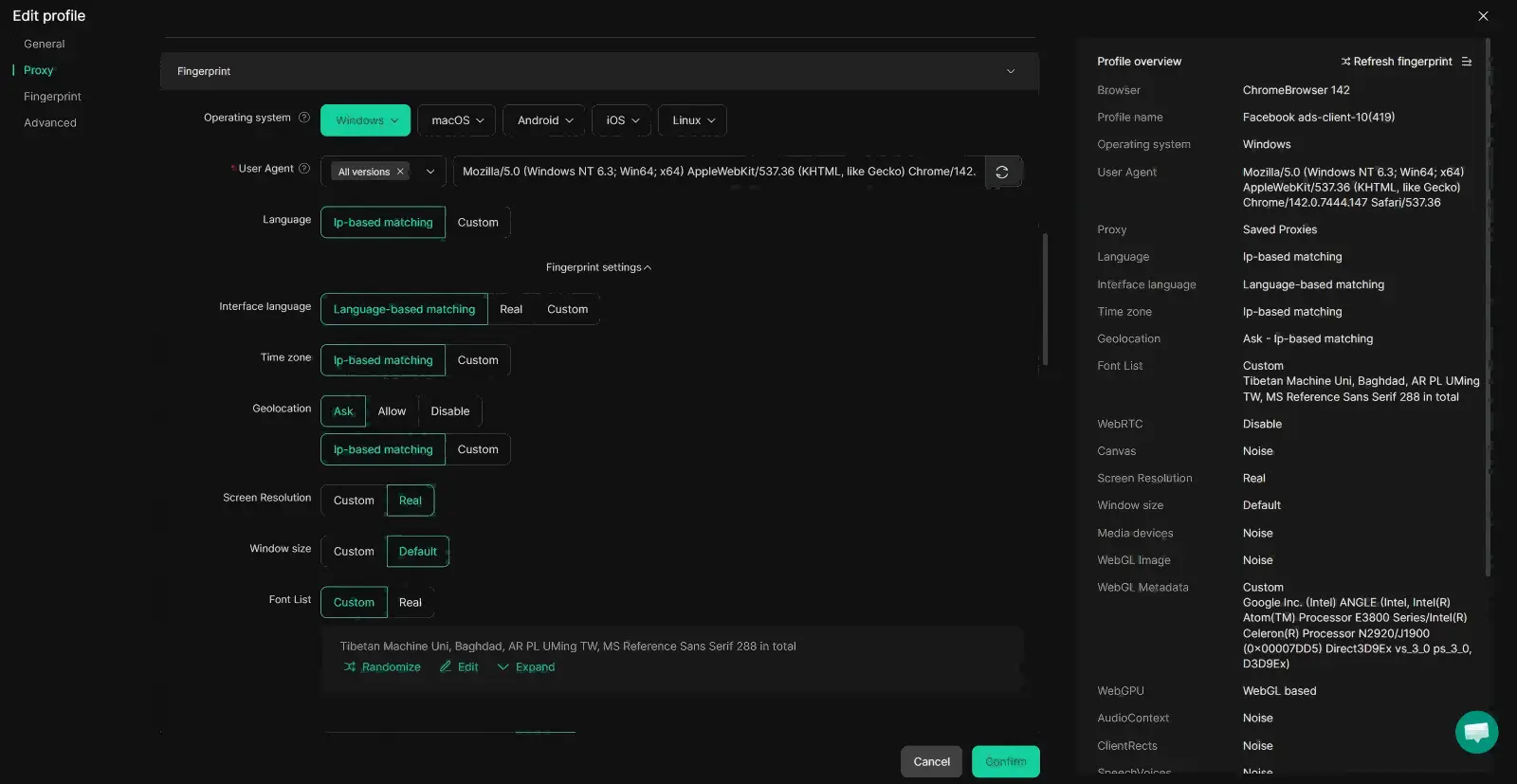
An antidetect browser such as DICloak can be useful for users who want stronger browser fingerprint isolation. Users can create a separate browser Profile for each authorized account and configure different browser fingerprint settings, including user agent, operating system, timezone, language, fonts, Canvas, WebGL, and other browser parameters. Each Profile can also keep its own cookies, login session, and proxy settings. This may help users maintain a more consistent and separated browser profile for each account instead of switching between several accounts inside the same browser profile.
This type of fingerprint isolation should be used for legitimate account organization and security. It does not replace Google AdSense PIN verification, identity checks, or Google policies, and it should not be treated as a way to bypass account restrictions. For publishers managing several authorized workspaces, the main value is having clearer separation between browser profiles while keeping each account session easier to control.
Keep Authorized AdSense Workspaces Separate
If you manage several authorized accounts or work with different clients, switching between them in one normal browser can become messy. You may sign in to the wrong Google account, reuse the wrong session, or mix cookies between different workspaces. These are simple mistakes, but they can make account management harder than it needs to be.
With DICloak, users can assign each account or client workspace to a separate browser Profile. Each Profile can keep its own cookies, local storage, login session, browser settings, and proxy configuration. For example, an agency team could keep Client A's Google account in one Profile and Client B's account in another instead of signing in and out of both accounts in the same browser window. This kind of separation may make daily account management easier to organize and reduce accidental session mix-ups.
It is still important to follow Google's account ownership, payment, and AdSense policies. Browser separation should be used to manage accounts that you are allowed to access, not to bypass account limits, PIN verification, identity checks, or enforcement actions.
Control Team Access to AdSense Workspaces
Account access can become harder to manage when several people work on the same publishing business. For example, an agency may have one person checking revenue, another handling website content, and a manager reviewing payment settings. Giving every team member access to every browser Profile may create unnecessary security risks and make it harder to know who is working with each account.
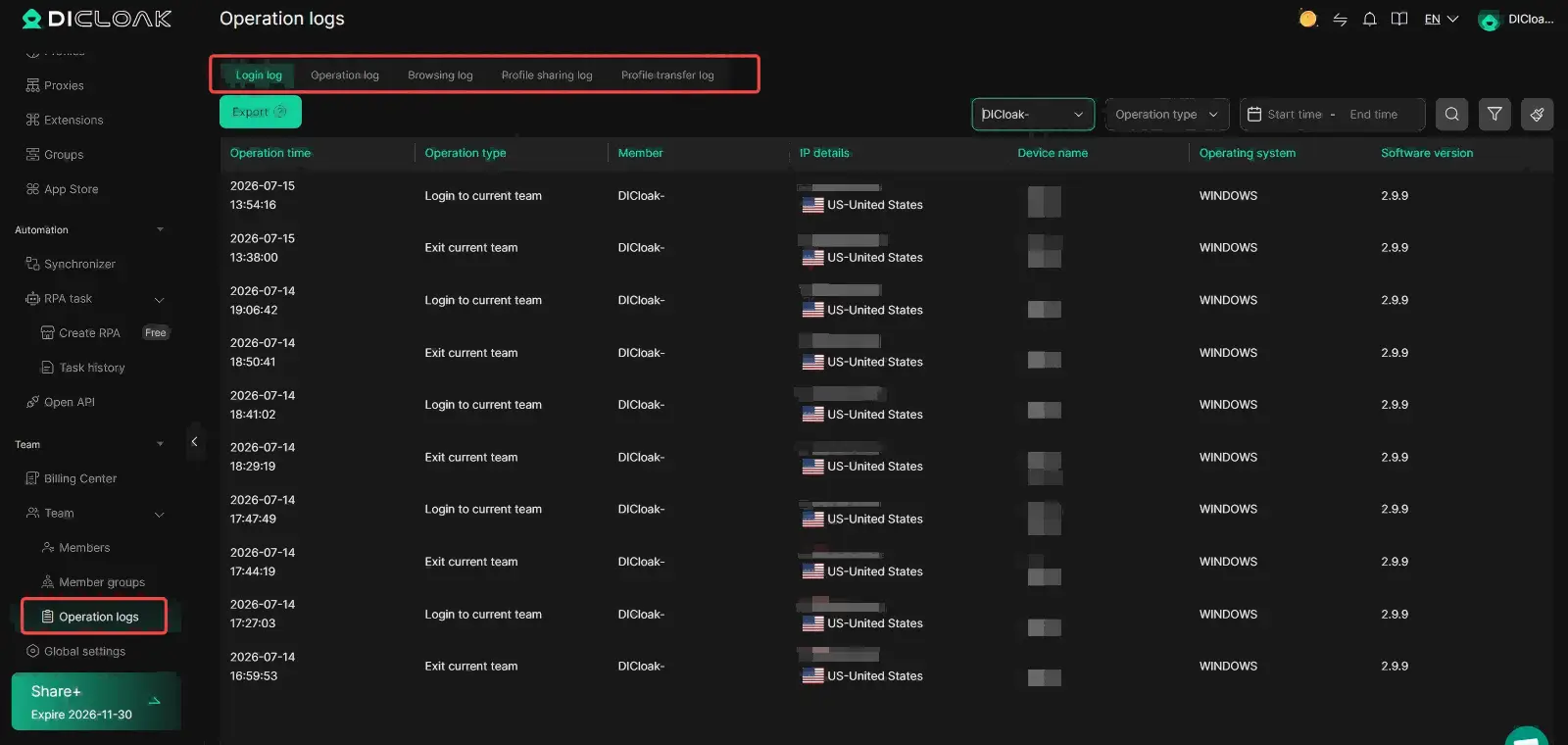
Teams using DICloak can assign browser Profiles to specific members or groups based on their work. Administrators can also manage permissions, review operation logs, and remove access when a member no longer needs a Profile. This may help publishers keep account access more organized without giving every team member the same level of control.
For AdSense users, these controls should support normal account management rather than replace Google's own security and verification steps. Publishers should still use features such as two-factor authentication and follow Google's rules for account access. When combined with separate browser Profiles, controlled team access can provide a clearer way to manage authorized AdSense workspaces as a business grows.
Frequently Asked Questions About What Is Google AdSense PIN
1. What Is Google AdSense PIN and Why Do I Need It?
What is Google AdSense PIN? It is a six-digit code Google uses to verify the payment address linked to your AdSense account. You need to complete this step before address verification can be cleared for future payments.
2. How Long Does a Google AdSense PIN Take to Arrive?
After Google sends the PIN, delivery usually takes about two to four weeks, depending on your country and local postal service. When learning what is Google AdSense PIN, remember that it is normally sent by standard mail rather than express delivery.
3. Can I Complete Google AdSense PIN Verification Online?
In most cases, you receive a physical PIN and enter it online in your AdSense account. Some users may be offered an online verification option based on their account or location, but Google AdSense PIN verification online is not available to everyone.
4. Can I Track My Google AdSense PIN Letter?
No tracking number is normally provided for standard PIN mail. This means Google AdSense PIN tracking is not available in the same way as tracking a courier package. You can check when the PIN was generated in your AdSense account instead.
5. What Should I Do If My Google AdSense PIN Never Arrives?
Check that your payment address is complete and can receive standard mail. If at least three weeks have passed since the last PIN was sent, you can request a replacement through AdSense. Understanding what is Google AdSense PIN also means knowing that replacement letters normally contain the same PIN as the original.
Conclusion
So, what is Google AdSense PIN? It is a six-digit code Google uses to verify your AdSense payment address. For most publishers, the PIN is sent by standard mail and must be entered in AdSense before address verification is complete.
To avoid delays, make sure your payment address is correct and wait for the normal delivery period before requesting a replacement. Google AdSense PIN tracking is usually not available, while Google AdSense PIN verification online may only be offered to some users based on their account or location.
Once your PIN is verified, address verification is complete. You may still need to meet other payment requirements, such as reaching the payment threshold, adding a payment method, and clearing any account holds.
 Web Proxy Tools
 Free Tools
 Cookie Plugin
 UA Generator
 MAC Address Generator
 IP Generator
 IP Address List
 2FA Code Generator
 World Clock
 Anonymous Check
 WebRTC Leak Test
 UUID Generator
 Free Web Proxy Site
 Proxy Checker
 FB Ad Checker
 AI Web Scraping
 Free SMM Tools
 Twitter Shadowban Checker
 Instagram Name Checker
 UTM Generator
 Username Generator
 AI Hashtag Generator
 LinkedIn Headline Generator
 Social Media Image Resizer





