Managing multiple online accounts has become much harder in recent years. Platforms now track devices, behavior, and network signals more closely than ever. For many users, a single mistake can lead to account bans, extra verification, or lost work. This is why tools like XLogin have gained attention among marketers, sellers, and teams who need better control over how accounts are accessed.
In this guide, we take a clear and practical look at XLogin. We examine how it works, how safe it is, and what the real user experience looks like in daily use. Instead of marketing claims, the focus is on actual workflows, common problems, and limits that users may face as they scale.
To give a complete picture, the guide also compares XLogin with DICloak, a newer antidetect browser designed for automation and team-based workflows. By the end of this article, you will understand where XLogin fits, where it falls short, and which type of user may benefit more from a system built for efficiency and growth.
Understanding XLogin
Before looking at specific features, it helps to understand what XLogin is and why people use it. This section explains the basic idea behind XLogin and how it works in real situations.
What is XLogin?
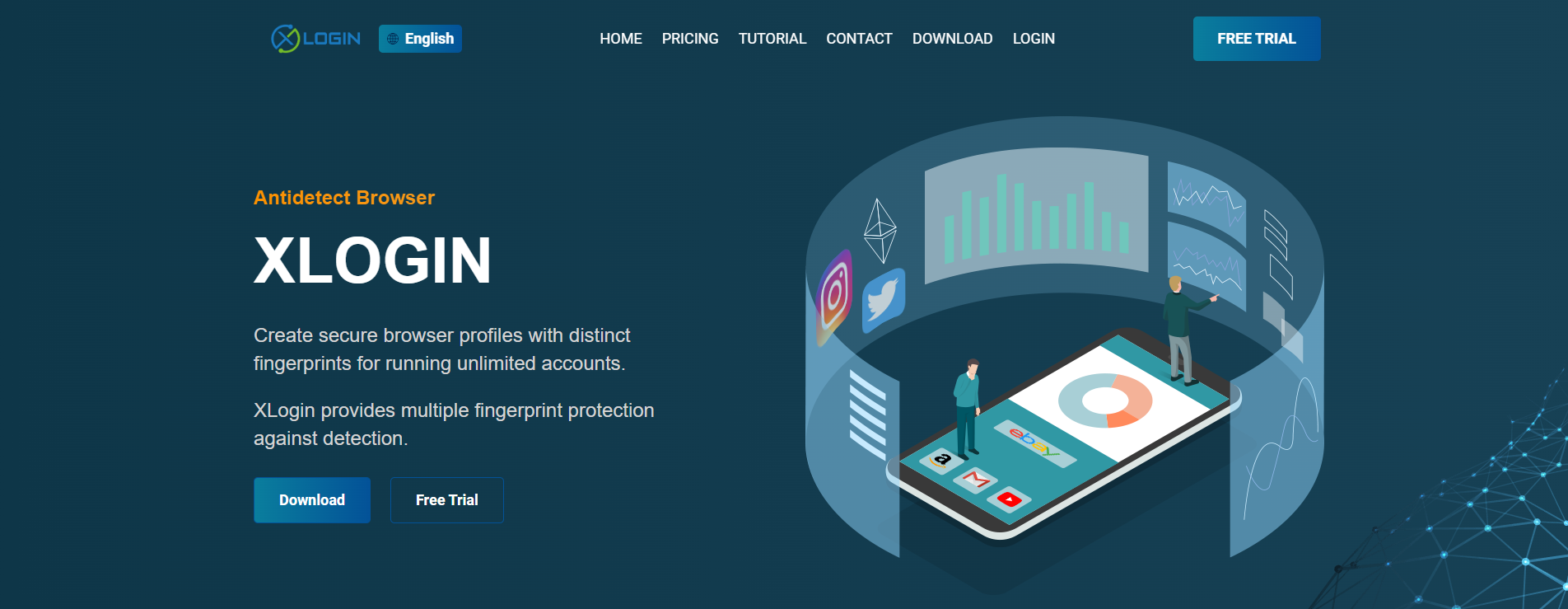
XLogin is an antidetect browser designed for users who need to manage multiple online accounts in a safe and controlled way. Unlike normal browsers, XLogin allows you to create many separate browser profiles on one device. Each profile acts like a different computer, which helps prevent accounts from being linked by websites.
For example, a digital marketer may run several ad accounts on the same platform. If all accounts log in from one regular browser, the platform may flag them as risky. With XLogin, each account uses its own profile with separate cookies and settings, making daily work more stable and predictable.
In simple terms, XLogin helps users create clean and isolated browsing environments. One profile cannot see or affect another. This setup is widely used by e-commerce sellers, marketing teams, and testers who work with many accounts at the same time.
Key Features of XLogin
- Independent Browser Profiles: Each XLogin profile works as a separate environment with its own data, cookies, and local storage. For example, you can manage a payment account in one profile and a social media account in another without any overlap.
- Browser Fingerprint Management: Websites collect device details to identify users. XLogin changes these details for each profile so every account looks like it comes from a different device. This helps reduce the risk of account linking.
- Proxy Integration: XLogin allows you to bind a proxy to each profile. One profile can appear to connect from the US, while another appears to connect from a different country. This is useful for region-based testing or global account management.
- Automation Support: XLogin supports automation tools that help with repetitive tasks. For example, users can automate login checks or page visits across many profiles, saving time and effort.
- Team Collaboration Tools: XLogin makes it easy to share profiles with team members while controlling access. This allows teams to work together efficiently without sharing passwords or mixing account environments.
Security Concerns with XLogin
After understanding how XLogin works and why people use it, the next step is to talk about security. XLogin is designed to help protect accounts, but like any popular tool, it can also attract risks. Knowing these risks helps users stay safe and use XLogin in the right way.
Common Scams and Risks
As XLogin becomes more widely used, some bad actors try to take advantage of its name and users.
One common risk is bogus copyright or warning messages. Some users report seeing emails or pop-ups that claim XLogin has legal issues or that their accounts will be closed. These messages often ask users to click a link or download a “fixed version.” In many cases, these warnings are fake and are meant to scare users into taking unsafe actions.
Another risk comes from phishing attacks targeting XLogin users. For example, a fake website may look very similar to the real XLogin site and ask users to log in. If users enter their email and password, attackers can steal their account access. This usually happens when users download XLogin from unofficial sources or click links shared in random forums or chats.
Essential Security Measures
To stay safe while using XLogin, basic security habits are very important.
- Create strong passwords: Always use a unique and strong password for your XLogin account. Avoid simple words or passwords you already use elsewhere. A strong password makes it much harder for attackers to break in, even if your email is exposed.
- Enable two-factor authentication (2FA): If XLogin offers two-factor authentication, turn it on. With 2FA, logging in requires both your password and a one-time code. For example, even if someone steals your password, they still cannot log in without the second code.
These small steps can greatly reduce the chance of losing access to your XLogin account.
Recognizing and Mitigating Vulnerabilities
Some users worry when they see Trojan or virus warnings during installation. In many cases, this happens because antidetect browsers change browser behavior, which can trigger false alerts from antivirus software. However, users should still be careful.
A good practice is to download XLogin only from its official website and avoid modified versions shared by third parties. If your security software shows a warning, check the file source before ignoring it. Never disable antivirus protection blindly.
For secure daily use, keep your system clean and updated. Do not install unknown browser extensions inside XLogin profiles. Also, test new profiles with low-risk accounts first. For example, before logging into a high-value business account, make sure the XLogin profile works normally with a test account.
User Experience with XLogin
After understanding how XLogin works and reviewing its security considerations, it is important to look at the actual user experience. This includes how XLogin is installed, how the interface works, and how users manage multiple accounts in daily use.
Dashboard and Customization Experience
Most daily work in XLogin takes place in the dashboard, where browser profiles are created, launched, edited, and organized. The dashboard is functional but offers little visual customization. It mainly shows profile creation time, last launch time, and editing history. The layout is fixed, and users cannot resize the window or rearrange columns.
For users with a small number of profiles, this setup is usually enough. As the number of profiles grows, limits become clearer. Users cannot highlight group names or profile status, and all profiles follow the same display format.
To balance this, XLogin provides a detailed right-click menu. From here, users can edit profiles, export data, manage cookies, and move profiles into groups. Profile grouping is handled in a separate tab, which helps with organization but does not change the main layout.
XLogin also includes a recycle bin. Deleted profiles stay there for seven days and can be restored if removed by mistake. This helps prevent data loss.
Overall, XLogin focuses on stable profile management rather than interface flexibility. It supports multi-account workflows but offers limited visual control and customization.
Profile Creation and Fingerprints
XLogin offers a very detailed profile creation process. Users can adjust many settings when creating a new browser profile. Because of this, first-time users may find the interface complex at the beginning.
To reduce setup difficulty, XLogin allows users to generate a random fingerprint or follow built-in tutorials that explain what each option controls. These guides help users understand the purpose of different settings before making changes.
The fingerprint configuration area covers a wide range of parameters. Users can modify items such as the user agent, canvas behavior, font settings, and media device information. Advanced options are also available for users who need more control.
XLogin supports batch profile creation as well. This allows users to create multiple profiles at once. However, the batch option is placed near the end of the settings list, which may make it harder to find during initial use.
Proxy Management and Profile Viability
In XLogin, proxy setup is closely tied to browser profiles rather than managed from a separate proxy panel. There is no dedicated proxy tab in the interface. Instead, users assign proxies when creating or editing a profile.
XLogin also allows users to import proxies from a text file. These proxies can then be applied to individual profiles or to batches of profiles at once. This approach works for bulk operations, but it adds extra steps compared to tools that offer a central proxy dashboard.
Because the interface is minimal, XLogin does not clearly show which proxy is linked to a profile from the main dashboard view. To confirm proxy details, users must open the profile settings and check manually. When managing many profiles, this can slow down troubleshooting and reviewing.
Beyond setup, profile viability depends on how browser fingerprints and proxies work together. While XLogin offers options to emulate different environments, including Android and iOS, results can vary in practice.
In real-world testing, some users report inconsistent fingerprint scan results. For example, a profile may pass one detection test but fail another, even when using the same configuration. Tools such as Pixelscan and IPhey may show different outcomes for the same XLogin profile.
In one test scenario, the same browser and proxy settings were used twice. Pixelscan returned a “pass” result, while IPhey flagged inconsistencies. This suggests that fingerprint signals may not always align across different detection systems.
Because of this, users often need to experiment with multiple settings. Adjusting fingerprints, switching proxies, or testing different environments may be required to reach stable results. Even then, consistency is not guaranteed across all platforms or scan tools.
Reputation and Customer Support
XLogin has a limited public presence outside its main user regions. General online searches return few independent discussions, which makes it harder to assess broad user sentiment. Major review platforms such as G2 and Capterra show little to no activity related to XLogin.
On Trustpilot, there are only a small number of reviews. Most are general and positive, while one older review raises concerns about profile stability and pricing. Although this feedback is several years old, there is limited newer public commentary to confirm major changes.
XLogin provides detailed documentation on its official site. The knowledge base covers a wide range of topics, including profile setup, advanced settings, and API usage. Step-by-step guides and video tutorials are available, which can help new users understand the platform.
Customer support for XLogin is available through email, Telegram, and Skype. Response times vary. Users often receive replies during weekdays, while responses may be slower on weekends.
XLogin vs DICloak: How DICloak Enhances Multi-Account Management in 2026
After examining XLogin’s strengths and limitations across usability, proxy handling, and scale, it is useful to look at how other tools address the same challenges. DICloak is an antidetect browser built for teams and users who require clearer control, stronger automation, and easier scaling in multi-account environments.
Proxy Configuration and Network Control
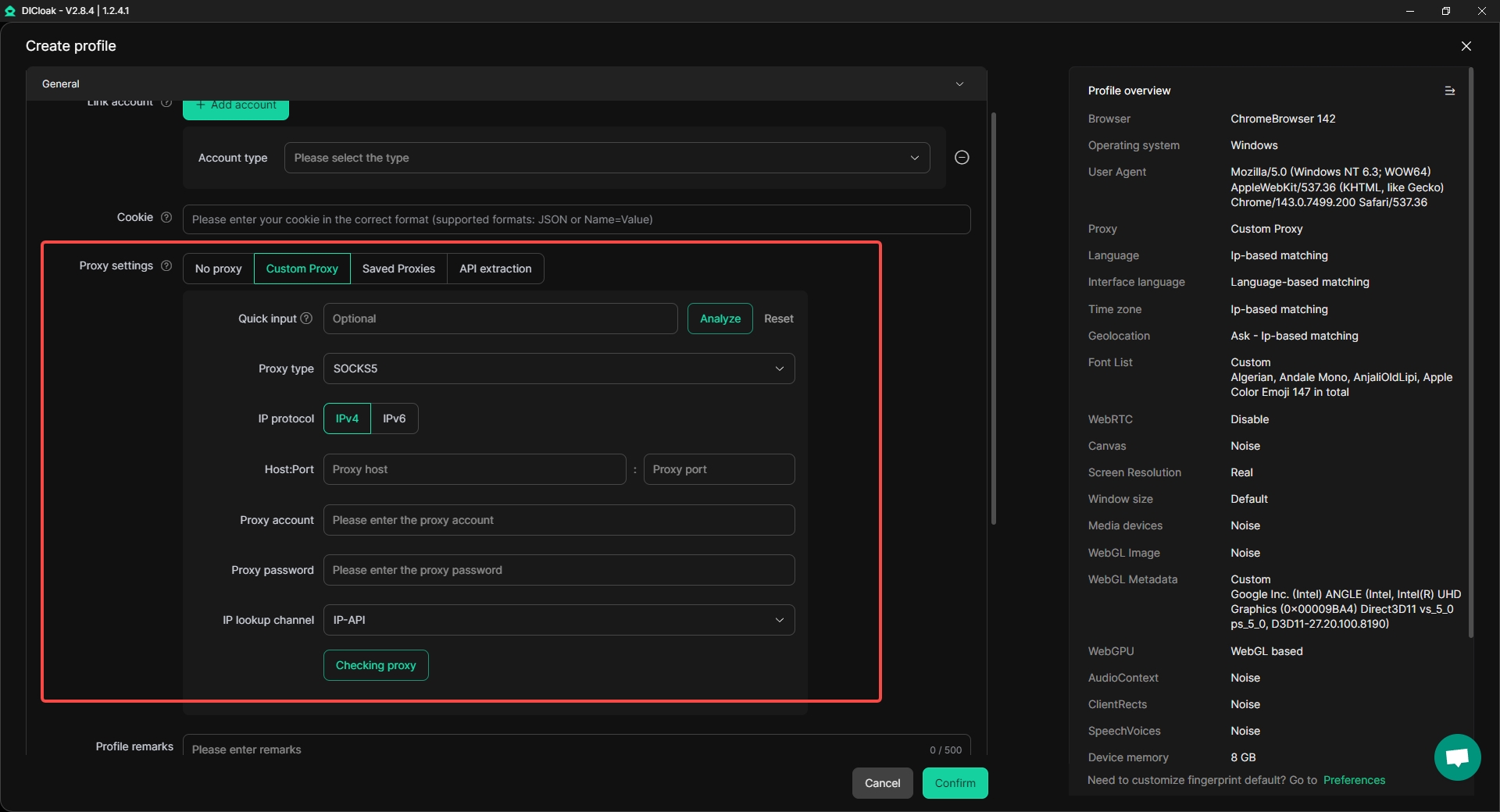
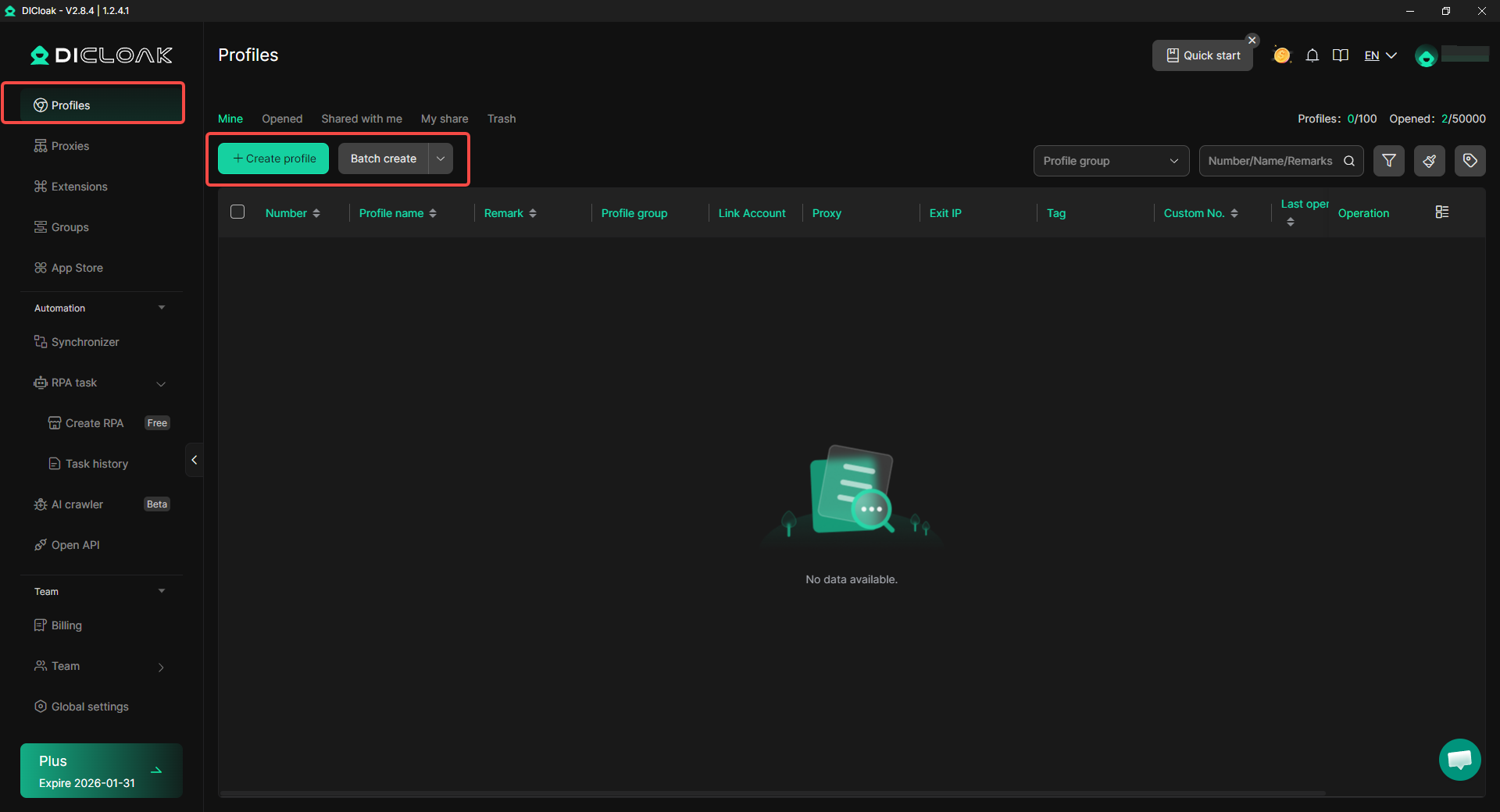
DICloak supports flexible proxy configuration across common protocols such as HTTP, HTTPS, and SOCKS5. Proxies can be added individually or managed in bulk, which reduces manual work when handling large proxy pools.
Unlike profile-level-only proxy checks, DICloak provides clearer visibility when assigning and managing proxies at scale. This helps users avoid repeated profile edits just to confirm IP assignments. For teams working with many accounts, bulk proxy operations make daily maintenance more predictable.
User Experience and Profile Management
DICloak focuses on reducing friction during profile creation and daily use. Profiles can be created, imported, and launched in batches. This approach is useful for users who manage dozens or hundreds of accounts at the same time.
Compared to more rigid dashboard layouts, DICloak emphasizes operational clarity. Users can organize profiles more efficiently and perform repeated actions without relying heavily on hidden menus or manual checks.
Automation and Workflow Efficiency
DICloak’s automation is centered on ready-made RPA workflows inside its RPA Market, not on vague “background scripts.” In the interface, users can pick platform-based templates (such as Facebook, TikTok, YouTube, Instagram, Amazon, Etsy, and X/Twitter) and apply them to a profile in a few clicks. Typical tasks include browsing a feed, liking content, or running routine account-activity actions that follow a preset flow.
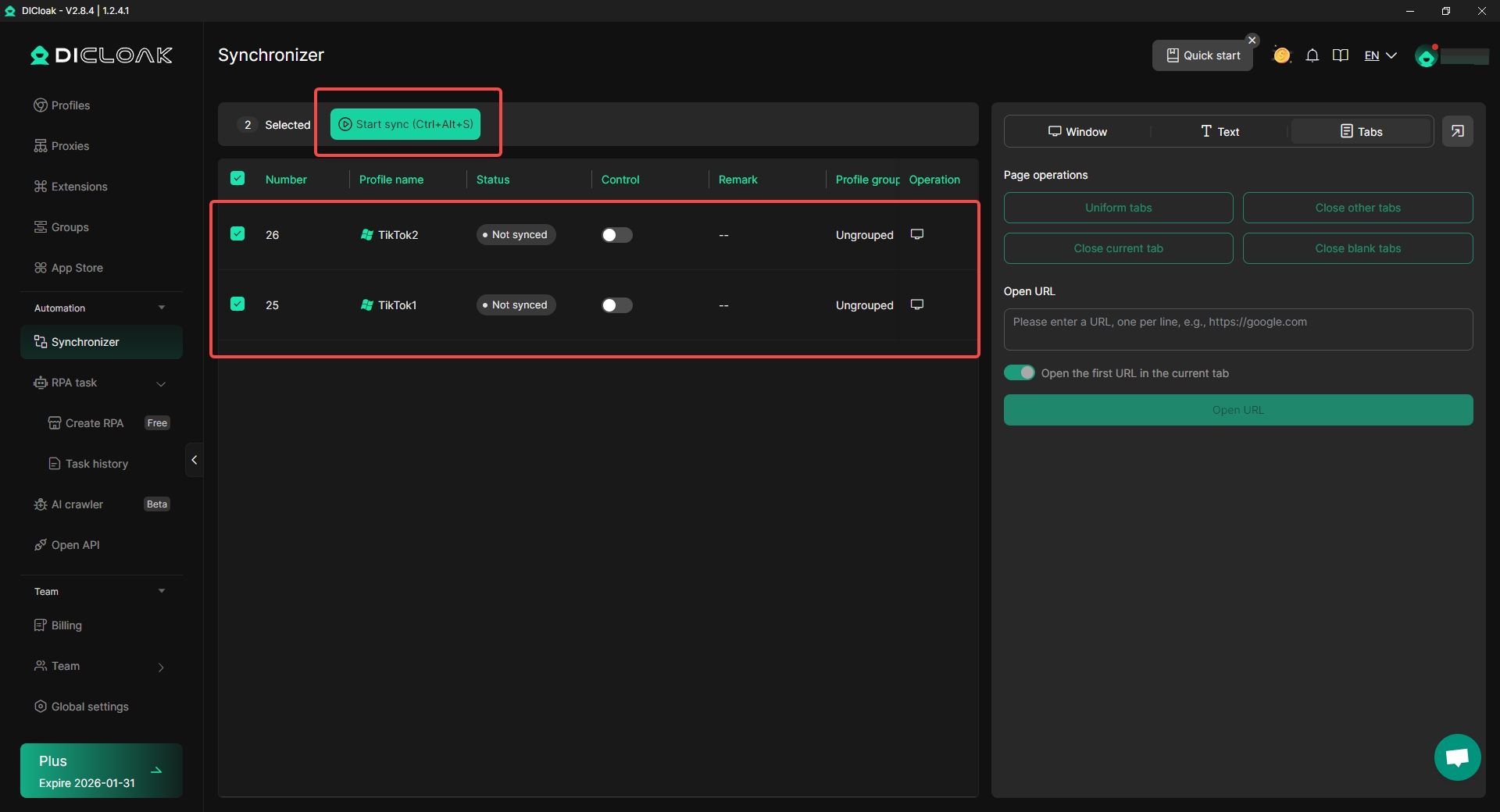
Alongside RPA, DICloak also offers a Synchronizer. This feature lets you sync actions like clicking, typing, and scrolling across multiple opened profiles at the same time, so you do not need to repeat the same steps window by window. It is designed for multi-profile operations where consistent manual input is still needed, but switching costs are high.
Team Collaboration and Permission Control
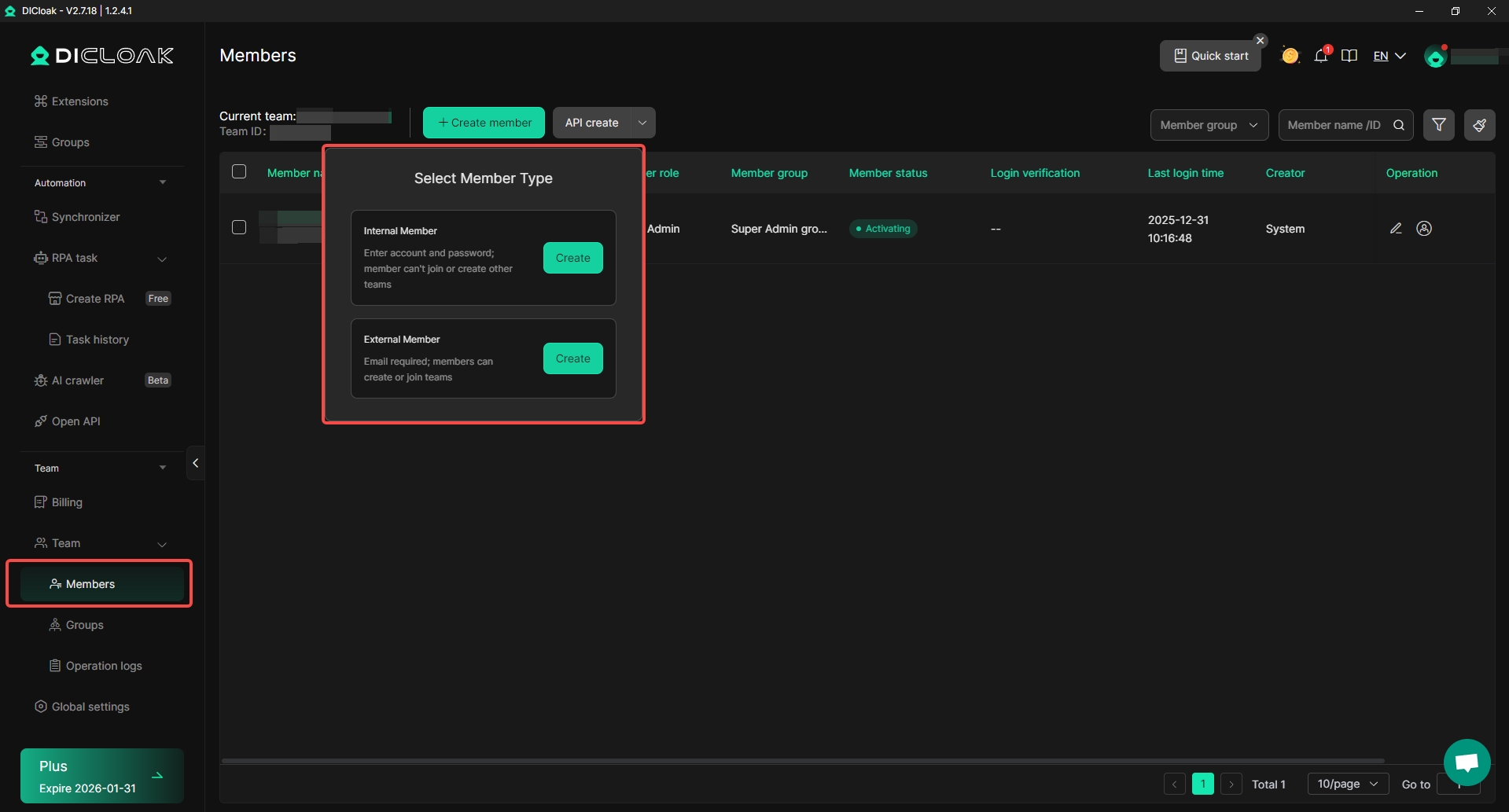
DICloak includes structured tools for team collaboration. Administrators can share profiles, assign permissions, isolate data, and review operation logs. This makes it easier to manage team activity without sharing full account access.
Profiles can be restricted by role or grouped by task. This structure helps teams work in parallel while maintaining clear boundaries. Compared to limited collaboration visibility, this setup supports long-term team operations and accountability.
Platform and Environment Support
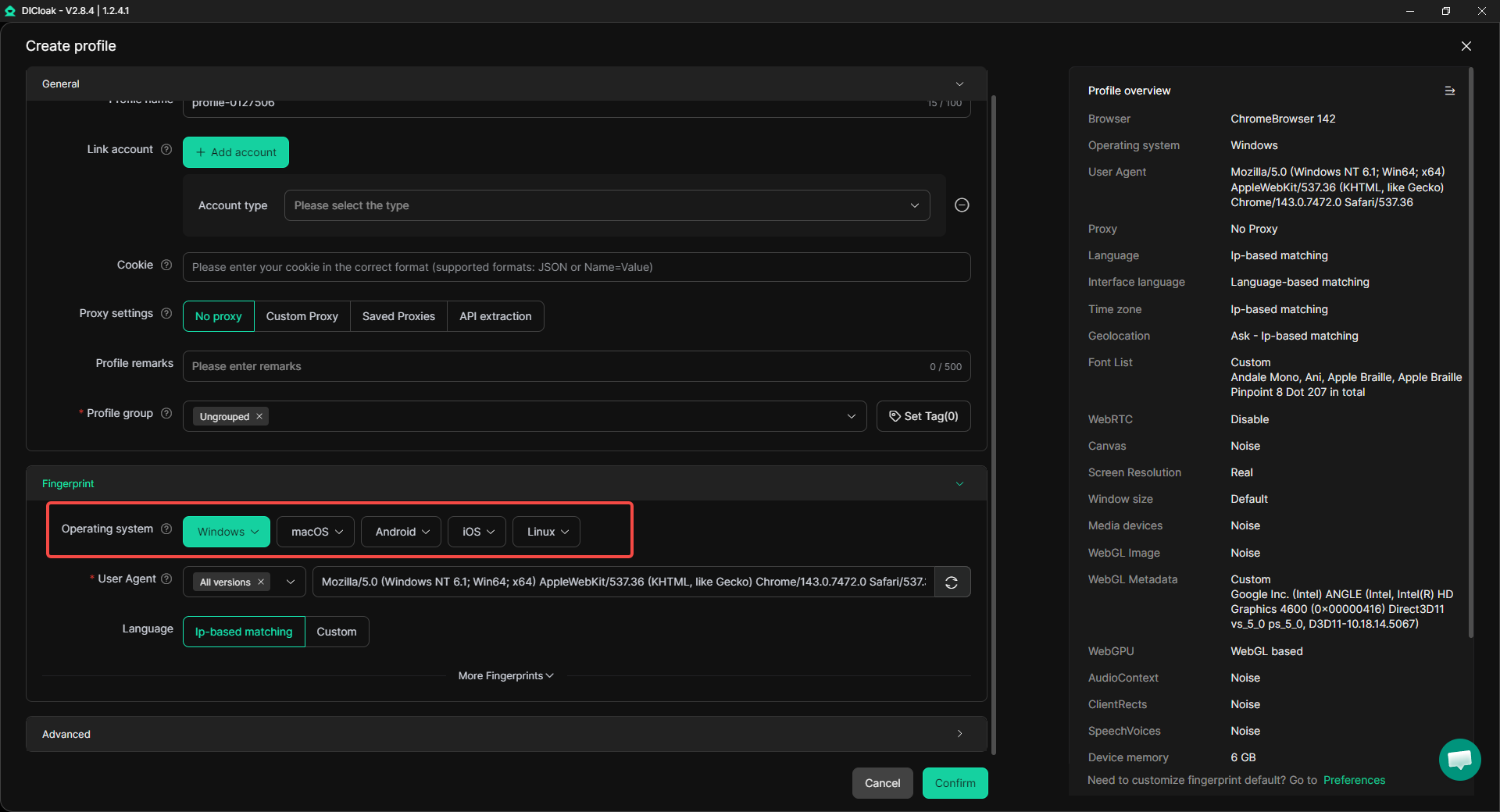
DICloak is built on the Chrome core and supports multiple operating environments. Users can simulate Windows, macOS, Linux, Android, and iOS environments within the browser.
This flexibility is useful for users who need to operate across different platforms or test how accounts behave in various system contexts. It also reduces the need to maintain separate devices or operating systems for different workflows.
Positioning in Multi-Account Workflows
DICloak approaches multi-account management with an emphasis on scale, automation, and operational structure. While tools like XLogin focus on basic profile isolation, DICloak expands on that foundation with bulk operations, built-in automation, and team-oriented controls.
For users whose needs go beyond individual profile management and into coordinated, high-volume workflows, DICloak represents a more system-driven approach to the same challenges discussed throughout this guide.
XLogin vs DICloak: Pricing
After comparing features, automation, and workflow design, pricing becomes a key factor when choosing between XLogin and DICloak. The two tools take very different approaches to trials, entry cost, and scaling.
Trials & Free Plans
XLogin does not offer a long-term free version. Instead, it provides a 3-day free trial, which must be activated through customer support. Depending on timing, activation can take anywhere from minutes to several hours. During the trial, users can save up to 5 browser profiles, but sub-accounts and profile sharing are not available. This trial mainly allows users to test the core interface and basic profile creation.
In contrast, DICloak offers a free plan that can be used indefinitely, not just as a short trial. The free plan supports a small number of profiles and limited daily usage, which is suitable for basic testing or light multi-account work. This allows users to evaluate DICloak in real conditions without time pressure before upgrading.
For users who want to explore workflows slowly or test automation features over time, this difference in trial structure may affect how easily they can evaluate each tool.
Paid Plans
XLogin Paid Plans
XLogin’s paid plans start at a relatively high entry point and scale mainly by profile count and team seats:
- SOLO – $99/month: Includes up to 200 browser profiles and 5 sub-accounts. Features include batch profile creation, cookie import/export, profile sharing, transfer tools, and basic REST API access.
- TEAM – $209/month: Supports 500 profiles and 10 sub-accounts. This tier targets teams managing larger account sets and shared workflows.
- SCALE – $499/month: Designed for high-volume operations. It allows up to 3,000 profiles, 20 sub-accounts, and includes advanced REST API access.
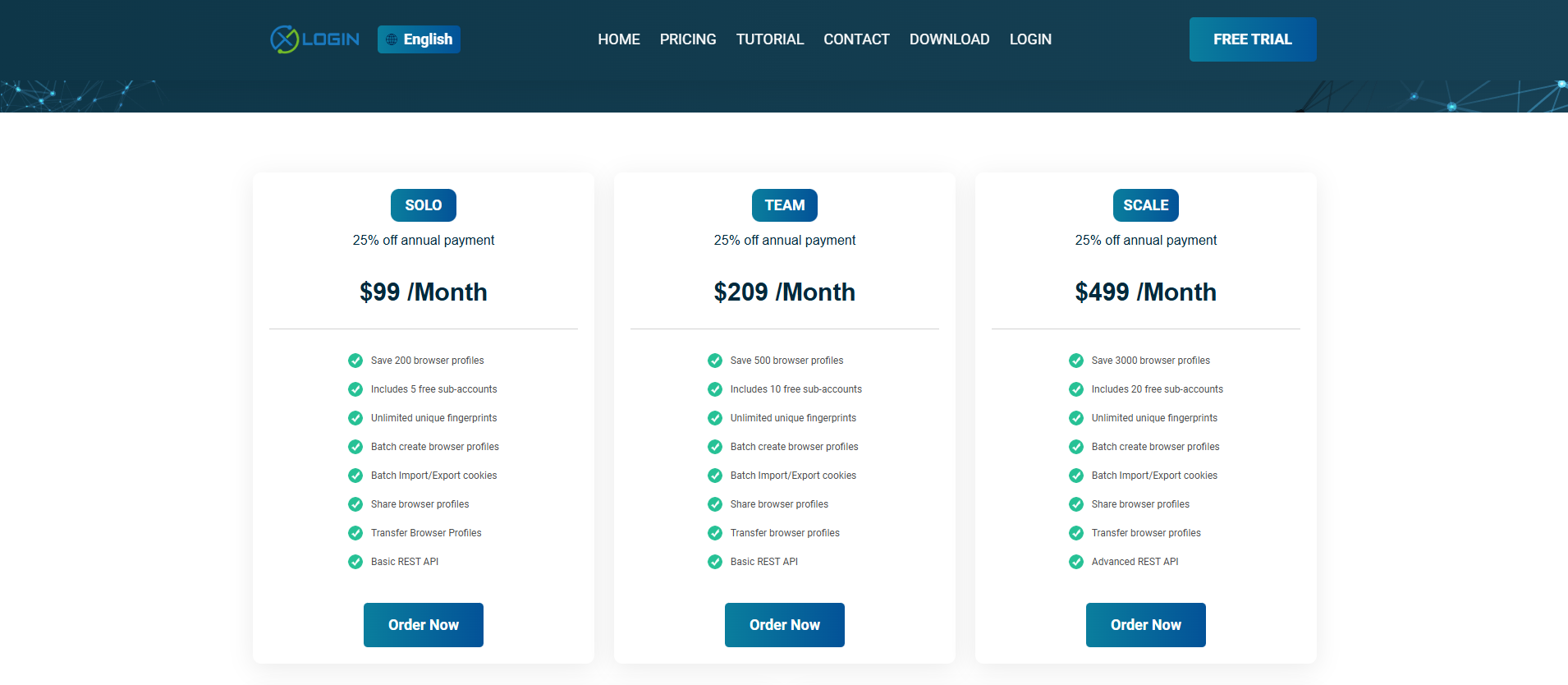
XLogin also offers a 25% discount for annual billing, but even with this discount, the starting price remains relatively high for solo users or small teams.
DICloak Paid Plans
DICloak’s pricing starts at a lower level and scales more gradually:
- Share Plan – around $8/month: Supports a limited number of profiles and team sharing features. It is aimed at small teams or users who need basic collaboration.
- Plus Plan – around $28.8/month: Expands profile limits and unlocks automation features such as RPA workflows and the Synchronizer. This tier is often used by users running multiple accounts with repeated tasks.
- Share+ Plan – around $138/month: Designed for larger teams. It includes more profiles, more team members, API access, and advanced collaboration tools.
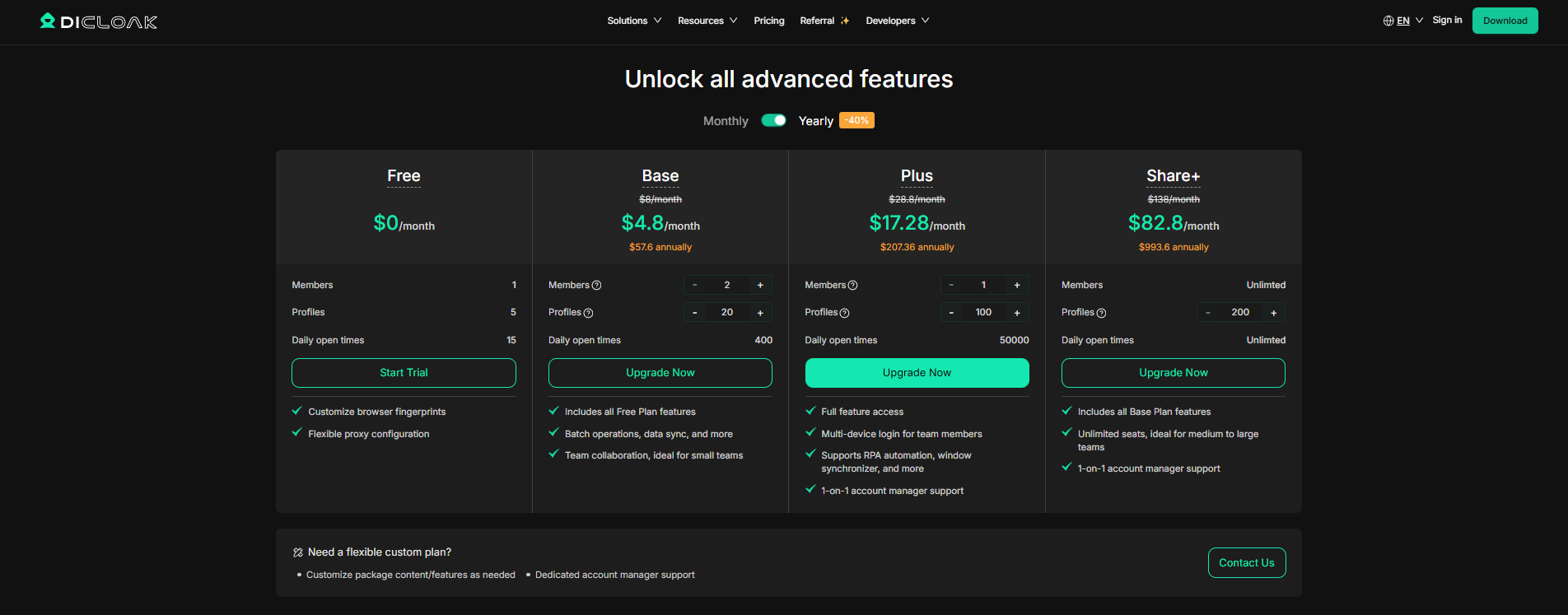
Compared to XLogin, DICloak offers lower entry cost and more granular scaling, allowing users to move up step by step instead of starting at a high base price.
Pricing Differences in Practice
In real use, the pricing gap reflects different target users:
- XLogin pricing is structured for established teams that already need hundreds of profiles and multiple seats. For smaller users, the $99/month entry level may be more capacity than needed.
- DICloak provides more flexibility at the lower end, which can be useful for individuals, small teams, or users who want to scale gradually.
- At higher tiers, both tools support large-scale operations, but DICloak generally reaches similar team and automation capabilities at a lower monthly cost.
Understanding these pricing structures helps users choose based not only on features, but also on how much capacity they actually need today versus in the future.
XLogin vs DICloak – The Verdict
Based on the analysis above, the differences between XLogin and DICloak are clearer when comparing real-world usage, automation depth, and pricing flexibility.
Feature Comparison
| Comparison Criteria |
XLogin |
DICloak |
| Free plan |
❌ |
✅ |
| Free trial of paid plans |
✅ (3 days, manual activation) |
✅ (free plan available long-term) |
| Feature completeness |
✅ |
✅ |
| Beginner-friendly setup |
❌ |
✅ |
| Dashboard customization |
❌ |
clearer for workflows |
| Batch profile creation |
✅ |
✅ |
| Bulk profile launch / management |
Limited |
✅ |
| Built-in automation (RPA) |
❌ |
✅ (RPA Market templates) |
| Multi-window Synchronizer |
❌ |
✅ |
| Team permission control |
Basic sub-accounts |
Advanced role & permission system |
| Supported operating systems (usable) |
Windows only |
Windows & macOS |
| Centralized proxy management |
❌ (profile-level only) |
✅ |
| Affordable entry-level pricing |
❌ |
✅ |
| Scalability for teams |
✅ (high entry cost) |
✅ (gradual scaling) |
| Documentation quality |
✅ |
✅ |
How to Interpret the Verdict
From a practical perspective, XLogin shows clear limitations for new users and small teams. Its interface is dense, the learning curve is steep, and the pricing starts at a high level. Many features require manual configuration, and workflows rely heavily on user experience rather than system guidance. For users who only need basic profile isolation and already manage large-scale operations, this may be acceptable. For others, it can feel rigid and costly.
By comparison, users working with DICloak can rely more on system-driven workflows. Routine actions can be handled through built-in automation templates, bulk profile operations, and synchronized multi-window control. This reduces repetitive manual work and helps teams maintain consistency as their operations grow.
In practice, the difference comes down to how work is organized. With XLogin, users spend more time configuring and managing individual profiles. Through DICloak, users can focus more on process execution, team coordination, and gradual scaling. For those who prefer structured workflows and predictable growth, this model fits more closely with the multi-account use cases discussed throughout this guide.
Conclusion
This guide reviewed XLogin in real multi-account use and found clear limits in daily workflows. While XLogin offers basic profile isolation, it relies heavily on manual setup, has a steep learning curve, and starts at a high price point. Limited dashboard flexibility and proxy visibility can slow work as account numbers grow, making it less suitable for small teams or users who need efficiency.
Through DICloak, users can rely more on automation, bulk actions, and structured team workflows. Built-in RPA tools, synchronized operations, and clearer permission control reduce repetitive tasks and support smoother scaling. For users focused on efficiency and long-term growth, DICloak provides a more practical and scalable solution.
Frequently Asked Questions (FAQs) about XLogin
What is XLogin mainly used for?
XLogin is mainly used for managing multiple online accounts from one computer. It allows users to create separate browser profiles so each account runs in its own environment. This helps reduce account linking on platforms like social media sites, e-commerce platforms, and advertising dashboards.
Is XLogin safe to use for multi-account management?
XLogin includes features such as profile isolation, proxy support, and fingerprint configuration to improve account separation. However, safe use also depends on user behavior. Downloading XLogin only from the official site, using strong passwords, and testing profiles before large-scale use are important steps to reduce risks.
Does XLogin support proxy integration?
Yes, XLogin supports proxy integration at the profile level. Users can assign a proxy when creating or editing a profile and can also import proxy lists in bulk. Since there is no central proxy dashboard, users usually need to check proxy details inside each profile.
What are the main limitations of XLogin for new users?
For new users, XLogin can feel complex. The dashboard layout is fixed, many settings require manual configuration, and batch features are not always easy to find. In addition, the entry-level paid plan starts at a higher price, which may not suit users with small or simple workflows.
How does XLogin compare with DICloak for long-term use?
XLogin focuses on manual control and large-capacity plans, which may suit experienced teams managing many profiles. In comparison, users working with DICloak can rely more on automation, bulk operations, and structured team workflows. The choice depends on whether users prefer hands-on control or system-guided scaling.
 Web Proxy Tools
 Free Tools
 Cookie Plugin
 UA Generator
 MAC Address Generator
 IP Generator
 IP Address List
 2FA Code Generator
 World Clock
 Anonymous Check
 WebRTC Leak Test
 UUID Generator
 Free Web Proxy Site
 Proxy Checker
 FB Ad Checker
 AI Web Scraping
 Free SMM Tools
 Twitter Shadowban Checker
 Instagram Name Checker
 UTM Generator
 Username Generator
 AI Hashtag Generator
 LinkedIn Headline Generator
 Social Media Image Resizer