Choosing between two leading AI chatbots is rarely as simple as picking the one that seems more popular or familiar. For anyone comparing ChatGPT vs Claude, the real friction comes from small but crucial workflow gaps, like which tool handles longer inputs, where answers get too generic, or whether one bot keeps missing context in complex prompts.
Plenty of users assume both bots are nearly interchangeable, at least for day-to-day questions. That impression usually falls apart after the second or third failed output, especially if you’re working with code, legal text, or anything that needs careful follow-up. The differences start to matter once you hit limits, token size, memory, or even subtle quirks in how each model interprets instructions.
What matters most isn’t the marketing pitch, but how these tools actually fit into real work, handling long documents, supporting plugins, or keeping up with multi-step reasoning. If you pick based on surface features, you can end up stuck with the wrong model for your main use case. Ignore the hype about “smarter AI” and instead focus on where results break down, where context gets dropped, and what actually saves you time under deadline pressure.
Now, take a closer look at the core differences that decide which one is right for your workflow.
What Are the Key Differences Between ChatGPT and Claude in 2026?
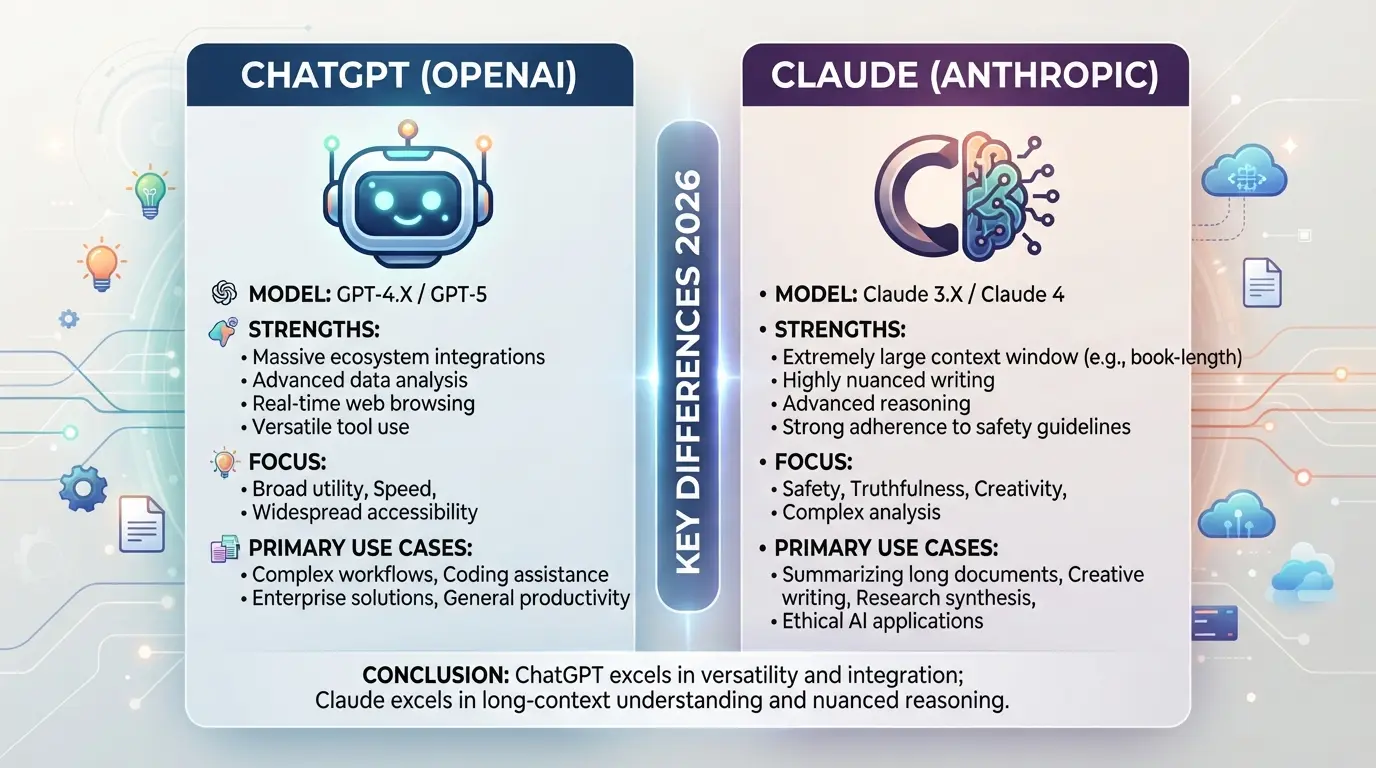
The gap between ChatGPT and Claude isn’t just about model size or brand, it’s how each handles context, privacy, and real-world integration. If you care about accuracy on long tasks or how your data is treated, these differences decide which AI fits your workflow.
Underlying Models and Technology
ChatGPT runs on GPT-4 Turbo and newer, with plugin support and a focus on rapid iteration. Claude uses Anthropic’s proprietary architecture, tuned for longer context windows and stricter prompt interpretation. Both rely on transformer designs, but Claude’s training puts more weight on safety and stable output, especially in multi-turn conversations.
Data Privacy and Security Approaches
When you type sensitive data, the risks aren’t just theoretical. ChatGPT stores user prompts and responses for ongoing model improvement unless you use a business-tier or API with explicit opt-out. This means anything typed into standard ChatGPT can get reviewed by the team or appear in training sets. Claude, by comparison, applies stricter retention limits and claims not to use user content for training in certain enterprise settings. The main catch: free or consumer accounts usually don’t get strong guarantees, so confidential client info or source code can end up in logs unless you pick the right plan. For users handling private or regulated material, skipping a consumer account and going straight to business or API access is the only way to reduce exposure. If you skip this step, you risk leaking trade secrets or violating compliance rules, most users only notice after a breach or legal inquiry, when recovery is messy and slow.
Supported Languages, Integrations, and Ecosystem
- ChatGPT connects with dozens of plugins, supports third-party apps, and offers browser access.
- Claude is more limited, fewer integrations, but strong support for long document uploads and precise formatting.
- Major ecosystem gap: Claude’s API is less widespread, so some productivity tools only offer ChatGPT integration.
The next step is to see how these technical and privacy differences play out when you use each AI for writing, coding, or routine tasks, because the real pain points show up in daily workflows, not just specs.
How Do ChatGPT and Claude Compare for Writing, Coding, and Everyday Tasks?
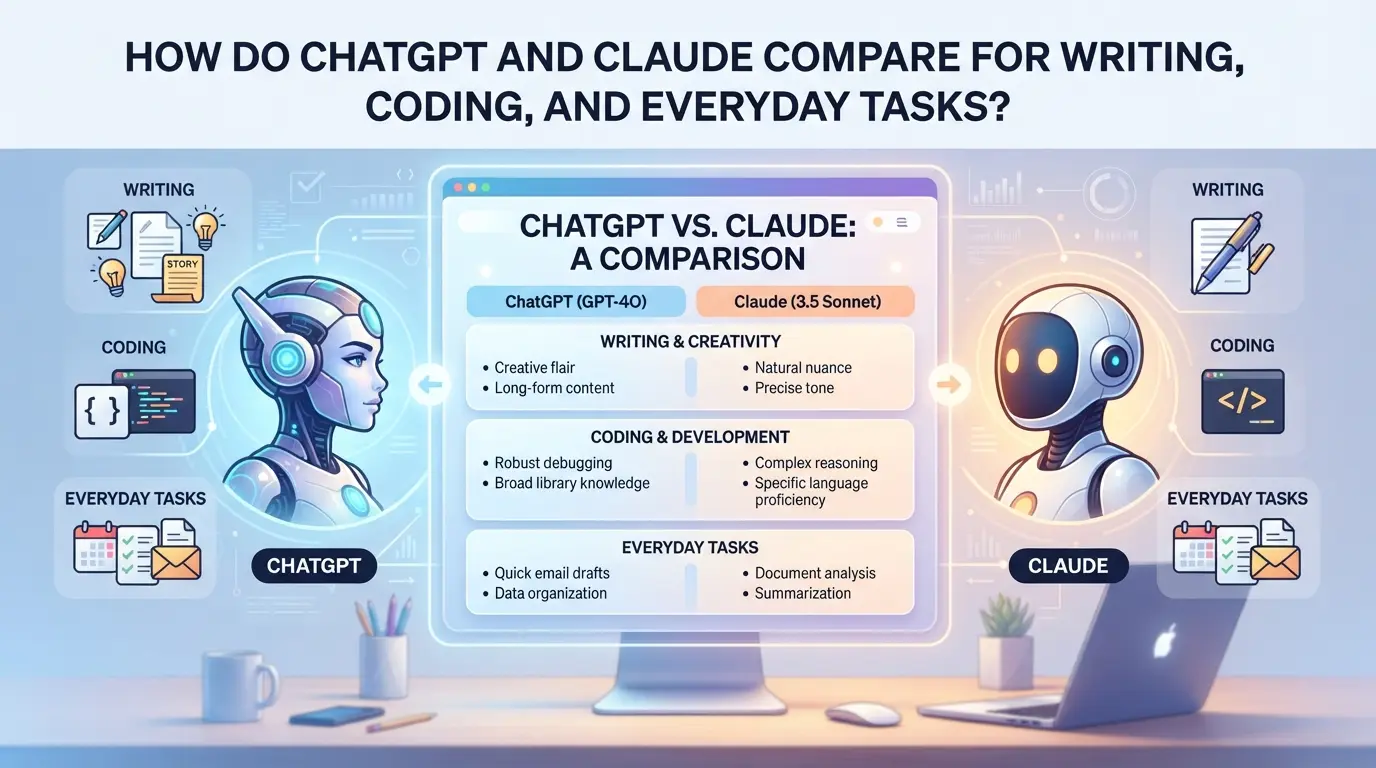
If you need fast, reliable drafts or code, both tools cover the basics, but the choice comes down to how they handle edge cases, longer workflows, and messy real-world content. Here’s where the differences show up in daily use.
Writing and Content Generation
| Feature/Scenario |
ChatGPT |
Claude |
| Clarity & Structure |
Tight, formal, clear |
More conversational, easier to tweak |
| Creativity & Tone |
Good at direct prompts |
Better at nuanced or “human” voice |
| Long-Form Handling |
Limits at ~32k tokens, can split |
Handles up to 200k tokens, stays on topic |
ChatGPT nails short, structured drafts, especially if you give it a clear format. Claude keeps context over huge documents, which matters if you’re rewriting contracts or summarizing research. For long-form or when you need a natural tone, Claude pulls ahead.
Coding and Technical Assistance
If you’re working in Python, JavaScript, or SQL, both models generate solid starter code and basic bug fixes. ChatGPT is a step faster at code autocompletion, but Claude tends to write cleaner comments and explains its changes in plainer English. Tougher bugs sometimes need you to restate the problem for both models.

Everyday Productivity and Research
For quick summaries, basic research, or sorting through emails, Claude remembers more context per session and won’t lose track in longer threads. ChatGPT shines with plugin support, so if you want to connect tasks to calendars or databases, it’s often the better pick. Most people end up switching tools depending on which hiccup slows them down.
Next up: before you pick one, know what to check so you don’t get stuck when your workflow hits a wall.
What Should You Check Before Choosing ChatGPT or Claude?
The biggest mistakes with ChatGPT or Claude happen before you even start, missing a restriction, misunderstanding costs, or ignoring account safety. The right call depends on more than features. Before you commit, run through these checks to avoid headaches and wasted time.
Access, Availability, and Regional Restrictions
Not every model is open everywhere, and access can change with little notice. Check if your country or company network blocks one of the tools. Some accounts require real-name registration or payment method tied to your region. If you rely on plugins or API, confirm those work in your location, otherwise, you might hit a wall mid-project.
Pricing, Free Tiers, and Subscription Traps
- Confirm free tier limits, both models cut you off or throttle speed after a set number of messages.
- Compare how paid plans bill: monthly, per token/character, or both.
- Watch for features that require upgrades (like file uploads or plugins), even if the advertised price looks cheap.
| Model |
Free Tier Limits |
Paid Model (2026) |
Gotchas |
| ChatGPT |
25 messages/3 hours |
$20/month |
Plugins only on paid plan |
| Claude |
50 messages/6 hours |
$15/month |
File size cap on free |
Source: Official pricing pages, 2026
Even solo users can get tripped up by risky account sharing or unclear data policies. For teams, the stakes jump, lost access or policy violations can lock out your whole group.
- Never share main login; use team features or delegated access if available.
- Check export and deletion controls, can you actually remove your data?
- Read the terms: some platforms flag shared accounts or block automation, so know what triggers a ban.
Missing these checks is what leads most users to regret their first pick, don’t skip them.
Why Do Users Switch Between ChatGPT and Claude, and What Goes Wrong?
Switching between ChatGPT and Claude usually happens when a tool misses a key feature, changes its pricing, or stops supporting a needed workflow. But the move isn’t always smooth, users often run into problems that cost time or even access.
Typical Reasons for Switching
People change platforms because one adds better file support, updates its interface, or suddenly limits free usage. When pricing shifts or access gets restricted, users jump ship, only to find that the new tool might not handle their old prompts or workflows.
Migration Pitfalls and Data Loss
Losing your prompts or chat history is common if you don’t export before switching.
- You might find saved chats are locked behind the old account, or custom instructions don’t transfer.
- Safer move: export your data in advance, and double-check what the new tool supports before you delete or cancel anything.
Mistakes That Trigger Account Restrictions
Sharing logins or ignoring platform terms can get your account flagged or even banned. Platforms scan for shared sessions and mismatched locations, if you trigger a lockout, recovery takes days. Stick to one user per account, and avoid risky shortcuts.
How Teams Can Share ChatGPT or Claude Accounts More Safely
Sharing AI accounts inside a team isn’t just about convenience, it’s about avoiding bans, accidental lockouts, and leaks that can cost real work hours. Teams that skip structured sharing often find themselves locked out or flagged for suspicious activity.
Set Up a Shared Access Workflow
- List all users who need access. Limit to those with a real job to do, idle or “just in case” logins raise red flags.
- Assign time slots or usage windows. If two people log in from different locations at once, the account may get flagged, especially if the login pattern changes day-to-day.
- Use a shared channel (like Slack or internal chat) to signal when someone is using the account. This avoids accidental overlap.
If your team ignores step 2, brace for forced password resets, these usually happen after 2-3 concurrent login attempts from new IPs.
Control Browser Environment and IP Consistency
- Always use the same browser profile for shared AI logins. This keeps cookies, browser fingerprints, and local storage consistent, most platforms check these to spot sharing.
- Route traffic through the same proxy or static IP. Jumping between IPs (even in the same country) is a common reason for unexpected security checks or temporary bans.
- Avoid browser autofill for passwords and emails. Autofill can overwrite saved data and break the session for the next user.
If your team skips proxy consistency, expect to see “unusual activity” warnings or even account locks within a few days. Recovery is rarely quick, support often takes 48+ hours to respond.
Protect Credentials and Sensitive Data
- Never share the raw password in open channels. Use a password manager with team features so you can revoke access if someone leaves.
- Limit who can see or export cookies, one leak, and the account can be hijacked.
- Set clear permission rules: who can reset the password, who can add plugins, and who can access payment info.
Most account breaches happen because someone copies credentials into a personal notes app or chat. The fastest way to lose control is letting anyone download the login or cookies to their own device. If you need to rotate access, change both the password and all recovery information at the same time.
How to Use DICloak for Secure Team Account Sharing with AI Platforms
If your team needs to share a ChatGPT or Claude account, browser profiles and saved credentials can quickly become a point of failure. A simple password handoff won’t solve the risks: you need a way to keep team sessions consistent, control who sees what, and block accidental leaks. Here’s how admins can use DICloak to keep shared platform accounts organized and safer for real team workflows.
Keep Team Access Consistent with Unified IP and Fingerprint
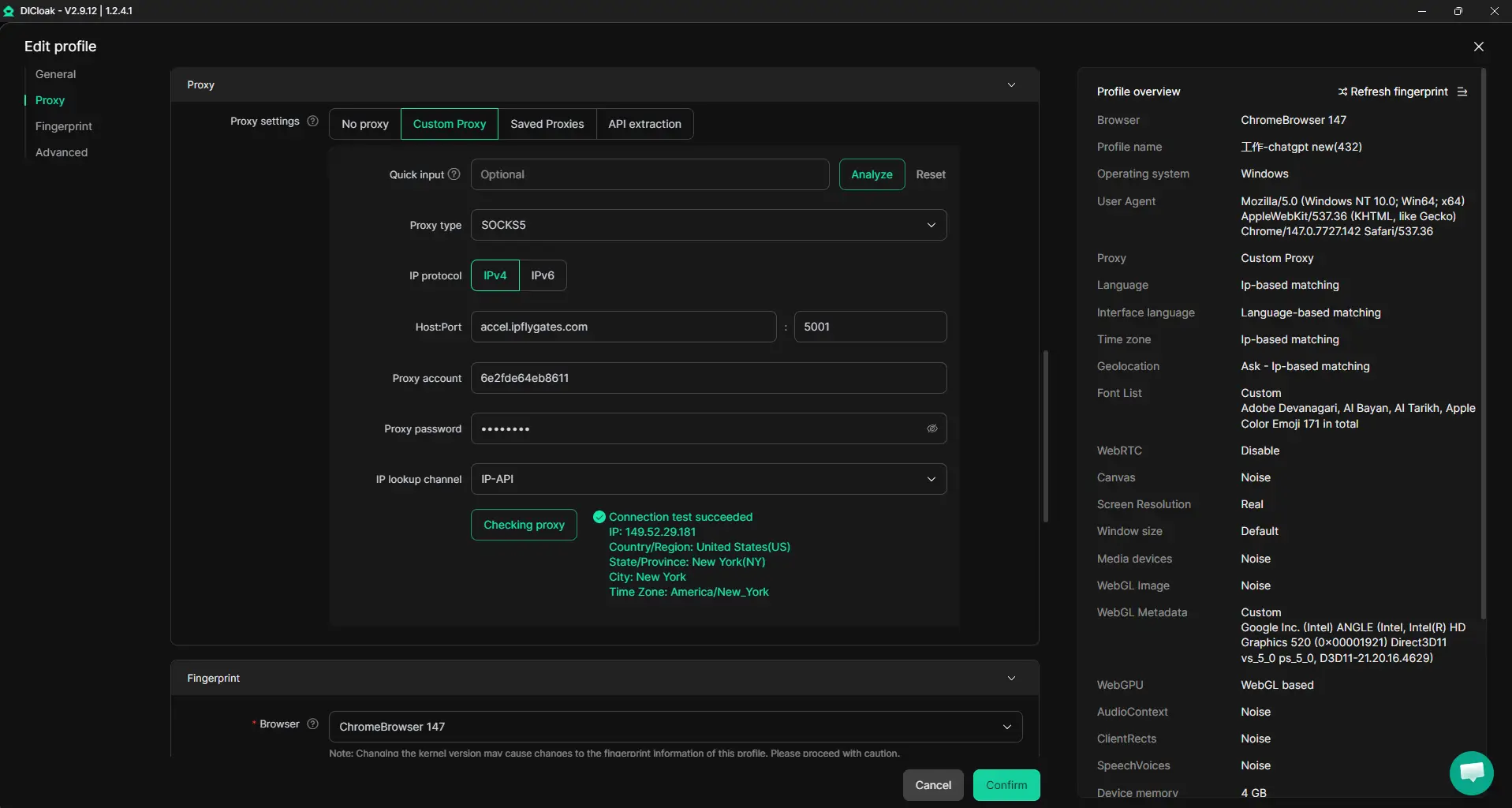
Teams that use a shared DICloak browser profile for an AI platform account get everyone working in the same browser profile. Admins prepare the profile, set up a user-owned proxy, and share that exact profile with team members. Each person who opens it gets the same fingerprint and network route, which means platform logins see a unified history, unless someone skips the shared profile or changes the proxy. This keeps session context stable, but it does not guarantee the platform will treat all sessions as one user.
Browser-Profile Access Controls for Shared Account Workflows
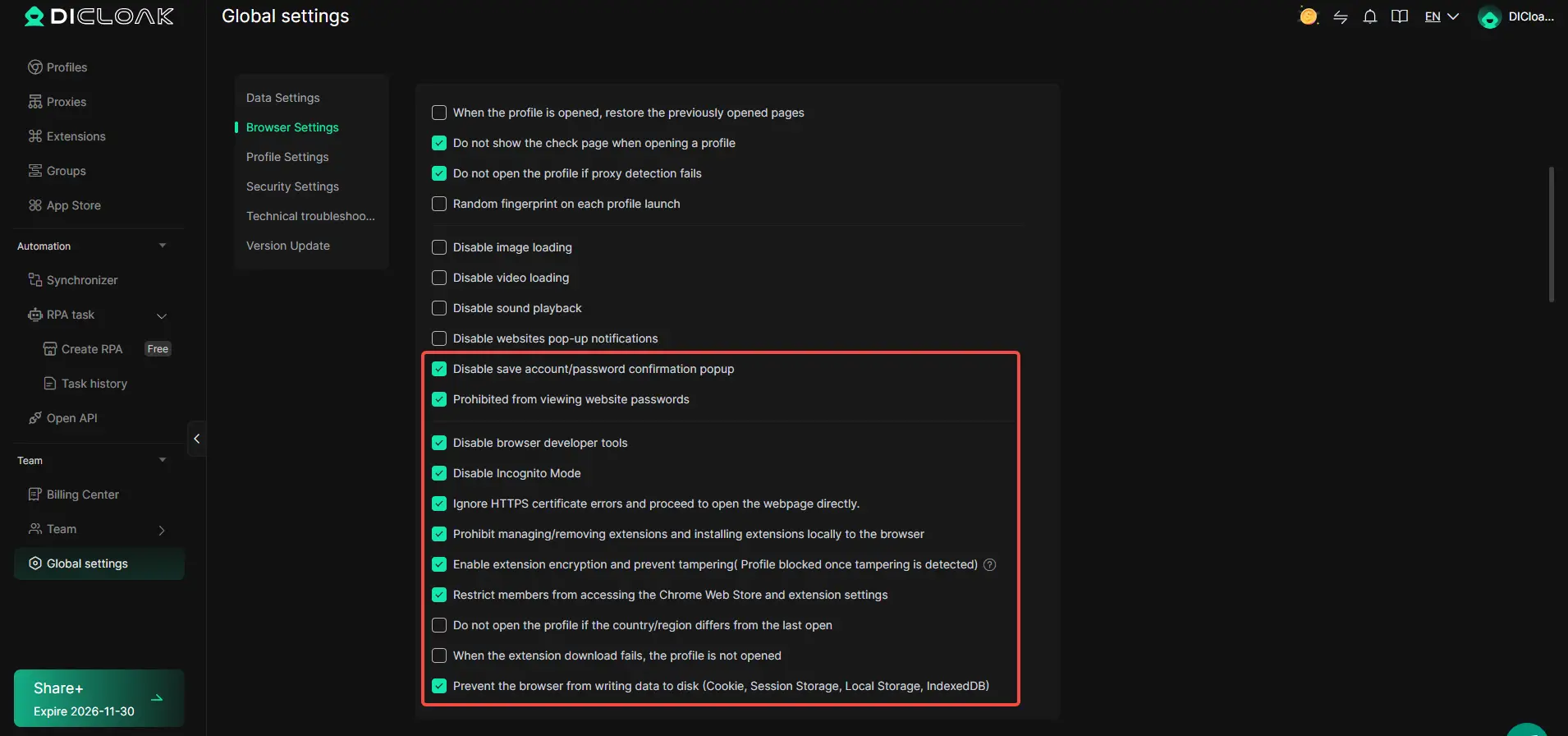
When several people can access a shared account, the risk of password or cookie leaks rises fast. Admins can use DICloak security settings to cut down exposure: block access to saved passwords, encrypt cookies where available, and restrict entry to sensitive account pages inside the browser profile. Blocking browser developer tools and extension changes keeps prying eyes away from details that could let someone take the account elsewhere. The scope is limited to browser-profile access; it does not change the connected SaaS tool.
Assign Team Permissions for Least-Privilege Access
Not every team member needs the same access. Admins can set up groups in DICloak, then decide who can open which shared profiles, and which profile details or actions are visible per role. For example, one group might only view and open profiles, while another can edit profile details or manage team members. These controls keep access on a need-to-know basis and limit accidental or risky actions inside DICloak itself.

The next section will show where teams slip up when sharing AI platform accounts, and what to check before a problem spreads.
What Are the Most Common Mistakes When Using ChatGPT or Claude in Teams?
Even with account sharing tools in place, teams still slip up in ways that lead to bans or leaks. Here’s where most teams get burned, and how to avoid it.
Unsafe Sharing of Credentials
Sharing passwords by email or chat is the quickest way to lose control of an account. If one person copies credentials on a personal device, the whole team risks a data breach or a permanent ban. Use access controls instead of raw passwords.
Inconsistent Browser Environments
Using different browsers, devices, or IP addresses for the same team account triggers fraud checks.
- You may see forced logouts, extra captchas, or warnings about suspicious activity.
- To avoid this, stick to one managed environment per shared account, don’t mix home and office setups.
Ignoring Platform Terms and Limits
Running up against usage quotas or sharing an account beyond what the platform allows can get your team locked out. If you ignore the fine print, expect throttled access or even loss of paid features. Check official terms and rotate tasks to stay under limits.
When Is It Better to Use ChatGPT, Claude, or Both?
If you want a quick answer: pick ChatGPT for plugin-heavy tasks or tight coding loops, Claude for handling very large documents or legal drafts, and use both when your workflow jumps between summary and detail. The right choice comes down to where your real blockers appear, not just which tool is newer.
Best-Fit Scenarios for ChatGPT
| Scenario |
ChatGPT Strength |
When to Prefer ChatGPT |
| Plugin integrations & APIs |
Stronger & broader |
Need to connect with external apps |
| Short to mid-length code generation |
Fast, accurate |
Coding in small sections |
| Everyday Q&A, writing, or summaries |
Quick context-switching |
Task variety in one session |
If your workflow depends on outside tools or frequent context changes, ChatGPT will save you more time, especially when plugins or fast code feedback matter.
Best-Fit Scenarios for Claude
Claude handles huge documents and multi-thousand word contracts far better. If you’re stuck with long-form analysis or need to keep a lot of context active, Claude’s larger context window often avoids the “memory loss” you’ll hit in ChatGPT.
When to Combine or Alternate Both AIs
Teams often start with one AI and find edge cases where output quality drops, long emails in Claude, fast code in ChatGPT. Switching models mid-task isn’t a hassle if you keep clear version control, but don’t mix instructions between them or you’ll end up with mismatched results.
Frequently Asked Questions About ChatGPT vs Claude
Is Claude better than ChatGPT for coding in 2026?
Claude handles Python and JavaScript code well and explains logic in clear steps. ChatGPT, especially GPT-4, is stronger with complex code, debugging, and more languages like C++ or Java. For quick scripts or code reviews, Claude works fast. If you want deeper technical help, ChatGPT often gives more detailed answers.
Can I use both ChatGPT and Claude with the same account or email?
You cannot use the same account or email for both platforms. ChatGPT and Claude require separate sign-ups. Sharing emails or using one login for both can break terms of service and may cause account lockouts or data confusion. Always use unique accounts for each service to avoid problems.
What are the privacy risks when sharing ChatGPT or Claude accounts?
Sharing your AI account can lead to password leaks, data mix-ups, or even loss of control over your chats. Sensitive information might get exposed if others access your prompts or saved content. To stay safe, never share passwords and use account features like two-factor authentication where possible.
How do I test ChatGPT and Claude side by side before choosing?
Start with simple tasks, like writing an email, summarizing text, or coding a short function, in both AIs. Compare their answers, speed, and accuracy. Try longer projects if you need deeper help. Write down differences you notice. This head-to-head testing helps you pick the AI that matches your workflow.
What happens if my team triggers a restriction on a shared AI account?
If your team hits a usage or policy limit, the account may be suspended or access blocked. You’ll likely get a warning email or in-app message. To restore service, follow the provider’s steps, this might mean verifying users or waiting for a reset. Avoid sharing logins and review usage rules to prevent future issues.
Consider testing both AI assistants directly to evaluate which aligns better with your specific workflow and goals. Experimenting with real-world tasks can reveal strengths and limitations that matter most to you. Try DICloak For Free
 Web Proxy Tools
 Free Tools
 Cookie Plugin
 UA Generator
 MAC Address Generator
 IP Generator
 IP Address List
 2FA Code Generator
 World Clock
 Anonymous Check
 WebRTC Leak Test
 UUID Generator
 Free Web Proxy Site
 Proxy Checker
 FB Ad Checker
 AI Web Scraping
 Free SMM Tools
 Twitter Shadowban Checker
 Instagram Name Checker
 UTM Generator
 Username Generator
 AI Hashtag Generator
 LinkedIn Headline Generator
 Social Media Image Resizer