Discord Nitro Tokens can be confusing at first. Some users think they are special codes, while others use the term for Nitro plans, gifts, or promo offers. In simple terms, they usually refer to the different ways people buy, claim, or use Discord Nitro.
In 2026, Discord Nitro is still popular with gamers, creators, and server owners. But before buying, it is important to understand what you are getting, how to redeem it, and how to avoid risky offers. This guide will help you understand Discord Nitro Tokens more clearly and use them in a safer, smarter way.
What Discord Nitro Usually Refers To
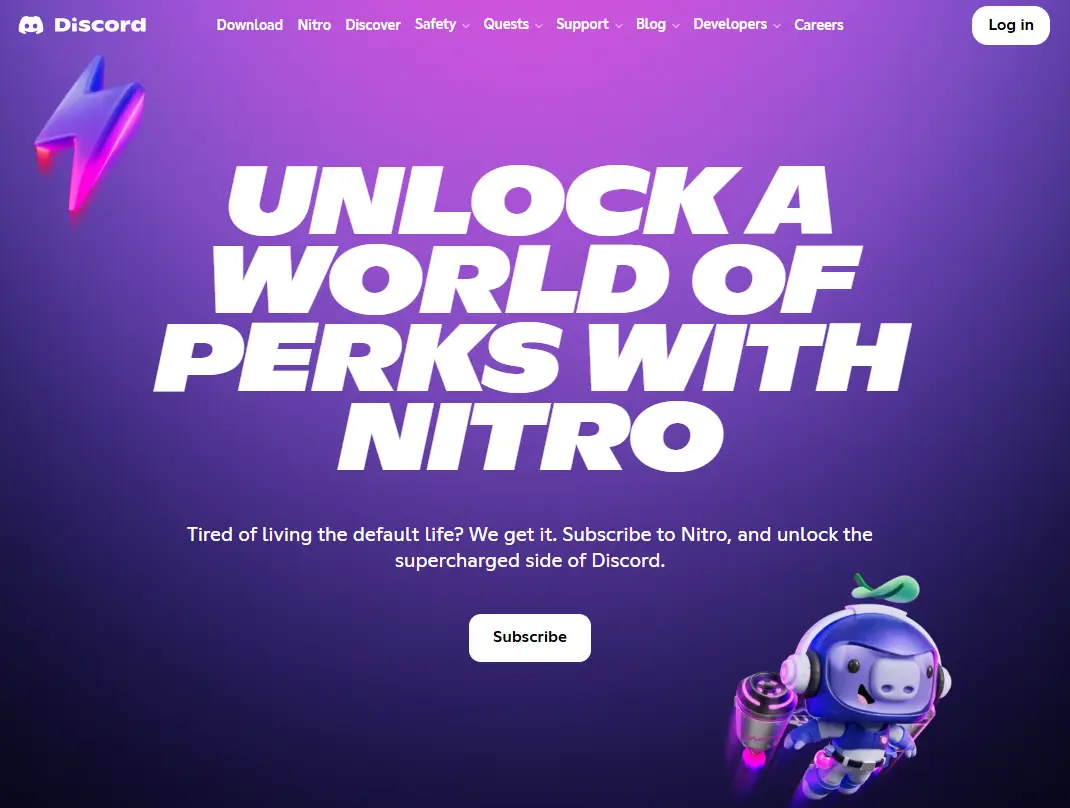
When people search for Discord Nitro Tokens, they usually mean Discord Nitro itself, a Nitro gift code, or a redeemable Nitro credit. In official Discord language, the platform usually says Nitro, Nitro Basic, or gift, not “tokens.” That is why this term can be confusing for new users.
In simple words, Discord Nitro is Discord’s paid membership. It gives users extra features like bigger file uploads, custom emojis, profile upgrades, and other premium perks. Full Nitro also includes Server Boost benefits, while Nitro Basic is more limited.
For example, if a user buys a Nitro gift code from an official promotion and redeems it on their account, they may call it a Discord Nitro Token. But in practice, it is usually a code, a subscription, or a credit, not a separate “token” product. Understanding this quickly helps users avoid confusion before they buy anything.
Discord Nitro vs. Server Boosts
Many people think Discord Nitro and Server Boosts are the same, but they are not. Discord Nitro is a premium plan for one user account. Server Boosts are used to support a specific server and unlock perks for that whole community.
A simple example makes this easy to understand. If you buy Nitro for your own account, you get personal benefits like better uploads and profile features. If you use a Server Boost, that boost helps a server grow and unlock shared rewards for all members. So, Nitro helps the user, while boosts help the server.
Common Ways People Buy Discord Nitro
After learning what Discord Nitro Tokens usually mean, it helps to look at the most common ways people get them. In real use, this usually means a subscription, a gift code, or perks connected to Server Boosts. These are the main options Discord shows in its own Nitro and promo pages.
Nitro Monthly Or Yearly Subscriptions
The most direct option is a monthly or yearly Nitro plan. This is best for people who want steady access to Nitro features on one account. A monthly plan feels easier to try. A yearly plan can make more sense for users who already know they use Discord often.
Nitro Gift Codes And Promotions
Another common form of Discord Nitro Tokens is a gift code or a promo. Discord still runs official Nitro gift offers and partner promotions. For example, Discord published 2025–2026 promos with Corsair, Streamlabs, Epic Games Store, and PlayStation Plus. These offers usually have claim dates and redeem deadlines, so users need to read the rules before they click.
Server Boost-Related Perks
Some users are less focused on personal Nitro perks and care more about server growth. That is where boost-related value matters. Full Nitro includes Server Boost perks, and some plans or offers may handle boosts differently. A simple example is a server owner who wants to improve a community server, not just their own profile. In that case, boost-related perks may matter more than a basic Nitro purchase.
Why People Buy Discord Nitro Tokens
After looking at the main purchase types, it becomes easier to see why people spend money on Discord Nitro Tokens. Most users do not buy them just to “have Nitro.” They buy them because the features can improve daily use in real ways. Discord says Nitro gives users perks like HD streaming, 500MB uploads, profile customization, and 2 free Server Boosts with full Nitro.
Main Benefits for Individual Users
For one person, Nitro is mostly about convenience and self-expression. A user can share larger files, stream in better quality, and make their profile feel more personal. For example, a student in a study server may want to upload a large project file, while a gamer may care more about streaming and custom emojis. These are small things, but for active users, they can make Discord feel much better every day.
How Nitro Helps Communities and Server Owners
Nitro also helps communities, not just individuals. Full Nitro includes Server Boosts, and Boosts can unlock extra perks for a server. Discord’s latest Server Boosting FAQ says boosts can now unlock features like Server Tags and Enhanced Role Styles more flexibly, and Discord also lets supported communities turn Boosts into dedicated game servers. That gives server owners a stronger reason to care about Nitro and Boost-related perks.
Is Discord Nitro Worth It for Different Types of Users
Whether Discord Nitro Tokens are worth it depends on how often someone uses Discord. A casual user who only sends short messages may not need Nitro. But a creator, community manager, streamer, or server owner may get much more value from it. Discord’s 2025–2026 partner promos with PlayStation Plus, Epic Games Store, Best Buy, and Elgato also show that Nitro is still being pushed as a useful upgrade for active users.
Where To Buy Discord Nitro Tokens Safely
After deciding why Nitro may be worth it, the next step is knowing where to buy Discord Nitro Tokens without added risk. The safest path is still the official one. Discord says users can buy Nitro directly inside Discord, and it also says Nitro can be bought through Discord’s official Amazon store in select regions. Discord’s own safety guidance also says the more secure way to buy Nitro is directly through Discord or its official Amazon store.
Buying Directly From Discord
Buying from Discord is the easiest option for most users. It is simple, direct, and easier to manage later. Users can also buy official Nitro gifts through Discord, which makes it a good choice for people who want a clean purchase process with less confusion. A good example is a user who wants Nitro for everyday chat, streaming, and uploads. In that case, buying inside Discord is usually the clearest and safest choice.
Buying Discord Nitro From Third-Party Platforms
Some users also get Discord Nitro Tokens through third-party platforms, but this only makes sense when the source is clearly legitimate. Official promo partners and major retailers can be valid examples. Discord has published official promotion pages tied to Best Buy, PlayStation Plus, Corsair, and Drop.com, which shows that outside offers do exist. Still, these deals often come with limits, short claim windows, or auto-renew rules after the trial ends. For example, Discord’s PlayStation promo had a fixed claim period ending on April 2, 2026, and Best Buy’s offer notes that Nitro converts to a paid monthly subscription after the promo period unless canceled.
So the best rule is simple: buy direct when you can, and only trust third-party offers when Discord itself or a major retailer clearly supports them. That small check can save money and prevent a lot of trouble later.
How To Redeem And Use Discord Nitro Tokens Effectively
Once you know where to buy Discord Nitro Tokens safely, the next step is using them the right way. This part matters because a good purchase can still go wrong if the code is entered late, the account is not eligible, or the user forgets to manage the subscription after activation. Discord’s support pages explain that redeeming and using Nitro is usually simple, but some promo offers have rules, deadlines, or account limits.
How To Claim A Discord Nitro Code
To claim a Nitro code, users usually open the gift link or enter the code in Discord’s Gift Inventory. Discord’s promo help pages note that some offers use a unique 24-digit code format, and some promo codes expire if they are not redeemed by a set date. For example, Discord’s 2026 PlayStation Plus Nitro promo had to be redeemed by May 2, 2026.
A simple real-life example is someone who gets a promo code from a partner offer and waits too long to use it. The code may no longer work, even if it was valid at first. That is why it is smart to redeem Nitro soon after you receive it and check the offer rules before you click. Some promos also say users who had Nitro in the last 12 months may not be eligible.
How Discord Nitro Benefits Work After Activation
After activation, Nitro perks are added to the user’s account. Discord says Nitro can include features like larger uploads, better streaming, profile customization, and, for full Nitro, two Server Boosts. Nitro Credits also exist, but they work differently because they give Nitro for a limited time and do not turn into a recurring subscription on their own.
How Server Boosts Work And Why They Matter
Server Boosts are linked to servers, not just personal accounts. Discord says full Nitro includes two boosts, and boosts can unlock server-level perks. In 2026, Discord also says boosts can be turned into dedicated game servers for supported titles. This means boosts can matter a lot for server owners and active communities, not just for individual users.
How To Manage Or Cancel A Nitro Subscription
After using Discord Nitro Tokens, users should also know how to manage billing. Discord says users can go to User Settings > Subscriptions to cancel Nitro, and cancellation stops renewal at the end of the billing period. Discord also notes that if you want to remove saved payment methods, you should cancel the active subscription first.
For users with only one Discord account, Nitro may be simple to manage. But for people handling several Discord accounts across work, communities, or client projects, organization becomes a separate challenge.
After learning how to redeem and manage Discord Nitro Tokens, some users face a different problem: keeping several Discord accounts organized. This is common for people who run a gaming community, manage client servers, handle support accounts, or separate personal and work use. When too many logins are mixed in one browser, it becomes easy to open the wrong account, lose track of cookies, or create a messy workflow. DICloak’s own help center explains that each browser profile works like a separately configured virtual computer, which gives users a cleaner way to organize account activity.
Why Discord Users May Need Better Account Organization
A simple example is a community manager who uses one Discord account for personal chats, one for a game guild, and one for project support. That setup can get confusing very fast in a normal browser. Better account organization helps reduce login mistakes and keeps daily work more stable. This matters even more when users buy Discord Nitro Tokens for different accounts and want each account to keep its own settings and session history.
How DICloak Helps Keep Discord Profiles Separate
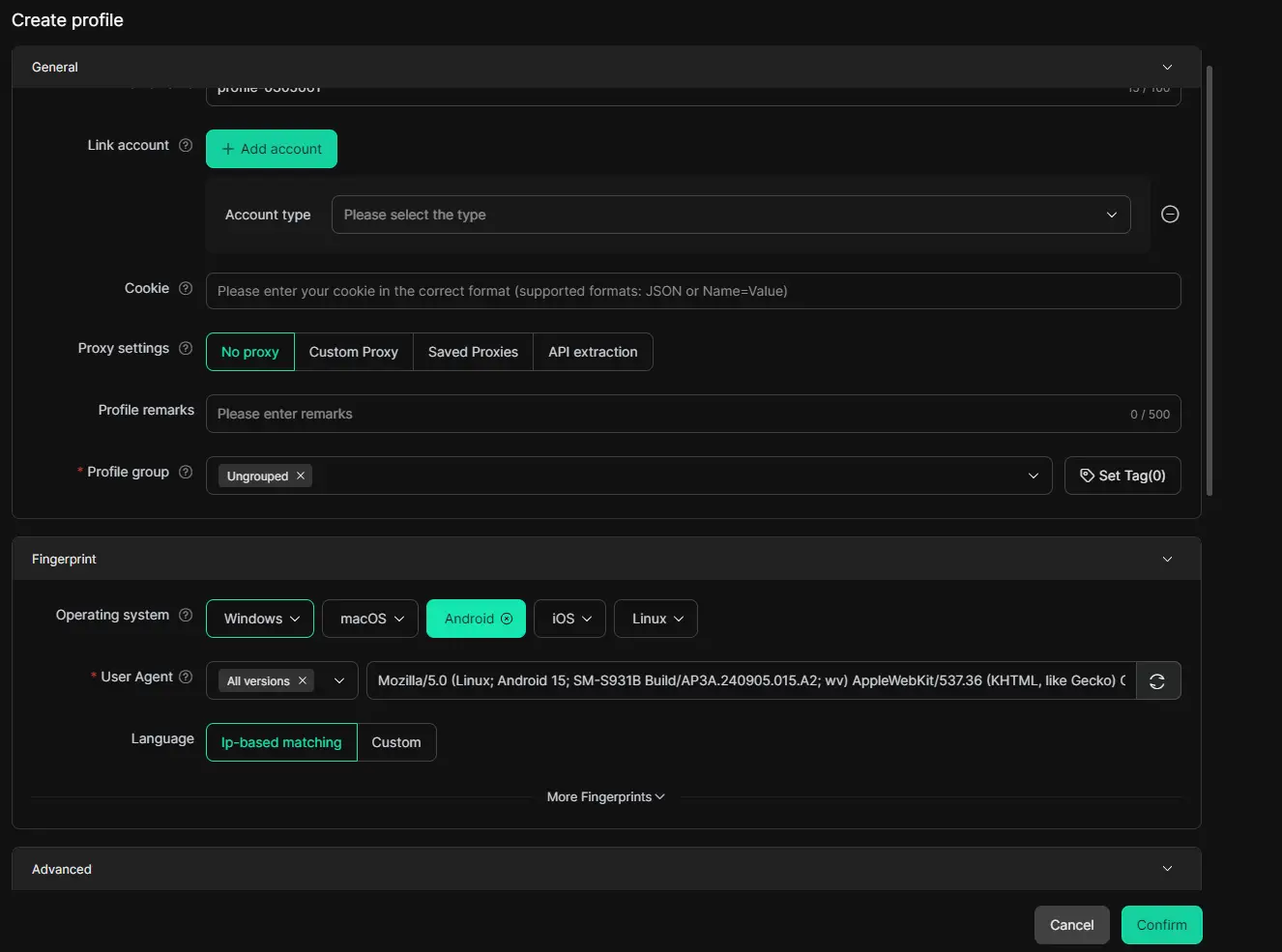
DICloak says users can create separate browser profiles, and each profile can have its own cookies, storage, account details, and settings. The company also says each browser profile is like its own virtual computer. In practice, that means one Discord profile does not need to mix with another. For users who switch between several Discord roles in one day, this makes account handling much easier.
Using Customized Proxy Settings For Different Workflows
DICloak also lets users choose proxy settings when they create a profile. Its help docs say users can use no proxy, a custom proxy, or saved proxies, and the proxy setup page explains how to add proxies to hide a real IP address. DICloak also supports common proxy types such as HTTP, HTTPS, and SOCKS5. This gives users more control when they want different Discord workflows to run in clearly separated profiles.
How DICloak Supports Team Collaboration And Multi-Account Operations
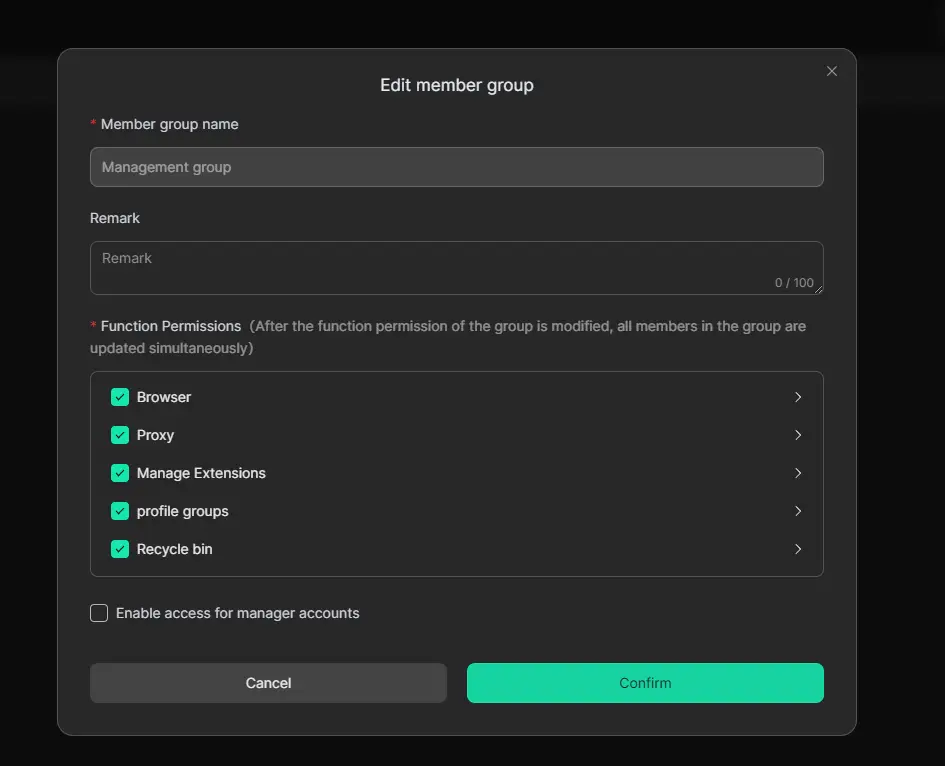
For teams, DICloak also offers member management, profile sharing, and permission settings. Its help center says teams can share browser profiles, manage members, assign permissions, and review member activity logs. A simple example is a small Discord operations team where one person handles moderation, another handles creator outreach, and another handles support. With clearer profile access and role settings, the workflow can stay more organized and easier to manage.
How To Use Discord Nitro Tokens More Efficiently Across Multiple Discord Workflows
Once separate browser profiles are in place, the next step is deciding how to use Discord Nitro features across those different accounts.After setting up a safer multi-account system, the next step is using Discord Nitro Tokens in a clearer and more practical way. This matters because Nitro features are tied to each account, not to one shared browser setup. Discord says Nitro includes perks like custom emoji use across servers, HD streaming, larger uploads, and Server Boosts, so active users often want to keep those benefits organized by workflow.
Managing Personal, Work, And Community Accounts More Clearly
Many people use Discord for more than one purpose. One account may be for friends, one for client work, and one for a gaming or creator community. In that case, it helps to keep each account in its own browser profile, so Nitro perks stay tied to the right login. A simple example is a community manager who wants custom emojis and better uploads on a work account, but does not want that account mixed with a personal one. DICloak says each profile can keep separate cookies and browser data, which makes this kind of setup easier to manage.
Reducing Login Confusion Across Multiple Discord Roles
Login confusion is a real problem when one person switches between several Discord roles in the same day. Opening the wrong account can waste time and create mistakes. DICloak’s help pages say users can run multiple independent browser profiles at once, and each one can have its own fingerprint information, cookies, and browser configuration. That gives users a cleaner way to separate Discord roles instead of stacking everything inside one browser session.
Combining Nitro Features With DICloak Browser Setup
This setup becomes even more useful when Nitro features are part of daily work. For example, one team may use Nitro for HD streaming and custom emoji use, while a server owner may care more about the included Boosts and newer Boost perks like Server Tags or Enhanced Role Styles. DICloak also offers window synchronization, which lets selected profiles follow one master window. For users handling repeated actions across several accounts, that can make the workflow more organized and more efficient.
Discord Nitro Tokens Conclusion
Discord Nitro Tokens can be useful if you know what you are buying and how you plan to use it. For active users, Nitro can bring better uploads, profile perks, and server benefits. But for casual users, it may not always be necessary.
If you manage more than one Discord account, staying organized matters just as much as buying Nitro itself. That is where DICloak fits in. It helps keep different Discord accounts separate, clearer, and easier to manage. If you want to use Discord Nitro Tokens in a safer and more efficient way, DICloak is a smart tool to add to your workflow.
FAQs About Discord Nitro Tokens
After learning how to buy and use Discord Nitro Tokens, a few common questions still come up. These short answers can help readers avoid simple mistakes and make better choices before they spend money.
Is It Safe To Buy Discord Nitro From Third-Party Websites?
It can be safe, but only when the seller is clearly legitimate. The safest option is still buying directly from Discord. Some third-party offers are real, such as official promos with Best Buy, PlayStation Plus, Epic Games Store, and Streamlabs. But many outside listings are not official, so users should be careful. A simple rule is this: if Discord or a major brand does not clearly support the offer, do not trust it.
What Is The Difference Between Discord Nitro And Server Boost?
Discord Nitro is a premium plan for one user account. Server Boost is support for one server. Full Nitro includes 2 Server Boosts, but Boosts can also be managed as a separate monthly subscription. In simple terms, Nitro gives personal perks, while Boosts help a community unlock shared perks. For example, a gamer may want Nitro for bigger uploads, while a server owner may care more about Boosts for server growth.
Why Is My Discord Nitro Code Not Working?
The most common reasons are expiration, account eligibility, or promo limits. Some codes stop working after a deadline. For example, Discord’s Epic Games Store promo expired if it was not redeemed by February 7, 2026, and the PlayStation Plus promo had to be redeemed by May 2, 2026. Some offers also do not work if the account had Nitro recently, or if the promotion is not available in that region. That is why it is smart to redeem codes early and read the offer rules carefully.
 Web Proxy Tools
 Free Tools
 Cookie Plugin
 UA Generator
 MAC Address Generator
 IP Generator
 IP Address List
 2FA Code Generator
 World Clock
 Anonymous Check
 WebRTC Leak Test
 UUID Generator
 Free Web Proxy Site
 Proxy Checker
 FB Ad Checker
 AI Web Scraping
 Free SMM Tools
 Twitter Shadowban Checker
 Instagram Name Checker
 UTM Generator
 Username Generator
 AI Hashtag Generator
 LinkedIn Headline Generator
 Social Media Image Resizer