Getting locked out of Facebook can be frustrating, especially when you do not know what went wrong. Sometimes the problem is as simple as a wrong password. Other times, it may be a security check, a browser issue, a device problem, or even a temporary platform outage. This guide walks through the most common reasons you can’t log into Facebook in 2026 and shows practical ways to fix them.
Common Reasons You Can't Log Into Facebook
If you can't log into facebook, the cause is usually one of a few common problems. In many cases, it is not a full account loss. It is a password issue, a temporary lock, a security check, or a login error inside the app or browser. The good news is that these problems often leave clues, and those clues can help you fix the right thing faster.
Forgotten Password or Incorrect Login Credentials
This is still the most common reason people cannot get in. A small mistake can be enough. Passwords are case-sensitive, so one wrong capital letter can block the login. It also happens when someone forgets whether they signed up with an email address or a phone number, or tries an old password after changing it on another device.
A very normal example looks like this: someone resets their password on a laptop, then later tries to log in on the phone with the old saved password. Facebook treats that as a wrong login, even if the person feels sure they typed it correctly. In that case, the fastest move is usually to use the password recovery path and confirm which email or phone number is actually linked to the account.
Account Temporarily Locked or Restricted
Sometimes the password is not the real issue. The account may be locked for security reasons. This often happens after unusual login activity, repeated failed attempts, or behavior that looks risky to Facebook’s systems. When that happens, people often think they are hacked or banned, but the account may simply be under a temporary protection step.
For example, if you try to sign in many times from a new device, a new location, or after entering the wrong password again and again, the account may be blocked until you verify it. That can feel sudden and stressful, but it is often meant to stop unauthorized access. If you can't log into facebook after several failed tries, a temporary lock is one of the first things to consider.
Security Code Request During Login
A security code request usually appears when Facebook wants extra proof that it is really you. This often happens with two-factor authentication, suspicious login detection, or login attempts from a device Facebook does not recognize. In some cases, the code goes to a phone, an email inbox, or an authentication app. In others, the real problem is not the code itself, but not having access to the device or method that receives it.
A common real-life case is when someone upgrades phones and forgets to move their authentication app. They know the password, but they still cannot finish login because the security code is going to the old setup. Another common case is when the code is sent, but the user is looking in the wrong email inbox or waiting for an SMS on a number that is no longer active.
Unexpected Errors or App Glitches
Not every login failure is about the account itself. Sometimes the problem is the app, the browser session, or saved data on the device. A login may fail because the Facebook app is stuck, the browser has broken cookies, or the session data is outdated. This is why one person may fail to log in on the app but still get in through a browser, or fail on mobile but succeed on desktop.
A simple example is this: the app keeps showing an error, but the same account opens in the browser on a device that was used before. That usually points to a local glitch, not a dead account. In that situation, trying another browser, another device, or a previously used device can help you tell the difference between an account problem and a technical login bug.
How to Recover Your Facebook Password
If you can’t log into Facebook because your password no longer works, the recovery process is usually straightforward at first. The harder cases begin when the reset code goes to an old email address or an inactive phone number. That is why it helps to know both the standard reset path and the backup recovery options before you get stuck.
Steps to Reset Your Password via Email or Phone
The usual reset path starts with the “Forgot account?” or password recovery flow. From there, Facebook lets you search for your account using an email address, phone number, name, or username, then sends a reset code to one of the recovery methods linked to the account. In most cases, this is the fastest fix when the password is wrong but your recovery email or phone still works.
A common real-life example is when someone remembers their Facebook email but not the password. They request a reset code, open the email, create a new password, and sign back in on the same device a few minutes later. Another common case is using a phone number instead of an email because that is the only recovery option the person still recognizes.
What to Do if You No Longer Have Access to Your Recovery Options
This is where many people feel stuck. If you no longer have access to the email address or mobile number on the account, Facebook’s recovery guidance points users toward account recovery steps designed for exactly that situation. The key is to start from the recovery flow and follow the path for accounts where the old contact methods are no longer available, rather than trying the same failed reset again and again.
A simple example is when someone changed phone numbers two years ago and never updated Facebook. The password reset code keeps going to that old number, so the normal reset path never finishes. In that case, the better move is to use the account recovery route for lost email or phone access, not to keep requesting new codes that you still cannot receive.
How to Create a Strong Password to Avoid Future Issues
Once you get back in, the next step is to set a stronger password so the problem is less likely to happen again. Facebook’s password guidance recommends making the password harder to guess by mixing uppercase and lowercase letters, numbers, and symbols. A good password should also be unique to Facebook rather than reused from email, shopping sites, or older social accounts.
A practical example would be changing a weak password like Jessica1989 to something longer and less predictable, then saving it in a password manager so you do not have to rely on memory alone. That small step can prevent both future login trouble and a lot of security risk. Facebook also points users toward extra account protection tools after recovery, which makes strong password habits even more important.
Fixing Facebook Login Errors on Different Devices
Facebook login problems do not always look the same on every device. A login can fail in a desktop browser but work on a phone, or break inside the app while the mobile browser still works. That difference is useful. It often tells you whether the problem is tied to the browser, the app, or the device itself.
Troubleshooting Login Issues on Desktop Browsers
On desktop, the most common causes are old cache files, broken cookies, or a browser-specific problem. If Facebook will not load correctly or keeps looping back to the login screen, the first fixes are usually simple: refresh the page, close and reopen the tab, clear cache and temporary data, and try a different browser. If one browser fails but another works, the account is usually fine and the issue is local to that browser session.
A common example is when someone cannot log in on Chrome, but the same account opens on Edge or Safari. That usually means saved browser data is interfering with the login flow. In that situation, clearing cookies or opening a private window is often faster than retrying the same broken session over and over.
Resolving App-Related Login Problems on Mobile Devices
On mobile, the problem is often the app rather than the account. If Facebook keeps crashing, freezing, or refusing to log in, updating the app, reinstalling it, or trying login from a mobile browser is often the fastest way to test the issue. This matters because a damaged app session can make it feel like the whole account is inaccessible when the real problem is just the app on that device.
A very normal case is this: the Facebook app keeps showing an error, but the same email and password work in the phone browser. That usually points to an app glitch, not a hacked or disabled account. Low storage can also make Meta apps crash more often, so checking available space can help when the issue keeps coming back on mobile.
How to Log In Using Facebook Lite as an Alternative
If the main Facebook app is unstable, Facebook Lite can be a useful backup on Android. It is a smaller app that is designed to use less storage and work in weaker network conditions, including 2G. That makes it a practical option when the regular app feels too heavy, keeps failing on an older phone, or struggles on slow mobile data.
This does not solve every login problem, but it can help you separate an app-performance issue from a true account-access issue. Facebook also still points users on older mobile browsers toward alternatives such as Facebook Lite, which shows it remains a relevant fallback path in 2026.
What to Do If Your Facebook Account Is Restricted
A restricted Facebook account can feel scary at first. You may suddenly lose access, see fewer features, or get pushed into a security check. In many cases, though, the restriction is tied to a specific trigger, and knowing that trigger helps you respond more calmly and clearly.
Reasons Facebook Might Restrict Your Account
Restrictions often happen after unusual activity. That can include too many failed login attempts, logging in from a device or location that looks unfamiliar, moving too fast with certain actions, or behavior that triggers a security review. In some cases, access can also be limited because the device used to access Facebook may have malware or other suspicious software on it.
A simple example is when someone travels, signs in from a new phone, then keeps retrying the password after getting it wrong once or twice. From the user’s point of view, it feels like a normal login problem. From the platform’s point of view, it can look risky enough to trigger a temporary restriction or account check.
How to Appeal a Restriction or Ban
The next step depends on the type of restriction. If the account is suspended or disabled, the appeal window matters. Current Facebook help results indicate that a suspension can be appealed within 180 days, and if no appeal is submitted in that period, the account may become permanently disabled. For lighter restrictions, the review option often appears directly inside the warning or account status flow.
A good practical rule is not to keep guessing or opening fresh accounts right away. If there is a review or appeal path available, use that path first and follow it carefully. Repeated rushed actions can make the situation feel worse and may delay a clean recovery.
Steps to Verify Your Identity with Facebook
Identity checks are a normal part of recovery when Facebook needs more proof that the account really belongs to you. That process can involve a security check, an ID upload, or even a selfie-based verification step in some cases. Problems usually happen when the submitted ID photo is blurry, incomplete, or missing important details, which can lead to rejection.
A common real-life case is when a user is asked to upload ID after a lock, but the first image is dark or cropped. The review then fails, even though the account is legitimate. In that situation, the better move is to resubmit a clear, readable image and make sure the requested details are visible, rather than assuming the account is gone for good.
How to Check If Facebook Is Down in 2026
When Facebook suddenly will not load, the first question is simple: is it your account, or is Facebook down for everyone? That is an important difference. A platform-wide outage can look a lot like a personal login problem at first, especially when the app opens but the feed, messages, or login page will not finish loading. In 2026, Meta still provides a status site for some Facebook-related services, including Facebook Login, while third-party outage trackers can help show whether many users are reporting the same problem at the same time.
Tools to Check Facebook Server Status
A good first step is to check Meta Status. It includes service pages for products such as Facebook Login, and those pages show whether there are known issues or whether the service is currently operating normally. That gives you a cleaner signal than guessing based on one failed login. A second useful check is a public outage tracker like Downdetector, which can show spikes in user reports when a larger disruption is happening.
A simple example is this: Facebook will not let you log in on your phone, so you try again on desktop and still fail. Before resetting your password, you check Meta Status and a report tracker. If both show unusual activity, the issue may be broader than your account. That can save you from changing settings or recovery details too quickly.
Signs of a Platform-Wide Outage Affecting Login
A wider outage usually has a pattern. Login may fail on multiple devices, the feed may stay blank, pages may half-load, or the app may keep spinning without finishing. The strongest clue is when the same problem appears across different networks and devices at the same time. If your password suddenly stops working everywhere, but there is no sign of a security alert or account restriction, a service issue becomes much more likely. Meta’s status pages exist for exactly this kind of situation.
This matters because one device failure can be local, but a failure across phone, desktop, and browser usually points in a different direction. If the login page, app, and related Meta services all feel unstable at the same time, that is often a sign of a larger outage rather than a simple password problem.
What to Do While Waiting for Facebook to Resolve Outages
If the outage looks platform-wide, the best move is usually to wait instead of forcing more login attempts. Repeated retries can create more confusion, especially if you start resetting passwords during a service disruption. While waiting, you can check the status page again later, keep an eye on public outage reports, and avoid changing account recovery settings unless you are sure the issue is only on your side.
A practical approach is to test once in another browser or device, confirm whether the problem is widespread, and then pause. If Facebook is having a broader outage, patience is often more useful than more troubleshooting. Once the platform stabilizes, a login that looked broken may start working again without any change from you.
Clearing Browser Cache to Fix Login Problems
When Facebook login keeps failing for no clear reason, the browser session is often part of the problem. Old cache files, broken cookies, or stale site data can make Facebook load the wrong session, loop back to the login page, or show errors even when your password is correct. That is why clearing cache and site data is one of the most common fixes for login trouble.
Why Clearing Cache Can Resolve Login Issues
Your browser saves cached files and cookies to speed up websites and keep you signed in. That usually helps, but sometimes the saved data becomes outdated or corrupted. When that happens, Facebook may keep trying to use broken session data instead of loading a fresh login. The result can look confusing: the page opens, but login fails, reloads, or gets stuck. Clearing cache and cookies removes that old data so the site can build a clean session again.
A simple example is when Facebook keeps sending you back to the login screen in one browser, but works in a private window or another browser. In that case, the account is often fine. The local browser data is the more likely cause.
Step-by-Step Guide to Clear Cache on Popular Browsers
- On Chrome, open Settings, go to Privacy and security, then choose the option to clear browsing data.
- On Microsoft Edge, open Settings, go to Privacy, search, and services, then choose Clear browsing data and select what to remove.
- On Safari on Mac, open Safari, go to Settings, then Privacy, and use Manage Website Data to remove saved website data.
- On Firefox, open Settings, go to Privacy & Security, then find Cookies and Site Data and choose Clear Data.
If the problem is only with Facebook, it is often better to remove data for that site first instead of wiping everything. Safari supports removing website data for a specific site, and Firefox also supports clearing cookies and site data for a single domain in some cases. That can fix login issues while keeping the rest of your browsing data more intact.
Risks of Clearing Cache and How to Avoid Losing Saved Data
Clearing browser data can sign you out of websites and remove saved site preferences. On Safari, clearing history can also remove other browsing-related data, not just cache. On Edge and Firefox, clearing cookies and site data can log you out of most sites.
The safest approach is to make sure you know your Facebook password before clearing anything. It also helps to save important logins in a password manager and, when possible, clear only the data types you need or remove data only for the affected site. That way, you get the benefit of a clean login session without losing more saved information than necessary.
Contacting Facebook Support for Login Assistance
When the usual fixes do not work, support becomes the next step. This is most helpful when the problem is no longer limited to one browser, one phone, or one bad password attempt. If you still can’t get in after trying recovery, device checks, and basic login fixes, it usually makes more sense to use Facebook’s recovery and help tools than to keep guessing.
How to Access Facebook's Help Center for Login Problems
The main place to start is Facebook’s Help Center, especially the login and account recovery sections. There you can find guided paths for password reset, lost email or phone access, hacked accounts, temporary locks, and security checks. If the account is still partly reachable, Facebook also routes some users through account recovery flows that work best on a device they have used before.
A common example is this: you try to log in, the password reset does not solve it, and Facebook keeps asking for more checks. At that point, using the recovery flow is usually better than retrying the same login screen over and over. If the account may have been compromised, Facebook also has a separate hacked-account recovery path.
What Information to Provide When Contacting Support
The most useful reports are specific. It helps to include the email address or phone number linked to the account, the type of login problem you see, when it started, what devices and browsers you tested, and what recovery steps you already tried. Screenshots can also help when the error message is hard to explain. Facebook’s problem-report tools specifically support reporting something that is broken, and visual proof can make the issue easier to understand.
A stronger report might say: “I cannot log in on both Chrome and the Facebook app. The issue started this morning. Password reset worked, but the account still shows a security check loop.” That gives support or the recovery system something clear to work with.
How Long It Typically Takes to Resolve Login Issues
There is no single fixed timeline for all Facebook login problems. Some issues are resolved the same day, especially simple password resets or security checks. Others take longer when the account is locked, under review, or needs an appeal. One concrete timing clue Facebook does give is that some security-check cases require a 24-hour wait before login access returns, and suspended or disabled accounts have formal appeal windows that can last much longer.
So the best expectation is this: simple login problems may clear up quickly, but restrictions, identity checks, and account reviews can take more time. If Facebook is asking you to wait, or if the account is in a review state, pushing the login again and again usually does not speed anything up.
Managing Facebook Account Operations with DICloak
Managing Facebook accounts on shared devices can easily lead to login conflicts, security checks, and access risks. A more controlled setup helps reduce these problems. DICloak is designed for that kind of account management, with isolated browser profiles, permission controls, and automation tools.
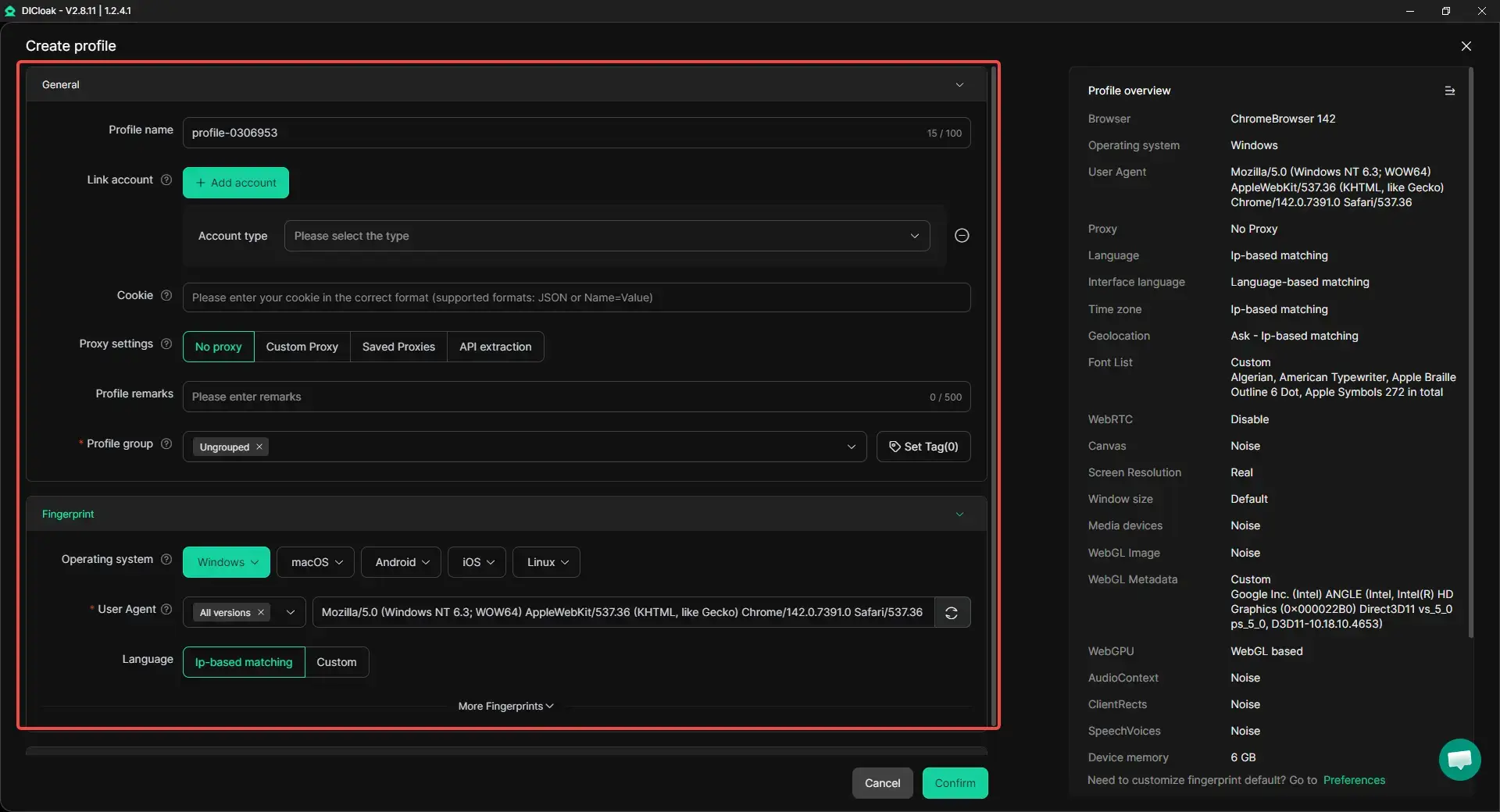
- Profile isolation and custom proxy configuration: Users can place different Facebook accounts in separate browser profiles instead of running everything in one browser session. Each profile can keep its own cookies, cache, and login state, and users can configure a separate proxy for each one. This makes it easier to keep account environments apart and manage multiple accounts more clearly.
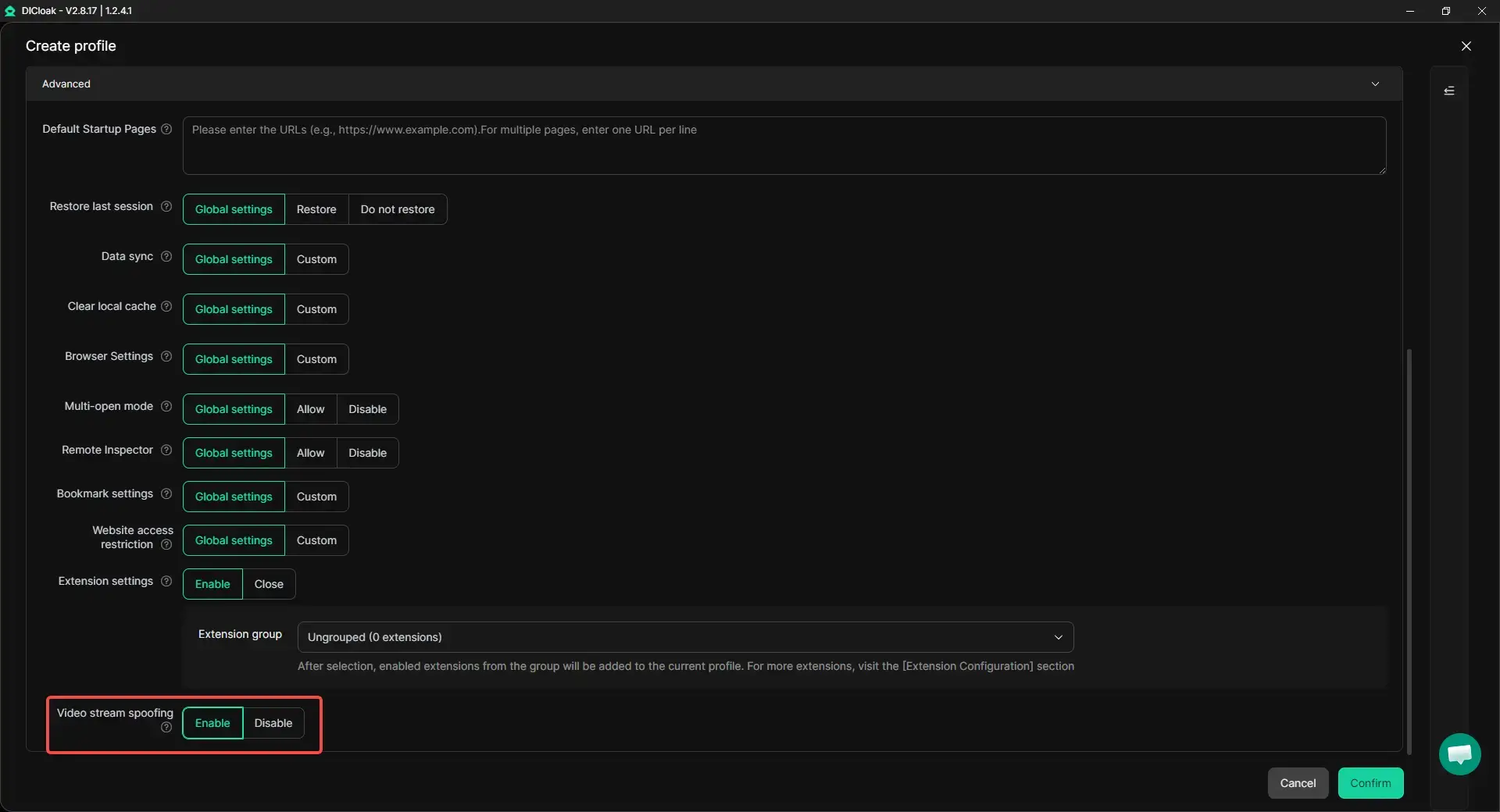
- Handling video selfie verification with less disruption: When Facebook triggers video selfie verification, repeated checks can interrupt account operations. In these cases, users can use DICloak's Video Stream Spoofing feature to upload pre-recorded video files directly through the webpage, which can make verification-related steps easier to handle inside a more consistent browser profile.
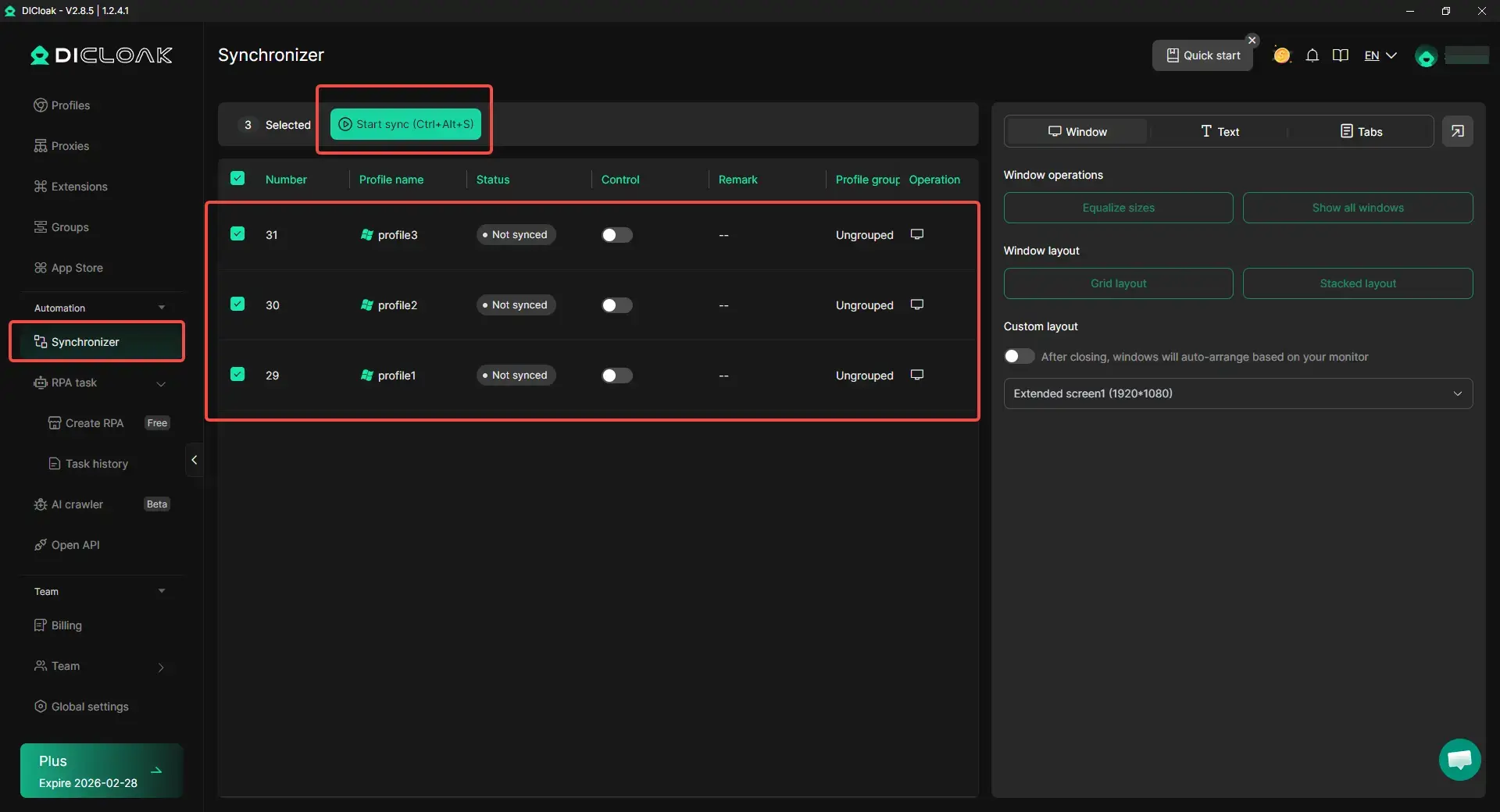
- Synchronizer for multi-account tasks: When the same basic action needs to be repeated across several Facebook accounts, users can use Synchronizer to perform those steps more efficiently. This can be useful for simple multi-account operations without needing to click through each profile one by one.
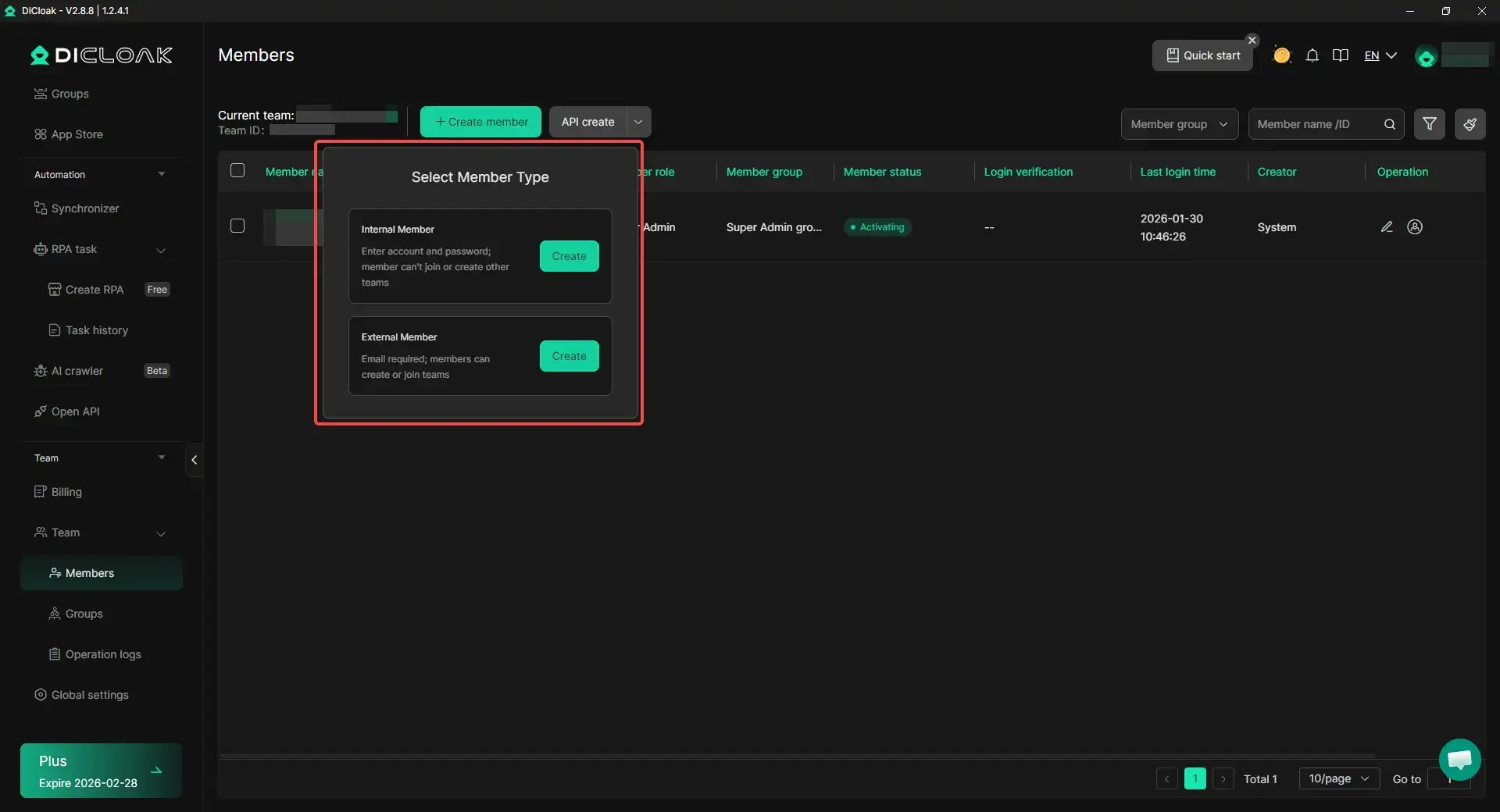
- Team collaboration and access management: When more than one person is involved in account operations, users can organize profile access more clearly through team collaboration and permission controls. This can make shared account management easier to handle while keeping different account environments separated.
FAQ About Can't Log Into Facebook
Why am I getting a security code request every time I log in?
This usually happens because Facebook does not fully trust the login yet. Private browsing, clearing cookies, switching devices often, or turning on extra login protection can make Facebook ask for a code more often. If the browser does not keep the saved device information, the code check may keep coming back.
Can I log into Facebook without my email or phone number?
Sometimes, yes, but it depends on what account details you still know. Facebook’s recovery flow can help you find the account using other identifying information, and there is also a recovery path for cases where you no longer have access to the old email address or mobile number. If you still cannot receive recovery messages, the best move is to use the official account recovery route instead of trying random login attempts.
How do I fix Facebook login issues caused by two-factor authentication?
Start by checking whether the code is going to SMS, an authentication app, or a login approval prompt on another trusted device. SMS codes can arrive late, and some people get stuck because they changed phones and no longer have the app that generates the code. If you are still logged in somewhere else, that device may help you approve the login faster.
What should I do if my account was hacked and I can't log in?
Go straight to Facebook’s hacked account recovery flow instead of using the normal login page again and again. Facebook recommends visiting the hacked-account recovery page, and it works best from a device you have used to log into Facebook before. That gives the recovery system stronger signals that the account really belongs to you.
Is it safe to use third-party apps to log into Facebook?
It is safer to be very careful here. Some third-party apps and browser extensions can create security risks, especially if they ask for unnecessary access or come from sources you do not trust. Facebook also limits what apps can request through Facebook Login, which is one reason to avoid unofficial tools that promise easy login access or recovery shortcuts.
Conclusion
If you can’t log into Facebook, the problem is usually tied to your password, recovery options, device, browser, or a temporary restriction. The best approach is to check each cause step by step instead of guessing. In many cases, the fix is simple once you know where the problem starts. And if the issue is more serious, such as a hacked or restricted account, using the right recovery path early can save a lot of time and stress.
 Web Proxy Tools
 Free Tools
 Cookie Plugin
 UA Generator
 MAC Address Generator
 IP Generator
 IP Address List
 2FA Code Generator
 World Clock
 Anonymous Check
 WebRTC Leak Test
 UUID Generator
 Free Web Proxy Site
 Proxy Checker
 FB Ad Checker
 AI Web Scraping
 Free SMM Tools
 Twitter Shadowban Checker
 Instagram Name Checker
 UTM Generator
 Username Generator
 AI Hashtag Generator
 LinkedIn Headline Generator
 Social Media Image Resizer