If you’re stuck choosing between organic growth and paid ads, you’re not alone. TikTok’s fast-changing rules and unpredictable reach leave creators and marketers wondering if running ads is actually a smart move. The question isn’t just “can you promote your tiktok through ad”, it’s whether those ads will actually push real followers, views, or engagement, and what you risk if you get it wrong.
Anyone can boost a video with TikTok’s ad tools, but the process isn’t as simple as hitting “Promote.” You’ll face choices about targeting, budget, and creative that can make or break your results. Running ads for your TikTok account or content can help reach new audiences, but the wrong strategy often burns through money without delivering lasting followers or engagement. That’s why so many creators search for practical guidance on TikTok ad promotion, or compare whether it’s smarter to promote TikTok account with ads or stick to organic tactics.
You need to know not just whether you can run ads, but how to avoid the common pitfalls, like wasted spend, low-quality traffic, or getting flagged for “unnatural” growth. There’s no shortcut, but you can dodge most rookie mistakes by understanding how TikTok’s ad platform works and what types of campaigns actually drive results.
Here’s what to check before you launch your first TikTok promotion.
What Does It Mean to Promote Your TikTok Through Ads?
Promoting your TikTok with ads means paying TikTok to show your videos or profile to people who wouldn’t have seen them otherwise. Instead of waiting for the algorithm to pick up your content, you buy direct reach, your videos get pushed into other users’ feeds based on audience targeting and campaign settings.
Organic vs Paid Promotion: What’s the Difference?
- Organic growth on TikTok comes from users sharing, commenting, or the algorithm boosting your video after good engagement, no spend required.
- Paid ads let you target who sees your videos, but you pay for that reach, so results depend on your ad setup and budget.
- With ads, you’re not just hoping for a “viral” moment, you’re buying a chance to reach viewers, but the platform still watches for signals of real interest.
Main Goals of TikTok Ad Promotion
Most people run TikTok ads to get more followers, boost video views fast, or drive engagement like comments and shares. You might also use ads to send traffic to a website, push app downloads, or trigger direct sales. The tradeoff: paid ads can get you in front of the right audience quickly, but if your content doesn’t hold attention, views drop off as soon as the money stops. For example, running a $100 “follower” campaign might double your follower count in a week, but if your videos aren’t sticky, you’ll see low engagement and most new followers won’t interact again. Relying only on ads also increases the risk of “dead accounts”, lots of numbers, but little real growth.
The hardest part is matching the goal to your content and audience, buying views won’t help if your creative doesn’t spark interest, and chasing followers without engagement can even lower your reputation on the platform. If you notice your ad-driven views spike but comments or shares lag, that’s a clear sign your campaign needs a content or targeting fix before spending more.
Paid TikTok promotion opens doors to new audiences, but the real impact depends on choosing the right ad type and setting clear goals. Next: see which TikTok ad types are available in 2026 and how each one fits different promotion strategies.
Which TikTok Ad Types Are Available in 2026?
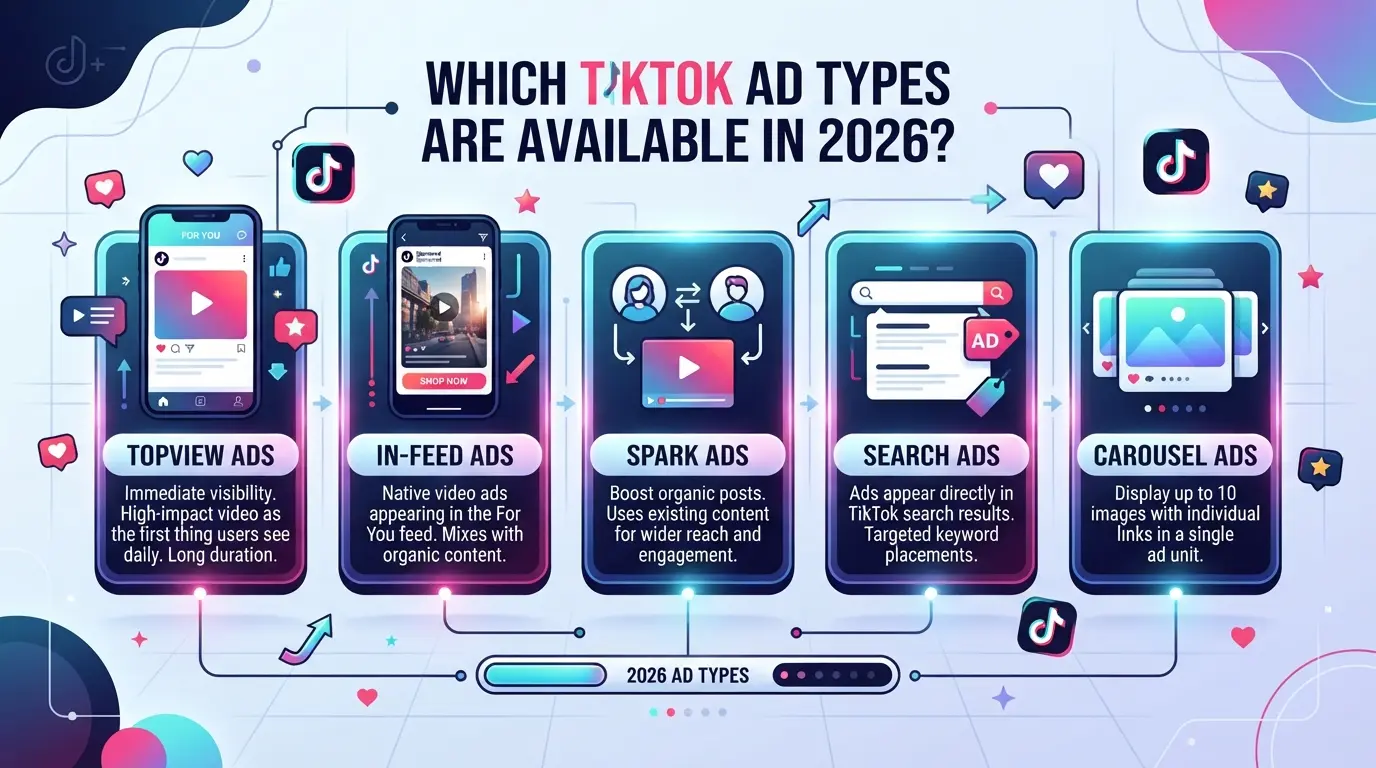
Yes, you can promote your TikTok through ad placements, but picking the right format is what separates a wasted budget from actual audience growth. TikTok’s ad platform now offers several campaign types, each with a different strength depending on whether you want views, followers, or brand impact.
In-Feed Ads: The Most Accessible Option
In-feed ads are short video ads that show up in users’ For You feeds, mixed with organic TikTok content. They look like regular posts, so most viewers don’t swipe past immediately. These ads are the default choice for most campaigns because they work for both new accounts and established creators.
Spark Ads: Promoting Existing Content
Spark Ads let you turn your own organic TikTok videos, or someone else’s, with permission, into paid ads. This works well if a post already has likes and comments and you want to amplify that momentum instead of starting from zero. For example, if your tutorial just hit 10,000 views but stopped trending, using Spark Ads can push it back in front of target viewers. The main risk: boosting a weak post rarely turns it into a winner. If your video had low engagement before, Spark Ads won’t magically fix it.
Branded Hashtag Challenges and Other Formats
- Branded Hashtag Challenges: Great for viral reach and UGC (user-generated content), but require a larger budget and creative planning.
- TopView and Brand Takeover: These put your ad at the very top or as a full-screen takeover when users first open TikTok; best for brands, not personal accounts.
- Shopping Ads: Available in select regions, connects your content to direct product sales if you’re in TikTok Shop.
Each of these advanced formats has different setup steps, costs, and eligibility rules. Unless you’re running a big campaign, most creators start with in-feed or Spark ads, then test other types once they understand basic performance.
Next, you’ll see how to set up your first TikTok ad campaign, step by step.
How to Set Up a TikTok Ad Campaign: Step-by-Step
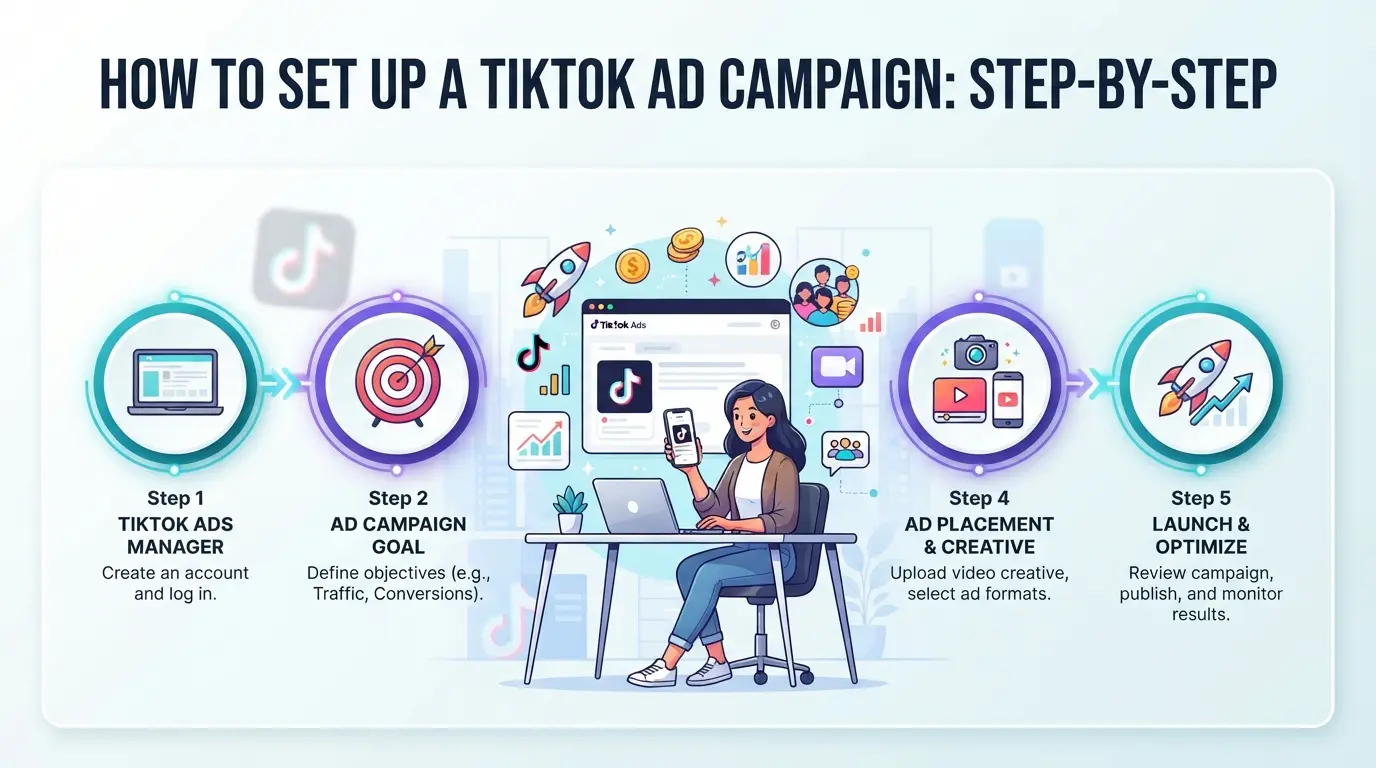
If you’re asking, "can you promote your TikTok through ad," the answer is yes, TikTok’s ad platform lets creators and brands push content straight to target audiences. But launching a campaign isn’t just about clicking “promote.” You need to walk through the setup steps, check for failure points, and match each action to your real promotion goal.
Creating a TikTok Ads Manager Account
- Go to TikTok Ads Manager and hit “Create Account.” Use a business email, not a personal one, to avoid verification issues later.
- Fill in business info and contact details. If your address or phone doesn’t match your official records, TikTok may flag your account and pause access.
- Verify your email and submit documents if requested. Skipping this step means your account stays inactive.
- Log in and check dashboard access. If you’re stuck at verification, retry with a different browser or clear cookies.
Choosing Your Promotion Objective
- Pick your main goal: follower growth, views, or conversions. If you want lasting followers, skip “views” and select “community” or “account” promotion.
- Match your goal to the ad format. For follower growth, use Spark Ads or In-Feed Ads; for conversions, stick to Traffic or Lead Generation campaigns.
- If you’re unsure, start with a small test, run two ad types for $20 each and compare which delivers better engagement.
Targeting Your Audience and Setting Budget
- Set demographics: age, gender, location. If you select too broad, your ad may waste spend on low-interest viewers.
- Add interests or behaviors, like “music lovers” or “foodies”, to narrow focus. If your audience is too niche, expect higher cost per action.
- Choose daily or lifetime budget. For first campaigns, daily budget of $30-50 is enough to spot performance issues before losing big money.
- Pick bid strategy: lowest cost or target cost. If you want steady follower growth, lowest cost works, but target cost can help avoid overspending.
| Targeting Option |
What It Controls |
Risk If Wrong |
| Age/Location |
Shows ad to right users |
Wasted spend |
| Interests/Behaviors |
Improves relevance |
Low engagement |
| Budget |
Limits daily/lifetime cost |
Overspending |
| Bid Strategy |
Sets cost per action |
Unstable results |
Table: TikTok targeting and budget settings. Source: TikTok Ads Manager interface.
Uploading Creative and Launching the Campaign
- Upload your TikTok video. Follow the specs, vertical, under 60 seconds, clear branding. If you miss requirements, your ad won’t run.
- Write a catchy caption and call-to-action. Weak copy means viewers scroll past without following or clicking.
- Preview your ad. If it looks blurry or the sound is off, fix before launch, bad creative burns money fast.
- Hit “Submit” and watch for approval. If you get rejected, check for banned topics or copyright issues. Re-edit and resubmit.
The step that most trips up new advertisers is mismatching objectives and ad formats, choosing “views” when you really want followers means you pay for empty numbers.
Once your campaign is live, shift focus to monitoring results and watch for signs of wasted spend or low-quality traffic. The next section covers the main risks and mistakes, so you can avoid burning your ad budget on clicks that don’t turn into real engagement.
What Risks and Mistakes Should You Avoid When Promoting TikTok with Ads?
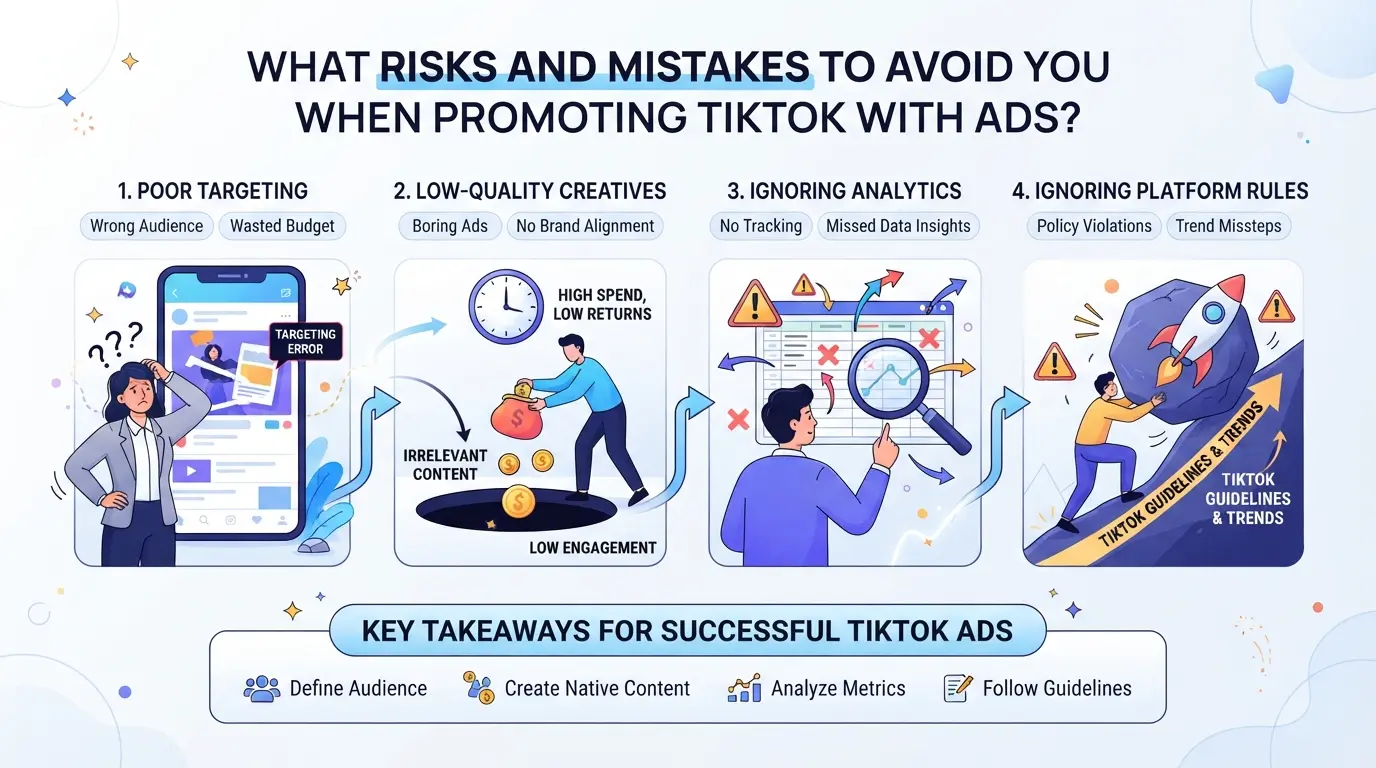
Running ads on TikTok can grow your reach, but it’s easy to waste budget or trigger account flags if you miss key details. Before you ask "can you promote your tiktok through ad," get clear on these pitfalls.
Ad Policy Violations and Account Restrictions
TikTok’s ad rules are strict, any hint of banned content, misleading claims, or copyright issues can get your ad rejected or even freeze your account. Account restrictions usually start with a warning, but repeat violations lead to permanent bans, blocking you from future ad campaigns. Always double-check TikTok’s ad policy before launching.
Budget Waste: Targeting and Creative Errors
Most ad spend gets lost when targeting is too broad or creative is low-quality. If your campaign delivers the wrong message or targets users who don’t care, you’ll pay for views with zero engagement.
- Check targeting settings, avoid “interest” groups too wide for your niche.
- Review your ad creative, skip stock video and focus on real, relevant clips.
- Set daily limits, stop campaigns if cost per follower jumps above $1.
Multiple Account Risks: Linking and Detection
TikTok tracks device data and account links, managing multiple ad accounts from one phone or browser can trigger detection.
- Never run more than one ad account per device.
- Change browser profiles when switching accounts.
- Avoid reusing payment methods across accounts.
If you want to run ads safely for multiple TikTok profiles, the next section covers practical ways to avoid detection and account bans.
How Teams and Agencies Can Manage Multiple TikTok Ad Accounts Safely with DICloak
Managing TikTok ad accounts for clients or brands is a different game from running a single campaign. The main challenge isn’t just scaling spend, it’s keeping every account session clean, isolated, and easy to hand off without mixing browser data or risking platform detection. Agencies and teams face extra complexity when multiple operators switch between accounts or run dozens of ads at once. If you try to run everything in a single browser, session overlap and storage leaks can quickly trigger platform review, and mistakes here are hard to unwind. The right workflow is to give each TikTok ad account its own controlled environment, network exit, and batch management tool. That’s where DICloak’s features fit.
Isolated Browser Profiles and Fingerprint Configuration
Operators can set up a separate browser profile for each TikTok ad account, making sure login sessions never share browser storage or fingerprint signals. Each profile stores its own browser version, interface language, time zone, geolocation, and screen resolution. For agencies, this means a creator, client, or brand TikTok ad account stays tied to its own environment, no cross-session contamination. Teams can also configure WebRTC handling, canvas fingerprint, and hardware concurrency for each profile. The scope is limited to browser-profile access; it does not change the connected SaaS tool. Isolating browser profiles is the most reliable way to prevent session overlap between client accounts. 
Proxy Configuration for Separate Network Exits
Operators have the option to configure their own proxy for each browser profile, so every TikTok ad account can connect through a distinct network exit. Before opening an account workflow, admins can add a custom proxy, HTTP, HTTPS, or SOCKS5, and test the connection in the proxy settings. If a campaign needs a specific region or provider, teams can select a saved proxy or use API Extraction to pull proxy details as required. It’s up to the operator to supply proxies and decide rotation or quality rules; DICloak only stores and applies the settings. A successful proxy check shows the detected exit IP and time zone, but doesn’t guarantee platform access or safety. 
Bulk Operations for Efficient Profile Management
Manually launching dozens of TikTok ad account profiles wastes time and increases the risk of error, especially as campaigns scale. Teams can use Bulk Operations to batch open, edit, assign proxies, and update fingerprint settings for all selected profiles at once. For example, when a team needs to launch 20 TikTok ad account profiles, they can do it in one click and then apply new proxy settings across the batch. The biggest tradeoff, shared settings are quick, but a mistake affects every profile, so review each bulk action before confirming. Bulk Operations affect browser profiles only; they don’t change TikTok account content or campaign settings. 
With these controls, operators can keep TikTok ad account workflows organized and scalable, ready to measure and improve campaigns in the next step.
How to Measure and improve Your TikTok Ad Campaigns for Better Results
Tracking TikTok ad campaigns goes beyond watching spend; you need clear metrics and ongoing tweaks to get real results from TikTok ad promotion.
Key Metrics to Track
Watch impressions, clicks, and conversions, but don’t overlook follower growth and comment rates. If engagement stays flat while spend rises, your campaign probably needs a creative refresh.
A/B Testing and Creative Optimization
Run two versions of your ad, change only one element, like the headline or video. Split your budget, check which version gets better click-through or follower gains, then replace the weaker creative. Small creative tweaks often drive bigger gains than raising your budget.
Scaling Campaigns Safely
- Raise spend only after steady conversion rates for a week
- Pause scaling if engagement drops or costs spike
- Check audience overlap, scaling too fast often dilutes results
Measuring and tweaking your TikTok ads keeps your campaigns from drifting into expensive, low-impact territory. If you see high spend but weak engagement, it’s a sign to rethink your approach before adding more budget.
When Promoting TikTok with Ads Isn’t the Best Choice
Sometimes, running TikTok ads just burns budget without real results. If you’re asking “can you promote your tiktok through ad,” you need to know when to skip paid promotion and look for better growth strategies.
Budget Constraints and ROI Concerns
| Scenario |
Risk/Downside |
When to Avoid Ads |
| Low ticket or hobby content |
Ad spend eats any possible ROI |
Stick to organic efforts |
| Weak content or no clear CTA |
Views spike, no followers stay |
Fix content first |
| Unclear targeting or offer |
Clicks come, no conversion |
Rethink audience/goals |
If your content or offer can’t hold attention, even the best TikTok ad campaign won’t fix the problem, ads will just make it obvious faster.
Organic Growth Strategies That Can Outperform Ads
Consistent posting, riding TikTok trends, and smart collaborations often bring more lasting followers than a paid push. If ads aren’t moving the needle, double down on content quality and join trending challenges instead.
Frequently Asked Questions About can you promote your tiktok through ad
Can you promote your TikTok through ad if your account is new?
Yes, you can promote your TikTok through ad even if your account is new. However, new accounts often face stricter ad review and may have limited targeting options. TikTok may check your ad content and account history more carefully. It’s best to follow all guidelines and start with simple campaigns until your account builds trust.
Is it safe to run multiple TikTok ad accounts for different clients?
It is safe to manage several TikTok ad accounts if you use separate browser profiles and unique proxies for each account. This helps prevent TikTok from linking accounts together, which could cause bans or restrictions. Agencies often use these methods to keep client accounts secure and independent.
How much budget should you start with for TikTok ads?
Start with a small test budget, such as $20–$50 per campaign. Monitor results closely, including clicks and conversions. Once you see positive ROI and engagement, you can slowly increase your budget. This helps you avoid wasting money and lets you learn what works before scaling up.
What happens if your TikTok ad violates platform policies?
If your TikTok ad breaks platform rules, your ad will be rejected. TikTok may also limit your account or even ban it if violations continue. Always follow the ad guidelines for content, images, and targeting. Review TikTok’s ad policies before submitting campaigns to avoid penalties.
Can agencies automate TikTok ad account management?
Agencies can automate parts of TikTok ad account management using bulk profile tools for tasks like login and account switching. However, creative work and campaign setup still need manual input. Automation can save time, but ads must be customized and comply with TikTok’s rules for best results.
If you're considering boosting your TikTok presence with ads, evaluate your budget and target audience to determine which ad format best aligns with your goals. Experiment with small campaigns to measure performance and adjust your strategy as you learn what resonates. Try DICloak For Free
 Web Proxy Tools
 Free Tools
 Cookie Plugin
 UA Generator
 MAC Address Generator
 IP Generator
 IP Address List
 2FA Code Generator
 World Clock
 Anonymous Check
 WebRTC Leak Test
 UUID Generator
 Free Web Proxy Site
 Proxy Checker
 FB Ad Checker
 AI Web Scraping
 Free SMM Tools
 Twitter Shadowban Checker
 Instagram Name Checker
 UTM Generator
 Username Generator
 AI Hashtag Generator
 LinkedIn Headline Generator
 Social Media Image Resizer