Many people still search for a twitter viewer when they want to check X posts, profiles, or trends without logging in. It sounds simple, but not every tool works well, and some can waste your time or even put your privacy at risk.
In this guide, you will learn what a Twitter viewer can do in 2026, what limits to expect, how to choose a safe tool, and which options are worth trying.

What Is a Twitter Viewer and Why Do People Use One?
When people search for a twitter viewer, they usually want a simple way to check public X content without signing in, switching accounts, or dealing with extra friction. X says posts are public by default, which is why many users look for tools that help them read public profiles, posts, and search results more easily. At the same time, X also makes clear that protected posts are only visible to approved followers, so a twitter viewer is mainly useful for viewing public content, not private accounts.
What is a Twitter viewer?
A twitter viewer is a tool, site, or browser-based method that helps people look at public X content in a simpler way. In most cases, it is used to open public profiles, read posts, check hashtags, or follow public conversations without relying on the full X experience. Since X still treats public posts as viewable by anyone, this kind of tool is usually built around easier access, faster browsing, or cleaner viewing.
For example, a person may want to check a brand’s latest posts, read a trending thread, or look at a creator’s public profile without logging into an account first. In that case, a twitter viewer is less about “unlocking” hidden content and more about making public content easier to read and track. X also notes that protected posts do not appear to the general public and are only available to followers approved by that account.
Why do people look for Twitter viewers in 2026?
In 2026, many people still search for twitter viewer because they want speed, privacy, and convenience. Some do not want to log in just to check a few public posts. Some want to follow news, trends, or competitor activity without mixing that task into their main account. Others simply want a cleaner way to browse public content when normal access feels limited or inconvenient. X’s own help pages still separate public posts from protected ones, which keeps demand high for tools that help users read public content more easily.
Another reason is work. Marketers, researchers, and social media teams often need to watch several public accounts, hashtags, or conversations at once. X Pro itself shows that advanced search, columns, and grouped workspaces are valuable for heavier monitoring tasks, which tells us that many users want more efficient ways to track public content.
Who can benefit most from using a Twitter viewer?
A twitter viewer can help casual users, but it is most useful for people who check public content often. That includes marketers watching brand activity, researchers tracking public discussions, journalists following breaking news, and support or community teams reviewing public feedback. These users usually care more about speed, organization, and easier monitoring than about posting or replying. Public posts are visible by default on X, so these groups often focus on viewing and tracking rather than direct engagement.
A simple example is a marketer who wants to compare three competitor accounts before a campaign launch. Another example is a researcher who wants to follow one keyword across several public discussions. In both cases, a twitter viewer can save time by making public content easier to check. But it is not the right tool for private account access, because X clearly states that protected posts are limited to approved followers.
Can You View Twitter Without an Account in 2026?
Many people search for a twitter viewer because they want to read X content without logging in. In 2026, that is still possible in some cases, but only for public content. X makes clear that public posts can be seen by anyone, while protected posts are only visible to approved followers. That means a twitter viewer can help with public browsing, but it cannot give access to private accounts.
What public X content can you view without logging in?
Without an account, you may still be able to view some public profiles, public posts, and parts of public conversations. A twitter viewer is mainly useful for checking content that is already public, such as a brand page, a creator profile, or a shared post. It is more about easier access than unlocking hidden content.
What limits should you expect when browsing anonymously?
The biggest limit is that anonymous browsing is not as complete or stable as using an account. Some pages may not load well, search may feel limited, and protected posts will not be visible. So even if a twitter viewer works for quick checks, it usually cannot match the full X experience.
Why do some Twitter viewer methods stop working?
Some twitter viewer tools stop working because they depend on platform access they do not control. If X changes page structure, search behavior, or logged-out access, these tools can break quickly. Some also promise too much from the start, which is why they often become unreliable over time.
Best Twitter Viewer Tools to Try in 2026
If you are looking for the best twitter viewer in 2026, the right choice depends on what you want to do. Some tools are better for quick public browsing. Others are better for trend tracking or professional monitoring. The key is to choose a tool that matches your goal instead of expecting one tool to do everything.
Best Twitter viewer for quick public browsing
For quick public browsing, lightweight tools like TwStalker are often the easiest option. TwStalker says it lets users view public profiles, tweets, media, and trends without an account, which makes it useful for fast checks when you only need public content. Still, like many third-party viewer tools, it is best for simple viewing, not full platform access.
Best Twitter viewer for hashtags, keywords, and trends
For hashtags, keywords, and trend tracking, X Pro is a stronger choice than a basic twitter viewer. X says X Pro includes advanced search, new column types, grouped workspaces called Decks, and column filters that help users follow content more efficiently. That makes it a better fit for users who need organized trend watching instead of one-time browsing.
Best Twitter viewer for marketers, researchers, and monitoring work
For marketers, researchers, and monitoring teams, a social listening platform like Brand24 is often the better option. Brand24 says it tracks keywords, hashtags, brand mentions, and competitor activity across X and many other public sources in real time. So if your goal is ongoing research or campaign monitoring, this kind of tool usually offers more value than a simple twitter viewer.
How to Choose a Safe Twitter Viewer
Choosing a safe twitter viewer is really about picking a tool that is useful without asking for too much. A good tool should help you view public content more easily, stay clear about what it can do, and avoid making unrealistic promises. The safest options usually focus on public browsing, search, monitoring, or workspace features instead of claiming they can unlock private content. X Pro, for example, focuses on advanced search, columns, and organized workspaces for tracking content more efficiently.
What features matter most in a good Twitter viewer?
A good twitter viewer should be simple, stable, and easy to understand. For basic use, the most important features are public profile viewing, post browsing, hashtag tracking, and clean search. If you need deeper research, tools with advanced search, columns, alerts, or keyword monitoring are usually more useful. X Pro offers advanced search and grouped workspaces, while monitoring tools like Brand24 focus more on mentions, keywords, and real-time tracking.
What warning signs should you avoid?
The biggest warning sign is a tool that promises too much. If a twitter viewer claims it can show private accounts, bypass every limit, or guarantee full access forever, that is a bad sign. Another red flag is when a tool asks for login details, personal information, or payment before showing clear value. In most cases, safe tools are more honest about limits and focus on public content only.
Should you choose a free or paid Twitter viewer?
That depends on your goal. A free twitter viewer may be enough if you only want quick public browsing now and then. But if you need serious monitoring, organized workflows, or deeper research, a paid tool may make more sense. X Pro is built around advanced search and workspace management, while Brand24 is positioned more for ongoing monitoring and analytics.
Risks of Using Twitter Viewers
A twitter viewer can save time, but it can also create risks if you choose the wrong tool. The biggest problem is not viewing public posts. The real risk comes from third-party sites that ask for account access, personal details, or payment before they prove any value. X also makes clear that protected posts are only visible to approved followers, so tools that claim to bypass that rule should be treated with caution.
Can a Twitter viewer put your data or account at risk?
Yes, it can. If a twitter viewer asks for your login, email, phone number, or other personal details, that is a warning sign. A tool that only helps you view public content should not need deep access to your account. X also enforces rules against inauthentic behavior and abusive automation, so risky third-party tools can create account problems as well as privacy concerns.
Are private Twitter viewer tools real or misleading?
Most of the time, they are misleading. X says protected posts can only be seen by approved followers and do not appear in public search. That means a so-called private twitter viewer is usually just clickbait, a weak tool, or a site trying to collect traffic or user data.
What should you do if a tool asks for login details or payment too early?
Stop and leave the page. A safe twitter viewer for public browsing should be clear about what it does before asking for anything sensitive. If a tool asks for login details or pushes payment before showing real value, it is better to avoid it and use a more transparent option instead.
Common Mistakes People Make With Twitter Viewers
Many people use a twitter viewer with the wrong expectations. They assume every tool can show everything, work all the time, and give the same experience as X itself. In reality, most problems come from misunderstanding what these tools can actually do. X makes clear that public posts are open, but protected posts are only visible to approved followers. X search results are also filtered for relevance, safety, and spam control, so not every post or account will appear the same way every time.
Expecting a viewer to show private or protected accounts
One common mistake is thinking a twitter viewer can show private or protected accounts. That is not how X works. X says protected posts are only visible to followers approved by that account, and they do not appear in public search engines. So if a tool claims it can show protected content, that claim should not be trusted.
Trusting tools that promise too much
Another mistake is trusting tools that make big promises. Some sites claim they can show any profile, bypass all limits, or work forever without problems. But X search is shaped by relevance, safety, and anti-spam systems, which means outside tools do not control everything. When a viewer sounds too powerful, it is often a sign that the tool is overstating what it can really do.
Using one tool without checking freshness or reliability
A third mistake is relying on one tool without checking whether it still works well. X can change search behavior, visibility rules, or page structure, and outside tools may stop working or become less reliable. That is why it is smart to treat any twitter viewer as a convenience tool, not a guaranteed solution.
Tips to Get More Value From a Twitter Viewer
A twitter viewer becomes more useful when you use it with a clear goal. Instead of only checking random posts, it helps to track topics, watch selected accounts, and keep useful finds in one place. X’s own tools show the same pattern: trends, Lists, advanced search, and organized views all make public content easier to follow.
How to follow hashtags and trending topics faster
To follow hashtags and trends faster, focus on a few target keywords instead of checking everything at once. X says trends appear across Explore and other surfaces, and advanced search can help narrow results by words, people, and dates. That makes it easier to turn a basic twitter viewer into a more focused research tool.
How to monitor multiple public accounts more efficiently
If you need to watch several public accounts, organize them by topic instead of opening one profile at a time. X says Lists can show a stream of posts from only the accounts on that List, and X Pro adds columns and grouped workspaces for more structured monitoring. For marketers or researchers, this is much more efficient than checking accounts one by one.
How to save useful posts and notes for later
When you find something useful, save it right away. X supports bookmarks for saving posts, and many users also keep simple notes with links, screenshots, or short comments so they can find the content again later. Even with a basic twitter viewer, this habit makes trend tracking and competitor research much easier.
How DICloak Helps Manage Multiple Twitter Accounts More Efficiently
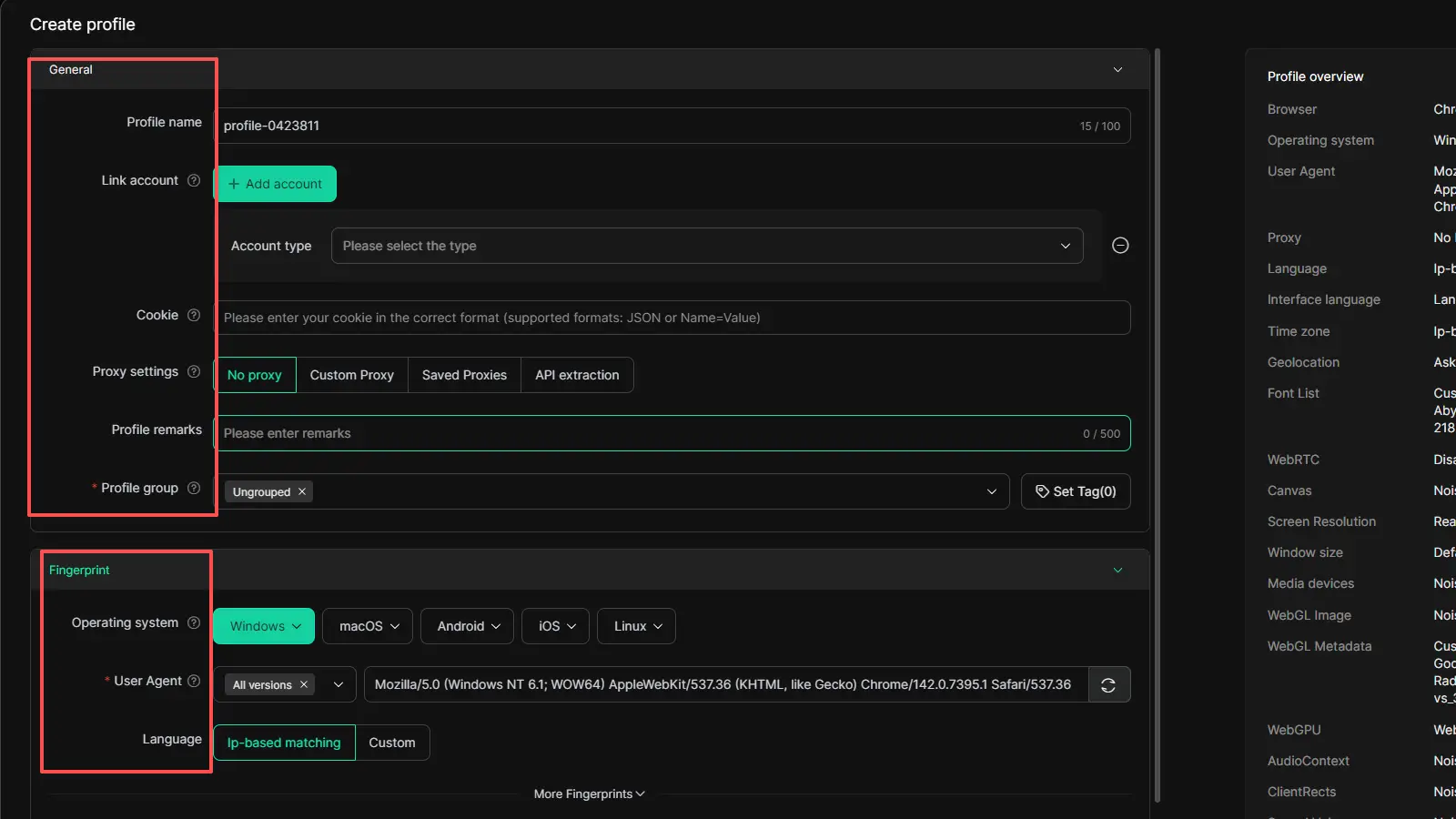
If a basic twitter viewer is only for quick checks, DICloak is more useful for people or teams that need to manage multiple Twitter accounts every day. It is an antidetect browser built for multi-account work, with isolated profiles, team controls, and automation features that make account management easier and more organized.
Keep multiple Twitter account sessions separated on one device
DICloak lets each Twitter account run in its own isolated browser profile. This helps keep cookies, logins, fingerprints, and proxy settings from getting mixed together. For users managing multiple Twitter accounts on one device, this makes daily work cleaner and lowers the risk of account overlap.
Reduce account mix-ups during team work
When several people work on shared Twitter accounts, mistakes can happen easily. DICloak offers member permission controls, web element hiding, website access restrictions, and security protection mode. These features help reduce wrong-account actions and make shared account management safer and more structured.
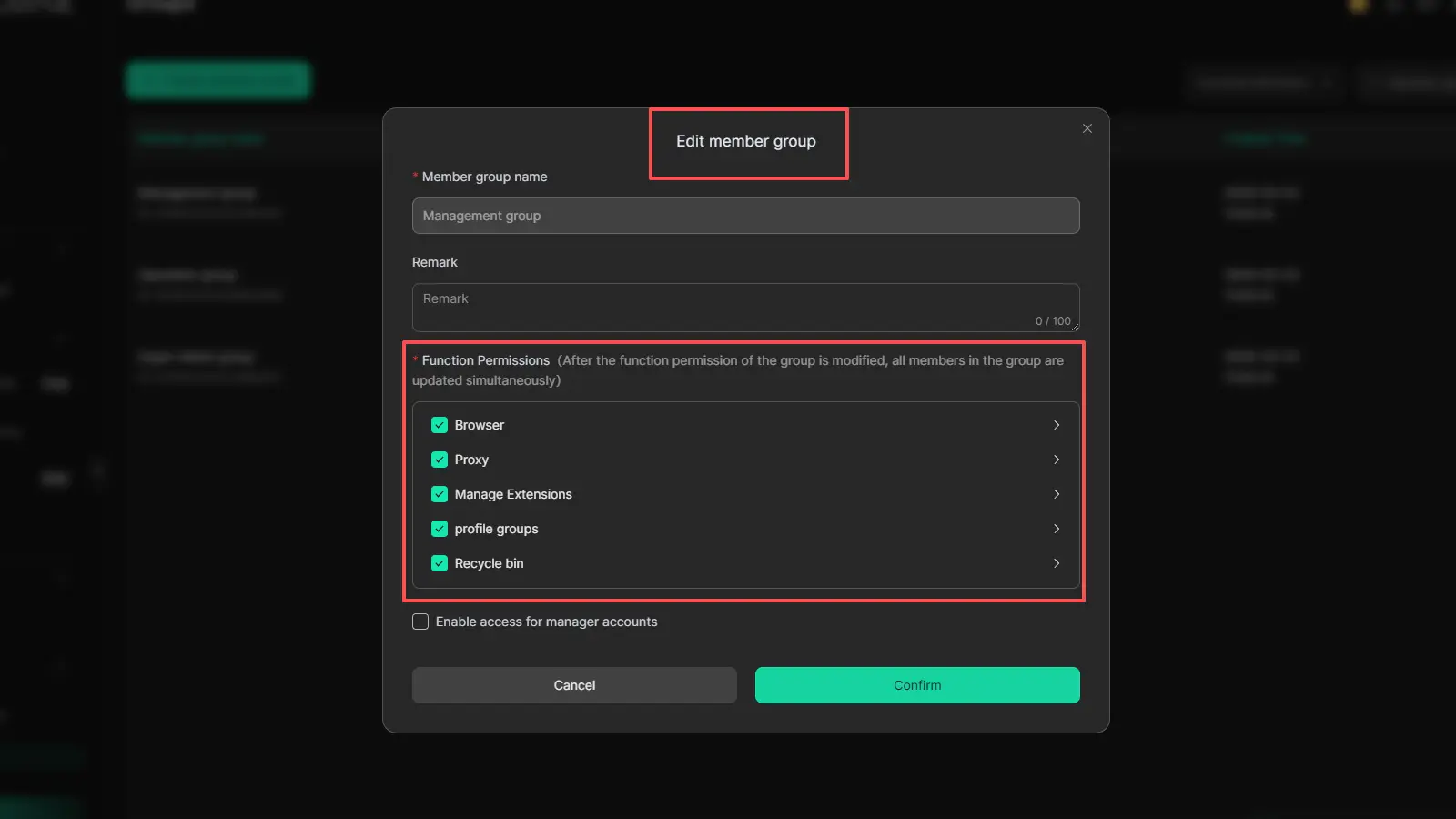
Make multi-account Twitter operations more efficient
DICloak also helps reduce repeated account tasks. Its Multi-Window Synchronizer can sync actions across profiles, which is useful when teams need to handle similar operations across multiple Twitter accounts. For users managing brand accounts, campaign accounts, or client accounts, this can save time and make multi-account work much easier than using a regular browser alone.
FAQs about Twitter Viewer
Q1: Can a Twitter viewer show private Twitter accounts?
No. A twitter viewer can only help you view content that is already public. If an account is private or protected, its posts are only visible to approved followers. That means a tool that claims to show private Twitter accounts is usually misleading.
Q2: Are there any free Twitter viewers worth trying?
Yes, some free twitter viewer tools can be useful for quick public browsing, especially if you only want to check public profiles, posts, or trends. However, free tools often have limits. They may show less content, work less consistently, or lack stronger search and tracking features.
Q3: Do Twitter viewers work on mobile devices?
Yes, many twitter viewer tools work on mobile devices because they run in a browser. This can be helpful if you want to quickly check public X content on your phone without logging in. However, the mobile experience may feel more limited than desktop, especially for research or multi-account monitoring.
Q4: Why does a Twitter viewer sometimes stop working?
A twitter viewer may stop working when X changes its page structure, search behavior, or logged-out access rules. Some tools also fail because they depend on unstable methods or make promises they cannot keep for long. That is why a viewer should be treated as a convenience tool, not a guaranteed solution.
Q5: Is it safe to use a Twitter viewer that asks for personal information?
In most cases, no. A twitter viewer for public browsing should not need your password, phone number, or other sensitive details. If a tool asks for too much personal information too early, it is safer to leave and use a more transparent option.
Conclusion
A twitter viewer can be a useful tool if you want to check public X content in a faster and simpler way. It can help with quick browsing, trend tracking, and public account monitoring, but it also has clear limits. It cannot show private accounts, and not every tool is safe or reliable.
The best approach is to choose a twitter viewer that matches your real needs. If you only want to view a few public posts, a simple tool may be enough. If you need deeper monitoring or team-based research, a more structured setup may work better. In the end, the safest choice is always a tool that is honest about what it can do and does not ask for more access than necessary.
 Web Proxy Tools
 Free Tools
 Cookie Plugin
 UA Generator
 MAC Address Generator
 IP Generator
 IP Address List
 2FA Code Generator
 World Clock
 Anonymous Check
 WebRTC Leak Test
 UUID Generator
 Free Web Proxy Site
 Proxy Checker
 FB Ad Checker
 AI Web Scraping
 Free SMM Tools
 Twitter Shadowban Checker
 Instagram Name Checker
 UTM Generator
 Username Generator
 AI Hashtag Generator
 LinkedIn Headline Generator
 Social Media Image Resizer