Choosing a Discord alternative isn’t just about finding a chat app that looks familiar. Teams who actually need to migrate often get stuck between platforms that promise “community” but miss basic team workflows, or tools that claim enterprise features but feel clunky for daily conversation. The real problem is figuring out which platform covers both sides, without forcing your group to adapt or lose key integrations. That’s why so many searches for what is the real discord alternative end with more confusion than answers.
It’s easy to get distracted by feature lists or “best discord alternatives 2026” rankings, most options do tick the boxes on channels, roles, and file sharing. But the gap shows up right after setup. You’ll see issues with notification controls, permission management, and user onboarding. If you skip this layer, you risk a messy migration where team coordination breaks down, or you end up with a platform that’s secure but too rigid for creative work.
The practical challenge isn’t just switching software, it’s matching the right platform to your team’s real work habits. This means checking how Discord vs competitors stack up for privacy, group management, and actual collaboration. Before you jump, you need to know which secure discord alternative actually fits your workflow, not just what looks popular.
Next, here’s how platform selection really impacts daily team operations.
What Makes a Discord Alternative ‘Real’ in 2026?
A real Discord alternative in 2026 isn’t just another chat app with channels. It’s a platform that covers the same ground on communication, group structure, and admin controls, without leaving teams stuck with missing basics or messy workarounds. If you’re searching “what is the real discord alternative,” the answer starts with matching the functions you actually use day-to-day, not just the surface look.
Core Features That Must Be Matched
A genuine replacement for Discord needs to cover these three areas:
- Text, voice, and video chat: All three modes must work reliably, not just basic DMs or group calls.
- Community/server structure: The platform should let you create separate groups (“servers”) with channels, categories, and role-based access.
- Moderation and permissions: Tools for banning, muting, slow mode, and role-based controls must be built-in, not tacked on or missing.
Where Most ‘Alternatives’ Fall Short
Plenty of so-called alternatives check the boxes for chat and file sharing, but fall apart when you try to run a real community or team. The cracks show up with weak moderation (no audit logs, limited ban options), missing features like channel permissions, or community tools that only support a few hundred users before slowing down.
For example, many Discord replacements handle small private chats well, but struggle as soon as you need to run event notifications, assign temporary roles, or integrate with bots. Open source Discord alternatives might promise control, but often require heavy setup or force you to build missing features from scratch. Even paid platforms can hit a wall if they lack integrations for workflows you depend on, like real-time alerts, calendar syncing, or API hooks for automation.
The biggest gap? If you move your team and suddenly lose moderation controls, onboarding flows, or notification fine-tuning, the whole platform starts to feel like a downgrade, no matter how polished the UI looks. That’s why most “alternatives” end up as side tools, not true replacements.
Before you even start comparing features or pricing, check how well each option handles the core structure and admin controls. Missing this step is the fastest way to get stuck with a new platform that’s harder to manage than Discord ever was.
The next step is understanding why so many teams and communities are now looking beyond Discord itself, even when the alternatives aren’t perfect.
Why Teams and Communities Are Looking Beyond Discord
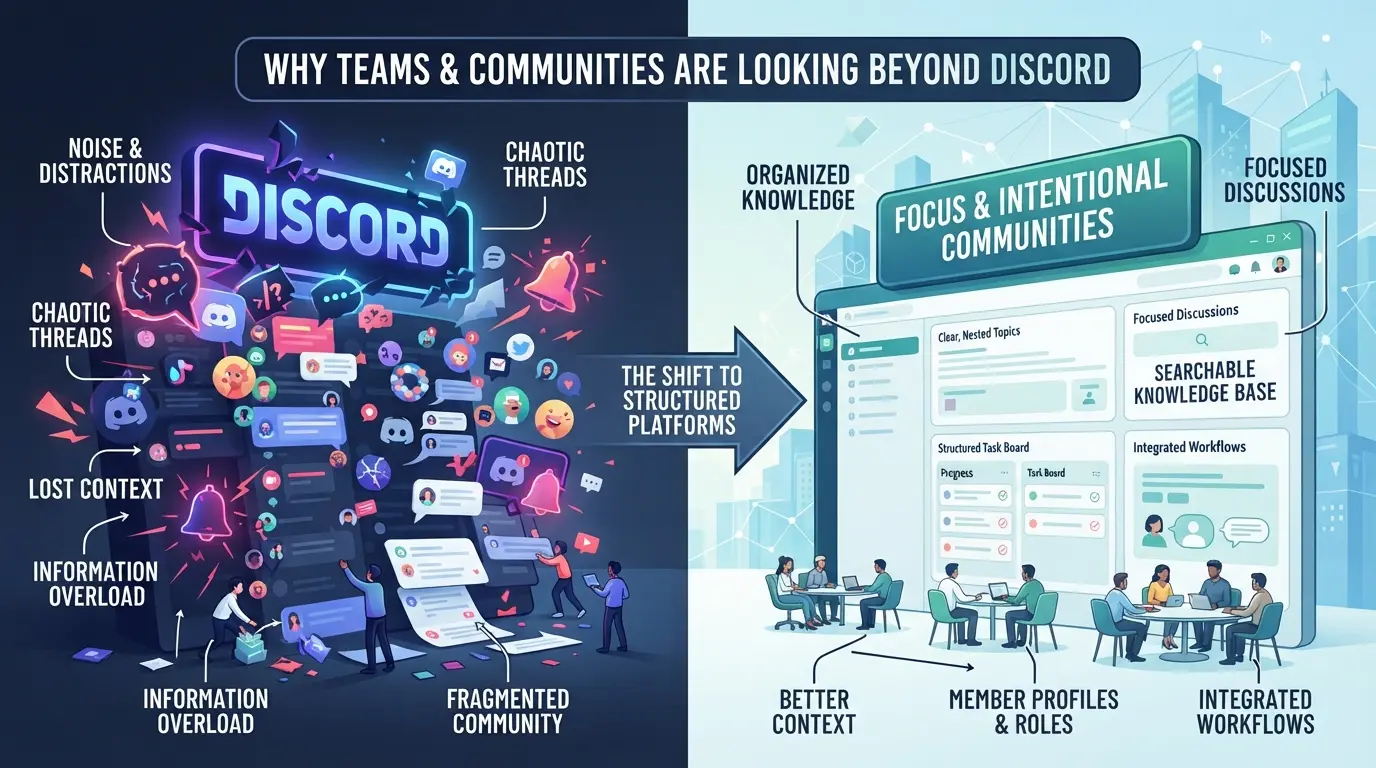
Teams aren’t just chasing new features, they’re trying to fix real pain points that Discord brings into daily work. The main push to find what is the real discord alternative comes from privacy worries, platform limits, and roadblocks to scaling up team management.
Privacy and Data Concerns
Discord collects more user data than most teams realize. Account linking across services can expose real names or emails if you’re not careful. For groups handling sensitive projects, this becomes a deal-breaker.
Platform Restrictions and Reliability
Server outages and regional blocks can halt work with zero warning. In 2025, Discord had three major outages lasting over four hours each, teams relying on it for project coordination got stuck waiting, and had to scramble for backup channels. That’s not just annoying; it can cost you deadlines. Regional limitations hit even harder for global teams. If a member can’t access the server due to local restrictions, you lose a key part of your workflow. Sometimes, these blocks come with little notice, one Monday morning, you log in and find your main channel grayed out, with support replies saying “no ETA.” When reliability drops, switching platforms isn’t just about new features, it's about protecting your ability to actually operate.
Scaling and Team Management Challenges
- Permission systems get messy fast: custom roles often clash, leading to confusion about who can see what.
- Managing multiple accounts is awkward, admins juggle logins, risking lockouts or accidental cross-posts.
- Onboarding new members is inconsistent: Discord’s invite links can expire, and there’s no built-in way to track who’s joined or missed key info.
Teams that hit these limits realize channel basics aren’t enough. Privacy and uptime issues force a shift, but the hardest change comes when permission chaos and multi-account headaches start breaking workflows. That’s when groups stop asking about “popular Discord alternatives”, they want a platform that actually fits how their team works, not just the same chat with a new logo.
The real decision isn’t just about leaving Discord; it’s about choosing a platform that solves these core problems. Next, you’ll see how to match alternative platforms to your team’s use case, so you avoid trading one set of headaches for another.
How to Decide Which Discord Alternative Fits Your Use Case
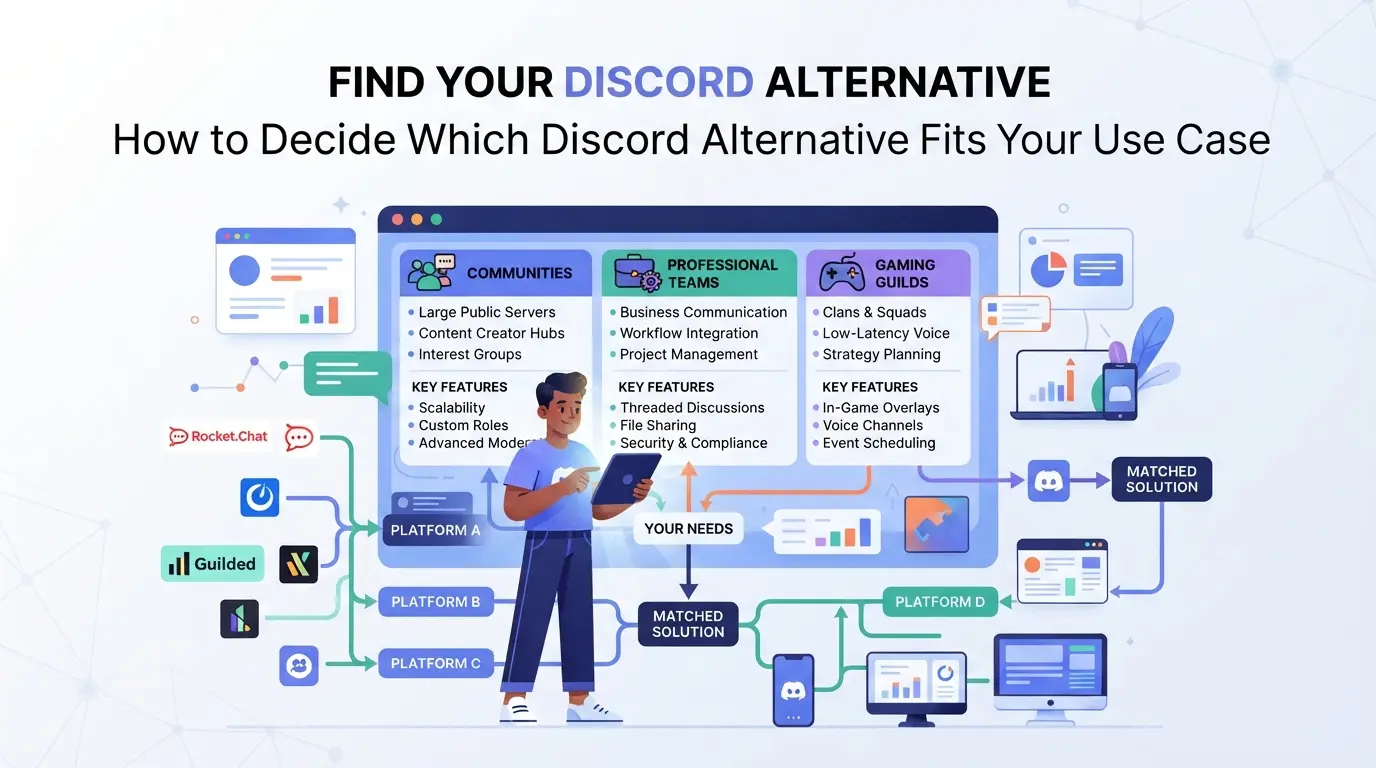
If you want to avoid switching to another chat platform that turns out to be the wrong fit, focus on how your team actually works, not just who has the most features. Here’s a direct checklist to help you pick a real Discord alternative that matches your workflow, security, and integration needs.
Team Size and Collaboration Needs
What works for a gaming group can fall flat for a 500-person community. Small teams usually want quick setup and flexible roles; large groups need strong access controls and audit logs. If your community has public events or invite links, moderation and permission layers matter much more than just UI design.
| Team Size |
Good Fit Platforms |
Key Features Needed |
| 2-20 (small team) |
Slack, Guilded, Matrix |
Direct roles, fast onboarding |
| 20-200 (mid-size) |
Mattermost, Rocket.Chat |
Group permissions, channel privacy |
| 200+ (community) |
Zulip, Discourse |
Hierarchy, moderation, logging |
Table: Platform fit by team size, real differences show up in permission depth and onboarding friction.
Security, Privacy, and Compliance
Privacy isn’t just about encryption. If session isolation or compliance matters, surface-level comparisons miss the risks. Use this checklist to avoid common blind spots:
- Check if the platform supports per-user session logs and device management.
- Confirm where data is stored and who owns admin keys.
- Review compliance certifications, don’t assume “EU-hosted” means GDPR ready.
Workflow and Integration Requirements
Most teams hit a wall when their Discord replacement can’t connect to key tools or automate simple actions. Before you commit, run through these checkpoints:
- List your must-have integrations (e.g., Google Drive, GitHub, Zapier) and test for real support, not just an API claim.
- Confirm if bots and automations run in isolated sandboxes or need extra permissions, this is where data leaks happen.
- Map your daily tasks: if anything takes more steps than it did in Discord, flag it now.
Choosing a platform is as much about what breaks as what works. If you skip these checks, you’ll likely face permission headaches, integration gaps, or user pushback after launch, issues much harder to fix later. The next section covers the specific risks and mistakes teams face during migration.
Risks and Mistakes When Switching from Discord to Another Platform
Switching platforms isn’t just about picking the right tool, teams get tripped up by broken data, login confusion, and user pushback. Here’s what usually goes wrong and how to avoid it.
Data Migration and Loss
Export tools often miss private messages, old files, and role settings. If you skip a dry run, you’ll find gaps after launch, sudden missing channels, lost files, or broken access links. Always map out what transfers and what you’ll need to rebuild from scratch.
Account Linking and Session Risks
- Check if user logins will overlap across old and new platforms.
- Require re-authentication for all accounts after migration.
- Audit active sessions, close any inherited from Discord.
User Adoption and Workflow Disruption
The hardest part is getting everyone to switch habits. Even a great discord replacement for teams can fail if users don’t buy in.
- Schedule live walkthroughs for new workflows.
- Assign a migration lead to handle user questions.
- Set a freeze date for the old platform to push full adoption.
How Social Media Teams Can Manage Multiple Platform Accounts Safely with DICloak
Teams that handle multiple platform accounts after leaving Discord face a different kind of workflow risk, browser sessions for one account can leak data or storage into another if not kept separate. Even if your new chat platform claims to isolate user sessions, the real operational headache is at the browser and network layer. For teams that need to keep Discord alternatives and other social accounts truly separated, browser profile isolation and proxy management become non-negotiable. Here’s how operators can use DICloak for this layer of control.
Profile Isolation and Fingerprint Configuration for Each Account
When managing several accounts that each connect to a Discord alternative or any platform, sharing one browser profile can quickly cause session mix-ups and cross-account data leaks. Operators can create separate browser profiles in DICloak for each assigned account, this means every account gets its own isolated storage, cookies, and browser profile. For each profile, operators can set up specific fingerprint signals like operating system, user agent, screen size, and time zone. This ensures every account workflow is handled in a separate environment, so actions from one login don’t spill into another. The focus here is on keeping browser profiles distinct and making the configured signals consistent with each use case. The scope is limited to browser-profile access; it does not manage or modify the connected chat or community platform itself.

Proxy Configuration for Account Session Separation
In many social media workflows, running each account session through a separately configured network is just as important as isolating the browser profile. Operators can assign their own proxy to a specific DICloak profile, entering the host, port, and authentication details where needed. Before starting any account session, the built-in proxy test lets you check that the connection works and shows the detected exit IP and region, so you know which network is in use for that session. This way, teams that need network separation for compliance or workflow reasons can tie each browser profile to a tested proxy, keeping traffic for each account distinct. Operators are responsible for choosing, testing, and rotating proxies as needed; DICloak does not sell or supply proxies, and it does not guarantee any result at the platform level.

With profile and network isolation handled at the browser layer, teams can run multiple platform accounts for Discord alternatives without overlapping sessions or mixed storage, avoiding a source of confusion and risk that platform switches alone do not fix.
Top Discord Alternatives Compared: Features, Risks, and Workflow Fit
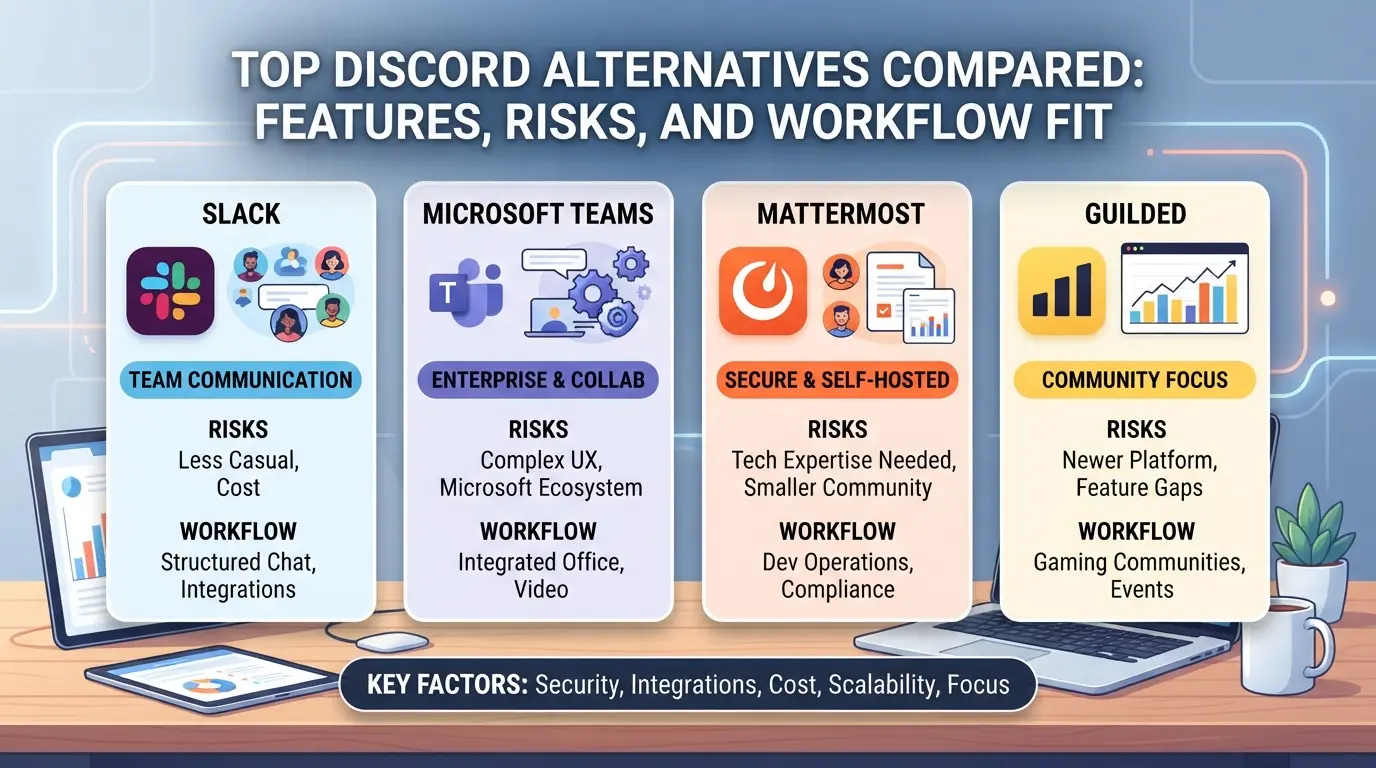
If you’re searching for what is the real discord alternative, the answer depends on how your team works day to day. Here’s a practical side-by-side look at the leading options, where they beat Discord, and where they fall short for actual collaboration.
Slack vs Discord: Collaboration and Automation
| Feature |
Slack |
Discord |
| Workflow Fit |
Structured channels, threads; strong for teams with formal tasks |
Flexible chat; less structure, more for communities |
| Integrations |
2,400+ apps, native automation, advanced bots |
Basic bots, fewer integrations |
| Notification Control |
Granular (per thread, per channel) |
Simpler muting, less fine-tuned |
Slack handles workflows with more control and app support, while Discord is easier for informal group chat but gets messy when teams need structure.
Microsoft Teams vs Discord: Enterprise Fit
Teams brings built-in compliance, AD integration, and advanced permission controls. Most orgs needing audit trails or regulatory coverage choose Teams, but it’s slower to set up and feels heavy for non-corporate use.
Element, Rocket.Chat, and Open-Source Options
Open-source platforms like Element or Rocket.Chat give you full control, self-hosting means you can lock down data and tune privacy policies. The real tradeoff is setup and support: you’ll need IT resources, and casual users hit usability snags fast.
Voice-First Platforms: TeamSpeak, Mumble, and Others
TeamSpeak and Mumble win for voice quality and session privacy, especially with self-hosted servers. But they lack modern chat, automation, and mobile features, so they only fit if voice is your main channel and you don’t need integrated text or workflow tools.
The main thing most teams miss is that switching platforms can solve one pain (like privacy or control) but easily break another (workflow fit, everyday usability, or onboarding). If you only check feature lists or price, you can end up with a tool that slows your team more than it helps.
When a Discord Alternative Isn’t Enough: Workflow and Security Gaps to Watch
Switching to a new platform solves only part of the problem, hidden workflow and security gaps can persist. Even the best discord alternatives 2026 can leave teams scrambling to fill holes in account isolation, privacy, or permission controls.
Session Isolation and Multi-Account Risks
- Platform logins often cross-contaminate sessions, risking account linkage.
- Built-in tools rarely support true browser profile separation.
- If you run multiple accounts, skipping dedicated session management almost always causes permission conflicts or exposes admin identities.
Privacy, Proxy, and Fingerprint Controls
Most open source discord alternatives don’t cover proxy routing or browser fingerprint masking. This means you’ll need external tools for deep privacy, especially if you operate sensitive workflows or manage accounts with different compliance needs. If you don’t bridge this gap, your team’s activity can be tracked back to a single source.
Frequently Asked Questions About what is the real discord alternative
What is the real Discord alternative for privacy-focused teams?
Open-source and encrypted platforms like Element (Matrix) and Rocket.Chat are strong Discord alternatives for privacy-focused teams. They offer self-hosting, end-to-end encryption, and granular admin controls. Unlike Discord, you own your data and can control user access. These platforms also publish their code, so you can audit security and privacy settings directly.
How do I migrate my Discord community without losing data?
First, export your Discord server’s message history and member list using community tools or bots. Next, set up channels and permissions on your new platform before inviting members. Always check file format compatibility and test imports with a small group. Avoid rushing, as missed permissions or formatting errors are common pitfalls during migration.
Can I use proxies with Discord alternatives for session isolation?
Some Discord alternatives like Mattermost and Zulip support proxy use. You can run each session in separate browser containers or use proxys and proxies for added isolation. Check platform documentation for proxy settings. Make sure to separate logins to stop session crossover and keep user data private.
Are open-source Discord alternatives safe for business use?
Open-source Discord alternatives can be safe for business use if you follow best practices. You are responsible for your own hosting, updates, and backups. Many options have strong security and compliance features, but you need to configure encryption and access controls. Regular audits and updates help keep your team’s data protected.
What’s the best Discord alternative for large teams in 2026?
For large teams in 2026, top alternatives include Element, Mattermost, and Slack. Element offers strong scalability and federation for global teams. Mattermost provides solid permission controls and easy workflow integration. Slack remains popular for its app ecosystem. Choose a platform that fits your team size, control needs, and collaboration style.
Finding the right platform depends on your priorities, whether it's privacy, customization, or a simplifyd user experience. If you're ready to see how a modern alternative measures up, the next step is to test it out for yourself.
Try DICloak For Free
 Web Proxy Tools
 Free Tools
 Cookie Plugin
 UA Generator
 MAC Address Generator
 IP Generator
 IP Address List
 2FA Code Generator
 World Clock
 Anonymous Check
 WebRTC Leak Test
 UUID Generator
 Free Web Proxy Site
 Proxy Checker
 FB Ad Checker
 AI Web Scraping
 Free SMM Tools
 Twitter Shadowban Checker
 Instagram Name Checker
 UTM Generator
 Username Generator
 AI Hashtag Generator
 LinkedIn Headline Generator
 Social Media Image Resizer