Handling a number around TikTok accounts on just one gadget can feel like a delicate balancing act. TikTok’s systems are built to spot unusual behavior, and being careless might get your profiles tagged as business-oriented promotions. This typically results in fewer views and less interaction – something nobody desires when aiming to expand their presence on the site.
So, how can you manage numerous TikTok accounts without hitting these snags? Several approaches can assist you in tackling this hurdle successfully. Let's examine them.
Why Juggling Several TikTok Accounts Can Be Challenging
For individuals in social media promotion and those with influence, overseeing multiple TikTok accounts is frequently a necessity. Whether it’s for different clientele or personal branding, having beyond one profile can streamline operations.
However, TikTok is especially watchful about monitoring numerous profiles originating from the same device. The platform employs advanced methods of identifying users through their browser and device characteristics to pinpoint suspicious patterns. Should the platform notice something irregular, it might prompt account verification, and failing to comply could lead to temporary or permanent blocks.
Consider managing TikTok accounts for several clients. TikTok’s system can recognize when numerous profiles are being operated from a single gadget via a range of tracking mechanisms:
- Network Address Monitoring – TikTok records your IP address each time you sign in
- Device Identification – Your phone’s distinct hardware and software markers
- Activity Trends – How you engage with the application (how fast you scroll, when you post, engagement habits)
- Profile Switching Speed – Rapidly moving between profiles raises alerts
When this occurs, the platform may require you to confirm the profiles are legitimate. If you cannot provide the needed verification, you risk having those profiles suspended or experiencing a TikTok shadow restriction.

What Is a TikTok Shadow Restriction and How It Affects Multiple Accounts
You've probably encountered the term “shadowban” across social media, but what precisely does it signify on TikTok? A shadow restriction happens when your profile is partially or entirely limited without your immediate awareness. The chief indicator of a shadow restriction is that your content stops showing up on the “For You” feed, which is the main avenue for TikTok users to discover fresh content.
TikTok frequently applies shadow restrictions when it detects questionable activity or when content breaches its community standards. Nevertheless, these standards can sometimes be ambiguous, making it easy to unintentionally activate a shadow restriction. With TikTok having removed over 50 million videos in just six months, adhering to its regulations is vital.
Indicators Your TikTok Profile Is Shadow Restricted
- Sharp Decline in Views – Your videos abruptly receive considerably fewer views than normal
- No Visibility on the For You Feed – Your content doesn't appear on anyone's FYP
- Lowered Interaction Rate – Likes, comments, and shares decrease sharply
- Hashtags Become Ineffective – Your posts don't surface in hashtag searches
- Restricted Access for Followers – Even your established followers are not seeing your content
How to Steer Clear of a TikTok Shadow Restriction While Managing Multiple Accounts
The optimal approach to avoid a shadow restriction is to adhere to TikTok’s guidelines. Here are a few pointers to keep in mind:
- Avoid Mimicry: Do not operate several profiles that portray an identical persona. This can easily be flagged by TikTok’s automated detection systems.
- Ensure Content Appropriateness: Refrain from publishing anything that might be deemed offensive, mature material, or hostile language. TikTok’s community rules are strict, and violations can trigger automatic flagging.
- Respect Ownership Rights: Re-uploading content belonging to others, even your prior videos, can be precarious without proper attribution. TikTok’s mechanism actively scans for duplicated material across different profiles.
- Refrain from Excessive Activity: Posting an excessive number of videos quickly, following many users rapidly, or liking numerous pieces of content across your profiles can all lead to a shadow restriction. These actions are classic signs of automated behavior that TikTok's anti-bot software is designed to catch.
- Maintain Believable Activity Patterns: Each profile should demonstrate distinct, human-like usage. Avoid publishing at precisely the same moments across profiles or employing identical descriptions and tags.
Overseeing multiple profiles from a single gadget is a frequent cause for receiving a shadow restriction. TikTok’s detection mechanisms are advanced and can readily connect profiles to the same individual through canvas and WebGL fingerprinting techniques, limiting their exposure.
Managing Several TikTok Accounts Without Facing Penalties
There are various techniques you can employ to handle multiple TikTok accounts without being flagged or blocked. Each has its benefits and drawbacks, so let's examine them:
Utilize Different Gadgets
One of the most straightforward ways to evade detection is to distribute your profiles across various hardware units. Each unit should only manage one or two profiles to lessen the probability of TikTok associating them. However, this approach can become costly and inconvenient if you manage more than a couple of profiles.
Upsides:
- Complete physical segregation of profiles
- Activity patterns that appear natural
- No software setup required
Drawbacks:
- High cost for acquiring extra hardware
- Tough to oversee numerous profiles
- Takes significant time to switch between devices
- Issues with storage and upkeep
Separate Browser Personas
Establishing distinct browser personas for each TikTok profile is another viable tactic when using TikTok via a web browser. Each persona functions autonomously, which assists in keeping your profiles separate. This strategy is especially helpful if you're managing profiles on a desktop or laptop computer.
That said, standard browser personas still share the same underlying digital identification, making it relatively simple for platforms to link them.
Employ Application Duplication
Application duplication on mobile devices allows you to create copies of the TikTok application and log into separate profiles on each duplicate. This method is convenient, but it carries certain risks:
- Battery Depletion: Duplicating applications often runs processes unseen, which can rapidly use up your battery life.
- Security Concerns: Some application cloning software might not be secure, so it's vital to select one with positive feedback and a strong standing.
- Detection Likelihood: TikTok can still spot cloned applications via device emulation checks and other identification methods.
Cycle Through Proxies
If you prefer to remain on one device, using a mix of rotating proxies can help conceal your network address and create the appearance that each profile is being managed from a different location. This method can be effective, but it isn't completely foolproof.
TikTok’s tracking methods extend beyond just network addresses. The platform leverages sophisticated browser tracking approaches, which include:
- Canvas Fingerprinting – Tracking how your hardware renders visual elements
- WebGL Fingerprinting – Identifying your graphics processing unit and visual capacities
- Audio Fingerprinting – Detecting unique sound system characteristics
- Font Fingerprinting – Analyzing the typefaces installed on your device
- Geographic Location and Language Settings – Checking for uniformity across profiles
Typical proxies only alter your network address, leaving all these other identifying markers unchanged. This explains why platforms can still connect profiles even when you are using different network addresses.
How DICloak Simplifies Managing Various TikTok Accounts
Handling numerous TikTok accounts without attracting suspicion can be tricky, but DICloak emerges as a crucial aid in this scenario.
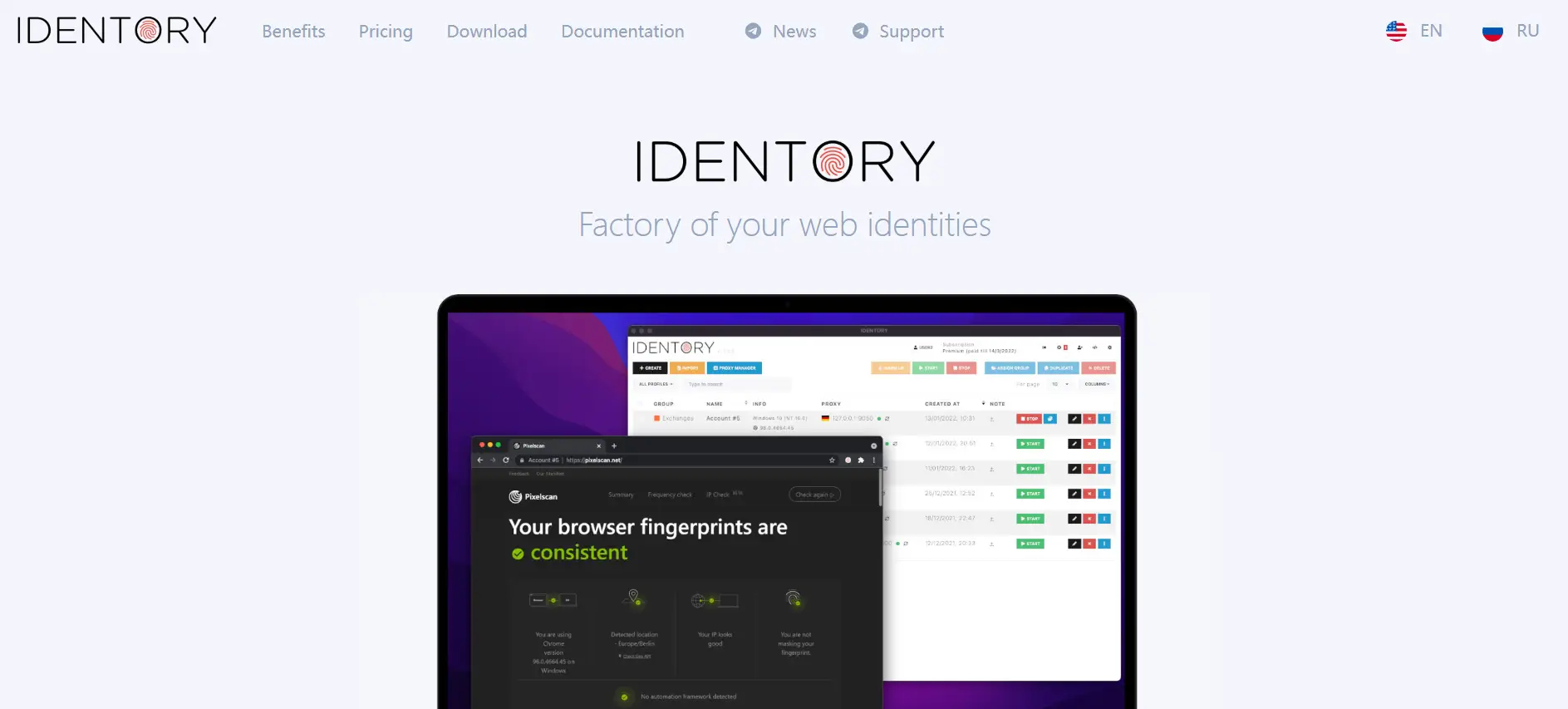
DICloak functions as an antidetect browser, enabling you to establish distinct browser instances for every TikTok profile. This makes each one appear as though it's being operated from a completely separate device and user profile. This not only helps safeguard your accounts from potential bans but also ensures your creations reach the intended viewers without undue limitations.
Going beyond basic proxies, DICloak offers robust safeguards by concealing every facet of your online identity, positioning it as the premium choice for serious multi-account handling.
- Separate Browser Contexts: DICloak allows the creation of numerous browser profiles that remain entirely distinct through advanced isolation techniques. Each profile possesses its own unique digital signature, meaning TikTok perceives each account as a different, genuine user.
- Unique Digital Signatures: Unlike standard browsers, DICloak furnishes each profile with a distinct digital fingerprint using advanced masking methods. This encompasses:
- Distinct canvas and WebGL identifiers
- Varied hardware specifications
- Separate time zone and language settings
- Individual font arrangements
- Unique user agent identifiers
- This renders it virtually impossible for TikTok to determine that all the accounts originate from the same hardware.
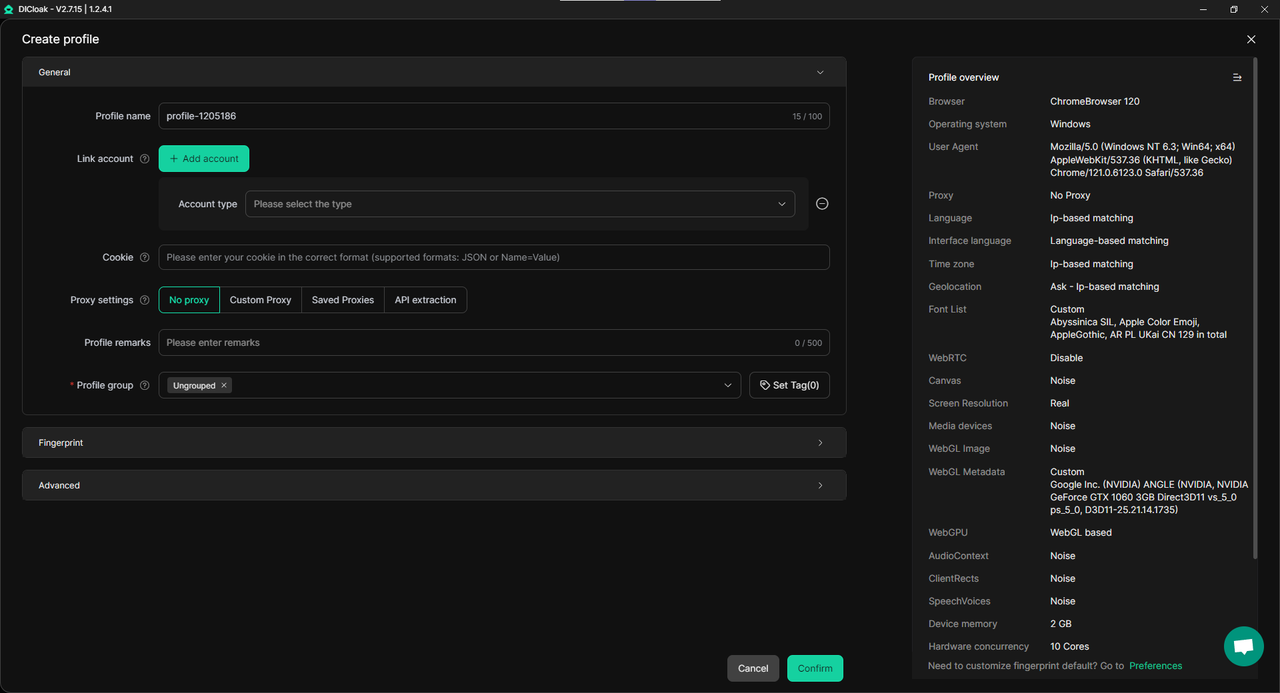
- Seamless Account Transitions: You can effortlessly move between different TikTok accounts without needing to constantly log in and out. DICloak’s session management retains your sessions, eliminating the need to re-enter login details each time.
- Customizable Proxy Configuration: DICloak allows users to configure their own proxy settings for each profile. This flexibility ensures that each account can be assigned a unique IP address from various sources, enhancing authenticity and security.
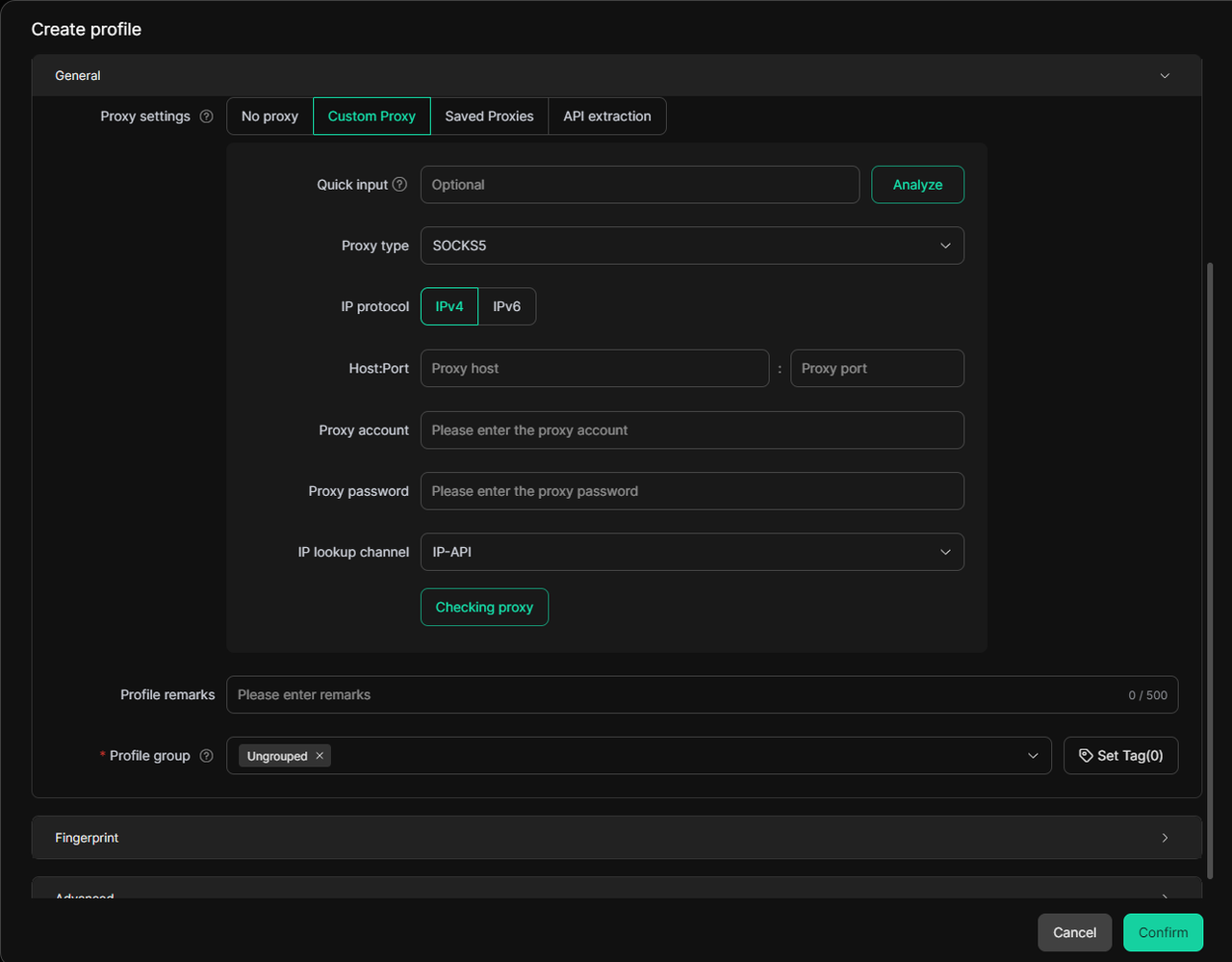
- Improved Confidentiality and Safety: DICloak offers more than just IP alteration via proxy handling. It defends against browser identification through sophisticated fingerprint randomization, maintaining the anonymity and security of your accounts from TikTok’s tracking mechanisms.
- Pre-Established Cookies: DICloak provides access to pre-configured cookies that grant your new TikTok accounts an existing browsing timeline, making them appear seasoned and credible immediately.
- Team Collaboration: For those collaborating in a group, DICloak facilitates easy sharing of account access without jeopardizing security. Each team member can manage their assigned accounts without accidental overlap—ideal for social media marketing firms.
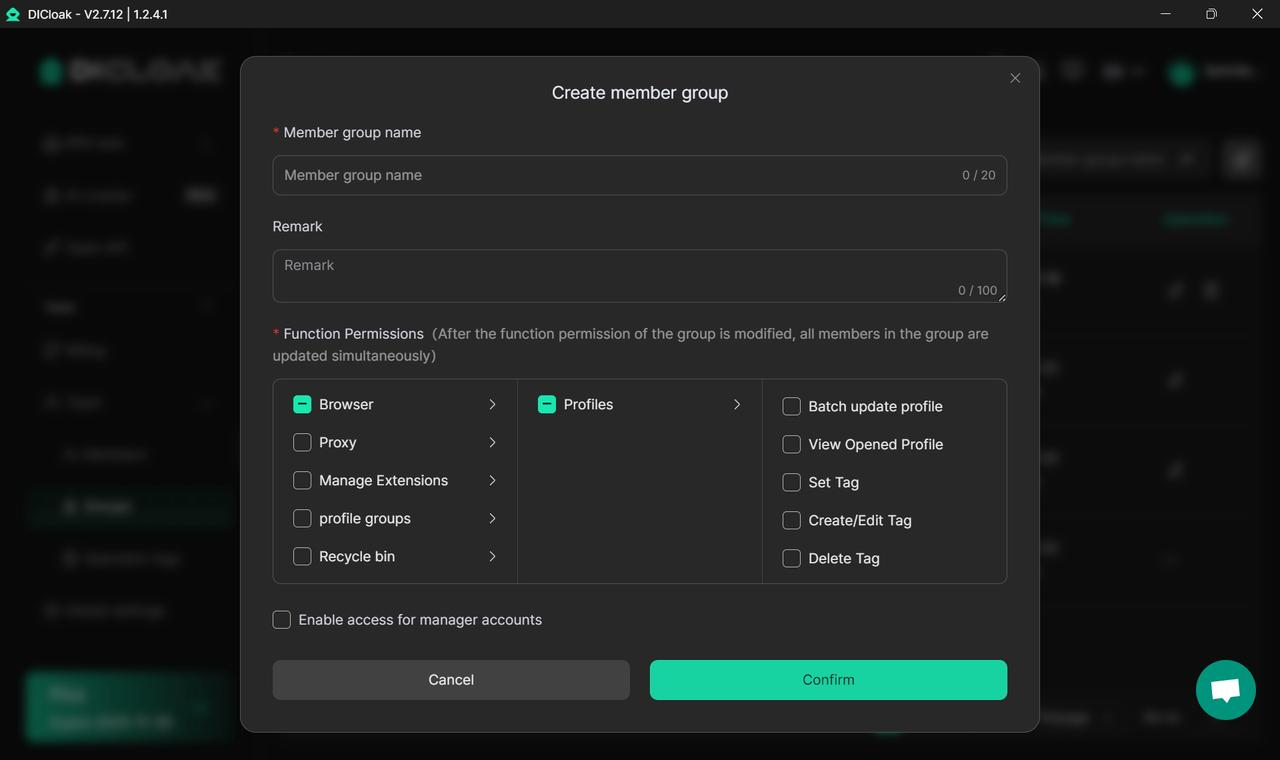
Using DICloak makes operating several TikTok accounts significantly smoother and more secure. You can concentrate on content creation and audience interaction without the constant concern of restrictions or suspensions.
Advanced Techniques for Secure Account Operations: How Many TikTok Accounts Can You Have?
For individuals managing a large volume of accounts, more sophisticated approaches may be necessary. Here are a few to contemplate:
Segregate Accounts with Distinct Digital Identifiers
A highly effective method for handling numerous TikTok accounts securely is ensuring every profile possesses a unique digital signature. This causes each account to appear as if it's managed by a different, authentic user.
Solutions like DICloak, which generate separate browser instances for each account utilizing advanced anti-fingerprint technology, can help accomplish this. Each instance maintains complete separation through:
- Isolated Cookie Storage – Employing cookie separation to prevent data crossover
- Independent Local Data – Each instance maintains its own HTML5 storage
- Unique Hardware Traces – Distinct canvas, WebGL, and audio identifiers
- Individual Network Configurations – Separate proxy assignments per instance
Maintain Uniform Activity Patterns
Consistency is paramount when overseeing multiple accounts. Ensure each profile exhibits organic and steady engagement. Avoid sudden shifts in behavior, such as immediately following hundreds of users or uploading dozens of videos in a brief timeframe. Such actions can readily activate TikTok’s detection systems.
Optimal practices for natural engagement:
- Schedule posts at different times for each profile
- Vary your interaction frequencies (likes, comments, shares)
- Utilize distinct content styles and focuses for each account
- Sustain believable growth rates for followers
- Refrain from identical captions or hashtag sets
- Stagger the initiation dates of the accounts
Employ Platform-Specific Proxies
When managing numerous TikTok accounts, utilizing premium residential proxies is crucial. These proxies route your internet traffic via genuine residential IP addresses, making your actions appear completely ordinary.
Consider the TikTok Proxy and Antidetect Bundle, which merges superior proxies optimized for TikTok with DICloak’s antidetect capabilities for maximum defense.
Routinely Inspect Account Status
Regularly assessing the condition of your accounts is vital. Watch for indicators of reduced interaction, such as fewer likes, comments, or shares, as these can be early warnings of a shadowban. Being proactive will aid in resolving issues before they become major problems.
Key metrics to review:
- Video view counts
- Interaction percentages (likes, comments, shares)
- Visibility on the For You page
- Follower acquisition pace
- Hashtag performance
- Content reach beyond existing followers
If you observe any sudden declines in these figures, it may suggest TikTok’s algorithm has flagged your account due to unusual activity.
Setting Up Multiple TikTok Accounts: A Guide
Here is the procedure for correctly establishing numerous TikTok accounts using professional resources:
- Select your antidetect browser – Commence with DICloak to forge isolated browser instances.
- Generate unique instances – Establish separate profiles featuring distinct identifiers for every account.
- Configure residential proxies – Assign different IP addresses to each instance from relevant geographic areas.
- Register accounts progressively – Avoid setting up all accounts at once; stagger them over days or weeks.
- Develop account history – Utilize pre-existing cookies or gradually build natural browsing activity.
- Diversify your content plan – Ensure each account has unique material, posting schedules, and engagement habits.
- Observe and adapt – Periodically check account health and modify your approach as required.
What is the Maximum Number of TikTok Accounts Allowed?
Technically, TikTok’s stipulations do not specify a hard limit on the accounts you can create. However, the platform monitors for behavior patterns suggestive of automated or spam operations.
For safe multi-account handling:
- Casual users: 2-3 profiles per device without specialized applications
- Professional marketers: 10-50+ profiles when using a proper antidetect browser setup
- Agencies: An unrestricted number of profiles when employing enterprise-level solutions such as DICloak
The crucial element isn't the sheer volume of accounts, but the thoroughness of their separation and management. With the appropriate resources and methods, you can safely operate dozens of accounts without triggering TikTok’s detection protocols.
Common Pitfalls to Steer Clear Of When Managing Multiple TikTok Accounts
When engaged in the operation of multiple TikTok accounts, steer clear of these significant errors:
- Employing the same email address: Although TikTok technically permits multiple accounts per email, using distinct email addresses for each grants an added layer of separation.
- Disregarding time zones: If your proxy places you in New York, but you consistently post at 3 AM New York time, TikTok will note the discrepancy. Implement time zone masking to align with your proxy location.
- Immediate content reuse: Posting identical videos across accounts is a major alert. If content reuse is necessary, wait several days and introduce some variations.
- Rapid profile switching: Constantly jumping between accounts in short intervals mimics automated behavior. Space out your interactions naturally.
- Inferior proxy quality: Subpar or data center proxies are easily spotted. Always opt for high-quality residential proxies.
- Overlooking WebRTC exposure: Even with a proxy, WebRTC can reveal your genuine IP. Use tools like DICloak that automatically block WebRTC vulnerabilities.
Growing Your TikTok Footprint Securely: Managing Multiple Accounts the Right Way
After getting comfortable handling a small number of profiles, expanding requires methodical strategies:
For Content Creators and Influencers
When developing several niche profiles or handling accounts for clients, think about:
- Designating each profile for particular content topics
- Stretching out content production to maintain distinct posting schedules
- Cultivating genuine followings slowly on every profile
- Employing web browser automation for repetitive chores while preserving human-like behaviors
For Social Media Firms
Agencies overseeing numerous client profiles need enterprise-level solutions:
- Features for team synergy to allocate profiles to staff members
- Centralized IP address handling across all profiles
- Session administration to keep long-term account access
- Adherence tools to confirm all profiles adhere to platform rules
For E-commerce and Dropshipping
Sellers on TikTok Shop frequently require additional profiles to:
- Experiment with various merchandise and market segments
- Target distinct regional markets
- Establish backup profiles should restrictions occur
- Expand successful methods across multiple online shops
Discover more about dropshipping and e-commerce methods utilizing multiple accounts.
The Repercussions of Being Prohibited: How Many TikTok Accounts Can You Have Before You Face Penalties?
Before economizing on profile security, weigh what is at risk:
- Loss of viewers and interaction: Building a TikTok following demands months of steady endeavor. A ban means reverting to zero.
- Profit reduction: If your earnings come from TikTok Shop, the Creator Fund, or brand partnerships, a ban immediately affects your income.
- Harm to brand perception: Patrons will be displeased if their profiles are banned due to subpar management techniques.
- Time expenditure: The hours dedicated to content creation, audience engagement, and presence building vanish instantly.
- Competitive handicap: While you are restoring banned profiles, rivals are capturing market share.
Alternative Platforms and Managing Across Networks
While concentrating on TikTok, think about diversifying your social media presence:
- Instagram: Find out how to establish numerous Instagram profiles safely using comparable techniques.
- YouTube: Handle multiple YouTube profiles for reusing video assets.
- Facebook: Prevent Facebook prohibitions when overseeing numerous business pages.
- Twitter/X: Broaden your reach by efficiently managing several Twitter accounts.
- Discord: Develop communities across various Discord profiles for distinct niches.
Managing across platforms with DICloak lets you sustain consistent digital identities across social media sites or keep them entirely separate—whatever your plan necessitates.
Legal and Moral Considerations When Managing Several TikTok Accounts
Handling numerous profiles is lawful and common for genuine business objectives. Nevertheless, it is vital to:
- Adhere to platform service terms: While setting up multiple profiles is permitted, employing them for unsolicited messaging, abuse, or manipulation breaches TikTok’s mandates.
- Be forthright with clients: If managing profiles on behalf of others, ensure they comprehend your multi-account methods.
- Respect originator rights: Avoid utilizing multiple profiles to bypass copyright safeguards or pretend to be someone else.
- Refrain from artificial boosting: Do not artificially increase engagement by having your profiles interact with one another.
- Maintain genuineness: Each profile should deliver real value to its viewership.
Professional antidetect browsers like DICloak are crafted for legitimate commercial application—ranging from marketing firms to e-commerce vendors to content creators needing to manage several brand personas.
Frequently Asked Questions
How many TikTok accounts can one email support?
TikTok generally permits up to five profiles per email on its mobile application. However, if you need to handle more, utilizing distinct emails or phone numbers for each profile is a more secure path.
How do I set up a second TikTok profile?
Within your TikTok application, navigate to the profile area, select “Add Account,” and choose “Use phone or email.” You will need a distinct phone number or email address to establish an extra profile.
Is managing multiple TikTok accounts allowed?
Yes, TikTok permits users to oversee several profiles. However, if the platform identifies their use for commercial activity, it might result in limitations like shadowbans. Keeping your profiles distinct and using separate devices or setups can aid in avoiding this.
Why has my TikTok profile been blocked?
Profiles can be blocked for numerous reasons, such as breaching TikTok’s terms of service, posting unsuitable content, or participating in questionable activities like managing multiple profiles from a single device. Ensuring every profile respects TikTok’s guidelines is crucial to avoid blocks.
Is having several TikTok accounts hazardous?
Having multiple profiles is not inherently dangerous, but managing them from one gadget without safeguards can lead to issues like shadowbans or blocks. It’s important to keep profiles isolated and manage them in a way that evades detection by TikTok’s monitoring systems.
Can I switch between profiles on TikTok?
Indeed, you can toggle between profiles directly within the TikTok application. However, doing so frequently, particularly with business-related profiles, can elevate the risk of being flagged. Utilizing distinct devices or browser setups for each profile is a safer alternative.
 Web Proxy Tools
 Free Tools
 Cookie Plugin
 UA Generator
 MAC Address Generator
 IP Generator
 IP Address List
 2FA Code Generator
 World Clock
 Anonymous Check
 WebRTC Leak Test
 UUID Generator
 Free Web Proxy Site
 Proxy Checker
 FB Ad Checker
 AI Web Scraping
 Free SMM Tools
 Twitter Shadowban Checker
 Instagram Name Checker
 UTM Generator
 Username Generator
 AI Hashtag Generator
 LinkedIn Headline Generator
 Social Media Image Resizer