Are you wondering how many TikTok accounts you can have? Whether you’re a content creator, marketer, or just curious about managing multiple profiles, it’s important to know the rules and best practices. With the right strategies, you can run multiple accounts without risking bans or detection. In this guide, we’ll walk you through how to safely create and manage several TikTok accounts, avoid common mistakes, and show you how DICloak can make account management easy and secure. Keep reading to learn how to scale your TikTok presence with confidence!
TikTok’s terms of service don’t set a specific limit on how many accounts you can create. However, the platform closely monitors activity patterns, especially those that suggest automated or spammy behavior, such as rapid account switching or identical content across multiple profiles.
So, how many TikTok accounts can you safely manage? Here’s a breakdown based on different user needs and tools:
1. Casual Users: 2-3 Accounts Per Device Without Specialized Tools
For casual users who just want to separate personal and hobby accounts, managing 2-3 accounts on a single device is typically fine. No special tools are required for this, and switching between accounts is simple. However, if you want to add more accounts, you may start running into issues with device limitations or account detection if you use the same device for too many accounts.
2. Professional Marketers: 10-50+ Accounts with Proper Antidetect Browser Setup
Professional marketers who manage multiple brand accounts or run niche content strategies can scale up to 10-50+ accounts. However, to avoid detection and prevent bans, they need more than just basic device switching. This is where specialized tools like DICloak’s Antidetect Browser come into play. With features like profile isolation, custom proxy configuration, and browser fingerprinting protection, you can run many accounts on the same device without triggering TikTok's detection systems. This setup allows you to manage multiple accounts securely while staying under the radar of TikTok’s algorithms.
For example, a digital marketing agency running several TikTok accounts for different clients can use DICloak to isolate each profile, ensuring that the accounts appear as independent users, each with its own digital fingerprint and browsing data.
3. Agencies and Enterprises: Unlimited Accounts with Enterprise-Grade Solutions
Agencies or businesses that need to manage unlimited TikTok accounts typically use enterprise-grade solutions like DICloak. With team management features and the ability to configure multiple custom proxies, you can manage large numbers of accounts at once without risk of detection or bans. These solutions provide the scalability and security needed for agencies or large-scale marketing operations to run dozens or even hundreds of accounts seamlessly.
For example, an agency handling marketing for multiple clients across different industries can create and manage an unlimited number of TikTok accounts by leveraging DICloak's enterprise tools, ensuring smooth operations and avoiding cross-account interference.
Key Takeaway:
The key to managing multiple TikTok accounts isn’t how many you can have, but how well you isolate and manage them. With the right tools and strategies, such as DICloak’s Antidetect Browser, you can run dozens (or even hundreds) of accounts safely without triggering TikTok’s detection systems.
Risks and Challenges of Multiple TikTok Accounts
When you manage multiple TikTok accounts, you might run into some risks and challenges. While TikTok doesn’t directly limit how many accounts you can create, there are rules and algorithms in place to monitor suspicious activity. If your accounts aren’t properly isolated or managed, you could face issues like shadowbans or even account suspensions. Let’s dive deeper into some of the main risks.
Understanding Shadowbans and Account Suspensions
When you run more than one account on TikTok, you face real risks. One big risk is a “shadowban.” A shadowban means your content might stop showing up — even if you did not break any rule.
A shadowban is different from a full ban. You can still log in, post, and use TikTok. But your videos get little or no exposure.
That is a problem if you try to manage many accounts. If TikTok thinks one account has suspicious activity (for example frequent switching, similar content across accounts, or many new accounts under the same device/IP), the risk of shadowban or suspension rises.
Signs of a Shadowban and How to Avoid It
How do you know if you got a shadowban? Some signs:
- Your view count drops a lot, even on new posts.
- Your videos no longer show on the “For You” page (FYP) or in hashtag searches.
- Even your followers don’t see your content — only direct visitors or your own profile can see things.
Imagine you run three TikTok accounts — one for cooking videos, one for travel, one for funny pets. For all three, you post similar content or use the same hashtags. TikTok’s algorithm may treat these as duplicate or spam. Then all three might suffer low reach — even if only one “triggered” the system.
To avoid a shadowban, many experts suggest:
- Keep each account truly separate. Use different content, different posting times, different themes. Don’t post the same video or reuse hashtags across accounts.
- Avoid sudden spikes: don’t follow hundreds of people at once, don’t like/comment in bulk, don’t post many videos at once. Grow slowly and naturally.
Compliance with TikTok's Community Guidelines
Another challenge is staying within the rules of TikTok. The platform has a set of rules: its TikTok Community Guidelines. If you break them, you risk removal of content — or even account suspension.
What kinds of content or behavior trigger violations? Common issues: posting adult or violent content, hate speech, harassment, copyrighted media, or spammy or automated behavior (bots, mass posting, reuse of content).
For example, if you try to boost views by using automation tools or posting identical content from several accounts, TikTok may flag that as suspicious or spam. That can quickly lead to a shadowban or full suspension.
Thus, even if you're careful about how many accounts you use, failing to obey TikTok’s rules — or making your multiple accounts behave too similarly — can cause big problems.
Why This Matters for “How Many TikTok Accounts Can You Have”
You might be able to create many accounts. But if you ignore the risks, you may lose reach or get banned. So the real question is not only how many TikTok accounts can you have, but how safely you manage them. Good practices matter more than just account numbers.
Step‑by‑Step Guide to Creating Multiple TikTok Accounts
If you want to run more than one account, it helps to know exactly how to set them up. Below is a simple, step‑by‑step guide for creating multiple TikTok accounts. This builds on what we already discussed — how many TikTok accounts can you have — and shows the practical steps.
Necessary Requirements for Account Creation
Before you make a new TikTok account, make sure you have these things ready:
- A valid email address or phone number you haven’t used on another TikTok account.
- The TikTok app (on phone or tablet) or access via web / browser.
- A unique username and password for the new account.
- Optionally, a device or setup that helps keep accounts separated to avoid accidental linking.
In short, each TikTok account must have its own login detail — email or phone — and a unique profile. That is the base requirement if you wonder how many TikTok accounts can you have.
How to Use Unique Email Addresses or Phone Numbers
To create multiple accounts safely, you must use different contact information (email or phone) for each account. Using the same email or number again will cause errors or blocking.
Here’s how to do it step by step:
- Create a new email (or ensure your phone number was never used for TikTok).
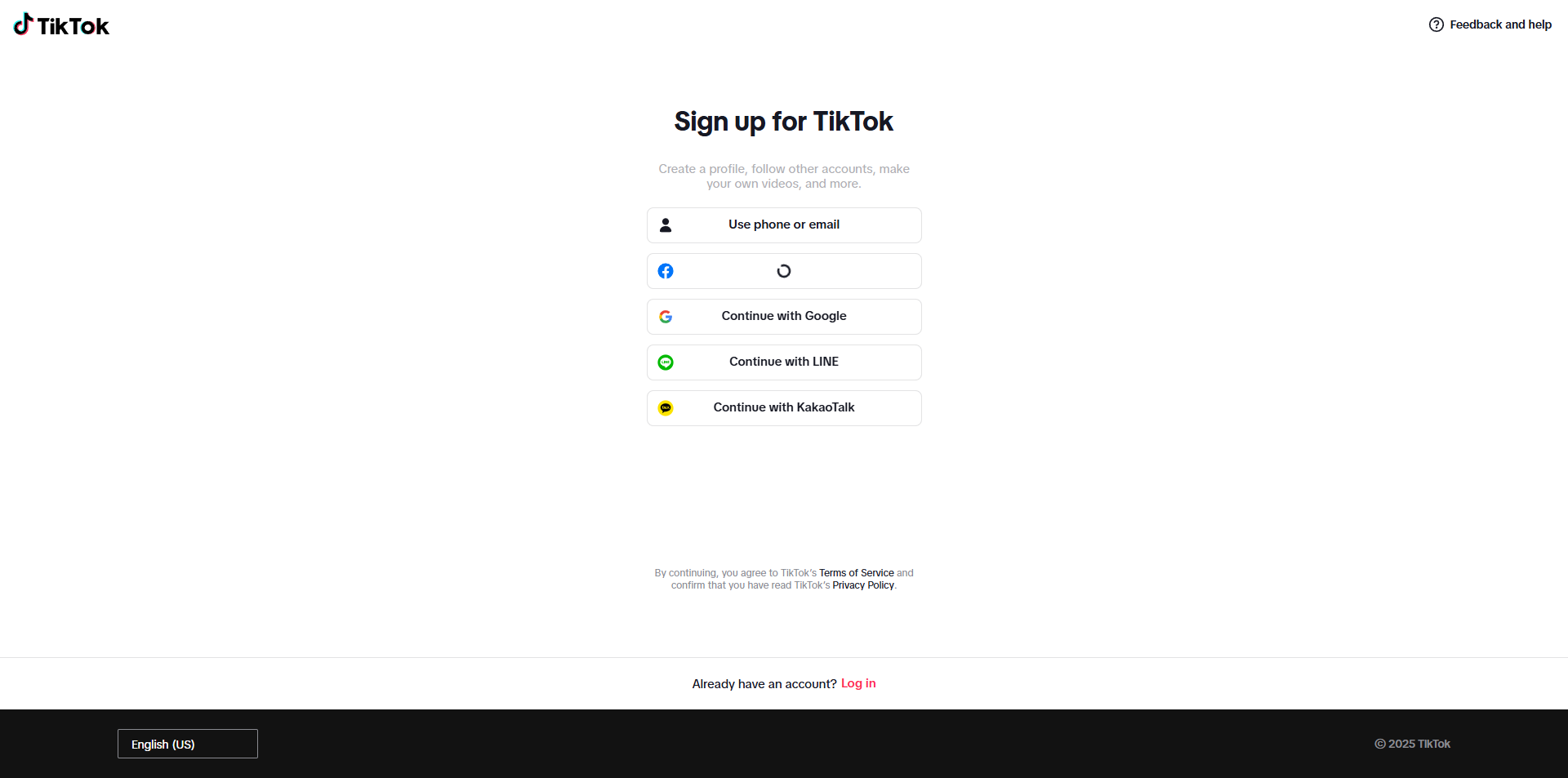
- Open the TikTok app, go to “Add Account,” then choose “Sign Up.”
- Enter the new email (or phone) and fill in the rest of the sign‑up info (birth date, password, username).
- Complete any verification — TikTok may send a code to email or phone. This helps keep the account valid.
Why this matters:
If you skip this — for example try to use same email twice — TikTok will block creation. Using unique contact info ensures your second or third account works and stays safe.
Tips for Setting Up Accounts on Different Devices
Using more than one device can help you manage multiple accounts more safely. If you try to run many accounts on a single phone, TikTok might flag activity as suspicious.
Here are some helpful tips:
- Use a separate phone or tablet for each account when possible. This keeps device‑level data separate and reduces risk.
- If you only have one device, create one account on the app, and for others consider using a separate browser or a tool that isolates profiles (so each account feels like it's on a different “device”). This is similar to how some users handle multiple accounts without detection.
- Use unique usernames, profile pictures, and account details (bio, location, etc.) for each account. Making each account look distinct helps avoid TikTok flagging multiple accounts as linked.
Knowing the exact steps and requirements helps you answer how many TikTok accounts can you have in practice — not just in theory. Yes, TikTok lets you create multiple accounts. But each account must use its own email or phone and needs to be set up properly. If you follow the steps and keep accounts separated, you can safely manage a few or many accounts depending on your needs.
Avoid These Common Mistakes When Managing Multiple TikTok Accounts
If you know how many TikTok accounts can you have, it is also very important to avoid common mistakes. These mistakes often cause detection, shadowbans, or full bans. Below are frequent errors — and how to avoid them.
Using a Single Email for Multiple Accounts
One of the simplest yet serious mistakes is using the same email (or phone number) for more than one account. Many guides say each account needs its own unique login info — email or phone.
What goes wrong: If you reuse an email, TikTok may link the accounts behind the scenes. This can trigger spam detection or raise suspicion. Then even if you ask how many TikTok accounts can you have, those extra accounts could get locked or limited.
Tip: Always use a fresh email (or phone) that TikTok has never seen for each new account.
Overlooking Time Zone Differences
When you run multiple accounts, especially for different niches or audiences, time zone matters. If all accounts show the same time zone, same login times, or post at identical local hours, TikTok’s system may suspect they belong to one user.
What goes wrong: If you manage five accounts and post all from 9:00 AM Pacific Time on every account, it looks unnatural. The algorithm might treat them like bots or linked accounts.
Tip: Adjust the posting and activity times for each account based on its target region. If possible, set the device locale or time zone accordingly, to make each account appear as a real local user.
Replicating Content Too Quickly
Posting the same video or very similar content across multiple accounts is another common mistake. Many sources warn that duplicate content across profiles is a red flag.
What goes wrong: When TikTok sees nearly identical posts from different accounts, it may treat them as spam or bot behavior. This can hurt reach, cause shadowbans, or even account removal.
Tip: Ensure each account has unique content. If you reuse a video, wait several days, change captions, edit slightly or adjust hashtags. Make each account feel like a unique person.
Switching Accounts Too Frequently
Frequent login/logout or switching accounts quickly is risky. Sources say rapid account switching can trigger TikTok’s detection as automation or bot‑like behavior.
What goes wrong: If you jump from account A to B to C in a short time — especially on the same device or IP — TikTok may suspect unnatural activity. This brings risk of shadowban or suspension.
Tip: Spread out your activity. Log into an account, do a few natural actions, wait a while before logging into another. Don’t treat account switching like tab‑browsing.
Relying on Low-Quality Proxies
Using cheap or free proxies is tempting — but often dangerous. Many guides warn that TikTok can detect shared or blacklisted IPs, especially if many users use them.
What goes wrong: Free proxies are often used by many people. IPs get blocked or flagged. Also, some free proxies are unstable or risky — they may leak data or cause suspicious login patterns. Academic research shows free proxies often have instability and security flaws.
Tip: Use high-quality, residential, or mobile proxies (not cheap datacenter ones). Ideally, each account uses a unique stable IP.
Ignoring WebRTC Leak Protection
Even if you use a proxy, sometimes your real IP can leak via WebRTC (a browser feature). If that happens, TikTok can link your accounts — bypassing proxy protection. Many multi‑account guides mention neglecting WebRTC leaks as a common mistake.
What goes wrong: Your real IP or device fingerprint leaks. TikTok sees multiple accounts using same IP/device and flags them. This defeats the attempt to keep accounts separate.
Tip: Use a tool (like an antidetect browser) that blocks WebRTC leaks. Or manually disable WebRTC leak in your browser settings. Also combine with good proxies and unique device fingerprints.
Knowing how many TikTok accounts can you have is just the first step. If you make the mistakes above, you risk losing all your accounts’ value. Using unique email, respecting time zones, giving each account its own style and login behavior, using good proxies, protecting against IP leaks — these are all key to long‑term success.
Best Practices for Managing Multiple TikTok Accounts
When you know how many TikTok accounts can you have, the next question is: how to manage them in a safe and smart way. These practices help you keep accounts healthy and avoid detection, bans, or other problems.
Tools and Software for Account Management
Using the right tools makes a big difference. Instead of switching manually between accounts on one phone, many professionals use a separate browser or special software to keep accounts clean and separate.
- Use an “antidetect browser” or isolation tool. This lets each TikTok account run inside its own safe “profile.” Each profile has different device settings (time zone, browser fingerprint, cookies, etc.). This way, even if you have many accounts, each looks like it's from a different device.
- Use high‑quality, stable proxies (residential or mobile), not free or shared ones. A good proxy masks your real IP and location, making each account look independent.
- Keep login info, cookies, and browser data separate for each account. Avoid sharing data between accounts — isolation matters.
Strategies for Avoiding Detection and Bans
Even with tools, you must follow smart behavior to avoid triggering TikTok’s detection systems.
- Assign unique IP / proxy per account. Don’t use the same proxy or IP for multiple accounts. Shared IPs are a common reason for bans or linked‑account detection.
- Don’t post or act identically across accounts. Avoid posting the same video, same hashtags, or doing actions across many accounts at once. Keep content, posting times, and behavior distinct for each account.
- “Warm up” new accounts slowly. New accounts should behave like real users — watch, like, comment, slowly post content. Sudden bursts of activity look suspicious.
- Maintain consistent behavior patterns. Frequent switching, using the same IP/device/proxy, or random behavior spikes are risky. Try to keep each account’s activity stable and natural.
Maintaining Security Across Accounts
Security matters — especially if you manage many accounts. Good security reduces risk of leaks, bans, or unintended linking of accounts.
- Use strong, unique credentials for each account. Different email/password per account prevent cross‑account leaks or recovery problems.
- Use quality proxies and avoid free/shared ones. Research shows free proxies often have security flaws, instability, or may leak data.
- Protect against IP leak and fingerprint leaks. Even with a proxy, data leaks via WebRTC or browser fingerprinting can expose your real identity and link accounts. A good browser or security setup blocks leaks.
- Monitor account health and logs. Check each account’s activity, login history, and performance. If you see unusual drops in views, or login warnings — pause and re-evaluate before continuing.
With good tools, smart routines, and strong security, you can safely run multiple accounts without bans or reach drops. This helps you scale, test content, run niches, or manage multiple brands — while keeping each account clean and safe.
How DICloak Can Help You Manage Multiple TikTok Accounts
Managing multiple TikTok accounts can be a complex task, but DICloak simplifies this by offering the right tools to ensure your accounts remain secure and independent. Whether you’re managing personal accounts, marketing multiple brands, or farming accounts for different purposes, DICloak provides the perfect solution with team collaboration, profile isolation, and RPA automation features that make managing multiple accounts smooth and risk-free.
Team Collaboration and Account Sharing
For businesses or social media teams managing multiple TikTok accounts, DICloak offers an efficient and secure way to collaborate. With DICloak, you can share access to specific accounts with team members while maintaining the privacy and security of each individual profile.
- Profile assignment: You can allocate specific profiles for each team member, allowing them to work within their designated set of accounts. This ensures that each person is responsible for their own profiles, with no cross-contamination of data or actions across accounts.
- Collaborative management: Whether you're managing a small team or a large-scale operation, DICloak’s team management features allow your team to handle multiple accounts smoothly and securely. Each member can perform tasks independently, without compromising account security or violating TikTok’s terms.
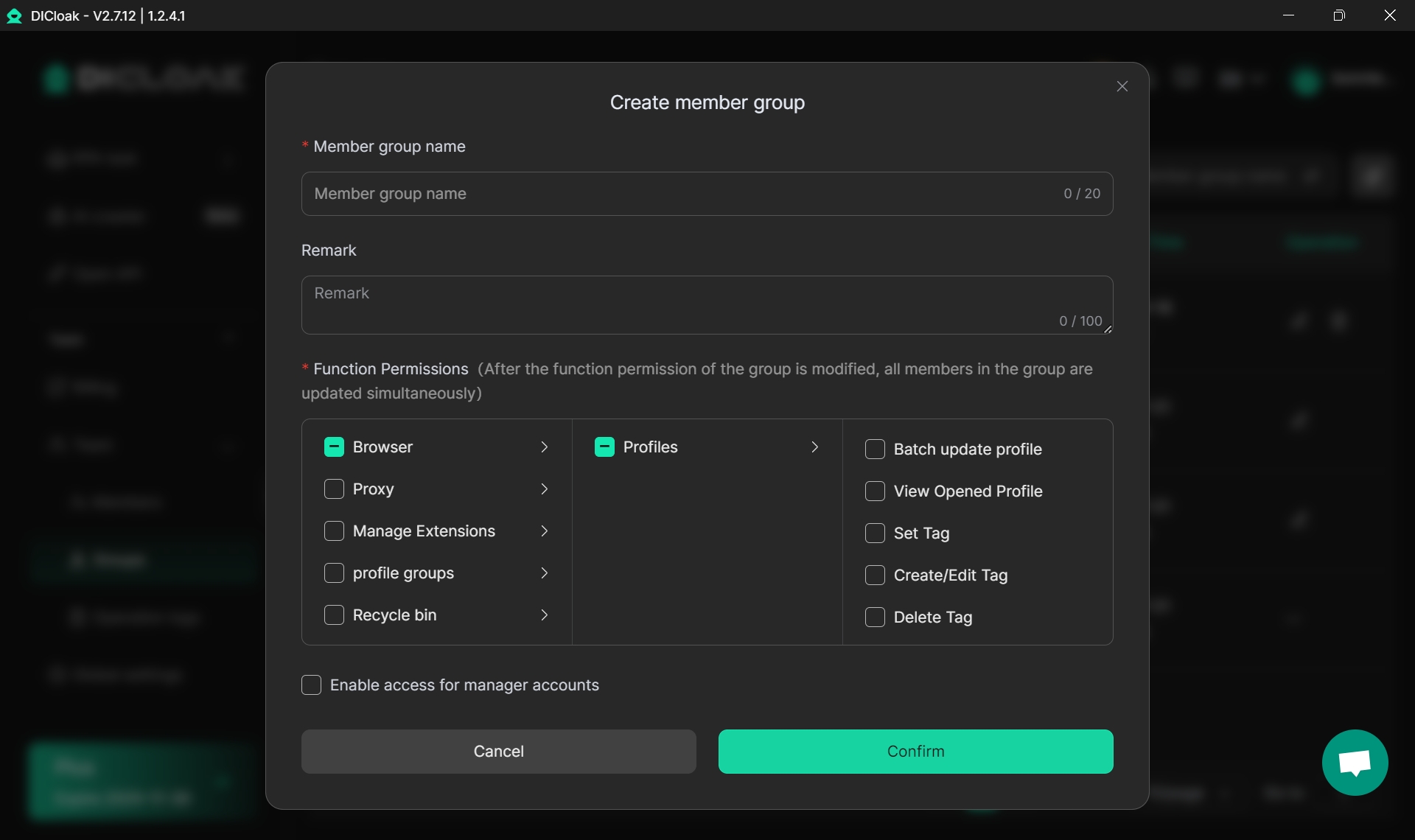
By assigning team members to dedicated profiles, DICloak ensures efficient and secure account management, especially when handling numerous TikTok profiles.
Profile Isolation and Custom Proxy Configuration
DICloak uses profile isolation to ensure each TikTok account operates as an independent entity, even when managed on the same device. This feature is essential for keeping your accounts safe and preventing detection or bans from TikTok.
- Unique profile for each account: Each TikTok account is assigned a separate profile, with a unique digital fingerprint (browser settings, time zone, language, etc.). This makes it appear as though each account is being managed by a different user, even if they’re on the same device.
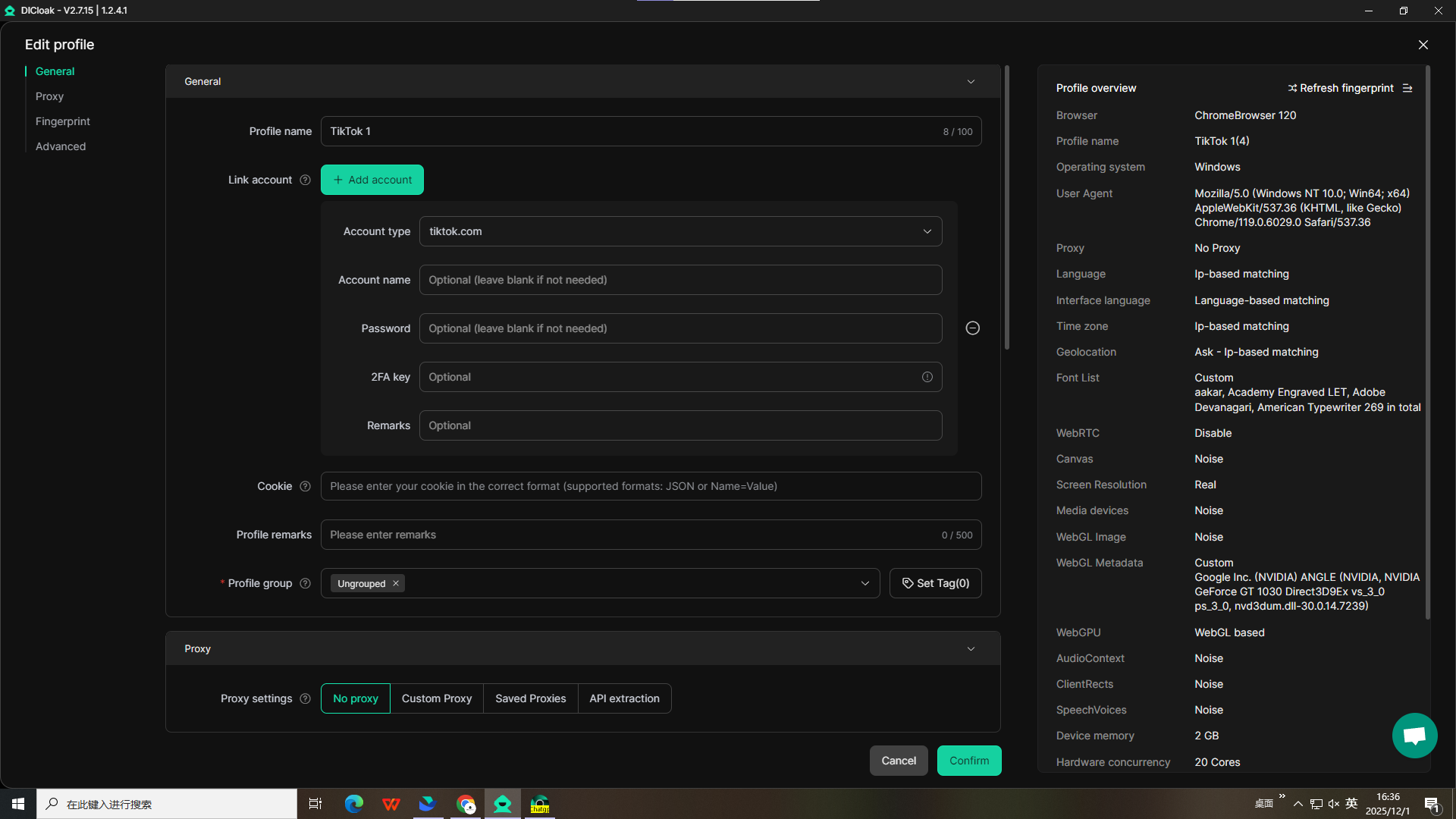
- Custom proxy configurations: DICloak allows you to customize proxies for each account, giving each account a unique IP address. This prevents TikTok from linking accounts to the same device or IP, reducing the risk of detection.
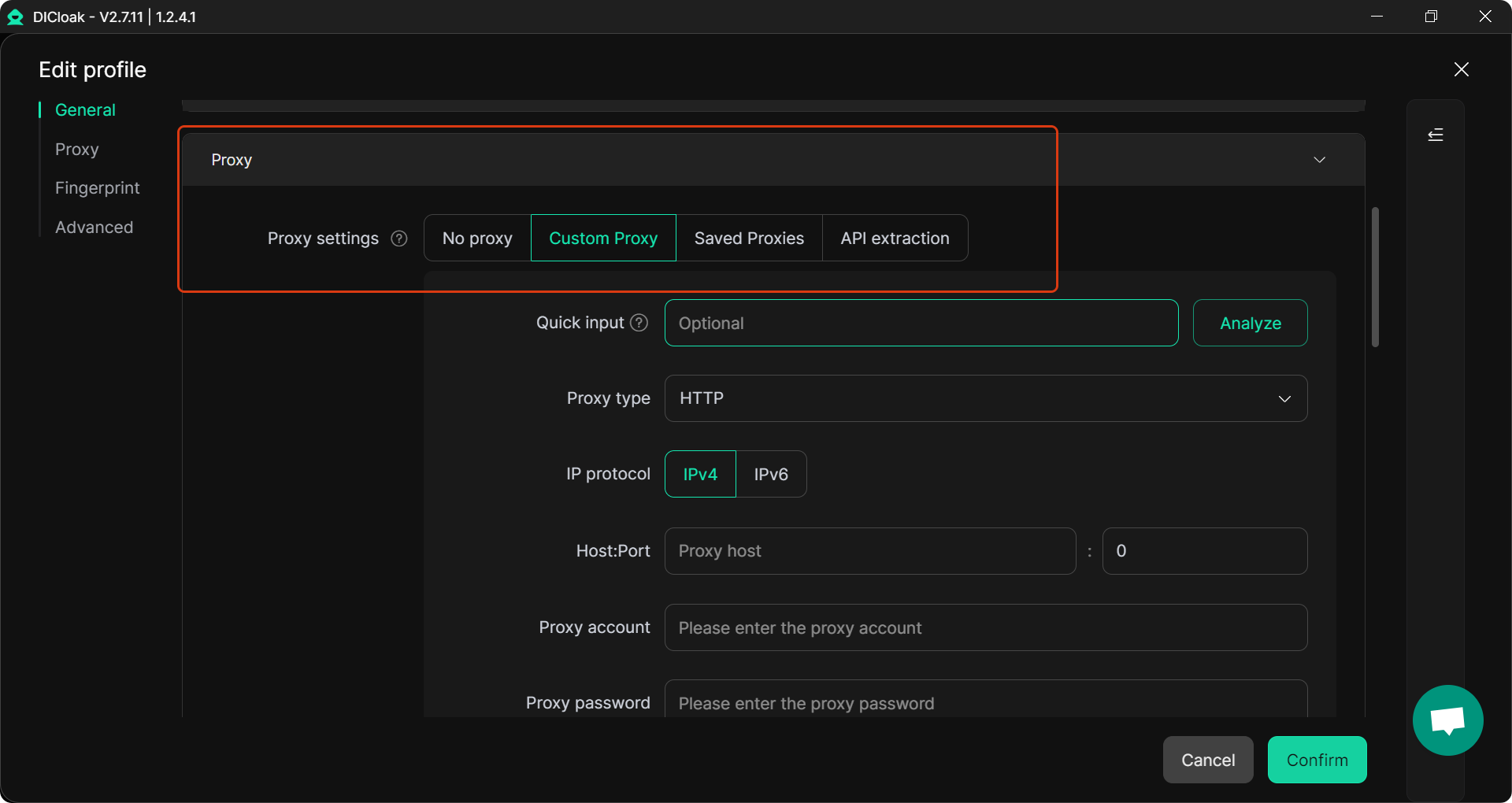
- Complete isolation: DICloak’s profile isolation ensures that accounts do not interfere with each other, keeping your activities clean and reducing the chances of TikTok flagging multiple accounts as suspicious.
RPA Automation for Account Engagement
DICloak’s RPA (Robotic Process Automation) tools automate repetitive tasks across your TikTok accounts, saving you time while maintaining natural, human-like activity.
- Automated interactions: With DICloak’s RPA, you can automatically like, comment, follow, and engage across multiple profiles. These actions are done in a natural way, preventing your accounts from being flagged as spammy.
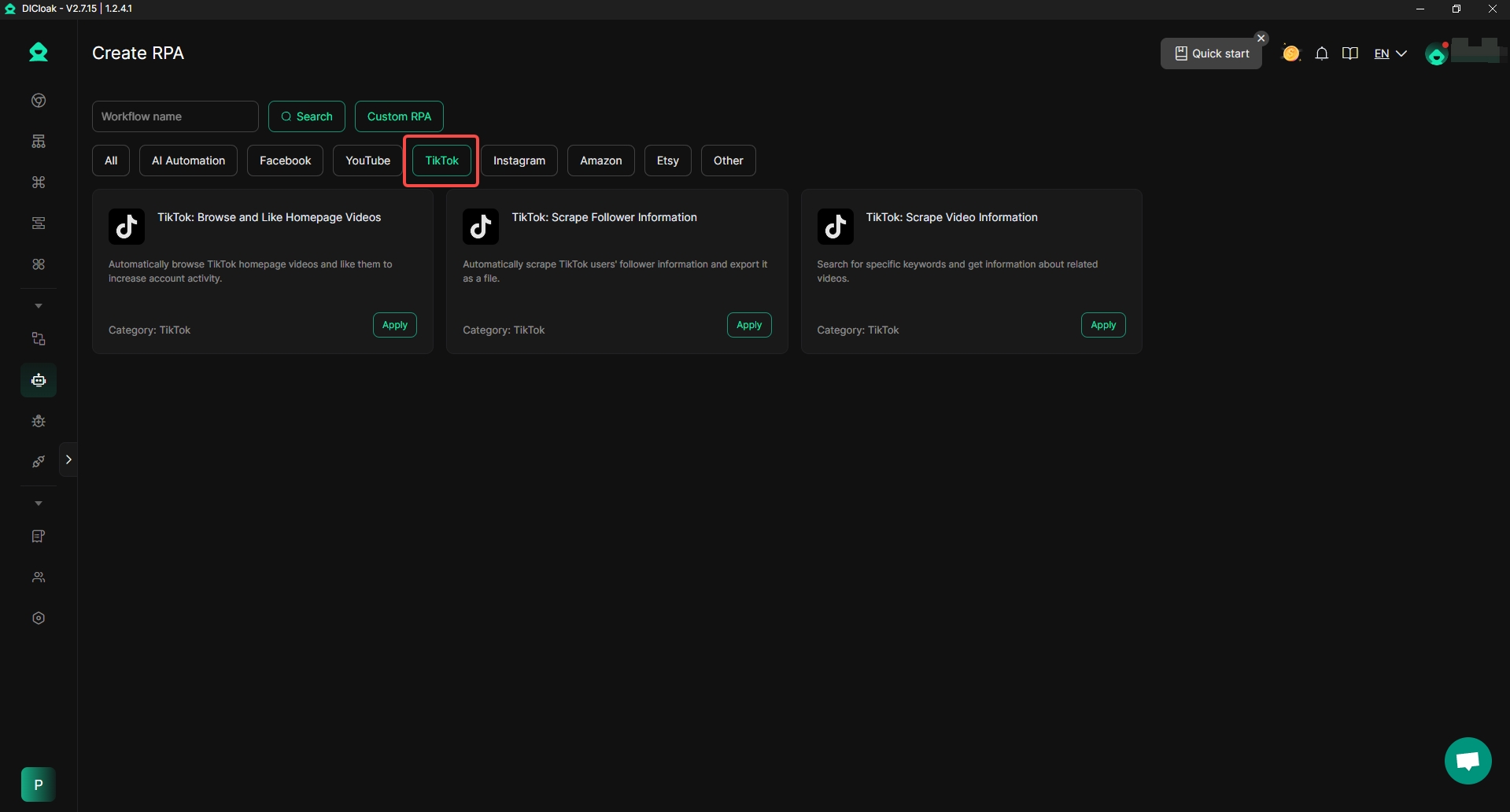
- Consistency across accounts: DICloak’s Synchronizer allows you to perform actions across multiple accounts at once, maintaining natural activity on each profile.
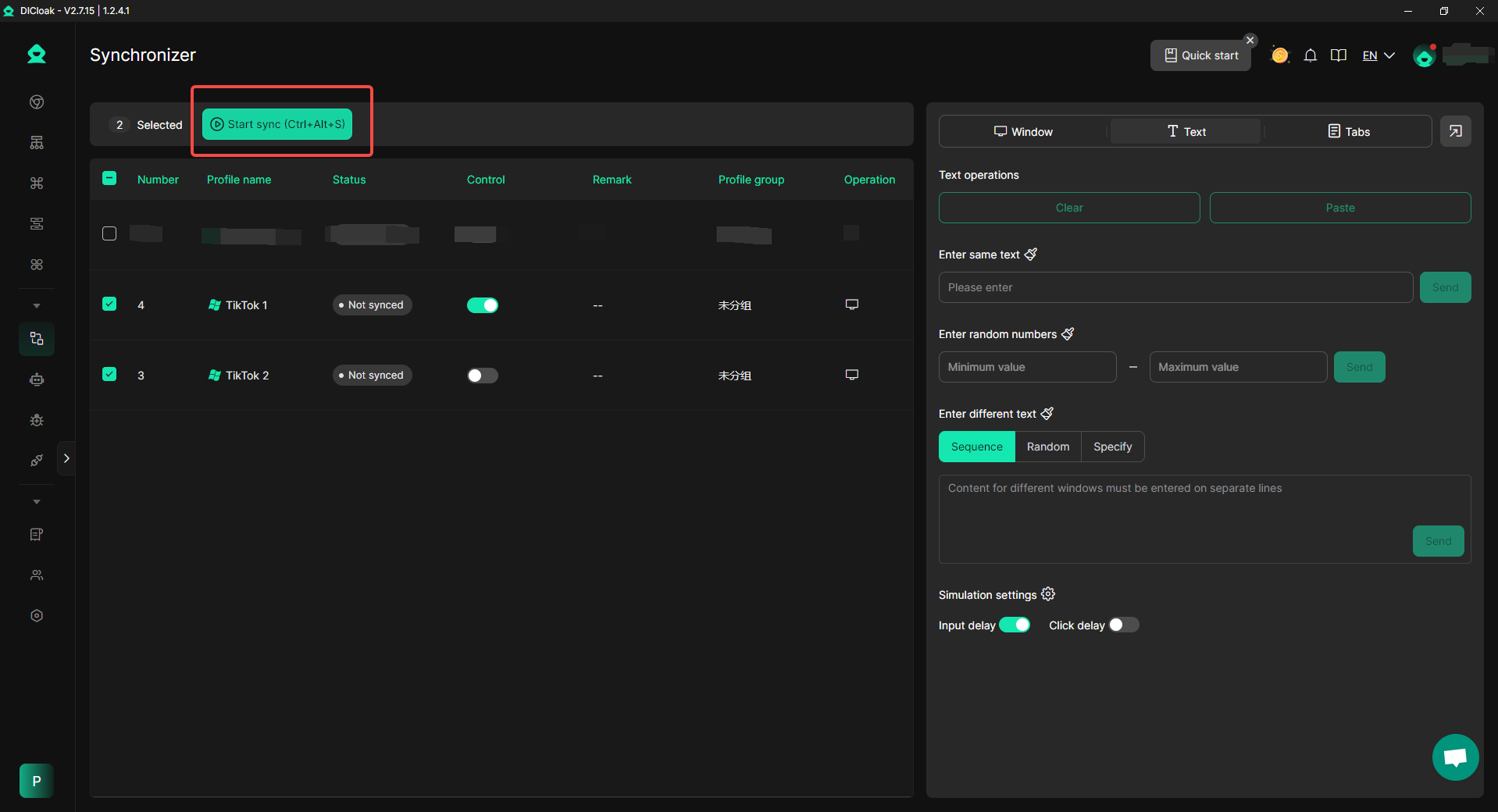
- Efficient account farming: Whether you’re farming accounts for content creation or marketing campaigns, DICloak’s automation tools help you keep accounts active and engaged without manual work.
DICloak’s team collaboration, profile isolation, and RPA automation features make it the perfect solution for securely managing multiple TikTok accounts. With custom proxy configurations and advanced fingerprint management, DICloak ensures your accounts remain independent and protected, reducing the risk of bans or suspensions.
Ready to manage multiple TikTok accounts safely and efficiently? Start using DICloak today and take your social media management to the next level.
Conclusion
TikTok doesn’t limit how many accounts you can have, but it monitors for suspicious activity. Casual users can manage 2-3 accounts per device, while marketers can manage 10-50+ accounts with tools like DICloak.
To avoid risks like shadowbans or account suspensions, each account should have a unique email and fingerprint. DICloak helps by providing profile isolation, custom proxy configurations, and automation tools to manage accounts securely and independently.
Avoid common mistakes like using a single email, replicating content too quickly, or switching accounts too often, which can trigger bans.
With DICloak, you can safely manage multiple TikTok accounts, automate tasks, and ensure each account remains secure.
FAQ
How many TikTok accounts can you have on one device?
You can manage 2-3 TikTok accounts on a single device without special tools. However, to handle more accounts securely, tools like DICloak can help you run 10-50+ accounts on one device without detection. The key is maintaining account isolation and using custom proxies.
Can you use the same email for multiple TikTok accounts?
No, you cannot use the same email for multiple TikTok accounts. Each account requires a unique email or phone number for registration. Reusing emails can cause accounts to be linked, risking detection or bans.
How do I avoid being banned when managing multiple TikTok accounts?
To avoid bans when managing multiple TikTok accounts, ensure each account has a unique fingerprint, use custom proxies, and maintain natural activity. Avoid common mistakes like switching accounts too frequently or replicating content across accounts.
How many TikTok accounts can you have with one email?
TikTok allows only one account per email or phone number. For each additional account, you need a unique email or phone number to ensure they remain separate and avoid detection.
Is it safe to manage multiple TikTok accounts with DICloak?
Yes, DICloak is a safe solution for managing multiple TikTok accounts. With profile isolation, custom proxy configuration, and RPA automation, DICloak ensures each account remains independent and secure, reducing the risk of detection or bans while managing several accounts.
 Web Proxy Tools
 Free Tools
 Cookie Plugin
 UA Generator
 MAC Address Generator
 IP Generator
 IP Address List
 2FA Code Generator
 World Clock
 Anonymous Check
 WebRTC Leak Test
 UUID Generator
 Free Web Proxy Site
 Proxy Checker
 FB Ad Checker
 AI Web Scraping
 Free SMM Tools
 Twitter Shadowban Checker
 Instagram Name Checker
 UTM Generator
 Username Generator
 AI Hashtag Generator
 LinkedIn Headline Generator
 Social Media Image Resizer