Why Digital Marketers Need to Download Pinterest Videos for High-Level Curation
While Pinterest serves as the premier global visual discovery engine, its native architecture is intentionally restrictive. To protect intellectual property, the platform allows users to save "Pins" to internal boards, but these assets remain anchored to Pinterest’s servers. For the casual user, this is a convenience; for the professional digital marketer or infrastructure expert, this represents Data Volatility.
In a professional context, relying on platform-hosted content is a liability. Assets can be shadowbanned, deleted by creators, or rendered inaccessible due to account-level restrictions without notice. Transitioning to a high-level curation workflow requires moving these assets from the cloud to local storage. By converting Pins to local MP4 or GIF files, researchers can perform deep-dive creative analysis, build offline inspiration libraries, and conduct marketing forensics without the risk of losing the source material. This necessitates the use of third-party conversion tools that bridge the gap between Pinterest's proprietary server-side hosting and your local hardware.
Understanding the Legal Framework for Content Acquisition
Operating at scale requires a clear understanding of the ethical and legal boundaries of data acquisition. Adhering to these "Rules of Engagement" is essential for maintaining digital trust and long-term platform compliance.
Rules of Engagement:
- Restricted Usage: Content should only be acquired for personal, educational, or internal marketing research purposes.
- Unauthorized Monetization: Never re-upload or monetize content belonging to third parties without explicit legal consent.
- Mandatory Attribution: Crediting the original creator is a non-negotiable standard when sharing downloaded materials with clients or collaborators.
From a cybersecurity perspective, ignoring these rules doesn't just invite legal trouble; it increases your profile’s Heuristic Detection risk, as platforms often monitor for patterns of content scraping and re-uploading.

Efficient Methods to Download Pinterest Videos on Laptop and Desktop
For individual asset acquisition, several entry-level methods exist, though they vary in terms of security and stability.
Utilizing Online Video Converters and Downloader Sites
Web-based scrapers are the most common entry point. They function by parsing the Pinterest URL to locate the direct video source hosted on the CDN.
- Recommended Tools: For reliable acquisition, use established platforms like ExpertsPHP, PinterestVideoDownloader.com, or SavePin.app.
- Security Protocol: Always ensure the site is HTTPS-secured. Avoid any platform requiring login credentials or PII (Personally Identifiable Information), as these are primary vectors for Credential Stuffing and unauthorized data harvesting.
Implementing Browser Extensions for Frequent Access
Extensions provide a UI layer modification that adds a "Download" button directly to the Pinterest interface. However, these tools face a perpetual Condition of Failure: Pinterest frequently updates its site architecture via CI/CD pipelines, changing dynamic CSS class names and HTML structures that render static extensions obsolete overnight.
Pro Tip: When using extensions, run them within isolated browser profiles to minimize Browser Entropy. This prevents extension-based tracking scripts from linking your research activities to your primary professional accounts.
Strategic Workflow to Download Pinterest Video on Laptop for Multi-Account Managers
For agencies and affiliate marketers, managing high-volume data across 10, 50, or 1,000 accounts presents a massive Account Association risk. Platforms use sophisticated fingerprinting to detect "Account Nesting," where multiple profiles are linked to a single piece of hardware. If one account is flagged for aggressive downloading, all associated accounts are often banned in a chain reaction.
The industry standard for mitigating this risk is the use of isolated browser profiles. By separating the cookies, cache, and hardware identifiers of each account, you can manage a massive content pipeline without triggering the platform's anti-fraud heuristics.
Advanced Infrastructure for Scale: Beyond Basic Downloads
True scale in 2026 requires an understanding of how platforms identify and track users beyond simple IP addresses.
Modern platforms detect users by reading the unique "fingerprint" of the GPU, HTML5 Canvas element, WebGL, and AudioContext. These elements create a nearly unique signature for every machine. Professional antidetect tools like DICloak mask these by providing custom, non-generic values for each profile, ensuring that your 50th profile looks like an entirely different machine than your 1st.
Custom Profile Parameters for Platform Simulation
To effectively simulate a diverse user base, your infrastructure must mimic various operating systems—Windows, Mac, iOS, Android, and Linux. For instance, an e-commerce team may simulate 20 different mobile device profiles to test how their Pinterest video ads render across different screen resolutions and OS versions, ensuring a seamless experience for their target demographics.
Optimizing Network Isolation through Proxy Management
HTTP and SOCKS5 Proxy Integration
Network isolation is the bedrock of account stability. Professional workflows integrate proxy protocols (HTTP, HTTPS, SOCKS5) directly at the profile level. Residential Proxies are significantly superior to datacenter proxies because they carry a higher "Trust Score." Because residential IPs are mapped to legitimate ISPs rather than known server farms, they are far less likely to trigger verification checkpoints.
Bulk Proxy Pool Management
Managing a pool of IPs is essential to avoid "IP Jumping"—the act of one account logging in from multiple locations in a short timeframe. Assigning a static, dedicated residential IP to a specific browser profile ensures the platform sees a consistent, legitimate user journey.
Automating the Grind with RPA and Bulk Operations
Manual downloading is a bottleneck. To scale, marketers utilize Robotic Process Automation (RPA).
- RPA Scripts: These scripts automate the navigation to Pinterest URLs, the triggering of the download link, and the systematic sorting of files into specific project directories.
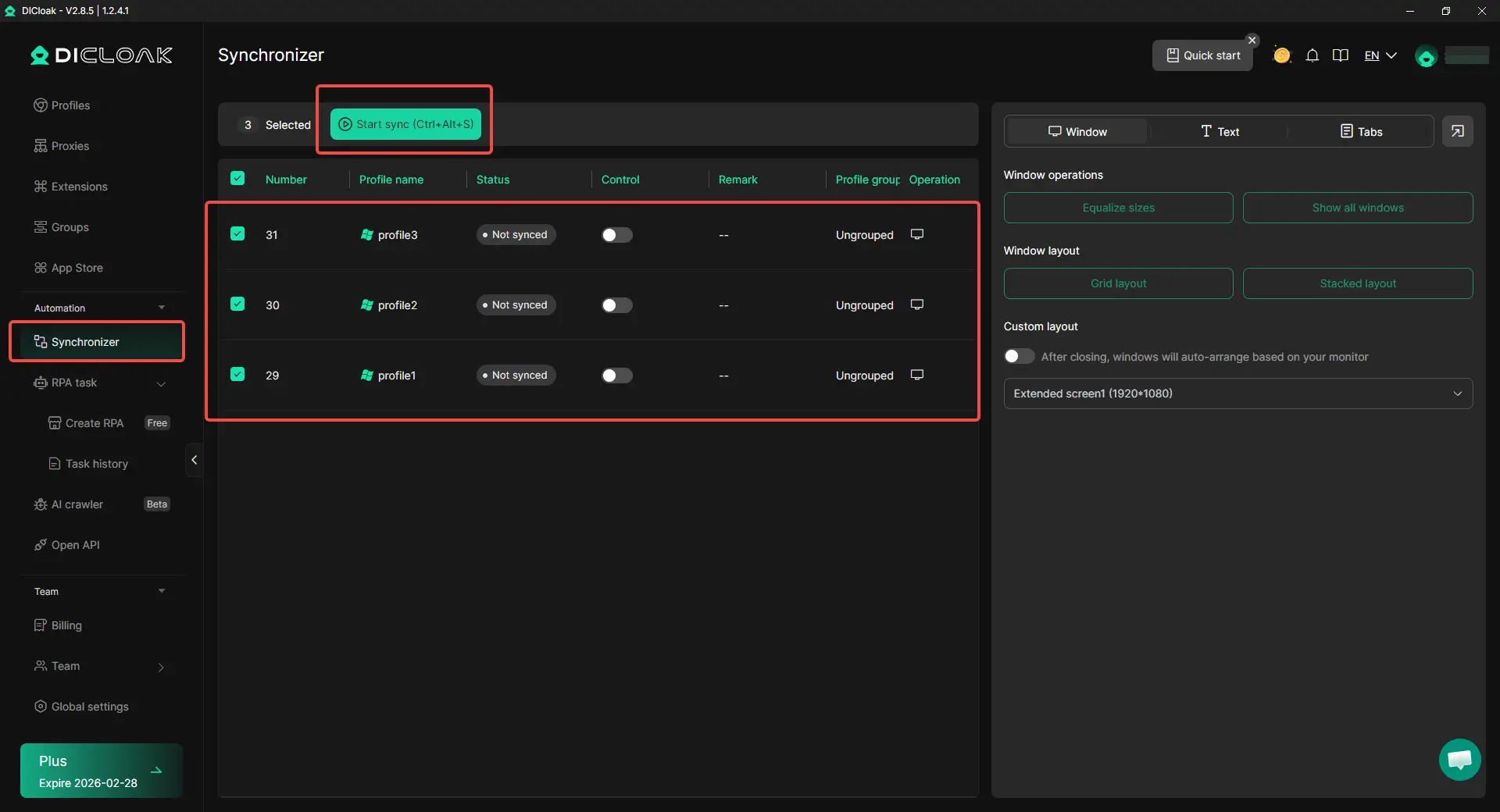
- The Synchronizer Mechanics: Advanced tools like DICloak feature a "Synchronizer." This allows you to paste a list of multiple Pinterest links into a "Designated text" area, which then triggers parallel downloads across all active, isolated profile windows simultaneously.
Comparative Analysis: Standard Browsers vs. DICloak Antidetect Browser
| Feature |
Standard Browser (Chrome/Safari) |
DICloak Antidetect Browser |
| Account Isolation |
Cookies only; identical hardware fingerprints |
isolation of Canvas, WebGL, AudioContext, and hardware IDs |
| IP Management |
System-wide (one IP for all tabs) |
Profile-level (Custom Proxy Configuration) |
| Automation |
Basic extensions only |
Built-in RPA for complex content workflows |
| Team Scaling |
Manual credential sharing (High Risk) |
Secure profile sharing with Permission Settings & Operation Logs |
| OS Simulation |
Limited to your physical hardware |
Simulates Windows, Mac, Linux, iOS, Android |
Operational Benefits of DICloak for Digital Asset Management
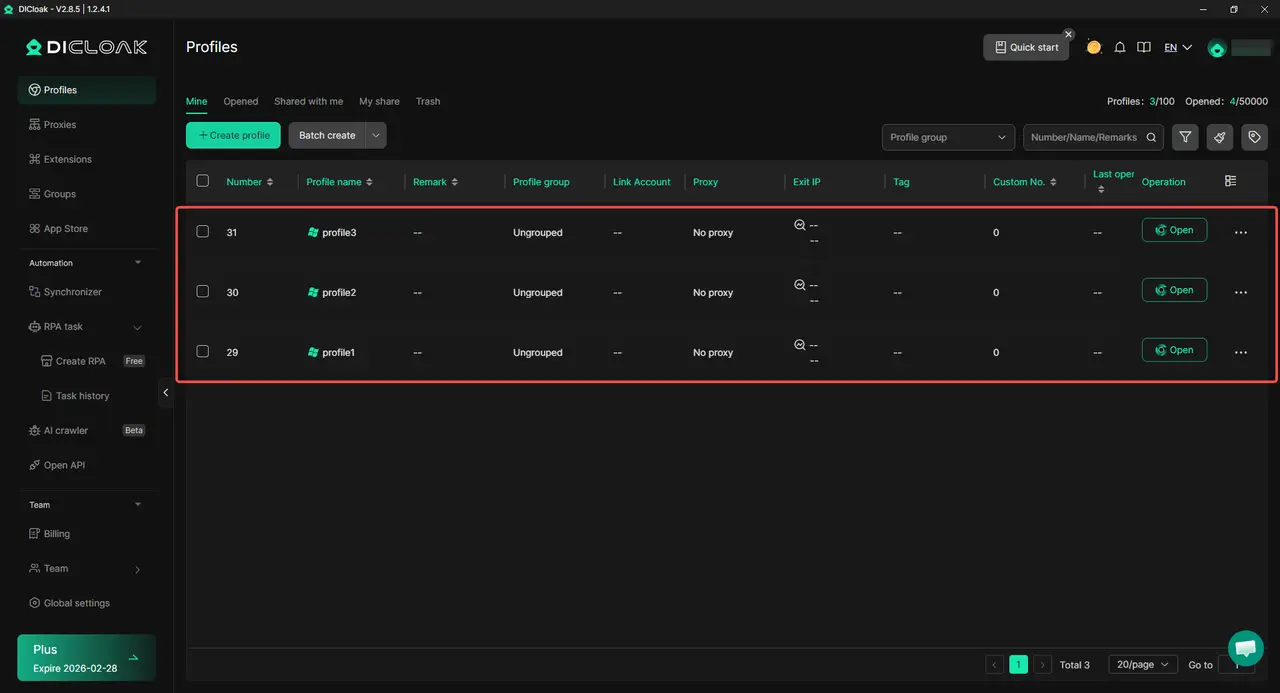
DICloak is a Chrome-based infrastructure tool designed for high-stakes multi-account management. It allows a single operator to manage over 1,000 accounts on one device, drastically reducing hardware overhead while maintaining isolation.
The Synchronizer is the standout feature for curators; it allows actions performed in a master window to be mirrored across dozens of sub-windows. This is how agencies download hundreds of trending videos in minutes rather than hours.
Pros & Cons:
- Pros: Massive bulk scalability; custom proxy configuration (HTTP/HTTPS/SOCKS5); granular team permission settings; familiar Chrome-based interface.
- Cons: Currently available only on Windows and macOS.
Common Obstacles when you Download Pinterest Video on Laptop
- Scenario: 403 Forbidden Error: This indicates your IP has been blacklisted or rate-limited.
- Solution: Configure a custom proxy in the DICloak profile and update it as needed to keep the network environment consistent.
- Scenario: Low Resolution Downloads: Some tools default to mobile-optimized versions.
- Solution: Ensure you select the maximum resolution (often 1080p) on the downloader site before the final MP4 generation.
- Scenario: Shadowbanning of URLs: If multiple accounts post the exact same downloaded MP4, the platform may flag the file's Digital Hash.
- Solution: Use basic editing or metadata stripping to keep each file appears unique to platform forensics.
FAQ: Essential Knowledge for Pinterest Content Management
Can I download Pinterest videos directly from the mobile app?
No native support exists. Mobile users should use SavePin.app via a mobile browser or utilize Telegram Pinterest Downloader Bots for quick acquisition. iPhone users can use Documents by Readdle to manage and save files directly to their gallery.
Are Pinterest downloader websites safe?
They are safe only if they use HTTPS and do not request software downloads. The primary risk is Third-party script injection on non-secure sites; always use an isolated profile when visiting these sites to protect your main data.
How can I automate bulk video downloads for research?
Utilize an RPA-enabled browser like DICloak. Use the Synchronizer to paste multiple URLs into the "Designated text" area, allowing you to trigger parallel downloads across multiple isolated environments at once.
What is the risk of using one IP for multiple Pinterest accounts?
This triggers "Account Nesting" detection. If one account is flagged for a TOS violation, the platform can use your shared IP and hardware fingerprint to ban every other account in your portfolio.
Final Summary on Secure Content Curation
As we move through 2026, the gap between casual curation and professional asset management is widening. While simple web tools suffice for occasional use, scaling a digital agency or research firm requires professional-grade infrastructure. Utilizing an isolated, secure environment like DICloak is no longer optional—it is the industry standard for those looking to mitigate risk, protect account longevity, and transform Pinterest into a structured, high-value inspiration library.
 Web Proxy Tools
 Free Tools
 Cookie Plugin
 UA Generator
 MAC Address Generator
 IP Generator
 IP Address List
 2FA Code Generator
 World Clock
 Anonymous Check
 WebRTC Leak Test
 UUID Generator
 Free Web Proxy Site
 Proxy Checker
 FB Ad Checker
 AI Web Scraping
 Free SMM Tools
 Twitter Shadowban Checker
 Instagram Name Checker
 UTM Generator
 Username Generator
 AI Hashtag Generator
 LinkedIn Headline Generator
 Social Media Image Resizer





