Finding the best time to post on TikTok can make a big difference in how your videos perform. Even strong content can miss views and engagement if it goes live when your audience is not active. In this guide, you will learn the best posting times by day, how to find your own best schedule, what works for different industries, and how to boost engagement with smarter TikTok strategies.
Why Timing Matters for Engagement
Creating good TikTok content is important. But posting it at the right time matters too.
Here’s why finding the best times to post on TikTok can make a real difference:
- TikTok values early engagement – If your video gets quick likes, comments, shares, and watch time, it has a better chance to reach more people. Posting when your audience is active can help your content get that strong early push.
- Your audience is not online all day – People scroll TikTok at different times. If you post when most of your followers are busy, your video may lose momentum before they even see it. That is why the best times to post on TikTok matter for visibility.
- Good timing can improve results – Better timing can lead to more views, stronger engagement, and more profile visits. For brands, sellers, and creators, this can also mean more clicks and better conversion potential.
- Different audiences have different habits – A student audience may be more active at night, while working adults may check TikTok after work. So the best times to post on TikTok often depend on who you want to reach.
- It helps your content perform without extra cost – You do not always need to spend money to get better results. Sometimes, adjusting your posting schedule to match your viewers’ habits is one of the simplest ways to improve performance.
Whether you run a personal account, a business page, or a niche content channel, learning the best times to post on TikTok is a smart step if you want more engagement from every post.
Best Time to Post on TikTok
There is no single answer that works for everyone, but the best time to post on TikTok often follows clear patterns across many industries and audience groups.
In general, TikTok activity tends to rise at certain times of day. These usually include early morning, lunch breaks, and evening hours, when people are more likely to check their phones and scroll through short videos.
Still, the best time to post on TikTok depends on your audience. Their location, time zone, daily routine, and online habits all matter.
If you are just getting started and do not have enough account data yet, these common posting windows can be a useful starting point:
- Monday: 7 a.m., 11 a.m., 10 p.m.
- Tuesday: 2:30 a.m., 4 a.m., 7 p.m.
- Wednesday: 8 a.m., 9 a.m., 11 p.m.
- Thursday: 9 a.m., 12 p.m., 6 p.m.
- Friday: 6 a.m., 1 p.m., 4 p.m.
- Saturday: 11 a.m., 3 p.m., 8 p.m.
- Sunday: 9 a.m., 10 a.m., 4 p.m.
These time slots are based on EST and can help you find the best time to post on TikTok when you are still testing what works.
But over time, your own results matter more than general data. The best way to improve is to test different posting times and check your TikTok analytics. Look at when your followers are active, which posts get more engagement, and which hours bring better watch time.

Best days to post on TikTok
Next, let’s look at each day more closely so you can adjust your posting schedule with more confidence.
Best Time to Post on Monday
Monday may feel slow, but it can still bring strong early-week engagement. Many people check TikTok on the way to work, during a short break, or late at night when they want to relax.
The best time to post on TikTok on Monday is:
- 7 a.m. – Catch people during their morning scroll
- 11 a.m. – A good late-morning window
- 10 p.m. – Great for late-night users
These time slots can help you test the best time to post on TikTok for your audience at the start of the week.
Best Time to Post on Tuesday
Tuesday is often one of the strongest days for TikTok posting. It gives you a mix of early and evening time slots, which is useful if you want to reach different audience groups.
The best time to post on TikTok on Tuesday is:
- 2:30 a.m. – Useful for reaching users in different time zones
- 4 a.m. – Can work for global audiences or late-night activity
- 7 p.m. – A strong evening window when users are more active
Tuesday is a good day to test your schedule and see when your audience responds best.
Best Time to Post on Wednesday
Wednesday often shows steady engagement, especially in the morning and late evening. People may check TikTok before work, before class, or while relaxing at night.
The best time to post on TikTok on Wednesday is:
- 8 a.m. – Good for early viewers
- 9 a.m. – Before the day gets busy
- 11 p.m. – A strong slot for late-night scrolling
If you want to test content with higher interaction potential, Wednesday can be a useful day to watch closely.
Best Time to Post on Thursday
Thursday is often one of the best-performing days on TikTok. User activity stays strong across several parts of the day, which gives you more than one good chance to post.
The best time to post on TikTok on Thursday is:
- 9 a.m. – A solid morning window
- 12 p.m. – Good for lunch-break scrolling
- 6 p.m. – Strong evening engagement
If you want more reach, Thursday is a smart day to post content that is timely, interesting, or easy to share.
Best Time to Post on Friday
Friday can work well because people often check TikTok more as the weekend gets closer. Lunch breaks and afternoon hours can be especially useful.
The best time to post on TikTok on Friday is:
- 6 a.m. – Good for early users
- 1 p.m. – A strong midday slot
- 4 p.m. – Engagement can rise as the weekend starts
Friday is a good time for lighter content, promotional posts, or videos that match weekend energy.
Best Time to Post on Saturday
Saturday usually has a slower start, but activity often picks up later in the day. People have more free time, so they may spend longer browsing and watching videos.
The best time to post on TikTok on Saturday is:
- 11 a.m. – A strong late-morning window
- 3 p.m. – Good afternoon engagement
- 8 p.m. – Useful for evening traffic
Saturday is a good day to try more casual content, storytelling, or videos with a lifestyle feel.
Best Time to Post on Sunday
Sunday is calmer, but it can still bring good engagement. Many users scroll in the morning or later in the afternoon while getting ready for the new week.
The best time to post on TikTok on Sunday is:
- 9 a.m. – A quiet but visible morning slot
- 10 a.m. – Good for continued morning activity
- 4 p.m. – A solid afternoon window before evening slowdown
Posting during these hours can help you stay visible and keep your content fresh in your audience’s mind before the week begins again.
How to Find Your Best Posting Times
General data is helpful, but your own audience data matters more. The best posting time for one account may not work for another.
Here are a few simple ways to find your best time to post on TikTok:
Switch to a TikTok Business or Creator account
First, you need to set up a TikTok business account on the app. It's a free feature that can simply let you switch back and forth with your personal account.
Go to Settings and Privacy - Account - Switch to Business Account. This gives you access to TikTok account analytics as well as other features.
Check your TikTok analytics
Look at when and where your followers are most active. Pay attention to
- Top territories – Where most of your followers are based
- Follower activity – When your audience is online, shown by hour and day
Use this to match your posting time to when your audience is most active. Remember that TikTok shows data in UTC, so convert it to your audience’s time zone.
Review your top-performing content
In the Content tab, look at which videos got the most views, likes, shares, and watch time. Then check when those posts went live. Over time, you may start to see clear patterns. That can help you find the best time to post on TikTok for your audience.
Track your results over time
Audience habits can change over time. Keep checking your data and updating your schedule when needed. You can make a spreadsheet including:
- Posting date
- Posting time
- Video topic or style
- Views, likes, shares
- Watch time and reach
Over time, you’ll gather data on what works and when, allowing you to adjust your timing accordingly to find the best time to post on TikTok.
Best time to post for different industries
The best time to post on TikTok can be changed by industry. Here’s a quick look at industry-specific TikTok posting times that consistently drive higher engagement:
- Education: Wednesday, 4 p.m.–6 p.m.
- Financial services: Thursday, 12 p.m.; Friday, 11 a.m.
- Retail / eCommerce: Midday to evening, especially lunch hours and evening scroll time
- Beauty / Fashion: Evening, around 5 p.m.–9 p.m.
- Entertainment / Media: Evening, around 5 p.m.–9 p.m.
- Food / Hospitality / Travel: Late afternoon to evening, around 4 p.m.–8 p.m.
- Technology: Morning to early afternoon, around 8 a.m.–1 p.m.
- Healthcare: Morning, around 8 a.m.–11 a.m.
The safest approach is to use industry trends as a guide, then compare them with your own TikTok analytics. This helps you move closer to the best time to post on TikTok for your niche, instead of copying a schedule that works for someone else.
How to Boost Your TikTok videos for Engagement
Nailing the best time to post on TikTok gives your content a head start – but timing alone won’t carry the whole show. To keep people watching, interacting, and coming back, you need content that hooks fast and speaks directly to your audience.
Here are key strategies to increase engagement beyond just posting at the right time:
Hook viewers in the first 2 seconds
TikTok moves fast. Your opening visuals or captions should instantly signal what the video is about. Whether it’s a bold statement, a question, or a behind-the-scenes shot, grab attention immediately to increase average watch time.
Use trending audio and relevant hashtags
Leaning into market trends, popular sounds, and appropriate hashtags can get your videos in front of more users. Stay current and experiment with remixing trends and fresh ideas to fit your brand voice or product. It is recommend to use DICloak’s AI Crawlers to help you:
- Collect and analyze data efficiently
- Generate content ideas effortlessly
- Refine marketing strategies with AI insights
Include a strong call to action (CTA)
Guide your audience. A clear CTA on your TikTok videos, like “drop a comment,” “check the link,” or “save this for later” can drive maximum engagement and signal value to the algorithm.
Posting consistently
It builds recognition and signals to TikTok that you're an active creator. Whether it’s once a day or a few times a week, consistent activity keeps your brand top of mind and improves long-term reach.
Using account management tool
Posting consistently is one of the easiest ways to improve TikTok engagement. But for creators, agencies, or sellers managing more than one account, staying consistent can get messy fast. That is where tools like DICloak become useful. DICloak helps users manage multiple TikTok accounts in separate browser profiles, making it easier to organize posting work, reduce account mix-ups, and keep daily operations more efficient.

Key Features of DICloak for Managing TikTok Accounts
- Secure Each Account with Unique Fingerprints
- Run Multiple Accounts on One Device
- Maintain Natural, Consistent Activity Across Accounts
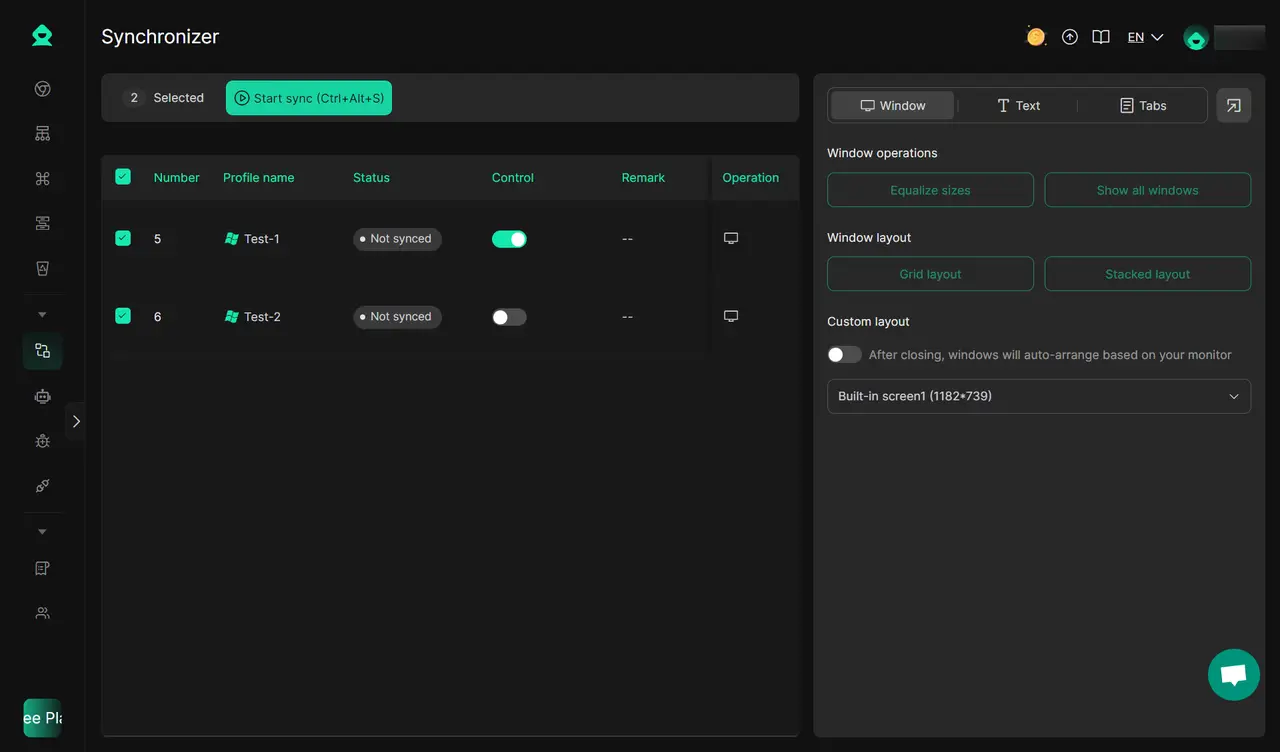
You can also keep your accounts active and engaging with DICloak’s built-in automation tools. Multi-Window Synchronizer also supports you like, comment, and follow across multiple profiles and platforms simultaneously, mimicking real user behavior for safe social media browsing.
Also, you can try ready-to-use TikTok RPA templates in DICloak to automate tasks such as browsing and liking homepage videos, scraping follower data, and collecting video information.

Common Mistakes and Myths About TikTok Posting
Many creators spend too much time following advice that sounds smart but does not always work. To grow on TikTok, it is important to separate myths from real strategy.
Here are some common myths about TikTok posting:
- Myth 1: There is one perfect time to post for everyone This is not true. The best time to post on TikTok depends on your audience, niche, and time zone. A good posting time for a beauty creator may not work for a finance account.
- Myth 2: Posting more always means better results More posts do not always lead to more engagement. If content quality drops, performance can drop too. Consistent posting matters, but quality still comes first.
- Myth 3: You must post late at night to go viral Some people believe late-night posting always works better. In reality, this only helps if your audience is active at that time. Viral growth depends on content, timing, and audience response together.
- Myth 4: If a post does badly, the time was wrong Timing matters, but it is not the only reason a post may underperform. The hook, topic, video length, caption, and viewer interest also affect results.
- Myth 5: General studies are enough Broad data can be a helpful starting point, but it should not replace your own TikTok analytics. Your account will show you more than any general chart can.
The smartest approach is simple: use general posting trends as a guide, test different time slots, and follow your own data over time.
Conclusion
There is no single best time to post on TikTok for every account, but there are clear patterns that can help you start strong. The most effective approach is to use general posting trends, test different time slots, and follow your own analytics over time. When you combine good timing, strong content, and a consistent workflow, you give your TikTok videos a much better chance to reach more people and drive better engagement.
Frequently Asked Questions (FAQs)
What is the best time to post on TikTok for more views?
The best time to post on TikTok for more views depends on when your audience is most active. In general, early morning, lunch hours, and evening tend to perform well. But the best results usually come from checking your own TikTok analytics and testing different time slots.
Is there one best time to post on TikTok for every account?
No, there is no single best time to post on TikTok that works for everyone. The right posting time can change based on your niche, audience age, location, and time zone. What works for a beauty creator may not work for a business or education account.
How can I find the best time to post on TikTok for my audience?
To find the best time to post on TikTok, start by switching to a Business or Creator account and checking your analytics. Look at when your followers are online, review your top-performing posts, and track which posting times lead to better views, watch time, and engagement.
Does the best time to post on TikTok change by day?
Yes, the best time to post on TikTok can change depending on the day of the week. Some days may perform better in the morning, while others may bring stronger engagement in the afternoon or evening. That is why many creators test different days and time slots instead of following one fixed schedule.
Why is the best time to post on TikTok important for engagement?
The best time to post on TikTok matters because posting when your audience is active can help your video get faster likes, comments, shares, and watch time. Strong early engagement gives your content a better chance to reach more people and perform better overall.
 Web Proxy Tools
 Free Tools
 Cookie Plugin
 UA Generator
 MAC Address Generator
 IP Generator
 IP Address List
 2FA Code Generator
 World Clock
 Anonymous Check
 WebRTC Leak Test
 UUID Generator
 Free Web Proxy Site
 Proxy Checker
 FB Ad Checker
 AI Web Scraping
 Free SMM Tools
 Twitter Shadowban Checker
 Instagram Name Checker
 UTM Generator
 Username Generator
 AI Hashtag Generator
 LinkedIn Headline Generator
 Social Media Image Resizer