A warmup cache request is a simple way to make pages load faster before real visitors arrive. Instead of waiting for the first user to trigger cache creation, the system sends an early request so the page can already be stored and ready to serve. That matters because a warm cache can reduce slow first loads, lower origin pressure, and help important pages stay more stable after updates, cache purges, or traffic spikes. In this guide, you will learn what a warmup cache request is, how it works, when to use it, and what mistakes to avoid if you want better website speed in 2026.

What Is a Warmup Cache Request?
A warmup cache request is a request sent before real users arrive, so a page or file can be stored in cache early. In simple words, it helps the system get ready first. Instead of making the first visitor wait while the server builds the page, the site loads that page into cache ahead of time. This idea is often called cache warming or cache preloading, and it is used to reduce delay on the first real visit.
To understand why this matters, it helps to look at the difference between a cold cache and a warm cache.
What a warmup cache request means in simple words
Think of a news article page right after a cache purge. If no one has opened it yet, the server may need to fetch data, build the page, and then store the result. A warmup cache request does that work early. So when a real visitor opens the same page, the cached version is already there and can load faster. This is why many platforms warm important URLs after updates, deployments, or cache clears.
The difference between a cold cache and a warm cache
A cold cache means the cache does not have the needed content yet. The system has to go back to the origin server, database, or another slower source to get it. A warm cache means the content is already stored and ready to serve. That usually means lower latency and a smoother first-page experience. In practice, a cold cache often appears after a restart, purge, or new deployment, while a warm cache is what you get after useful content has already been loaded into the cache.
Why first visits are often slower without cache warmup
Without cache warmup, the first visitor often pays the performance cost. The server may need to render the page, run queries, pull assets, or fetch data from the origin before anything can be cached. That extra work can slow down the first request and put more pressure on the backend. For example, if an online store clears cache after a product update, the first shopper who lands on a popular category page may get a slower response than the next shopper. A warmup cache request helps avoid that by filling the cache before live traffic hits the page.
How Warmup Cache Requests Work
Now that the idea of a warmup cache request is clear, the next step is understanding what it actually does behind the scenes. The short version is simple: when cache is empty, the system has to build content from scratch. A warmup cache request helps do that work early, so later visitors can get a faster response.
What happens when a cache is empty
When a cache is empty, the page is not ready yet. The server may need to run code, pull data from the database, and assemble the final HTML before it can send the page to the browser. That takes more time than serving a cached copy. This is why the first visit after a purge, restart, or update often feels slower. A warmup cache request helps fill that gap by making the first request happen before a real user shows up.
How automated requests build cached pages before users arrive
This is where automation matters. Instead of waiting for random visitors to rebuild pages one by one, many cache systems send automated requests to important URLs after cache is cleared. These requests act like early visits. They load pages, trigger cache creation, and prepare files that can be served faster later. WP Rocket says this preload process is attached to cache clearing and can run on sitemap URLs, homepage links, and recently updated content.
In practice, this means a warmup cache request is often not a one-time action. It can be part of an ongoing workflow. For example, after a blog post is updated or a cache lifespan expires, the system may automatically queue that URL for preload again. On larger sites, these requests are often paced in batches to avoid putting too much pressure on the server at once. WP Rocket’s guidance on related processing also shows grouped URL handling and warns against overloading the server on large sites.
Which layers can be warmed: page cache, CDN cache, and edge cache
Not all caching happens in one place. A warmup cache request can help at different layers, depending on the stack. The first layer is page cache, where generated HTML pages are stored so the origin server does not need to rebuild them for every visit. This is the most common form people mean when they talk about cache preload.
Another layer is CDN or edge cache. In that setup, content is stored closer to users on distributed servers, often called edge locations. When those cache layers are warm, users may get files faster because the request does not need to travel all the way back to the origin for every load. Cloudflare’s documentation explains the edge-to-origin request path and how requests pass through Cloudflare before reaching the origin, which helps show why warming content outside the origin layer can matter too.
When Should You Use Warmup Cache Requests?
Once you know how a warmup cache request works, the next question is timing. In most cases, you should use it right after something changes or right before more visitors arrive. That is because cache is often weakest at those moments.
After a deployment or site update
A warmup cache request is useful after a deployment or site update because new code, layout changes, or edited content can leave important pages uncached. If you publish a new homepage banner, update product pages, or push a theme change, the cache may need to be rebuilt. Without warmup, the first real users may hit slower page loads while the server does that work live. WP Rocket says preload can automatically generate cache files after settings changes and content updates, which helps avoid that first-visitor delay.
A simple example is a store that updates its sale page at 8 a.m. If traffic starts at 8:05, but cache is still cold, the first shoppers may get a slower response. A warmup cache request can load that sale page early, so more visitors see the faster cached version instead of waiting for the page to build on demand.
After a cache purge or server restart
You should also use a warmup cache request after a cache purge or server restart. A purge removes cached files so new content can be served. Cloudflare’s purge documentation explains that purge actions immediately clear cached content, which means those cached copies are no longer ready to serve until they are requested again.
Before a traffic spike, campaign, or product launch
This is another strong use case. If you expect a traffic spike from an email campaign, ad push, influencer mention, or product launch, a warmup cache request can help get key pages ready before the rush starts. Cloudflare notes that caching reduces origin load and improves performance by serving content from distributed locations closer to users. That matters even more when many people arrive at once.
How Warmup Cache Requests Improve Website Speed
After you know when to use a warmup cache request, the next question is simple: what does it improve in real life? The biggest gain is that pages are already prepared before real users arrive. That can reduce delay on the first load, lower the amount of work your server must do, and keep busy pages more stable when traffic starts to rise.
Faster time to first byte for important pages
A warmup cache request can help improve TTFB on key pages because the page does not need to be built from scratch when the first visitor arrives.
Lower server load during the first wave of visits
A warmup cache request also helps reduce pressure on the origin server during the first wave of visits. That matters because when many users hit uncached pages at the same time, the server may need to rebuild the same content again and again. Cache warming reduces the chance that real users will all trigger expensive work at once. Cloudflare’s glossary defines a cache hit as content being found in cache, which reduces the need to fetch it from the origin server.This becomes easy to see during a launch or campaign. Imagine a store sends an email to thousands of users at 9 a.m. If the landing page is already warm, more requests can be served from cache instead of pushing all that traffic back to the origin.
More stable performance across high-traffic pages
Warm cache can also make performance more stable on pages that get repeated visits. A warmup cache request helps prepare pages like the homepage, pricing page, sale page, or a popular article before demand rises. This does not just help one visitor. It can help the next group of visitors get a more consistent experience as well. WP Rocket says preload can run on important URLs so real users do not have to wait for cache creation themselves.For sites that also use a CDN or edge caching, the effect can be even stronger.
Best Practices for Running Warmup Cache Requests in 2026
Once you understand how a warmup cache request improves speed, the next step is using it in a smarter way. Good warmup is not about hitting every URL as fast as possible. It is about warming the right pages, at the right pace, with rules that match how your cache actually works.
Prioritize your most important URLs first
Start with the pages that matter most to users and to the business. These are usually the homepage, key category pages, top product pages, pricing pages, and landing pages from ads or email campaigns. If you try to warm everything first, the process can take longer and waste resources on pages that get little traffic.A simple example is an online store before a sale. It makes more sense to run a warmup cache request on the homepage, sale page, and top product pages than to spend early warmup capacity on old blog posts or deep archive URLs. This helps the pages with the highest chance of being visited first stay fast when traffic starts coming in.
Throttle requests to avoid overloading the origin
Warmup should be paced, not rushed. If you send too many requests at once, you can create the same kind of spike you were trying to avoid. That can put extra pressure on the origin server, especially right after a purge or deployment. WP Rocket’s documentation says preload on large sites should be made smaller and more controlled, and its troubleshooting docs also note that multiple cache layers can interfere with preload behavior.
Common Problems and Mistakes to Avoid
Good warmup is not only about what to do. It is also about what not to do. After setting priorities, pacing requests, and matching cache rules, the next step is avoiding mistakes that waste resources or warm the wrong version of a page. This matters because a warmup cache request can help a lot when used well, but it can also create extra load or miss key cache versions if the setup is too broad or too simple. WP Rocket’s guidance for large websites warns that preloading too many URLs can cause high CPU usage, and CDN platforms like CloudFront show that cache can vary by headers, cookies, and query strings.
Warming too many low-value pages
One common mistake is trying to warm every page on the site. That sounds complete, but it is often inefficient. Many pages get little traffic and do not need to be warmed first.
Sending requests too fast
Another mistake is sending warmup requests too quickly. The goal of a warmup cache request is to reduce pressure on the origin, not create a new spike.
Forgetting mobile, logged-out, or regional cache variations
This is a quieter mistake, but it can be just as important. Many sites do not serve only one version of a page. CDN caches can vary based on headers, cookies, and query strings. CloudFront’s docs explain that caching can create multiple versions of an object based on selected request headers, and responses can also vary by cookies or query string parameters. That means one warmup cache request may warm only one version, not every version users actually see.
DICloak Can Help Teams Check Cache Results More Clearly
A warmup cache request helps pages get ready before users arrive. But after that, teams still need to check whether those pages look stable across different browser profiles. That is where a tool like DICloak can be useful. It is not a cache warmup tool itself, but it can support the testing side of the workflow in a more organized way. For teams that review pages often after updates, purges, or campaign launches, that can save time and reduce confusion.
Here are a few ways DICloak can fit into that process:
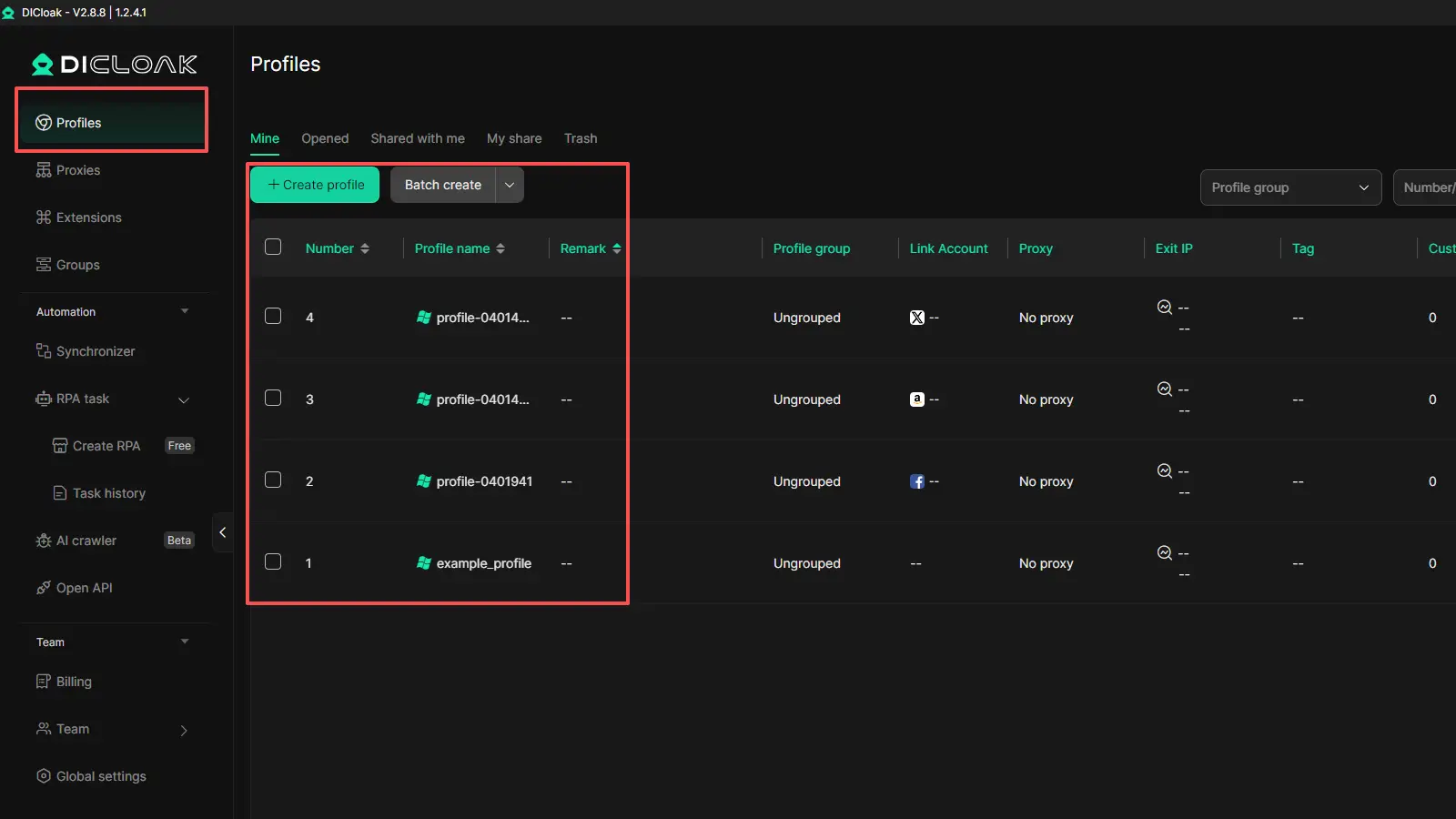
- Separate browser profiles for cleaner testing DICloak lets users create isolated browser profiles with separate cookies, sessions, and fingerprints. This can help teams check whether a cached page behaves the same way across different environments.
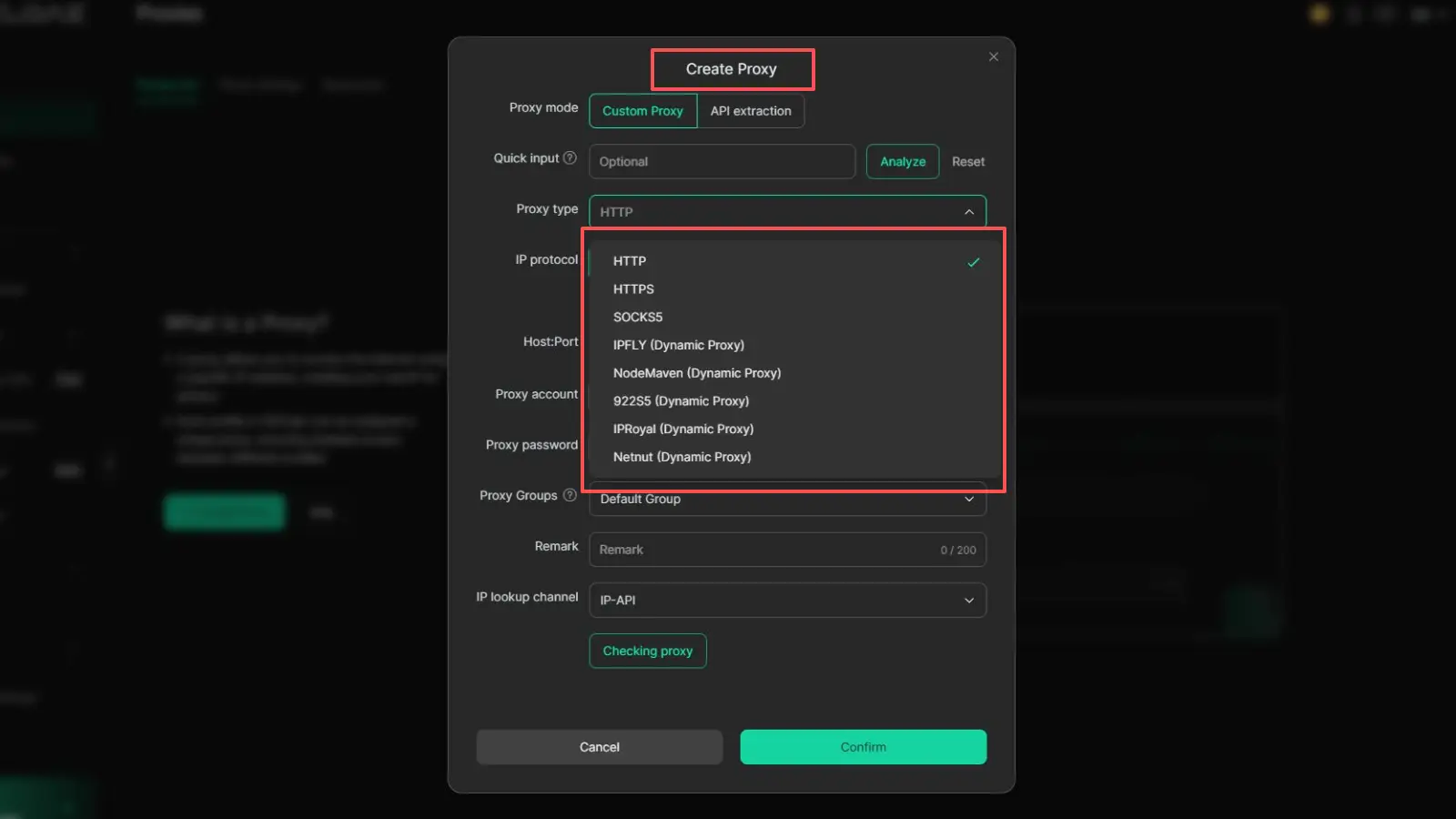
- Proxy support for different access setups Each profile can use its own proxy settings. This makes it easier to compare how pages load under different network conditions or access paths.
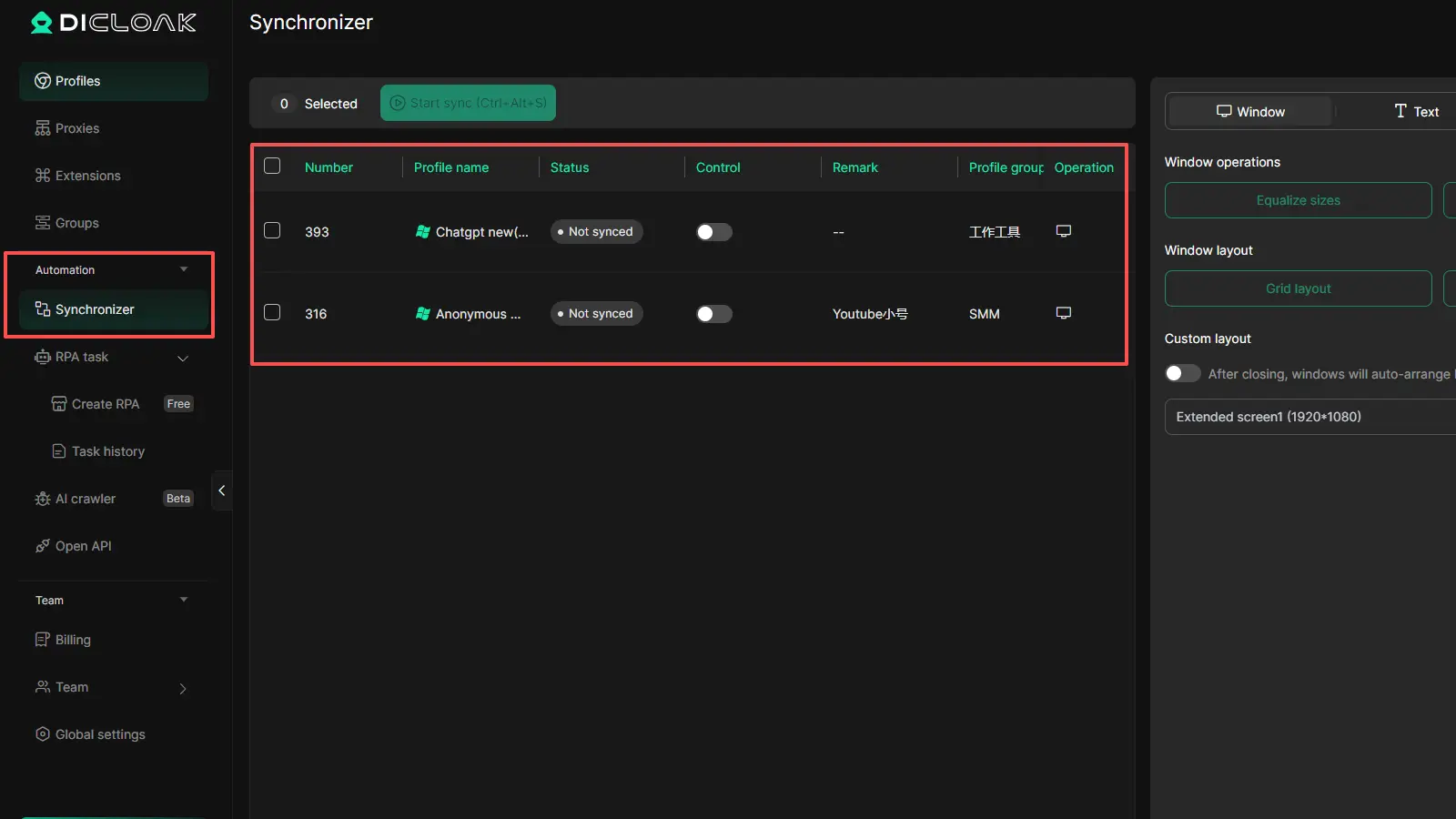
- Bulk operations for repeated checks If a team needs to open many profiles or review many pages after a cache update, DICloak’s bulk tools can make that work faster and easier to manage.
- Useful for team-based workflows DICloak also includes profile sharing, permission controls, and team collaboration features. That can help when several people need to review the same pages without mixing data or sessions.
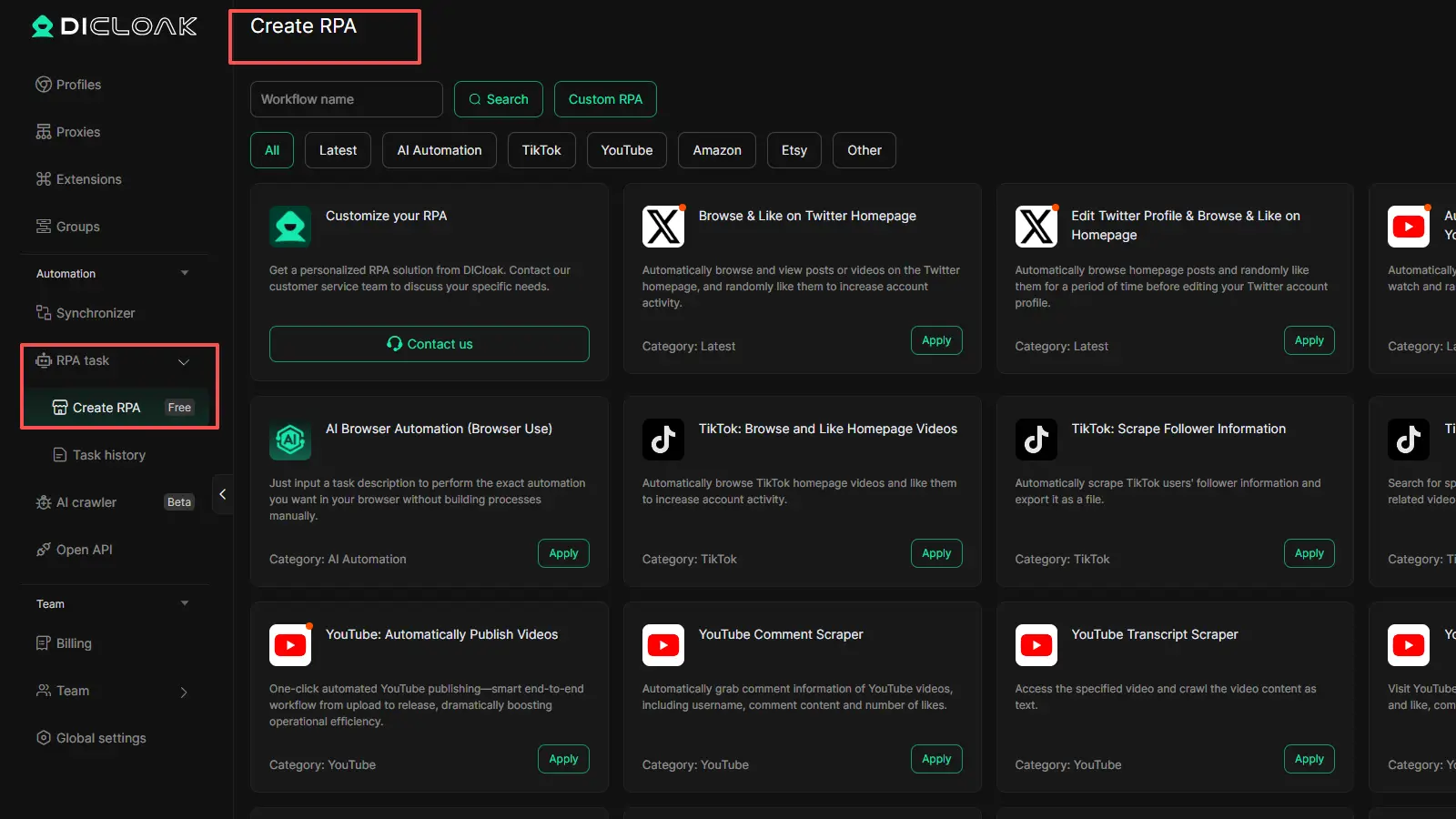
- Helpful for large-scale routine tasks For teams that run repeated checks, DICloak also offers RPA automation and synchronizer features, which can make ongoing review work more efficient.
FAQs about Warmup Cache Request
Q1: What is a warmup cache request?
A warmup cache request is an early request sent before real visitors arrive, so the system can generate and store cached content in advance. In simple terms, it helps pages get ready sooner instead of making the first user wait for the cache to be built. WP Rocket describes preload cache as a feature that emulates visits to pages to generate cache files before real visitors access them.
Q2: When should I run a warmup cache request?
You should usually run a warmup cache request after a deployment, after a cache purge, after a restart, or right before a traffic spike. These are the moments when cache is most likely to be empty or incomplete. Cloudflare notes that purging instantly clears cached resources, and new requests then go back to the origin until cache is rebuilt.
Q3: Can a warmup cache request improve page speed?
Yes, a warmup cache request can improve perceived page speed, especially on important pages that would otherwise be cold on the first visit. One reason is that it can help reduce Time to First Byte, or TTFB, which web.dev defines as the time between starting navigation and when the first byte of the response begins to arrive. When a page is already cached, the server often has less work to do before sending that first byte.
Q4: Can one warmup cache request cover every version of a page?
Not always. A warmup cache request may warm only one cache variant if your site varies content by query strings, headers, cookies, or device type. AWS CloudFront explains that different query string values can create separate cached versions, and Cloudflare also documents device-type cache keys for mobile, desktop, and tablet variants.
Q5: Can a warmup cache request cause problems if I use it the wrong way?
Yes. A warmup cache request can create extra server pressure if you warm too many URLs at once or send requests too quickly. WP Rocket’s guidance for large websites warns that preloading too much can increase CPU usage, and its high-CPU troubleshooting shows they reduce batch size and increase wait time when preload is stressing the server.
Conclusion
A warmup cache request is a simple but useful way to improve website speed before real visitors arrive. It helps key pages get cached early, reduces slow first loads, and can lower pressure on the server during updates, purges, and traffic spikes. In 2026, this matters even more because users expect fast pages right away, not after the second or third visit. The key is to warm the right URLs, control the request pace, and make sure your warmup rules match your real cache setup. When used well, a warmup cache request does not just improve speed. It also helps create a more stable experience across your most important pages.
 Web Proxy Tools
 Free Tools
 Cookie Plugin
 UA Generator
 MAC Address Generator
 IP Generator
 IP Address List
 2FA Code Generator
 World Clock
 Anonymous Check
 WebRTC Leak Test
 UUID Generator
 Free Web Proxy Site
 Proxy Checker
 FB Ad Checker
 AI Web Scraping
 Free SMM Tools
 Twitter Shadowban Checker
 Instagram Name Checker
 UTM Generator
 Username Generator
 AI Hashtag Generator
 LinkedIn Headline Generator
 Social Media Image Resizer