You love watching videos on YouTube, but suddenly you can’t access it. Maybe it’s at school, at work, or even in your country. It feels frustrating when your favorite videos won’t load. The good news is, there are ways to unblock YouTube safely. In this article, we will explain why YouTube is blocked and show real methods to access it.
Understanding YouTube Restrictions
Why is YouTube Blocked?
YouTube is one of the world’s biggest video sites. But sometimes, people can’t watch it. Other times, they can watch YouTube unblocked but certain videos still don’t play. There are a few common reasons for this. Each reason has real examples from schools, workplaces, and countries around the world.
Geographical Restrictions
One key reason YouTube is blocked is due to geo rules. This means the video or the whole site is limited by region. YouTube checks your location using your internet address (IP). If you are outside the allowed region, YouTube may block the video.
For example, some music videos are only licensed in the United States. If you try to watch them in Germany, they might not load. Germany has many cases where music videos are blocked because of licensing fights between YouTube and music rights groups.
This means even when you can unblock YouTube normally, you might still see messages like “not available in your country.”
Institutional Restrictions (Schools and Workplaces)
Another common reason YouTube is blocked is at schools or workplaces. Many schools block YouTube on their Wi‑Fi. They want students to focus on class work and not get distracted by videos. Other times, companies limit YouTube so workers stay productive.
For example, a student might use a school Chromebook and find all YouTube links not working. Even educational videos get blocked if the network admin has set strict filters. Some schools use firewalls or special tools to block YouTube at the network level.
Workers in some offices have the same experience. They might see a message like “This site is blocked by your administrator.” This is because the company’s internet rules do not allow YouTube on certain networks.
Content Restrictions (Age and Licensing)
YouTube also blocks content based on age or content rules. Some videos are only for adults. YouTube may ask you to sign in and confirm you are 18+ before you can watch. This is common for videos with strong language, violence, or other mature topics.
Besides age limits, YouTube and video creators can also restrict where content appears. For example, a creator may choose to block a video in some regions because they don’t have rights to show it everywhere. This is a form of licensing restriction.
Because of these rules, even when some users find a way to unblock YouTube, YouTube itself may still stop certain videos from playing.
Top Methods to Unblock YouTube
Now that you know why YouTube may be blocked, let’s look at ways to unblock YouTube. These methods have helped many people get YouTube unblocked when networks or countries block the site. Each method works in a slightly different situation.
Accessing YouTube via Proxy Servers
What Is a Proxy Server?
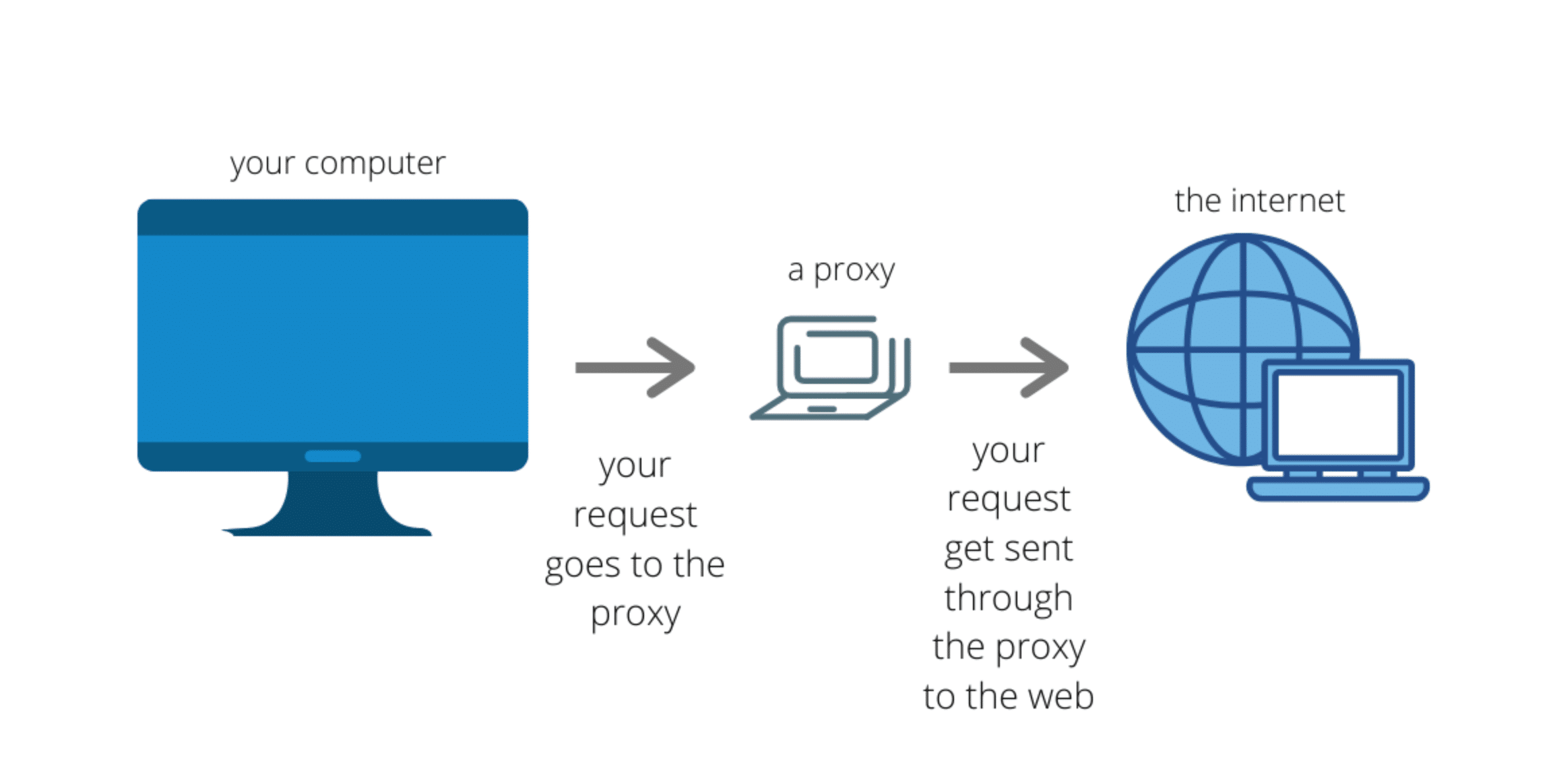
A proxy server is a computer that acts like a middleman between your device and YouTube. When you use a proxy, it sends your requests to YouTube for you. To YouTube, it looks like the proxy is asking for the video — not your real computer. This can let you unblock YouTube when a school or simple network block stops you.
Pros and Cons of Using Proxies
Proxies can be easy and fast, but they have limits. A good proxy might quickly let you watch videos on YouTube unblocked. Free proxies, like CroxyProxy, are simple — you just go to the proxy website and enter the YouTube link. Even Reddit users report CroxyProxy is simple and works fast to see blocked sites.
However, free proxies may slow your video stream or show ads. They may also be less secure, and some may track your activity. Always choose a reliable proxy service with good reviews and privacy policies.
How to Use a Proxy to Unblock YouTube
- Open your browser and go to a proxy website like CroxyProxy.
- Enter the YouTube URL you want to watch.
- Wait for the proxy to load the page and play the video.
This can be a quick way to get YouTube unblocked without extra software.
Browser Extensions and Add‑ons
Recommended Extensions for Unblocking YouTube
Another way to unblock YouTube is through browser extensions. These are small tools you install in your browser. Some popular ones like Hola, ZenMate, and Browsec help reroute your traffic so YouTube appears unblocked.
These tools work well when you are on a school or workplace network that blocks the YouTube site itself. They let you access YouTube through the extension’s proxy system.
Installation and Usage Instructions
- Open your browser’s extension store (Chrome Web Store, Firefox Add‑ons).
- Search for a “YouTube unblocker” or one of the extensions above.
- Click “Add to Browser” and install it.
- Turn the extension on and choose a server or location.
- Visit YouTube — now it should show up unblocked.
Always check extension privacy and reviews before installing. Some extensions may collect data or serve ads, so choose ones with a good reputation and clear privacy policies.
Utilizing the Tor Browser
Overview of the Tor Browser
The Tor Browser is a special web browser built for privacy and censorship bypass. It sends your traffic through many volunteer‑run servers around the world. This hides your real location and can often allow you to unblock YouTube when other tools fail.
Tor focuses on anonymity. It is used by people in strict countries where video sites are blocked. It makes your traffic look very different, so YouTube may think you are in a place where it is allowed.
How to Access YouTube Anonymously with Tor
- Visit the official Tor website and download the Tor Browser.
- Install and open it on your device.
- Type “youtube.com” in the Tor Browser’s address bar.
- Wait — you should now see YouTube unblocked and you can watch videos.
Note: Tor can be slower than a normal browser because it routes traffic through many servers. Videos may buffer or load slowly, especially in high quality.
Alternative Methods to Access YouTube
Using Google Translate
Google Translate can sometimes help you unblock YouTube without extensions or proxies. You type a blocked YouTube link into Google Translate and set the source language to another language (like Spanish) with the output to English. This trick sometimes lets the link load inside the translation frame. However, it may not work for all videos, and the quality can be lower than normal.
Mobile Hotspots and Other Creative Solutions
If a Wi‑Fi network blocks YouTube, try using your phone’s mobile data as a hotspot. When you connect your laptop or tablet to your phone’s hotspot, YouTube may be unblocked because your data bypasses the school or workplace network. This simple method does not require tools or software.
Other creative solutions include using alternative front‑ends for YouTube or mirror sites that host unblocked content copies. These are less common but can work if typical methods fail.
Safety and Legality of Unblocking YouTube
Trying to unblock YouTube can help you watch videos that your network or region blocks. But it’s not just about whether it works. You should also think about safety and law. Some tools are safe. Others can put your data or device at risk. Let’s look at these concerns so you make smart choices when accessing YouTube unblocked content.
Assessing the Risks of Unblocking Methods
Data Privacy Concerns
When you use tools like proxies, browser extensions, or Tor to unblock YouTube, you send your internet traffic through another service. Some of these services log what you do online. They may store your IP address, pages you visit, or even login data. Free proxies or unknown extensions are the most risky. They might sell this information to other companies or show harmful ads.
For example, if you use a free proxy to watch a video and enter your YouTube login, a bad proxy could capture that login and later compromise your account. That is why experts recommend using well‑known, trusted tools with strong privacy policies.
Malware Risks with Free Proxies and Extensions
Free proxies and browser add-ons can seem tempting. They promise to let you unblock YouTube at no cost. But many of them come with hidden dangers. Some may install malware, spyware, or unwanted ads on your device. This can slow your computer, steal passwords, or track your activity online.
For instance, security blogs often warn that many free proxy servers are unstable and run by unknown operators. They may be unreliable or even harmful. That is why it is important to pick services with verified reviews and clear privacy rules.
Understanding the Legal Implications
Legal Status of Proxies and Extensions in Different Regions
The law around tools to unblock YouTube varies from place to place. In many countries such as the U.S., Canada, and most of Europe, using secure proxies or trusted browser extensions is legal. People use these tools for privacy, security, or accessing blocked content at schools or workplaces.
However, some countries have strict rules. In China, Russia, Iran, and a few others, unapproved proxies or similar tools may be illegal. Using them to bypass network restrictions could result in fines or other penalties.
Importance of Compliance with Local Laws
It’s important to follow local laws and service rules. YouTube’s terms of service generally say you shouldn’t bypass geographic limits. If you use a proxy or extension to watch YouTube unblocked content that is region‑restricted, you may break these rules. This could lead to YouTube limiting your account or access.
For example, if you travel to a country with strong internet restrictions, using a proxy or other tools to access YouTube might violate local regulations. Knowing and respecting these rules helps you avoid legal trouble.
Overall, trying to unblock YouTube can be useful, but not without risk. Always protect your privacy, use trusted services, and know the rules in your region. In the next section, we will explore tips and best practices to safely access YouTube unblocked videos without compromising security.
Common Problems When Unblocking YouTube
Proxy Server Errors
A frequent issue is connection errors. Proxies may fail if the server is down, overloaded, or blocked. Free proxies often change IP addresses, which can trigger messages like “Cannot connect” or “Proxy blocked.”
To fix this, try a different proxy server, preferably one in a nearby country. Check your browser settings and ensure your internet connection is stable. Switching from Wi‑Fi to mobile data can also help.
Impact on Internet Speed
Even when YouTube is unblocked, videos may load slowly. Extra steps like proxies can reduce speed, especially if servers are far or crowded. Choosing a nearby server or using mobile data often improves playback.
Device Compatibility
Some methods work on laptops but not phones. Browser extensions may not install on mobile browsers. Web proxies usually work across devices. If a device blocks changes, using a personal smartphone or mobile hotspot can solve the problem. Keeping browsers updated also fixes many playback issues.
In some cases, simple tools like proxies or extensions are not enough. Networks can still detect your browser and block access. This is where antidetect browsers can help. Tools like DICloak create separate browser profiles with clean fingerprints. This makes your activity look more natural and less restricted. For many users, this approach makes it easier to unblock YouTube and keep YouTube unblocked even on strict school or work networks.
Why Choose DICloak Antidetect Browsers?
⚡The DICloak Antidetect Browser has become a global favorite for its unparalleled ability to efficiently and securely manage multiple accounts. Designed for professionals in social media management, and more, DICloak offers powerful features like RPA automation, bulk operations, and a synchronizer. Additionally, it allows you to customize fingerprints and integrate proxies for each profile, ensuring top-level security and operational efficiency. It’s the ultimate tool for seamless, secure, and scalable operations.

What Makes DICloak Stand Out?
✅ Manage 1,000+ Accounts on One Device: Stop wasting money on extra hardware! DICloak allows you to manage multiple accounts on a single device, cutting costs and boosting efficiency.
✅ Guaranteed Account Safety, No Ban Risks: Every account gets its own isolated browser profile with custom fingerprints and IPs, drastically reducing the risk of bans. Your accounts, your control!
✅ Flexible Proxy Configuration for Maximum Performance: Seamlessly integrate with all major proxy protocols (HTTP/HTTPS, SOCKS5) and manage your proxy pool with bulk operations. No more struggling with IP management—DICloak has you covered.
✅ Streamlined Team Collaboration for Better Results: Easily manage your team with advanced tools like profile sharing, permission settings, data isolation, and operation logs. Your team works smarter, not harder.
✅ Automate the Grind with RPA: DICloak's built-in RPA saves you hours of manual work. Automate repetitive tasks, streamline workflows, and focus on what really matters—growing your business.
✅ Powerful Bulk Tools to Scale Your Operations: Create, import, and launch multiple browser profiles in one click. DICloak makes scaling your business as easy as it gets.
✅ Compatible with All Major Operating Systems: Based on the Chrome core, DICloak supports simulating Windows, Mac, iOS, Android, and Linux operating systems. No matter what platform you need, DICloak has you covered.
🔗 Ready to Get Started?
Visit the DICloak website to explore more details and choose the plan that’s right for you. Start for free today and experience the power of secure, efficient, and scalable multi-account management!
Conclusion
There are several ways to unblock YouTube, from web proxies and browser extensions to the Tor browser or simply switching networks. Each method has its own strengths and works best in different situations. For example, a proxy can quickly load a blocked video, while Tor helps when stricter filters are in place. Choosing the right method depends on your device, network, and need for privacy. By picking the approach that fits your situation, you can watch YouTube unblocked safely and smoothly.
FAQ
1.Is it safe to unblock YouTube at school or work?
It can be safe to unblock YouTube if you use trusted tools and do not share personal information. Always check your school or workplace rules before trying.
2.Why does YouTube stay blocked even after I try to unblock YouTube?
Some networks use strong filters. In these cases, simple proxies may fail. Trying a different method or network often helps unblock YouTube.
3.Can I unblock YouTube on my phone or tablet?
Yes, you can unblock YouTube on mobile devices. Web proxies and mobile data often work better than browser extensions on phones.
4.Will unblocking YouTube make my internet slower?
It can. When you unblock YouTube, traffic may pass through extra servers, which can slow video loading. Choosing a nearby server helps.
5.Is it legal to unblock YouTube in every country?
No. Laws vary by region. Before you unblock YouTube, make sure the method you use follows local laws and YouTube’s rules.
 Web Proxy Tools
 Free Tools
 Cookie Plugin
 UA Generator
 MAC Address Generator
 IP Generator
 IP Address List
 2FA Code Generator
 World Clock
 Anonymous Check
 WebRTC Leak Test
 UUID Generator
 Free Web Proxy Site
 Proxy Checker
 FB Ad Checker
 AI Web Scraping
 Free SMM Tools
 Twitter Shadowban Checker
 Instagram Name Checker
 UTM Generator
 Username Generator
 AI Hashtag Generator
 LinkedIn Headline Generator
 Social Media Image Resizer