Most people trying to start with AI tools hit the same wall: it’s easy to ask Claude for answers, but turning that into real income is a different story. You might have tried prompt engineering or writing content, only to find that generic outputs don’t stand out, clients or platforms expect more than just copy-paste results.
Even using clever Claude monetization strategies, there’s always the risk of getting stuck in low-paying gig work or having your accounts flagged for spammy behavior. Automation sounds tempting, but if your workflow isn’t set up right, you end up wasting time chasing tasks that never add up to decent pay.
Here’s the shift: people actually making money with Claude in 2026 are not doing it by acting like a content farm. They build small but repeatable workflows that solve a real need, lead scraping, quick-turn research, or bulk data cleaning. The trick isn’t just “how to make money with Claude”, it’s knowing which tasks scale, what clients actually need, and how to avoid platform friction that kills your margins.
If you want a practical path, not just theory, start by mapping the highest-yield Claude workflows. The next section breaks these down step by step.
What Actually Works for Making Money with Claude in 2026?
People who actually profit with Claude in 2026 aren't chasing viral app launches or running endless prompt spam, they're selling clear, repeatable services that clients pay for month after month. The hype around "Claude side hustles" misses that most income comes from serving real business needs, not gaming the system for one-off wins.
Service-Based Monetization: Why Selling Solutions Beats Building Apps
The fastest path to steady income is offering Claude-powered services, not launching your own app. Why? Apps take months to gain traction and rarely pay off unless you already have an audience or niche. Service workflows, by contrast, pay from day one if you solve a real pain point.
- Lead scraping for agencies (pulling B2B leads, summarizing websites, qualifying contacts)
- Bulk data cleanup for marketing teams (deduplication, categorizing, fixing spreadsheets)
- Custom research briefs (market, competitor, or product research on demand)
The harsh reality: 90% of "build your own Claude tool" projects stall out before they earn $500, while service sellers can close their first paying client within a week.
Freelance, Agency, and Team Scenarios: Who Actually Pays for Claude Skills
Most buyers aren’t looking for a “Claude expert”, they’re searching for someone who can deliver results faster and cheaper than a manual process. A freelancer might pitch LinkedIn profile enrichment: scraping candidate lists, running them through Claude for summary notes, and handing back a spreadsheet with next steps. An agency could use Claude to batch-produce product descriptions, but the client only cares that descriptions are accurate and delivered on time, not that Claude is behind the scenes. For teams, Claude often plugs into internal tools, handling repetitive data prep or QA tasks. The upside: you can charge for outcomes, not just hours. The catch? If you oversell what Claude can do, or use it as a crutch for jobs that need human review, quality drops fast and clients notice. Failed deliveries happen when you automate beyond Claude’s real limits, like nuanced writing or research that needs judgment. The only way to avoid churn is to set clear boundaries up front and treat Claude as an assistant, not a replacement for all skilled labor.
If you’re mapping out your next move, don’t get distracted by one-off app ideas, list out three Claude workflows you could offer as a service, then talk to real clients about what they'd pay for. The next step is understanding what you need to prepare before you start pitching those services.
What to Prepare Before You Start Monetizing Claude

Jumping into paid Claude workflows without the right setup is a fast way to waste time or burn an account. Before you look for clients or try to scale, nail down these basics, otherwise even the smartest Claude AI earning methods won’t pay off.
Account Setup and Platform Selection: Where to Start
Pick the platform that matches what you want to sell, Upwork for freelance gigs, Product Hunt for SaaS launches, or direct outreach if you’re building an agency. Don’t just reuse your personal accounts. Make a separate work profile on every platform you plan to use. This isn’t just about keeping things tidy; most gig and SaaS sites flag accounts that mix personal and business activity, and you rarely get a second shot if banned.
Skill Assessment and Workflow Planning
- List out the Claude-powered tasks you can actually deliver (not just what you’ve read about).
- Map a sample project: what steps, how long, what outputs, where you’d get stuck.
- Check if there’s real demand, scan freelance job posts or SaaS reviews for your target workflow.
Security and Compliance Basics
Protecting your accounts and client data matters more than most people think. If you skip this, you risk losing access, getting paid late, or leaking client information. Here’s a quick checklist before you start:
- Use unique passwords and two-factor authentication for every work account.
- Read each platform’s rules, know the spam, scraping, and automation limits before you act.
- Never store client data in shared folders or personal cloud drives without permission.
Most mistakes in the early days of Claude monetization come from treating these steps as optional. If you skip platform setup or ignore security, you don’t just lose money, you often get locked out completely, and your reputation takes a hit.
Ready with a clean setup and a real workflow plan, you’ll move faster in the next step: actually turning Claude skills into income.
How to Turn Claude Skills into Income: Step-by-Step Workflow

The fastest way to move from “experimenting” to getting paid with Claude is to treat your workflow like a real service, not a side hustle. This means picking a problem people will pay for, wrapping it in a format clients understand, and delivering results that make them come back. Here’s how to go from skills to steady income without getting stuck in the endless cycle of gig work.
Identifying Client Needs and Matching Claude Capabilities
- Scan Upwork, Fiverr, and LinkedIn job posts for pain points you can solve, skip anything that looks like mass content spam or pays less than $20 per hour.
- List what Claude is actually good at: bulk data cleaning, rapid research, quick-turn rewriting, lead extraction, avoid tasks where the model struggles with accuracy or domain expertise.
- Reach out to real businesses or freelancers, not just “AI” buyers, ask them which tasks waste their time every week. If no one pays for this work already, move on.
- Test Claude on a small sample. If it can’t produce results without heavy manual cleanup, the workflow isn’t ready for paid work.
The easiest way to waste weeks is building a service nobody needs, start with real demand, not tech demos.
Packaging and Pricing Your Claude-Powered Service
- Define your deliverable: one-pager report, cleaned CSV, batch of rewritten posts, clients need to see what they’re buying.
- Choose a pricing model that matches project size. One-off tasks (like a single lead list) work best as fixed price. Ongoing needs (weekly research summaries, monthly cleanup) fit subscription or retainer pricing.
- Benchmark against real listings. If top sellers ask $50 for a task, don’t try $200 unless you can show a clear difference.
- Set limits for scope, state “up to 100 entries per batch” or “two rounds of edits included”. This avoids scope creep and missed deadlines.
| Service Type |
Typical Price |
Recurring? |
| Lead scraping |
$30–$100 per job |
Yes, weekly |
| Data cleaning |
$40–$150 per file |
Yes, monthly |
| Content rewriting |
$10–$50 per batch |
No (one-off) |
Table: Example Claude-powered service pricing. Source: Upwork/Fiverr listings, May 2026
Delivering Results and Building Repeat Income
- Use a simple checklist to track: input received, Claude output, manual review, delivery sent, feedback logged.
- Overdeliver on round one, fix formatting, catch obvious errors, and include a “next steps” suggestion. That’s what turns a one-time client into a monthly retainer.
- If a client takes more than a week to pay or keeps changing the brief, cut them, chasing late payments or scope drift kills your hourly rate fast.
- Offer easy reorders. Keep templates, prompt libraries, and last month’s files ready so repeat jobs take half the time.
A clear workflow and strict boundary on what you deliver will save you from nightmare clients and burnout. Next: see the most common mistakes that wipe out your profit margins, and how to avoid them.
Common Mistakes That Cost You Money When Using Claude

Small mistakes in your Claude workflows drain profit fast. If you want to avoid wasted effort, focus on what actually blocks results, not just what sounds smart on paper.
Overpromising Results or Misunderstanding Claude's Limits
Clients get frustrated when you claim Claude can do things it simply can’t, like 100% accurate research or bulk content with zero errors. Set clear boundaries. When you explain up front where Claude works and where it doesn’t, you avoid refunds, bad reviews, and scope creep.
Workflow Inefficiencies and Missed Automation Opportunities
Manual steps slow you down and eat into pay, missing easy automation kills your hourly rate.
- If you’re copying and pasting between apps, you’ll lose hours every week and probably miss deadlines.
- Replace repeated manual tasks with small scripts or batch prompts, even if you’re not a coder. This single move often doubles your throughput without extra cost.
| Task Type |
Manual Workflow |
Automated Workflow |
| Lead extraction |
Copy-paste emails one by one |
Use a Claude batch prompt |
| Data cleanup |
Edit rows in Excel manually |
Scripted CSV processing |
Account Risks: Losing Access, Getting Banned, or Data Leaks
Reusing the same Claude account for too many clients, or sharing login details, risks lockouts and bans. One careless file upload can leak sensitive client data. Use unique logins for each project and keep account credentials private, if you skip this, you may lose both your earnings and your reputation.
How Teams Can Manage Multiple Claude-Powered Accounts More Safely with DICloak
Once you start earning as a team, the solo mistakes from earlier get replaced by new risks, profiles scattered across devices, inconsistent fingerprints, or team members using the wrong login at the wrong time. Not every reader will need multi-account workflows, but if your Claude-powered income setup relies on joint access or rotating members, running all accounts from one laptop quickly stops working. The real challenge is keeping team operations both secure and efficient, so you don’t lose revenue to access mistakes or unexpected lockouts. When teams need to share platform accounts and control who can do what, DICloak’s browser profile and permission features handle the operational layer, without touching the AI output or platform-native objects.
Unified IP and Fingerprint for Account Sharing
Teams who share Claude-powered platform accounts face a simple but high-stakes workflow problem: if each user logs in from their own device, the account history fills up with mismatched fingerprints and IPs. This is where using a shared DICloak browser profile with a configured fingerprint and user-provided proxy makes a difference. The admin sets up the profile once, configures the fingerprint and proxy (not provided by DICloak), and shares it with authorized members. Every member who opens that profile gets the same browser profile and network route, so you avoid the “why is the account suddenly logging in from five device types across three countries?” problem. This setup does not guarantee that a platform will treat all logins as one person, and it won’t override the platform’s own risk rules, but it solves the team’s side of keeping the environment consistent. The scope here is limited: DICloak covers only the browser profile and proxy settings. You still need to pick the right proxy and coordinate use according to platform terms.
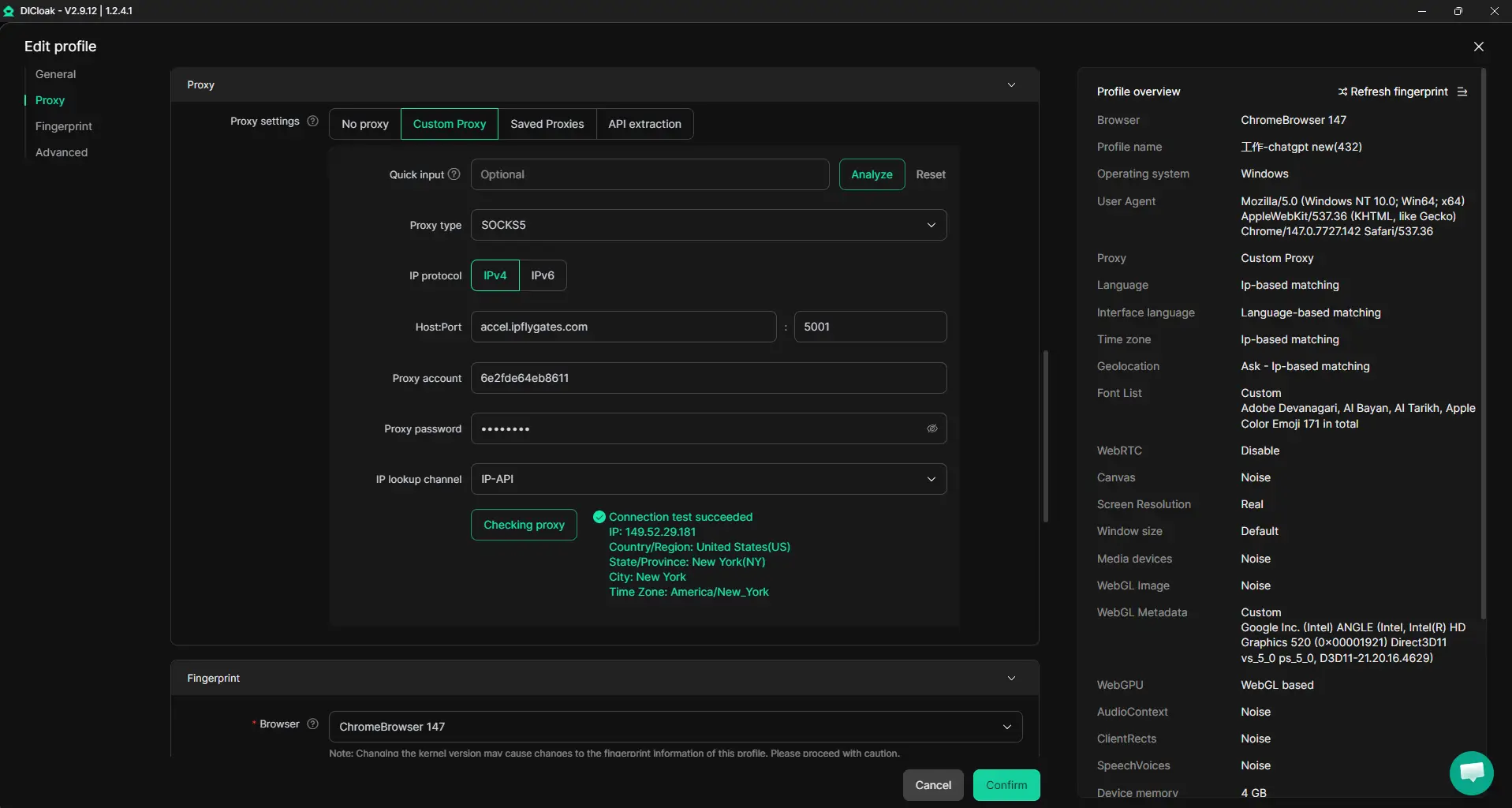
Team Collaboration and Permissions
Running multiple income accounts as a team isn’t just about sharing logins, it’s about making sure the right people have the right access, and nothing more. In DICloak, administrators set up member groups, assign permissions for each group, and control which profile groups each member can reach. For example, the admin can restrict access so that only the research team gets into the data-cleaning accounts, while the outreach group sees a separate set. Permissions can be set to the bare minimum: some members may only be able to view and open assigned browser profiles, with no edit or export options. This supports clear separation between roles and limits accidental changes that can break a shared workflow. Permissions in DICloak only affect what members can do in the workspace, they don’t replace or change any permission inside connected platforms. The control stays local, at the browser-profile layer, helping teams avoid internal slip-ups as they scale up their Claude-powered projects.

When you have these controls in place, scaling to larger workflows or more accounts becomes less about scrambling to fix mistakes and more about planning for growth. The next section covers how to handle bulk operations once the basics are stable.
How to Scale Your Claude-Powered Income: When Bulk Operations and Automation Matter
Scaling up Claude-powered income only pays off when your workflow can handle bulk actions and automation without breaking down or getting flagged. The real win comes from knowing which tasks multiply earnings, and which just multiply headaches.
Bulk Account Management: Pros, Cons, and Workflow Tips
- Bulk operations make sense when you handle repeatable tasks, like scraping leads, batch research, or mass data cleanup.
- Scaling too fast leads to quality drops and more risk of account bans.
- Always check if your bulk workflow can survive platform limits; a single missed flag can freeze all your revenue streams.
Automation Tools: Where RPA and Synchronizers Save Time
Robotic process automation (RPA) and synchronizers help people automate Claude AI earning methods, like running scheduled prompts or scraping data across dozens of accounts. The payoff comes when automation cuts manual work without crossing compliance lines, if your script triggers platform warnings or mismatches, you waste hours fixing lockouts instead of earning. Even with a tight setup, skipped error handling is the fastest way to lose money and momentum.
When Monetizing Claude Isn't the Right Fit: Signs to Watch For
Some people hit a wall trying to make Claude profitable, usually because their skills or market don’t match what Claude does well.
Skill, Market, and Workflow Misalignment
Relying on Claude for income when your actual work doesn’t fit its strengths often leads to wasted effort and frustration.
- You may spend hours automating tasks Claude can’t do well, ending up with low pay or unsatisfied clients.
- The safer move: compare your workflow against what Claude’s models are truly efficient at, if your main service is outside that range, look for other Claude AI earning methods or pick a tool better matched to your field.
Frequently Asked Questions About making money with Claude
Can I make money with Claude if I'm not a developer?
Yes, you can earn money with Claude even if you don’t code. Many people offer services like content writing, research, or virtual assistance using Claude’s AI. You can use Claude to speed up tasks for clients or create helpful tools. No coding is required for most service-based workflows.
What platforms are best for selling Claude-powered services?
Popular options include Upwork, Fiverr, and Freelancer for finding clients who want AI-driven services. Some people start agencies or offer services directly through their own websites. Reaching out to local businesses or using LinkedIn can also help you land clients needing Claude-powered solutions.
How do I avoid account bans when managing multiple Claude accounts?
Keep each Claude account in a separate browser profile or use browser containers to avoid linking them. Make sure your devices and browser “fingerprints” look unique for each account. Never share passwords or mix permissions between accounts. Follow platform guidelines to reduce risk of bans.
Is it legal to use Claude for client work and monetization?
Usually, it’s legal to use Claude for client projects as long as you follow the platform’s terms and your local laws. Always check the Terms of Service and avoid activities like spam or copyright violations. When in doubt, reach out to legal or compliance experts for advice.
How much can I realistically earn with Claude in 2026?
Earnings depend on your skills, the services you offer, and client demand. Simple tasks might bring in $10–$30 per project, while complex workflows pay more. Most people using Claude AI earning methods treat it as a side income, but some build full-time businesses around it. Avoid expecting quick riches.
Now is the time to experiment with your preferred approach, whether that's automating tasks, building AI-powered services, or monetizing your own creative ideas. Take the next step by leveraging accessible tools to turn your concepts into real earnings. Try DICloak For Free
 Web Proxy Tools
 Free Tools
 Cookie Plugin
 UA Generator
 MAC Address Generator
 IP Generator
 IP Address List
 2FA Code Generator
 World Clock
 Anonymous Check
 WebRTC Leak Test
 UUID Generator
 Free Web Proxy Site
 Proxy Checker
 FB Ad Checker
 AI Web Scraping
 Free SMM Tools
 Twitter Shadowban Checker
 Instagram Name Checker
 UTM Generator
 Username Generator
 AI Hashtag Generator
 LinkedIn Headline Generator
 Social Media Image Resizer