TikTok is one of the most popular apps in the world. Millions of people use it every day to watch, create, and share videos. Sometimes, one account is not enough. You might want a second account to try new content, keep your personal and business videos separate, or reach a different group of viewers. Learning how to make a second TikTok account can help you manage multiple profiles easily and grow your presence on the platform.
Understanding Why Create a Second TikTok Account
Many people want to know how to make a second TikTok account. There are real reasons for this. Some people have a personal TikTok account. They post funny or daily life videos there. But they also want a separate space for business or niche topics. For example, a person might have one account for dance videos and another account just for art tutorials. This helps them reach two different groups of viewers clearly and without mixing topics.
A second TikTok account can also help with privacy. A user might want to explore new trends or ideas without mixing those videos with their main profile. Some creators use one account for serious content and another for fun or experimental posts. This way, they learn what works best before posting on their main account.
Step‑by‑Step Instructions for Creating a Second TikTok Account
Now that you understand why someone might want to know how to make a second TikTok account, let’s walk through the real steps. In this section, we will explain how to start from opening the app to finishing the new account setup.
Opening the TikTok App
First, open the TikTok app on your phone or tablet. If you are already logged in with your main account, don’t worry — you don’t need to log out. Just go to your profile by tapping the “Me” icon at the bottom right. This page shows your videos, likes, and settings. On this page, you will find the controls to add another account.
Adding a New Account
Once you are on your profile page, look for the three lines or menu icon at the top right. Tap it to open Settings & privacy. Scroll down until you see “Switch account” or “Add account.” Tap “Add account.” This is your first real step toward learning how to make a second TikTok account. After tapping it, TikTok will show choices to sign up or log in.
Some users are surprised at how easy this part is. For example, a small business owner named Mia wanted two profiles — one for personal dance videos and one for her pottery shop. She tapped “Add account”, and soon she was on the second step of creating her new TikTok profile.
Choosing a Sign‑Up Method
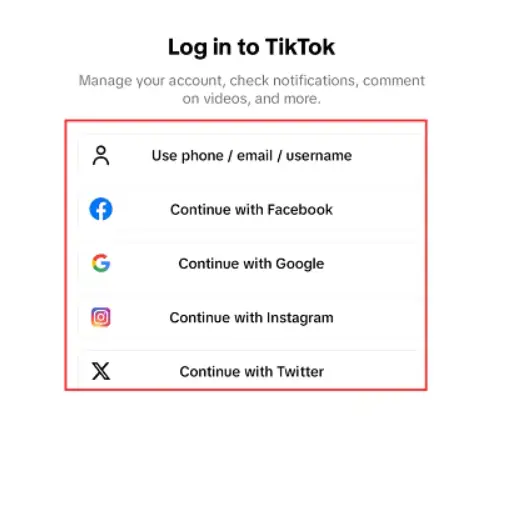
Now TikTok will ask how you want to sign up for the second account. There are a few options:
Using a Unique Phone Number
You can enter a phone number that is not already linked to any TikTok account. TikTok will send a text message with a code. Type that code to verify your new account. This is a very common method because most people have extra phone numbers or use a second SIM.
Using a Different Email Address
You can also use a different email address that is not tied to your first TikTok account. After you enter the email, TikTok will send a confirmation email. Click the link or enter the code from the email to continue. Many users do this because it is free and easy to set up a second email just for social media.
Signing Up Through Social Media
TikTok may let you register using another service like Facebook, Google, or Apple. If you pick one of these, make sure the social media account you choose is not already connected to your main TikTok. For example, a young creator named Jay used his Apple ID to register his second account for gaming videos, while his personal account used his phone number. This kept the two TikTok profiles separate.
Each method helps you learn exactly how to make a second TikTok account in a way that matches your needs.
Completing the Sign‑Up Process
After you choose your sign‑up method, follow the simple instructions on the screen. TikTok will ask you to:
- Pick a username that is not already taken
- Create a password
- Add a profile photo
- Enter basic details like birthday
Take a moment to choose a name that fits your content or brand. For example, if you are making travel tips, a name like “TravelWithSara” might work well. Once all fields are complete, tap “Sign Up” or “Done.” Your second TikTok account is now ready.
You will see your new profile page just like your first account. Now you can post videos, explore new audiences, and switch between accounts whenever you want without logging out.
By following these steps — opening TikTok, adding a new account, selecting a sign‑up method, and completing the setup — you have learned the real, practical way of how to make a second TikTok account that works for your purpose.
The Importance of Creating Multiple TikTok Accounts
After you learn how to make a second TikTok account, it’s important to understand why having multiple accounts can be useful. Multiple accounts let you separate different types of content and audiences. For example, a creator might post comedy on one account and tutorials on another. This keeps followers focused and prevents confusion.
Having more than one account also allows you to test new ideas safely. You can experiment with trends, video styles, or topics on a secondary account without affecting your main profile. This reduces risk and helps you find what content performs best.
Finally, multiple accounts improve branding. Each account can have its own theme, username, and bio, making it easier for viewers to understand your content. Understanding the value of multiple accounts makes managing them more effective, which naturally leads into learning how to switch between accounts and use TikTok’s management features in the next section.

Managing Multiple TikTok Accounts
Now that you know how to make a second TikTok account and understand why multiple accounts are important, the next step is learning how to manage them. TikTok makes it easy to use more than one account in the app. In this section, we will explain how to switch between accounts and what built‑in features TikTok offers to help you manage your profiles smoothly.
Switching Between Accounts
Once you have two or more TikTok profiles, you can switch between them without logging out each time. This makes it quick to post or check notifications on the right account. Here’s how you do it:
At the bottom of the screen, tap the profile icon. On your profile page, tap your username at the top. You will see a list of your TikTok accounts. Tap the account name you want to open, and TikTok will switch to it immediately. This is the easiest way to move from one profile to another. Most users find this helpful when they post content for different audiences. For example, a travel blogger named Alex keeps one account for destination videos and another for gear reviews. By tapping the username at the top, Alex can quickly switch between the two and post without mistakes.
If you ever don’t see the option to switch or add accounts, make sure your TikTok app is updated to the latest version. Sometimes older versions do not show the switch menu clearly.
Utilizing TikTok’s Built‑in Features
TikTok provides simple account management features to help you handle multiple profiles in one app. These features let you stay organized and reduce mistakes when posting or engaging with followers.
- Easy Account List – When you tap your username, all your added accounts appear in one place. You do not need to enter your password each time, which saves time.
- Profile Photos and Names – Each account shows its own profile picture and username. This makes it easier to see which account is active before you post a video. Many creators choose very clear pictures so they don’t accidentally post to the wrong profile.
- Notification Indicators – On your account list, TikTok shows small dots or numbers next to each profile. These numbers tell you how many new notifications that account has. This feature helps creators manage interactions across their accounts without missing comments or messages.
- Drafts and Saved Content – TikTok keeps drafts separately for each account. If you start a video on one profile and switch to another, your draft stays safe. Later you can return and finish it.
Managing multiple accounts may seem tricky at first, but once you understand the switch options and the built‑in features, it becomes second nature. These tools are part of how to make a second TikTok account practical for real use — not just creating it, but running it well every day.
If you only manage one or two profiles, TikTok’s built‑in tools are usually enough. But things change when you have many accounts to handle at the same time. Switching back and forth becomes slow and tiring. More importantly, accounts logged in on the same device can be linked together. This makes them easier for the platform’s system to notice and review. In this situation, learning how to make a second TikTok account is no longer the hardest part. Safe and long‑term management becomes the real challenge. This is where an antidetect browser like DICloak becomes very useful. It helps separate account environments and reduces the risk of accounts being connected by platform algorithms.
⚡The DICloak Antidetect Browser has become a global favorite for its unparalleled ability to efficiently and securely manage multiple accounts. Designed for professionals in social media management, and more, DICloak offers powerful features like RPA automation, bulk operations, and a synchronizer. Additionally, it allows you to customize fingerprints and integrate proxies for each profile, ensuring top-level security and operational efficiency. It’s the ultimate tool for seamless, secure, and scalable operations.

What Makes DICloak Stand Out?
✅ Manage 1,000+ Accounts on One Device: Stop wasting money on extra hardware! DICloak allows you to manage multiple accounts on a single device, cutting costs and boosting efficiency.
✅ Guaranteed Account Safety, No Ban Risks: Every account gets its own isolated browser profile with custom fingerprints and IPs, drastically reducing the risk of bans. Your accounts, your control!
✅ Flexible Proxy Configuration for Maximum Performance: Seamlessly integrate with all major proxy protocols (HTTP/HTTPS, SOCKS5) and manage your proxy pool with bulk operations. No more struggling with IP management—DICloak has you covered.
✅ Streamlined Team Collaboration for Better Results: Easily manage your team with advanced tools like profile sharing, permission settings, data isolation, and operation logs. Your team works smarter, not harder.
✅ Automate the Grind with RPA: DICloak's built-in RPA saves you hours of manual work. Automate repetitive tasks, streamline workflows, and focus on what really matters—growing your business.
✅ Powerful Bulk Tools to Scale Your Operations: Create, import, and launch multiple browser profiles in one click. DICloak makes scaling your business as easy as it gets.
✅ Compatible with All Major Operating Systems: Based on the Chrome core, DICloak supports simulating Windows, Mac, iOS, Android, and Linux operating systems. No matter what platform you need, DICloak has you covered.
🔗 Ready to Get Started?
Visit the DICloak website to explore more details and choose the plan that’s right for you. Start for free today and experience the power of secure, efficient, and scalable multi-account management!
The Importance of Creating Multiple TikTok Accounts
Having multiple TikTok accounts is more than just convenience—it helps you grow strategically. Different accounts let you separate personal content from professional or niche content. For example, a fashion influencer might use one account for daily outfit posts and another for makeup tutorials. This keeps followers focused on what they are most interested in.
Multiple accounts also allow creators to test new content without affecting their main profile. You can try trends, experiment with video styles, or post different topics to see what works best. It reduces risk and keeps your main account safe from mistakes.
Additionally, managing multiple accounts helps with branding. Each profile can have a clear theme, unique username, and tailored bio, making it easier for viewers to understand your content and follow the right account. For anyone serious about growing on TikTok, knowing how to make a second TikTok account and why it matters is an important step for long-term success.
Safety and Compliance Considerations
Managing multiple accounts is not just about convenience. To keep your profiles safe, you need to follow some simple rules when learning how to make a second TikTok account.
Avoiding Account Bans
Always use a unique email or phone number for each account. Avoid posting the same content across multiple profiles. Duplicate content can trigger TikTok’s system and may lead to account restrictions.
Understanding TikTok's Community Guidelines
Follow TikTok’s rules. Do not post harmful, misleading, or copyrighted content. Respect other users and avoid spam. Staying within these guidelines keeps your accounts safe and ensures smooth operation.
Common Mistakes to Avoid
Don’t link all accounts on the same device without precautions. Avoid repeated usernames or profile info. Also, posting too fast or copying content can lead to bans. Careful management is key for anyone handling multiple accounts.
By following these steps, you can safely use multiple profiles and confidently manage how to make a second TikTok account without risking bans.
FAQs
Can You Have Multiple Accounts on the Same Device?
Yes, you can. TikTok allows multiple accounts on one device. Use the “Add Account” feature to switch without logging out. For many accounts, consider tools like DICloak to avoid linking issues.
Is There a Limit to How Many Accounts You Can Create?
TikTok does not set a strict number, but too many accounts on one device may raise flags. Each account should use a unique email or phone number to stay safe.
What to Do If You Encounter Issues?
If login or switching fails, update the app first. Clear cache or restart the device. Make sure each account uses its own contact info. These steps help solve common problems when managing multiple profiles.
By following these tips, you can confidently manage multiple profiles and understand how to make a second TikTok account safely and efficiently.
Conclusion
Creating and managing multiple TikTok accounts is simple if you follow the right steps. By learning how to make a second TikTok account, you can open the app, add a new account, choose a sign-up method, and complete the setup. Use TikTok’s built-in features to switch between accounts and keep them organized. Always use unique emails or phone numbers and follow community guidelines to avoid bans. Many creators, like those running one account for travel and another for cooking, find this approach helps them reach different audiences safely. Managing multiple accounts lets you share different content, experiment with ideas, and grow your presence on TikTok effectively.
 Web Proxy Tools
 Free Tools
 Cookie Plugin
 UA Generator
 MAC Address Generator
 IP Generator
 IP Address List
 2FA Code Generator
 World Clock
 Anonymous Check
 WebRTC Leak Test
 UUID Generator
 Free Web Proxy Site
 Proxy Checker
 FB Ad Checker
 AI Web Scraping
 Free SMM Tools
 Twitter Shadowban Checker
 Instagram Name Checker
 UTM Generator
 Username Generator
 AI Hashtag Generator
 LinkedIn Headline Generator
 Social Media Image Resizer