Many users want to Download Facebook Reels without watermark so the video remains clean.
Unlike some short-video platforms, Facebook Reels usually do not include heavy watermarks. When a downloader extracts the original video file, the result is typically watermark-free.
However, the content still belongs to the original creator. If you plan to repost the video, it is best to give credit or request permission.
Brief Overview of Facebook Reels and Their Popularity
Facebook Reels are short vertical videos designed for quick viewing and sharing. These videos usually last from a few seconds to about a minute and often include music, captions, and simple edits.
Creators use Reels to share tutorials, funny moments, product demonstrations, and marketing tips. Because short videos are highly engaging, Facebook promotes Reels heavily within the platform’s feed and recommendation system.
With billions of users worldwide, Reels have become one of the most important video formats on Facebook. Many users now spend a large portion of their time watching short videos.
If you want to Download Facebook Reels, the process is usually simple.
Quick Steps
- Open the Facebook Reel you want
- Tap Share → Copy Link
- Open a Facebook Reel downloader website
- Paste the link into the download box
- Click Download and save the video
Since Facebook does not provide a direct download option for most public Reels, users typically rely on external tools or screen recording.
Download Facebook Reels Using Online Tools
Online downloaders are the fastest way to Download Facebook Reels.
These tools run directly in a browser and require no installation.
Popular examples include:
- FDownloader
- SnapSave
- FDown.net
How It Works
- Copy the Reel link from Facebook
- Open the downloader website
- Paste the link into the download field
- Choose video quality
- Save the file
This method works on smartphones, tablets, and computers.
Download Facebook Reels With Desktop Software
Another option to Download Facebook Reels is desktop downloader software.
Programs such as 4K Video Downloader allow users to save videos from multiple platforms.
Features often include:
- HD downloads
- batch downloads
- file format conversion
Basic Steps
- Install the downloader software
- Copy the Reel link
- Paste the link into the software
- Choose video quality
- Save the video
This method is commonly used by creators and marketers studying video trends.
Download Facebook Reels With Screen Recording
If downloader tools do not work, users can still Download Facebook Reels using screen recording.
Most devices now include built-in recording tools.
Steps
- Open the Reel
- Start screen recording
- Play the video
- Stop recording and trim the clip
Although this method may require small edits, it works in almost any situation.
Download Facebook Reels on iPhone
Many users want to Download Facebook Reels directly to their iPhone.
Steps
- Copy the Reel link in the Facebook app
- Open Safari
- Visit a Reel downloader website
- Paste the link and download
The video will usually appear in the Files app or Photos library.
Download Facebook Reels on Android
Android users can easily Download Facebook Reels using browser tools or apps.
Methods
- online downloader websites
- video downloader apps
- screen recording
Downloaded videos typically appear in the Downloads folder or phone gallery.
Download Facebook Reels on PC or Mac
Users working on computers often prefer to Download Facebook Reels directly to their desktop.
Steps
- Open Facebook in your browser
- Copy the Reel link
- Visit a downloader website
- Paste the link
- Download the file
The video will appear in the browser Downloads folder.
Best Facebook Reels Downloader Tools (Top 6)
If you want to Download Facebook Reels quickly, using a reliable Facebook Reels downloader is usually the easiest method. These tools allow users to copy the Reel link from Facebook, paste it into a download box, and save the video directly to their device.
Most downloader websites work directly in a browser, so there is no need to install additional software. Below are some of the most commonly used tools for downloading Facebook Reels.
FDownloader
FDownloader is one of the most popular tools for users who want to Download Facebook Reels quickly. The website has a simple interface where users only need to paste the Reel link to generate download options. It supports multiple video qualities and works across different devices.
Pros
- Easy to use with a simple interface
- Supports HD video downloads
- Works on both mobile and desktop browsers
Cons
- Ads may appear on the page
- Occasionally slower during peak usage
SnapSave
SnapSave is a widely used Facebook Reels downloader known for fast processing speed and high-quality downloads. It supports HD video extraction and works well on both smartphones and computers.
Pros
- Fast download speed
- Supports high-resolution videos
- Compatible with most devices
Cons
- Some download options may redirect to ads
- Interface can feel cluttered for new users
FDown.net
FDown.net has been used for downloading Facebook videos for many years. It supports both standard Facebook videos and Reels, making it a versatile tool for users who frequently save content.
Pros
- Long-standing and widely trusted tool
- Simple step-by-step instructions
- Works across multiple browsers
Cons
- Limited advanced download options
- May not support some newly updated video formats immediately
SaveFrom.net
SaveFrom.net is a multi-platform downloader that supports several social media sites, including Facebook. Users can Download Facebook Reels by simply pasting the video link into the site.
Pros
- Supports multiple social media platforms
- Easy download process
- Multiple format options available
Cons
- Some regions may experience limited access
- Interface contains advertisements
Publer Downloader
Publer offers a clean and lightweight Facebook video downloader designed for quick downloads. The tool focuses on simplicity and allows users to download public Facebook videos and Reels directly from a browser.
Pros
- Clean and simple interface
- Quick download process
- Works without installing software
Cons
- Limited customization options
- Not designed for bulk downloads
FSave
FSave is often used by mobile users who want to Download Facebook Reels directly from their phone browser. The site is optimized for mobile viewing, making the download process straightforward.
Pros
- Mobile-friendly design
- Quick video extraction
- Simple paste-and-download workflow
Cons
- Fewer advanced settings
- Occasional pop-up ads
Facebook Reels Downloader Tools Comparison
| Tool |
Free |
HD Download |
Watermark |
Works On |
| FDownloader |
Yes |
Yes |
No |
Web |
| SnapSave |
Yes |
Yes |
No |
Web |
| FDown.net |
Yes |
Yes |
No |
Web |
| SaveFrom |
Yes |
Yes |
No |
Web |
| Publer |
Yes |
Limited |
No |
Web |
| FSave |
Yes |
Yes |
No |
Mobile |
These tools make it easy to Download Facebook Reels across different devices. Most users prefer browser-based downloaders because they work quickly without requiring software installation.
Why You Can't Download Facebook Reels
Sometimes users try to Download Facebook Reels but the downloader fails.
Private Reels
Videos shared privately or inside closed groups may not be accessible to downloader tools.
Facebook Platform Updates
Facebook regularly updates its video system, which may temporarily break downloader tools.
Incorrect Links
If the copied link is incomplete or incorrect, the downloader may not locate the video.
When this happens, switching tools or using screen recording usually solves the problem.
Download Facebook Reels Tips for Better Organization
If you frequently Download Facebook Reels, organizing them can save time.
Create Video Libraries
Organize videos into folders such as:
- marketing ideas
- tutorials
- inspiration
- entertainment
Save Source Links
Keeping the original link helps you revisit the creator’s profile.
Use Reliable Download Tools
Trusted tools reduce the risk of malware or broken downloads.
Download Facebook Reels for Social Media Research With DICloak
While it is important to Download Facebook Reels safely and respect creator rights, many users save Reels for legitimate purposes such as learning, inspiration, and market research.
For example, marketers and content creators often download successful Reels to study what makes short videos perform well. By reviewing viral clips, teams can analyze video hooks, editing styles, storytelling formats, and other elements that attract engagement. These saved videos often become a reference library when planning future content.
However, when research involves multiple accounts, industries, or clients, managing the workflow can become more complicated. Teams may need to monitor different niches, test ideas across accounts, and keep their research sessions organized.
This is where tools like DICloak can help streamline the process.
DICloak is an anti-detect browser that allows users to create isolated browser profiles, each running with its own fingerprint. This helps separate different social media sessions when managing multiple accounts.
Because DICloak can simulate Android web browser profiles, researchers can also view how Facebook Reels appear in mobile web layouts while studying trends.
For example, a marketing team might use DICloak as part of their workflow when researching and saving Facebook Reel ideas.
Example Workflow: Research and Save Facebook Reels Using DICloak
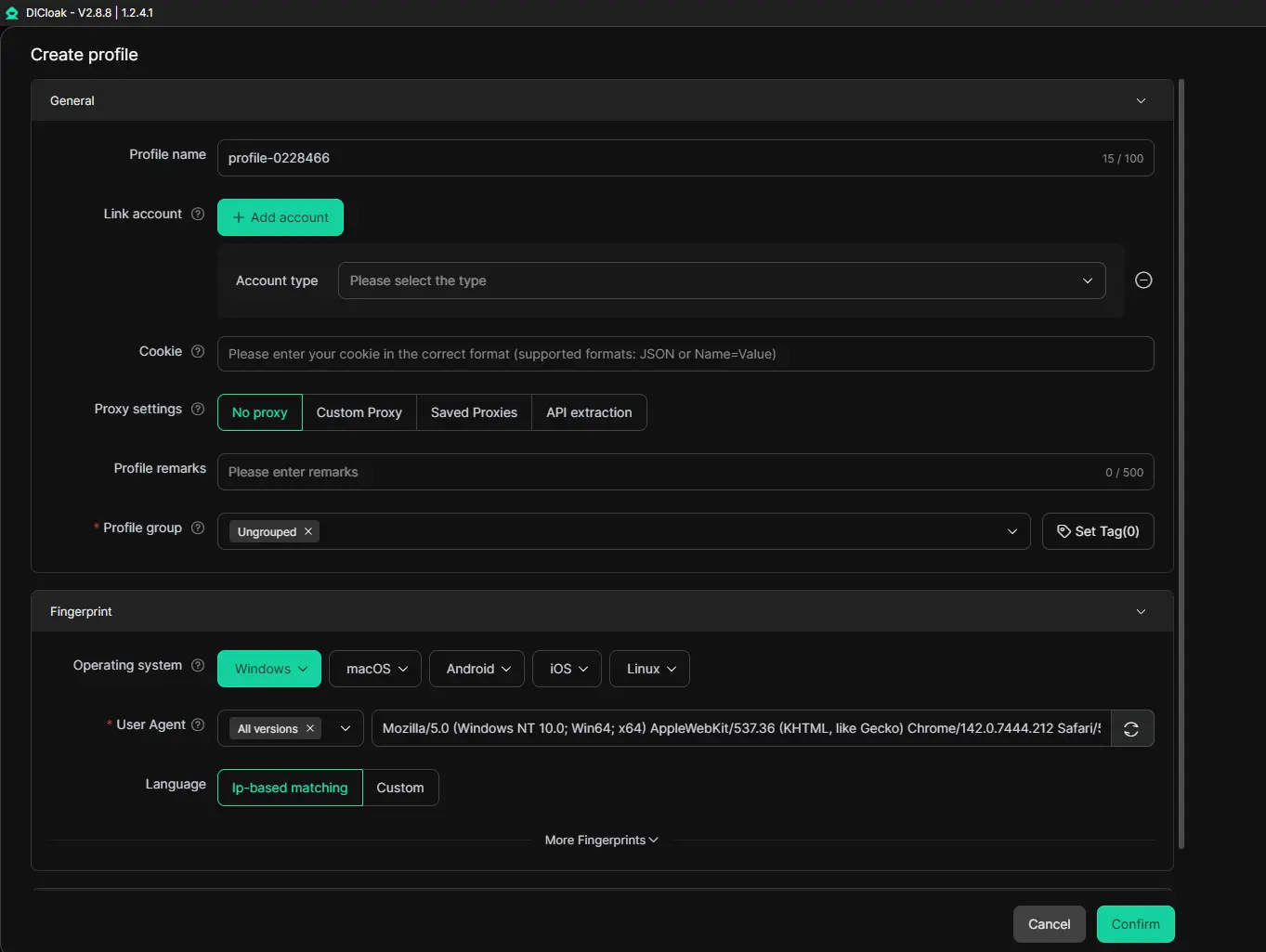
Step 1: Create Separate Browser Profiles
Start by creating different browser profiles inside DICloak. Each profile runs independently with its own browser fingerprint and session data. Teams often create separate profiles for different clients, projects, or market niches, making research easier to organize.
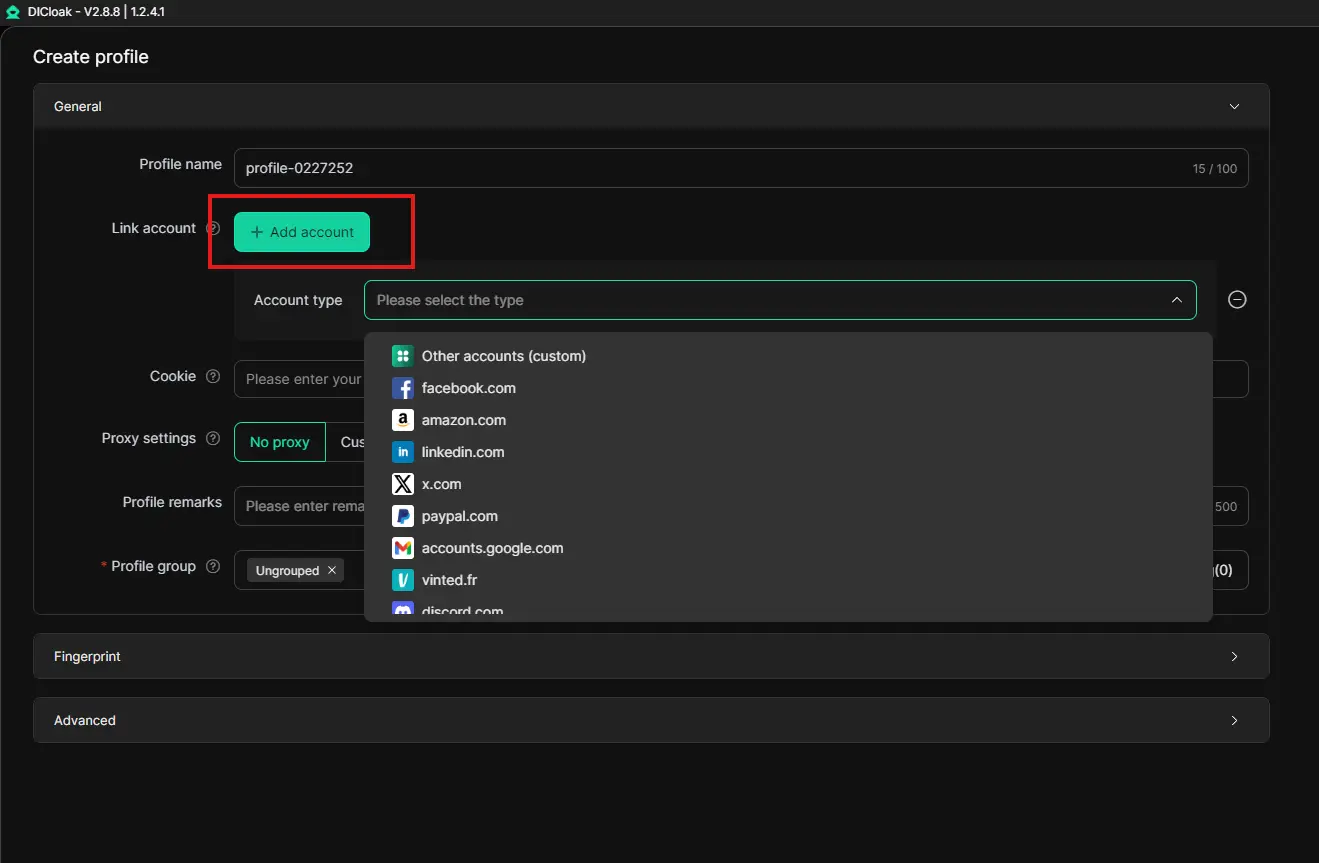
Step 2: Log Into Facebook Accounts in Each Profile
Next, log into the relevant Facebook account inside each profile. Because the profiles are isolated, every account operates in its own browsing session. This helps teams avoid mixing activities when managing multiple accounts.
Step 3: Explore Trending Reels
Once the accounts are ready, team members can browse Facebook to find trending Reels in their industry. For example, a social media manager might review Reels in niches such as e-commerce, fitness, or digital marketing to identify patterns in successful content.
During this step, marketers usually pay attention to:
- the opening hook in the first few seconds
- video editing style and pacing
- captions and hashtags used by creators
- storytelling formats that generate engagement
Step 4: Download Facebook Reels Efficiently With Multi-Window Synchronization
When useful examples appear, the team can Download Facebook Reels using the downloader tools mentioned earlier in this guide. What makes this process more efficient is DICloak’s Multi-Window Synchronizer.
Instead of switching between accounts one by one, teams can open multiple browser profiles and windows at the same time. The synchronizer allows actions such as opening pages, clicking buttons, or typing text to be mirrored across several profiles simultaneously from a master window.
For example, a marketer can open several Facebook feeds in different profile windows to monitor trending Reels in multiple niches. By using the synchronizer, they can quickly navigate through content across all windows without repeating the same actions manually.
When a promising Reel appears, the researcher can copy the video link and paste it into downloader tools in parallel across different windows. Because several profiles are open at the same time, teams can collect multiple Reel examples during a single research session instead of downloading them one by one.
This multi-window workflow helps teams:
- monitor trends across different accounts simultaneously
- collect multiple Reel examples faster
- build organized folders of video hooks, editing styles, and campaign ideas
Over time, this process allows teams to create a structured library of high-performing Facebook Reels that can inspire future content strategies.
Download Facebook Reels FAQ
Can You Download Facebook Reels Directly From Facebook?
In most cases, Facebook does not offer a built-in option to Download Facebook Reels created by other users. Creators may sometimes download their own Reels from the post menu, but public videos typically do not include a download button.
If you want to save someone else's Reel, you usually need to use an online Facebook Reels downloader website or screen recording to capture the video for offline viewing.
Is It Legal to Download Facebook Reels?
It is generally acceptable to Download Facebook Reels for personal use, such as learning from tutorials or saving helpful content for later viewing. However, the video still belongs to the original creator.
Reposting the video without permission or using it commercially may violate copyright rules. If you plan to share the content publicly, it is best to credit the creator or ask for permission first.
Why Do Facebook Reels Downloader Tools Sometimes Stop Working?
Sometimes users try to Download Facebook Reels, but the downloader tool cannot process the video link. This often happens when Facebook updates its video delivery system or when the Reel is shared privately.
If a downloader website stops working, you can try another tool or use screen recording as an alternative way to save the video.
Can You Download Facebook Reels Without Watermark?
Yes, many tools allow users to Download Facebook Reels without watermark. Facebook Reels typically do not include strong built-in watermarks, so downloader tools can often extract the original video file directly.
However, even if the downloaded video appears clean, the content still belongs to the original creator. Always give credit if you plan to share the video publicly.
Do Facebook Reels Download Tools Work on All Devices?
Most tools used to Download Facebook Reels work across different devices, including Android phones, iPhones, Windows PCs, and Mac computers. Browser-based downloader websites are especially flexible because they work on almost any device.
For marketers or researchers studying short-video trends, tools like DICloak can also help manage multiple accounts using separate browser profiles, making it easier to analyze Reels across different sessions without mixing activity.
Conclusion: Download Facebook Reels Efficiently and Turn Insights Into Action
Downloading Facebook Reels can be a simple and practical way to save useful videos for inspiration, offline viewing, or content research. In this guide, we explored several effective methods to Download Facebook Reels, including online downloader websites, desktop software, and screen recording. We also covered how to download Reels on different devices, choose reliable downloader tools, and organize saved videos for future reference.
As short-form video continues to grow on Facebook, Reels will remain an important source of ideas, tutorials, and marketing inspiration. By downloading videos responsibly and respecting creator rights, you can build a valuable library of high-performing content examples.
If you regularly analyze trending videos or manage multiple social media accounts, organizing your research workflow can make a big difference. Tools like DICloak help teams manage multiple browser profiles, monitor trends across different accounts, and efficiently collect Reel examples during research. Try incorporating DICloak into your workflow to streamline how you discover, analyze, and save Facebook Reels for your next content strategy.
 Web Proxy Tools
 Free Tools
 Cookie Plugin
 UA Generator
 MAC Address Generator
 IP Generator
 IP Address List
 2FA Code Generator
 World Clock
 Anonymous Check
 WebRTC Leak Test
 UUID Generator
 Free Web Proxy Site
 Proxy Checker
 FB Ad Checker
 AI Web Scraping
 Free SMM Tools
 Twitter Shadowban Checker
 Instagram Name Checker
 UTM Generator
 Username Generator
 AI Hashtag Generator
 LinkedIn Headline Generator
 Social Media Image Resizer