Creating a TikTok account sounds simple, but a rushed setup can cause problems later. You may choose the wrong sign-up method, enter an old phone number, skip verification, or forget which login method belongs to which account. These small mistakes can lead to TikTok sign in issues, failed recovery, or even lost access.
In 2026, a clean TikTok account setup is more important for creators, brands, and teams. Your email, phone number, birthday, device, and security settings all affect how stable the account will be. This guide will show you how to create TikTok account step by step, how to verify it, what mistakes to avoid, and how to manage multiple TikTok accounts more safely.
What You Need to Know Before Creating a TikTok Account?
Before you create a TikTok account, prepare a sign-up method, a supported device, and the correct birth date. These details affect login, recovery, privacy settings, and future access to business tools.
TikTok lets users create an account through the app or website by choosing a sign-up method and following the steps on screen. You may also need verification codes, passkeys, or other security checks when signing in from a new or unknown device.

Can You Create a TikTok Account Without a Phone Number?
A phone number is not always required when you create TikTok account. In many cases, you can use an email address or a supported third-party login instead. However, the available sign-up options may vary by region, device, and app version.
Email sign-up is useful if you do not want to use a personal phone number. Use an active email, a strong password, and keep the email safe for future TikTok sign in and recovery.
What devices are compatible with TikTok?
TikTok works best on modern mobile devices. Most users create TikTok account through the app on iPhone or Android. TikTok also has a web sign-up page where users can start with phone or email.
For iPhone users, TikTok currently requires iOS 14.0 or later. Very old iPhones may not install or run the app well. For Android users, support can depend on phone model, Android version, region, and app store access. In general, TikTok runs better on updated software, enough storage, and a stable connection.
If the app freezes or crashes during sign-up, the problem may be your device, app version, storage, or network. Try updating the app, clearing storage, restarting the phone, or using another device.
A laptop can help with TikTok sign in and basic account access. But for first-time setup, the mobile app is usually smoother because it supports camera tools, posting, editing, and mobile profile checks.
Why Age Verification Matters When You Create a TikTok Account?
Age affects your TikTok features, safety settings, and account status. TikTok accounts are generally for users aged 13 or older, though rules may vary by region.
TikTok uses age details to protect younger users, so teen accounts may have stricter privacy settings and feature limits. If you enter the wrong birth date, some features may not appear, or the account may face an age review.
For business use, correct account details also matter. Wrong or hard-to-verify information can make future access difficult. Use real details, a stable sign-up method, and a trusted device from the start.
Step-by-Step Guide to Creating a TikTok Account
Once you know what you need, the next step is simple. You can create TikTok account in a few minutes if you use the right app, choose a sign-up method you can keep, and set up your profile with care. This is important for both personal users and brands. A clean setup makes future TikTok sign in, account recovery, and profile growth much easier.
How to download and install the TikTok app
The safest way to start is to download TikTok from an official app store. On iPhone or iPad, use the App Store. On Android, use Google Play when available. After installation, open TikTok and tap Sign up.
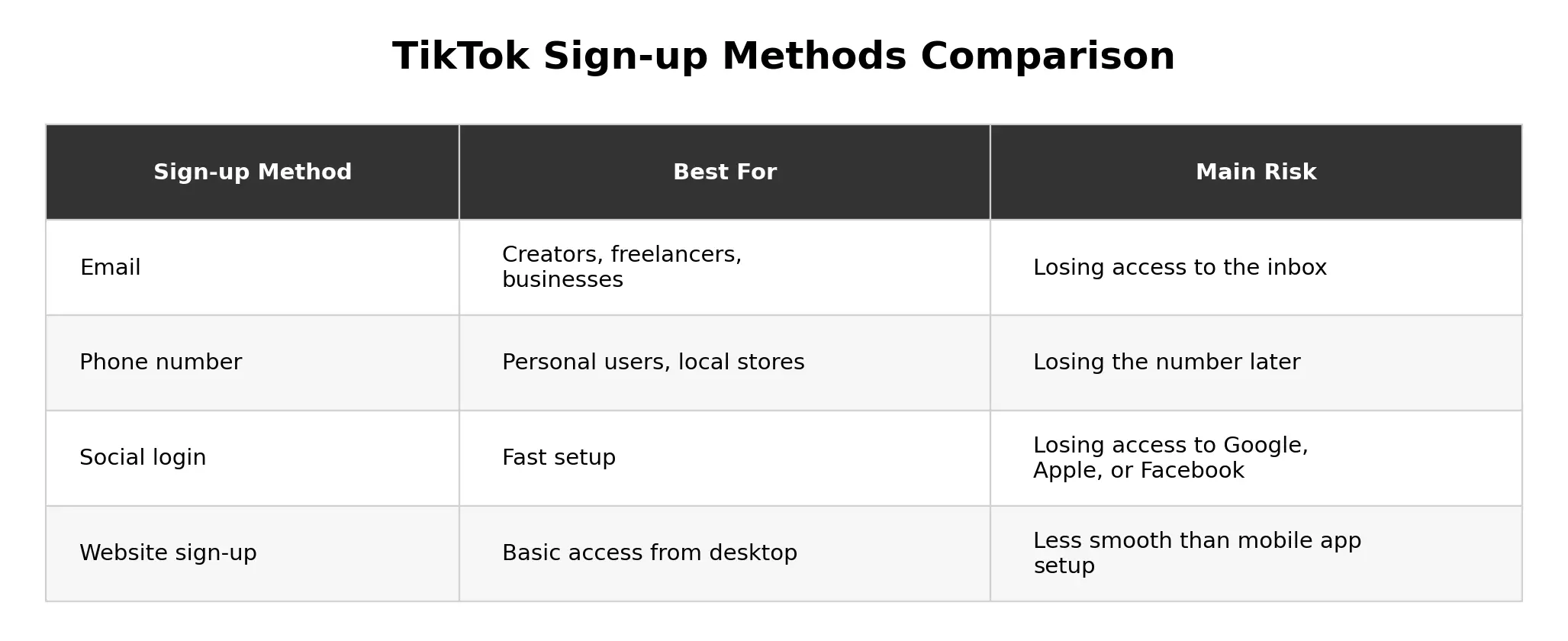
You may see options such as phone, email, or social login. Choose the method that fits your long-term use. Do not rush this step. The email or phone number you use may be needed later for login, password reset, and security checks.
A new creator may use a personal content email. A small business may use a company email if the account may become a brand profile. You can also sign up from TikTok’s website, but the app is usually better for first-time setup and posting.
How to sign up using your phone number
To create TikTok account with phone number, open the app, go to the sign-up screen, choose Use phone or email, and select the phone option. Enter your phone number and type in the SMS code TikTok sends.
This method is simple because most people keep their phone nearby. It can also make TikTok sign in and recovery easier. But use a number you can keep. Temporary numbers can cause serious problems if the account grows and you later lose access.
Phone sign-up works well for personal users or local stores with a stable business phone. If several team members need access, email may be easier to manage. It is also smart to add a trusted email later for backup recovery.
How to register with an email address
To create TikTok account with email, choose Use phone or email, then select email. Enter an email address you can access, create a password, and verify the email if TikTok asks for a code.
This is a good choice for creators, freelancers, and businesses. It is also useful if you want to create TikTok account without phone number. Use a real inbox, not a temporary email, because recovery may depend on it later.
For business use, email sign-up is often cleaner. A fitness coach can use a personal brand email, while a store can use a company email. If you plan to Create TikTok Account for Business, your first setup should be stable and easy to manage.
After registration, make sure you know how to log in. Then set your username, profile photo, bio, and privacy settings.
How to Create a TikTok Account Using a Social Media Login
After phone and email sign-up, social login is another option many users see on the TikTok sign-up page. You can also create TikTok account with a social media login or third-party login. This can save time because you may not need to create a new password at the first step. But if you lose access to that outside account, TikTok sign in may become harder.
After using social login, add a safe email or phone number in TikTok settings when possible. This gives the account a second recovery path, which is useful if the outside login fails later. A backup method helps with login and password recovery.
Which social media platforms can you use to sign up?
Available sign-up choices may change by country, device, and app version. TikTok may show options such as phone, email, Google, Apple, or Facebook.
Social login is helpful for a fast start. A student may use Google. An iPhone user may choose Apple. A shop owner may use a brand Google account if they want to Create TikTok Account for Business later.
Still, social login is not always the best long-term choice. For better control, email sign-up can be cleaner, especially when more than one trusted team member may need access. If you want to create TikTok account without phone number, Google or Apple may work. If you want to create TikTok account without email, phone or supported social login may work. In either case, add a recovery method later.
How to link your social media account to TikTok
Open TikTok and go to the sign-up screen. Choose the social login option shown on your device, such as Continue with Google. Select the account you want to use, approve the connection, and finish the profile setup.
TikTok may still ask for your birthday, username, or other details. These steps help set the right account rules and safety settings.
For business use, avoid building the account around one employee’s personal Google, Apple, or Facebook account. If that person leaves or loses access, the brand may lose control. Use a company-owned email or company-owned social login whenever possible.
What to do if your social media login fails
If social login fails, update the TikTok app, restart your phone, check your internet, and make sure you are logged in to the correct Google, Apple, or Facebook account.
Then try another login method if you added one. Use email, phone number, username, or TikTok recovery options. Do not try too many times too fast, because repeated failures may trigger more checks.
For example, a creator may sign up with Google on one phone, then use a new phone linked to a different Google account. TikTok may not find the right profile. Switching to the correct Google account can fix the issue.
How to Verify Your TikTok Account for Security
No matter which sign-up method you choose, account verification should come next. After you create TikTok account, the next step is to protect it. This is where verification matters. It may feel like a small step, but it can decide whether you can log back in later.
Verification usually means confirming that you own your email address, phone number, or login method. It helps TikTok know that the account belongs to you. It also gives you a safer way to recover the account if TikTok sign in fails.
Why TikTok requires account verification
TikTok uses verification to protect accounts from unsafe access. If someone logs in from a new device, TikTok may ask for a code to confirm the user.
TikTok recommends adding security methods and turning on 2-step verification. These methods may include email, phone, or an authenticator app. This helps protect the account even if the password is exposed.
Treat verification as part of setup, not a delay. A verified account is easier to protect and recover.
How to confirm your email or phone number
If you create TikTok account with email, TikTok may send a code to your inbox. Check spam or junk folders if you do not see it. Also make sure the email is typed correctly.
If you create TikTok account with phone number, TikTok may send a code by SMS. Check your signal, country code, and message-blocking settings. Wait before requesting another code.
If you want to create TikTok account without phone number, use a stable email. If you want to create TikTok account without email, use a phone number or supported login method you can keep. For US TikTok account create, avoid temporary emails, old phone numbers, or someone else’s login.
What happens if you skip the verification process
Skipping verification can make future login harder. You may use TikTok at first, but password reset, account recovery, or sign-in from a new device may become difficult later.
This is risky for teams. A brand may create TikTok account with one employee’s phone number. If that person leaves, the business may struggle to access its own account.
After account creation, add a real email, add a phone number if it fits your needs, turn on 2-step verification, and save login details safely. A few minutes of setup can prevent a much bigger problem later.
Common Mistakes to Avoid When Creating a TikTok Account
After you verify your account, the next step is to avoid mistakes that can create problems later. Many TikTok login problems start on day one.
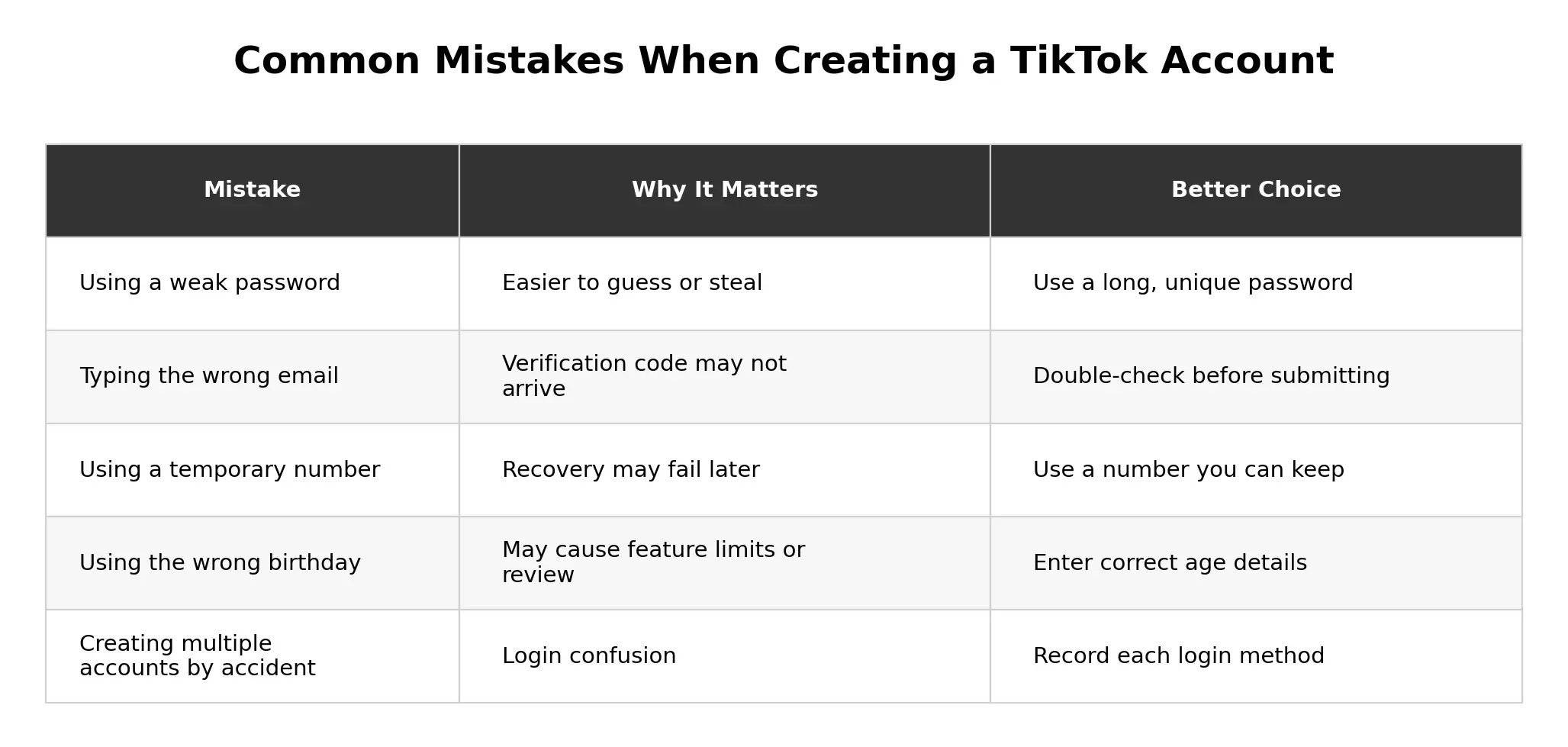
When you create TikTok account, your password, birthday, email, phone number, and login method all matter. A rushed setup may later cause failed TikTok sign in, recovery delays, or lost access.
For business accounts, clean setup is even more important because the account may become a real marketing channel. A small setup mistake can later affect posting, team access, customer comments, and brand trust.
Why choosing a weak password can put your account at risk
Weak passwords are easy to guess and often reused. Passwords like tiktok123, brandname2026, or password123 are not safe.
Use a long, unique password that does not include your birthday, brand name, pet name, or phone number. A password manager can help if you manage many accounts. Also protect the email behind your TikTok account, because password reset may go there.
For business use, do not share the same password across TikTok, Instagram, email, or other tools. Use a unique password and turn on 2-step verification.
How entering incorrect information can delay sign-up
Wrong information can slow sign-up and recovery. This includes a misspelled email, old phone number, wrong country code, or incorrect birthday.
For example, typing gamil.com instead of gmail.com may stop the verification code from arriving. A wrong birth date may place the account under the wrong safety settings or cause review issues later.
If you want to create TikTok account without phone number, double-check your email before submitting it. If you want to create TikTok account without email, make sure the phone number is yours and will stay active.
What to do if you accidentally create multiple accounts
Users often create extra accounts by accident when they try different login methods. One day they use email. Another day they tap Google, Apple, or Facebook. Later, TikTok sign in opens a different account.
First, identify each account. Check the username, profile photo, linked email, linked phone number, and login method. Write down which method opens which account.
If one account is only for testing, you can leave it unused or delete it. Before deleting, make sure you are in the correct account. For business use, choose one main account, add a stable business email, turn on stronger security, and tell the team which login method to use.
How to Customize Your TikTok Profile After Signing Up
Once your account is created and secured, the next step is to make it look complete. After signup, make the account look real and clear. A TikTok profile tells people who you are, what you post, and why they should follow you.
Do not leave the default profile for too long. A blank photo, random username, and empty bio can make the account look unfinished. This is especially harmful if you want to Create TikTok Account for Business.
How to choose the perfect username
Your username is your TikTok handle. It helps people find, tag, and remember you. Choose a name that is short, clear, and close to your real name, brand name, or content topic.
A fitness coach named Mia might use @miatrains or @fitwithmia. A coffee shop called Oak Street Coffee might use @oakstreetcoffee. If the name is taken, try a simple version like @oakstreetcoffeeus.
Avoid long numbers, random letters, or names that are hard to spell. For US TikTok account create, a local business may add a city or state if useful, such as @austinfoodtruck or @miamiskincare.
How to upload a profile picture or video
Your profile image is one of the first things people notice. Go to Profile, tap Edit profile, choose Change photo or Change video, then crop and save the file.
Creators should use a clear face photo or a simple image that matches their niche. Businesses should use a logo, product image, or brand mark that is easy to see on a small screen.
A profile video can also work if it is simple and relevant. A pet creator may use a short pet clip. A coffee shop may show coffee being poured. Keep it clean, not crowded.
How to add a bio that stands out
Your bio should answer one question: why should someone follow this account? Keep it short and clear.
A good bio explains who you are, what you post, and what value people get. Examples include “Easy dinner ideas for busy families,” “Simple home workouts for beginners,” or “Handmade candles poured in Austin.”
Avoid vague bios like “Welcome to my TikTok” or “Follow for more.” For a business account, focus on the customer’s need, such as “Clean skincare tips for sensitive skin” or “Affordable home decor ideas for small spaces.”
After your bio is ready, review the profile like a new visitor. The username, photo, and bio should explain the account in one second.
Troubleshooting Issues When Creating a TikTok Account
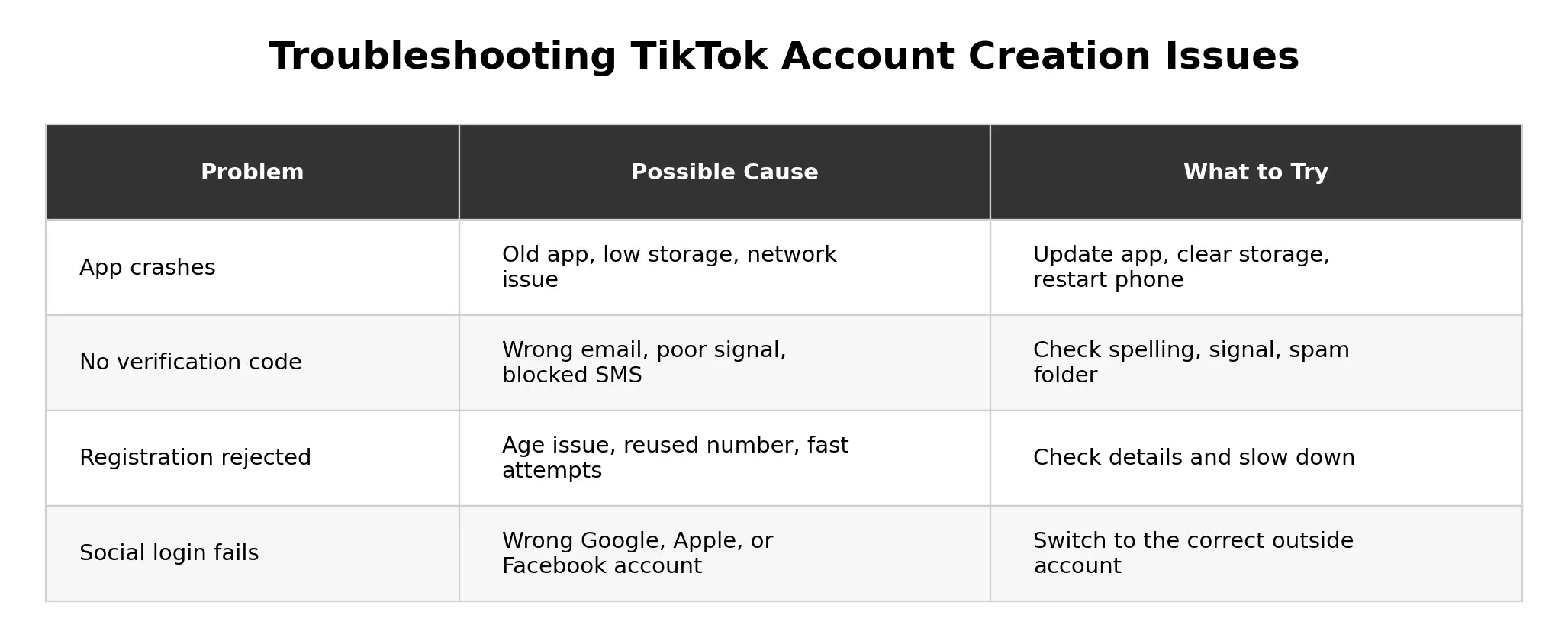
You may still meet sign-up problems even after preparing everything. Most TikTok account creation issues have simple causes, such as age details, email format, phone number, app version, device storage, network, or verification code errors.
If you cannot create TikTok account on the first try, do not keep tapping the same button. Slow down and check the basic.
Why TikTok might reject your registration
TikTok may reject registration because of age limits, wrong information, reused phone numbers, weak login details, or too many fast attempts.
Use a valid email or phone number. If the email is wrong, the phone number is inactive, or the code cannot be confirmed, sign-up may not finish.
Age can also block registration. Do not enter a fake birthday to move faster. It may create bigger problems later if TikTok asks for age confirmation.
Another common issue is using the same phone number for more than one account. One phone number can only be linked to one TikTok account at a time. If the number is already linked elsewhere, remove it from the old account first.
How to fix app crashes during sign-up
If TikTok crashes while you create TikTok account, the issue may be the app, storage, network, or device system.
Close and reopen TikTok. Restart your phone. Update the app from the App Store or Google Play. Check that your phone has enough free storage. You can also switch between Wi-Fi and mobile data or clear cache.
If the app still crashes, try signing up from TikTok’s website or another device. If web sign-up works, your phone app may be the problem.
What to do if you don’t receive a verification code
If you do not receive a code, first check the details you entered. If you create TikTok account with email, check spelling and search spam, junk, and promotions folders. If you create TikTok account with phone number, check the country code, signal, SMS settings, and blocked messages.
Do not request too many codes too quickly. Wait, then try again. You can also switch networks.
If no code arrives after several careful tries, review the full setup: app version, device, network, email spelling, phone number, and country code. If everything is correct, use TikTok’s help or recovery options instead of making random attempts.
How to Manage TikTok Accounts More Safely with DICloak
After you learn how to create TikTok account, you may also need a cleaner way to manage more than one TikTok account. This is common for creators, agencies, social media teams, and brands that run different accounts for different niches, clients, or markets. When many TikTok accounts are opened in one normal browser, cookies, sessions, local storage, and login data can get mixed.
Create separate profiles for each TikTok account
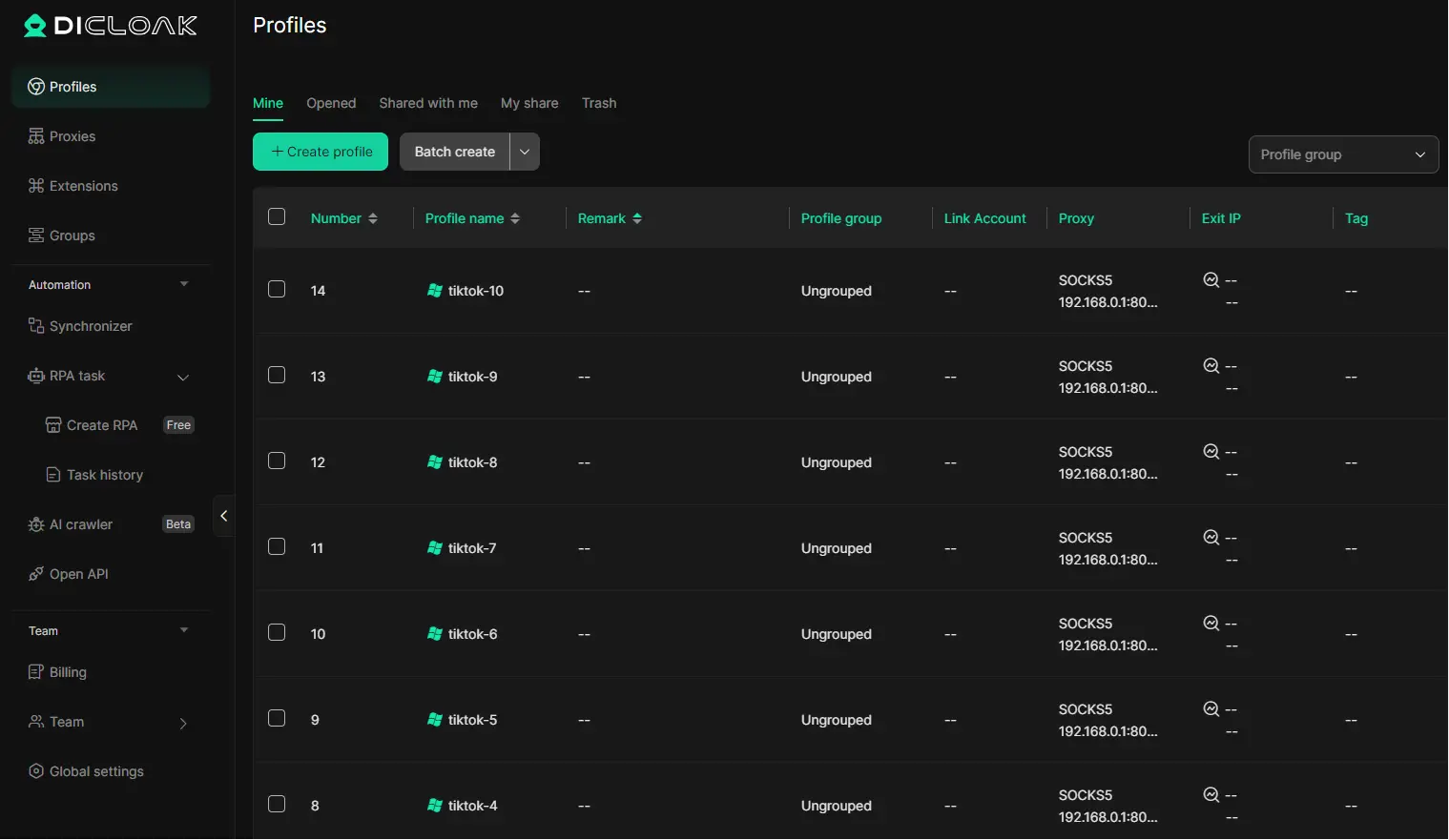
You can use DICloak to create a separate browser profile for each TikTok account. Each profile can keep its own cookies, login session, local storage, and browser fingerprint. For example, one profile can be used for a fashion account, while another is used for a food or fitness account. This makes it easier to keep each TikTok account in its own environment and avoid opening the wrong account by mistake.
Keep access more stable with custom fingerprints and proxies
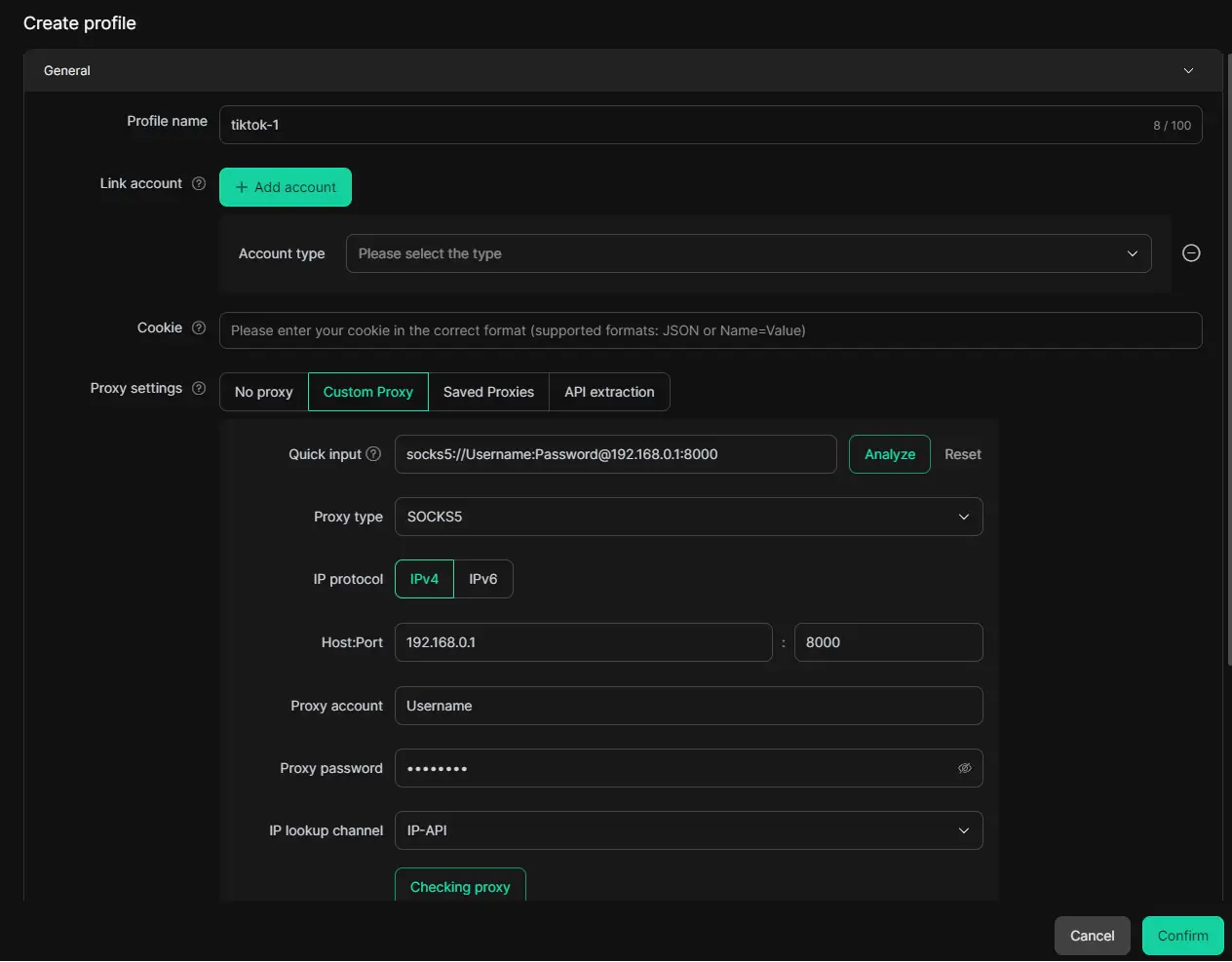
You can also set custom fingerprints and proxies for different profiles. Fingerprint settings may include User-Agent, screen resolution, language, time zone, Canvas, WebGL, fonts, and other browser signals. For proxy setup, DICloak supports common proxy protocols like HTTP, HTTPS, and SOCKS5. This is useful when a team manages TikTok accounts for different regions. For example, if you are doing US TikTok account create for a brand, a stable U.S. proxy can help keep the login environment more consistent.
Keep cookies, sessions, and local storage separate
For long-term TikTok account management, browser data separation is important. You can keep each TikTok account’s cookies, sessions, local storage, and login state inside its own DICloak profile. This helps reduce problems caused by mixed account data, repeated TikTok sign in checks, or shared browser history. It is especially useful when you manage accounts for different clients, markets, or content projects.
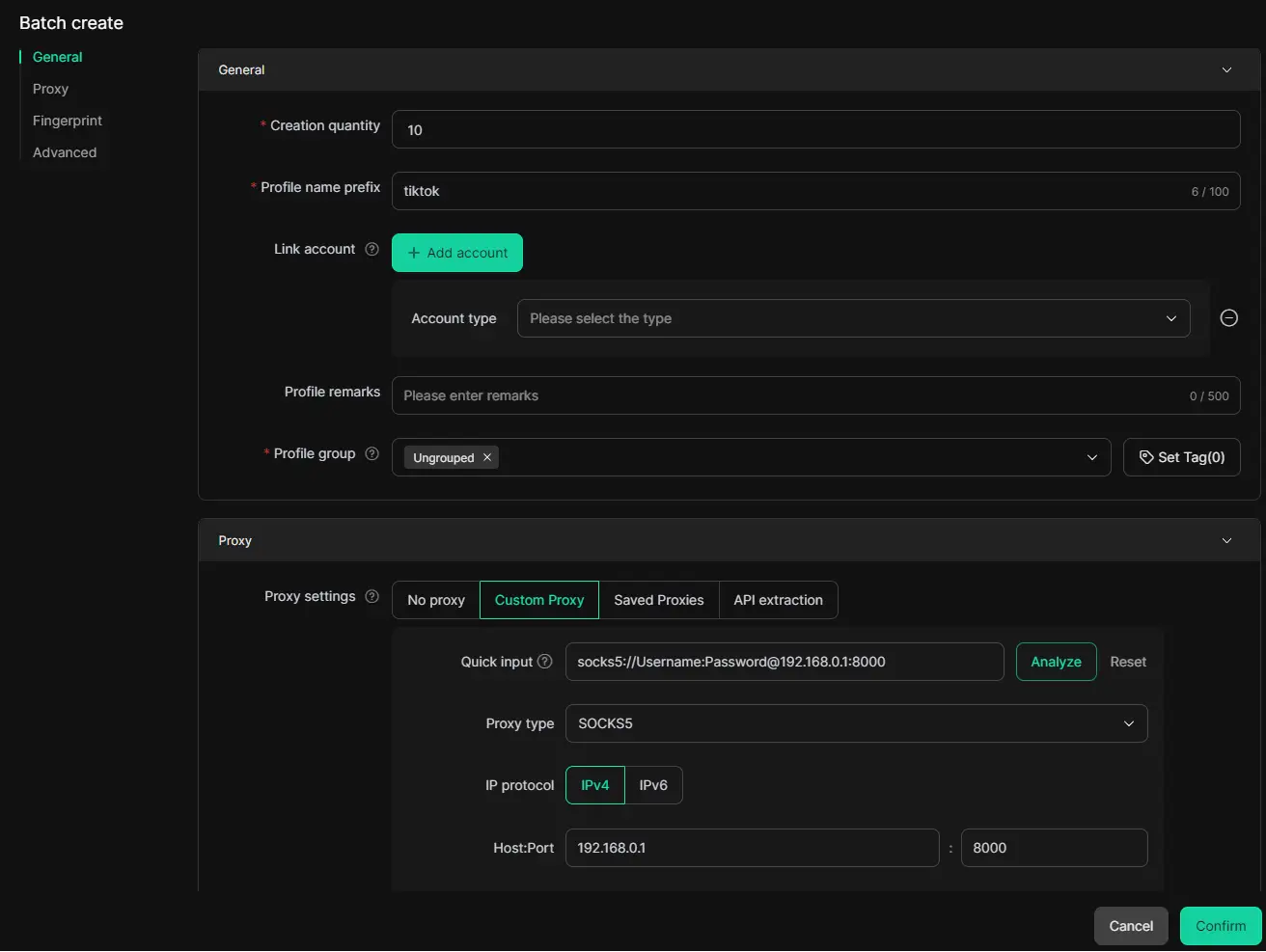
When you handle many TikTok accounts, proxy management can become messy. You can use DICloak to configure and manage proxies in bulk, which saves time and keeps account environments easier to organize. This does not guarantee account safety or remove all ban risks, because content quality, behavior, login habits, and platform rules still matter. But a cleaner profile, proxy, and data setup can make multi-account management more stable and easier to control.
Frequently Asked Questions about Creating a TikTok Account
Can I create multiple TikTok accounts on the same device?
Yes, you can create multiple TikTok accounts, but each account should use a different login method. One account can use an email, and another can use a phone number. One mobile phone number can only be linked to one TikTok account at a time.
If you create TikTok account for different brands, keep each account’s email, phone number, and purpose clear. This helps avoid login confusion.
How do I delete a TikTok account I no longer use?
You can delete a TikTok account from the app settings. Before deleting, make sure you are signed in to the correct account. Check the username, profile photo, and linked email first.
If the account was only for testing, write down which login method belongs to it so you do not delete your main account by accident.
Is it possible to create a TikTok account without a phone number?
Yes, in many cases you can create TikTok account without a phone number by using an email address or supported social login. Exact options may vary by device and region.
For long-term use, email is usually cleaner. Use an inbox you can keep and avoid temporary emails.
How do I recover a TikTok account if I forget my login details?
Start with the method you used when creating the account. Try your email, phone number, username, or social login. Adding both email and phone number can make recovery easier.
If you create TikTok account with phone number and later change numbers, recovery can become harder. That is why a valid backup email is useful.
Can I switch from a personal account to a business account later?
Yes, you can switch to a TikTok Business Account later. This is useful if you first create TikTok account as a personal creator and later start selling products or managing a brand.
Before switching, make sure your username, email, and profile details look professional.
Conclusion
Creating a TikTok account in 2026 is simple when you prepare the right sign-up method, use real information, and secure your account from the start. Whether you use email, phone number, or social login, stable access matters most for future TikTok sign in and recovery.
After sign-up, take time to verify your account, avoid common setup mistakes, and build a clear profile with a strong username, photo, and bio. If you manage multiple TikTok accounts for business, clients, or different markets, tools like DICloak can help you keep each account environment separate, organized, and easier to manage.
 Web Proxy Tools
 Free Tools
 Cookie Plugin
 UA Generator
 MAC Address Generator
 IP Generator
 IP Address List
 2FA Code Generator
 World Clock
 Anonymous Check
 WebRTC Leak Test
 UUID Generator
 Free Web Proxy Site
 Proxy Checker
 FB Ad Checker
 AI Web Scraping
 Free SMM Tools
 Twitter Shadowban Checker
 Instagram Name Checker
 UTM Generator
 Username Generator
 AI Hashtag Generator
 LinkedIn Headline Generator
 Social Media Image Resizer