Have you ever clicked on a website at school only to see a “This content is blocked” message pop up on your screen? School internet filters are meant to keep networks safe and students focused, but they often block helpful learning tools, research sites, and creative platforms as well. That’s why more students and educators are searching for how to bypass school filter restrictions in a practical and informed way. In this comprehensive guide, you’ll explore how school filters work, why certain content gets blocked, and the common methods people use to regain access—along with key considerations to keep in mind before accessing blocked content.
Understanding School Filters
Before learning why certain websites are blocked, many students search online for how to bypass school filter. This usually happens when a needed page does not open during class or homework time. To solve this problem the right way, the first step is understanding what school filters are, why schools use them, and which types of websites are blocked most often. Once you understand how filters work, it becomes easier to tell the difference between a real safety block and a simple mistake.
What Are School Filters?
School filters are systems that control which websites students can access on school networks and school-managed devices. Schools often call this process web filtering or content filtering. The main purpose is to support learning while reducing online risks.
Most school filters work in a few basic ways:
- Category filtering: Websites are grouped into categories like social media, gaming, or adult content. Entire categories can be blocked at once.
- Domain blocking: Specific websites are added to a block list or allow list.
- Network-level control: Traffic is filtered directly on the school’s Wi-Fi or firewall system.
For example, if a student tries to open a discussion forum for homework research and sees a block page, they may assume the only option is how to bypass school filter. In reality, the site may simply fall under a blocked category such as “forums” or “user-generated content,” even if the content itself is educational.
Why Do Schools Implement Internet Filters?
Schools use internet filters mainly to protect students and keep learning on track.
One key reason is student safety. In the United States, many public schools follow guidelines connected to the Children’s Internet Protection Act (CIPA). This law requires schools that receive certain federal support to block visual content that is harmful to minors and to maintain an internet safety policy.
Another reason is focus during school hours. Platforms like social media or video streaming sites can easily distract students from lessons. Even safe content may be blocked if it interrupts class time or uses too much network bandwidth.
For example, a teacher assigns a project that includes watching short educational videos. A student opens the link at school, but the page is blocked because the platform is labeled as “entertainment.” This situation often leads students to search for how to bypass school filter, even though the correct solution is usually asking a teacher or IT staff to allow that specific resource.

Reasons Students Search for How to Bypass School Filter Safely
After understanding how school filters work, many students still search for how to bypass school filters. In most cases, this is not about breaking rules. It happens because a blocked website prevents them from studying, communicating, or relaxing during school hours.
Accessing Educational Resources
One of the most common reasons students look for how to bypass school filter is access to learning materials. School filters often block entire categories, not individual pages. This means safe and useful sites can be blocked by mistake.
For example, a student may need a video tutorial, an online forum, or a coding tool for homework. If the platform is labeled as “streaming” or “forums,” the filter may block it, even when the content is academic. When deadlines are close, students feel pressure and start searching for quick solutions.
Social Media and Entertainment
Another reason students search for how to bypass school filter is blocked social media and entertainment sites. While these platforms can be distracting, they are also part of daily student life.
Students often use social platforms to coordinate group projects, share notes, or receive club updates. Entertainment content, such as music or short videos, also helps students relax during breaks.
Social media supports communication and peer learning. When all access is blocked at all times, students feel disconnected. This explains why many turn to searches like how to bypass school filter, even when their goal is simple communication, not misuse.
Understanding these reasons helps explain student behavior and sets the stage for discussing safer and more responsible solutions in the next section.
How to Bypass School Filters
After understanding why students search for how to bypass school filter, many begin looking for methods they hear about online. These methods vary in reliability and risk. Some work only in limited cases, while others fail on modern school networks. Knowing how each method works helps students avoid wasted time and frustration.
Accessing Proxy Websites
Proxy websites are often the first option mentioned when discussing how to bypass school filter. A proxy works as a middle layer between the user and the blocked website. Instead of connecting directly, the proxy loads the page and displays it to the user.
This method can sometimes allow access to text-based pages, such as articles or reference materials. For example, a student may be able to read a blocked blog post needed for a project.
Limitations: Most schools actively block known proxy sites. Proxies often stop working without warning. Page layouts may break, and loading speeds are usually slow.
Some students try browser extensions after searching how to bypass school filter. These tools claim to change how web traffic is handled inside the browser.
On school-managed devices, extensions are usually restricted. Even if an extension appears to be installed, it may be disabled automatically by school settings.
Limitations: Extensions rarely work on school-issued devices. They are easy for IT systems to detect and block.
Mobile Hotspot Tethering
Mobile hotspot tethering avoids the school network by using a phone’s cellular connection instead. This is why it appears frequently in how to bypass school filter discussions.
Using a hotspot can provide unrestricted access because the traffic does not pass through school Wi-Fi.
Limitations: Hotspots consume large amounts of mobile data, drain phone batteries quickly, and may violate school usage policies. Performance also depends on cellular signal quality.
Creative Workarounds
Some indirect methods allow limited access to blocked content without fully bypassing filters.
Using Google Translate to load a webpage can sometimes display text content, because the page is fetched through Google’s servers. Another option is viewing saved versions of pages through Google Cache or the Wayback Machine.
Limitations: These methods work only for basic text. Videos, interactive tools, and downloads usually fail. Schools increasingly restrict these workarounds.
Changing DNS Settings
DNS-related ideas often appear in searches for how to bypass school filter, but they are commonly misunderstood.
On most school networks, filtering happens beyond DNS. Even if DNS settings are changed, access is usually still blocked.
Limitations: School devices often lock DNS settings or reset them automatically. DNS changes alone rarely solve filtering issues.
Exploiting HTTPS Connections
HTTPS encrypts website content, which leads some students to believe it can bypass filters. In reality, schools can still block websites by domain name, even when HTTPS is used.
This misunderstanding explains why many how to bypass school filter attempts fail.
Using Portable Browsers
Portable browsers run without full installation and are stored on external devices. Some students believe they help avoid restrictions.
In practice, portable browsers do not bypass network-level filtering. Many schools disable USB access or detect unknown applications quickly.
When researching how to bypass school filters, some users look for more stable solutions than temporary workarounds. In these cases, an antidetect browser such as DICloak is often discussed because it allows users to work inside isolated browser profiles with custom proxy settings.
This approach does not change the school network itself. Instead, it focuses on creating a clean and consistent browsing profile for educational access.

How Users Configure DICloak for Educational Access
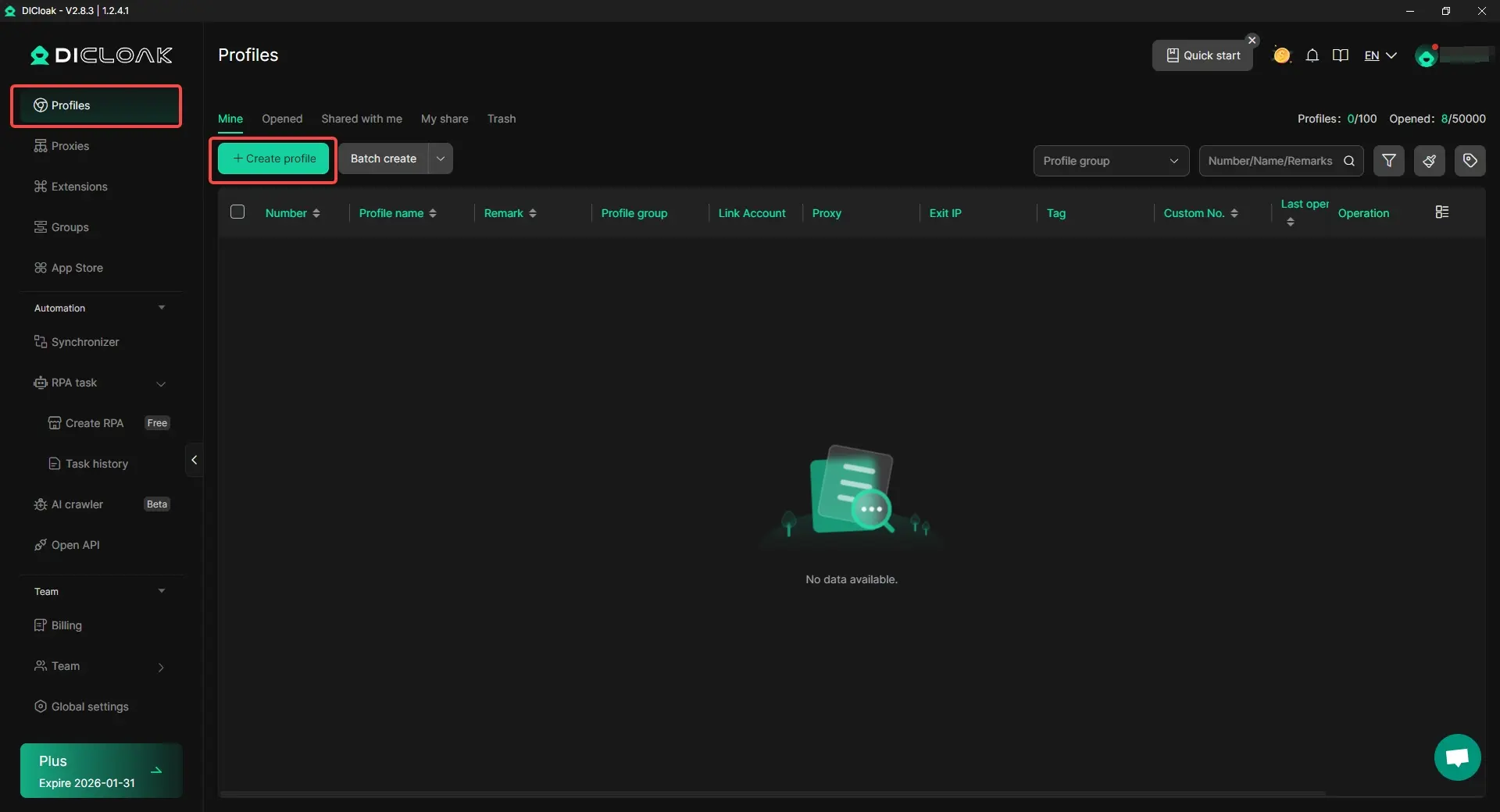
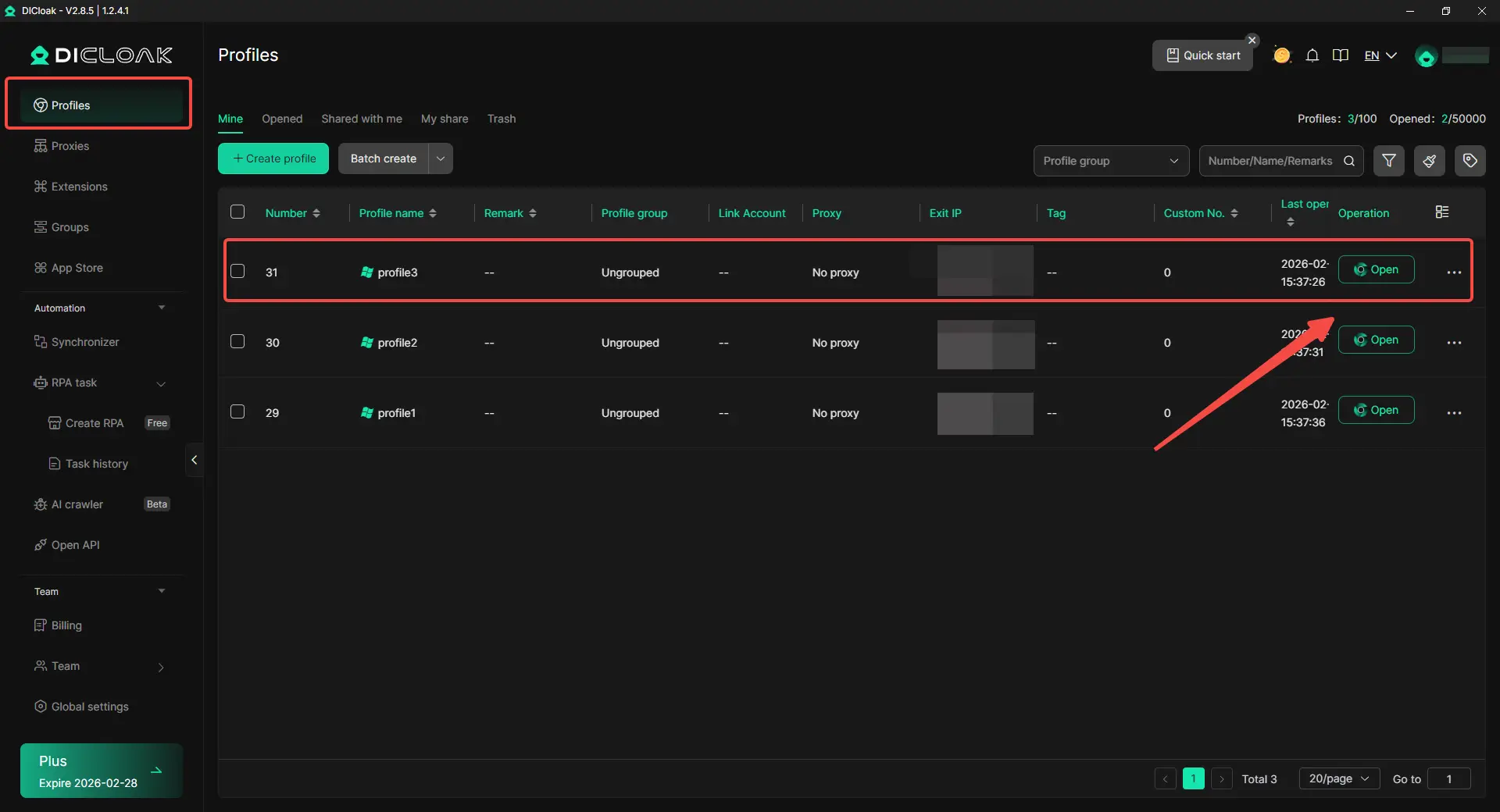
Step 1: Create a Dedicated Learning Profile
Users start by creating a new browser profile that is used only for schoolwork, such as research, assignments, or academic tools. Keeping this profile separate from personal or entertainment browsing helps avoid mixed behavior that can trigger automatic blocks.
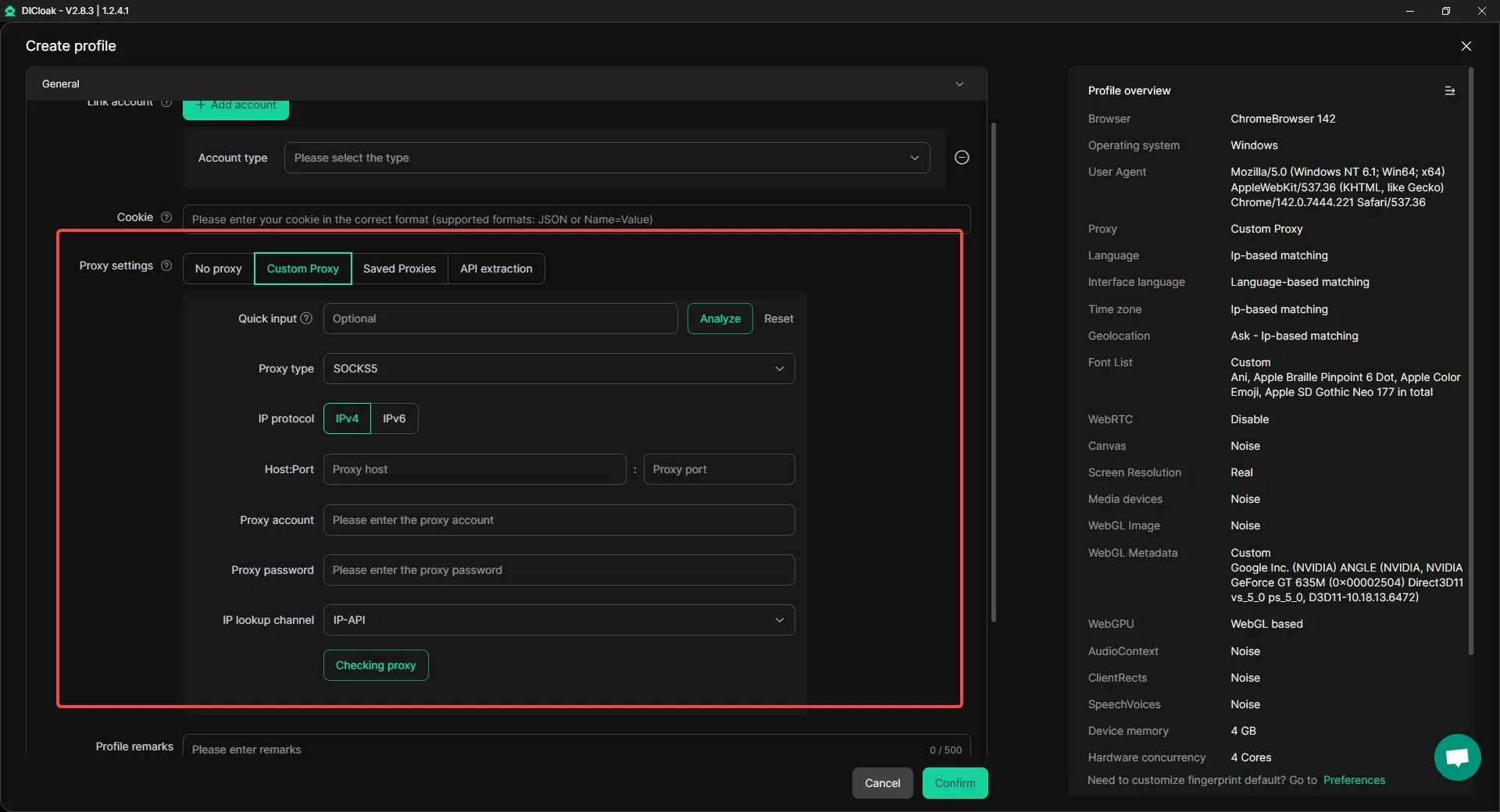
Step 2: Apply Isolation and Custom Proxy Settings
Within the learning profile, users enable full browser isolation and assign a custom proxy connection. This ensures the profile uses a consistent browsing profile and a defined network path, which can help when access is blocked due to broad category or location-based filtering.
Step 3: Open the Profile and Access Blocked Educational Content
After the profile is set up, users open it and access learning resources that were previously blocked. Because the browser profile is clean, isolated, and purpose-focused, some educational websites may load normally without repeated interruptions.
Comparison: Common Methods to Bypass School Filters
| Feature |
DICloak (Antidetect Browser) |
Proxy Websites |
Browser Extensions |
Mobile Hotspot |
Google Translate / Cache |
Portable Browser |
| Overall Rating |
⭐⭐⭐⭐⭐ 9.2/10 |
⭐⭐ 4.0/10 |
⭐⭐ 3.5/10 |
⭐⭐⭐☆ 6.0/10 |
⭐⭐ 3.0/10 |
⭐⭐⭐ 5.0/10 |
| Bypasses Network Filter |
✅ Excellent |
⚠️ Limited |
❌ Rarely |
✅ Complete |
⚠️ Basic |
❌ No |
| Video Streaming |
✅ Smooth & Stable |
❌ Poor |
❌ Poor |
⚠️ Limited |
❌ Fails |
❌ Poor |
| Detection Risk |
✅ Very Low |
❌ High |
❌ High |
⚠️ Medium |
❌ High |
❌ High |
| Setup Difficulty |
✅ Easy |
✅ Easy |
⚠️ Easy |
✅ Easy |
✅ Very Easy |
⚠️ Moderate |
| Educational Use |
✅ Ideal |
⚠️ Limited |
❌ Poor |
⚠️ Restricted |
❌ Poor |
⚠️ Limited |
| Privacy Protection |
✅ Excellent |
❌ Low |
⚠️ Varies |
⚠️ Medium |
❌ None |
⚠️ Moderate |
| Reliability |
✅ Very High |
❌ Low |
❌ Very Low |
⚠️ Medium |
❌ Very Low |
⚠️ Moderate |
In discussions around how to bypass school filter, DICloak stands out because it focuses on profile isolation, fingerprint consistency, and controlled browser profiles, rather than temporary tricks. This leads to better stability, lower detection risk, and stronger privacy protection—especially for legitimate educational access.
Ratings are based on general educational use cases and common school network environments. Actual results may vary depending on device restrictions, school policies, and network controls.
What to Consider Before Learning How to Bypass School Filter
When students search for how to bypass school filter, safety should always come first, especially on Chromebooks and school-managed devices. Here are a few helpful tips to keep in mind:
- Always follow your school’s digital use policies. Breaking these rules can lead to loss of device or network access, even if your goal is academic.
- Avoid installing unknown browser extensions. Many free tools collect data, show ads, or trigger school security systems.
- Keep learning activity separate from personal accounts. Do not log into private email or social platforms when using workarounds.
- Be cautious with public proxy websites. They are often unstable and may record browsing activity.
Conclusion
School internet filters are designed to create a safe and focused online environment, but they often block more than intended. Many educational platforms, research tools, and useful websites are restricted simply because they fall into broad filtering categories. This is why so many users search for how to bypass school filter systems—to regain access to legitimate content needed for learning, research, or creativity.
By understanding how school filters work and why they are implemented, users can better evaluate the different methods available, from simple browser-based approaches to more advanced configurations. Each option comes with its own limits, and effectiveness depends largely on how strict the school’s network controls are.
Before attempting how to bypass school filter restrictions, it is important to consider school policies, potential consequences, and personal data safety. Responsible use, clear intent, and awareness of risks are essential. When approached carefully, understanding how to bypass school filter limitations can help users access valuable information without compromising security or trust.
Frequently Asked Questions (FAQs)
What does “how to bypass school filter” mean in real school networks?
When users search for how to bypass school filter, they are usually trying to access websites blocked by school internet controls. These filters often restrict educational platforms, forums, or tools along with social media and entertainment sites, even when the content itself is safe.
Why do school filters block educational and research websites?
Many school filtering systems rely on automated categories and keyword detection. As a result, useful learning resources may be grouped with restricted content. This is a common reason students look for how to bypass school filter solutions to access legitimate academic materials.
What are the most common ways people try how to bypass school filter restrictions?
Popular approaches to how to bypass school filter include accessing proxy websites, using browser extensions, changing DNS settings, portable browsers, or alternative network connections. Each method works differently depending on how strict the school’s filtering system is.
Can tools like antidetect browsers help with how to bypass school filter limits?
Some users explore antidetect browsers when researching how to bypass school filter restrictions, as these tools create isolated browser profiles and reduce device-level tracking. When configured correctly, they may help users access educational platforms that are blocked by standard school browsers.
What should I consider before attempting how to bypass school filter at school?
Before learning how to bypass school filter systems, users should review school internet policies, understand potential consequences, and prioritize online safety. Any method should be used responsibly and primarily for educational or research purposes.
 Web Proxy Tools
 Free Tools
 Cookie Plugin
 UA Generator
 MAC Address Generator
 IP Generator
 IP Address List
 2FA Code Generator
 World Clock
 Anonymous Check
 WebRTC Leak Test
 UUID Generator
 Free Web Proxy Site
 Proxy Checker
 FB Ad Checker
 AI Web Scraping
 Free SMM Tools
 Twitter Shadowban Checker
 Instagram Name Checker
 UTM Generator
 Username Generator
 AI Hashtag Generator
 LinkedIn Headline Generator
 Social Media Image Resizer