If you are trying to figure out how many followers to go live on TikTok, the short answer is simple: most creators need 1,000 followers to unlock TikTok LIVE, and they also need to be at least 18 years old to go live. But in real use, that is not always the full story. Some users hit the follower goal and still do not see the LIVE option right away. Others are confused by age checks, account status, or regional differences. In this guide, we will break down what TikTok’s current rules say, why TikTok LIVE may still not show up, and what you can do next if you want to unlock LIVE faster and use it well once it becomes available.

What Are the Requirements to Go Live on TikTok?
If you are asking how many followers to go live on TikTok, the answer is usually simple, but there are a few extra rules that matter too. TikTok does not treat LIVE as an open feature for every account. To use it, creators need to meet a follower threshold, meet the age rule, and be in a location where LIVE is available. In some cases, account status can matter as well.
How Many Followers Do You Need to Unlock TikTok Live?
For most creators, the common answer to how many followers to go live on TikTok is 1,000 followers. TikTok’s official LIVE Subscription news page clearly says creators need at least 1,000 followers to access that LIVE feature, and TikTok’s LIVE help page says creators must meet a local minimum follower threshold.So if you are searching how many followers to go live on TikTok 2026, the practical answer is still to work toward that 1,000-follower mark.
What Age Restrictions Apply to TikTok Live Access?
Followers are only one part of the requirement. TikTok also says creators must be 18 years old or older to go LIVE. If TikTok cannot confirm your age, you may not be able to access the feature, even if your follower count is high enough. TikTok may ask some users to verify age with ID and selfies before allowing LIVE access.For example, a creator may have 1,200 followers but still not be allowed to go LIVE if the account birthday is wrong or age verification is incomplete.
Are There Any Regional or Account-Based Limitations?
Yes, there can be. TikTok’s LIVE help page says users must meet a local follower threshold, which means availability can depend on location. TikTok also notes that some age checks depend on location, and if you meet the requirements but still cannot go LIVE, you can report the issue in the app. On top of that, some features on TikTok are limited by account type or feature availability.
That is why the question how many followers to go live on TikTok is important, but it is not the only thing that decides access.
Why Can’t I Go Live Even After Meeting the Requirements?
Even after you understand how many followers to go live on TikTok, you may still run into a problem: the LIVE option does not appear. This confuses a lot of creators. Reaching the follower goal is important, but it is not the only condition. TikTok also checks age, local availability, and sometimes account standing before giving access to LIVE. TikTok’s help center says creators must be 18 or older to go LIVE, must meet a local follower threshold, and may need to confirm age depending on location or account history.
Common Reasons TikTok Live Is Still Not Available
One common reason is age verification. A creator may have already reached the answer to how many followers on TikTok to go live, but if TikTok cannot confirm that the person is 18 or older, LIVE may still stay locked.
Another reason is account condition. TikTok uses account status and policy signals in different creator features, and its LIVE Gifts rules also say your account must be in good standing and follow the Community Guidelines and Terms of Service.
How to Check if Your Account Is Eligible for TikTok Live
The easiest place to start is inside the app. TikTok says you can check your account status through TikTok Studio by going to Profile > Menu > TikTok Studio > Account check. This can help you see if there are restrictions affecting your account.
What to Do If TikTok Live Is Not Showing Up
If LIVE is still not showing up, first make sure the basics are truly met. Check your follower count, confirm that you are old enough, and review your account status. Then update the app and try again. If you believe you qualify but still do not have access, TikTok’s LIVE help page says you can report the issue in the app.If the problem is age-related, TikTok also has an appeal process. Its help center says that if access to an age-restricted feature was removed by mistake, you can open the in-app notification and submit an appeal. That gives creators a direct path to fix the issue instead of guessing what went wrong.
How to Go Live on TikTok Step by Step
Once your account is eligible, the next step is simple: start your first LIVE the right way. Many creators spend a lot of time asking how many followers to go live on TikTok, but once they unlock the feature, they are not always sure what to do next. The good news is that TikTok’s basic LIVE flow is very simple inside the app.
How to Start a TikTok Live Session in the App
If you already meet the answer to how many followers on TikTok to go live, starting a LIVE session only takes a few steps. Open TikTok, tap the + button at the bottom, and swipe until you see LIVE. Then add a title and tap Go LIVE.
What Settings Should You Check Before Going Live?
Before you start, it is worth checking a few settings. TikTok’s LIVE settings let creators manage things like moderators and audience controls, including an option to limit the LIVE to viewers who are at least 18 years old.
This matters because a smoother setup often leads to a better stream. For example, if you expect a busy comment section, adding a moderator before going live can make the session easier to manage. If your topic is more adult or sensitive, turning on the audience control setting may also make sense. So even if your main concern started with how many followers to go live on TikTok, a few small settings checks can improve the experience a lot.
How to End a TikTok Live Session Properly
Ending a LIVE is also simple, but it is better to do it cleanly instead of closing the app suddenly. TikTok says that when you are ready to finish, you should tap the End LIVE button at the top, then tap End now. That is the normal way to close the session in the app. A good habit is to wrap up before you end it. For example, you can thank viewers, answer one last question, and tell them what kind of content is coming next. Then tap End LIVE and finish the stream the proper way.
Can You Go Live Without 1,000 Followers on TikTok?
After learning the normal steps, many creators ask the next big question: can you go LIVE before you hit the usual threshold? This comes up all the time when people search how many followers to go live on TikTok. The short answer is that TikTok’s official rule still points to a local minimum follower threshold, and in most public guidance around LIVE features, that usually means 1,000 followers. So if you are asking how many followers on TikTok to go live, 1,000 is still the safest number to follow in 2026.
What TikTok’s Official Rules Say
TikTok’s own help page says you must be at least 18 years old to go LIVE and must meet a local threshold of minimum followers. TikTok’s official LIVE Subscription announcement is even more specific and says creators need at least 1,000 followers for that LIVE-related feature. That is why most creators still treat 1,000 as the practical answer to how many followers to go live on TikTok 2026.
What TikTok’s Official Rules Say
TikTok’s own help page says you must be at least 18 years old to go LIVE and must meet a local threshold of minimum followers. TikTok’s official LIVE Subscription announcement is even more specific and says creators need at least 1,000 followers for that LIVE-related feature. That is why most creators still treat 1,000 as the practical answer to how many followers to go live on TikTok 2026.
Why Third-Party “Unlock” Tools Are Risky
If you see a tool or service promising to unlock TikTok LIVE without meeting the normal requirements, be careful. TikTok’s rules are based on age, local follower thresholds, and account eligibility. Third-party tools cannot safely replace those platform checks. In many cases, they ask for account access, push fake engagement, or create activity that can put the account at risk. TikTok also has account status and safety systems that review restrictions and feature access, so trying to force access with outside tools is not a smart long-term move.
How to Reach 1,000 Followers Faster on TikTok
If you cannot go LIVE yet, the next goal is clear: reach the follower threshold in a steady way. Since the usual answer to how many followers to go live on TikTok is still around 1,000 followers, growth matters a lot. The good news is that TikTok’s own guidance shows follower growth is not only about posting more. It is also about making content people want to watch, respond to, and follow. TikTok says its recommendation system is shaped by user interactions like likes, follows, and other engagement signals.
Which Content Types Can Help You Grow Faster?
The fastest-growing content is usually easy to understand and easy to react to. TikTok’s own guidance on recommendations says the platform responds to user interactions and interests, while its audience-growth advice tells creators to review top posts and audience engagement to see what connects best. In simple terms, content that gets watched, liked, shared, or commented on has a better chance to reach more people.
Which Content Types Can Help You Grow Faster?
The fastest-growing content is usually easy to understand and easy to react to. TikTok’s own guidance on recommendations says the platform responds to user interactions and interests, while its audience-growth advice tells creators to review top posts and audience engagement to see what connects best. In simple terms, content that gets watched, liked, shared, or commented on has a better chance to reach more people.
Why Engagement Matters More Than Raw Follower Count
Follower count matters because it unlocks LIVE, but engagement is what helps you get there. TikTok’s recommendation system is based on how users respond to content, and TikTok’s own growth page tells creators to engage with viewers through comments and use analytics to understand trending posts. That means a smaller account with active viewers can grow faster than a larger account with weak response.
What Risks Should Creators Know Before Going Live?
Once you reach the usual answer to how many followers to go live on TikTok, the next step is not only starting a stream. It is also understanding the risks that come with it. TikTok LIVE can help creators connect faster, but it also puts more pressure on content, moderation, and personal energy.
How to Avoid Breaking TikTok’s Community Guidelines
The first risk is content moderation. TikTok says its Community Guidelines apply to everything shared on the platform, and its enforcement page explains that violative content can be removed, while severe violations can lead to stronger penalties, including bans.If something goes wrong, TikTok also gives creators and viewers reporting and appeal paths. You can report problems in the app, report a LIVE directly, and appeal removed content or bans through TikTok’s support flow.
How to Protect Your Energy and Avoid Burnout
The second risk is burnout. Many creators focus so much on reaching the answer to how many followers to go live on TikTok that they do not think enough about how draining regular LIVE sessions can be. Research published in 2025 on content creators found that deadline pressure, constant performance demands, and ongoing digital work can contribute to burnout and other mental strain. Broader 2026 research on technostress also links heavy digital pressure to psychological strain and burnout. A better approach is to keep a realistic schedule, choose topics in advance, and leave space between streams so LIVE does not become a daily burden. That way, once you pass the usual how many followers on TikTok to go live mark, LIVE can support your growth instead of wearing you down.
Tips for Running Better TikTok Live Sessions
Once you reach the point where how many followers to go live on TikTok is no longer the main problem, the next goal is making your LIVE worth watching. A good stream is not only about turning the camera on. It also depends on topic choice, simple setup, and how well you manage the chat.
How to Pick Topics Your Audience Will Care About
The best LIVE topics usually come from things your audience already reacts to. TikTok says creators should review analytics, top posts, and audience engagement to understand what people care about. Its Creator Search Insights tool also lets creators explore popular search topics and content gaps, which can help you find LIVE ideas that already match viewer interest. A simple example is this: if your short skincare videos get the most saves and questions, a LIVE Q&A on acne mistakes is usually a better choice than a random personal chat.
How to Handle Negative Comments During a Live
Negative comments are one of the fastest ways to throw off a LIVE if you are not ready. TikTok says creators and moderators can filter comments, block certain keywords, and report, mute, limit, or block viewers during a LIVE. TikTok also notes that some comments may not appear if comment filters or keyword blocks are on. A simple rule helps here: do not argue with every rude comment in real time. If someone is only trying to disrupt the stream, use the moderation tools and move on
What Tools Can Improve Your TikTok Live Setup?
A better LIVE setup does not need to be complicated. TikTok says creators can add moderators, manage audience controls, and use guest settings during a LIVE. If you go live from a web browser, TikTok says you need LIVE Studio on Windows or OBS Studio on Linux, macOS, or Windows. In practice, that means a simple phone setup may be enough for a basic stream, but moderators, guest layouts, and browser tools can help once your sessions get busier.
How DICloak Can Support TikTok Live Preparation and Account Management
As creators work toward TikTok LIVE, the challenge is not only how many followers to go live on TikTok. It is also keeping daily account work organized. A tool like DICloak can fit here as a workflow support option.
Managing multiple TikTok account environments more cleanly
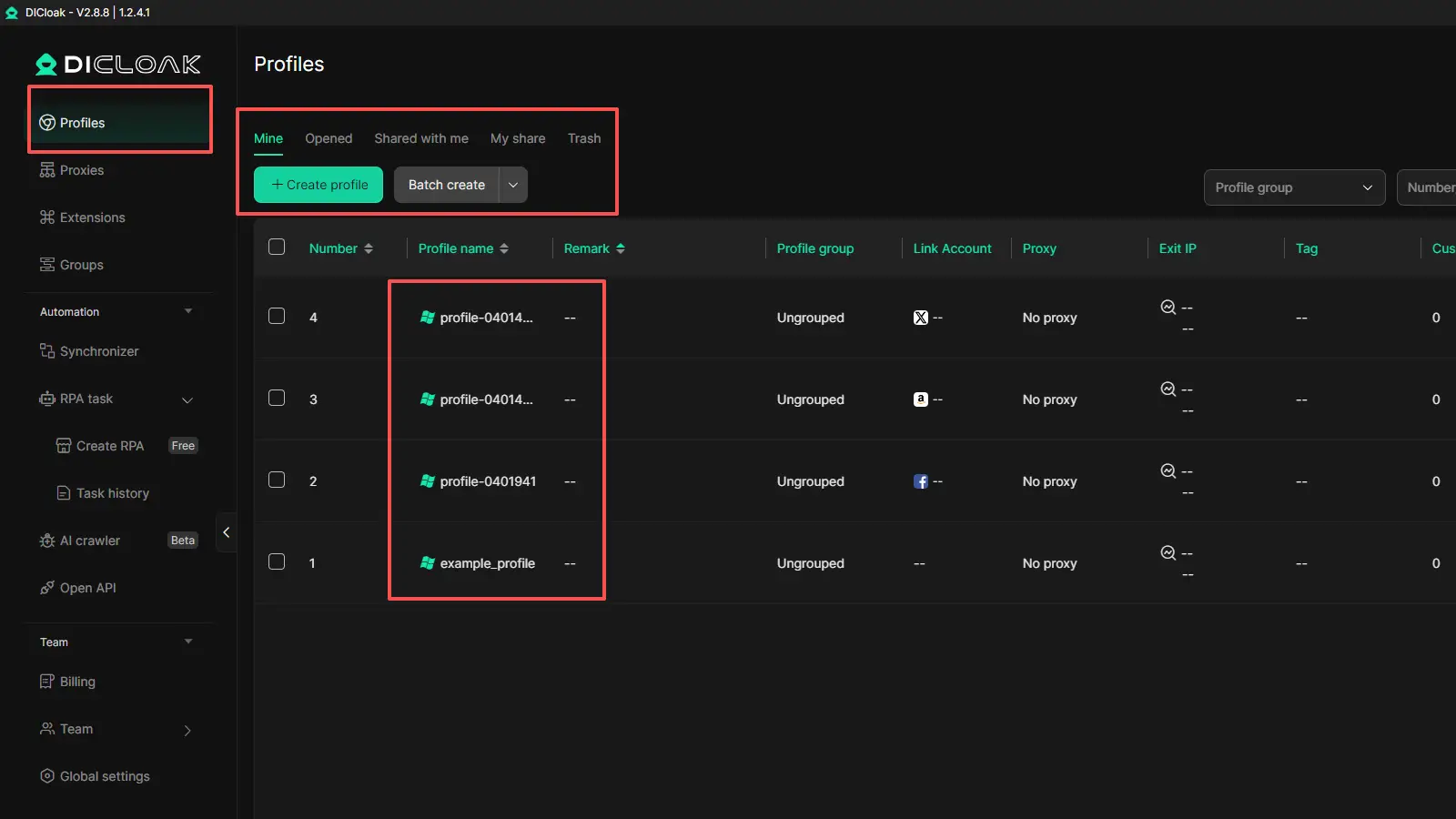
DICloak uses isolated browser profiles, so different TikTok account environments can stay separate. This helps reduce session mix-ups and keeps cookies, local data, and daily account work more organized. It also supports custom fingerprint settings and user-configured proxy setup for each profile.
Keeping livestream preparation and daily account work organized
Before going LIVE, creators often need to handle content checks, profile work, comment review, and account prep. DICloak can help keep these tasks in separate browser profiles instead of mixing everything in one session. For teams, it also offers member permission controls, website access restrictions, and Security Protection Mode, which can make shared account work easier to manage.
Saving time with automation and team collaboration tools
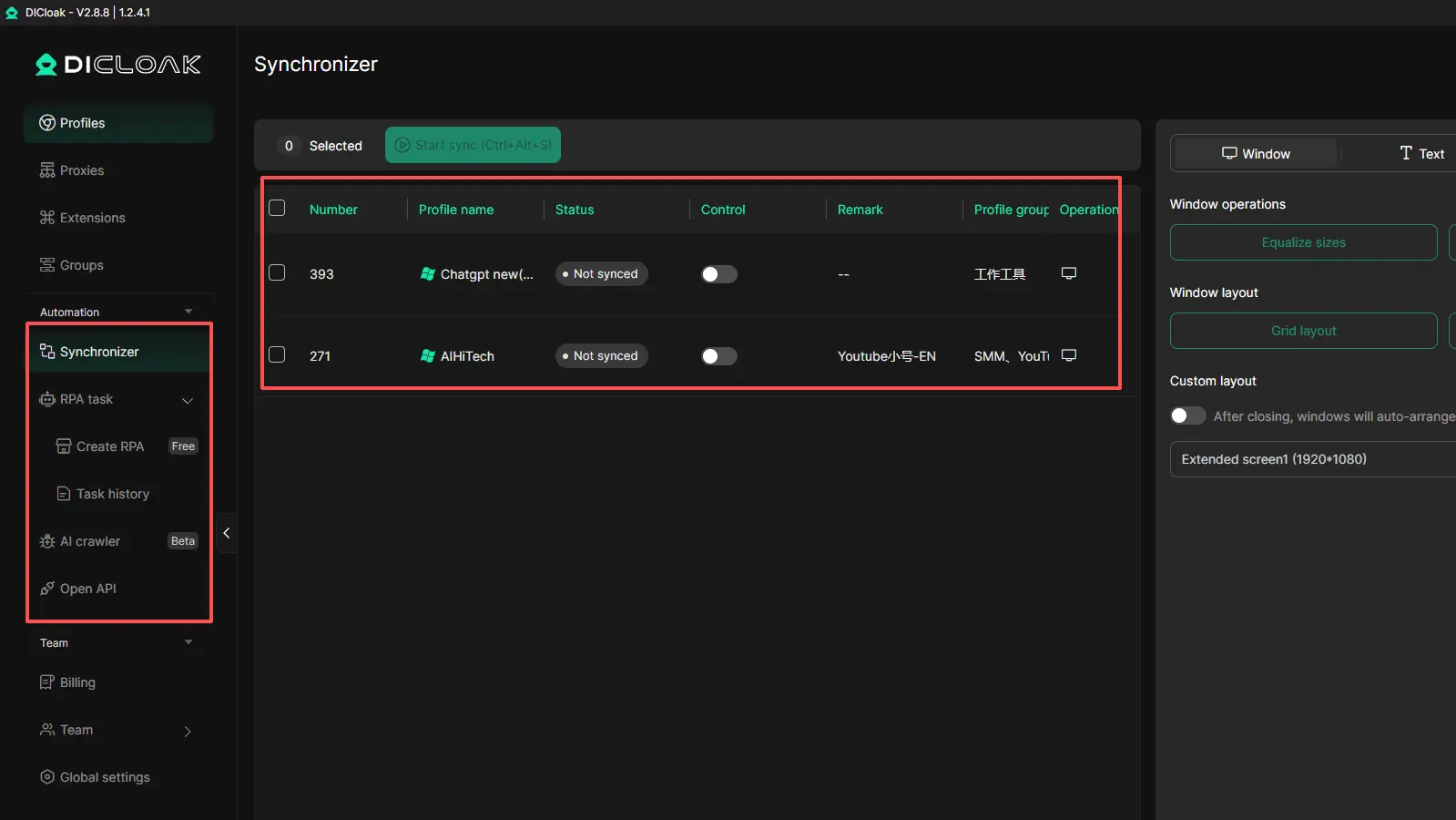
DICloak also includes tools such as the Multi-Window Synchronizer, AI Crawler, and built-in automation features. These can help reduce repetitive work and improve efficiency when creators or teams manage multiple TikTok tasks at the same time. In that sense, DICloak works best here as a support tool for cleaner account management and smoother TikTok LIVE preparation.
FAQ About How Many Followers to Go Live on TikTok
Q1: How many followers to go live on TikTok do you usually need?
For most creators, the usual answer to how many followers to go live on TikTok is 1,000 followers. You also need to meet TikTok’s age and account eligibility rules.
Q2: Can you go live on TikTok before reaching the how many followers to go live on TikTok limit?
In most cases, TikTok still requires the normal follower threshold before LIVE becomes available. Smaller accounts can keep growing with regular posts, comments, and other engagement features until they reach the usual how many followers to go live on TikTok requirement.
Q3: Why is TikTok LIVE missing even after I reach the how many followers to go live on TikTok threshold?
This can happen if your age is not verified, your account is not in good standing, or the feature is still limited by local rollout or account status. So reaching the follower number does not always unlock LIVE right away.
Q4: Does the how many followers to go live on TikTok rule change by country?
TikTok says LIVE access depends on a local minimum follower threshold, so some details may vary by region. Still, 1,000 followers is the most common public answer for creators asking how many followers to go live on TikTok.
Q5: What happens if I lose followers after unlocking how many followers to go live on TikTok access?
TikTok does not clearly say that LIVE is removed right away if your follower count drops later. But it is still a good idea to keep your account active, follow TikTok’s rules, and keep building real engagement after unlocking LIVE.
Conclusion
If you are wondering how many followers to go live on TikTok, the safest answer in 2026 is still 1,000 followers, plus the right age and account eligibility. But reaching that number is only the first step. To use TikTok LIVE well, creators also need to understand account limits, follow platform rules, and build real engagement before going live. The better your content and daily workflow are, the easier it becomes to unlock LIVE and make it useful once the feature appears.
 Web Proxy Tools
 Free Tools
 Cookie Plugin
 UA Generator
 MAC Address Generator
 IP Generator
 IP Address List
 2FA Code Generator
 World Clock
 Anonymous Check
 WebRTC Leak Test
 UUID Generator
 Free Web Proxy Site
 Proxy Checker
 FB Ad Checker
 AI Web Scraping
 Free SMM Tools
 Twitter Shadowban Checker
 Instagram Name Checker
 UTM Generator
 Username Generator
 AI Hashtag Generator
 LinkedIn Headline Generator
 Social Media Image Resizer