In 2026, the debate about grok vs chatgpt is real and active. These are two powerful AI models people use every day. Grok AI and ChatGPT both help with writing, coding, learning, and more. But they work in different ways, and each has its own strengths and limits.
Grok is made by xAI, a company started by Elon Musk. It grew fast from early versions like Grok 3 into newer ones such as Grok 4. People often describe Grok as bold, witty, and closely tied to social media. It can pull real-time info from X (formerly Twitter) while it works, so answers can feel fresh and lively.
On the other hand, ChatGPT comes from OpenAI and runs on strong models that have evolved for years. Many people use chatgpt.com and the ChatGPT login page to start sessions. ChatGPT is known for its clear explanations and wide range of skills. It helps with creative writing, research, business planning, and complex tasks. There is a ChatGPT Free tier, and other paid tiers that add features.
In real comparisons, testers found that Grok 4 can respond quickly and sometimes gives bold insights, especially when you ask for short summaries or real-time info. But ChatGPT often gives more structured, consistent answers when you need detailed writing or deep research.
For people who log in daily, the choice can matter. Many professionals who need polished business writing still choose ChatGPT. Users who want speed and casual tone may enjoy Grok. In the next sections, we will look deeper at specific tasks to help you decide which one fits your needs best.
Grok vs ChatGPT: Feature Comparison
Core Features of Grok
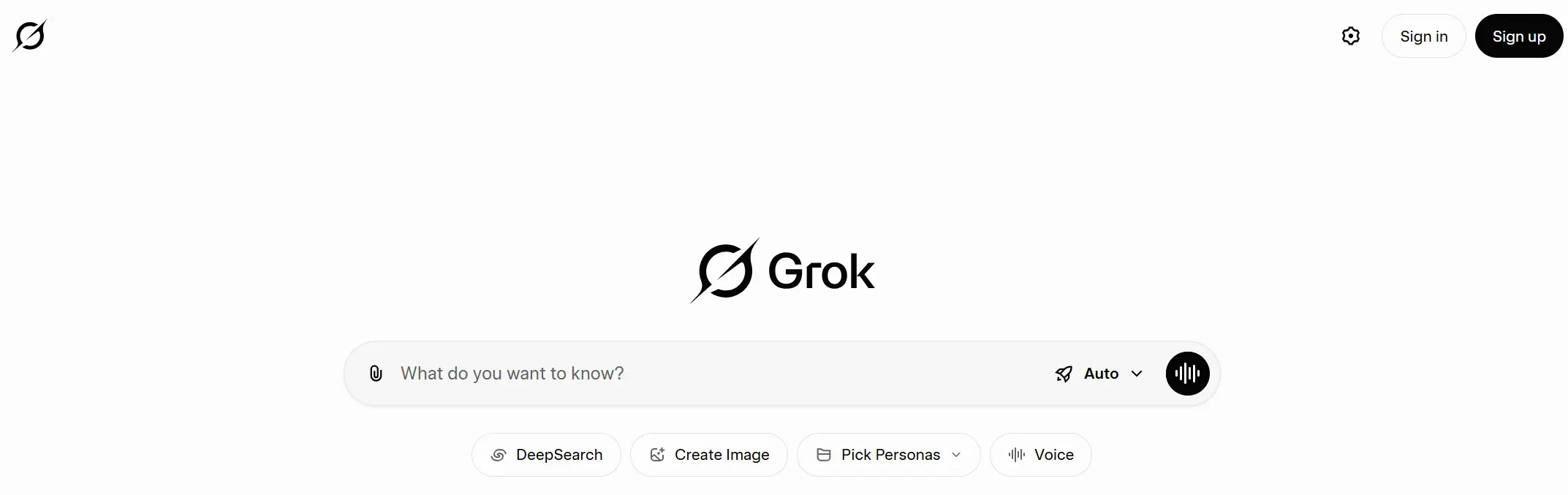
When we talk about grok vs chatgpt, it helps to know what each tool can do. Grok AI is a chatbot built by xAI. At its core, Grok pulls real-time info from the web and social streams to give answers that feel current and lively. This real-time access makes Grok good for trends, quick summaries, and real-time social media insights.
For example, if you ask Grok to summarize breaking news or trending topics, it will often pull recent posts and data. Many users say its replies feel more like a social feed with insights and commentary. That’s because Grok is built to act more like a conversational partner with instant info.
Grok’s core models have grown fast from older versions like Grok 3 into newer releases such as Grok 4. These updates improved reasoning, basic coding help, and real‑time search output, and they now compete not just with proprietary tools like ChatGPT but also with open‑source AI models that emphasize transparency and community‑driven innovation. Some testers report that Grok handles quick STEM tasks and coding logic with strong performance, often at a high speed.
To use Grok, people often go to a Grok login page from xAI or through the social platform where Grok is integrated. Because Grok mixes personality and real-time data, its replies can seem witty or bold, which some users like for casual conversations.
Core Features of ChatGPT
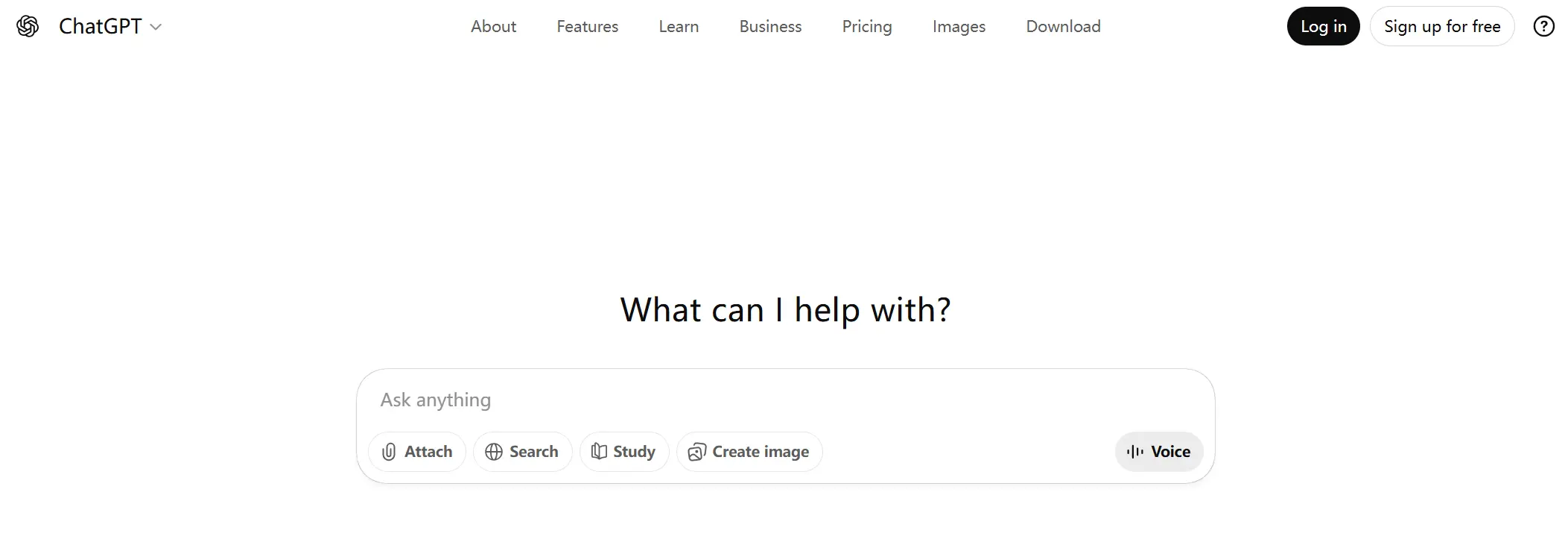
On the other side, ChatGPT is made by OpenAI and lives on chatgpt.com. Many people start by going to ChatGPT login or using the ChatGPT Free tier to try the tool. That free tier gives access to basic features, and higher tiers unlock more advanced models like GPT-5 and specialized tools.
ChatGPT’s strength comes from its polished writing and broad use cases. It is trained on diverse and curated data to give balanced responses. This makes it great for essays, structured text, detailed explanations, professional emails, business reports, and research summaries. Testers report that ChatGPT often gives more coherent long-form writing than some other models.
For instance, a user asked both tools to create a long business report. ChatGPT produced clear sections, with headings and citations, while Grok’s version was shorter and more informal. This shows how ChatGPT works well when structure and depth are priorities.
ChatGPT also supports voice interaction, multimodal input (text, images, voice), and deep research tools. These features help users who need rich context or multi-step explanations.
Performance Metrics: A Side-by-Side Analysis
To compare grok vs chatgpt fairly, it helps to look at real tests. In coding and STEM tasks, sources show that newer Grok versions like Grok 4 can be very fast and accurate, especially in logic or math challenges. Some test results show Grok performing well on benchmarks where reasoning speed matters.
But in creative writing and complex analysis, ChatGPT often wins. For long pieces of text or structured business writing, ChatGPT’s consistency stands out. It balances safety, accuracy, and tone more reliably than many competitors.
One practical example comes from developers testing both tools on code help. Grok sometimes responded with brief code fixes quickly. ChatGPT gave longer, step-by-step explanations that users found easier to follow when learning a new language or debugging deeply.
In short, Grok excels when you want fast real-time insights or trend-based replies, while ChatGPT excels when you need structured, polished, and detailed work. Both are strong tools, and many users choose based on the task they face right now.
Grok vs ChatGPT: Usability and Accessibility
After comparing features, usability becomes the deciding factor in grok vs chatgpt. How fast you can log in, understand the interface, and fit the tool into daily work matters more than raw power.
User Experience: Interface and Design
Grok AI feels fast and social. After Grok login, the interface highlights real-time topics and short replies. This design works well for quick questions and trend-based tasks. Many users say Grok feels like chatting inside a live feed, not a long editor.
ChatGPT, accessed via chatgpt.com and ChatGPT login, looks clean and calm. The layout favors long text, editing, and history review. This makes ChatGPT easier for writing articles, reports, or step-by-step guides. For focused work, the interface feels less distracting.
Integration into Workflows
In daily use, ChatGPT fits well into many workflows. Users often start with ChatGPT Free to draft emails, summaries, or outlines, then move content into Docs or Notion. Teams also use ChatGPT for research and planning because it handles long context well.
Grok, including versions like Grok 3 and Grok 4, shines in fast workflows. It works best when you need quick answers from live data. For example, a marketer may use Grok to react to trending news, then switch to ChatGPT to write a full blog post.
Pricing Models: Free vs. Paid Options
Both tools offer free access. ChatGPT Free is enough for light use, such as homework help or short writing. Paid plans unlock more power and higher limits.
Grok also offers free access with daily limits, especially in Grok 4. Heavy users often upgrade when they need more speed or prompts. In practice, casual users stay free, while professionals pay for reliability.
Overall, in grok vs chatgpt, Grok feels easier for fast, real-time tasks, while ChatGPT feels easier for deep, structured work.
Grok vs ChatGPT: Strengths and Weaknesses
After talking about usability and access, it helps to see the real pros and cons of grok vs chatgpt. Both tools are powerful, but they are good at different things. Real users and tests show how Grok and ChatGPT perform in real work.
Pros and Cons of Grok
Grok AI has clear strengths. It pulls real-time info from the web and from X (formerly Twitter), so it is quick with trends and fresh topics. Users who need fast replies and short summaries like Grok’s lively tone. The newer versions like Grok 3 and Grok 4 can also handle coding tasks and logic problems well in quick tests.
However, Grok has weaknesses. Its casual style and quick replies can be rough and less polished for long writing or deep reports. Some users report that Grok sometimes gives raw or incomplete explanations, especially when the task is complex. Grok also relies on the social platform where it lives, so if X has issues, Grok’s performance may be affected.
Another practical note: many free Grok plans have tight limits on how many prompts you can send per hour or per day, so heavy users may hit caps quickly.
Pros and Cons of ChatGPT
ChatGPT is known for polished and structured answers. After going to chatgpt.com and completing ChatGPT login, many users rely on its stable output for long writing, business planning, research summaries, and creative work. Its strong language skills make long essays and detailed explanations easy to read.
ChatGPT’s cons include usage limits on free plans, where users may only send a small number of messages in a set time. If you hit the limit, you must wait or upgrade. Also, ChatGPT’s replies can be more cautious, which means it may avoid creative or edgy content that some users like in Grok.
Limitations of Each AI Model
No AI is perfect. Grok’s real-time strength can also be a weakness. Because it mixes social data, sometimes the replies are less reliable or less formal than you want. In critical work, errors or unfinished logic can require extra checking.
ChatGPT, while strong at detail and writing, may also hallucinate or invent facts if the prompt isn’t clear or if the topic is obscure. This means users must still verify important information.
Both tools can produce wrong answers when tasks are tricky or highly specialized, so human checking remains important. In short, Grok is fast and trendy, while ChatGPT is steady and thorough. The best choice depends on what you need right now.
Grok vs ChatGPT: Use Cases and Applications
Now that you know the strengths and weaknesses of grok vs chatgpt, it helps to look at real use cases. This shows how each model works in business, coding, marketing, and creative projects. Real examples help you see where each AI shines.
Business Applications of Grok
Grok AI is used in business when speed and real-time insight matter. Because it can pull live trends from X (formerly Twitter), teams use Grok to track audience mood and shift content quickly. For example, a marketing group might ask Grok to summarize the latest conversation about a product launch. In minutes, they get fresh real-time facts they can use in social posts or ads.
Some companies also use Grok to spot trends in their industry. They ask “what is Grok” and then prompt it with specific topics, like competitor mentions or customer reactions, and get quick snapshots of public sentiment. This fast feedback helps teams make quick decisions without long research cycles.
However, Grok’s casual and edgy style means its output may need editing for formal business documents. It works best when leaders want fast ideas, not final polished text.
Business Applications of ChatGPT
ChatGPT has broad business use because it can create structured and polished content. After ChatGPT login at chatgpt.com, many teams use its tools to write reports, training guides, and proposals. Because it supports long conversations, it keeps context across many inputs, which helps when drafting multi-section documents.
For example, a small business may use ChatGPT Free to draft a customer support guide. ChatGPT can break complex topics into clear steps, help refine wording, and even generate a table of contents. Because it is trained on professional use cases, its output is easier to read and edit for external audiences.
ChatGPT also works well in planning and strategy tasks. Teams ask it to compare market trends or draft business plans, then refine the drafts with more prompts. This makes it a strong choice for companies that need consistent quality across many documents.
Specific Use Cases: Coding, Marketing, and Creative Writing
Coding: Both tools help with programming. Grok can often suggest quick code snippets or logic solutions in live tests. This works well when developers want short, task-specific answers. ChatGPT is known to produce more stable, detailed code explanations and debugging help, especially for beginners or complex problems. Many developers test both tools on the same task. In some tests, Grok was faster on simple tasks, while ChatGPT gave clearer step-by-step code with comments.
Marketing: Grok excels in trend-driven content like short social captions or quick reaction posts. It can spot what people talk about right now and help marketers write timely content. ChatGPT is stronger for full marketing campaigns, SEO planning, and long articles because it keeps structure and tone consistent.
Creative Writing: In creative tasks like storytelling, both tools are useful. Some users say Grok’s more casual style provides unexpected ideas or fresh angles. Others find ChatGPT more reliable for revised stories or scripts where clarity and flow matter. In either case, drafts often need human editing to shape final creative work.
Grok vs ChatGPT: Personality and Tone
After reviewing strengths and weaknesses, the final difference in grok vs chatgpt often comes down to how they talk. Personality and tone shape how comfortable users feel and how much they trust the output.
Interaction Style of Grok
Grok AI feels bold and casual. After Grok login, replies are often short, direct, and lively. Grok reacts like a real-time companion, especially when discussing trends or hot topics. This style fits creative brainstorming and social content well. Versions like Grok 3 and Grok 4 lean into this fast, informal tone, which some users find engaging but less suitable for formal tasks.
Interaction Style of ChatGPT
ChatGPT speaks in a calm and structured way. After ChatGPT login on chatgpt.com, users get clear and polite answers. Even on ChatGPT Free, responses are organized and easy to follow. This tone works well for learning, business writing, and step-by-step guidance. ChatGPT feels more like a patient assistant than a social voice.
Impact on User Engagement and Satisfaction
Tone affects satisfaction. Grok’s energetic style keeps users engaged in quick chats and trend work. ChatGPT’s steady tone builds trust for deep work and long content. In practice, many users enjoy Grok for fast ideas and ChatGPT for serious tasks. That human feel is a key part of choosing between grok vs chatgpt.
Grok vs ChatGPT: Future Developments
As grok vs chatgpt continues to shape the future of AI, developers are racing to add fresh features and new capabilities. Both Grok AI and ChatGPT are evolving fast, and upcoming changes may shift how people use them.
Upcoming Features for Grok
Grok AI is preparing new updates beyond versions like Grok 3 and Grok 4. According to xAI’s roadmap, future releases such as Grok 4.20 and beyond aim to improve reasoning and language understanding even more. These updates focus on better generalization so the AI gives more accurate answers across a wider range of topics.
Grok may also expand its multimodal tools — not just text, but images and voice — to give richer input options in the future. In 2025, xAI added image generation tools like Aurora built into the platform, and later versions are expected to build on this with more powerful creative features.
One major real-world sign of Grok’s expanding role is that the U.S. Department of Defense announced plans to integrate Grok into military networks, showing its potential for high-impact environments.
Upcoming Features for ChatGPT
ChatGPT also continues to add new tools and upgrades. After users complete ChatGPT login on chatgpt.com, they can already use features like images and voice chat in some versions. OpenAI has been expanding multimodal tools that let the model understand text, pictures, and even audio.
Future updates may improve how ChatGPT reasons over long text and how it interacts with external apps and data. This means ChatGPT could become even better at tasks like research, planning, and workflows — all while keeping replies clear and reliable. Many users now try the ChatGPT Free tier and then upgrade to paid plans to access the newest capabilities.
Competitive Landscape: How They Compare to Other AI Models
The AI field is crowded. Models from other companies like Google’s Gemini continue to evolve alongside grok vs chatgpt. Gemini and others push both Grok and ChatGPT to add better reasoning, safety checks, and multimodal features.
In this landscape, Grok’s strength is real-time trend awareness and bold replies, which makes it popular for quick insights. ChatGPT’s advantage lies in structured knowledge and broad use across industries. Future versions of both tools will likely borrow ideas from competitors while keeping their unique tone and utility.
Overall, watching the future of grok vs chatgpt shows how AI tools will become more powerful, easier to use, and more connected to real life. Continued innovation means users can expect faster, smarter, and more helpful AI assistants in the years ahead.
Maximize Savings and Enhance Security: Using DICloak Antidetect Browser to Share Your Grok or ChatGPT Account
After looking at the future of grok vs chatgpt, one practical question comes up fast: “How do we use these tools in a team without creating security chaos?” Here is the key point first. Both OpenAI and xAI say you should not share account credentials (passwords) with other people. OpenAI states your account is meant for the person who created it. xAI’s consumer terms also say you may not share your login details.
So what can you do safely?
A modern, secure solution to the sharing problem is an antidetect browser. This technology is designed to safely manage multiple online identities, making it the perfect tool for controlled account sharing. The recommended tool, DICloak, solves the problems inherent in the risky methods mentioned above.
This approach directly mitigates the core risks of traditional sharing:
- Credentials are never exposed, eliminating the primary vector for privacy breaches and financial fraud.
- The native browser experience is superior to the laggy, insecure nature of remote desktop solutions.
How DICloak Enables Safe Grok or ChatGPT Account Sharing
DICloak works by creating a single, dedicated browser profile for the shared account. This profile is configured with a stable proxy and a fixed digital fingerprint, making all logins appear as if they are coming from the same legitimate user. This consistency prevents suspicious-login alerts and dramatically reduces the risk of an account ban.
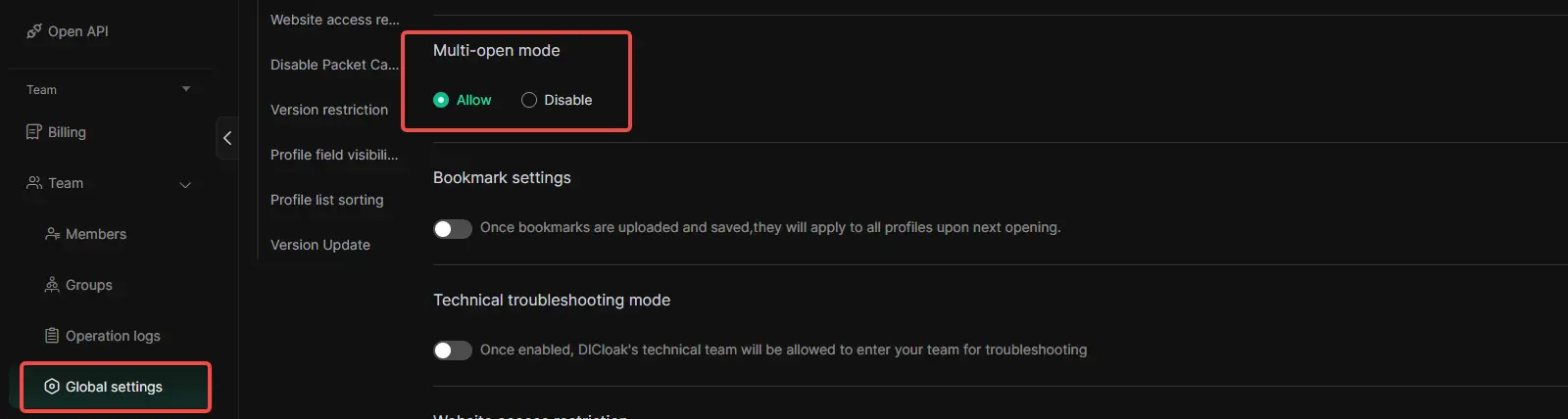
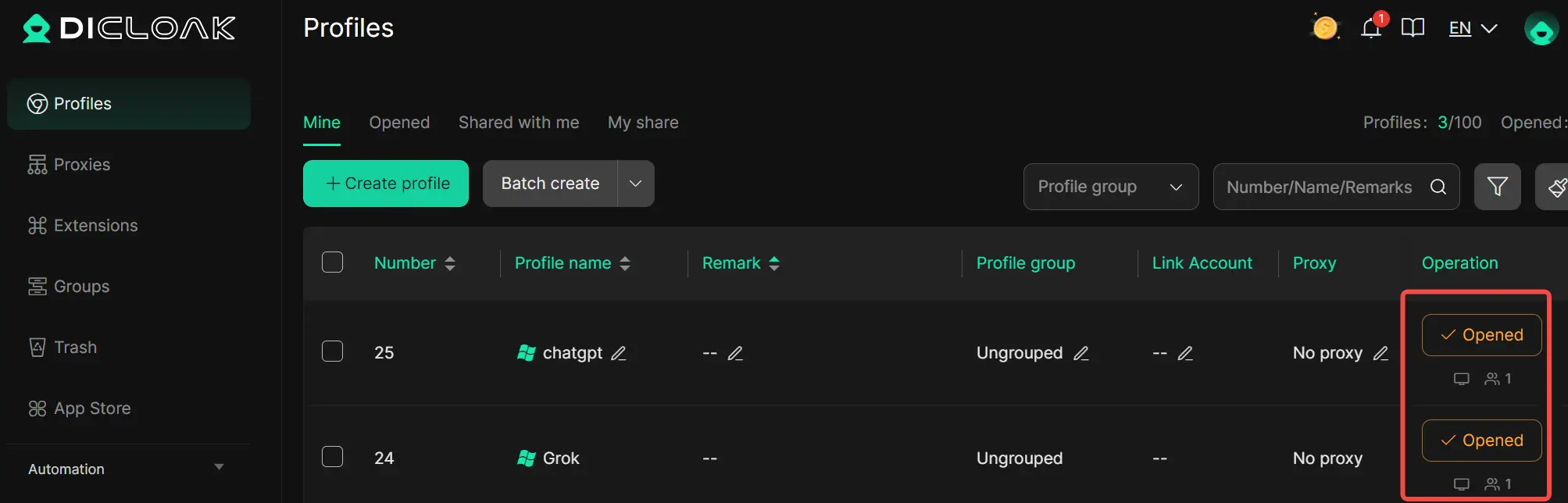
• Simultaneous Access: DICloak’s "Multi-open mode" allows multiple team members to use the same account at the same time without logging each other out.
• Consistent IP Address: A static residential proxy ensures all logins appear to come from one stable location. Think of your IP address as the key to your house; if you use the same key every day, your security system recognizes you. A static proxy ensures your whole team uses the same "key," so the AI platform never gets suspicious. Conversely, multiple IPs accessing one account is the digital equivalent of ten different keys from around the world suddenly unlocking the same door—an immediate red flag for any security system.
• Synced Login Status: The "Data Sync" feature saves the login profile. After the initial login, team members can launch the profile and access the account directly without needing the password.
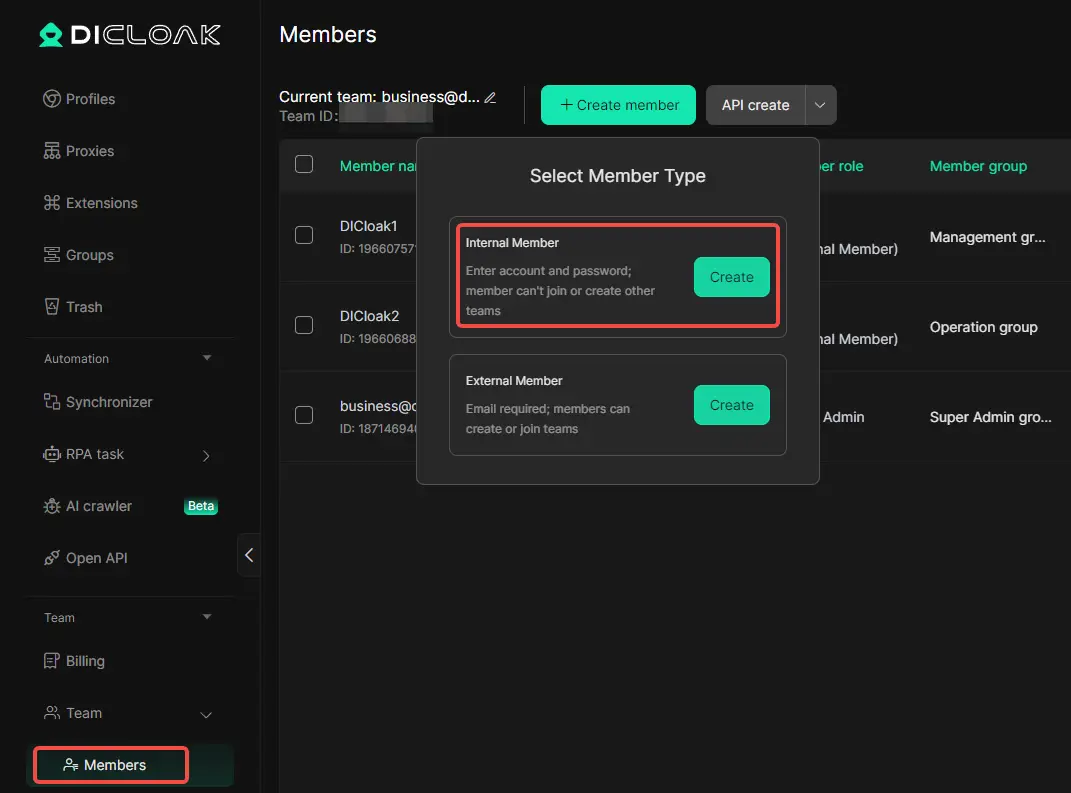
• Secure Team Management: You can create separate member accounts within DICloak and grant them access only to the specific ChatGPT profile, keeping your other online accounts completely private.
Step-by-Step: Securely Share Your Grok or ChatGPT Account with DICloak
Setting up a shared account with DICloak is a straightforward process that does not require deep technical knowledge.
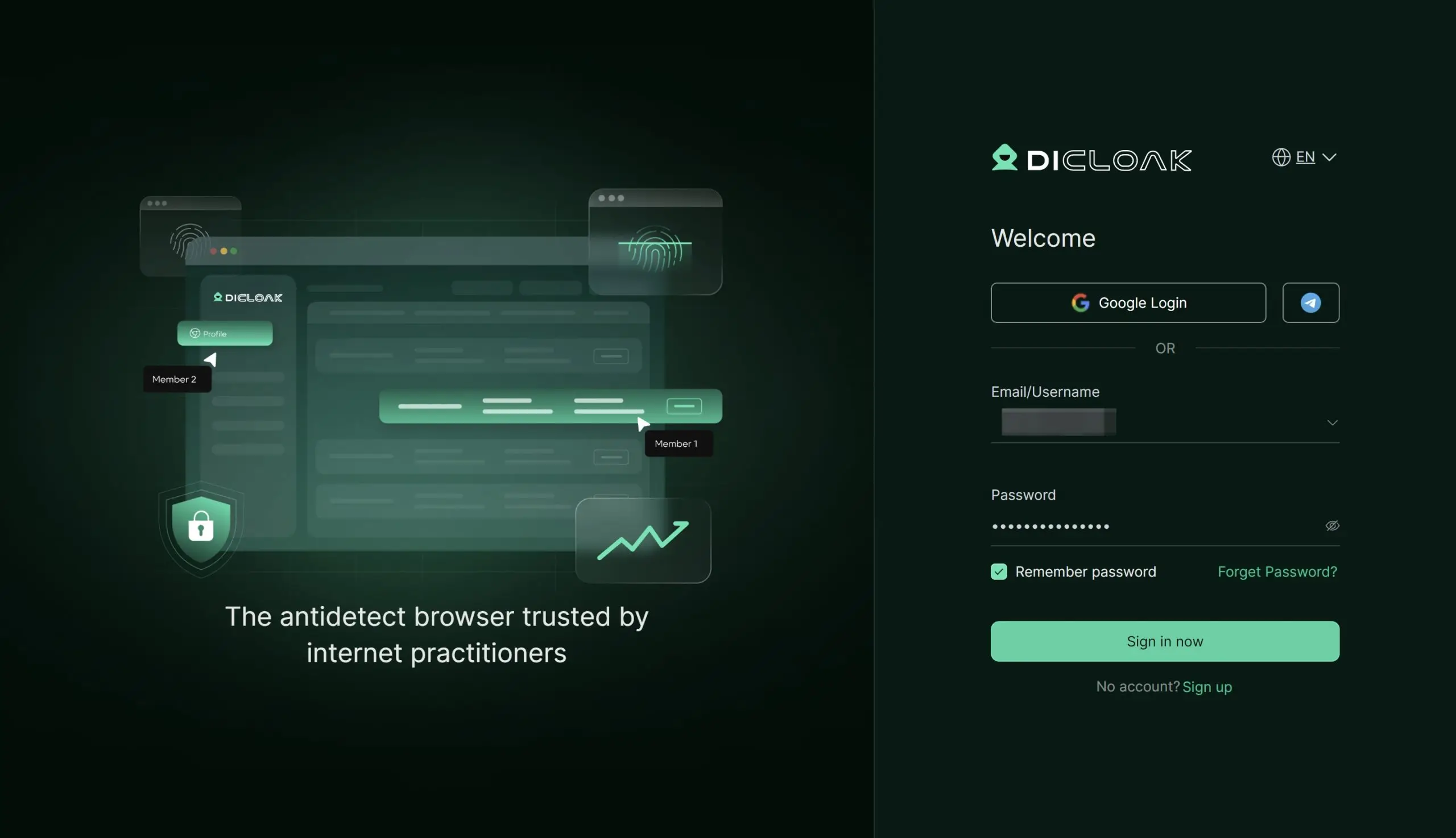
Step 1: Download and Install DICloak
Visit the official DICloak website to register for an account, then download and install the application.
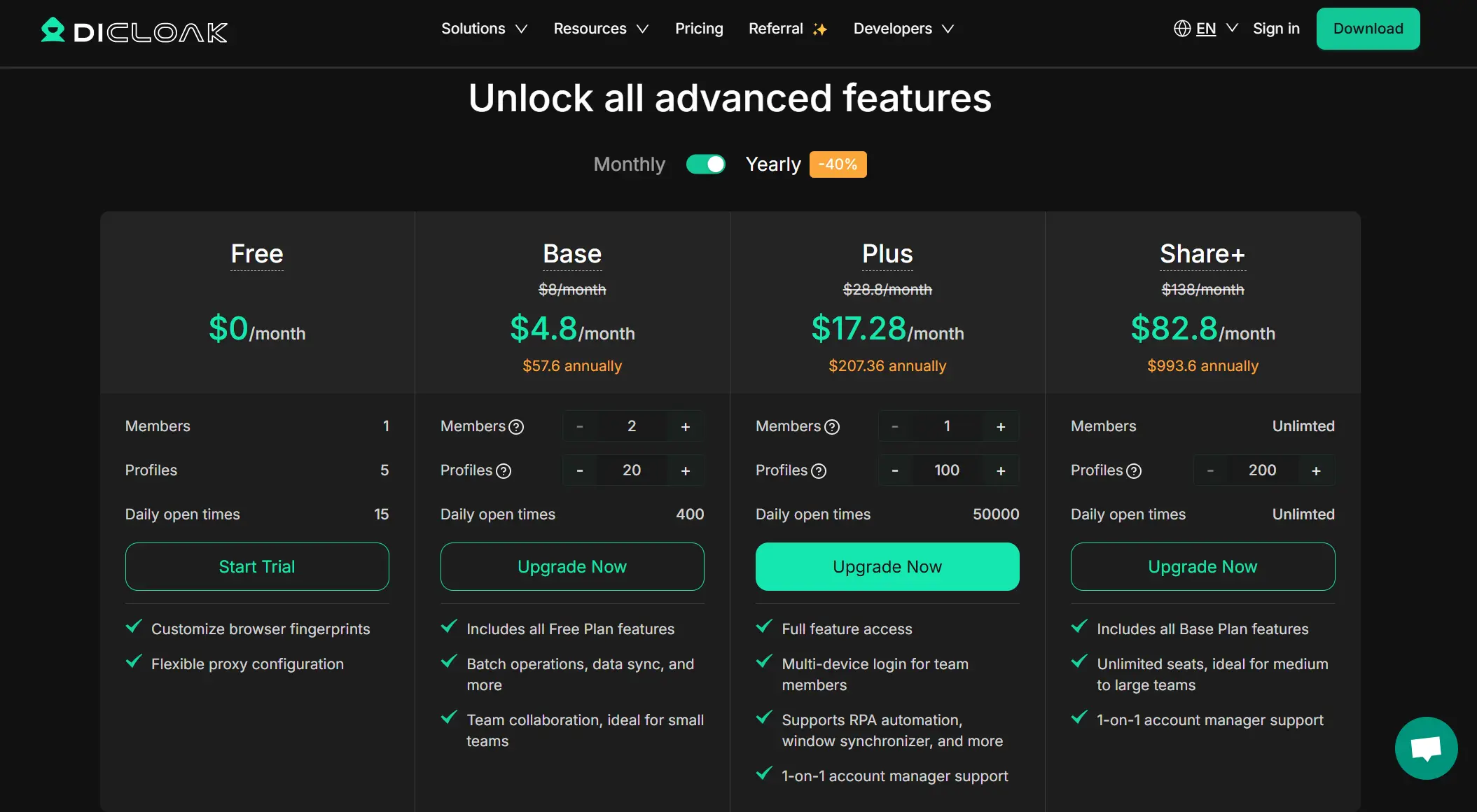
Step 2: Choose the Right Plan
Subscribe to a DICloak plan based on your team's size. The Base Plan is a good starting point for smaller teams, while the Share+ Plan is recommended for larger teams needing unlimited member access.
Step 3: Set Up a Static Residential Proxy (Recommended)
This step is highly recommended to provide a stable, fixed IP address for the shared profile, which greatly reduces security risks. DICloak partners with several trusted third-party proxy providers.
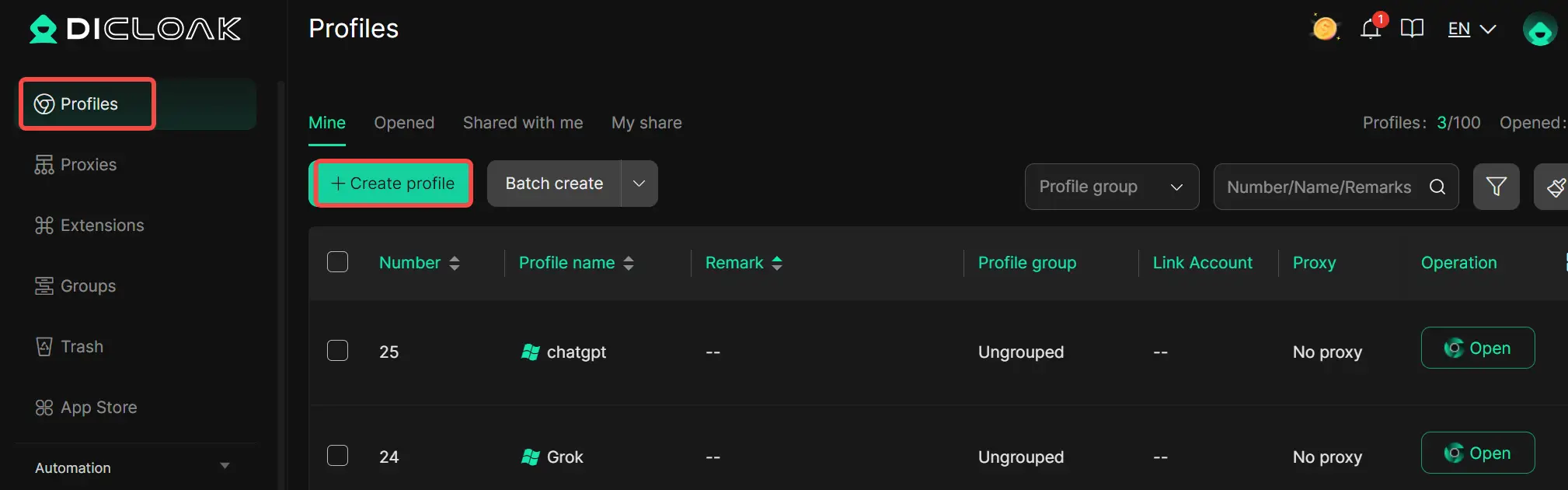
Step 4: Create a New Browser Profile
Inside the DICloak application, create a new profile that will serve as the dedicated profile for your shared Grok or ChatGPT account.
Step 5: Enable Multi-open Mode
Go to [Global Settings], find [Multi-open mode], and select [Allow]. This permits multiple users to access the same profile simultaneously.
Step 6: Log In to Grok or ChatGPT
Launch the new profile, which will open a secure browser window. Navigate to the official Grok or ChatGPT website and log in with your credentials.
Step 7: Share the Profile with Your Team
Use the team feature to create member accounts and invite teammates to your DICloak Team.
Step 8: Access the Shared Account
Once a teammate accepts the invitation, the shared profile will appear in their DICloak application. They can launch it and will be automatically logged into the shared profile.
Advanced Security When You Share Your Grok or ChatGPT Account with DICloak
DICloak includes advanced security features to protect the account owner from potential misuse by shared users.
• Hide the Password: Use DICloak's built-in password manager to allow one-click login for team members without ever revealing the actual password.
• Prevent Cookie & Profile Theft: Block access to browser developer tools and prohibit users from installing their own extensions to stop common data theft methods.
• Block Malicious Software: DICloak can automatically block packet capture software like Wireshark or Fiddler, protecting your login data from network inspection.
• Restrict Website Access: Whitelist specific URLs (e.g., chat.openai.com) to ensure users cannot navigate to other websites within the shared profile.
• Hide Sensitive Information: Use the "Web Element Hider" extension to conceal specific parts of the webpage, such as billing details or account settings, from shared users.
Frequently Asked Questions (FAQs)
Grok vs ChatGPT: Which AI is better for daily use in 2026?
The answer depends on your daily tasks. In grok vs chatgpt, Grok is better for fast answers and real-time trends, especially social topics. ChatGPT is better for writing, learning, and structured work like reports or emails. Many users use Grok for quick ideas and ChatGPT for deep tasks.
Is Grok more powerful than ChatGPT for real-time information?
Yes, in most cases. In the grok vs chatgpt comparison, Grok has stronger real-time awareness because it connects to live data sources. ChatGPT focuses more on stable knowledge and reasoning. If you need breaking news or trend tracking, Grok usually responds faster.
Can I use ChatGPT Free instead of Grok for business tasks?
You can, but there are limits. ChatGPT Free works well for light business tasks like short emails or simple drafts. In grok vs chatgpt, ChatGPT is still better for structured business writing. However, free plans have message limits, so heavy users may need a paid option.
Is it safe to share a Grok or ChatGPT account with a team?
Direct password sharing is not recommended. Both platforms expect individual use. In real grok vs chatgpt workflows, teams often use tools like DICloak to isolate browser profiles while keeping accounts secure. This reduces login risk and avoids account bans.
Which AI is better for beginners, Grok or ChatGPT?
For most beginners, ChatGPT is easier. In grok vs chatgpt, ChatGPT offers clearer explanations and step-by-step answers. Grok can feel more casual and fast, which some new users enjoy, but ChatGPT is usually easier to learn with, especially for study or work tasks.
Conclusion
Choosing between grok vs chatgpt in 2026 is not about finding a single “best” AI. It is about matching the tool to your real needs. Grok stands out for real-time insights, fast responses, and a bold interaction style. ChatGPT excels in structured writing, learning support, and professional tasks that require clarity and depth.
For many users, the smartest choice is not Grok or ChatGPT, but knowing when to use each one. Use Grok for trends, quick ideas, and live discussions. Use ChatGPT for planning, coding help, long-form content, and business work. Understanding these differences helps you get better results with less effort.
In the end, the grok vs chatgpt decision becomes simple when you focus on your workflow, your goals, and how you want to work with AI in 2026.
 Web Proxy Tools
 Free Tools
 Cookie Plugin
 UA Generator
 MAC Address Generator
 IP Generator
 IP Address List
 2FA Code Generator
 World Clock
 Anonymous Check
 WebRTC Leak Test
 UUID Generator
 Free Web Proxy Site
 Proxy Checker
 FB Ad Checker
 AI Web Scraping
 Free SMM Tools
 Twitter Shadowban Checker
 Instagram Name Checker
 UTM Generator
 Username Generator
 AI Hashtag Generator
 LinkedIn Headline Generator
 Social Media Image Resizer