If you want to earn money online with affiliate marketing, you may have heard of CPABuild. Some people say it works well. Others say it has challenges. This guide will help you learn what CPABuild really is, how it works, and why many marketers use it today. You will see real examples and simple explanations to help you decide if CPABuild is right for you.
Introduction to CPABuild
Affiliate marketing is a popular way to earn money online. You make a commission when people take action, like signing up or completing a form. One tool many affiliates use to earn money is CPABuild. It helps marketers promote offers and get paid for actions. This guide will explain what CPABuild is, how it works, and whether it is a reliable choice for affiliate marketers.
What is CPABuild?
CPABuild is a Cost Per Action (CPA) network. It pays marketers when users complete certain tasks. Tasks can include filling out surveys, signing up for newsletters, or joining offers. CPABuild connects advertisers, who want leads or sales, with affiliates, who promote the offers.
A key feature of CPABuild is content lockers. Content lockers let you lock content on your site, so visitors must complete an action to access it. For example, if you have a free PDF guide, you can lock it so users complete a short offer first. This helps affiliates turn regular website traffic into earnings.
Importance of CPABuild in Affiliate Marketing
CPABuild is important because it allows affiliates to earn without selling products directly. Beginners often struggle to sell items, so earning through actions like email signups or app installs is easier. The platform also provides tracking tools to monitor campaign performance.
For example, a gaming blogger might lock a free game guide with CPABuild. Visitors complete an offer to unlock the guide, and the affiliate earns money for each completed action. This shows how CPABuild can convert simple traffic into income.
How Does CPABuild Work?
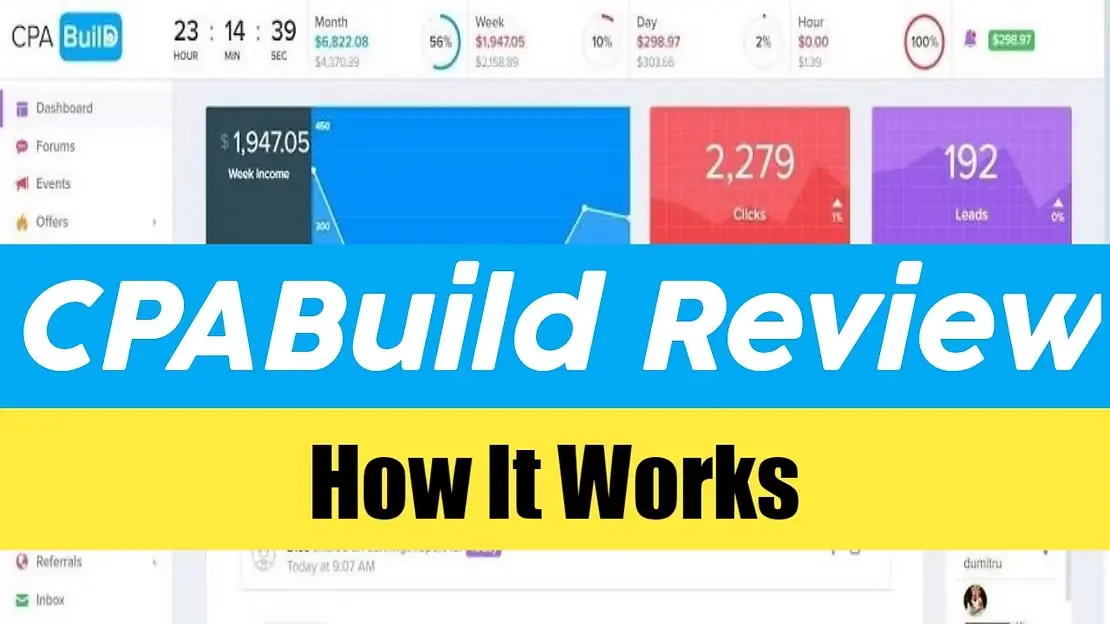
CPABuild works in a few simple steps:
- Sign Up: Create a free affiliate account.
- Find Offers: Browse available CPA offers that pay for actions.
- Promote Offers: Add links or content lockers to your site or social media.
- Earn Money: When someone completes an action, CPABuild tracks it and credits your account.
- Get Paid: Withdraw earnings after reaching the minimum payout.
The platform also provides analytics to track clicks, conversions, and total earnings. This helps you improve campaigns by testing what works best.
Is CPABuild Legit?
CPABuild is a legitimate platform used by many affiliates worldwide. It offers real payment options such as PayPal, Payoneer, Bitcoin, and bank transfers. Many users report earning successfully with the platform.
However, some users have experienced tracking issues or delays in support. To avoid problems, follow all rules and start with small campaigns. Testing the platform first helps ensure your traffic converts and payments are accurate. When done correctly, CPABuild is a reliable way to earn through affiliate marketing.
Key Features of CPABuild
When you start with CPABuild, you will see many tools that can help you make money online. These tools help you plan, track, and earn from affiliate offers. In this section, we explain three big features that many affiliates like. These features explain why CPABuild can work for beginners and experienced marketers alike.
Content Locking Mechanism
One of the main tools inside CPABuild is called content locking. This tool lets you put a “lock” on part of your content on a website or blog. The lock stops visitors from seeing files or text until they complete an action. The action can be something simple, like a survey, sign‑up, or download.
Here is a simple example: Imagine you write a blog post about fitness tips. You have a free PDF guide that readers can download at the end. Instead of giving it away for free, you use CPABuild’s content lock. A visitor must complete a short offer first, then they get the PDF. You earn money for each completed offer.
This is powerful because it turns simple traffic into earnings. Many small bloggers use content locking to make money from their existing content.
Real‑Time Analytics and Reporting
Another key feature of CPABuild is its real‑time analytics. Analytics means data about your visitors, clicks, and conversions. Real‑time means you see this information right away while your campaign is running.
For example, if you send traffic from social media to a CPABuild offer, the analytics will show how many people clicked your link and how many completed the action. This helps you know what works and what does not.
Imagine you have two Facebook posts promoting the same offer. One gets 100 clicks and 10 conversions, while the other gets 200 clicks but only 5 conversions. With CPABuild’s data, you see this difference quickly and focus on the post that earns more money. Good tracking can save you time and help you earn more with less effort.
Variety of Offers Available
CPABuild gives you many different offers to choose from. These offers are tasks that people must complete so you can earn a commission. The offers vary by type and audience.
Some offers might ask visitors to sign up for a newsletter, download an app, or fill out a survey. Others can be for products like mobile games, email lists, or special deals.
For example, one affiliate might focus on mobile app downloads because their traffic comes from TikTok. Another affiliate might choose email sign‑up offers because their blog has a small but loyal audience. With CPABuild, both types of affiliates can find offers that fit their audience and goals.
This variety makes CPABuild useful for many kinds of affiliate marketers. You are not stuck with one type of campaign or one group of offers.
Pros and Cons of CPABuild
After looking at the main features of CPABuild, it is helpful to understand both the good and the bad sides. No platform is perfect, and knowing the pros and cons helps you decide if CPABuild fits your affiliate goals.
Pros
Easy Way to Make Money
One big benefit of CPABuild is that it gives beginners a simple way to start making money online. You do not need to sell products or carry stock. Instead, you earn when people take action by completing offers you share. This can feel easier than traditional selling, especially for new marketers who do not want to create their own products.
Many affiliates use content lockers to turn free traffic into earnings. For example, one user might lock a free PDF guide on fitness tips. Visitors must complete a short offer before they can download it. When they do, the affiliate earns money for that action. This kind of strategy has helped newcomers see their first affiliate dollars without complex sales funnels.
Low Withdrawal Threshold
Another advantage of CPABuild is its relatively low payout barrier. Affiliates can withdraw funds once they reach the minimum threshold, which is low enough that smaller publishers can still cash out their earnings without waiting too long or needing huge volumes of traffic. This helps people stay motivated and keep building their affiliate skills over time.
Global User Acceptance
CPABuild accepts affiliates from many countries. This global reach means you do not have to be in one specific region to join and earn. People from different countries can pick offers that suit their audience or traffic sources. This global access is helpful if your audience is spread across different parts of the world.
User‑Friendly Interface
The CPABuild dashboard is designed to be easy to use. Even if you are new to affiliate marketing, you can find offers, set up content lockers, and check reports without feeling lost. The simple layout with clear menus makes daily tracking less stressful. For example, affiliates often say the reporting section helps them check how many people clicked their links and how many completed actions, all in one place.
Cons of CPABuild
Scam‑Like Offers
One downside some affiliates mention is that certain offers on CPABuild can feel scam‑like or low quality. This means a visitor might hesitate to complete the action because it seems suspicious. Complaints online show some offers ask for personal info without clear benefit, and this can lower conversion rates or make users distrust your site. Stories from some affiliates describe problems with questionable lead quality, so it is important to choose offers carefully and avoid those that look untrustworthy.
Loss of Audience Trust
If you promote offers that seem fake or annoying, your audience might lose trust in you. For example, if a visitor expects to download a file but instead faces a long survey with unclear purpose, they may avoid your future content. As an affiliate, keeping trust is important. Bad experiences with low‑quality offers can make your email list or site audience less likely to engage again.
Sustainability of Income
While CPABuild can help you earn money fast, income can be unpredictable. Earnings often depend on how offers convert, how much traffic you send, and whether your audience is interested. Some affiliates see quick spikes in income that then slow down. This means CPABuild may work well short‑term, but earnings can drop if offers change, traffic slows, or trends shift. To be successful long‑term, affiliates often diversify by adding additional networks or marketing methods so they are not dependent on one source of income.
Getting Started with CPABuild
Now that you know the benefits and challenges of CPABuild, let’s walk through how to actually begin using it. This section shows the step‑by‑step sign‑up process, how to move around the platform, and how to set up your first campaign with real examples so you can start earning.
Step‑by‑Step Sign‑Up Process
The first step to earning with CPABuild is creating your account. It is simple and takes only a few minutes.
- Go to the official CPABuild website.
- Click the Sign Up button at the top right of the page.
- Enter your email address and choose a strong password.
- Submit the form and open your email.
- Click the verification link in the email to activate your account.
- Log in with your new details and explore the dashboard.
This process helps CPABuild know you are a real user. Most new affiliates can finish this in under 10 minutes. Once you are logged in, you will see offers, tools, and your account stats all in one place. This first step is essential before you can pick offers or build campaigns.
Navigating the CPABuild Platform
After logging in, you will be on the main dashboard. At first, it may look like a lot, but the layout is designed to be simple and clear.
- The Offers tab shows all available offers you can promote.
- The Tools section gives options like landing pages or content locking tools.
- The Reports area shows how your clicks and earnings are doing in real time.
For example, if you click “Offers,” you can filter by niche or payout to find ones you think your audience will like. If your audience loves gaming, you might pick offers related to game apps or rewards. If your audience is into fitness, you might choose health and wellness offers. This helps you match the right offer to the right people so you earn more.
CPABuild also shows how many clicks, conversions, and income you have earned so far. You can check these stats often to decide what works and what doesn’t. This ability to see results quickly helps you avoid spending time on campaigns that do not convert well.
Setting Up Your First Campaign
Once you choose an offer, you can set up your first campaign. A campaign is how you tell people about the offer and get them to complete the action.
- Choose an offer from the list you want to promote.
- Decide how you will share it — using a content locker, a landing page, or a direct link.
- If you use a content locker, choose the content you want to lock (for example, a free guide).
- Set a landing page or content locker that matches your offer.
- Start sending traffic from your website or social media accounts.
For instance, a blogger might write a list of “Top 10 Mobile Games” and lock a bonus guide to unlock with CPABuild. Visitors must complete a small action, like signing up for a free trial, to see the guide. When they do, the blogger earns a payout for that completed offer — and you can check in your dashboard to see how many people did it.
Some affiliates also run paid ads or use YouTube videos to bring more people into their campaigns. But even with free sources like blogs or niche forums, you can start small and grow over time. The key is to monitor performance and tweak your landing pages or offers so more people convert into actions you get paid for.
Understanding Earnings and Payouts
Once you start using CPABuild, one of the first questions many new affiliates ask is “How do I earn money?” and “When will I get paid?” This section breaks down how earnings are calculated, what payout thresholds you must meet, and the payment methods you can choose. Understanding these details early can help you plan your affiliate strategy with confidence.
How Earnings are Calculated
With CPABuild, your earnings depend on actions people take after clicking your links. You earn money when someone completes an offer, such as signing up for a newsletter, filling out a form, or doing another required step. Each offer has its own payout amount. For example, one offer might pay $1.50 for a completed survey, while another might pay $5 for a newsletter signup or more for high‑value actions. The better the offer and the more users complete it, the more you earn.
Earnings are tracked automatically inside the CPABuild dashboard. This means you can check your stats and see how many clicks turned into actions and how much money you have earned so far. Real users often watch their performance each day to see which offers bring the most income and adjust their campaign focus based on what works best.
Minimum Payout Thresholds
Most affiliate networks set a minimum payout threshold, and CPABuild is no different. To withdraw your earnings, you must first reach a set amount in your account. For many affiliates, this threshold is around $50, though this can vary based on your chosen payment method and account settings. You must earn at least this amount before you can request a payout.
For example, if your CPABuild dashboard shows $30 earned, you may need to continue promoting offers until your balance reaches $50. Once you hit that level, you become eligible to withdraw your funds. This simple rule helps both the network and affiliates manage payments more smoothly.
Available Payment Methods
CPABuild offers a range of payment methods so affiliates can choose what works best for them. This flexibility is especially helpful if you live outside the United States or do not use traditional banking methods. Below are common options available inside CPABuild:
- PayPal – A widely used and fast way to receive payments. Many affiliates like PayPal because funds arrive quickly and can be used immediately.
- Payoneer – Another popular choice, especially for international affiliates. With Payoneer, you can transfer earnings to your local bank or use a Payoneer card.
- ACH (Bank Transfer) – This direct deposit method sends money straight to your bank account. It is usually available for U.S. bank accounts.
- Bitcoin (BTC) – Cryptocurrency payments are also supported. Bitcoin can be sent quickly and offers alternative options where traditional banking is harder.
These payment methods give you options based on your needs. For example, a user in Europe might choose Payoneer to avoid high bank fees, while someone in the U.S. might prefer ACH for direct deposit. Knowing your payment method options helps you plan how and when you want to receive your earnings.
Alternatives to CPABuild
While CPABuild is a popular choice for CPA marketing, other affiliate networks also offer unique features and benefits. Exploring alternatives helps affiliates find the best fit for their audience, traffic type, and earning goals. Here’s an overview and a clear comparison of the top alternatives.
Overview of Other Affiliate Networks
- MaxBounty: Known for high‑quality CPA offers in niches like health, finance, and dating. Offers reliable tracking and higher payouts.
- CPAlead: Popular for mobile traffic and quick or frequent payouts. Works well with content lockers and simple campaigns.
- Offer.One / AdWork Media: Similar to CPABuild, these networks provide content lockers and smart link tools for easy monetization.
- FlexOffers / Impact Radius: Broader networks offering CPA, CPS, and recurring commissions. Ideal for affiliates promoting products and services with ongoing value.
Comparative Analysis of Features and Benefits
| Feature / Network |
CPABuild |
MaxBounty |
CPAlead |
FlexOffers / Impact Radius |
| Primary Model |
CPA (Cost Per Action) |
CPA |
CPA |
CPA, CPS, Recurring Commissions |
| Ease for Beginners |
Very easy |
Moderate |
Easy |
Moderate to Hard |
| Content Locking |
Yes |
No |
Yes |
Limited |
| Payout Speed |
Standard (monthly) |
Weekly or biweekly |
Daily or weekly |
Monthly |
| Offer Variety |
Medium |
High |
Medium |
High |
| Global Reach |
Wide |
Wide |
Wide |
Wide |
| Best Use Case |
Beginners, content monetization |
Higher payouts, advanced CPA |
Mobile traffic, fast payout |
Product promotion, stable income |
This table shows that CPABuild is simple and beginner‑friendly, especially if you want to monetize content with content lockers. Other networks like MaxBounty offer higher payouts and advanced campaigns, while CPAlead is good for mobile traffic and faster earnings. FlexOffers and Impact Radius provide long-term income opportunities through diverse commission models.
By comparing these networks, affiliates can choose which platform fits their traffic type, audience, and revenue goals best. CPABuild remains a solid starting point, but combining it with other networks can help diversify income and scale campaigns more effectively.
To protect your accounts and track multiple campaigns safely, many affiliates use CPABuild with an antidetect browser. This setup helps manage multiple profiles, prevent blocks, and keep your traffic sources secure while running campaigns efficiently. It’s a smart way to maximize earnings without risking account issues.
Why Choose DICloak Antidetect Browsers for Your Business?
⚡The DICloak Antidetect Browser has become a global favorite for its unparalleled ability to efficiently and securely manage multiple accounts. Designed for professionals in affiliate marketing, and more, DICloak offers powerful features like RPA automation, bulk operations, and a synchronizer. Additionally, it allows you to customize fingerprints and integrate proxies for each profile, ensuring top-level security and operational efficiency. It’s the ultimate tool for seamless, secure, and scalable operations.

What Makes DICloak Stand Out?
✅ Manage 1,000+ Accounts on One Device: Stop wasting money on extra hardware! DICloak allows you to manage multiple accounts on a single device, cutting costs and boosting efficiency.
✅ Guaranteed Account Safety, No Ban Risks: Every account gets its own isolated browser profile with custom fingerprints and IPs, drastically reducing the risk of bans. Your accounts, your control!
✅ Flexible Proxy Configuration for Maximum Performance: Seamlessly integrate with all major proxy protocols (HTTP/HTTPS, SOCKS5) and manage your proxy pool with bulk operations. No more struggling with IP management—DICloak has you covered.
✅ Streamlined Team Collaboration for Better Results: Easily manage your team with advanced tools like profile sharing, permission settings, data isolation, and operation logs. Your team works smarter, not harder.
✅ Automate the Grind with RPA: DICloak's built-in RPA saves you hours of manual work. Automate repetitive tasks, streamline workflows, and focus on what really matters—growing your business.
✅ Powerful Bulk Tools to Scale Your Operations: Create, import, and launch multiple browser profiles in one click. DICloak makes scaling your business as easy as it gets.
✅ Compatible with All Major Operating Systems: Based on the Chrome core, DICloak supports simulating Windows, Mac, iOS, Android, and Linux operating systems. No matter what platform you need, DICloak has you covered.
🔗 Ready to Get Started?
Visit the DICloak website to explore more details and choose the plan that’s right for you. Start for free today and experience the power of secure, efficient, and scalable multi-account management!
Conclusion
CPABuild is a powerful and beginner‑friendly tool for affiliate marketing. It lets you earn through CPA offers, content lockers, and easy campaign setup. For example, a blogger can lock a free guide, requiring a sign‑up to unlock it, turning traffic into income. With real‑time tracking and a wide range of offers, CPABuild helps you test campaigns, learn what works, and grow your online revenue efficiently.
 Web Proxy Tools
 Free Tools
 Cookie Plugin
 UA Generator
 MAC Address Generator
 IP Generator
 IP Address List
 2FA Code Generator
 World Clock
 Anonymous Check
 WebRTC Leak Test
 UUID Generator
 Free Web Proxy Site
 Proxy Checker
 FB Ad Checker
 AI Web Scraping
 Free SMM Tools
 Twitter Shadowban Checker
 Instagram Name Checker
 UTM Generator
 Username Generator
 AI Hashtag Generator
 LinkedIn Headline Generator
 Social Media Image Resizer