Choosing to buy a Facebook account is not simply about going online to find a nick and then transferring money. Most beginners will be stunned by the wide variety of accounts – from white nicks, clones, and via, to verified accounts or interactive pre-sale nicks. The price difference for each type is huge, not to mention the increasingly tight Facebook policy, making getting an account that can be used right away a gamble.
Many people think that just "live nick, login" is done. But in fact, many accounts after buying and using them for less than 24 hours have been verified for identity, checkpoints, or limited features. Buying cheap facebook nicks, bulk accounts also does not help you sell or run ads stably if you are entangled in a breached account, abnormal login traces, or exposed proxies.
The best approach is to clearly define your purpose: do you need a Facebook account to sell, run ads, manage your fanpage, or simply back up in case of problems? From there, you need to know how to differentiate each type of account, evaluate how you trade, check the quality, and calculate the risks of security, true control, and long-term usability. Don't ignore factors such as activity history, registration sources, and handover processes – this is what differentiates a "long-lived" account from a nick that only lasts a few days.
So what are the criteria to prioritize and which Facebook account buying options are suitable in 2026? Let's dissect each factor right below.
Criteria to check before buying a Facebook account
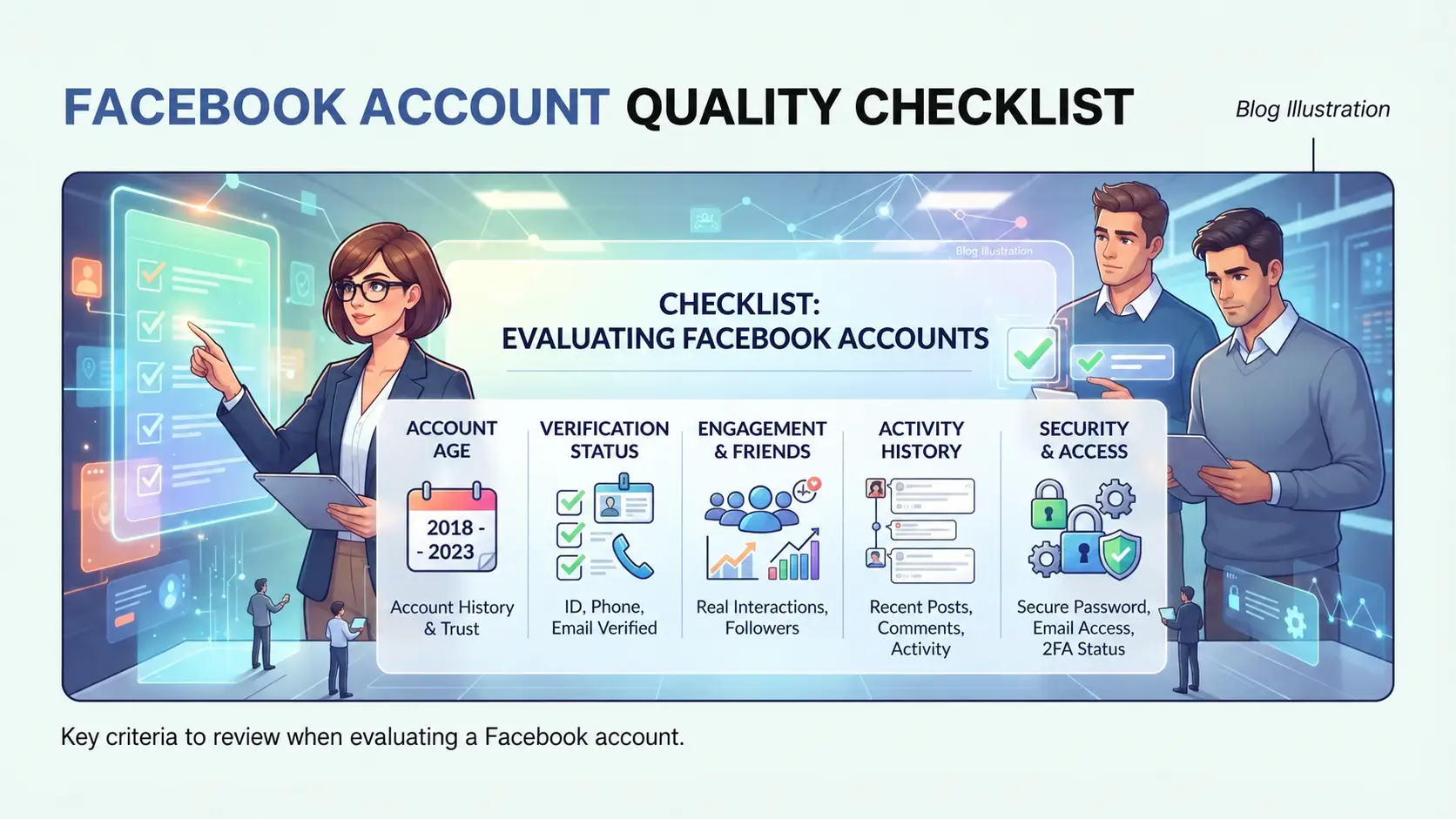
To avoid the situation where the purchase has been locked, you must carefully check each point before putting down money. Just ignore a small factor, the account is very easy to get restricted or lose control immediately after the transaction. Don't let the cost pave the way for mistakes, here are the criteria to focus on the most.
Account history and age
The older the Facebook account, the higher the chances of surviving scans. But just looking at the creation time is not enough, it is more important to check the login history and activity. If the account has been logged in from many strange IPs or has a long period of inactivity, the risk of being checkpointed increases significantly. Many people look at the number of years and ignore the history of posts, interactions, or spam traces, until they find out that the nick has been warned.
Accounts with regular activity, real interaction, and no warnings are the most preferred choice.
Origin of phone number, email link
Anyone who has ever bought a Facebook nick for sale but is locked immediately after entering a new number will understand: the source of the link determines the safety later. Accounts using virtual numbers or temporary emails are often scanned by Facebook, easily losing access. To avoid risks, quickly check with the checklist below:
- Identify the account associated with a real phone number or an original email, not a temporary/virtual one.
- Check the number and email for redemption during the handover process.
- Make sure there are no login traces from unfamiliar devices associated with virtual number sales services.
Identity verification and security status
If the account has been verified for ID/CCCD, the possibility of being checkpointed is reduced, but it is also necessary to see if the seller can convert the verification information. With 2-layer security, you must request to remove or transfer permissions before receiving the account. If you skip this step, when it is time to change the device, Facebook will ask for verification again, it is easy to lose nicks.
- Confirm whether the account has been verified or not, and look carefully at the personal information section.
- Check the 2-layer security setup, ask the seller to remove or transfer the right before handing over.
- Reconcile recovery information to make sure you're in full control alone.
Many people only look at the price and then buy a Facebook nick, but it is these criteria that determine whether the account can be used for a long time or not. Skipping a small checkpoint, later encountering a checkpoint or having their rights revoked, no one will refund. That's why the next section will analyze why many Facebook accounts are locked immediately after purchase.
Why are many Facebook accounts locked immediately after purchase?
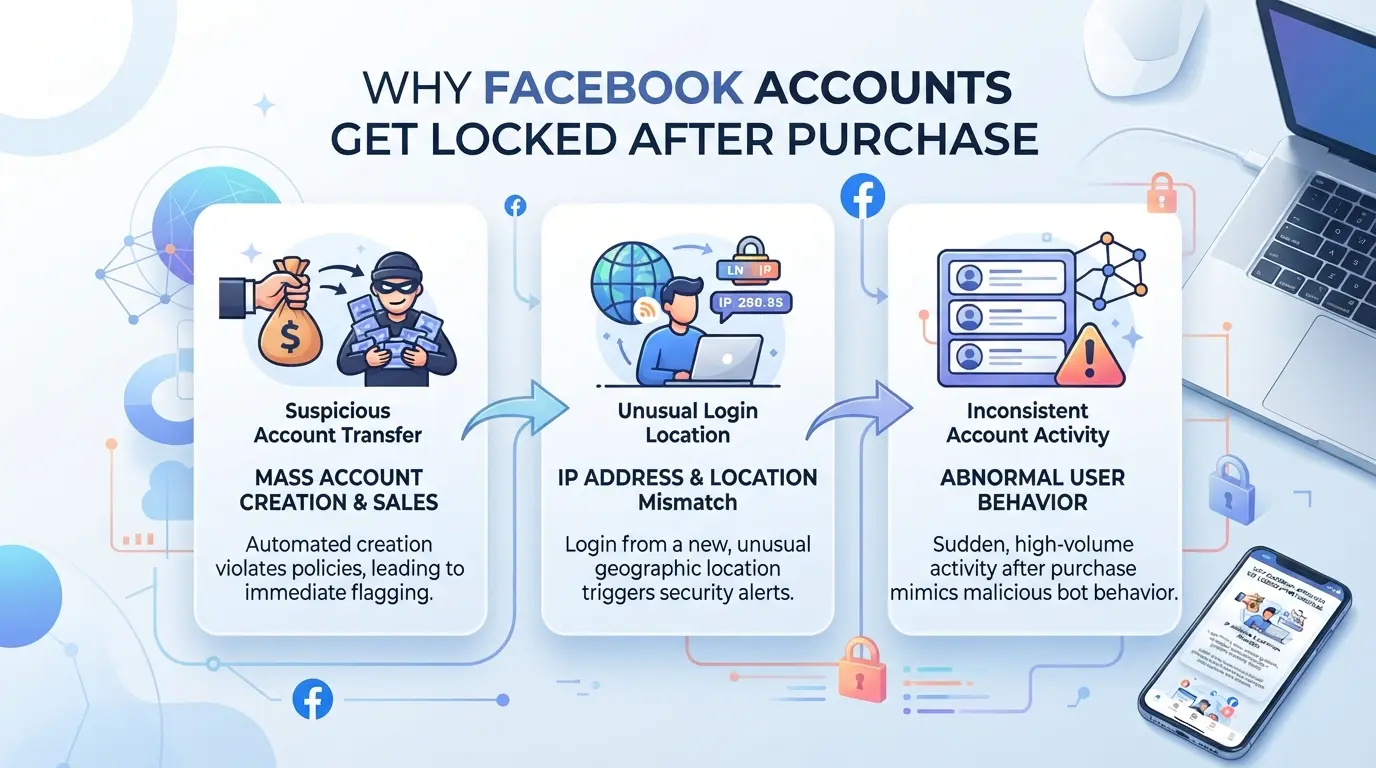
The Facebook account you just bought is very easy to be locked or restricted, even if the seller commits to a "clean nick". Most of the reasons do not lie in the purchase operation, but in the way of logging in, device traces, account history, and flawed transfer steps. If you don't look directly at these causes, no matter what type of nick you choose, it is difficult to avoid the situation that you have just received the account, sticking to a checkpoint, temporarily locking or losing access.
IP, device, and login traces
Logging in with an unfamiliar IP, a device you've never used before, and a new browser are three factors that cause Facebook to assess abnormal activity as soon as you receive the account. Just buy it, log in with a computer or phone that has never appeared in the access history, the system will automatically turn on verification. In case of roaming too far (for example, the account logged in before in Hanoi, but you opened it abroad), the risk of locking is higher.
Accounts that have violated policies or been reported
Many people only look at the number of years of registration and ignore the history of violations or previous reports. Facebook has a mechanism to evaluate "user reputation" based on the number of times violating community standards, being reported by others, or receiving spam warnings. When an account has been warned for spam groups, posting banned content, or having hidden reports, even if it is "clean" on the interface, the risk still lies in Facebook's underground system. There have been cases where buying a cheap "second-hand" Facebook account, just changing information, was immediately locked because of a low reputation score, even though the account was still working normally. Minor violations may only be checkpointed, but if they are repeated or show signs of repetition (for example, continuing to send mass friend requests), the account is easily permanently locked without warning. It is not enough to just check the information on the surface, it is necessary to ask to see the history of violations and ask if the account has ever been restricted from any functions.
Errors when transferring information, changing passwords
- Changing passwords as soon as you log in, without any other operations, is very easy to be considered "appropriation" by Facebook.
- Lack of phone number and email verification or lack of updated personal security information makes accounts vulnerable to revocation.
- Don't delete old login sessions or forget to log out of the merchant's device increases the risk of two-way lockout or control disputes.
If you skip these steps, the possibility of losing nicks or getting checkpoints is almost a matter of time sooner or later.
Understanding the main reason for this will help you see the differences between the types of Facebook accounts that are commonly sold on the market – and then consider which one to choose for a specific use.
Comparison of the types of Facebook accounts that are commonly sold: old, new, personal, business accounts
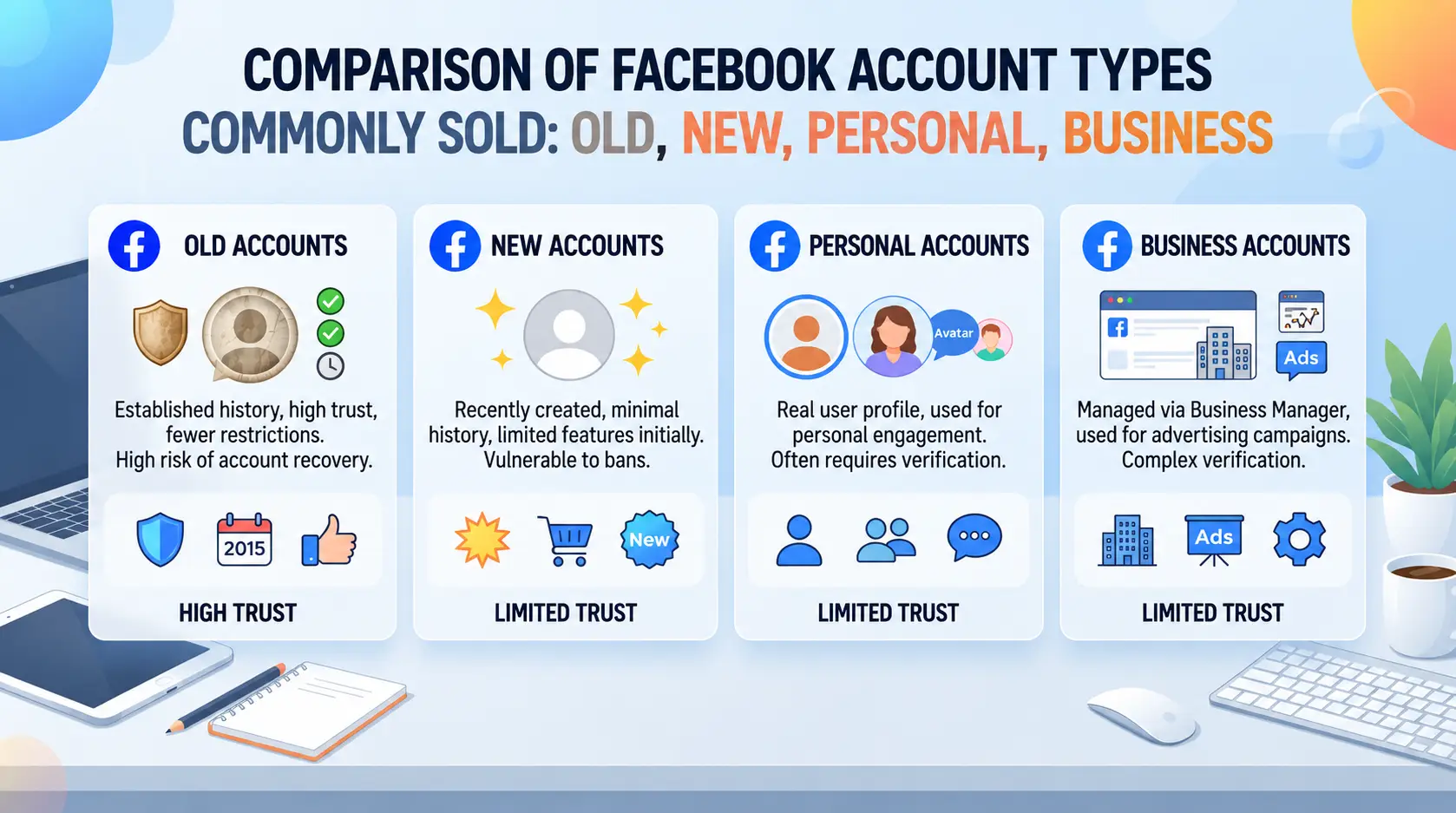
If you are wondering which type of Facebook account to choose for sales, advertising or backup, the deciding thing is not just "long-term nicks are fine" or "cheap new nicks can do anything". Each type has its own advantages and disadvantages, so it must be based on the purpose of use and the level of willingness to take risks.
Old account vs new account: reliability and pricing
| Account Types |
Reliability |
Price |
Common risks |
| Old (perennial) |
Higher |
More expensive |
May stick to old history |
| New (just created) |
Lower |
Cheaper |
Easy to lock, little interaction |
Long-term nicks are often prioritized for running ads because they are less scrutinized, but not all nicks are "clean". Cheap new nicks are prone to checkpoints, especially if they log in via strange proxies or abuse the function.
Personal vs business accounts: functionality and limitations
Business accounts are used to manage multiple pages, set up ads, and personal nicks are suitable for retail sales or backups. If you just need to post and message, then personal is enough; if you want to run big ads, you have to choose a business.
Factors affecting the selling price
Account age, number of friends, real interaction, identity verification and security are all factors that determine the price. If you only look at the price and ignore this point, it is easy to buy a "dead" nick or nick clone, use it for a few days and lose control.
To avoid being scammed or losing money, the next step is to know how to recognize the signs of fraud when buying a Facebook account.
Recognize the signs of fraud when buying a Facebook account
The way to recognize a fraudulent seller usually only needs to look at a few points: refusing to verify, selling at an unusually low price, or forcing a transfer before providing anything. If you only look at the profile and believe in the commitment, it is very easy to lose money without receiving a real account. Don't get caught up in the "cheap nick, get it now" advertisement and forget to check carefully.
Signs of an unreputable seller
Sellers who do not verify their identity, do not send photos of original information, or constantly change contact accounts are clear warnings. In particular, anyone who asks for payment before checking the account is suspicious. Transactions through reputable intermediaries, requiring full documents and tracking transfers are ways to reduce risk.
Fake, cloned, or hacked accounts
- Activity history is blank or only "virtual" interactions
- Accounts change their names, profile pictures too many times in a short time
- No real friends, no link to the owner's phone number/email
Popular Forms of Scams in 2026
Many sellers receive money and lose their toothpicks, or use the method of getting the nick back with an old email/number.
- Check the controls before checkout
- Change all recovery information as soon as you receive your account
- Don't buy through a channel that doesn't have insurance or a clear transaction history
Transfer and security process after buying a Facebook account
When you have just received a Facebook account from the seller, the first thing to do is transfer all control and lock all the old gateways. If you skip this step, you are likely to get your nick back or have unusual restrictions.
Steps to secure account transfer
- Change the password immediately after receiving the account, avoiding the seller from retaining access.
- Change your email and phone number to your original address – if you can't change it, stop the transaction because the risk of getting it back is very high.
- Check the logged-in device: go to the "Logged-in devices" section to log out all old devices, especially the nick used to run ads or sales.
- Confirm receipt of the full authentication code, recovery code, and no more emails or additional numbers associated with the seller.
Set up 2-layer security and verify identity
- Activate two-factor authentication (2FA) with a new app or phone number – this is a step that many people ignore, but it's the easiest point to lose nicks if a session is exposed.
- Update personal information such as name, date of birth, and photo – the more similar the real information, the lower the risk of being locked out by Facebook for verification.
- If your account has been restricted in the past, prioritize identity verification early to avoid being unexpectedly locked out in the first period of use.
Check login history, strange devices
- Remove access and log out of any unfamiliar devices under "Login activity."
- Track activity history: if you see a login from an unusual IP or location, change your password immediately and check if there is any malicious code or session exposure.
- Set a new login alert – if you get a strange notification, take action immediately before you continue using it for sales or running ads.
If you have done all the above steps and still have errors, it is now necessary to find an in-depth management solution to avoid the risk of using multiple accounts at the same time.
Managing Multiple Facebook Accounts Securely for Teams/Agencies: Solutions with DICloak
After completing the transfer and security of Facebook accounts, the next problem of the team/agency is how to operate dozens of accounts without being detected by Facebook for duplicate traces, abnormal links or locking in batches. Especially for those who have to buy Facebook accounts in bulk to serve sales and advertising, just a mistake in synchronizing the environment is a very real risk of "flying" a series of nicks. Here, the practical solution does not lie in manually operating each browser, but in setting up a separate environment, a separate IP and controlled synchronization operation for each account.
Create and configure a separate profile for each Facebook account
Many teams often use the same browser or virtual machine, but this method is very easy for Facebook to detect duplicate traces such as user agent, language, screen resolution, timezone or system font. In DICloak, the team can create a separate browser profile for each Facebook account, actively configure signals such as operating system, language, time zone, webRTC address, canvas fingerprint, etc. As a result, each account operates as if it is running on a truly different device. If you are running 10 accounts for 10 different campaigns, just create 10 separate profiles and are not afraid of the traces that will cause account association. This only affects the browser profile, does not change content or permissions on Facebook.

Set up separate proxies for each profile to separate IPs
Even if the profile is separated, sharing an IP is still a big loophole that causes many Facebook accounts to be suspected of logging in abnormally. On each DICloak profile, you can configure your own proxy – choose the type of proxy, enter the server information, check the IP, country, and time zone before using it. A team operating 20 accounts can completely control each connection: a sales nick in Vietnam goes to a Vietnamese proxy, a nick runs foreign ads using a US or UK proxy. Choosing a proxy, checking the connection, and coordinating with the login history of each account will greatly reduce the risk of being marked abnormally. DICloak does not provide proxies, the team must control the quality of the proxy source itself.

Use Window Synchronizer to sync multiple accounts
Operating a series of Facebook accounts without only manually manipulating each one is both time-consuming and confusing, especially when it is necessary to post and interact simultaneously. DICloak's Window Synchronizer allows the team to select a window as the "master" and then the operation – such as posting, entering text – will be directly reflected to the selected profiles. For example, when it is necessary to post a content to 5 different Facebooks, only one operation is required on the main window and the remaining accounts will synchronize this operation immediately. All of them are observed and controlled by the operator, not completely automatic. The limitation of this function lies in the level of browser operation, which does not interfere with Facebook content.
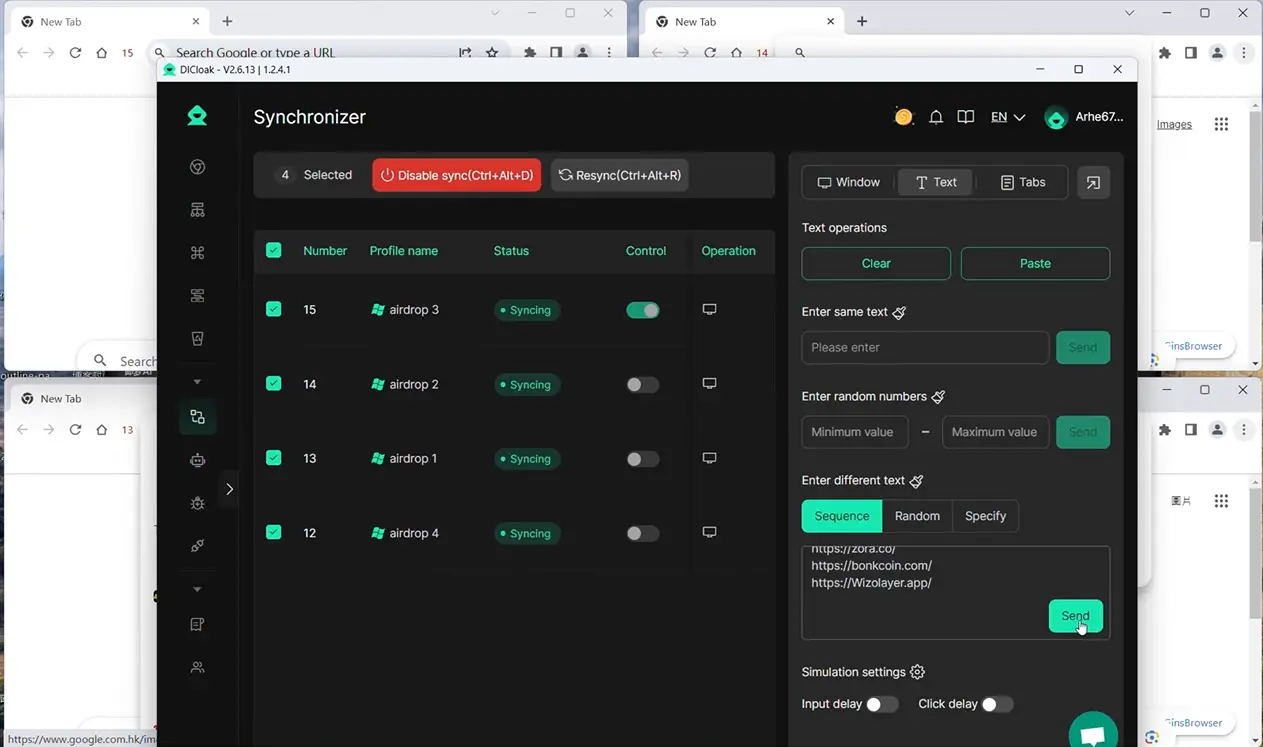
Only when the environment, IP and operation are tightly controlled will the team/agency have the basis to operate multiple Facebook accounts without revealing technical connections. However, no matter how well the control is, there are still situations where building your own account will be more suitable than buying Facebook nicks in bulk – this is the next story to consider.
When to buy a Facebook account and when to build one?
If you need a Facebook account to run a big campaign right away, or want a long-time nick with engagement available, buying an account will save you time. But it's not always a good idea to buy – control over your information and security is what determines whether or not you can use it for the long term.
Advantages and drawbacks of buying an account
| Criteria |
Buy an existing account |
New self-built |
| Validity Time |
Fast, use now |
Waiting for verification, need to be raised |
| Interaction, history |
Available, sometimes high |
You have to build it yourself |
| Risks |
Easy to lock, lose control |
Proactive, controllable |
While buying an account can help you get on the job quickly, just one verification error or a poor transfer can make the account easy to get checkpoints or lose it – especially when you don't have all the original information.
Advantages and drawbacks of self-built accounts
Creating your own Facebook account will be time-consuming, but you take the initiative in all information, passwords, emails, and phone numbers. This helps reduce the risk of being taken back or losing control later.
Cases to buy and to create your own
Agencies, teams running ads, or need a long-term account with a lot of interaction, buying a Facebook nick is easy to start quickly. On the contrary, individuals who sell small and have stable control, should create their own accounts and raise them from scratch will be safer and longer-lasting.
FAQs about buying facebook accounts
Is it legal to buy a Facebook account in Vietnam?
According to the regulations of Facebook and Vietnamese law, the purchase and sale of Facebook accounts is a violation of the terms of service and can be handled if it causes serious consequences. Buyers of Facebook accounts are at risk of having their accounts locked, losing money, or engaging in fraudulent and fake activities. It is necessary to consider carefully before implementing.
Is it possible to pay with crypto when buying a Facebook account?
You can use cryptocurrencies such as Bitcoin, USDT to pay when buying facebook nicks in some places. However, the most common method is still bank transfer or e-wallet. When using crypto, be careful of the risk of being scammed, do not get a refund if the transaction fails.
How many Facebook accounts should a person start with?
If you're only selling or advertising small, you should start with 1–3 Facebook accounts. Newbies shouldn't buy too many accounts at once to avoid Facebook detecting unusual behavior, leading to mass lockouts. Pay attention to proper account management and nurturing to reduce risk.
Is buying a facebook account better than building an account yourself?
Buying a facebook account saves time, can be used immediately for advertising or sales. However, the purchased account is easily restricted, insecure, and does not have a clear personal history. Building your own account is more secure but takes a long time to grow and develop.
Can I use multiple Facebook accounts on the same device?
Using multiple Facebook accounts on a single device can be detected by Facebook, resulting in nick locks or checkpoints. If you need to use multiple accounts, use different browsers, incognito mode, or management software to limit the risk of mass lockouts.
If you are considering owning a social media account for business or personal purposes, carefully research the options and ensure the security of your account. You can also experience tools to support account management to optimize usage. Try DICloak for free
 Web Proxy Tools
 Free Tools
 Cookie Plugin
 UA Generator
 MAC Address Generator
 IP Generator
 IP Address List
 2FA Code Generator
 World Clock
 Anonymous Check
 WebRTC Leak Test
 UUID Generator
 Free Web Proxy Site
 Proxy Checker
 FB Ad Checker
 AI Web Scraping
 Free SMM Tools
 Twitter Shadowban Checker
 Instagram Name Checker
 UTM Generator
 Username Generator
 AI Hashtag Generator
 LinkedIn Headline Generator
 Social Media Image Resizer