You may want to check a public Twitter profile, read someone's tweets, or explore posts without logging in or creating an account. This is a common need for researchers, marketers, and casual users who only want to view public content. Today, several legitimate tools allow you to browse public Twitter/X profiles and posts without signing in. These twitter profile viewer tools can be useful, but they also have clear limits. This guide explains what they can and cannot show, which tools are worth using, how to avoid scam sites, and what teams managing multiple Twitter accounts should know.
What Is a Twitter Profile Viewer?
A twitter profile viewer is a tool that helps you access publicly available Twitter/X information without using the platform directly. These tools work with public data only, so understanding their limits is important before using one.
What these tools can actually show you
Legitimate viewer tools can display public profile details such as a username, bio, follower and following counts, profile photo, and header image. They can also show public tweets, replies, media posts, and threads shared by an account.
Some tools provide basic engagement information, including likes, retweets, and reply counts on public posts. Depending on the tool, you may also explore trending hashtags and public search results. These features make it possible to view twitter profile without account when you only need access to publicly available information.
What they cannot do
A twitter profile viewer cannot show private account content. Protected tweets are only available to approved followers, and no legitimate viewer tool can change those privacy settings.
These tools also cannot show who viewed a profile because Twitter/X does not provide profile visitor data to third parties. They cannot access direct messages, private conversations, or hidden interactions. They also cannot display content that requires login access beyond what is already public.
Any tool claiming to unlock private accounts or show profile visitors is not legitimate.
How to spot a scam viewer tool
Not every site that calls itself a twitter profile viewer is trustworthy. Some use false promises to collect account details or push unwanted software.
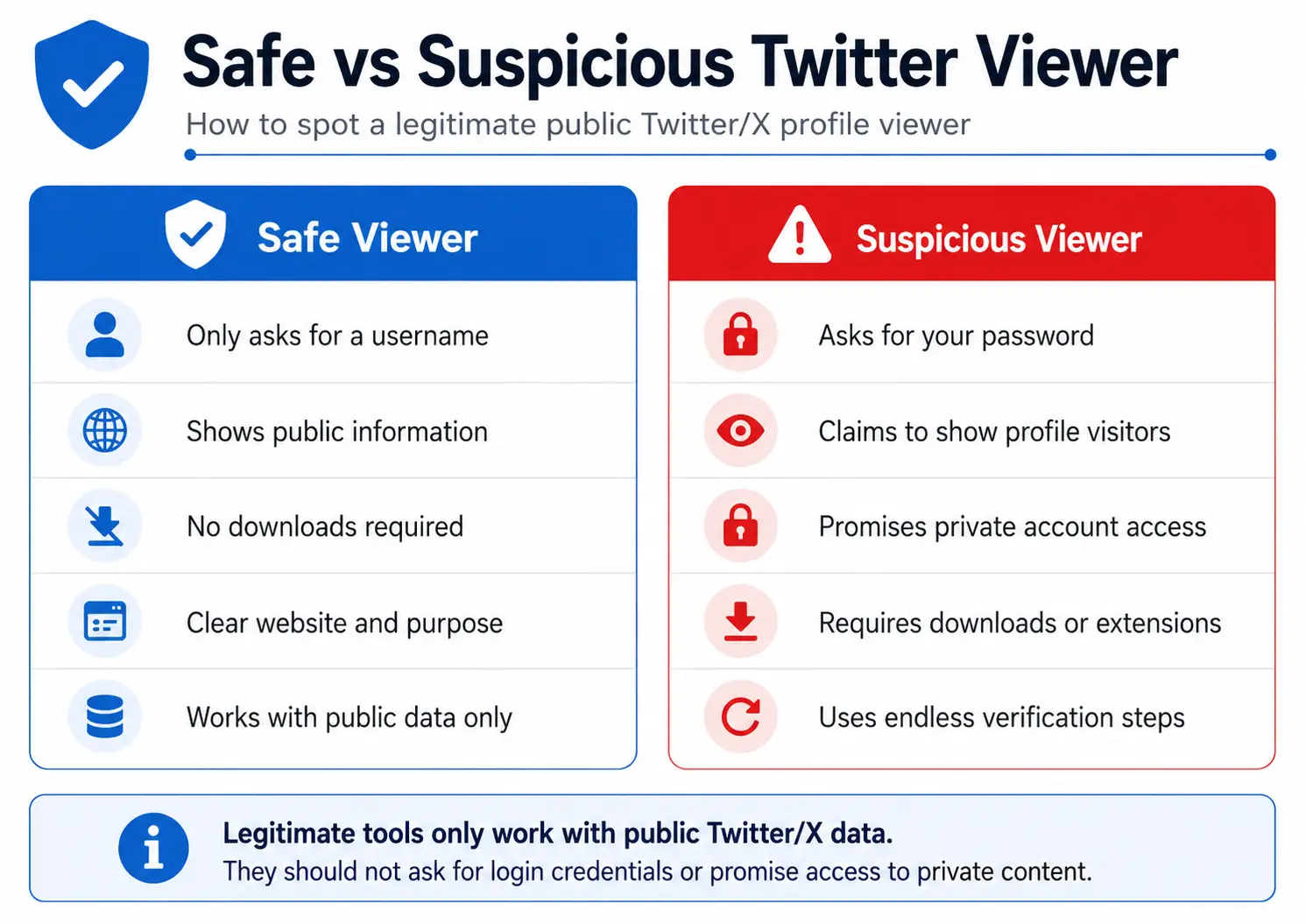
Watch for warning signs such as:
- Asking for your Twitter login or password
- Requiring endless “verification” steps before showing results
- Claiming to reveal who viewed your profile
- Promising access to private or protected accounts
- Pushing downloads or browser extensions before showing anything
- Charging for “premium” access to private content
A legitimate tool should only need public information, such as a username or profile URL. It should not ask for account credentials or personal access. Once you understand these limits, you can compare the tools that are designed for public profile browsing.
Best Twitter Profile Viewer Tools in 2026
The tools below are designed for browsing public Twitter/X content, including profiles, tweets, hashtags, and engagement data. These twitter profile viewer options can help you explore public information without signing in, but none of them can access private accounts.
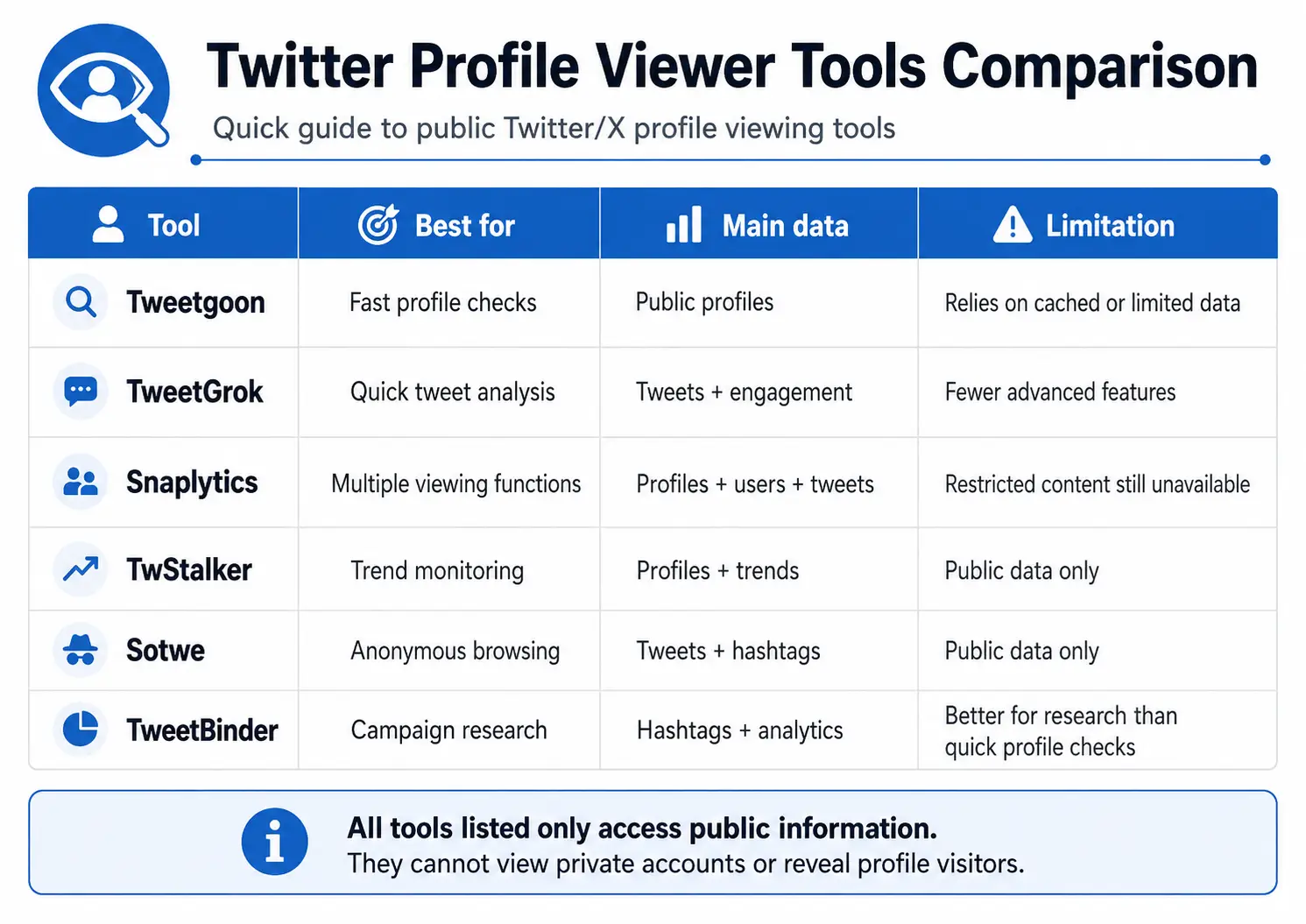
Tweetgoon
Tweetgoon is designed for quick public profile lookups without registration. It focuses on providing basic information from publicly available or cached data, making it useful when you only need a fast look at an account. The simple interface removes extra steps and allows users to check profiles without creating an account.
For example, a marketer researching a competitor may want to quickly confirm a username, profile details, or recent public activity before adding the account to a research list. Tweetgoon can be a convenient option when speed matters more than detailed analysis.
Best for: Fast, no-signup public profile checks Limitation: Results may depend on cached or limited public data
TweetGrok
TweetGrok provides a fast and minimal interface for exploring public Twitter/X content. It is useful for checking public tweets and viewing basic engagement metrics, including likes, retweets, and replies. The tool is built around quick access rather than complex reporting features.
For example, a social media manager comparing competitor posts may use TweetGrok to quickly review which public tweets receive more interaction. It can help identify content patterns without spending time navigating through multiple platform pages.
Best for: Quick competitive analysis of public tweet performance Limitation: Focused on speed with fewer advanced features
Snaplytics
Snaplytics provides several viewing functions in one place, including Profile Viewer, User Search, and Tweet Viewer. It is designed for users who want different ways to explore public Twitter/X information without registration. Because it combines multiple search and viewing options, it can work as a flexible twitter viewer tool for basic research.
For example, a researcher tracking several public accounts may use Snaplytics to switch between finding users, checking profiles, and reviewing tweets from one interface. It is useful when you need more than a simple profile lookup.
Best for: Users who need multiple viewing functions in one tool Limitation: Restricted content may still be unavailable due to Twitter/X access limits
TwStalker
TwStalker focuses on public profile browsing and trend tracking. It allows users to explore public accounts, tweets, and activity while keeping a clear boundary around publicly available information. The tool is designed for research and discovery rather than accessing private user data.
For example, someone monitoring industry discussions may use TwStalker to review public accounts, follow conversations, and track topics connected to specific trends. It can help users collect general insights from visible Twitter/X activity.
Best for: Trend monitoring and public profile research Limitation: The name may sound intrusive, but it only displays public information
Sotwe
Sotwe works as an anonymous twitter viewer for exploring public tweets, profiles, hashtags, and trends without creating an account. It provides a simple way to browse Twitter/X content when users want to view public information without signing in.
For example, a content researcher looking for trending discussions may use Sotwe to explore hashtags or review public posts from different profiles. It can be helpful for discovering conversations without opening a personal Twitter/X session.
Best for: Exploring public trends and profiles without signing in Limitation: It should only be used for publicly available content
TweetBinder
TweetBinder is focused on hashtag and keyword analytics for public Twitter/X data rather than simple profile browsing. It helps users analyze conversations, measure engagement patterns, and organize research around specific topics or campaigns. This makes it more of an analytics platform than a basic twitter profile viewer free option.
For example, a marketing team running a campaign may use TweetBinder to track hashtag performance, review public engagement, and measure discussion trends over time. It is better suited for structured research than checking a single profile quickly.
Best for: Campaign research, hashtag tracking, and public engagement reporting Limitation: Better suited for research than quick profile browsing
How to Choose the Right Twitter Profile Viewer Tool
Not every twitter profile viewer is designed for the same purpose. The right choice depends on whether you need a quick profile check, content research, trend monitoring, or more detailed public data analysis.
Choose based on your browsing goal
Start by identifying what you want to do with the tool. If you only need to check a public profile quickly, a simple viewer like Tweetgoon or TweetGrok may be enough. These tools are useful when you only need basic profile details or recent public activity.
If you need more viewing options in one place, Snaplytics can be a better fit because it combines profile viewing, user search, and tweet viewing features. For users tracking conversations, hashtags, or industry trends, tools like TwStalker and Sotwe are more suitable for exploring broader public activity.
For marketing teams, researchers, and analysts who need structured insights, TweetBinder is a better choice because it focuses on hashtag and keyword analytics rather than simple profile browsing.
Check what data the tool actually provides
A good twitter profile viewer should clearly explain what information it can access. Before using any tool, check whether it focuses on public profiles, tweets, hashtags, or engagement data.
Avoid choosing a tool based only on claims or extra features. A reliable viewer should have clear limits and should not promise access to private accounts, hidden interactions, or information that Twitter/X does not make publicly available.
Prioritize simple access and safe usage
The best tools are usually easy to use. For public profile browsing, you should normally only need a username or profile URL, not your Twitter/X login credentials.
A practical twitter profile viewer online should let you access public information without unnecessary steps, downloads, or account permissions. Choosing a tool with a clear purpose and simple workflow helps you get the information you need while reducing unnecessary risks.
How to Use Twitter Profile Viewer Tools Safely
Using a twitter profile viewer online tool is simple, but good habits help you protect your own accounts and browsing data. Focus on using tools for public information only and avoid giving unnecessary access to any service.
Warning signs that a viewer site is not legitimate
Besides the usual security checks, pay attention to the website itself. A suspicious anonymous twitter viewer may use a strange URL with random characters, lack HTTPS protection, or frequently change its domain name. These signs do not always prove a site is unsafe, but they are reasons to be careful. Stick with tools that have a stable website and a clear purpose.
Best practices when using any viewer tool
When using a twitter profile viewer online, only enter usernames or public profile URLs. Never provide your Twitter login details, even if a site claims it needs them to unlock more features.
Use a separate browser or private/incognito window when possible. This helps prevent your normal Twitter session from mixing with the viewer tool. Avoid downloading files or installing browser extensions from viewer websites.
If you find a reliable tool, bookmark the official website. This saves time and reduces the chance of landing on copycat pages that appear similar but may not offer the same service.
Managing Multiple Twitter Profiles After Using Twitter Profile Viewer Tools
Managing multiple Twitter accounts requires more than just accessing profiles. Agencies, social media teams, and marketing professionals need a structured workflow to keep accounts organized, reduce mistakes, and collaborate efficiently.
With DICloak, you can separate account environments and coordinate multi-account workflows with dedicated browser profiles and synchronized actions.
Keep each Twitter account in its own browser profile
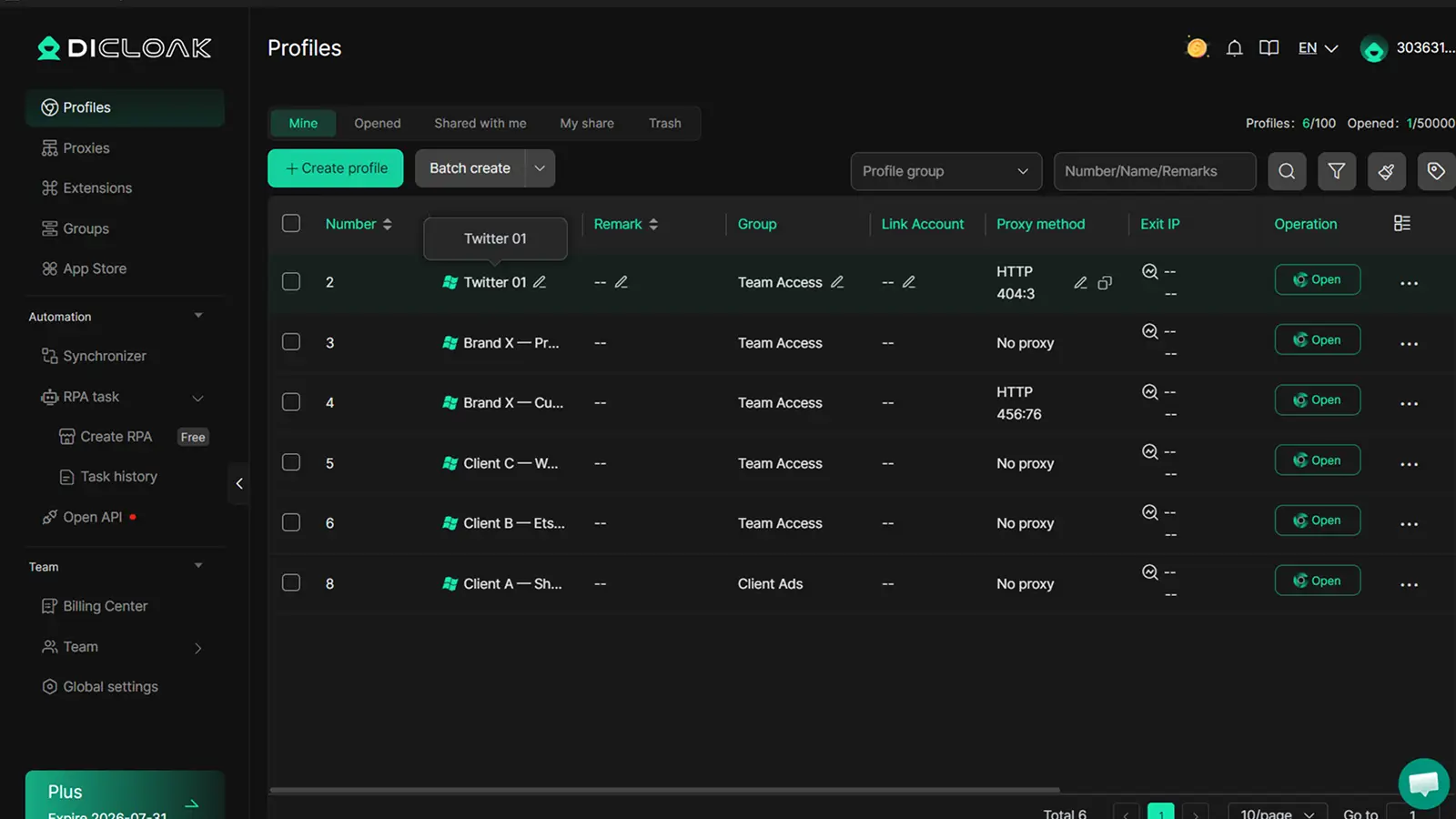
For agencies and social media teams, managing several client Twitter accounts can become difficult when all accounts share the same browser profile. Without separation, sessions and cookies can mix, increasing the chance of opening the wrong account or performing actions from the wrong profile.
With DICloak, you can create a separate browser profile for each authorized Twitter account. Each profile keeps its own cookies, login state, and session environment, allowing team members to manage different accounts without cross-account confusion. This makes it easier for agencies to organize multiple client accounts while keeping each workflow separate.
Use Synchronizer to browse multiple Twitter profiles at the same time
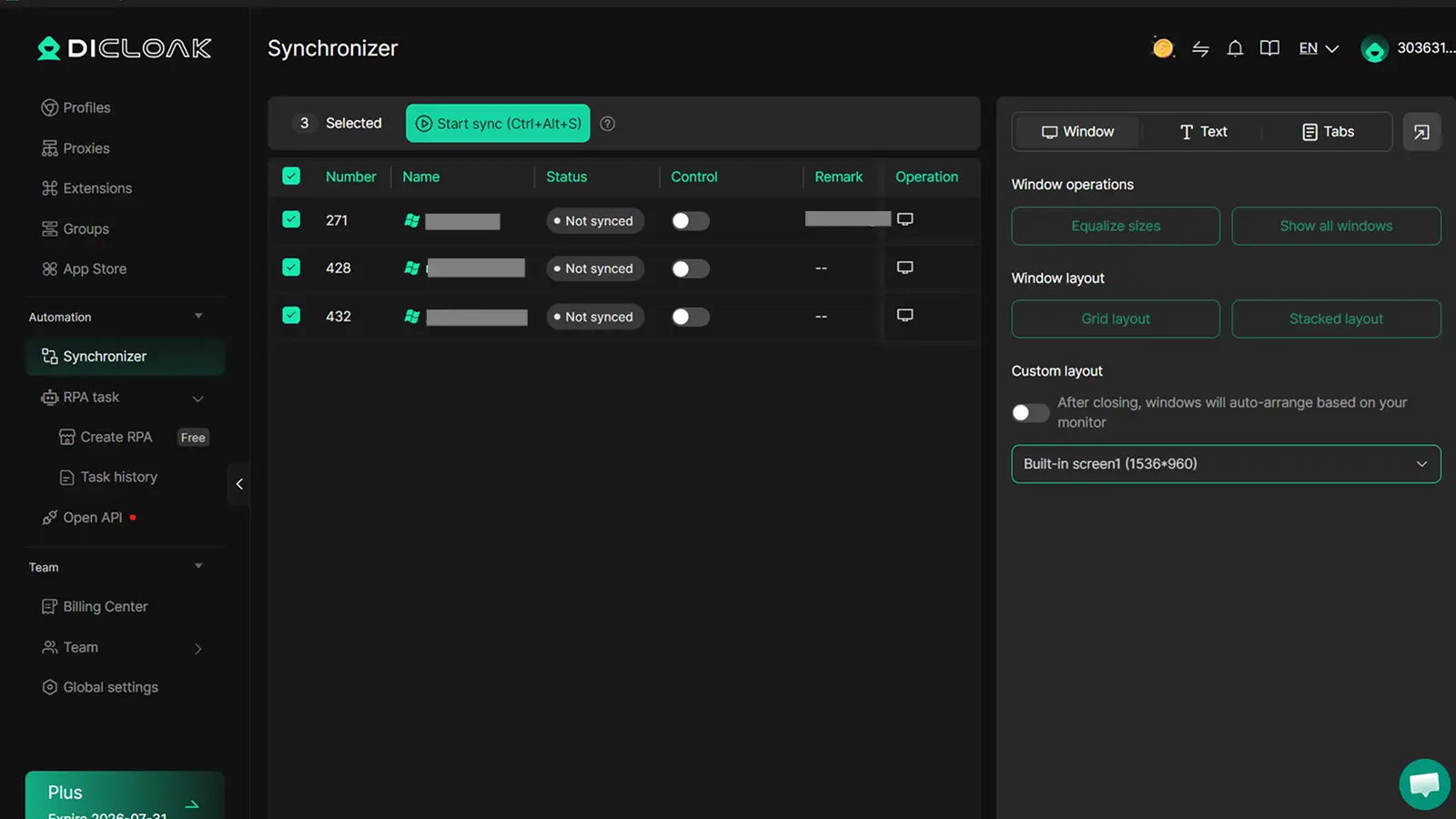
For researchers, analysts, and marketing teams, monitoring multiple Twitter profiles often requires repeated switching between accounts. When tracking several competitors or industry accounts, opening each profile one by one can slow down research and daily monitoring tasks.
With DICloak’s Multi-Window Synchronizer, you can open multiple browser profiles and synchronize actions across them. For example, a marketing analyst monitoring 10 competitor Twitter profiles can perform the same browsing actions across multiple windows instead of repeating the process manually, helping reduce repetitive work and improve research efficiency.
Frequently Asked Questions About Twitter Profile Viewer
Can I see who viewed my Twitter profile?
No. Twitter/X does not provide profile visitor data to users or third-party services. A twitter profile viewer cannot show who opened your profile, visited your posts, or viewed your content. Any tool claiming to provide this information is not accessing real profile data and should not be trusted.
Can Twitter profile viewers access private accounts?
No legitimate twitter profile viewer can access private or protected accounts. Protected tweets are only available to approved followers through Twitter/X’s own permission system. Viewer tools can only display information that is already publicly available.
Are Twitter profile viewer tools legal?
Using public data viewers is generally legal in most cases when they are used for normal research or browsing purposes. However, users should respect Twitter/X platform terms and applicable local laws. An anonymous twitter viewer should not be used to collect or use information in ways that violate privacy rules.
Do I need to log in to use a Twitter viewer?
No. Legitimate public viewer tools usually do not require a Twitter/X login. You typically only need a public username or profile URL to view available information. Avoid any service that asks for your account password before showing basic public content.
Which Twitter profile viewer is best?
The best option depends on your goal. For quick public profile checks, Tweetgoon or TweetGrok may work well. For multiple viewing functions, Snaplytics is a practical choice. For campaign research and hashtag analytics, TweetBinder is more suitable than a basic viewer tool.
A twitter profile viewer helps you browse public Twitter/X profiles and content without an account, but these tools have clear limits and only work with public information.
For teams managing multiple authorized Twitter accounts, keeping sessions and workflows organized becomes a different challenge. With DICloak, you can keep each account in a separate browser profile and manage multiple profiles more efficiently.Try DICloak for Free.
 Web Proxy Tools
 Free Tools
 Cookie Plugin
 UA Generator
 MAC Address Generator
 IP Generator
 IP Address List
 2FA Code Generator
 World Clock
 Anonymous Check
 WebRTC Leak Test
 UUID Generator
 Free Web Proxy Site
 Proxy Checker
 FB Ad Checker
 AI Web Scraping
 Free SMM Tools
 Twitter Shadowban Checker
 Instagram Name Checker
 UTM Generator
 Username Generator
 AI Hashtag Generator
 LinkedIn Headline Generator
 Social Media Image Resizer