As an SEO consultant for the past 5 years, I've managed everything from solo-preneur blogs to agency-level client portfolios. A constant operational headache has been Ahrefs access—specifically, how to share it with team members or securely use client accounts without paying exorbitant per-user fees or risking a ban.
The purpose of this guide is to walk you through how to easily achieve Ahrefs account share safely, without breaking rules or risking a ban. I’ve tested various methods and found solutions that help you manage multiple accounts from one device, avoid bans, and eliminate messy password sharing for good.
Why Do People Need an Ahrefs Account Share Solution?
Most SEO professionals, freelancers, and agencies eventually find themselves needing to share their Ahrefs account. This isn't about cutting corners; there are legitimate and practical reasons to give someone else access.
Managing Multiple Clients (For Freelancers and Agencies)
Clients often provide their own Ahrefs credentials for you to work on their projects. This forces agencies to juggle multiple logins from one device, an activity that Ahrefs flags as suspicious and can lead directly to an account ban.
Collaborating with Team Members
If you're a solo freelancer, you might need to give temporary access to a partner or a virtual assistant for tasks like pulling keyword reports or performing competitor checks. Paying for a full, separate subscription for occasional tasks isn't practical.
Saving on Extra User Costs
Ahrefs charges a significant fee for each additional user, ranging from $40 to $100 per person, per month. For small teams or startups, this cost is often not financially viable for a single SEO tool.
In these scenarios, the goal is effective collaboration and cost savings, not to cheat the system. Fortunately, there are ways to achieve this without getting locked out or constantly dealing with verification codes.
Ahrefs Account Share Rules and Pricing in 2025
Before exploring sharing methods, it's crucial to understand Ahrefs' official rules. Each of their plans includes only one primary user, and adding more team members comes at a steep price.
- Lite Plan ($129/mo): 1 user included. Add up to 2 more users at $40/month each.
- Standard Plan ($249/mo): 1 user included. Add up to 5 more users at $60/month each.
- Advanced Plan ($449/mo): 1 user included. Add up to 10 more users at $80/month each.
- Enterprise Plan (starts at $14,990/year): 3 users included. Add unlimited users at $100/month each.
This pricing structure makes Ahrefs' position clear: collaboration is a premium feature. For growing agencies or freelancers, these per-user costs can quickly escalate an already significant software expense.
Ahrefs’ terms strictly forbid sharing a single login among multiple people. Their official Terms and Conditions state:
“Your login may only be used by a single user. A single login shared by multiple users is not permitted. We reserve the right to cancel or suspend your access to the Service if we see any suspicious activity in your account that reasonably points out you willingly and/ or knowingly shared your credentials with another user.”
Furthermore, Ahrefs' help center warns that sharing login details will result in constant email verifications and that only one person can use the account at a time.
5 Common Methods for an Ahrefs Account Share
Based on my experience, I’ve seen several ways people try to share Ahrefs access. Some are officially supported, while others are clever but flawed workarounds.
Using the Ahrefs Team Feature (The Official Way)
This is the easiest and safest method if your budget allows for it. You simply pay Ahrefs for extra user slots and invite your colleagues to your workspace. Each person gets their own login, can use the tool simultaneously, and you remain fully compliant with Ahrefs' rules. The obvious downside is the high cost.
Sharing Ahrefs Login Credentials (Not Recommended)
This is the most common—and riskiest—shortcut people take. It directly violates Ahrefs' terms, is impractical due to constant verification prompts for new devices, and poses a significant security risk.
The Same IP Trick
A slightly more technical, but equally flawed, workaround involves trying to fool Ahrefs with a shared IP address. The major flaws are that you still have to share your credentials, coordinate usage times to avoid conflicts, and risk an immediate account ban if someone forgets to log out.
The Remote Desktop Approach
Another common solution involves setting up Ahrefs on one computer or a cloud-based virtual machine (VM) that everyone accesses remotely. While this keeps the session in one place so Ahrefs only sees one device, it's a clunky solution that introduces frustrating performance lags. Furthermore, managing a remote machine comes with its own costs and technical hassles.
Using an Anti-Detect Browser like DICloak
In my experience, the most secure and efficient way to share an Ahrefs account is by using an anti-detect browser like DICloak. This method creates a virtual browser profile with a fixed digital fingerprint. You log into Ahrefs within this profile once, and then you can share the entire profile with your team without ever sharing your password.
With DICloak, you can:
- Share one or more Ahrefs accounts at once.
- Invite teammates to access those accounts without sharing passwords.
- Manage all your accounts from a single dashboard.
- Set different access levels for users.
How I Use DICloak for a Secure Ahrefs Account Share: Step-by-Step Guide
Ahrefs account share with DICloak is simple and takes just a few minutes to set up.
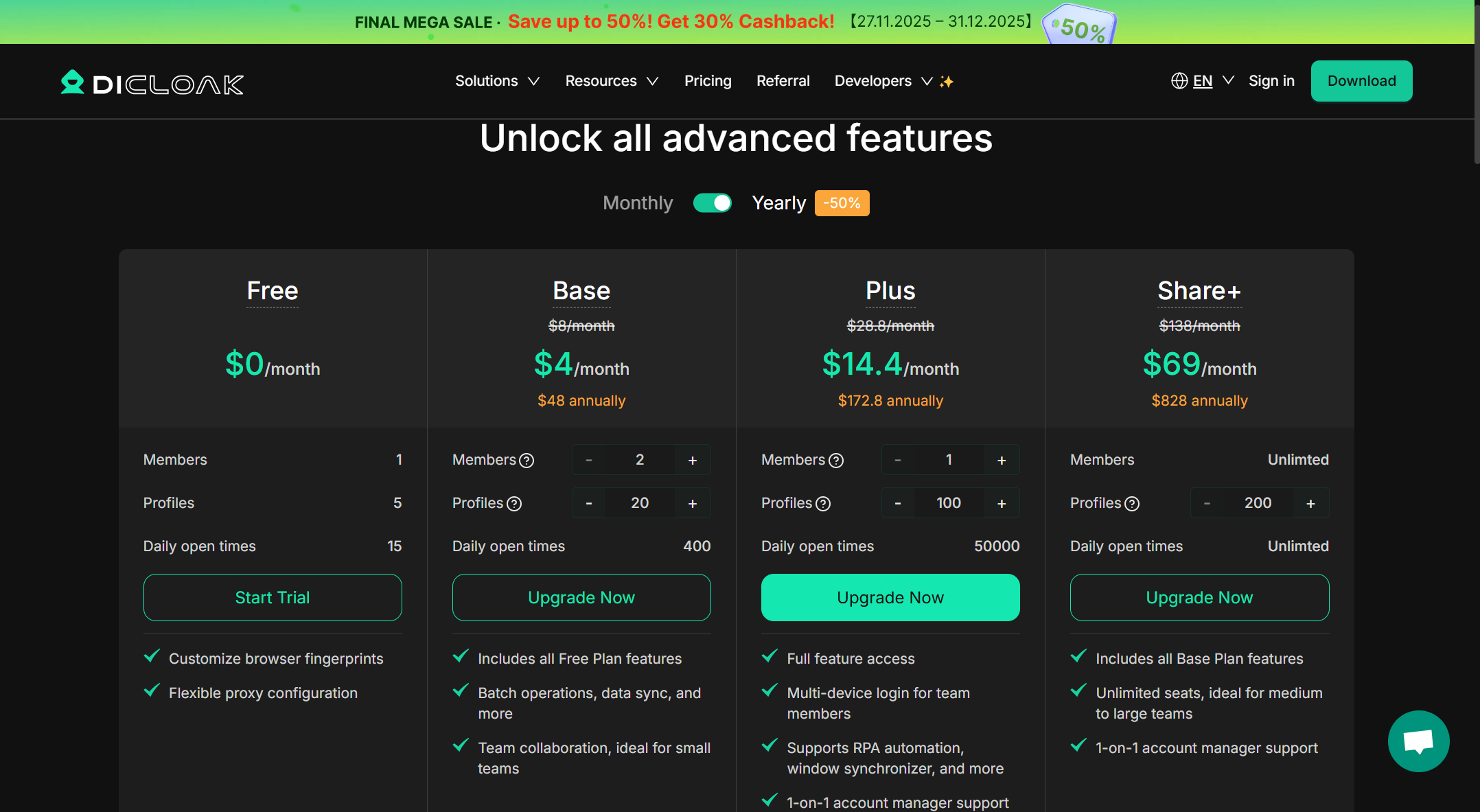
1. Set Up DICloak: Download and install DICloak on your device, then choose a plan that supports multiple profiles.
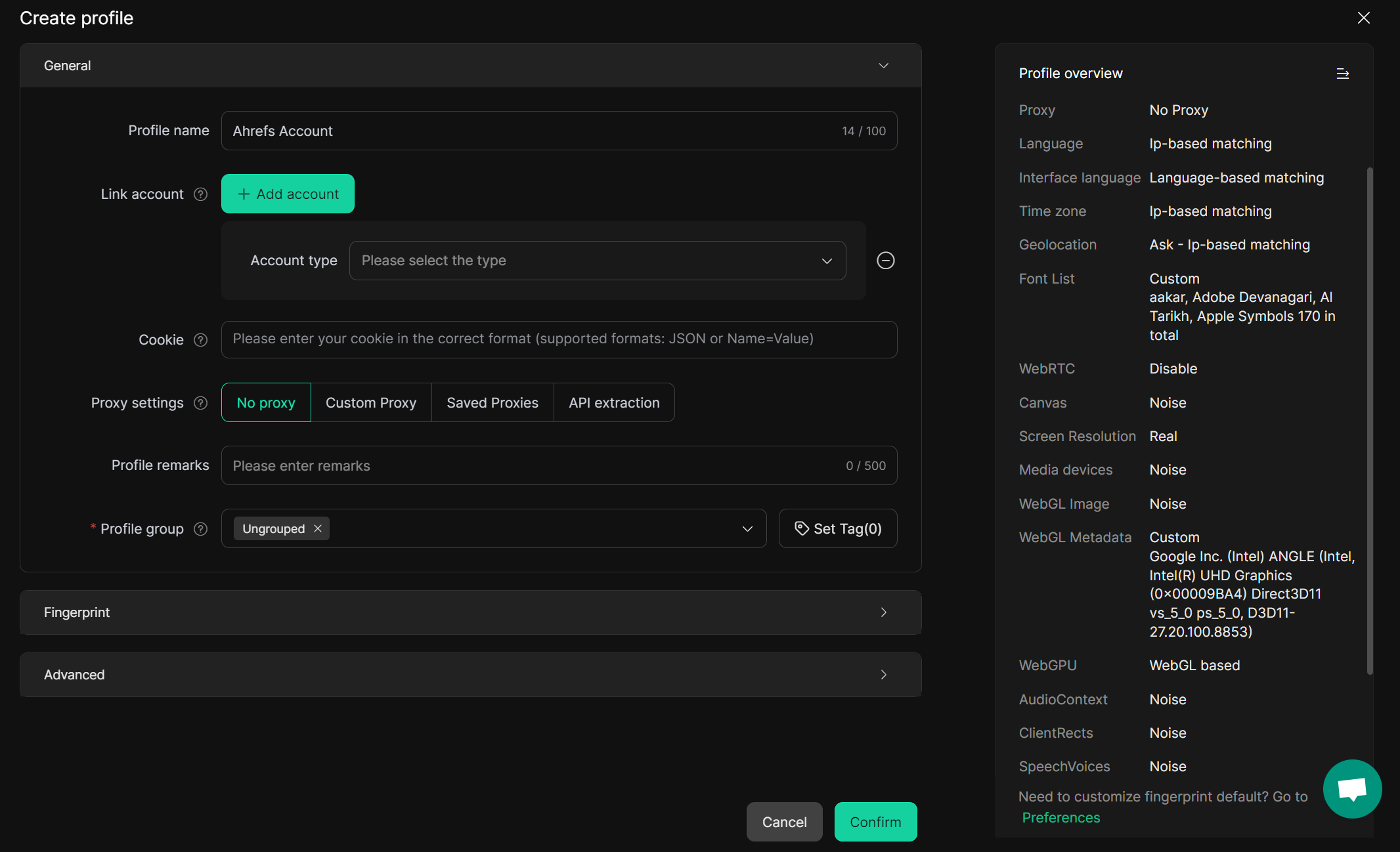
2. Create a Browser Profile: In the DICloak app, create a new browser profile, name it (e.g., "Ahrefs Account"), and customize its fingerprint for added privacy and security.
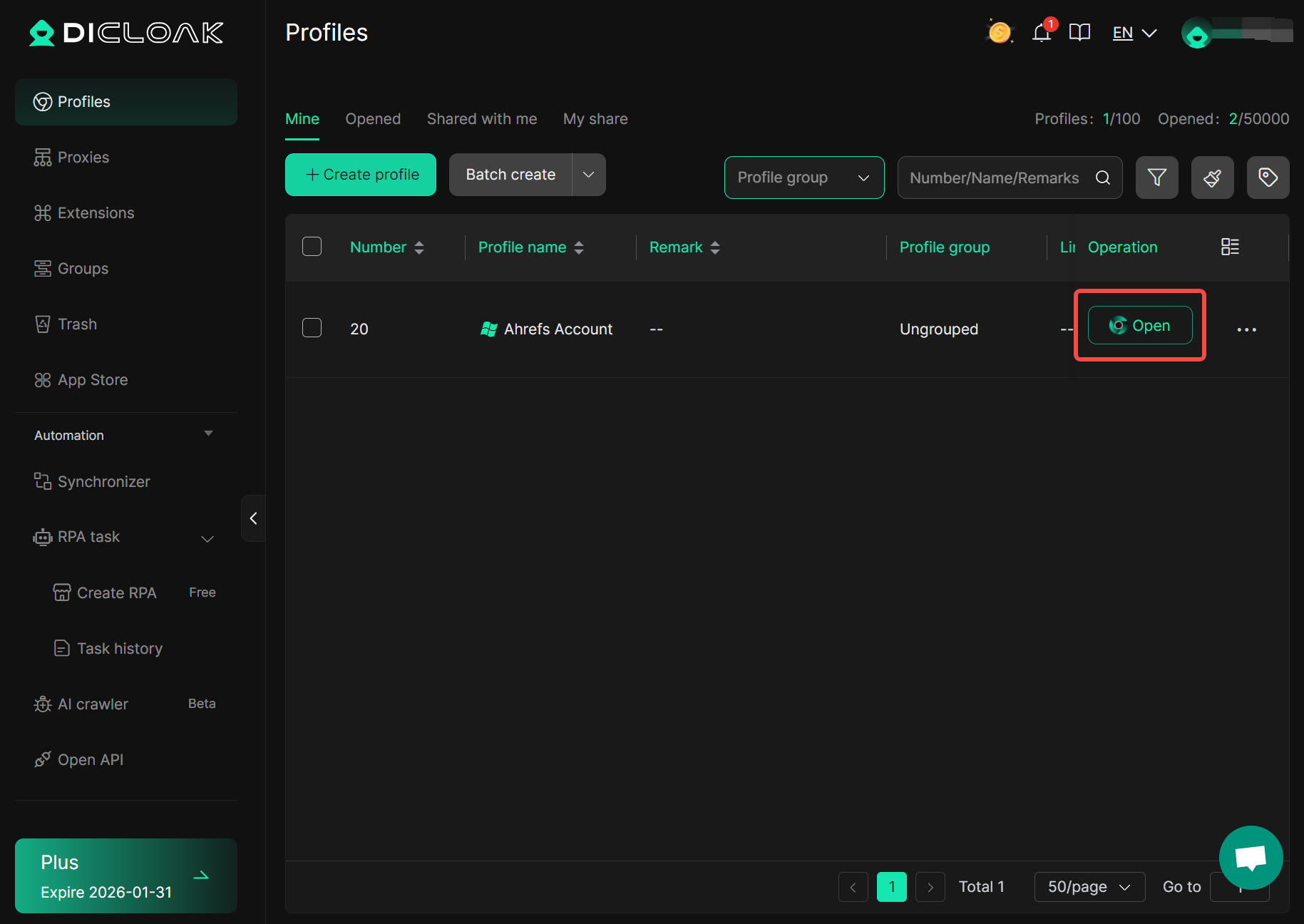
3. Log In to Ahrefs: Launch the new profile by clicking the "Open" button. This will open a new, isolated browser window. Once you're logged in, simply close the profile's browser window. DICloak will automatically save the entire profile, including cookies and login details, within that specific profile for future use.
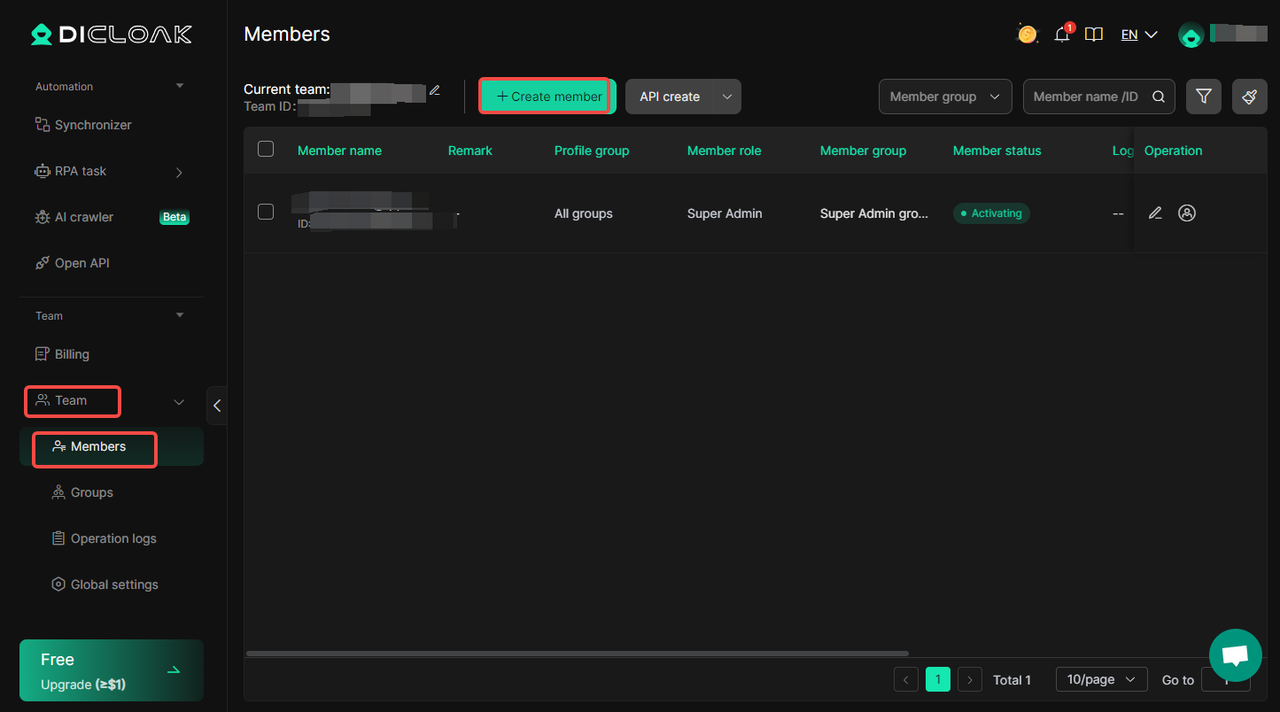
4. Share the Profile: Next, go to DICloak’s "Team" settings. Select "Members" and click "Create Member" to add teammates.
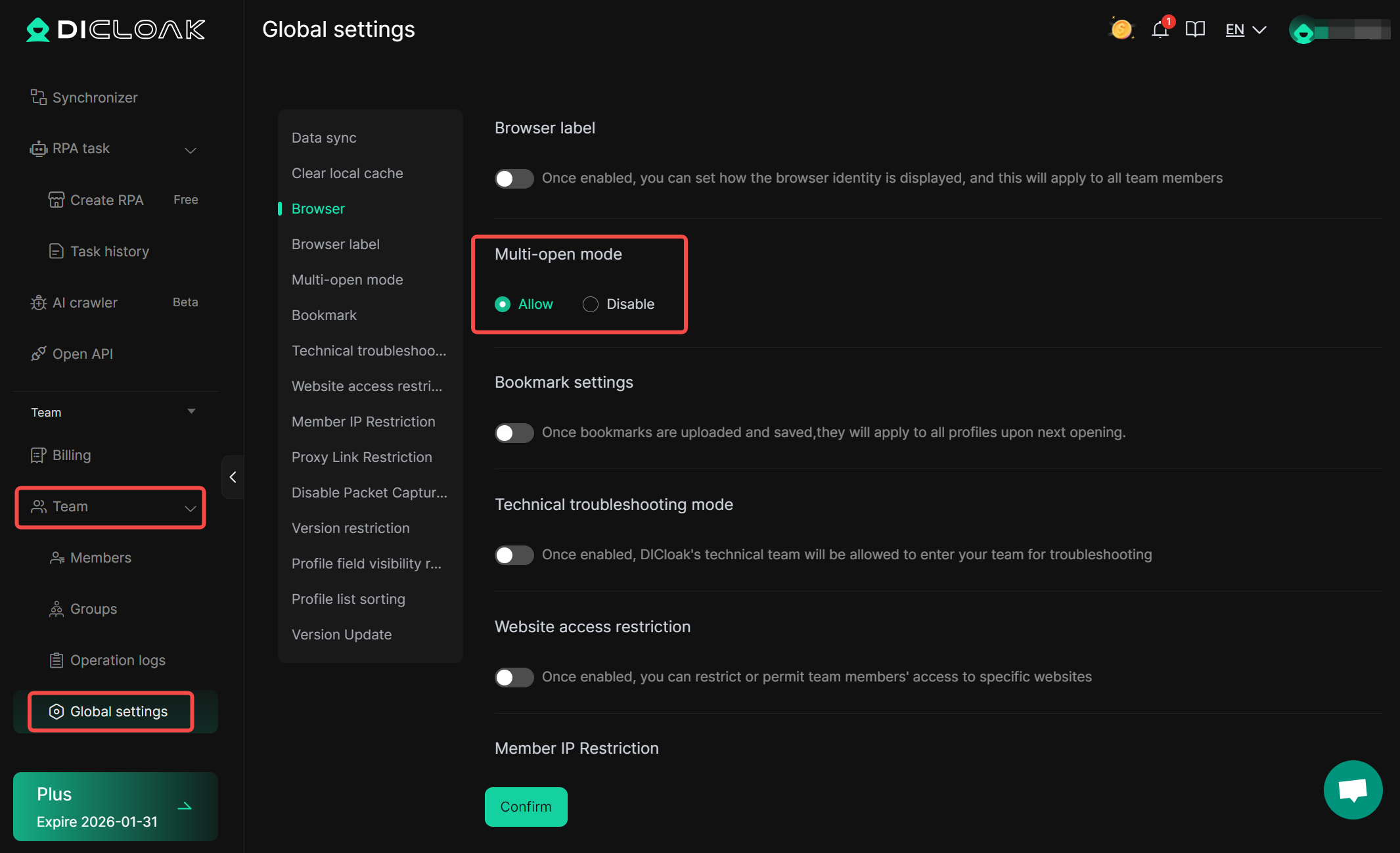
Then, enable the "Allow Multi-Open" option in global settings. This allows your team members to access the same isolated profile and use Ahrefs without sharing sensitive account details.
What Else Can You Share with DICloak?
The utility of DICloak extends far beyond just Ahrefs. It's a powerful tool for any platform where you need to manage or securely share access.
- Freelance Marketplace Accounts: Share access to Upwork or Fiverr accounts with your team for order fulfillment without triggering IP address security flags.
- Other SEO Tools: Manage and share access to other expensive tools like Similarweb and Semrush.
- Social Media & Business Accounts: Use separate browser profiles to manage multiple Facebook, LinkedIn, or other business accounts from one device, which is ideal for social media agencies.
In short, DICloak is perfect for any platform where account sharing is needed but officially restricted.
Conclusion
For any SEO professional tired of the dilemma between paying high per-user fees and resorting to risky password-sharing, DICloak is the workflow solution I personally use and recommend. It avoids extra user fees, eliminates security risks associated with sharing passwords, and is a fast and efficient way to collaborate.
Frequently Asked Questions (FAQ)
Is an Ahrefs account share allowed by their terms?
Ahrefs' official terms strictly forbid sharing a single login among multiple people. The official way to add users is by paying for extra seats on your plan.
What is the main risk of simply sharing my Ahrefs password?
Beyond violating Ahrefs' terms, it's a security risk. Ahrefs will also detect logins from different devices, leading to constant email verifications that make it impractical for more than one person to use the account.
How does an anti-detect browser like DICloak help with Ahrefs account sharing?
DICloak creates a unique browser profile that saves the Ahrefs login profile. You can share this entire profile with a teammate, who can then access Ahrefs without ever needing the password. This avoids security flags because Ahrefs always sees the same trusted "device."
Can my team achieve the Ahrefs account share at the same time with DICloak?
Ahrefs only allows one person to be active on a single login at a time. While DICloak makes sharing the profile easy and secure, users will still need to coordinate their usage times to avoid being logged out by another user.
Besides cost, what is the biggest advantage of using DICloak for an Ahrefs account share?
The biggest advantage is security and convenience. You never have to share your actual Ahrefs password, and you can grant or revoke access to the shared browser profile instantly from your DICloak dashboard.
 Web Proxy Tools
 Free Tools
 Cookie Plugin
 UA Generator
 MAC Address Generator
 IP Generator
 IP Address List
 2FA Code Generator
 World Clock
 Anonymous Check
 WebRTC Leak Test
 UUID Generator
 Free Web Proxy Site
 Proxy Checker
 FB Ad Checker
 AI Web Scraping
 Free SMM Tools
 Twitter Shadowban Checker
 Instagram Name Checker
 UTM Generator
 Username Generator
 AI Hashtag Generator
 LinkedIn Headline Generator
 Social Media Image Resizer