You upload your latest video, double-check the title, and hit publish, but nothing happens. Hours go by, then days. The problem is clear: YouTube videos get 0 view no matter what you try. If you’re searching “why my YouTube video has 0 views” or “how to fix 0 views on YouTube,” you’re not alone. This isn’t just about a slow start; sometimes even old channels with past views hit this wall, and it can feel like the platform is ignoring your work entirely.
It’s easy to blame YouTube’s algorithm or think the platform is broken, but the real causes are usually more practical, and more fixable, than most people expect. Sometimes it’s a settings issue. Other times, it’s an invisible filter, copyright flag, or even a mistake in how you uploaded the video. If you ignore these details, you can waste days tweaking titles and thumbnails with zero impact.
What actually works is a checklist, looking at upload status, visibility, copyright flags, and distribution settings before you panic about shadowbans or algorithm changes. The right fix depends on spotting where the process broke down, not just guessing.
Here’s what to check first when your YouTube videos are stuck at zero.
What Does It Really Mean When Your YouTube Video Gets 0 Views?
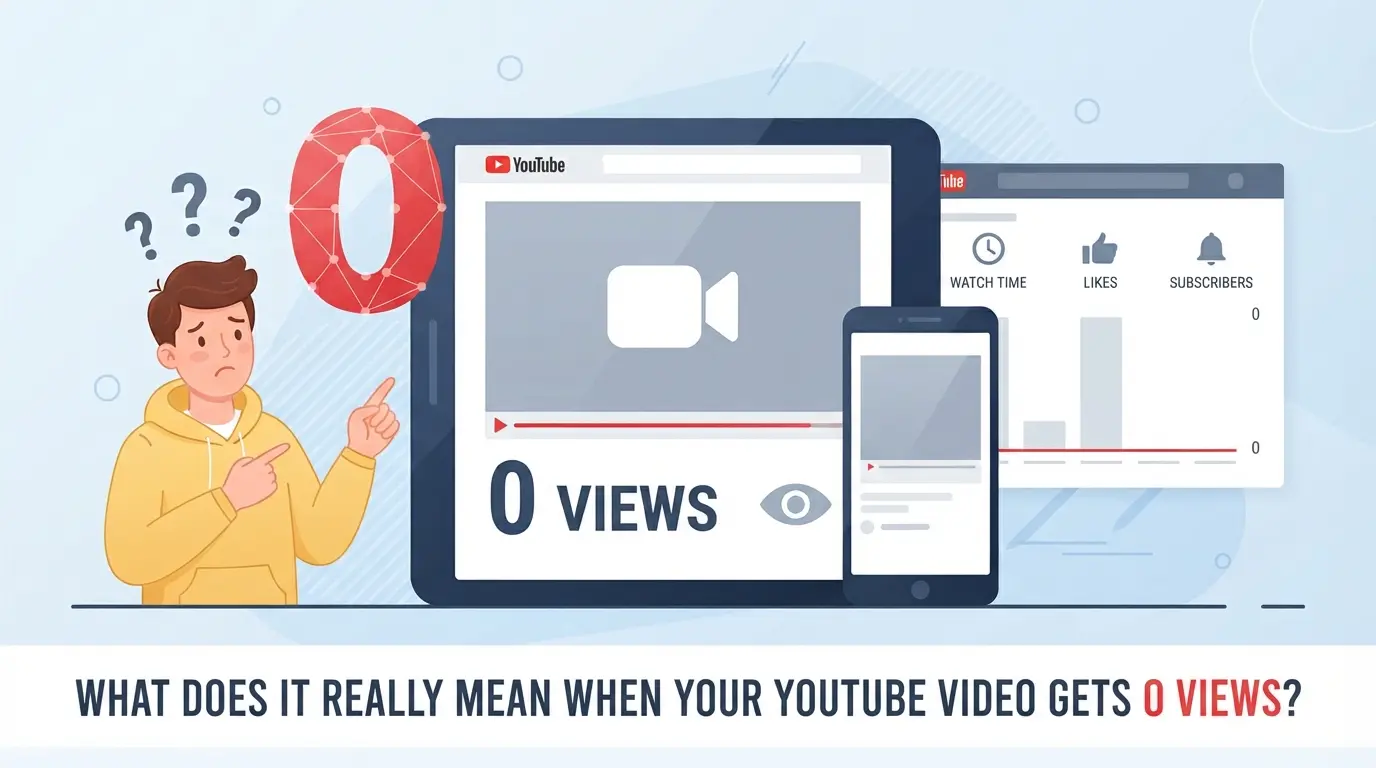
If your YouTube video shows zero views, it doesn’t always mean nobody has watched it. Sometimes the platform is just slow to update, but other times, there’s a real block stopping your video from being seen. Knowing the cause saves you from chasing the wrong fix.
How YouTube Counts and Updates Views
YouTube’s view count doesn’t update the second someone clicks play. Regular videos can show a delay of up to several hours, especially after upload. Shorts usually update faster, but both can lag if there’s a spike in traffic or server checks slow things down.
When a '0 View' Video Is Normal (and When It’s a Problem)
Seeing zero views in the first hour isn’t unusual, YouTube’s system often batches and verifies views before showing the final count. If your upload is public and you click play yourself, you may notice the view count stays stuck at zero. That’s because YouTube filters your own views and tries to catch bots or repeat refreshes. The real warning sign is when your video stays at zero for more than three hours, and you know friends or other accounts have watched it on different devices. At that point, you’re likely dealing with a visibility or distribution issue, not just a delay. For example, if you shared the link in a group chat and nobody’s view registers after half a day, YouTube may have flagged the video for review or hit it with a shadow restriction, meaning it won’t appear in search or recommendations until cleared.
How to Check If Your Video Is Public and Searchable
- Open YouTube Studio and confirm your video’s visibility is set to “Public”, not “Unlisted” or “Private.”
- Check for any age restrictions or copyright claims in the “Restrictions” column, since these can block your video in some regions or for some users.
- Try searching your video’s exact title in YouTube’s search bar from an incognito window, if you can’t find it, the video may be blocked from appearing in search.
When you see zero views, don’t assume it’s just a lag. The real problem is usually a mix of YouTube’s filters, your visibility settings, or a hidden restriction. The fastest way to get past zero is to confirm your video is both public and searchable, otherwise, no amount of waiting or sharing will unlock real views.
Next, you’ll want to look at the most common reasons “0 views” happens in 2026, including technical hiccups and content-related blocks.
Why Do YouTube Videos Get 0 Views? The Most Common Causes in 2026
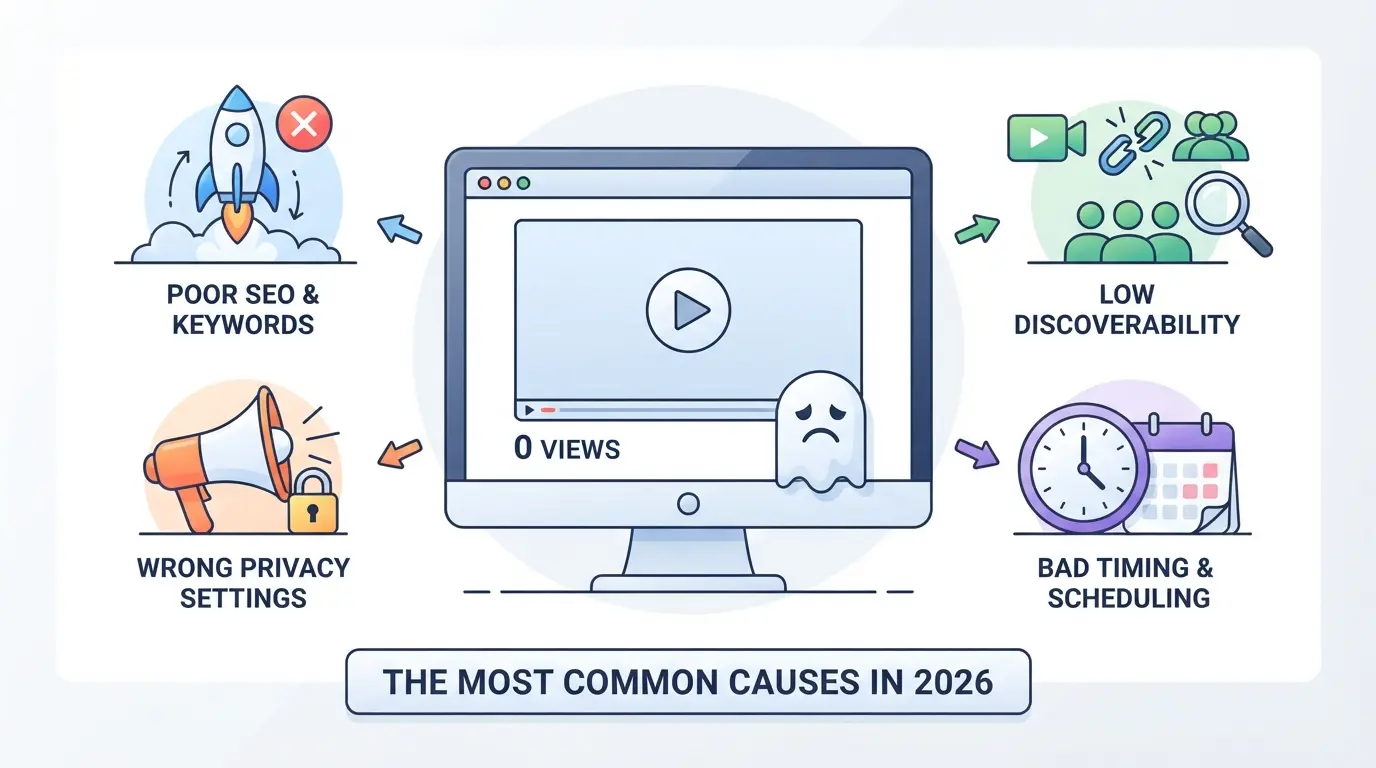
YouTube videos often get zero views because of overlooked technical mistakes, content problems, or platform settings. Most creators miss the real cause by focusing on algorithm myths, when the fix is often much simpler, sometimes as basic as changing a visibility setting or fixing a copyright flag. Here are the most common reasons your video isn’t getting seen in 2026.
Algorithm and Distribution Issues
If your video uses reused content, low originality, or clips flagged by Content ID, YouTube may block distribution or bury it from search and recommendations. Copyright matches, even music in the background, can stall visibility for days. The fastest way to break out of zero is to upload truly original material and check for copyright claims right after publishing.
Visibility and Publishing Mistakes
Accidentally setting a video to private or unlisted is still the top reason new uploads get zero views. A scheduled video won’t appear until its set release time, so if you forget and set the wrong date, it sits invisible. Picture this: you upload, everything looks fine in your dashboard, but viewers see nothing. That’s not a platform bug, it’s a visibility setting you can fix in seconds. The hidden trap is assuming “public” means visible everywhere, when in reality, age restrictions, region locks, or pending reviews can quietly block a video from reaching its audience. If your video’s status is anything but “Published” and “Public” in the dashboard, viewers won’t see it.
Poor Optimization: Titles, Tags, and Thumbnails
Weak or irrelevant titles, outdated tags, or missing thumbnails can lead to search invisibility. For example, uploading a video called “Test123” without a thumbnail or relevant tags will almost always result in zero views, since YouTube’s search and suggested video system skips over content that looks unfinished or off-topic. If you use misleading thumbnails or tags, the platform may throttle your reach before anyone even finds your video.
Niche Competition and Low Search Volume
Choosing a topic with no demand or competing against established creators means your upload can get buried instantly. Take a channel posting about a hyper-specific software update with only a handful of monthly searches, unless you already have a subscriber base, the video will likely stay at zero. Even strong optimization can’t overcome zero demand or aggressive competition in small niches.
Technical Errors and Upload Glitches
YouTube’s upload process in 2026 sometimes fails silently. Here’s what to check:
- Refresh your studio dashboard, if the video isn’t listed, the upload probably failed.
- Re-encode and re-upload if the file was corrupted or flagged during processing.
- Watch for platform bugs: after major updates, some uploads may get “processing” errors that block visibility for hours.
These technical issues don’t show as warnings, so missing them can keep your video invisible despite all other fixes.
The real difference is knowing exactly where the process broke, next, you’ll see how to check each step to move your video out of zero views and into real audience reach.
How to Troubleshoot a YouTube Video Stuck at 0 Views: Step-by-Step Checklist
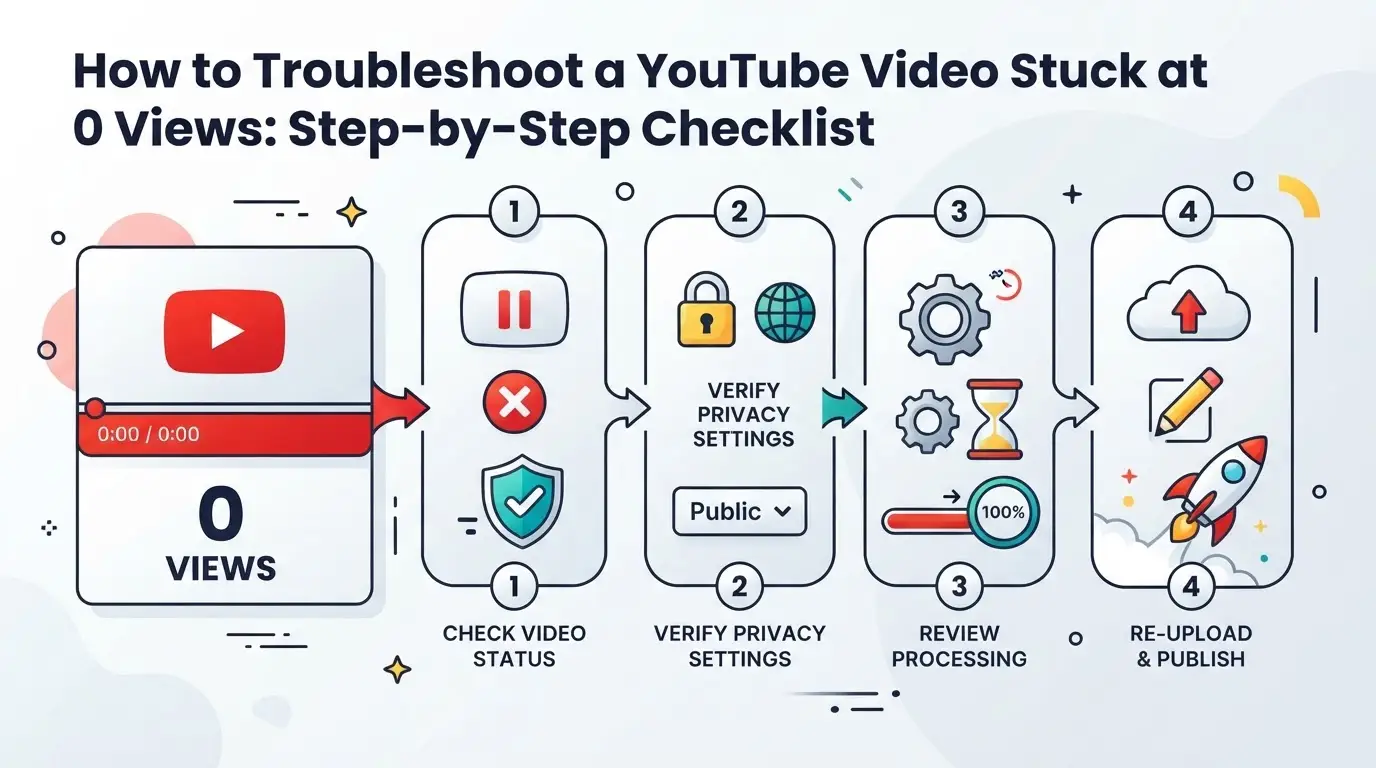
YouTube videos not getting views usually means something broke between upload and discovery. Instead of guessing, run through this checklist, most fixes are simple, but missing even one can keep your video invisible for days.
Step 1: Confirm Video Visibility and Publishing Status
- Open YouTube Studio and check the video’s visibility, if it’s set to private or unlisted, no one can find it except you or those with the link.
- Look for age or region restrictions. If you see a yellow warning beside "Visibility," your video may be blocked in some countries.
- Double-check publish status. Sometimes, a failed upload leaves the video in draft mode, which won’t get indexed.
Step 2: Test Searchability and Direct Link Access
- Search your video title in an incognito window. If nothing shows, your video isn’t indexed.
- Open your video link in a logged-out browser. If you get an error or the video won’t play, there’s likely a distribution problem.
Step 3: Review for Copyright or Policy Flags
- Check YouTube Studio for copyright claims. Even minor content ID matches can block distribution.
- Look for policy notifications. If YouTube flags your video, it can be hidden from search or recommendations.
Step 4: improve Title, Description, and Thumbnail
- Rewrite your title and description to match search terms, avoid vague or spammy wording.
- Update your thumbnail. If it’s blurry or misleading, YouTube may suppress your video in browse features.
Step 5: Wait and Monitor Analytics
- Wait up to 2 hours after updating. YouTube sometimes takes time to re-index.
- Check YouTube Analytics for impressions and traffic sources. If numbers stay at zero, revisit earlier steps.
If you don’t see movement after these checks, the issue likely isn’t content, it’s platform or policy related.
When Is '0 Views' a Platform Issue vs. a Content Problem?
You’re staring at zero views and wondering if YouTube itself is the problem, or if something in your upload or content is blocking discovery. The fastest way to decide what to do next is to match what you see with the right cause, platform glitch or content problem, so you don’t waste time fixing the wrong thing.
Signs of a Platform Glitch or Delay
| Sign or Test |
What It Means |
What to Do |
| Other creators report the same issue |
Likely a widespread bug or outage |
Check YouTube’s status page |
| YouTube’s official status updates |
Confirms known platform problems |
Wait for resolution |
| Video appears public but not searchable |
Platform indexing delay or filter |
Review official YouTube forums |
If you see these signs, don’t rush to edit or re-upload, waiting or checking official updates usually saves you wasted effort.
Signs of a Content or Optimization Problem
If your video has no impressions in Analytics, or gets flagged for reuse or low quality, the block is usually on your side. Copyright issues, private settings, or reused clips often stop distribution before any real viewer can see it.
What to Do If You Suspect a Platform Issue
When the signs point to a platform glitch, file a bug report only if the problem lasts more than a few hours and others aren’t affected. Most delays clear up within a day; re-uploading too soon can make things worse if the system is still catching up.
How Social Media Marketers and Teams Can Safely Manage Multiple YouTube Accounts with DICloak
If you’re running several YouTube accounts for clients or brands, the real risk isn’t just “YouTube videos get 0 view”, it’s session overlap, cross-account linkage, and messy team handoffs. Standard browsers mix logins and storage, so a minor mistake can connect accounts, trigger platform reviews, or confuse workflow ownership. Teams need a way to operate each account in its own controlled environment.
Set Up Separate Browser Profiles with Custom Fingerprints in DICloak
Operators start by creating a unique DICloak browser profile for every YouTube account. Each profile stores its own login, browser history, and session data, never overlapping with others. You can configure fingerprint signals like operating system, User Agent, language, and screen settings so each profile matches the account’s expected environment. This separation is what keeps accounts from exposing shared browser traces, even when switching between campaigns. The scope is limited to browser-profile access; it does not change YouTube’s video or content functions.

Configure User-Provided Proxies for Each Profile
If a workflow calls for a different network path per account, operators can assign their own proxy to each DICloak profile. Enter the proxy details, test connectivity, and confirm the detected IP and region before opening the session. This step ensures each account’s traffic routes through its assigned network, reducing mix-ups from reused connections. Proxy quality, rotation, and compliance are up to the operator; DICloak simply stores and applies what’s set.

For teams fixing account workflow issues, strict separation is the step that avoids most “invisible linkage” mistakes, before tackling risky fixes.
Risks and Mistakes to Avoid When Trying to Fix 0 Views on YouTube
Chasing quick fixes for a video stuck at zero views can do more harm than good. If you rush into risky tactics or keep making the same changes, you can actually hurt your channel’s chances of recovery.
Why Buying Views or Engagement Is a Bad Idea
Buying fake views, likes, or comments often triggers YouTube’s detection systems. When that happens, your video can get age-restricted, hidden, or even removed, sometimes your whole channel faces penalties. Shortcuts like these nearly always bring long-term damage instead of results.
Avoiding Spammy Promotion and Link Schemes
Trying to force traffic with mass-posted links or automated link drops can quickly backfire.
- YouTube’s system flags videos that get suspicious spikes from social media, forums, or spammy sources.
- A flagged video may lose visibility, or your account could be restricted. Focus on real audience engagement, share your link only where it’s welcome and relevant.
Common Fix Attempts That Backfire
Deleting and re-uploading the same video over and over resets its potential growth and can make the algorithm ignore it. Rapidly changing titles, tags, or descriptions can also trigger filters that freeze view counts. If you must edit, change one thing at a time and give it at least a day to update.
How to Get Your First Real Views: Proven Strategies for 2026
Getting your first real views in 2026 means fixing the basics before chasing hacks. If your YouTube videos get 0 view, the solution isn’t some hidden algorithm trick, it’s getting searchable, pushing the right way, and learning from early data. Here’s what actually works for new channels.
Make Your Videos Searchable and Relevant
If your video isn’t showing up in search, no one will find it except you. Use keyword tools built for 2026 trends, target phrases people use now, not what was popular two years ago. Match the title and description to real search intent, not just what sounds catchy. Even a strong thumbnail can’t fix weak relevance.
Promote Your Video the Right Way
The fastest way to break out of zero is to bring your own audience. Share your video in active communities where people care about your topic, think Discord servers, Reddit threads, or Facebook groups with real engagement. Collaborate with creators in your niche for cross-promotion; it works better than random cold DM spamming. If you go too broad (like dumping links in generic groups), you’ll get ignored or banned, and YouTube may see your traffic spikes as suspicious. For example, dropping a new gaming tutorial in a small Discord server where members already ask for advice can drive early views that actually stick, while mass-posting in unrelated forums just wastes effort and risks temporary channel restrictions.
Consistency and Analytics: Learning from Early Results
- Post at least once a week; more is fine if you can keep quality up
- Check your YouTube Studio for impressions, click-through rate, and watch time, not just raw views
- If a video gets no traction after 48 hours, test a new thumbnail or title before uploading another
Most channels see erratic numbers at the start. Keep watching what works, and shift your approach based on real viewer behavior, not guesses or hearsay.
Frequently Asked Questions About YouTube videos get 0 view
How long does it usually take for a new YouTube video to get its first views?
Most new YouTube videos show their first views within a few hours, but it can take up to 24 hours for the view count to update. If your video still has 0 views after 24-48 hours, check your privacy settings and make sure it’s public. Longer delays can mean technical issues or a very limited audience.
Can uploading too many videos at once cause 0 views?
Yes, uploading many videos in a short time can hurt performance. The YouTube algorithm may "throttle" your channel, showing your videos to fewer people. Best practice is to upload consistently, but not spam uploads. Space out your content to give each video a chance to be seen and recommended.
Is it normal for Shorts to get 0 views at first?
Yes, Shorts can often sit at 0 views for several hours. YouTube reviews new Shorts before pushing them to the Shorts feed. Sometimes, a Short gets picked up days later and suddenly gains views. If your Short stays at 0 views for more than 48 hours, try changing your title, description, or hashtags.
Do private or unlisted videos count towards view totals?
No, private videos do not count towards public view totals at all. Unlisted videos only get views if someone has the direct link, and those views are counted. For maximum reach, set your video to public. Only public videos appear in search and recommendations.
Can using multiple accounts to watch my own video help get views?
Watching your own video with different accounts usually does not help increase views. YouTube detects self-views using cookies and IP addresses. Trying to boost views this way can lead to your view count freezing or being adjusted downward. Focus on getting real viewers for lasting results.
Taking proactive steps such as optimizing your content strategy and leveraging innovative tools can make a significant difference in reaching your target audience. If you're ready to improve visibility for your videos and protect your creative efforts, consider trying a new approach today. Try DICloak For Free
 Web Proxy Tools
 Free Tools
 Cookie Plugin
 UA Generator
 MAC Address Generator
 IP Generator
 IP Address List
 2FA Code Generator
 World Clock
 Anonymous Check
 WebRTC Leak Test
 UUID Generator
 Free Web Proxy Site
 Proxy Checker
 FB Ad Checker
 AI Web Scraping
 Free SMM Tools
 Twitter Shadowban Checker
 Instagram Name Checker
 UTM Generator
 Username Generator
 AI Hashtag Generator
 LinkedIn Headline Generator
 Social Media Image Resizer