Creating high-quality content takes time, skill, and consistency. For many teams, this is the hardest part of digital marketing. Linkfox was built to solve this problem. It uses AI to help businesses create images, text, and marketing assets faster, without lowering quality.
In this guide, you will learn what Linkfox is, why it matters, and how it fits into modern content marketing workflows. We will also explore Linkfox AI features, pricing, and practical ways to use it more effectively. Whether you are a solo creator or part of a growing team, this article will help you understand how Linkfox can support smarter, more efficient content marketing.
What is Linkfox?
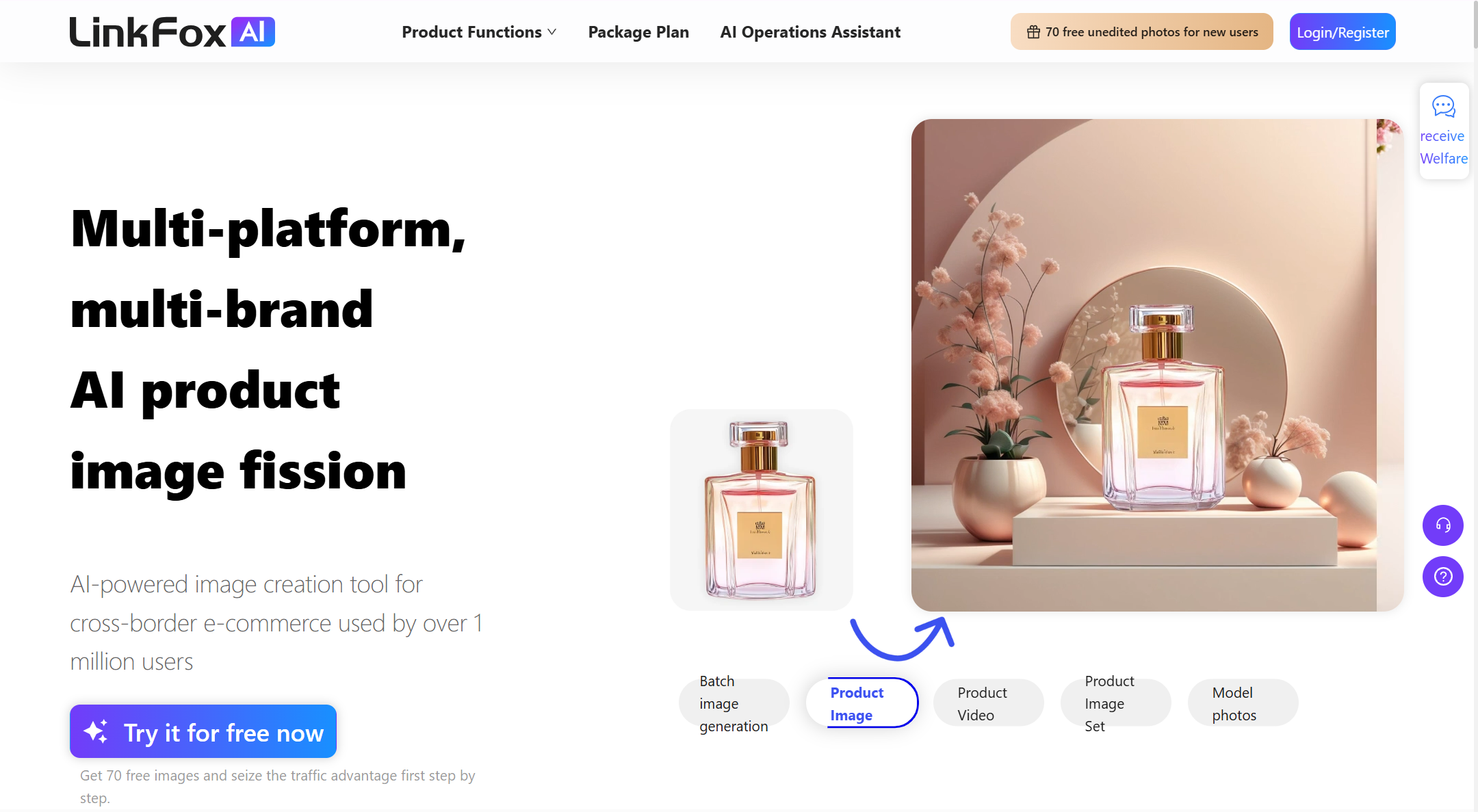
Linkfox is a smart AI tool built to help online sellers and marketers. It uses advanced technology to create content and data insights. This tool is also called Linkfox AI because it uses artificial intelligence to make many tasks easier. It works as a one-stop helper for sellers in global e-commerce markets. The tool is popular with cross-border businesses that sell on marketplaces like Amazon, Temu, or Shopify. With Linkfox, users can generate high-quality product photos, model images, and promotional visuals without a real photo studio. The platform also includes widgets for product research, keyword mining, and ad analytics so sellers can make smarter decisions fast.
For example, a small fashion seller can use Linkfox to automatically create professional images of their clothing items. This replaces the need for expensive photoshoots. In minutes, they can get studio-like shots and ready-to-use listings. This makes their online store look more professional and increases buyer interest.
Linkfox also supports market trend analysis and keyword discovery. A seller can explore which products are trending and what customers are searching for. This helps them decide what to sell next. It is more than just an image creator — it is a full assistant for e-commerce tasks.
Why Linkfox Matters?
Linkfox matters because it saves time and improves work quality for content creators and sellers. In the past, sellers had to hire photographers or spend many hours editing pictures. Now, with Linkfox AI, a team of one person can do the same work that used to need a whole team. This leads to faster results and lower costs.
Good content is key to selling online. A study of Amazon marketplaces shows listings with better images and detailed descriptions sell more. Linkfox helps brands create that content quickly. For example, a seller on Amazon used Linkfox to generate multiple product angles and background scenes in one day. The result was more clicks and more sales over the next month. These real use cases show how Linkfox can boost productivity and help teams work smarter.
Many marketers also use Linkfox to test new ideas quickly. For instance, they generate multiple versions of a product image to see which one gets more customer clicks. This type of testing would normally take weeks. With Linkfox AI, it takes only hours — and the seller can pick what works best. This shows why Linkfox is important to modern content creation and marketing teams.
Key Features of Linkfox
Now that you know what Linkfox is and why it matters, let’s look at what it can actually do. Linkfox is more than one tool. It has many useful features that help sellers and marketers save time and improve results. These core functions are part of Linkfox AI and support product content, design, and marketing analysis.
- AI Photo and Image Generation
Linkfox can take simple product photos and turn them into clear, professional pictures. You do not need a camera or a studio. For example, a small store owner can upload a photo of a shirt and get studio-like images in minutes. These pictures can show the product from different angles and with clean backgrounds. This feature is a big help for online stores that need many pictures fast.
- AI Model Replacement and Scene Change
Another useful feature in Linkfox AI is the ability to replace models or backgrounds in pictures. A seller can change the look of a model or put the product scene into a new setting. This works well when a brand wants to show the product for different markets or occasions. For example, a clothing seller can change the model to match the culture of a target market without real photoshoots.
- AI Text and Description Creation
Linkfox is not just about images. It also helps write product titles and descriptions. You can tell it a few details, and the tool will turn those into clear marketing text. This helps boost product listings that need strong words to attract buyers. Sellers have shared that using this tool saves hours of writing and improves listing quality.
For sellers with many products, Linkfox AI offers batch content generation. This means you can upload a group of items and get content for all of them at once. One small e-commerce team reported cutting their content creation time by more than half when preparing for a new seasonal sale.
- Video and Promotional Material
Linkfox also can turn still images into basic promotional videos. Videos help products stand out on marketplaces and social media. For example, a toy seller used Linkfox to make short animated clips of products. Those videos helped increase clicks on their listings in one week.
- Keyword and Market Widgets (Chrome Extension)
Some versions of Linkfox include widgets for keyword research and product analysis. These tools help sellers find popular search terms and estimate how products are selling. A marketplace seller used the keyword widgets to find trending keywords and then updated their listings. Sales improved in two weeks after the updates.
LinkFox AI Pricing
After we looked at the key features of Linkfox and Linkfox AI, it is important to understand how much it costs to use this tool. Pricing is a big factor for many teams and sellers who want to decide if Linkfox fits their budget and goals.
Understanding the Cost Structure
Linkfox offers multiple pricing plans so that both new users and growing businesses can choose what fits them best. The company calls its plans by simple names and gives options from free to advanced, based on how much usage and power you need.
- Free Plan – This plan costs $0 and lets you try basic features of Linkfox AI. It gives a monthly quota for things like image generation. This is useful for individuals or small sellers who want to test the tool before buying.
- Basic Plan – This plan usually costs around ¥129 per month (about $18 at current exchange rates) or a yearly option for a lower cost. It gives higher usage limits and more tools than the free plan. New sellers or small teams often start here.
- Advanced / Pro Plan – Around ¥589 per month (about $80), this plan gives much larger quotas and faster processing. It also unlocks more advanced features of Linkfox AI. Teams that create a lot of content or run regular campaigns use this plan.
- Team Edition – This plan is for groups of users. It charges based on compute units and includes multi-user access. This makes it a good option for larger teams with many members working together on content and creative work.
Many users also find that Linkfox sometimes offers promotional discounts on plans, especially for annual billing. These discounts can reduce monthly cost and make it easier for growing businesses to upgrade.
Value Proposition for Businesses and Individual Users
Linkfox’s pricing structure is designed to be fair for both small sellers and larger teams. The free plan gives a way to start without risk. A solo seller can use it to create a few product images or test text generation without paying. This is a low-risk way to try Linkfox AI before investing.
For a small business, the Basic Plan often brings real value. Imagine a seller who lists 50 products. With just the free plan, they may run out of monthly credits before finishing all images and descriptions. But with the Basic Plan, they get more usage and can finish faster. Many sellers say this plan helped them prepare content for a seasonal sale in one weekend, while before it took days of manual editing.
For larger teams or professional sellers, the Advanced / Pro and Team plans offer more power. These plans help remove limits on how much content can be created each month. For example, a fashion brand team can use Linkfox AI to generate many model-shot images with consistent style for all SKUs in a season. This would be costly and slow with a traditional photo studio, but with Linkfox, it becomes a predictable monthly expense and speeds up workflow.
In simple terms, Linkfox pricing lets users grow step by step. You can start small with the free plan, and then upgrade as your needs get bigger. This flexible cost structure makes Linkfox AI a practical choice for different sizes of businesses, from solo sellers to full teams.
Accessibility of Linkfox AI
After talking about pricing, it’s important to know who can use Linkfox and how easy it is to get started with Linkfox AI. This helps you decide if the tool fits your skills and team.
How Linkfox Caters to Different Types of Users
Linkfox is built for many kinds of users, not just one group. It is a tool that helps sellers, marketers, and even new business owners. For example, cross-border sellers use Linkfox to create images and descriptions for products on global marketplaces like Amazon and Shopify. It also offers tools like keyword mining and ad analytics that even experienced marketers value. This wide range of functions makes Linkfox useful for people with different goals and skills.
A beginner seller might first use Linkfox to generate a clean product photo or a short product description. Someone more experienced might use the tool’s browser widgets to study keywords or examine advertising patterns. This range of users shows how Linkfox adapts to both simple tasks and deeper business analysis.
Ease of Use for Beginners and Experienced Marketers
One big strength of Linkfox is that many users find it simple to start. You can install the Linkfox AI extension in your browser and begin using it while you browse products on marketplaces. Many features work with just a few clicks. There are clear menu options for image generation, text creation, and data insights.
For beginners, this means you don’t need special skills in design or coding. A new seller can upload a photo and get a studio-style product image in minutes. One small business owner shared that using Linkfox cut their editing work from hours to minutes. This helped them focus more on selling and less on editing pictures.
Experienced marketers also benefit from the user-friendly layout. They can quickly switch between tools like creative text generation and keyword research without learning multiple systems. For example, a digital marketing manager used Linkfox to test different product image styles, then used the data tools to see which visuals drove more clicks. This helped the team choose the best versions faster than doing tests manually.
In short, Linkfox meets users where they are. Beginners can get value right away, while professionals can use its deeper functions to refine content and strategy. This balance makes Linkfox AI a useful tool for teams big and small.
Enhancing Content Marketing Efficiency with Linkfox AI
Now that you know who can use Linkfox and how easy it is to start with Linkfox AI, let’s talk about how this tool actually makes your content marketing better. Many teams struggle with content quality, speed, and SEO. Linkfox helps in real, practical ways by guiding your strategy and letting you work faster.
Strategies for Improvement
Intelligent Keyword Placement Techniques
Good content does more than look nice. It needs to rank in searches and attract the right audience. One key way to improve this is smart keyword placement. When using Linkfox to write product descriptions or marketing text, start with a clear idea of what words your customers search for. Tools like Linkfox’s keyword widgets help you find terms buyers use most often when they search on marketplaces.
For example, a seller of outdoor gear might find that “waterproof hiking backpack” gets more searches than just “hiking backpack.” Using the more searched phrase first in your title and description will help your content show up higher in results. Place your top keyword near the beginning of product names and within the first line of descriptions. Then include related keywords in later lines to support that main idea. This simple habit makes your content more likely to be seen by buyers.
Overcoming Misconceptions About AI-Generated Content
Many people worry that AI content will feel robotic or low quality. This is a common fear, but it can be managed with a good process. AI tools like Linkfox AI can write drafts and ideas, but the best results still come when a human reviews and edits the content. Think of Linkfox as your helper, not a replacement for your voice.
For example, after Linkfox generates a product description, you might edit a few lines to match your brand’s tone or add a detail about your product’s unique feature. This gives you text that feels real and personal. Marketers who use this method report faster content creation without losing quality.
Practical Tips for Maximizing Linkfox AI
Actionable Insights for Integrating Linkfox into Marketing Campaigns
To get the most from Linkfox in a real campaign, start with specific goals. Do you want more site traffic? Better search rankings? Or more conversions? Once your goal is clear, use Linkfox to support that aim step by step.
Try this simple plan:
1. Research Keywords First – Use Linkfox’s keyword tools to find the best terms for your products. Place these words in your titles and listings.
2. Generate Variations – Ask Linkfox AI to create several versions of images and text. Then test them to see what gets better clicks.
3. Review and Edit – Always read through content to add your brand voice and fix any parts that feel off.
This step-by-step approach keeps your content strong while still saving time.
Using DICloak Antidetect Browser to Share Your Linkfox Account
Teams often share access to tools so multiple people can work together. The DICloak Antidetect Browser makes it easier to share tools like Linkfox securely across users without conflicts. By using DICloak, a team can manage one Linkfox account while keeping each user’s creative workflow safe and organized. This helps small teams work without buying multiple accounts and reduces costs.
For example, a small marketing agency can set up DICloak so each team member opens Linkfox in their own isolated browser profile. This keeps login profiles isolated and protects data, while still letting the group share a single subscription. This type of setup helps teams collaborate smoothly and lowers tool spending.
Why Choose DICloak Antidetect Browser for Your Business?
⚡The DICloak Antidetect Browser has become a global favorite for its unparalleled ability to efficiently and securely manage multiple accounts. Designed for professionals in social media management, affiliate marketing, traffic arbitrage, e-commerce, account farming, airdrops, and more, DICloak offers powerful features like RPA automation, bulk operations, and synchronizer. Additionally, it allows you to customize fingerprints and integrate proxies for each profile, ensuring top-level security and operational efficiency. It’s the ultimate tool for seamless, secure, and scalable operations.

What Makes DICloak Stand Out?
✅ Manage 1,000+ Accounts on One Device: Stop wasting money on extra hardware! DICloak allows you to manage multiple accounts on a single device, cutting costs and boosting efficiency.
✅ Guaranteed Account Safety, No Ban Risks: Every account gets its own isolated browser profile with custom fingerprints and IPs, drastically reducing the risk of bans. Your accounts, your control!
✅ Flexible Proxy Configuration for Maximum Performance: Seamlessly integrate with all major proxy protocols (HTTP/HTTPS, SOCKS5) and manage your proxy pool with bulk operations. No more struggling with IP management—DICloak has you covered.
✅ Streamlined Team Collaboration for Better Results: Easily manage your team with advanced tools like profile sharing, permission settings, data isolation, and operation logs. Your team works smarter, not harder.
✅ Automate the Grind with RPA: DICloak's built-in RPA saves you hours of manual work. Automate repetitive tasks, streamline workflows, and focus on what really matters—growing your business.
✅ Powerful Bulk Tools to Scale Your Operations: Create, import, and launch multiple browser profiles in one click. DICloak makes scaling your business as easy as it gets.
✅ Compatible with All Major Operating Systems: Based on the Chrome core, DICloak supports simulating Windows, Mac, iOS, Android, and Linux operating systems. No matter what platform you need, DICloak has you covered.
🔗 Ready to Get Started?
Visit the DICloak website to explore more details and choose the plan that’s right for you. Start for free today and experience the power of secure, efficient, and scalable multi-account management!
Frequently Asked Questions (FAQs) about Linkfox
What is Linkfox and how does it help content marketing?
Linkfox is an AI-powered content marketing tool. It helps users create product images, videos, and written content faster. Many sellers and marketers use Linkfox to save time and improve content quality. By using Linkfox, teams can focus more on strategy instead of manual work.
Is Linkfox suitable for beginners with no marketing experience?
Yes, Linkfox is designed for beginners and professionals. The interface is simple and easy to understand. New users can create images or text with just a few steps. At the same time, experienced marketers can use advanced features for testing and optimization. This makes Linkfox flexible for different skill levels.
Can Linkfox AI content hurt SEO or Google rankings?
No, using Linkfox AI does not hurt SEO by itself. What matters is how the content is used. If you review, edit, and add real value, Linkfox-generated content can perform well in search results. Many users combine Linkfox AI with human edits to keep content helpful, clear, and natural for readers.
How much does Linkfox cost, and is it worth the price?
Linkfox offers different pricing plans, including a free option and paid plans for higher usage. Small sellers often start with the free or basic plan. Larger teams choose advanced plans for more features. Compared to hiring designers or writers, many users find Linkfox cost-effective and easier to scale.
Can multiple team members use one Linkfox account safely?
Yes, teams can share a Linkfox account more safely by using tools like the DICloak Antidetect Browser. DICloak allows each team member to access Linkfox in an isolated browser profile. This helps avoid login conflicts and protects account security while supporting team collaboration.
Conclusion
Linkfox has become a practical solution for teams that want to create better content in less time. From image generation to text creation and keyword support, Linkfox helps simplify daily content marketing tasks without adding complexity. It is easy to use, flexible in pricing, and suitable for both beginners and experienced marketers.
More importantly, Linkfox supports smarter workflows. When combined with clear SEO goals and human review, it can improve content quality and efficiency at the same time. For teams that need to collaborate, using tools like the DICloak Antidetect Browser makes sharing a Linkfox account safer and more organized.
In short, Linkfox is not just an AI tool. It is a reliable content marketing assistant that helps businesses scale content, stay consistent, and compete more effectively in today’s fast-moving digital market.
 Web Proxy Tools
 Free Tools
 Cookie Plugin
 UA Generator
 MAC Address Generator
 IP Generator
 IP Address List
 2FA Code Generator
 World Clock
 Anonymous Check
 WebRTC Leak Test
 UUID Generator
 Free Web Proxy Site
 Proxy Checker
 FB Ad Checker
 AI Web Scraping
 Free SMM Tools
 Twitter Shadowban Checker
 Instagram Name Checker
 UTM Generator
 Username Generator
 AI Hashtag Generator
 LinkedIn Headline Generator
 Social Media Image Resizer