CAPTCHA is everywhere on today’s internet. From signing up for accounts to submitting forms or collecting data, these challenges are designed to stop bots—but they often slow down real work too. For developers, testers, and businesses that rely on automation, CAPTCHA can quickly become a daily obstacle.
This is where anti-captcha solutions come into focus. Instead of stopping your workflow, anti-captcha tools help you understand why CAPTCHA appears, how different systems work, and what options exist to handle them more effectively. In this guide, we break down modern CAPTCHA types, popular anti-captcha solutions, smarter alternatives, and practical ways to reduce detection risk. If you want to move past constant CAPTCHA interruptions and build more stable workflows, this article will show you where to start.
Introduction to Anti-Captcha
Before understanding how anti-captcha solutions work, it is important to know why CAPTCHA exists in the first place. CAPTCHA is a core part of modern web security. It affects almost every user, tool, and automated system online. This section explains what CAPTCHA is, why websites use it, and why anti-captcha solutions have become necessary.
What is CAPTCHA?
CAPTCHA is a security test that helps websites tell humans apart from bots. It stands for “Completely Automated Public Turing test to tell Computers and Humans Apart.”
Users often see CAPTCHA when signing up or logging in. Common examples include typing distorted text, selecting images like traffic lights, or clicking “I’m not a robot.” These tasks are simple for people but hard for automated programs.
Modern CAPTCHA systems, such as Google reCAPTCHA, go beyond images. They also analyze browser behavior and user actions to block spam, fake accounts, and automated attacks. Many sites use CAPTCHA to protect logins, ticket sales, and free trials, ensuring fair access for real users.
The Need for Anti-Captcha Solutions
While CAPTCHA improves security, it also blocks legitimate automation. Many businesses rely on automated tools for data collection, testing, and workflow automation. In these cases, CAPTCHA becomes a serious obstacle.
This is why anti-captcha solutions exist. An anti-captcha service helps software solve CAPTCHA challenges automatically, allowing tasks to continue without manual input.
For example, a price-monitoring tool may collect product data from many online stores. When a CAPTCHA appears, the process stops. By using an anti-captcha service, the system can solve the challenge and keep running.
Anti-captcha tools are now widely used in web scraping, QA testing, and large-scale automation. They support different CAPTCHA types, including image puzzles and reCAPTCHA, making automation more reliable and stable.

Types of CAPTCHA
Now that we understand why CAPTCHA exists and why anti-captcha solutions are needed, the next step is to look at the different types of CAPTCHA used today. Not all CAPTCHA systems work the same way. Each type creates different challenges for users, automation tools, and anti-captcha services.
Overview of Common CAPTCHA Variants
Most modern websites rely on a few widely used CAPTCHA systems. These systems are designed to block bots while allowing real users to pass with minimal effort.
reCAPTCHA (v2 and v3)
reCAPTCHA is one of the most common CAPTCHA systems on the web. Version 2 often shows image challenges or a simple “I’m not a robot” checkbox. If the system detects risk, it adds extra tests.
reCAPTCHA v3 works differently. It does not show any visible challenge. Instead, it scores user behavior in the background. Mouse movement, browsing speed, and request patterns all matter. This makes automation harder and increases the need for advanced anti-captcha solutions.
hCaptcha
hCaptcha looks similar to reCAPTCHA v2. Users usually solve image-based puzzles, such as selecting specific objects.
Many websites choose hCaptcha because it focuses more on user privacy. From an automation view, hCaptcha is still a major blocker. Anti-captcha services often rely on human solvers or AI models to handle these image tasks.
FunCaptcha
FunCaptcha is often used on gaming, social, and e-commerce platforms. It uses interactive challenges like rotating objects or matching shapes.
These puzzles are harder for bots because they require visual logic and timing. FunCaptcha is known for being more complex, which raises costs and difficulty for anti-captcha systems.
How Different CAPTCHAs Work
Each CAPTCHA type uses a different detection method. Some focus on images. Others focus on behavior.
For example, reCAPTCHA v3 may block a request even if no image appears. A scraping script that sends many requests too fast can trigger it. In contrast, hCaptcha usually stops the user with a visible image task.
Anti-captcha tools must adapt to these differences. Some solutions send CAPTCHA images to human workers. Others use machine learning to predict correct answers. Advanced anti-captcha systems also manage timing and behavior to avoid detection before a challenge appears.
Challenges Posed by Various CAPTCHA Types
Different CAPTCHA types create different problems for automation. Image CAPTCHAs slow down workflows and increase cost. Behavior-based CAPTCHAs are harder to detect and bypass.
For example, a web scraper may work fine on one site but fail on another using reCAPTCHA v3. The script may never see a challenge, but requests still get blocked. This is why many teams combine behavior control with anti-captcha services.
Understanding CAPTCHA types helps businesses choose the right anti-captcha strategy. It also reduces errors, saves time, and makes automation more stable in real-world use cases.
Popular Anti-Captcha Solutions
After reviewing different CAPTCHA types and their behavior, the next question is how to handle them in real workflows. This is where anti-captcha solutions come into play. These tools are widely used in automation, testing, and data collection to solve CAPTCHA challenges and keep processes running smoothly.
Overview of Leading Anti-Captcha Tools and Services
Most anti-captcha services work through APIs or browser tools. When a CAPTCHA appears, the challenge is sent to a solver. A valid response or token is then returned, allowing the request to continue.
2Captcha is one of the most established anti-captcha services on the market. It supports a wide range of CAPTCHA types, including reCAPTCHA, hCaptcha, image CAPTCHAs, and Cloudflare Turnstile.
The platform mainly relies on a large pool of human solvers. This makes it effective for complex image challenges where AI accuracy may drop. For example, many price-tracking and SEO data tools use 2Captcha when scraping e-commerce sites that trigger repeated image CAPTCHAs.
Another advantage is its usage-based billing model. Users only pay for successfully solved challenges, which helps control costs during low-volume or unstable periods.
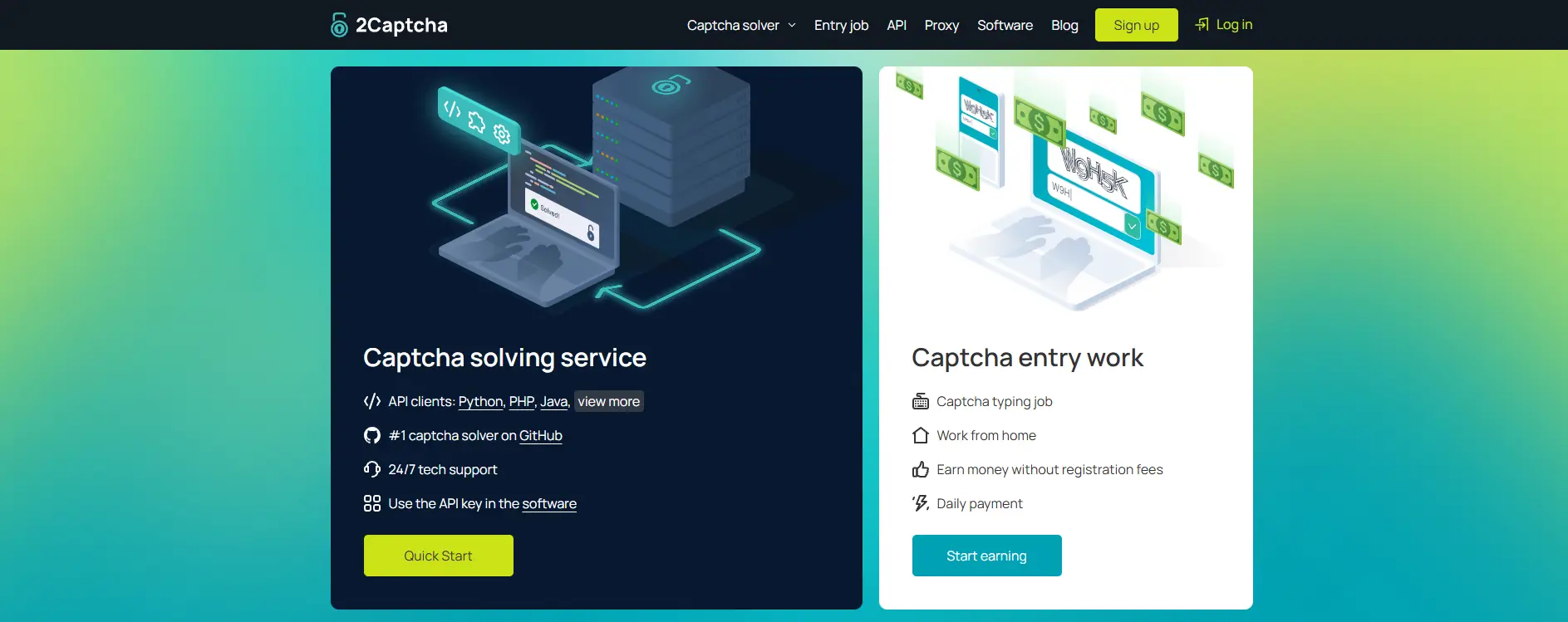
Pricing: Starts from about $1 / 1,000 solved CAPTCHAs Plan: Pay as you go Verdict: A reliable anti-captcha service for users who value human accuracy and flexible pricing.
Capsolver
Capsolver focuses on AI-driven CAPTCHA solving. It uses machine learning models to recognize images and patterns in challenges such as reCAPTCHA, hCaptcha, FunCaptcha, and image-to-text CAPTCHAs.
This service is often used in high-volume environments like market research, web scraping, and social media data collection. Because it relies more on automation, response times are usually stable when handling large batches of requests.
Capsolver also provides browser extensions, which are useful for testing and smaller workflows before moving to API-based automation.
Pricing: Roughly $0.8–$3 / 1,000 requests Plan: Pay as you go Verdict: A strong anti-captcha option for users who prefer AI-based solving at scale.
Anti-Captcha
Anti-Captcha has been operating for many years and is known for consistency. It supports popular CAPTCHA systems such as reCAPTCHA, GeeTest, and Cloudflare Turnstile.
Unlike AI-only tools, Anti-Captcha relies fully on human solvers. This makes it suitable for CAPTCHAs that require visual judgment or context. For example, QA teams testing login systems often use Anti-Captcha when repeated login attempts trigger stricter challenges.
The service also offers browser extensions and a stable API, making it easy to integrate into existing systems.
Pricing: Around $0.5–$2 / 1,000 requests Plan: Pay as you go Verdict: A dependable anti-captcha solution for users who trust human-based solving.
CapMonster Cloud
CapMonster Cloud provides automatic CAPTCHA solving through a cloud-based platform. It supports reCAPTCHA, hCaptcha, and other common CAPTCHA types.
This tool is often used in scenarios where speed and automation matter, such as gaming platforms, financial services, and crypto-related workflows. CapMonster Cloud integrates well with scripts and offers browser extensions for testing. Its pricing model is flexible, which makes it suitable for both small and large projects.
Pricing: From about $0.04 to $4 / 1,000 requests Plan: Pay as you go Verdict: Best for users looking for a scalable cloud-based anti-captcha service.
Free CAPTCHA Bypass (FCB)
Free CAPTCHA Bypass is designed with developers in mind. It follows an API-first approach and focuses on programmatic access rather than browser automation.
FCB is commonly used in automated testing, SEO data collection, and research projects. It offers a simple REST API and a limited browser extension for Chrome users.
The service is often chosen for its lower entry cost and ease of integration.
Pricing: Around $0.2–$0.8 / 1,000 requests Plan: Pay as you go Verdict: A practical anti-captcha solution for developers who prefer API-based workflows.
TrueCaptcha
TrueCaptcha uses a hybrid approach that combines automated solvers with human input. It supports image and text CAPTCHAs and is known for handling parallel requests efficiently.
This makes it useful in scenarios like batch form testing or multi-step automation flows, where many CAPTCHAs appear at the same time. The platform also provides a demo option for testing before full use.
Pricing: Starts from about $0.33 / 1,000 requests Plan: Pay as you go Verdict: A good anti-captcha option for users running multiple concurrent tasks.
AZcaptcha
AZcaptcha offers both usage-based pricing and subscription plans. It supports reCAPTCHA, hCaptcha, and invisible CAPTCHA challenges.
One of its distinguishing features is access to a growing database of solved CAPTCHA patterns. This can reduce solving time for repeated challenges. It is often used by teams that want predictable monthly costs.
Pricing: From $0.4 / 1,000 requests or about $24.9/month Plan: Pay as you go / Subscription Verdict: Suitable for users who prefer subscription-based anti-captcha access.
NopeCHA
NopeCHA is an AI-based anti-captcha solver that also offers browser extensions. It provides a free daily quota for small personal or hobby projects, which helps users test its capabilities without upfront cost.
Because it supports both APIs and browser tools, it is often used by developers experimenting with automation before scaling up.
Pricing: From $1 / 90,000 requests or $4.99/month Plan: Pay as you go / Subscription Verdict: Best for low-budget users and AI-focused CAPTCHA solving.
Browser Extensions for Bypassing CAPTCHA
Browser-based tools are a lighter form of anti-captcha solutions. They are mainly used for manual or semi-automated tasks.
Buster Browser Extension
Buster is a Chrome extension designed to help users solve reCAPTCHA challenges directly in the browser. It is commonly used during repeated form submissions or account access.
Pricing: Free Plan: Browser extension Verdict: Ideal for individual users dealing with frequent reCAPTCHA checks.
Rumola
Rumola is a Chrome-based CAPTCHA solver that handles text and image challenges inside the browser. It works across devices and supports quick activation through bookmarks.
Pricing: $1.95 / 150 requests Plan: Pay as you go Verdict: A simple anti-captcha extension for Chrome users.
No single anti-captcha solution fits every case. API-based services are best for large automation systems. Browser extensions work better for small, manual tasks. Choosing the right tool helps reduce failures, control costs, and improve long-term automation stability.
Alternatives to Traditional CAPTCHA
After reviewing popular anti-captcha solutions, it is important to look at another trend in web security. Some websites are moving away from traditional CAPTCHA tests altogether. Instead of forcing users to click images or solve puzzles, these platforms use newer systems that aim to reduce friction while still blocking abuse.
These alternatives do not replace anti-captcha tools in automation. However, they change how and when CAPTCHA challenges appear, which directly affects user experience and automated workflows.
Exploring Modern Alternatives to CAPTCHA
Modern CAPTCHA alternatives focus on passive checks. They try to verify users without visible challenges. Two well-known examples are Cloudflare Turnstile and Friendly Captcha.
Cloudflare Turnstile
Cloudflare Turnstile is a CAPTCHA alternative designed to work without user interaction. In most cases, users do not need to click or solve anything.
Turnstile checks signals like browser behavior, request patterns, and device characteristics in the background. If the request looks normal, access is granted instantly. For example, many websites using Cloudflare allow users to submit forms without seeing any challenge at all.
From an automation view, Turnstile still acts as a protection layer. When behavior looks suspicious, requests may be blocked or delayed. In these cases, teams often combine behavior tuning with anti-captcha or traffic control strategies to maintain stability.
Friendly Captcha
Friendly Captcha uses a different approach. It runs a small cryptographic puzzle in the user’s browser instead of showing images. The task is solved automatically by the device, not by the user.
This system is often used by privacy-focused websites. For example, some European platforms choose Friendly Captcha because it does not rely on tracking cookies or user profiling.
For automation tools, Friendly Captcha can still be a challenge. While there is no image to solve, the browser must complete the computation correctly. This means automation scripts need realistic browser behavior, even when using anti-captcha services.
Advantages of Using Alternative Solutions
The biggest advantage of CAPTCHA alternatives is reduced friction. Users no longer need to solve repeated puzzles or image grids. This leads to higher form completion rates and fewer abandoned sign-ups.
From a business point of view, fewer visible challenges mean fewer user complaints. Websites using Turnstile or Friendly Captcha often report smoother onboarding flows.
However, these systems do not remove the need for anti-captcha entirely. They simply shift the focus from image solving to behavior analysis. Automation tools must adapt to this change.
User Experience Improvements with Alternatives
Traditional CAPTCHA can frustrate users, especially on mobile devices. Small screens and slow connections make image selection difficult.
CAPTCHA alternatives improve this experience. For example, a user submitting a contact form may not even notice that a security check is happening. This creates a faster and more natural interaction.
For automation teams, this change means fewer visible challenges but stricter behavior checks. In practice, many professionals combine clean browser profiles, realistic request timing, and anti-captcha strategies to work reliably with these newer systems.
As websites adopt CAPTCHA alternatives, the role of anti-captcha is evolving. Instead of only solving puzzles, anti-captcha workflows now focus on behavior control, session quality, and smart request handling.
Security Concerns with Anti-Captcha Solutions
In the last section, we discussed how teams implement anti-captcha tools in real workflows. This is often where concerns start to appear. Anti-captcha sits close to core security controls. When used without care, it can introduce new risks, even in legitimate testing or automation tasks.
Potential Risks of Using Anti-Captcha Tools
- Third-party exposure of sensitive data: Many anti-captcha services work by sending a challenge to an external solver. That challenge may include images, site layout details, or tokens. If a page contains internal or user-related information, some of that data may leave your environment.
- For example, a QA team may test a signup flow on a staging site. Even if test emails are fake, the page can still expose internal URLs or product names. When those images are sent to an anti-captcha service, the information is no longer fully controlled.
- API key leakage and account abuse: Anti-captcha tools usually require an API key. If the key is stored in plain text or shared across tools and teams, it can be misused. This often leads to unexpected charges or blocked accounts.
- Compliance and Terms-of-Service risk: CAPTCHA is designed to stop automated abuse. Security frameworks such as OWASP list CAPTCHA defeat as a common automated threat pattern. If anti-captcha is used without permission, it may violate platform rules or legal agreements.
- Over-reliance on anti-captcha: In practice, some teams solve every challenge automatically instead of fixing the underlying behavioral issues. Over time, this can trigger stricter detection systems, especially those based on behavior rather than visible puzzles.
How to Mitigate Security Risks
There are practical steps that help reduce risk while using anti-captcha responsibly.
- Limit use to approved environments: Anti-captcha works best in staging, testing, or owned systems. When third-party platforms are involved, clear authorization matters.
- Reduce data exposure: Only send the CAPTCHA data needed to solve the challenge. Avoid full-page screenshots and remove any unnecessary context.
- Protect API keys carefully: Store keys in secure environments. Rotate them regularly. Restrict access to trusted services and team members.
- Lower CAPTCHA trigger rates: Many CAPTCHA systems activate when traffic looks unusual. Adding realistic delays and proper session handling can reduce how often challenges appear.
- Consider modern alternatives where possible: If you control the website, tools like Cloudflare Turnstile or Friendly Captcha can reduce user friction and lower reliance on anti-captcha workflows.
Ensuring Compliance with Web Security Standards
Responsible anti-captcha use also means aligning with security and privacy standards.
- Follow security best practices: Guidance from organizations such as OWASP highlights the importance of controlling automated behavior and avoiding abuse patterns.
- Document scope and intent: Teams should clearly define where and why anti-captcha is used. This helps with audits and internal reviews.
- Respect privacy obligations: If CAPTCHA challenges contain personal data, teams must understand how third-party solvers handle that information and ensure compliance with relevant privacy laws.
DICloak: A Smarter Way to Reduce CAPTCHA Triggers
Throughout this guide, we explored how anti-captcha tools help solve CAPTCHA challenges after they appear. These tools are effective, but solving CAPTCHA is only part of the story. In many real workflows, the better strategy is to reduce how often CAPTCHA is triggered in the first place.
This is where an antidetect browser like DICloak becomes highly relevant.

Reducing CAPTCHA Triggers Through Isolated Browser Profiles
Many CAPTCHA systems are triggered by account linking. When multiple logins share the same browser fingerprint, websites quickly detect automation or suspicious behavior. This leads to more frequent challenges, stricter checks, and higher anti-captcha costs.
DICloak solves this problem through profile isolation. Each browser profile runs in a fully separated profile with its own fingerprint, storage, cookies, and session data. To a website, every profile looks like a different real user on a different device.
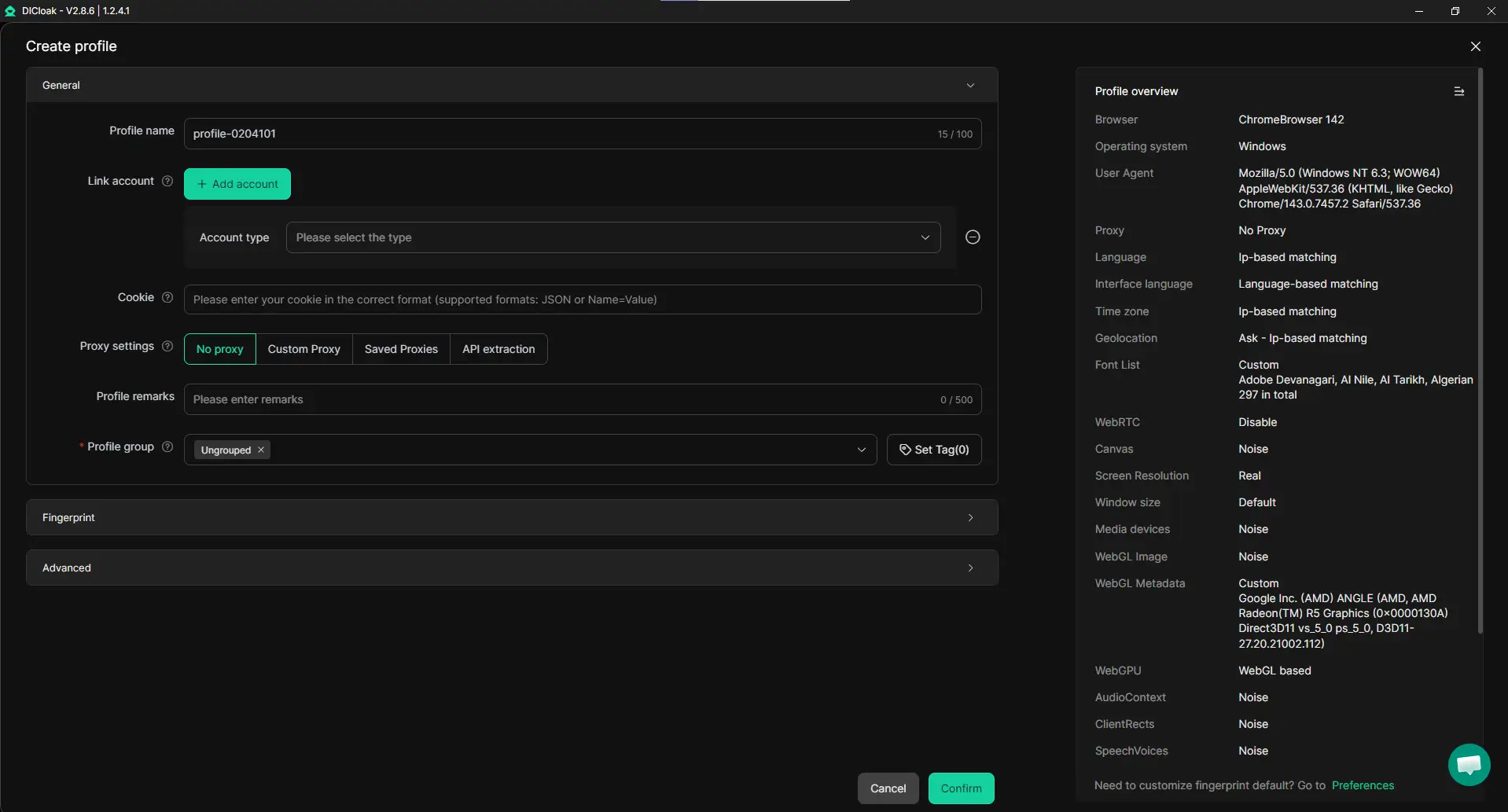
For example, a team managing multiple test accounts or scraping data from several platforms often sees CAPTCHA appear after repeated logins. By using isolated DICloak profiles, those logins no longer look related. As a result, CAPTCHA challenges appear less often, even before adding any anti-captcha service.
Custom Proxy Configuration for Realistic Traffic
Another common CAPTCHA trigger is inconsistent or low-quality network behavior. Using the same IP across many sessions or switching locations too often raises red flags.
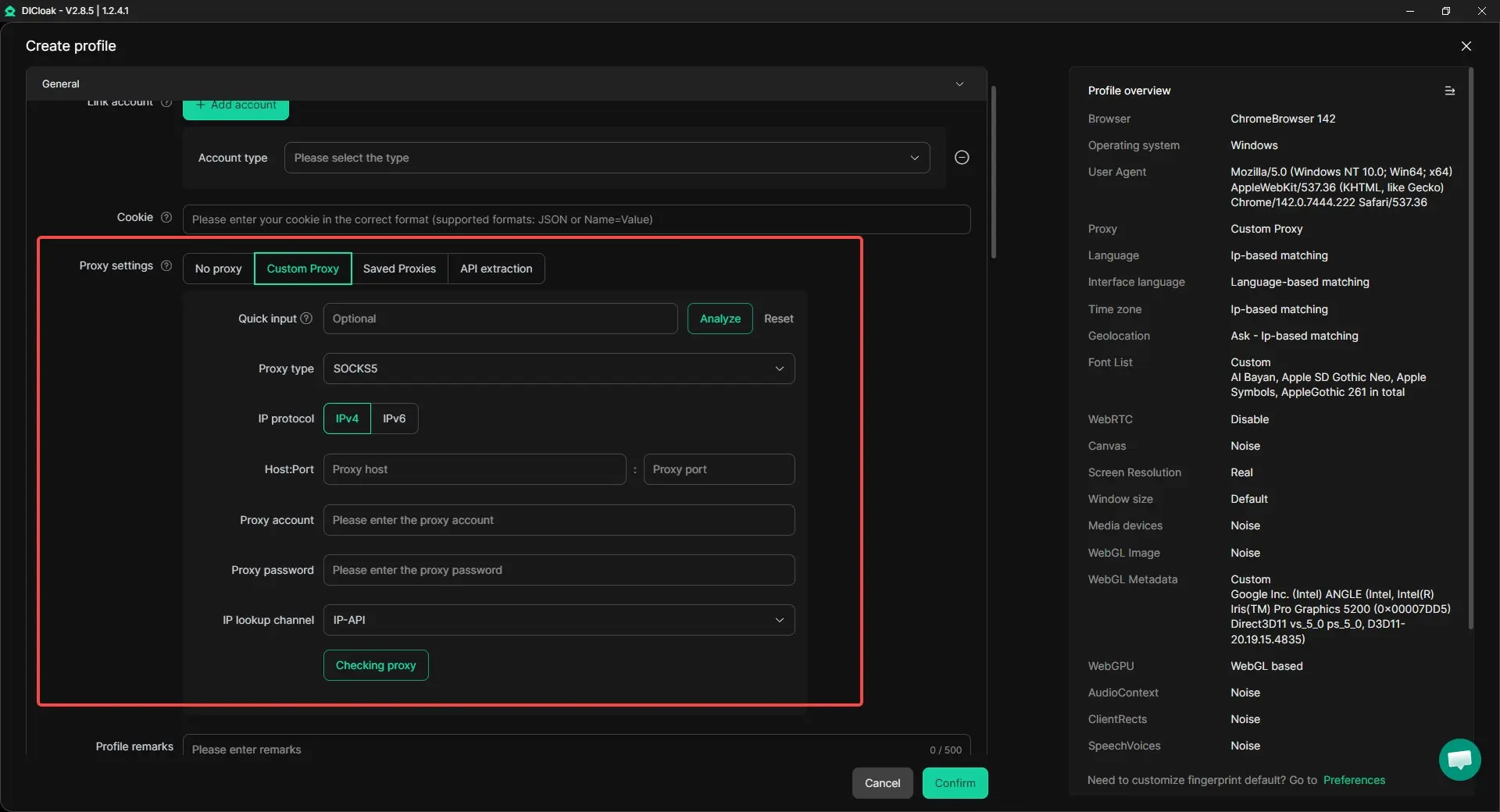
DICloak allows custom proxy configuration at the profile level. Each browser profile can be paired with its own residential, mobile, or ISP proxy. This creates a stable and realistic connection pattern that matches the browser fingerprint and location.
In practice, this matters a lot. When IP address, browser fingerprint, and behavior align, many websites apply fewer security challenges. Anti-captcha tools are still useful, but they are needed less often.
Working With Anti-Captcha, Not Against It
DICloak does not replace anti-captcha tools. Instead, it complements them. If a CAPTCHA still appears, users can integrate their existing anti-captcha services into workflows running inside DICloak profiles.
The difference is efficiency. With cleaner environments and better network isolation, anti-captcha credits last longer, success rates improve, and automation becomes more stable.
Why This Matters
Solving CAPTCHA is useful. Avoiding unnecessary CAPTCHA is better.
By combining profile isolation, custom proxy management, and optional anti-captcha integration, DICloak helps teams spend less time fighting security systems and more time focusing on their actual work—whether that is testing, research, or large-scale account operations.
Final Thoughts on Anti-Captcha Solutions
Anti-captcha solutions play an important role in modern web automation. As websites rely more on CAPTCHA systems to block abuse, many legitimate workflows such as testing, data collection, and research are also affected. Anti-captcha tools help these processes continue by solving challenges when they appear, making automation more stable and efficient.
At the same time, CAPTCHA technology keeps evolving. Systems like reCAPTCHA v3, Cloudflare Turnstile, and Friendly Captcha focus more on behavior and environment signals than simple image tests. This means anti-captcha works best when combined with clean browser profiles, realistic traffic patterns, and proper security practices.
Tools such as DICloak show that reducing CAPTCHA triggers is often better than solving them repeatedly. By isolating browser profiles and allowing custom proxy configuration, these environments lower detection risk and improve the effectiveness of anti-captcha solutions. When used responsibly and in approved scenarios, anti-captcha remains a practical way to balance automation needs with modern web security.
FAQs About Anti-Captcha Solutions
What is anti-captcha and how does it work?
Anti-captcha is a solution that helps software handle CAPTCHA challenges automatically. When a CAPTCHA appears, the anti-captcha tool solves it and returns a valid response so the task can continue. Most anti-captcha services work through APIs or browser tools and support common systems like reCAPTCHA and hCaptcha.
Is using anti-captcha legal and safe?
Anti-captcha itself is a tool, and its legality depends on how and where it is used. Using anti-captcha for authorized testing, research, or owned systems is generally acceptable. Problems arise when anti-captcha is used on websites without permission or against platform rules. To stay safe, always review terms of service and limit use to approved scenarios.
Why do some websites still block access even with anti-captcha?
Anti-captcha only solves the challenge, not the reason it appears. Many modern systems analyze browser fingerprints, IP behavior, and request patterns. If traffic looks suspicious, access may still be blocked. This is why anti-captcha works best when combined with clean environments and realistic behavior.
Can anti-captcha be used together with browsers like DICloak?
Yes. Anti-captcha works best when combined with tools that reduce CAPTCHA triggers. Browsers like DICloak isolate browser profiles and support custom proxy settings. This lowers detection risk, reduces how often CAPTCHA appears, and improves anti-captcha success rates when challenges do occur.
What is the best anti-captcha solution for beginners?
There is no single best anti-captcha tool for everyone. Beginners often start with services like 2Captcha or browser extensions because they are easy to use and flexible. As workflows scale, many users move to API-based anti-captcha tools combined with isolated browser profiles for better stability.
 Web Proxy Tools
 Free Tools
 Cookie Plugin
 UA Generator
 MAC Address Generator
 IP Generator
 IP Address List
 2FA Code Generator
 World Clock
 Anonymous Check
 WebRTC Leak Test
 UUID Generator
 Free Web Proxy Site
 Proxy Checker
 FB Ad Checker
 AI Web Scraping
 Free SMM Tools
 Twitter Shadowban Checker
 Instagram Name Checker
 UTM Generator
 Username Generator
 AI Hashtag Generator
 LinkedIn Headline Generator
 Social Media Image Resizer