Your online privacy is constantly at risk. From targeted ads to data collection by websites, your personal information is often being tracked in ways you might not even be aware of. Have you ever wondered how websites can recognize you across different sites, even when you’ve cleared your browsing history? The answer lies in something called browser fingerprinting, a method that creates a unique digital ID for your browser.
AmIUnique is a powerful tool that helps you understand how this fingerprinting process works and what data your browser reveals. By running a simple test, you can see how identifiable your browser setup is compared to others and what this means for your online privacy. In this article, we will explore what AmIUnique is, how it works, the risks involved with browser fingerprinting, and how you can protect yourself in an increasingly tracked world. Whether you're concerned about privacy or simply curious, this guide will provide the knowledge you need to take control of your online identity.
What is AmIUnique?
AmIUnique is a free online tool and research project that helps people understand how unique their browser is on the internet. It shows how your browser setup looks to websites and how easy it is for sites to identify you. Created by privacy researchers, AmIUnique focuses on browser fingerprinting and aims to raise awareness about online privacy.
When you visit the AmIUnique website at amiunique.org, the service examines various details your browser shares when you visit websites. These details include your browser type, operating system, screen settings, language, time zone, and more. This combination of data forms what experts call a browser fingerprint. Unlike cookies, which can be deleted, your browser fingerprint can still be used to identify you even if you clear your browsing data.
For instance, if two people use the same browser on the same operating system, they may still have different fonts, screen sizes, or browser extensions. AmIUnique uses these differences to calculate your uniqueness score. A high score means your browser setup is rare compared to others in the AmIUnique database. Many users find that their score suggests they are “unique among millions of tested browsers.”
AmIUnique does not sell or track your data. It only shows you information that is already visible to websites you visit, and stores fingerprints for research purposes. The data collected helps developers and privacy experts understand how browser fingerprinting works and improve privacy tools.
In simple terms, AmIUnique helps you see your browser’s digital fingerprint — a unique setup that websites can use to recognize you. This makes it an essential tool for anyone interested in learning more about how websites track them and how they can protect their privacy online.
The Importance of Browser Fingerprinting
As the internet becomes more integrated into our daily lives, the way websites identify and track users has evolved. While many people are familiar with cookies and IP tracking, there is another, often overlooked method that is gaining attention: browser fingerprinting. This technique can track users across different websites, even when traditional tracking methods are blocked. Understanding why browser fingerprinting matters is essential for anyone concerned with privacy and online security. Let's explore the significance of this method and how it impacts your digital footprint.
Why Browser Fingerprinting Matters
Now that you know what AmIUnique shows about your browser, it helps to understand why browser fingerprinting matters. Browser fingerprinting is a way websites and companies learn about you based on your browser details. It is not just a privacy test. It is a real method used on many sites across the web. Researchers have found that most browsers are unique when enough data points are combined. For example, one study showed over 80 % of tested browsers had unique fingerprints among many thousands tested.
This matters because your fingerprint can help sites with both good and bad uses. On the good side, browser fingerprinting can help banks and security systems spot fraud. If someone logs in from a very different fingerprint than usual, the system may ask for extra proof before allowing access. This can keep your money and accounts safer.
On the other hand, some companies use fingerprinting to track users without permission. This kind of tracking can follow you across many sites, even when cookies are deleted. A recent study by Johns Hopkins researchers showed that websites are actively using fingerprinting to link your visits across different sites, sometimes in ways not clearly explained to you.
Because of this, many people care about tools like AmIUnique. They want to see if their browser stands out and what that means for their online privacy.
Comparison with Other Tracking Methods (Cookies, IP Tracking, etc.)
Browser fingerprinting is different from older tracking methods like cookies and IP addresses. A cookie is a small file stored by websites on your browser to remember your actions, like a shopping cart. Cookies can be deleted or blocked, and many browsers show you cookie permissions. But fingerprinting uses signals your browser already shares, so it is harder to stop.
IP tracking uses your internet address to guess where you are. An IP address can show which city you are in, but it can be shared among many people in the same network. Browser fingerprints, on the other hand, combine many tiny details about your browser and system that are much harder to match with others. This makes fingerprints more precise for identifying a unique user.
For example, imagine two people at the same cafe. They may share the same IP address because they are on the same Wi‑Fi. But each person’s browser may have different fonts, languages, or screen shapes. That mix of small differences forms a unique fingerprint. Unlike cookies, which are made by sites to store information, fingerprints are created from details your browser already naturally shares.
This is why AmIUnique helps you learn more than a cookie test. It shows how easy it is for sites to link your visits across many pages — even without cookies. Understanding this difference helps you see why browser fingerprinting matters for both safety and privacy on the web.
User Privacy and Security Concerns: Why People Consider Using AmIUnique?
After learning why browser fingerprinting matters, many people begin to worry about how their data is used online. Tools like AmIUnique help you see how websites can “see” you. But there are real privacy and security concerns that make this topic important. In this section, we will look at risks, laws, common misunderstandings, and ways you can protect yourself.
Risks Associated with Browser Fingerprinting
Browser fingerprinting can identify your device and browser without your clear consent. This means websites can build a digital profile of you based on many small details. Some companies may use this to follow you across sites, even if you think you are private online. Research from Texas A&M and Johns Hopkins shows that fingerprinting is already used to link users across different sites and online actions without obvious notice.
One serious risk is loss of anonymity. Your fingerprint might be combined with other information to guess your interests, habits, or even identity. Some privacy groups argue that this can feel like hidden tracking because most users do not know it is happening.
Another risk is targeted exploitation. If someone bad knows specific details about your browser setup, they could craft web pages or attacks that target those exact conditions. This kind of risk was highlighted in the AmIUnique FAQ, saying that attackers could use fingerprint data to launch harmful and tailored exploits.
These risks are why many people use AmIUnique — not to block tracking, but to understand how easy it is for a site to identify them.
Legal and Ethical Considerations
Browser fingerprinting sits in a tricky legal space. In many regions, rules like the GDPR in Europe require that websites give users fair notice and consent when collecting personal data. Browser fingerprinting can count as personal data under GDPR, even if it does not include your name or email.
In the United States, laws like the CCPA give people rights over their data, but fingerprinting is not always clearly regulated. Some privacy advocates believe companies should be more transparent and ask for permission before using fingerprinting data.
Ethically, users expect simple privacy. Most people know about cookies and have seen cookie banners. But few users realize that scripts running in the background can gather very detailed browser traits without notice. This gap between user expectation and reality raises ethical questions about consent and fairness.
Misconceptions About Fingerprinting
Many people misunderstand browser fingerprinting. Here are some common myths:
Myth 1: Browser fingerprinting always identifies a person’s name or address.
This is false. Fingerprinting identifies a browser setup, not your personal records. It does not automatically know your name, email, or address. It only builds a unique signature based on technical details.
Myth 2: If fingerprinting is passive, it’s always harmful.
Not always. Some businesses use fingerprinting to protect users. For example, websites may detect bots, spam, or suspicious logins by comparing a fingerprint to past sessions. It can help prevent fraud.
Myth 3: If you use private tools, fingerprinting stops.
Even with blockers and settings, fingerprinting data may still be collected in some form. Tools can reduce the detail collected, but often cannot fully stop all tracking.
Tools like AmIUnique help you see these differences yourself. They show that a fingerprint is not just tracking, but a technical signal that websites use for many purposes.
Mitigation Strategies for Enhanced Privacy
Even though browser fingerprinting is widely used, there are ways to reduce how unique your fingerprint looks. Here are some practical strategies:
- Use privacy‑focused browsers.
Browsers like Firefox and Brave now include anti‑fingerprinting protections. For example, Firefox reports that its new privacy measures can reduce identifiable fingerprints by about 70 %. These protections make many users look more similar to each other.
- Reduce unique settings.
Simple changes, such as using default fonts and settings, lower the uniqueness of your fingerprint. If thousands of other users also have standard settings, your fingerprint blends in. Tools that change many settings often end up making your setup more unique.
- Limit unnecessary scripts.
Extensions like Privacy Badger or ad blockers can prevent many tracking scripts from running. These scripts often collect extra details that add to your fingerprint.
- Understand what you share.
Use tools like AmIUnique not just to test, but to learn what attributes contribute most to your uniqueness. This knowledge helps you make informed choices about your online habits.
In short, browser fingerprinting can affect your privacy in real ways. Tools like AmIUnique give you a clearer view of your digital identity online and help you think about privacy with real facts, not fear. Understanding risks, legal limits, common myths, and practical mitigation strategies lets you protect your privacy with confidence and control rather than confusion.
How AmIUnique Works
Browser fingerprinting is a technique used to gather specific details about your browser and device to create a unique digital ID. AmIUnique allows you to see how this works by collecting various data points from your browser, revealing how identifiable your setup is to websites. This section will explain how AmIUnique works, the mechanics behind browser fingerprinting, and the types of data it collects.
The Mechanics of Browser Fingerprinting
Fingerprinting works by collecting many small pieces of data your browser automatically shares when visiting websites. These details are combined to create a unique fingerprint. This process is similar to how people can be recognized by their unique traits, such as height, eye color, and hair type. In the case of AmIUnique, the details gathered include browser settings, device information, and various technical aspects of your browser’s behavior.
To explain this further: every time you visit a website, your browser sends out certain properties using JavaScript APIs. These include basic information such as your browser type, version, and operating system, along with more advanced details like screen resolution and even your device’s GPU model. The combination of these signals helps create a "fingerprint" that makes it harder for websites to confuse you with someone else.
Fingerprinting is done automatically and does not require your explicit input. It’s built into the way websites interact with your browser. AmIUnique shows you how this information is used to form a digital ID based on your unique browser configuration. It also demonstrates how easily websites can track your activity based on these details, even if cookies are cleared.
Types of Data Collected by AmIUnique
AmIUnique collects a range of data points to calculate how unique your browser fingerprint is. Most of this information is gathered through standard JavaScript APIs, and here’s a breakdown of the key data collected:
- Device and Browser Metadata: This includes basic details about your device and browser, such as
navigator.userAgent, navigator.platform, and navigator.languages. These values give insights into your browser type, operating system, and language preferences.
- CPU and Hardware Details: AmIUnique also collects the number of CPU cores via
navigator.hardwareConcurrency and checks your system’s general capabilities, helping form part of your fingerprint.
- Installed Plugins and MIME Types: The plugins installed on your browser, as well as the MIME types it can support, are part of the data AmIUnique looks at. These reveal additional details about the browser's capabilities.
- Display and Hardware Information: This includes your screen resolution, color depth, and sometimes details about your graphics card. The resolution (
window.screen) and color depth contribute to how identifiable your device is compared to others.
- GPU Model and Rendering Behavior: Using WebGL, AmIUnique checks how your device renders certain elements. This information includes the GPU model and any quirks in the rendering process that might be unique to your hardware setup.
- Canvas Fingerprinting: AmIUnique also uses
HTMLCanvasElement.toDataURL() to test the uniqueness of your browser. This method involves rendering an invisible image and using small differences in how your browser handles this to create a fingerprint.
- Network-Related Information: Your IP address and geolocation are inferred, although AmIUnique does not track these directly. Some tools might also look for signs of VPN or proxy usage, such as checking for WebRTC leaks or performing IP reputation checks.
- Advanced Signals: In some cases, AmIUnique may also gather advanced signals, like audio fingerprinting through
OfflineAudioContext or even flags that suggest automation (e.g., navigator.webdriver), which is often a sign of headless browsers.
Each of these data points contributes to building a digital fingerprint of your browser, which, when combined, makes your setup more unique compared to others. By using AmIUnique, you can see exactly how these small pieces of information are collected and how they contribute to your browser’s uniqueness. This transparency is key for understanding how fingerprinting works and how websites use this data to identify you across the internet.
In summary, AmIUnique works by collecting data from your browser using common web technologies. These details, from simple metadata to advanced rendering techniques, form a fingerprint that can identify you. Understanding this process can help you make more informed choices about how to protect your privacy online.
How to Check Your Browser Fingerprint with AmIUnique?
Now that you understand how AmIUnique works and what data it collects, let’s walk through how to check your own browser fingerprint. Many people feel unsure at first. But the test is simple, and it gives you a clear view of how identifiable your browser is on the web.
When you run a check with AmIUnique, you learn what details your browser shares with websites. You can see which parts make you stand out. This helps you understand your privacy risk and make better decisions about how to browse the web more safely.
Step‑by‑Step Guide to Check Your Browser Fingerprint
Here’s a clear, easy way to check your browser fingerprint using AmIUnique:
1. Open the AmIUnique Website
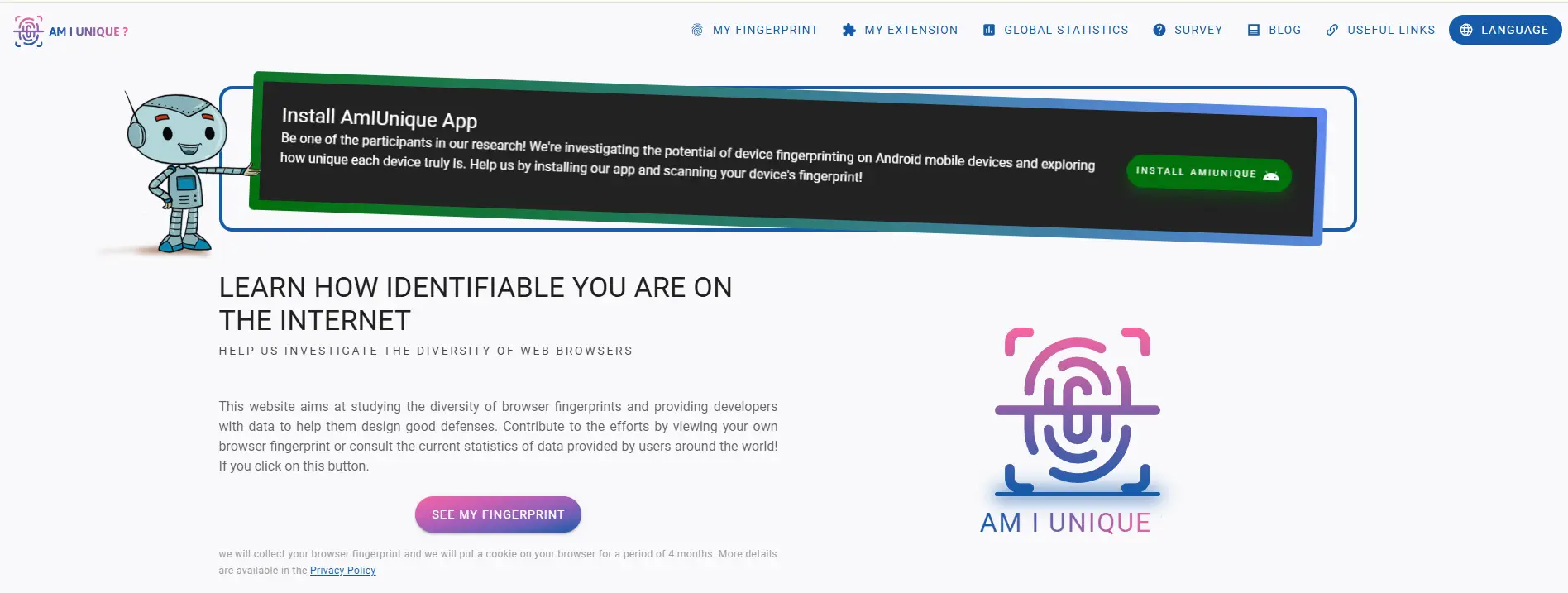
Go to the official tool at amiunique.org. You do not need to sign up or download anything. The page loads in your browser just like any normal website.
2. Click “See My Fingerprint”
On the homepage, you will see a big button that says “SEE MY FINGERPRINT”. Click that button to start the test. The site will begin gathering information from your browser.
3. Wait for the Analysis
The test usually finishes in a few seconds. While it runs, the site collects many details about your browser setup — like your browser type, screen size, language, plugins, and many other small attributes.
4. View Your Results
Once the test is done, you will see a page full of data. It shows each attribute that was collected. You will also see a unique score. This score tells you how rare your browser configuration is compared to millions of other fingerprints stored in the AmIUnique database.
For example, if the site says your browser is “unique among 1,000,000 tested fingerprints,” it means very few people have the exact same combination of settings and attributes that your browser has. Some users find this surprising if they think they are “normal” or “typical,” but even small differences like language settings or installed fonts can add up.
5. Explore Attribute Details
AmIUnique breaks down each part of your fingerprint. You can see things like:
- your browser name and version
- screen resolution
- time zone
- list of fonts
- plugin information
- canvas and WebGL tests
Each of these parts contributes to your overall fingerprint. Seeing them side by side helps you understand which settings are more unique or common.
6. Watch Your History (Optional)
If you test your browser again later, you can check how your fingerprint changed over time. Some users keep an eye on this after they make changes to their browser settings or install extensions.
Example of Fingerprint Test Results
To make this even clearer, imagine two people running the AmIUnique test:
- Person A uses a very common setup: Chrome on a common laptop with default settings. Their score might show they are similar to many others in the database.
- Person B uses a browser with rare fonts and unusual screen settings. Their score might show they are unique among hundreds of thousands of other fingerprints.
Both results are useful. Person A sees they blend in more, and Person B learns which parts of their setup make them stand out. This insight can help users decide what changes, if any, they want to make for better privacy.
What Happens After the Test?
Remember, AmIUnique does not track you across the internet after the test. It only shows you the information your browser already shares with sites you visit. The goal is to educate you about the data your browser leaks and help you think about your online privacy with real, visible results.
In short, checking your browser fingerprint with AmIUnique is fast, free, and informative. It gives you a clear look at how easily websites may recognize you — an important step in understanding and protecting your privacy online.
Alternatives to AmIUnique
After learning how to check your browser fingerprint with AmIUnique, you might wonder if there are other tools that can also help you understand your online privacy. The web has many alternatives that do similar tests, but each tool has its own focus. In this section, we’ll compare some of the top browser fingerprinting tools and explain how to choose the best one for your needs.
Comparative Analysis of Other Fingerprinting Tools
AmIUnique focuses on how unique your browser setup is compared to others. It shows you your fingerprint details and gives a uniqueness score. Many people use it to learn what data their browser shares with websites.
Here are some important alternatives:
- BrowserLeaks – This tool offers many different tests on one site. It checks for canvas fingerprinting, WebGL reports, IP leaks, and more. It gives a very detailed view of what your browser reveals when you visit a site. It is helpful if you want a deeper look into privacy holes.
- Cover Your Tracks (formerly Panopticlick) – Created by the Electronic Frontier Foundation (EFF), this tool tests whether your browser blocks trackers and how unique your fingerprint is. It also checks if your browser stops ads and invisible trackers. Many privacy experts trust this tool because it comes from a well‑known nonprofit group.
- Whoer.net – This site combines a fingerprint test with an IP and DNS analysis. It tells you which parts of your online identity are exposed and gives an anonymity score. This makes it easy for beginners to understand both fingerprint and network privacy.
- CreepJS – This is a technical tool that shows how a browser might try to mask or spoof its identity. It also gives a “crowd‑blending” score, which shows how well your browser settings blend in with other users. It is useful for people who want to dig deep into how different tests work.
- Pixelscan – This site provides detailed reports on fingerprint uniqueness and potential privacy leaks. It can be especially helpful if you want to see how tracking data might be used by sites to build user profiles or bypass ad blockers.
Each tool has strengths. Some show you how unique your browser is. Others focus on leaks or security risks. Some combine fingerprint checks with IP or DNS analysis, giving a broader view of your privacy landscape.
Choosing the Right Tool for Your Needs
Choosing the right fingerprinting tool depends on what you want to learn or protect:
✔ If you want clarity about browser uniqueness – AmIUnique is a strong choice. It is simple, clear, and focuses on showing how identifiable your setup is against a large database. Many privacy learners start here because it helps them see the real data.
✔ If you want a deeper technical check – BrowserLeaks is ideal. It breaks down different types of leaks, including WebRTC, JavaScript, and font fingerprinting. This helps you understand hidden risks that may not show in simpler tools.
✔ If you care about overall privacy defense – Cover Your Tracks gives context on how your browser resists tracking, not just how unique it is. It’s a trusted tool used by privacy advocates and developers.
✔ If you are new to fingerprints and privacy – Whoer.net offers a friendly view with hints on anonymity and network exposure. It’s easier for beginners to interpret.
✔ If you want to compare your setup over time – Tools like CreepJS or Pixelscan give advanced insights for repeat tests. They help you see how changes in settings affect your fingerprint.
It’s often useful to try more than one tool. AmIUnique gives you a solid starting point, and then deeper tools like BrowserLeaks or Cover Your Tracks add extra detail. Together, they help you build a full picture of how your browser is seen by websites and trackers.
Enhance Your Online Privacy with DICloak
Enhance Your Online Privacy with AmIUnique and DICloak
As you learn from AmIUnique how websites can identify your browser, it's important to consider additional tools that enhance privacy. A browser fingerprint shows how unique your settings are, but it doesn’t fully protect you—especially if you manage multiple accounts. This is where DICloak can help.
DICloak Antidetect Browser creates isolated profiles, ensuring each has separate cookies, settings, and storage, so activities don’t overlap. It also lets you configure proxies, giving each profile its own IP address, reducing the risk of cross‑site tracking. By combining AmIUnique’s insights with DICloak’s environment isolation and proxy management, you can better control your online privacy and keep your identities safe.

What Makes DICloak Stand Out?
✅ Manage 1,000+ Accounts on One Device:
Stop wasting money on extra hardware! DICloak allows you to manage multiple accounts on a single device, cutting costs and boosting efficiency.
✅ Guaranteed Account Safety, No Ban Risks:
Every account gets its own isolated browser profile with custom fingerprints and IPs, drastically reducing the risk of bans. Your accounts, your control!
✅ Flexible Proxy Configuration for Maximum Performance:
Seamlessly integrate with all major proxy protocols (HTTP/HTTPS, SOCKS5) and manage your proxy pool with bulk operations. No more struggling with IP management—DICloak has you covered.
✅ Streamlined Team Collaboration for Better Results:
Easily manage your team with advanced tools like profile sharing, permission settings, data isolation, and operation logs. Your team works smarter, not harder.
✅ Automate the Grind with RPA:
DICloak's built-in RPA saves you hours of manual work. Automate repetitive tasks, streamline workflows, and focus on what really matters—growing your business.
✅ Powerful Bulk Tools to Scale Your Operations:
Create, import, and launch multiple browser profiles in one click. DICloak makes scaling your business as easy as it gets.
✅ Compatible with All Major Operating Systems:
Based on the Chrome core, DICloak supports simulating Windows, Mac, iOS, Android, and Linux operating systems. No matter what platform you need, DICloak has you covered.
🔗 Ready to Get Started?
Visit the DICloak website to explore more details and choose the plan that’s right for you. Start for free today and experience the power of secure, efficient, and scalable multi-account management!
Conclusion
After learning about browser fingerprinting and how tools like AmIUnique work, you now have a clearer understanding of how websites track your browser. AmIUnique helps you see how your browser shares data with websites and shows how unique your setup is. This can be eye-opening, especially when you realize how easily websites can recognize you based on small details like your screen size, fonts, and system settings. By running the test, you can see how identifiable your browser is and take steps to protect your privacy.
Fingerprinting isn’t just used for tracking users, though. It’s also used to improve security, such as when banks verify your identity based on your browser’s fingerprint. However, the downside is that this technology is often used by advertisers and trackers to follow users across different websites, often without clear consent. This is why tools like AmIUnique are helpful. They give you a visible picture of what your browser reveals, empowering you to make informed decisions about your privacy. By understanding how fingerprinting works and what data is being shared, you can better control your online identity and take steps to reduce unnecessary tracking.
Frequently Asked Questions about AmIUnique
What is AmIUnique and how does it work?
AmIUnique is a tool that helps you understand how websites can identify you based on your browser’s fingerprint. It collects data about your browser’s settings, such as the screen size, fonts, and plugins, and then calculates how unique your setup is compared to other users. This helps you see how websites track you and understand your online privacy risks.
How does AmIUnique compare to other tracking methods like cookies or IP tracking?
Unlike cookies and IP tracking, which can be deleted or masked, AmIUnique uses data that is harder to control or block, like your browser’s system settings, installed fonts, and device specifications. This makes it a more permanent and unique identifier for your browser across websites, even if you clear your cookies or change your IP address.
Why should I use AmIUnique to check my browser fingerprint?
Using AmIUnique helps you see how your browser's fingerprint might be used to track your activity online. It shows how identifiable your setup is, which is important for protecting your privacy. By understanding the data your browser reveals, you can take steps to reduce your exposure to tracking.
Can I improve my online privacy after using AmIUnique?
Yes, AmIUnique is a great starting point for improving your privacy. It shows what data makes you identifiable, and with that knowledge, you can use tools like DICloak to isolate your browser profiles and manage proxies, providing an extra layer of protection against tracking.
Is AmIUnique safe to use?
Yes, AmIUnique is completely safe. It only shows the data your browser already shares with websites. It doesn’t track you or store your personal information. The tool simply helps you see how websites can identify your browser, which is an important first step in understanding and protecting your privacy online.
 Web Proxy Tools
 Free Tools
 Cookie Plugin
 UA Generator
 MAC Address Generator
 IP Generator
 IP Address List
 2FA Code Generator
 World Clock
 Anonymous Check
 WebRTC Leak Test
 UUID Generator
 Free Web Proxy Site
 Proxy Checker
 FB Ad Checker
 AI Web Scraping
 Free SMM Tools
 Twitter Shadowban Checker
 Instagram Name Checker
 UTM Generator
 Username Generator
 AI Hashtag Generator
 LinkedIn Headline Generator
 Social Media Image Resizer