Telegram is full of public channels, groups, posts, and bots. But finding the right content is not always easy. A good telegram search engine can help users search faster, filter better results, and avoid wasting time on inactive or low-quality pages.
In 2026, search tools on Telegram are more useful than before, but they also come with limits and risks. Some tools are fast and accurate, while others are outdated, unsafe, or weak on privacy. This guide explains which features matter most, how to search more efficiently, what risks to avoid, and how to stay safe while using a telegram search engine.
What Makes a Telegram Search Engine Effective?
A good telegram search engine should do more than return a long list of links. It should help users find fresh public posts, active channels, usernames, and useful discussions without wasting time. In 2026, the best tools are the ones that balance speed, relevance, and privacy, because Telegram search now spans public channels, public posts, hashtags, stories, usernames, and chat-level search in ways that did not exist a few years ago.
How real-time indexing improves search accuracy
Real-time indexing matters because Telegram moves fast. A channel post about a product drop, crypto update, or local event can lose value within hours. Telegram added global search for public posts in July 2025, which made fresh public content much easier to find across the platform. That raised the bar for any telegram search engine that wants to feel useful in daily use.
Why privacy features are critical for Telegram users
Privacy matters because not everything on Telegram is meant to be easy to discover. Public channels and public usernames can appear in search, but private channels are not openly searchable in the same way, and private chats are not part of public discovery. Global hashtag search also only shows content from large public channels, not private chats. A good telegram search engine should respect that line instead of making users feel exposed.
Common mistakes when choosing a search engine
One common mistake is choosing a tool just because it returns a lot of results. More results do not always mean better results. If a telegram search engine shows inactive channels, copied pages, or weak matches, users spend more time filtering than finding. A better tool should make it easier to spot current, relevant, public content fast.
Another mistake is ignoring privacy and source type. Some users search for private communities or assume every Telegram conversation can be found through public search. That is not how Telegram works. Public usernames, public channels, and public posts are easier to discover, while private spaces follow different rules. Choosing a telegram search engine without understanding that can lead to poor results and wrong expectations.
How to Search Telegram Groups and Channels Efficiently
Finding the right Telegram group or channel is easier when you search with the right words and know what Telegram can actually show. A good search method saves time, cuts down on weak results, and helps you find active public communities faster. In 2026, that matters even more because Telegram search now covers more public content than before, but not everything on the platform is searchable in the same way.
Steps to find specific groups using keywords
Start with simple, direct keywords. Search the main topic first, then add one extra word that narrows the result, such as a country, niche, language, or purpose. For example, “crypto trading” is broad, but “crypto trading signals” or “crypto trading India” is more useful. Telegram lets public groups and channels be found through search when they have public usernames, so specific terms usually work better than very general ones.
It also helps to try keyword variations. A group may use “jobs” instead of “careers,” or “deals” instead of “discounts.” If one search gives weak results, shorten the phrase, remove filler words, or search by the public username if you know it. Telegram also supports usernames for public groups and channels, which often makes exact discovery easier than title-based guessing.
How to filter results for better relevance
The fastest way to improve relevance is to look for signs that a result is active and public. A useful Telegram group or channel usually has a clear title, a readable description, recent posts, and a public username. If you search a topic and see several similar results, open the ones that look current instead of joining the biggest one first. Telegram’s public post search also made fresh public content easier to surface, so recent activity matters more than ever.
You should also match the result type to your goal. If you want discussion, look for groups. If you want updates, look for channels. This sounds basic, but it saves a lot of time. A news channel may look relevant in search, but it will not help much if you want member conversation or peer advice.
Why some groups or channels may not appear in results
Some groups or channels do not appear because they are private. Public channels with usernames can be found in search and joined, while private ones usually require an invite link or direct access. The same basic rule applies to private communities more broadly: if they are not meant for public discovery, search will not surface them like public spaces.
There are also cases where a public group or channel is still hard to find. Search may work better with the exact username than with a spaced title, and some users have reported matching issues around names. In simple terms, a group may exist, but your search words may not match the way Telegram reads its public name or username. That is why trying both topic keywords and exact username terms often works best.
Risks to Avoid When Using Telegram Search Engines
Telegram search can be useful, but not every search tool is safe. Some tools are slow, some show weak results, and some may push users toward risky pages or fake communities. That is why it helps to check how a telegram search engine works before you trust it.
How to identify unsafe or malicious search tools
A risky telegram search engine often shows warning signs early. It may ask you to log in with your Telegram account when a normal public search should not need that. It may also push strange download buttons, open too many ads, or send you to pages that do not clearly explain what they index.
Why some search engines may compromise your data
Some search tools can create risk by collecting more data than users expect. A weak tool may track searches, push users to fake login pages, or make them think private Telegram spaces are searchable when they are not. Telegram is clear that public channels with usernames can be found in Telegram search, while private channels require an invite link or direct access.
Signs of outdated or unreliable search engines
An unreliable telegram search engine often gives stale results. It may show dead channels, broken usernames, or results that do not match how Telegram search works today. In 2025, Telegram added global search for public posts, which means search expectations changed and tools that do not keep up can feel outdated fast.
Another sign is poor matching quality. Some users have reported search issues where results only appear with exact username-style wording instead of normal spaced names. That does not always mean the tool is malicious, but it can mean the search system is weak or badly maintained. A better telegram search engine should help users find active public content without making them guess the exact formatting.
Comparing the Top Telegram Search Engines in 2026
There is no single best telegram search engine for every user. In 2026, the main options fall into three groups: Telegram’s built-in search, large third-party indexes like TGStat and Telemetr, and more research-focused tools like Telemetry. The right choice depends on whether you care most about speed, deep filters, privacy, or historical data.
Key differences in features and usability
Telegram’s built-in search is the easiest place to start. It is fast, built into the app, and now includes a Posts tab for public post search, which is useful for quick discovery. But it is still more basic than specialist tools when you need deeper filtering, trend analysis, or large historical search.
TGStat is stronger for broad discovery and filtering. It has a very large catalog of channels, groups, and posts, supports real-time indexing, and offers filters by source, geography, language, type, and views. That makes it a better telegram search engine for users who want to compare many public sources at once.
Telemetr is closer to an analytics platform than a simple search tool. It is useful for channel tracking, mentions, ad research, and API-based workflows. It is a better fit for marketers, researchers, or teams that need more than keyword search.
Telemetry is more search-heavy and history-heavy. It supports Boolean logic, CSV export, analytics, and longer historical search windows on paid plans. That makes it useful for people doing structured research instead of casual browsing.
Which search engines prioritize privacy and security
Telegram’s own search is the safest default for most users because it stays inside Telegram’s normal product flow and follows Telegram’s public/private boundaries. Public posts, public channels, and public usernames can appear in search, while private spaces are still treated differently.
Third-party tools need more caution. GIJN specifically notes that Telemetr requires sign-in, and that TGStat now asks users to log in for some data. Their guidance is to avoid linking a real Telegram channel where the data collection picture is unclear, and to use a separate account when needed. That makes privacy a real point of difference, not just a side detail.
So if privacy is your top concern, Telegram’s native search is the safer choice for everyday use. If you need deeper discovery, TGStat, Telemetr, or Telemetry can offer more power, but they should be used with more care.
How premium options compare to free tools
Free tools are usually enough for light discovery. Telegram’s built-in search costs nothing, and free tiers from Telemetr or Telemetry can still help users find channels, groups, or posts. But free access is usually narrower, with fewer results, less historical depth, or weaker filtering.
Paid tools give more precision. Telemetry’s paid plans add larger result limits, Boolean search, CSV export, analytics, API access, and more historical coverage. Telemetr’s paid tiers expand verified channels, request volume, and historical mention data. In practice, free tools work for simple discovery, while premium tools are more useful for research, monitoring, and competitive analysis.
So the simplest way to compare them is this: Telegram search is best for fast in-app discovery, TGStat is strong for large-scale public search and filters, Telemetr is better for analytics and channel intelligence, and Telemetry is better for advanced query work and deep historical research.
How Bots Enhance Telegram Search Engine Functionality
Bots can make a telegram search engine feel faster and more flexible. They help users search from inside chats, jump to relevant results, and sometimes narrow results by topic or content type. In 2026, bots are most useful when they speed up discovery, not when they try to replace Telegram search completely.
Best bots for finding niche content on Telegram
The most useful bots for niche discovery are usually inline bots. Telegram’s inline mode lets users type a bot’s username in any chat and run a search without leaving the conversation. That works well for focused content, such as stickers, media, or topic-specific tools, because the bot can return a tighter set of results than a broad platform search. Telegram’s own examples include bots like @sticker, which helps users find relevant stickers through inline search.
Bots also became easier to discover. Telegram added “similar bots” on bot profiles, which helps users find related tools in the same category. That makes it easier to move from one niche bot to another when you are exploring a specific topic or workflow.
How to integrate bots into your search process
A simple way to use bots is to treat them as a second step. Start with Telegram’s built-in search to find public posts, channels, or usernames. Then use a bot when you need a narrower search inside a chat, quicker sharing, or a more specialized result type. This works well because Telegram now supports global public post search, while bots can still help with focused inline discovery.
For example, a user looking for a niche sticker pack, media clip, or topic-specific utility can search broadly first, then use an inline bot to refine the result. Telegram also supports deep links, inline buttons, and Mini Apps, so bots can fit into a wider search workflow instead of acting like a standalone tool.
Risks of relying solely on bots for searches
Bots are helpful, but they have limits. A bot only works as well as its own data source, update speed, and design. It may miss results that Telegram’s native public post search can find, or it may be too narrow for broad discovery. That is why a bot should support a telegram search engine workflow, not replace it.
There is also a trust issue. Some third-party bot-based tools ask users to sign in or connect accounts for deeper access. When a search tool goes beyond public discovery, privacy becomes more important. A safer habit is to use bots for public content discovery and be cautious with any tool that asks for more access than a normal search should need.
Why Some Telegram Search Engines Fail to Deliver Results
A telegram search engine can fail for simple reasons. Sometimes the tool is weak. Sometimes the content is not searchable. And sometimes the search words do not match how Telegram stores public names, usernames, or posts. In 2026, search is better than before, but it still has limits. Telegram’s public post search covers public channel posts, not everything on the platform, and public channels are searchable while private ones usually are not.
Common technical limitations of search engines
One big limit is coverage. A telegram search engine can only show content it can index. If a group is private, invite-only, or not exposed in a searchable public way, it may never appear in results. Even Telegram’s own broader search only covers public posts, and that feature is tied to the platform’s public content rules.
Another limit is matching quality. Some search systems do a poor job with spaces, naming formats, or exact keywords. Users have reported cases where a channel does not appear when searched by its normal spaced name, but does appear when the username-style wording is typed together. That means weak indexing or weak query matching can hide real results.
How user behavior affects search accuracy
Search quality also depends on how people search. Broad terms like “news” or “crypto” often bring too many weak results. More specific searches, such as a niche, region, or exact username, usually work better because they narrow the match and reduce noise. That is especially important on Telegram, where many public channels have similar names.
User expectations can also cause confusion. Some people expect a telegram search engine to find private groups, private chats, or every post ever made. That is not how Telegram works. If the space is private or invite-only, search may not surface it at all, so the problem is not always the engine itself.
What to do if your search engine isn’t working
Start by checking the basics. Make sure you are using current search terms, try the exact public username, and shorten the query if needed. If you are searching posts, remember that Telegram’s public post search is for public channel posts, and the feature was introduced in 2025, so older tools may not handle it well.
If results still look wrong, switch methods. Try Telegram’s built-in search, test a different keyword version, and verify whether the group or channel is public in the first place. When a tool keeps showing dead results, missing exact matches, or failing on fresh public content, it is usually a sign to move to a better search engine instead of forcing the same one to work.
How to Stay Safe While Using Telegram Search Engines
Telegram search can save time, but it can also lead users to fake pages, risky tools, or weak results. The safest approach is simple: use search tools that only help you find public content, and avoid anything that asks for more access than a normal search should need. Telegram’s public search is meant for public usernames, public groups, and public channels. Private channels still need an invite link or direct access.
Tips for avoiding scams and phishing attempts
Be careful with any telegram search engine that asks you to log in, enter a code, or connect your Telegram account just to search public content. That is a major warning sign. Telegram says login codes for your Telegram account are sent to the verified service chat named “Telegram” and should never be shared with anyone, including other apps or services.
It also helps to slow down before clicking. If a tool pushes urgent messages, fake invite buttons, or strange download links, leave the page. A safe search tool should help you discover public Telegram content, not pressure you into giving account access or personal details.
How to verify the credibility of search tools
Start by checking what the tool is actually searching. A more trustworthy telegram search engine is clear that it indexes public channels, public groups, or public posts. If it claims to expose private groups or hidden chats, that is not normal and should not be trusted. Telegram is clear that public channels can be found in search, while private channels require an invite link or owner access.
You should also check whether the tool explains its limits. Good tools do not promise “full Telegram access” or “secret results.” They show realistic search boundaries and let users stay outside risky login flows. In practice, the more a search tool respects Telegram’s public-private line, the more credible it usually is.
Best practices for protecting your personal data
Keep your Telegram account protected even when you only use search tools. Telegram recommends enabling 2-Step Verification and using a strong passcode. It also supports passkeys as a more secure login method than SMS codes.
A good rule is to separate discovery from account access. Use search tools for finding public content, but do not share your login code, password, or recovery details with them. And if you do need to sign in anywhere related to Telegram, make sure you are using Telegram’s own trusted flow, not a copycat page.
Managing Bulk Telegram Search Engine with DICloak
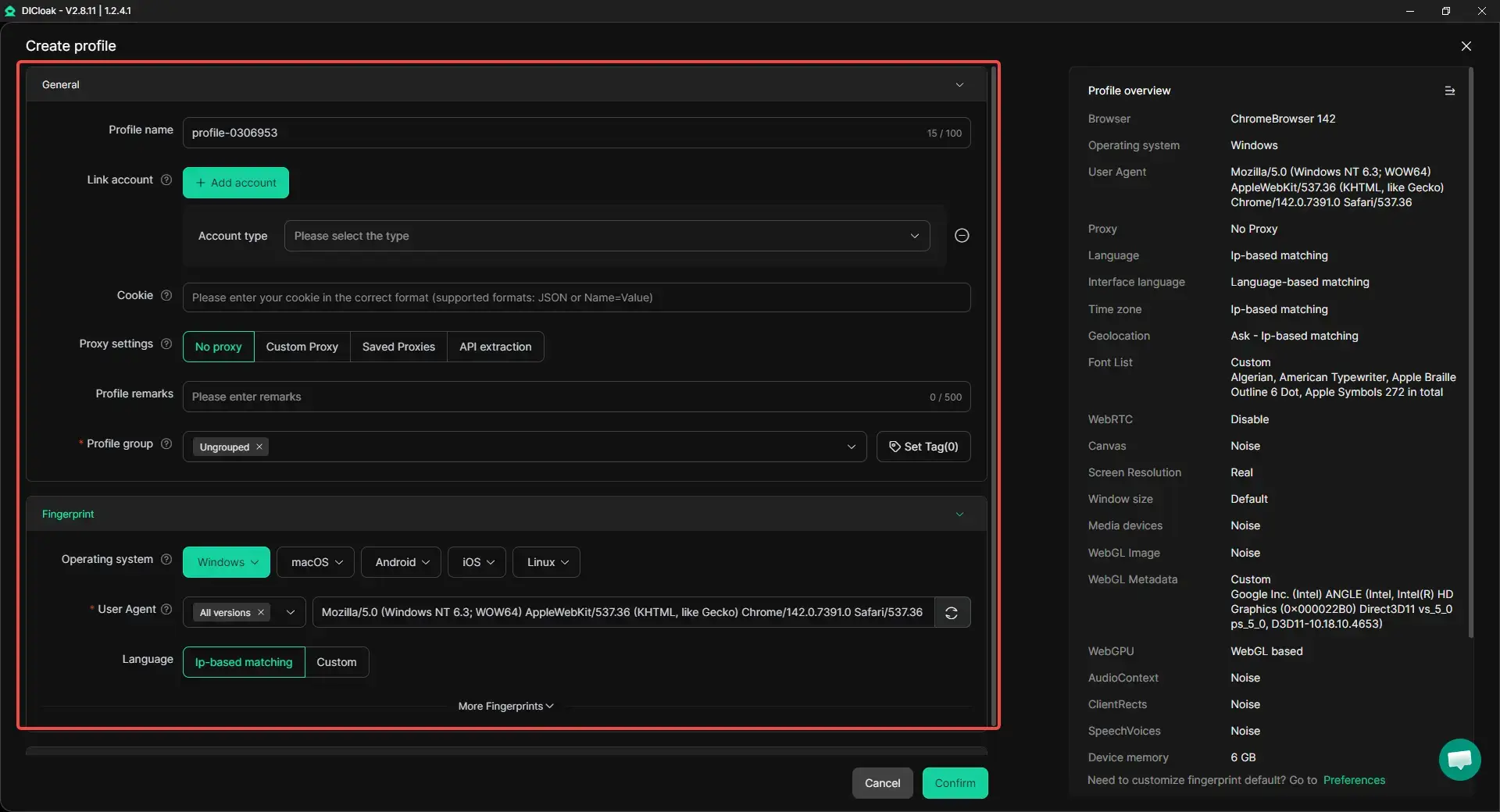
When the same search task needs to be repeated across multiple Telegram accounts, doing everything manually can take a lot of time. It can also become harder to keep account environments clearly separated if everything is handled in a regular browser. With DICloak, users can organize multiple accounts in separate browser profiles and handle repeated search tasks in a more structured way.
Separate profiles for different accounts
With DICloak, users can run each Telegram account in its own browser profile, with separate cookies, local storage, and session data. This helps keep account profiles apart and reduces unnecessary overlap during repeated use.
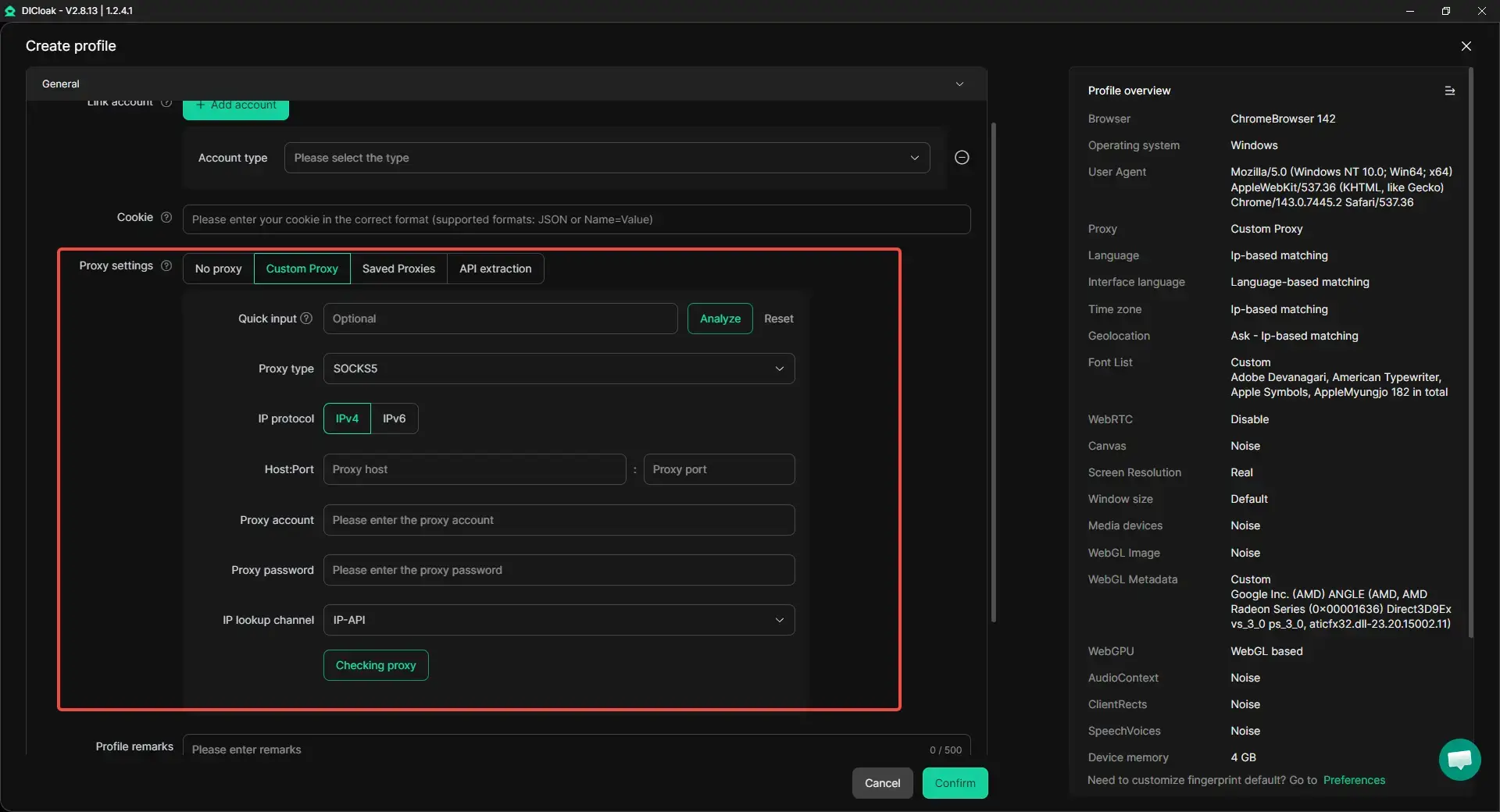
Custom proxy setup for each profile
With DICloak, users can configure custom proxies for each browser profile based on different account needs. This makes it easier to keep the network environment aligned with a specific profile and can help reduce mismatches caused by using the same connection setup across multiple accounts.
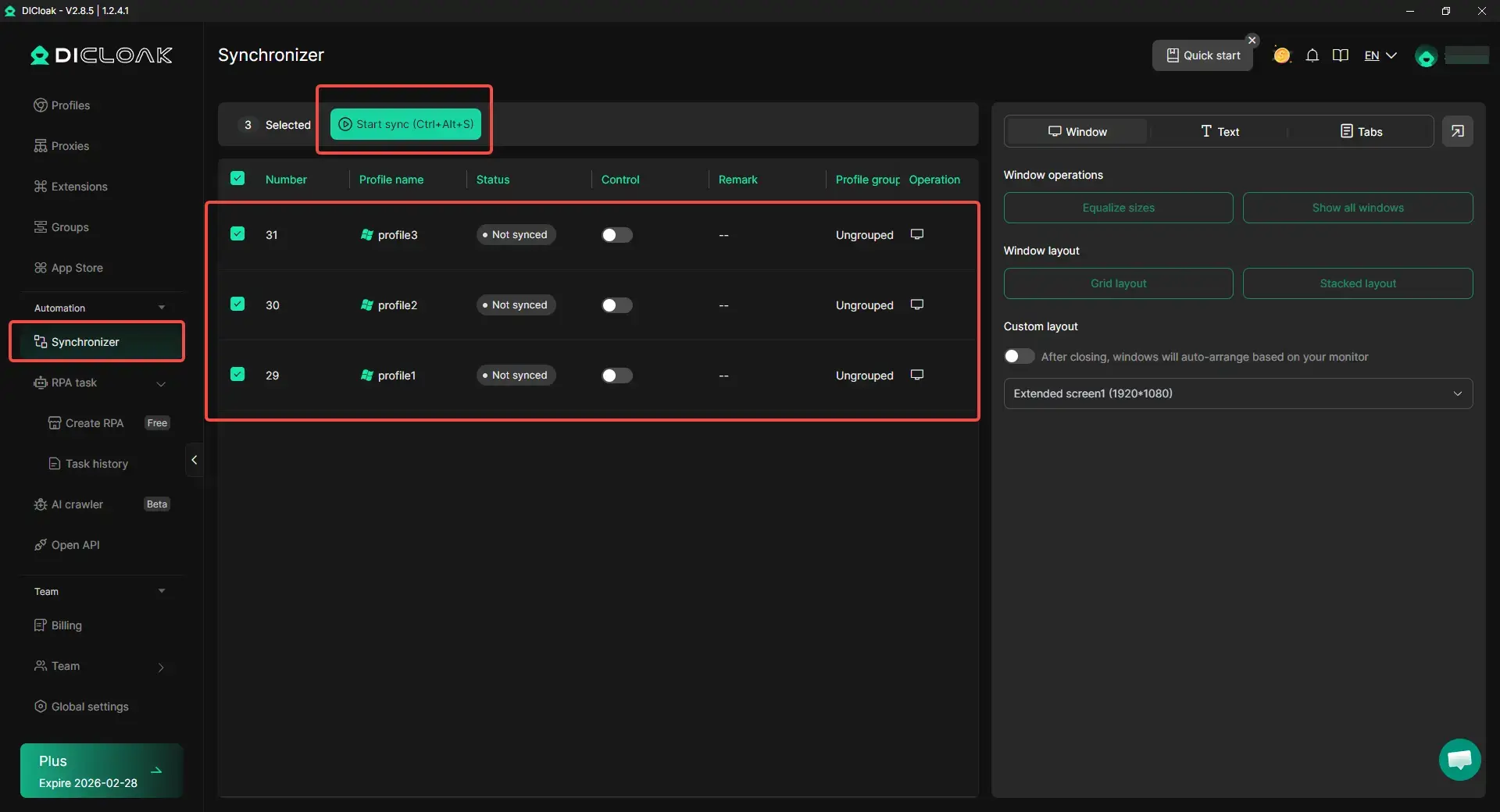
Managing multiple accounts more efficiently
With DICloak, users can organize multiple Telegram accounts more clearly and handle repeated tasks across them with less manual switching. Features like Synchronizer can help mirror the same actions across multiple open profile windows, which makes bulk searches easier to manage in day-to-day use.
Frequently Asked Questions About Telegram Search Engines
Can I use Telegram search engines without an account?
Sometimes, yes. Some third-party tools can show public Telegram content without a Telegram login, but Telegram’s own in-app search is tied to using Telegram itself.
Why can’t I find certain channels or groups?
The most common reason is that they are private. Public channels with usernames can be found in Telegram search, but private channels usually need an invite link or direct access.
Are Telegram search engines legal to use?
In general, searching public Telegram content is legal. The bigger issue is whether a tool respects Telegram’s public-private boundaries and local laws, especially if it claims to expose private spaces or hidden data.
How do I report a malicious search engine?
If the tool leads to harmful Telegram content, you can use Telegram’s built-in Report option on the message or content, or send links such as t.me/... or @... to Telegram’s abuse address. If the problem is a fake site outside Telegram, report it through your browser, search engine, or hosting provider too.
What’s the difference between bots and search engines?
A search engine helps you discover public channels, groups, or posts across a wider index. A bot is usually a tool inside Telegram that responds to commands or inline queries after you type @botname in a chat.
Conclusion
A telegram search engine can be very helpful when you want to find public groups, channels, posts, or niche content more efficiently. But better results depend on more than just the tool itself. Search quality, privacy protection, filtering options, and your own search habits all make a big difference.
The best approach is simple: use trusted tools, search with clear keywords, understand Telegram’s public and private limits, and stay careful with any tool that asks for extra access. When you combine the right search engine with safe habits, Telegram becomes much easier to explore.
 Web Proxy Tools
 Free Tools
 Cookie Plugin
 UA Generator
 MAC Address Generator
 IP Generator
 IP Address List
 2FA Code Generator
 World Clock
 Anonymous Check
 WebRTC Leak Test
 UUID Generator
 Free Web Proxy Site
 Proxy Checker
 FB Ad Checker
 AI Web Scraping
 Free SMM Tools
 Twitter Shadowban Checker
 Instagram Name Checker
 UTM Generator
 Username Generator
 AI Hashtag Generator
 LinkedIn Headline Generator
 Social Media Image Resizer