A Facebook Agency Account is a powerful tool for managing multiple client ad campaigns, providing agencies with higher spending limits, better control, and faster ad approvals. In this guide, we’ll explore the benefits of using a Facebook Agency Account, how to set it up, and the best practices to follow. We’ll also cover how to choose the right resellers, troubleshoot common issues, and use DICloak to efficiently manage multiple accounts. Whether you’re new to Facebook advertising or looking to streamline your process, this guide has you covered.
What is a Facebook Agency Account?
A “Facebook agency account” — sometimes called “Facebook agency ad account” — is a special type of ad account on Facebook (Meta) made for marketing firms or ad agencies.
Instead of being tied to one small business or a personal profile, an agency account is managed by a professional agency. This agency is often a certified partner of Meta (Facebook’s parent company).
With such an account, the agency can run ads, manage many ad campaigns, and handle billing, targeting, and reporting — all for one client or many clients.
Key Differences Between Personal and Agency Accounts
Limitations of Personal Accounts
- A personal ad account (or regular Facebook ad account) is often created automatically when someone uses Facebook ads for their own small business.
- Personal accounts usually come with lower spending limits at the start. This means if you try to spend a lot quickly (for a big campaign), Facebook may stop or restrict you.
- For small budgets or simple boosted posts, personal accounts are fine. But when you grow bigger, those limits and restrictions can block your growth.
Cost‑Effectiveness and Expertise of Agency Accounts
- A facebook agency account gives higher (often much higher) spending limits from the start.
- Agencies usually have experience, strong track records, and good relationships with Meta. That trust helps make ad delivery more stable and reliable.
- For advertisers who plan large or many campaigns, using an agency account can be more cost-effective over time — because you avoid ad bans, spending caps, and long delays.
How Facebook Agency Ad Account Works
When you use a Facebook agency ad account, here is how things generally work:
- The agency sets up the account under a “Meta‑approved” or “whitelisted” status. That means Facebook knows the agency is trusted.
- The agency manages many ad campaigns. This can include different clients, different ad sets, and different payment methods — all from one central place.
- You (the advertiser or client) can give the agency your goals, budget, creatives (images, copy), and other details. The agency then launches and runs ads for you. You don’t need to do every step yourself.
- Because the account is seen as “trusted,” ad approvals tend to be faster. If something goes wrong (e.g. an ad is flagged or reviewed), a dedicated support team from the agency — or through Meta — can often help fix it quickly.
Benefits of Using a Facebook Agency Account
Using a Facebook agency account brings many real benefits. These can help your business grow faster and more steadily. Here are the main advantages — with concrete examples when possible — to help you understand why an agency account often beats a regular ad account.
1. Higher Spending Limits & Easy Scaling
- With a Facebook agency account, you usually get much higher ad‑spend limits from the start.
- This kind of flexibility is especially useful if your business grows fast or if you manage ads for multiple products or brands.
2. Better Stability & Lower Risk of Account Problems
- Agency accounts tend to be more stable and Face fewer risks of being disabled or flagged.
- Many businesses report fewer sudden ad rejections or account suspensions when they use an agency account instead of a personal account.
3. Priority Support and Faster Issue Resolution
- With a Facebook agency account, you often get better support from Meta (Facebook). That includes faster ad reviews, quicker support if ads get disapproved, and more reliable customer service.
- This support helps businesses avoid painful delays or sudden breaks — which is very helpful for fast‑moving campaigns.
4. Access to Advanced Tools, Features, and Agency Expertise
- Using a Facebook agency ad account also gives access to advanced tools, better analytics, and professional ad‑management expertise.
- Agencies often have teams of experts — strategists, copywriters, data analysts — who know how to build and optimize ads well. They can use advanced targeting, track conversions accurately, and optimize your campaigns for real business results.
- For businesses without an in-house ad team, this expert help is often much more cost‑effective than hiring a full-time marketer.
5. Save Time — Focus on What You Do Best
- Running ads yourself can be a lot of work. You must create ads, monitor performance, adjust budgets, and keep up with changes. An agency account managed by professionals saves you a lot of time.
How to Set Up a Facebook Agency Account
Setting up a Facebook agency account is not hard. With the right steps, you can start running ads confidently. Below is a clear guide and smart practices for managing your agency account well.
Step-by-Step Guide to Setting Up Your Account
1. Go to Meta’s Business Manager
First, open a web browser and go to business.facebook.com. Log in with your personal Facebook account. This is just for identity check — it keeps your business assets separate from personal profile.
2. Create the Business Manager account
Click “Create Account.” Enter your business name, work email, and business info. Then follow the prompts to finish setup.
3. Add or Create an Ad Account
Once inside Business Manager, go to “Business Settings” → “Ad Accounts”. Click “Add”. You can:
- Add an existing ad account (if you already have one), or
- Create a new ad account if this is your first time.
When creating, you set time zone, currency, and basic billing info.
4. Connect Your Business Assets Besides ad accounts, you may also add a Facebook Page, Instagram account, and other assets (if needed). In “Business Settings,” go to Pages (or Instagram, etc.) and add or claim your assets.
5. Invite Your Team or Agency Partners
To let others help you — employees, teammates, or external agency — go to “People” or “Partners” in Business Settings. Use “Invite People” (for team) or “Add Partner” (for agency). Then assign roles based on what you want them to do.
Once these steps are done, you have a ready-to-use Facebook agency account. You can start creating and running ad campaigns via it.
Best Practices for Managing Your Agency Account
To get the most from your Facebook agency ad account, follow these good habits below. They help with smooth ads, security, and clear work flow.
Adding Payment Methods
Set up billing properly from the start. In your Ad Account settings, go to “Payment Methods” and add a valid payment option (credit card, debit card, etc.). Tip: Add a backup payment method if possible. That way, if your main card fails, your ads keep running — no unexpected pause.
Assigning Roles and Permissions
Don’t give full access to everyone. Use roles wisely. For example:
- Admin: full control — use only for senior staff or trusted agency.
- Advertiser: can create and manage ads, but cannot change main settings.
- Analyst: view reports only.
This keeps your account safe. It also helps you control who can change budget, who can view data, and who can run ads.
Organizing Ad Campaigns Effectively
When you run many campaigns (for different clients or products), organize them with clear names and separate ad sets. For example: use a naming pattern like “ClientA_ProductLaunch_2025Nov” or “ClientB_Retargeting”.
Better organization helps you track performance clearly. It also makes reporting easier. If you manage multiple clients or products, it avoids confusion. Many agencies and experts recommend organizing assets and campaigns from the start.
Recommended Facebook Agency Ad Account Resellers
If you don’t want to build an agency account from scratch, you can use a reseller or agency that provides a ready-to-use Facebook agency account. Below are some recommended resellers — and how to choose the right one.
Recommended resellers
Here are a few resellers that offer agency‑tier Facebook ad accounts. Each has useful features depending on your needs:
Uproas is described as a “top-tier” reseller for Facebook ad agency accounts. Their accounts are “pre‑warmed” and ready for immediate use, designed for high-volume or rapid scaling campaigns.
Pros:
- Pre‑warmed, high‑trust accounts — no need to wait for “warming up”, so you can start ads quickly.
- Ads often get approved in minutes — very useful for fast-moving campaigns.
- Unlimited ad account availability — good if you manage many clients or run many campaigns.
- High daily spend limits — useful for big budgets or aggressive ad scaling.
- Built-in billing setup — helps you launch without extra delays.
- Real-time expert support — good for troubleshooting or compliance help.
Cons:
- Likely higher cost — premium features and trust come at a price, which may be heavy for small advertisers.
- Using many accounts or large budgets may still carry risk if ad creative or targeting triggers policy reviews. Even a “high-trust” account doesn’t guarantee success.
- Dependence on a third-party; you may not have full long-term ownership of the account, which may raise risks if the provider changes terms or stops supporting.
Squarewave is positioned as a reseller for professional media buyers and large-scale advertisers. They offer enterprise‑grade ad accounts, with niche-optimized packages and compliance support.
Pros:
- Enterprise-grade accounts — suitable for high-volume advertisers or agencies managing many clients.
- Industry‑specific packages — you can choose accounts optimized for e‑commerce, SaaS, affiliate marketing, etc.
- Optional ad‑policy consulting — helps reduce risk of disapproval if you run sensitive or niche ads.
- Stable payment/billing setup — reduces chances of billing disruptions that could pause ads.
- Structured spend scaling — designed for long-term campaigns with gradual growth, which can protect account trust over time.
Cons:
- Onboarding may take longer — compared to faster resellers, the setup process may be slower.
- The cost may be higher due to enterprise-grade services and support.
- Might be overkill for small advertisers or single campaign users — complexity and scale are better suited for agencies or big advertisers.
OrangeTrail provides “verified Business Manager” access, with emphasis on compliance, transparency, and account longevity. They offer tiered account options suitable for advertisers at different experience levels.
Pros:
- Verified Business Manager access — trusted infrastructure helps reduce account risk and bans.
- Strong compliance support — good for advertisers in regulated or sensitive niches.
- Tiered account options — you can pick a level that matches your budget or needs, from entry-level to advanced.
- Optional creative audits — helps improve ad approval rates and reduces risk of disapproval.
- Good for long-term, stable campaigns — oriented toward compliance and reliable performance, not just quick scaling.
Cons:
- Possibly slower speed compared to ultra‑fast resellers (less “instant launch, instant approval” style).
- For small, low-budget advertisers, the compliance-focused package might cost more than benefits justify.
- Even with high compliance, ad rejection or account issues still depend greatly on ad content and targeting — reseller cannot guarantee 100% success.
Almar Media is a performance‑focused reseller. They deliver “in‑house tested” agency accounts, often with pre‑installed tracking tools (like Facebook Pixel) and support from experienced account managers.
Pros:
- Accounts are tested internally by their own media buying team — likely to be stable and high-performing.
- Good reputation scores and positive ad history — helps with ad delivery and reduces early flags.
- Pre‑configured Pixel & event tracking — helpful if you care about conversion tracking and optimization from day one.
- Flexible billing including multi-currency — useful for advertisers in different regions / global clients.
- Dedicated account managers — provides support and expert guidance, not just “account rental.”
Cons:
- Likely higher cost due to premium setup and management services.
- For small campaigns or test usage, pre-configured advanced accounts may be unnecessary and non‑cost‑effective.
- As always, using a third-party account adds dependency — you may have less control than if you built your own account.
Why Choose Resellers
Using a reseller for a Facebook agency account can be helpful.
- Faster start: You don’t need to build your account from zero. A reseller gives you a ready, trusted account. This can save time. For example, if your business wants to launch ads next week, a reseller account lets you start immediately.
- Better trust & fewer restrictions: Accounts from good resellers usually have higher trust levels. That means higher spend limits, faster ad approvals, and fewer chances of bans.
- Support & compliance help: Some resellers offer help with compliance rules and ad management. That reduces risk of policy violations.
How to Choose a Suitable Ad Agency Account Reseller
If you decide to use a reseller for a Facebook ad agency account, follow these guidelines to pick a good one:
- Check trust and reviews. Look for resellers with good reviews or public feedback. See whether other clients got stable, compliant ad accounts. For example, check if they have testimonials or case studies.
- Ask about compliance and support. A reliable reseller should offer help with ad‑policy compliance. They should guide you if an ad gets flagged or account needs review. This helps if your business has strict compliance requirements.
- Clarify ownership and transfer rules. Make sure you know who owns the ad account. If possible, choose a reseller that allows transferring account ownership later — so you keep control long-term.
- Compare cost vs benefit. Make sure the reseller’s fees and management costs are worth the benefits (higher spend limits, fewer bans, support). For a small business, a high cost might cancel out those benefits.
- Test with small campaigns first. Before committing big budget, run small test campaigns to check ad delivery, approval speed, and account stability. If everything works fine, scale up.
- Avoid “shady” or “too cheap” offers. If a reseller’s price is extremely low, or they cannot prove compliance and reliability, be cautious. Cheap often means risky — fake accounts, weak histories, or even policy violations.
Common Issues and Troubleshooting of Facebook Agency Account
Running a Facebook agency account can come with some common issues. Here are some tips to fix issues with your Facebook ad agency account:
Issue: If your payment method fails (expired card, wrong details), Facebook may pause your Facebook agency account.
Solution: Always check and update your payment info to ensure there are no issues. Consider adding a backup payment method to avoid disruptions.
Issue: Ads may be suspended if they violate Facebook’s policies or if unusual activity is detected.
Solution: If your account is disabled, use Facebook's appeal process. Provide accurate information, such as billing proof or compliance details, to get it reinstated.
Issue: Ads might be disapproved due to policy violations (e.g., misleading content, banned products).
Solution: Review Facebook’s ad policies to ensure compliance. Start with small, simple ads to avoid rejections. If rejected, fix the issue and resubmit.
Issue: Logging in from different devices or locations can trigger Facebook’s security flags, leading to account restrictions.
Solution: Use consistent login locations and devices. Avoid logging in from different countries or using suspicious IPs.
- Account Management Complexity
Issue: Managing multiple clients or campaigns can lead to confusion, accidental mistakes, or violations.
Solution: Keep campaigns, billing methods, and assets organized. Separate client accounts and avoid mixing their settings.
Using DICloak Antidetect Browser to Manage Multiple Facebook Agency Account After Getting
When you have a Facebook agency account (or several), managing them well matters. DICloak can help you do that — safely, neatly, and at scale. Here is how you can use DICloak’s key functions to run many accounts smoothly.
Why Use DICloak for Multiple Accounts
- Isolated Browser Profiles
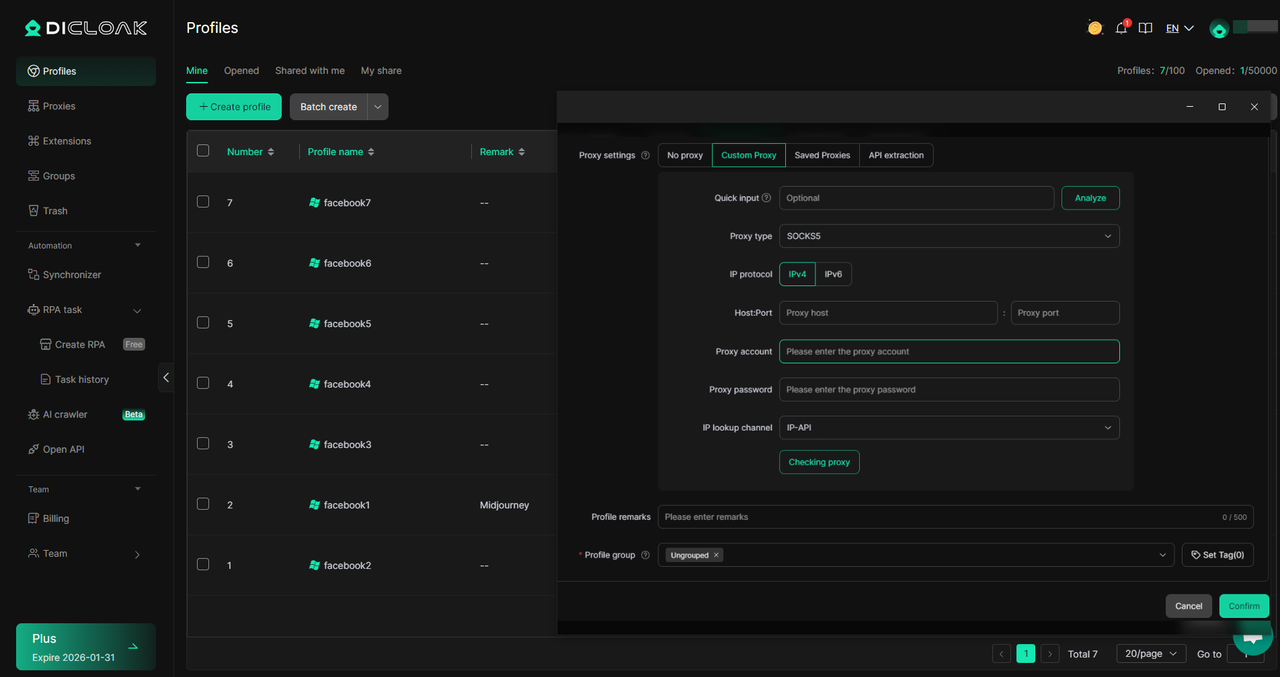
DICloak enables users to manage multiple Facebook agency accounts by creating independent browser profiles, each with its own unique browser fingerprint and settings. These profiles are fully isolated, ensuring no data is shared between them.
Users can also integrate their own purchased residential proxies into each profile, assigning a different IP address to every account. This configuration provides each Facebook agency account with its own distinct digital identity, improving the security and stability of managing multiple accounts.
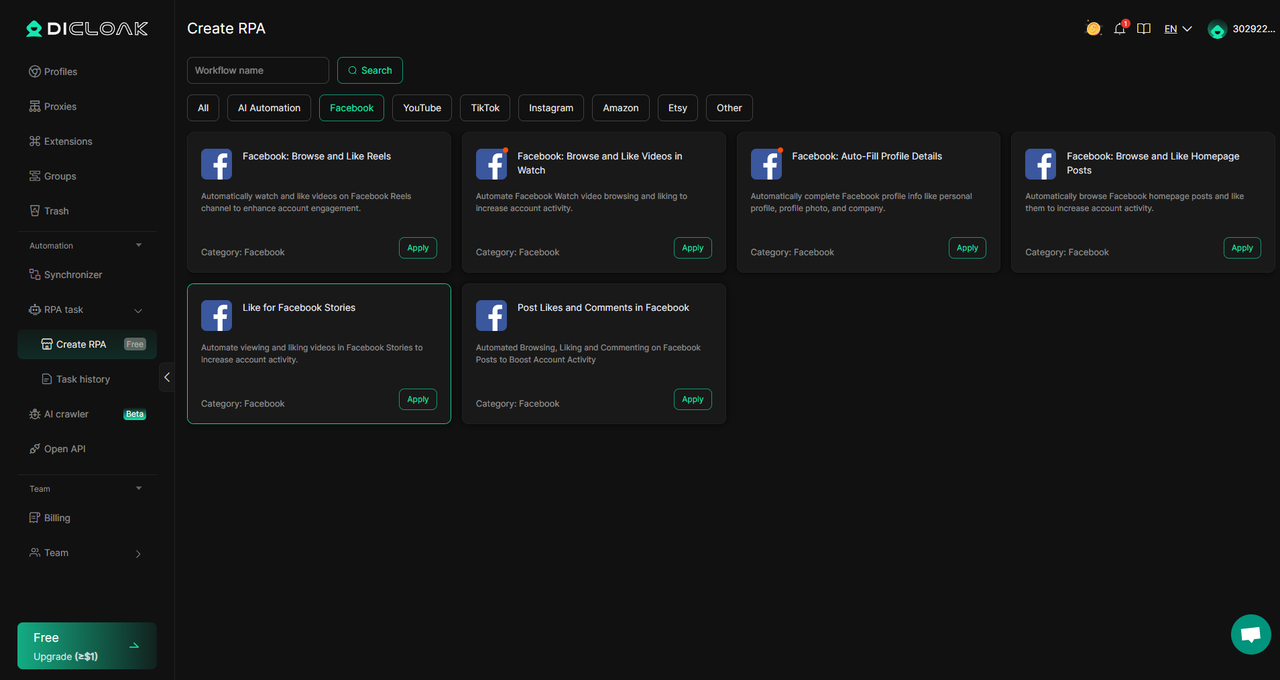
DICloak provides automation tools to efficiently manage multiple Facebook agency accounts, making it easier to handle tasks and maintain smooth operation across accounts.
Additionally, DICloak offers user-friendly RPA templates for common Facebook actions, such as bulk posting, responding to messages, and managing ads, making the process of managing multiple agency accounts more streamlined and efficient.
If you have a team, DICloak lets you share profiles, assign roles, and work together securely.
DICloak offers role-based access for teams, allowing you to assign isolated profiles to different team members for managing multiple Facebook agency accounts. This feature ensures that tasks remain organized and secure, enabling teams to handle accounts through a centralized Facebook Profile Viewer setup without any data overlap.

Conclusion
Managing a Facebook agency account offers numerous benefits, including greater control, higher spending limits, and streamlined ad management for multiple clients. By setting up your account properly and choosing the right resellers, you can scale your ad campaigns efficiently and securely. However, it’s important to address common issues and stay compliant with Facebook’s policies to avoid disruptions. Using tools like DICloak can further enhance your ability to manage multiple accounts safely, isolating profiles and automating tasks. With the right tools and strategies, your Facebook agency account will help you grow and succeed in the competitive world of digital advertising.
FAQs About Facebook Agency Accounts
1. What is a Facebook Agency Account and How Does It Work?
A Facebook agency account is a special type of account designed for agencies or businesses managing multiple Facebook ad accounts. Unlike personal accounts, a Facebook agency account allows agencies to handle ads for different clients, set higher spending limits, and enjoy advanced tools. This helps agencies manage large campaigns efficiently while keeping client data separated.
2. How Do I Set Up a Facebook Agency Account?
Setting up a Facebook agency account involves creating a Meta Business Manager, where you can add your agency’s ad account, clients' accounts, and other business assets. After adding all necessary details, you’ll need to set up payment methods, assign roles, and organize ad campaigns. This structure ensures smooth management of multiple clients under one central platform.
3. What Are the Benefits of Using a Facebook Agency Account?
The primary benefits of a Facebook agency account include higher ad spend limits, better control over multiple client accounts, and quicker ad approvals. Agency accounts also provide access to advanced features like team collaboration and custom reporting, allowing agencies to scale ad campaigns faster and more efficiently while maintaining compliance with Facebook’s advertising policies.
4. How Can I Choose the Right Facebook Agency Ad Account Reseller?
When choosing a Facebook agency ad account reseller, focus on their reputation, reliability, and support. Look for pre-warmed accounts, good customer feedback, and flexible payment options. Ensure they offer scalable accounts and help with setup and troubleshooting. Researching reviews and asking for recommendations can help you find a trusted reseller.
5. What Should I Do If My Facebook Agency Account Gets Disabled?
If your Facebook agency account is disabled, the first step is to check the notifications in Meta Business Manager for specific details on why it was disabled. Common reasons include policy violations or payment issues. Once you understand the cause, you can either appeal the decision through Facebook’s support system or fix the issue (e.g., updating payment details or correcting ad content) to request reactivation.
 Web Proxy Tools
 Free Tools
 Cookie Plugin
 UA Generator
 MAC Address Generator
 IP Generator
 IP Address List
 2FA Code Generator
 World Clock
 Anonymous Check
 WebRTC Leak Test
 UUID Generator
 Free Web Proxy Site
 Proxy Checker
 FB Ad Checker
 AI Web Scraping
 Free SMM Tools
 Twitter Shadowban Checker
 Instagram Name Checker
 UTM Generator
 Username Generator
 AI Hashtag Generator
 LinkedIn Headline Generator
 Social Media Image Resizer