In today's digital world, protecting your online identity is more important than ever. IPhey is a powerful tool that helps you understand how your browser’s digital fingerprint is seen by websites. By analyzing details such as your IP address, browser type, screen size, and more, IPhey shows what data websites can use to track and identify you. This guide explores how to use IPhey, interpret its results, and apply it for better online privacy.
Learn practical techniques to bypass detection, identify red flags in your fingerprint, and follow best practices for maintaining anonymity online. Whether you’re an affiliate marketer, web developer, or someone managing multiple accounts, IPhey can help you stay ahead in the fight for privacy and security in 2025.
Understanding IPhey
Before we dive into how IPhey works and its key features, let's first understand what this tool is all about and why it’s important for your digital privacy. In today’s world, websites gather a lot of information about visitors to track them, serve ads, and even prevent fraud. One of the main ways they do this is through something called "browser fingerprinting." This technique allows websites to create a unique profile for you based on your browser and device settings. IPhey helps you see exactly what information your browser is giving away, making it easier to understand your online identity and how to protect it.
What is IPhey?
IPhey is a tool designed to analyze your digital fingerprint. It looks at the details your browser sends to websites when you visit them. This includes your IP address, browser type, operating system, screen resolution, and other unique settings. By showing you this data, IPhey helps you understand what websites see when you visit them.
For example, when you visit a website, your browser communicates your operating system (like Windows or Mac), the version of the browser you're using (Chrome, Firefox, etc.), your screen size, and even your language preferences. IPhey reveals this hidden data, helping you see what websites could potentially use to track or identify you online.
This information might seem harmless, but when combined with other data points, it can create a detailed profile that websites can use to track you across the web. IPhey makes these invisible details visible so you can better control your digital footprint.
How IPhey Works
IPhey works by checking several aspects of your browser and device. When you visit the IPhey website, it automatically starts analyzing the details your browser sends to websites. It checks things like:
- IP Address and Geolocation – IPhey identifies your public IP address and uses it to estimate your location. This helps you understand how easily your location can be detected.
- Browser and Device Information – IPhey collects data about the type of browser you're using (e.g., Chrome, Firefox), its version, and your operating system (e.g., Windows or Mac).
- Unique Browser Settings – The tool checks things like installed fonts, your screen resolution, and other configurations that make your browser unique. These settings help create your “digital fingerprint.”
IPhey’s analysis works in real-time and provides you with a detailed report showing exactly what websites can detect about you. This helps you understand the kind of digital profile you're leaving behind while browsing.
Key Features of IPhey
IPhey offers several powerful features that help you monitor your digital identity and take steps to protect your privacy:
- Browser Fingerprint Analysis
IPhey analyzes the unique data points that make your browser identifiable. It shows you how websites can track you based on your browser type, screen size, fonts, and other technical details. This is crucial for understanding how easily your online activity can be traced.
- Geolocation Detection
The tool identifies your IP address and determines your location based on that information. It helps you see how websites can estimate where you are, even without asking for your location. This is particularly useful for checking if your location can be easily detected by websites.
- Privacy Risk Indicators
IPhey highlights potential privacy risks, such as mismatches between your location and time zone. If your IP address shows you’re in one country, but your browser settings suggest you're somewhere else, this could be a red flag for websites. IPhey helps you spot these inconsistencies.
- DNS and WebRTC Leak Tests
Some technologies, like WebRTC, can leak your real IP address, even if you’re using privacy tools. IPhey tests for these leaks to ensure that your true identity isn't being exposed. It’s a simple way to verify that your privacy setup is secure.
- Free and Easy to Use
One of the best features of IPhey is that it's easy to use and free. You don’t need to sign up or install anything. Simply visit the IPhey website, and it will analyze your browser in seconds. This makes it a great tool for anyone who wants to quickly check their privacy settings without hassle.
How to Use IPhey
Now that you know what IPhey is and how it shows your digital identity, let’s look at how to use it. This section explains how to access IPhey, how to read its results, and real reasons people use it. The steps are simple, clear, and useful for anyone who wants to understand their browser data better.
Step‑By‑Step Guide to Accessing IPhey
Using IPhey is quick and easy. You don’t need special tools or an account to begin. Here is a clear, real‑world example you can follow:
- Open a web browser — This could be Chrome, Firefox, or Edge.
- Go to the IPhey website — Type iphey.com in your address bar and press Enter. The tool loads automatically.
- Wait for the test to run — IPhey start scanning your browser data right away. You will see results in just a few seconds.
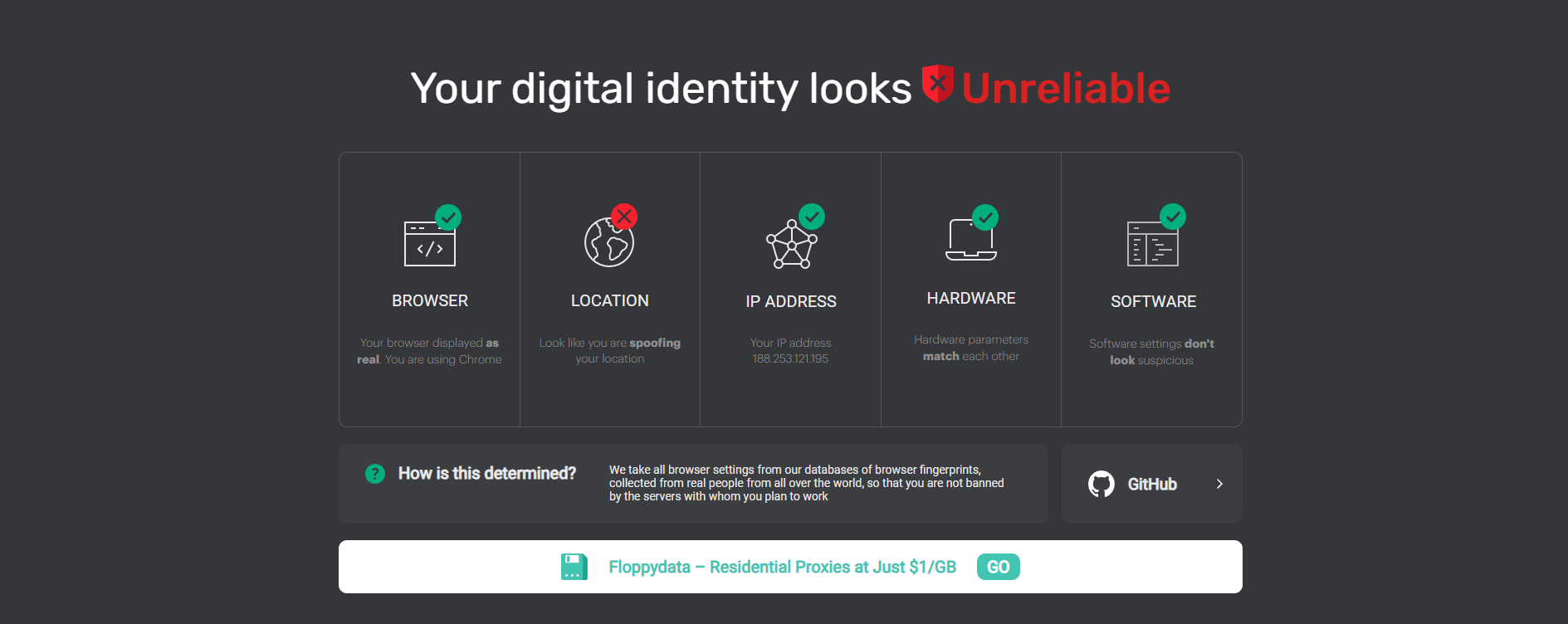
- Scroll through the report — You can see what your browser shared with the tool. The report has sections with your IP info, browser data, and more.
For example, when a user named Alex visited IPhey on his home laptop, the test displayed his browser version, screen size, and unique settings. Seeing this was surprising for him because he thought websites only see basic info like his city or browser name — but IPhey showed much more. This quick experience opened his eyes to how much data is shared every time he visits a site.
Interpreting IPhey Results
Once IPhey finishes scanning, it shows a detailed breakdown. Let’s break down the most important parts you will see:
- IP Address Panel
This part shows your public IP address and tells you the network your device is using. It may also show the general location tied to that IP. Many people are surprised to see how precise this can be.
- Browser Fingerprint Section
Here, IPhey lists things like your browser name, version, operating system, screen size, and installed plugins. These details make up your “fingerprint.” Each person’s combination of settings is often very distinct.
- Privacy Risk Insights
IPhey can show you a summary of how unique your fingerprint is compared to others. A high uniqueness score means your particular setup stands out. If many details are unusual, websites can tell your browser apart from others more easily.
For example, Maria, a small business owner, used IPhey before logging into a secure dashboard. She saw her fingerprint had unusual screen resolution and plugin details. After adjusting those, her browser looked more like common setups, which reduced alert flags on other services she used.
This kind of real feedback helps you understand not just what the tool shows, but what it means for your online activity.
Common Use Cases for IPhey
IPhey is useful in many real situations. Here are some practical examples people rely on:
- Check Your Digital Identity
Anyone curious about online privacy can use IPhey to see how much a website learns about them. It’s a simple way to learn what information your browser shares.
- Test Browser Configurations
Web developers often use IPhey to test how their websites see different browsers. They might run tests on a new setup to make sure their site runs smoothly across many devices.
- Spot Tracking Risks
If your browser shows many unique values, companies can track you more easily across sites. Using IPhey helps you spot these risks.
- Verify Browser Settings
Some users want to be sure their setup looks normal to websites. For example, if your language setting doesn’t match your timezone, that could look odd. IPhey highlights these mismatches so you can fix them.
Imagine Chris, a freelance digital artist. He used IPhey to test his new computer. The results showed an unusual value in screen color depth. After checking online, he learned this was from a browser extension. He removed the extension and then confirmed with IPhey again — the fingerprint looked more typical.
Privacy and Security Concerns:Why Will You Use IPhey?
Now that you know how to use IPhey and read its results, it is important to talk about privacy and safety. Browser fingerprinting — the very thing IPhey shows you — affects how your data is seen online. In this section, we explain why digital fingerprinting matters, how it is different from older tracking ways, and what it means for your privacy. This helps you see both risks and real effects on everyday web use.
The Importance of Digital Fingerprinting
Digital fingerprinting is the way websites and online tools collect many small details from your browser. These details include your browser type, screen size, system language, plugins, and much more. When they are combined, they create a unique pattern — like a fingerprint — that can identify your device or browser. This pattern stays harder to erase than cookies or history.
For example, researchers found that fingerprinting can track visitors across many websites without asking permission. Even if you clear your cookies or use private mode, fingerprinting may still see and follow you. This is why tools like IPhey matter — they show you what parts of your digital identity are visible.
Many people do not know fingerprinting is happening on most sites. A study showed that your browser leaves a “digital signature” as you browse. This signature could be used to recognize you later, even if you think you are private.
Seeing your own fingerprint with IPhey can be eye‑opening. It makes you realize how much small details add up to a profile that websites can see and store. This matters because it affects how firms track behavior, serve ads, and make decisions about your online activity.
Browser Fingerprinting vs. Traditional Tracking Methods
It helps to compare browser fingerprinting with old‑fashioned tracking methods so you can see what makes it different.
In the past, many websites used cookies to remember users. Cookies are files stored on your device that help websites recall your settings. You can usually delete cookies, and browsers let you block them.
In contrast, browser fingerprinting does not rely on files stored on your device. Instead, it reads many small bits of info your browser already sends when you load a page. Because these bits come from your system settings and hardware, fingerprinting can work even if you remove cookies or clear your history.
Here’s a simple example:
🔹 Cookies might remember your site login.
🔹 Fingerprinting might recognize you even without cookies, just based on your system details.
This makes fingerprinting harder to block or notice. Most users do not see any popup asking for permission. That lack of transparency is why privacy experts are concerned — and why a tool like IPhey helps reveal what is going on behind the scenes.
Implications for Online Privacy
The fact that your browser can be fingerprinted has real effects on your privacy.
Many websites use fingerprinting for good reasons. For example, banks and security teams rely on fingerprinting to spot fraud. They can see when a login attempt comes from a very different device than usual. This helps reduce bad access and protect accounts.
But in other cases, fingerprinting is used without clear consent. Websites and advertisers can track your visits over time, even when you think your identity is hidden. A research project connected fingerprinting with tracking ads and personalized bids on advertising spaces. This means fingerprint profiles can be used in ways most people don’t expect.
For a real‑world example, think about a small business owner who checks their browser with IPhey. If the fingerprint looks very unique, it could make online shops and analytics tools see her device as unusual. This might lead to extra security checks or different ad targeting. When she adjusted simple settings — like language and screen details — her fingerprint looked more like many others. That change reduced flags on some secure sites she uses.
Knowing this, you can decide what matters more to you: convenience or privacy. Tools like IPhey give you insight, but only you choose what to do next.
Strategies for Passing IPhey Detection
After learning about privacy risks and how IPhey shows your digital fingerprint, you may want to know how to reduce your browser’s uniqueness. Websites use fingerprinting to spot unique details about your setup, and IPhey helps highlight those details. In this section, we explain real‑world ways people try to make their browser look more ordinary, common warning signs IPhey might show, and good habits to stay less noticeable online.
Techniques for Bypass Detection
It is hard to completely hide from browser fingerprinting. However, many people use practical techniques to make their browser look more like others. These techniques do not stop IPhey from working, but they help reduce unique values that stand out to websites:
Use a Browser With Fingerprint Protection
Some browsers include features that make browser details less unique. For example, the Brave browser uses fingerprint randomization to make many users look more alike online. This means sites and tools like IPhey may see many users with similar patterns instead of one unusual pattern.
Match Common System Settings
Simple settings like screen size, language, and time zone can make your browser more common. For example, if your screen size is very unusual, it can make your fingerprint unique. Adjusting to standard values —the ones many people use — can lower the chance your browser stands out in an IPhey report.
Limit Extra Plugins or Scripts
Extra browser plugins and special scripts can add unique signals to your fingerprint. People who use many niche plugins may find they appear very unique in IPhey results. Reducing or choosing widely‑used plugins can make your browser look more typical, which may help online privacy.
For example, Jason, a blogger, saw his browser fingerprint stand out because he had many uncommon plugins installed. After removing most of these and keeping only essential ones, his IPhey report showed fewer unique values. Many trackers and sites then saw him as more similar to other users.
While these techniques do not “defeat” IPhey, they show how small adjustments can make your browser details closer to a shared baseline.
Common Red Flags Identified by IPhey
When you run a test with IPhey, some results are warnings that your fingerprint is unusual. These red flags can represent areas where your browser is easy to single out online:
Unusual Screen Sizes or Color Depth
Very high or very low screen resolution values are uncommon. IPhey may show these as unusual details. People with rare screen settings can appear more unique to websites.
Different Time Zones and Languages
If your browser’s language and time zone don’t match common combinations, your fingerprint might be easier to spot. For example, a browser that shows language “English (UK)” but has a time zone in East Asia may raise flags in an IPhey report because this combination is rare.
Rare Fonts or Plugins
Some plugins or custom fonts are only used by a small group of users. These details may make your fingerprint easier to single out when viewed by IPhey.
For instance, Sandra, a digital artist, tested her browser with IPhey and saw her font list was very unusual. After choosing more common font options, her fingerprint looked less unique. She found that some websites no longer treated her as “different,” which improved her browsing experience on certain platforms.
Red flags do not always mean danger, but they show where your browser setup stands out.
Best Practices for Maintaining Anonymity
Many people want better online privacy, but they also want a normal web experience. Here are good habits to help you stay less noticeable, while still using the internet normally:
Keep Your Browser Updated
Browsers like Chrome, Firefox, and Brave regularly improve privacy protections. Staying up to date helps reduce how much unique detail your browser shares.
Use Standard Settings When Possible
Try to use language, time zone, and display settings that many people share. Unusual combinations can make your browser look distinct in tools like IPhey.
Reduce Extra Custom Add‑Ons
Using only common browser extensions instead of many rare ones can make your overall setup look more typical.
Test Regularly With IPhey
IPhey lets you see your browser fingerprint at any time. Checking your browser before logging into sensitive accounts or services can help you notice changes and adjust settings. Most people find this simple habit useful in managing their digital identity.
For example, Aaron, a consultant, checks his browser with IPhey every month. When his fingerprint looked unusual after a software update, he compared old and new test results. This helped him adjust settings and keep his browser in a more ordinary range that many sites see.
Outsmarting Digital Fingerprint Detection with IPhey
Mastering digital fingerprint transformation is essential for professionals in fields like affiliate marketing, web development, multi-accounting, and web scraping. For these experts, it's not only about protecting privacy but also gaining a competitive edge. Many rely on advanced concealment strategies to secure their online identities while managing multiple accounts. With powerful tools like IPhey analyzing every detail of your digital fingerprint, understanding how to outsmart these techniques is crucial for anyone committed to maintaining a strong and resilient online identity and privacy.
Why choose DICloak Antidetect Browsers for your business?
⚡The DICloak Antidetect Browser has become a global favorite for its unparalleled ability to efficiently and securely manage multiple accounts. Designed for professionals in social media management, affiliate marketing, traffic arbitrage, e-commerce, account farming, airdrops, and more, DICloak offers powerful features like RPA automation, bulk operations, and a synchronizer. Additionally, it allows you to customize fingerprints and integrate proxies for each profile, ensuring top-level security and operational efficiency. It’s the ultimate tool for seamless, secure, and scalable operations.

What Makes DICloak Stand Out?
✅ Manage 1,000+ Accounts on One Device:
Stop wasting money on extra hardware! DICloak allows you to manage multiple accounts on a single device, cutting costs and boosting efficiency.
✅ Guaranteed Account Safety, No Ban Risks:
Every account gets its own isolated browser profile with custom fingerprints and IPs, drastically reducing the risk of bans. Your accounts, your control!
✅ Flexible Proxy Configuration for Maximum Performance:
Seamlessly integrate with all major proxy protocols (HTTP/HTTPS, SOCKS5) and manage your proxy pool with bulk operations. No more struggling with IP management—DICloak has you covered.
✅ Streamlined Team Collaboration for Better Results:
Easily manage your team with advanced tools like profile sharing, permission settings, data isolation, and operation logs. Your team works smarter, not harder.
✅ Automate the Grind with RPA:
DICloak's built-in RPA saves you hours of manual work. Automate repetitive tasks, streamline workflows, and focus on what really matters—growing your business.
✅ Powerful Bulk Tools to Scale Your Operations:
Create, import, and launch multiple browser profiles in one click. DICloak makes scaling your business as easy as it gets.
✅ Compatible with All Major Operating Systems:
Based on the Chrome core, DICloak supports simulating Windows, Mac, iOS, Android, and Linux operating systems. No matter what platform you need, DICloak has you covered.
🔗 Ready to Get Started?
Visit the DICloak website to explore more details and choose the plan that’s right for you. Start for free today and experience the power of secure, efficient, and scalable multi-account management!
Conclusion
In this guide, we explore how IPhey helps you understand and manage your online privacy by revealing the details of your browser’s digital fingerprint. As websites track user data through unique identifiers like browser type, screen size, and IP address, IPhey provides a way to see what information is visible to websites, helping you make informed decisions about your digital identity.
We walk you through how to access IPhey, interpret its results, and identify common red flags that make your browser fingerprint unique. We also discuss effective strategies for bypassing detection, such as using privacy‑focused browsers and matching common system settings. Additionally, when used together with IPhey, DICloak can adjust your digital fingerprint based on the test results from IPhey, further securing your online presence. DICloak's advanced features, like isolated profiles and proxy management, work alongside IPhey to mask your browser’s unique traits, making it harder to be tracked across multiple accounts or websites.
For professionals in fields like affiliate marketing, web development, or multi-account management, IPhey is an essential tool for maintaining privacy while running multiple accounts or scraping data. When used with DICloak, you can reduce the risk of exposure and enhance the security of your digital identity.
FAQ
What is IPhey and how does it help protect my online privacy?
IPhey is a tool that helps you analyze your browser’s digital fingerprint by showing you what information websites can track. By revealing details such as your IP address, browser type, and screen resolution, IPhey helps you understand how your digital identity is visible online, allowing you to take steps to protect your privacy.
How do I use IPhey to check my browser's fingerprint?
To use IPhey, simply visit its website, and the tool will automatically analyze your browser’s fingerprint. It will show you detailed information about your browser type, IP address, and other data points. This analysis helps you see which aspects of your digital fingerprint are unique and potentially identifiable.
How can IPhey help me avoid being tracked online?
IPhey helps you identify unique details of your digital fingerprint, such as screen size, browser settings, and plugins. By understanding these details, you can make adjustments to your browser to make your fingerprint look more like other users, thus reducing the risk of being tracked online.
Can I use IPhey with other private tools like DICloak?
Yes, combining IPhey with privacy tools like DICloak enhances your online protection. DICloak allows you to adjust your fingerprint based on IPhey's results, helping you hide or change unique traits to stay more anonymous while browsing. This combination provides an extra layer of security.
What are the common red flags identified by IPhey, and how can I address them?
Common red flags in IPhey results include unusual screen resolutions, uncommon fonts, and mismatched time zones or languages. These can make your browser fingerprint more unique. By using privacy-focused browsers, adjusting settings, and limiting unusual plugins, you can reduce these red flags and enhance your online anonymity.
 Web Proxy Tools
 Free Tools
 Cookie Plugin
 UA Generator
 MAC Address Generator
 IP Generator
 IP Address List
 2FA Code Generator
 World Clock
 Anonymous Check
 WebRTC Leak Test
 UUID Generator
 Free Web Proxy Site
 Proxy Checker
 FB Ad Checker
 AI Web Scraping
 Free SMM Tools
 Twitter Shadowban Checker
 Instagram Name Checker
 UTM Generator
 Username Generator
 AI Hashtag Generator
 LinkedIn Headline Generator
 Social Media Image Resizer