Every seller faces this at some point: deciding whether to stick with an aged eBay account or risk starting fresh. The choice between old eBay accounts vs new eBay accounts isn’t just about “age” , it hits you every time you try to scale, dodge a restriction, or open another store after a ban. There’s always the worry that picking wrong means wasted listings, delayed payouts, or an account that barely survives its first sales spike.
But the difference between old and new eBay accounts goes beyond surface trust scores or feedback numbers. What really throws sellers off is that an old account can still trigger limits, while a new account sometimes gets flagged for the smallest policy miss. Relying on account age alone leads to costly mistakes, especially as eBay’s detection systems get stricter.
The practical challenge isn’t just “is it better to use an old or new eBay account?”, it’s knowing what actually changes in account handling, what risks shift, and when a “fresh start” is just a setup for new headaches. Most guides skip these tradeoffs and leave out what seasoned operators do differently.
To make the right call, you need to see what really happens on the ground. Here’s what sets old and new eBay accounts apart, and why sellers in 2026 are changing how they judge account value.
What’s the Real Difference Between Old and New eBay Accounts?
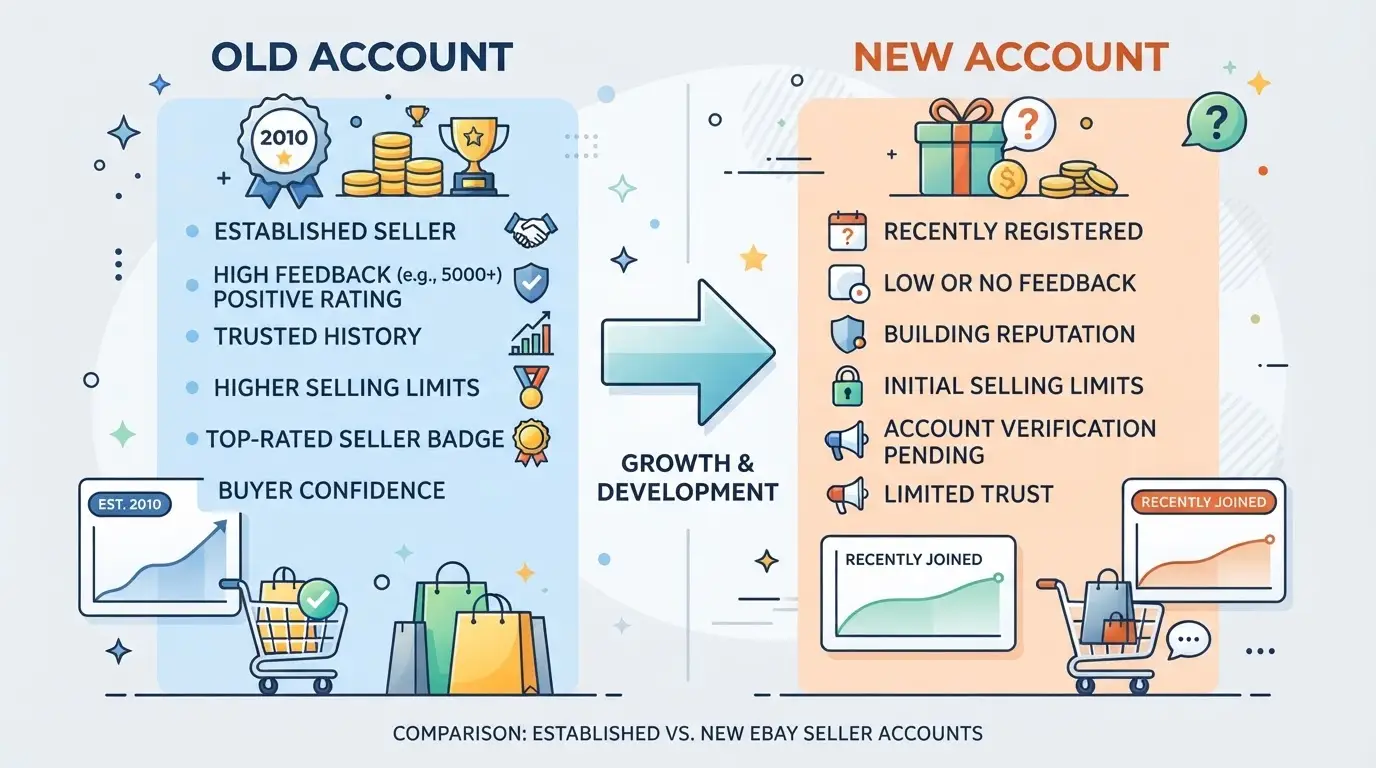
The real split between old and new eBay accounts isn’t just about how long the account has existed, it’s about how eBay’s systems treat trust, limits, and risk. Sellers get tripped up because these differences go beyond feedback scores or profile age.
Account Age and Trust Signals
eBay assigns more trust to accounts with a long, clean sales history, especially those with consistent feedback and no past restrictions. New accounts face extra scrutiny, so even small mistakes can trigger warnings or holds.
Verification, Limits, and Policy Differences
New eBay accounts must clear more verification steps. Right after sign-up, you’re hit with identity checks, phone and email validation, and often bank or tax info requests. These aren’t just formalities, missing or failing a single check can freeze the account before your first listing goes live.
Selling limits are where the gap really widens. Fresh accounts might start with a 10-item or $500/month cap, which can take months to raise if your activity isn’t steady. Even after a few successful sales, eBay’s automated risk systems watch for pattern changes, like listing different product types or boosting volume too quickly. Get flagged here and you can face 21-day PayPal holds, forced ID rechecks, or even indefinite selling bans.
Older accounts, especially those with real sales history and clean feedback, often bypass these early hurdles. But age isn’t a magic shield. If a dormant account suddenly ramps up with new IPs, different devices, or sharp listing changes, eBay can still apply restrictions. The risk is real: buying a supposedly “aged” account with hidden strikes or mismatched info can lead to instant suspension the moment you try to use it.
What throws newcomers is that eBay’s policies change each year. In 2026, the platform checks for digital fingerprint mismatches, cross-links between accounts, and recycled payment details. Skipping a small step, like updating all recovery contacts, can get even a years-old account flagged.
Typical Use Cases for Old vs New Accounts
- Sellers grab old accounts to skip slow limits, run higher volume, or build trust faster.
- New accounts suit those needing a clean slate, especially after a ban or for new product lines.
- Risk-averse sellers stick to their original accounts, valuing full control over speed or scale.
Sellers pay more for aged accounts when they need to dodge slow growth or want to avoid the early risk of holds, a topic that leads right into why the price gap exists.
Why Do Some Sellers Pay More for Aged eBay Accounts?
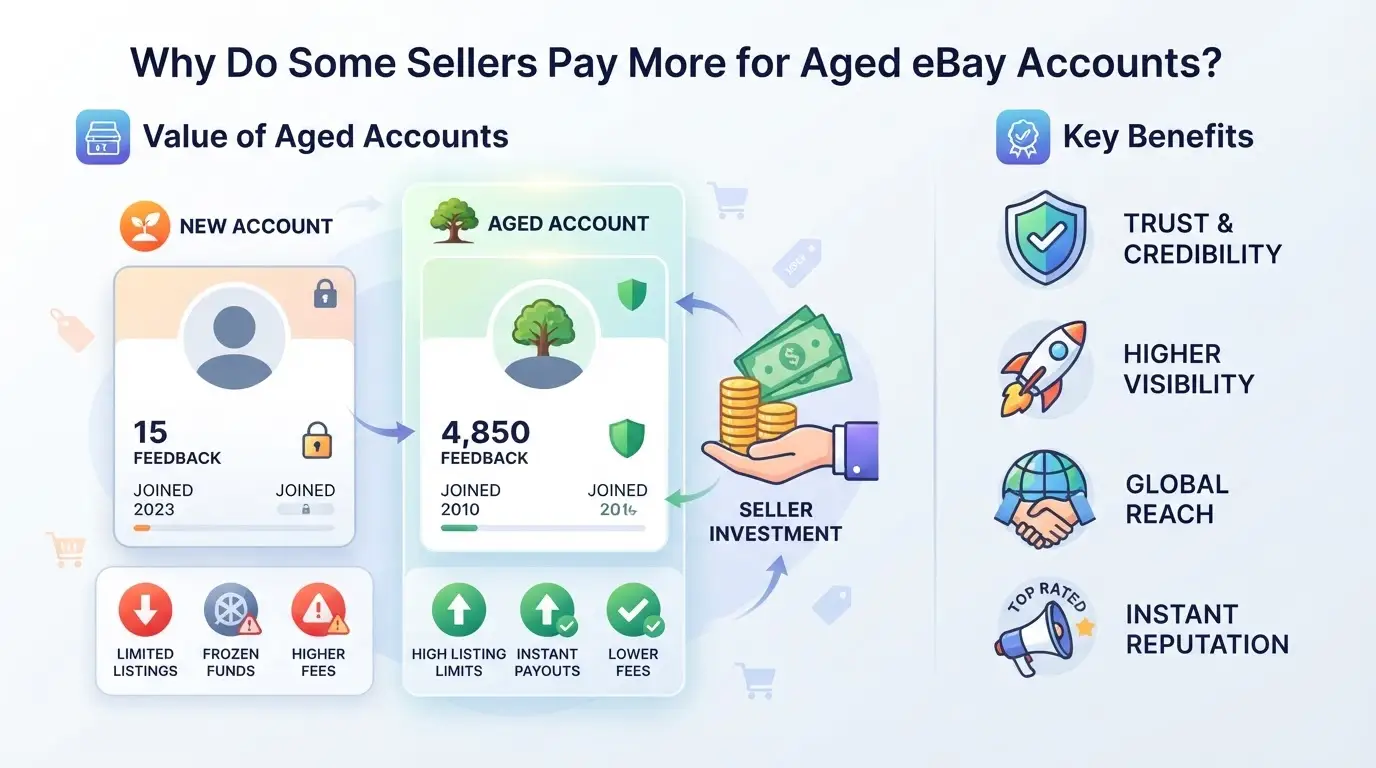
Sellers pay extra for old eBay accounts because these accounts can jump past annoying limits and build trust with buyers faster. The price difference isn’t just about age, it’s about what an older account can unlock or avoid in practice.
Trust, Feedback, and Selling Limits
Aged accounts often come with higher selling limits and a feedback trail that new accounts just can’t match. Buyers trust accounts with history, and eBay’s system gives them more room to list and sell items right away. For a seller, starting with a higher limit can mean thousands of dollars more in sales per month.
Risk of Suspension and Account Health
Older accounts can be less likely to get suspended on small mistakes because their history shows stability. But not every aged account is safer, if an account sat unused for years or picked up bad marks, it might trigger restrictions faster than a new one. For example, buying a 2018 account that was originally used for dropshipping can backfire if old policy violations still linger. Paying more only makes sense when the account’s history is clean and its feedback is real, not faked or bought.
When a New Account Is Actually Safer
Some situations make starting fresh the better call. Check these before paying a premium:
- The aged account has gaps in activity, sudden feedback bursts, or inconsistent IP history.
- The seller can’t prove the account’s login and recovery details will transfer fully.
- You plan to sell in a niche where past account activity could trigger extra scrutiny.
If any of these show up, a new account, though slower to ramp up, carries lower hidden risk. This is especially true when eBay’s fraud checks are tighter or when you need to control every detail from day one. The biggest mistake is assuming age alone makes an account safer or more profitable.
What Risks Do Sellers Face With Old and New eBay Accounts?
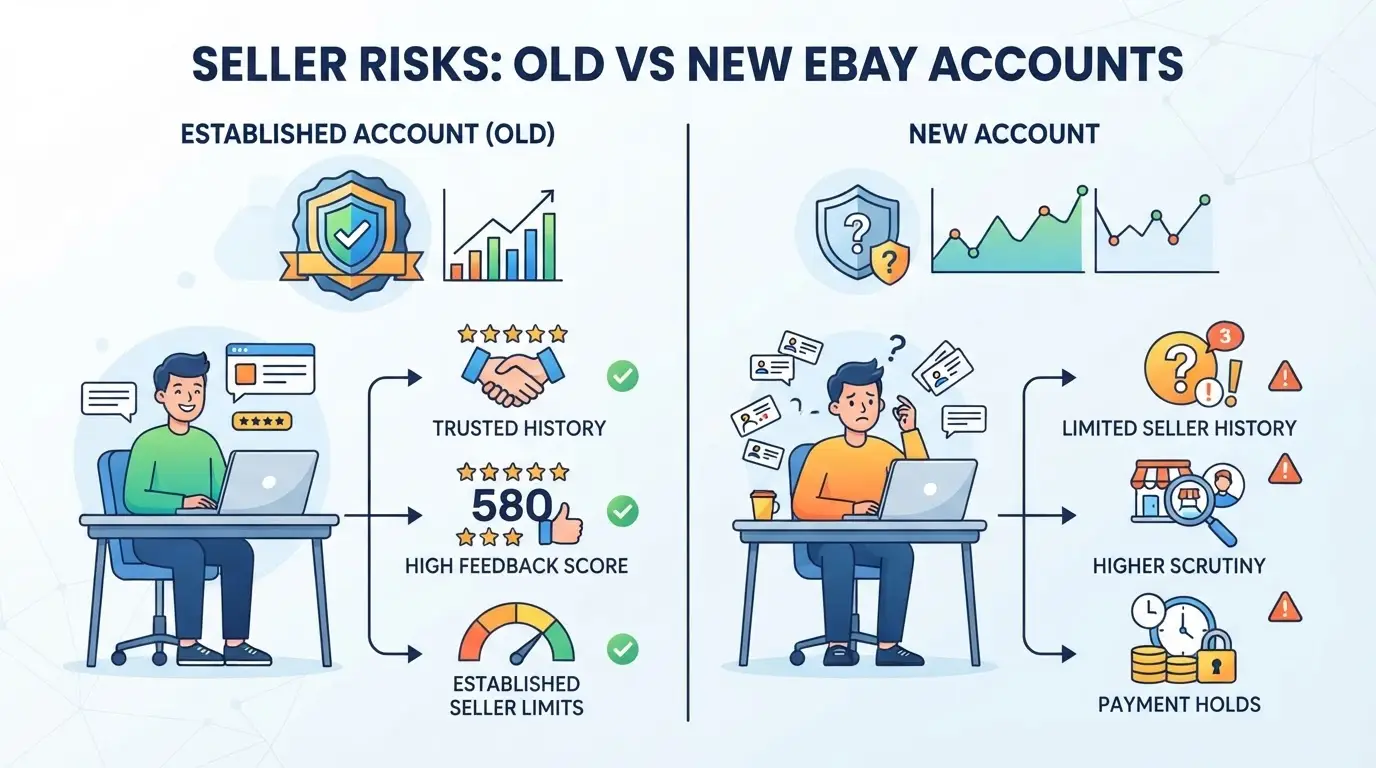
Sellers hit real trouble when they ignore how risk shifts between old and new eBay accounts. The traps aren’t just about age, they’re about how easily a slip can trigger bans, hold payouts, or waste months of effort.
Scams, Fake Accounts, and Marketplace Risks
Buyers of aged eBay accounts get burned most often by fake sellers or “recycled” accounts that already have a troubled history. The top scam is paying for an account that’s either locked, previously banned, or sold to multiple people at once. Even if login works, hidden restrictions or stealth bans can appear days later, usually after money or inventory is committed.
Instant Suspension and Verification Triggers
Aged accounts lull sellers into skipping basic checks. But eBay’s systems flag sudden changes, new IP, new device, or fresh product categories, no matter the account’s birth year. For example, if you buy a 2018 account and suddenly log in from another country, eBay can freeze it or demand full ID verification within hours. New eBay accounts face even less forgiveness: a single spike in listings or payment method changes is enough to trigger instant suspension. What’s missed is that both account types are now scanned for “impossible jumps”, like a zero-feedback account listing 100 items overnight, or an old account switching from books to high-risk electronics. Once flagged, getting reinstated is rare, and appeals often get automated rejections.
Account Linking and Multi-Account Risks
Sellers running more than one account see risk multiply, especially if they reuse any of the following:
- Same browser, device, or even a shared Wi-Fi network
- Overlapping contact info, address, or payment details
- Similar product listings, images, or descriptions
eBay’s backend cross-checks every login detail. If one linked account is banned, others often get swept up in the same action. Even a logged-out session or a background cookie can trigger detection. Old eBay accounts vs new eBay accounts both get caught by these linkages, but the damage is worse for sellers who invested in aged profiles hoping for stability, one misstep wipes out every connected account.
The next section will break down how eBay’s detection has changed in 2026, making these risks harder to avoid.
How Does eBay Detect Suspicious Account Activity in 2026?
eBay’s system doesn’t just look at account age, it tracks technical and behavioral signals to flag risky activity. Knowing how these checks work is the real difference between old eBay accounts vs new ebay accounts.
Device and Browser Fingerprinting
eBay records device type, browser version, screen resolution, and installed fonts. Changing these too often or using profiles that don’t match previous logins can trigger a review. Keeping a consistent fingerprint matters more than most sellers realize.
IP Address and Location Changes
Sudden jumps in IP address or logging in from a new country set off alerts, especially if the account never traveled before. Sellers who switch networks too quickly can end up restricted, even with a long-standing account. If your login city changes every week, expect a manual check.
Behavioral Patterns and Account History
- Multiple listings in a short time after months of inactivity
- Login times that don’t match past habits
- Old accounts suddenly acting like new sellers
These patterns get flagged, especially when combined with technical changes. Staying close to your usual activity helps avoid getting caught in automated reviews.
How Can Teams Manage Multiple eBay Accounts More Safely with DICloak?
After breaking down how eBay spots suspicious activity, the actual pain point for teams isn’t just about the old eBay accounts vs new eBay accounts debate. It’s how to keep each account’s browser session, network, and team access separate, without tripping platform signals. If you’re running multiple accounts as a team, piling everything into one device or browser profile is the mistake that gets accounts flagged for “linking”. Here’s how teams can use DICloak to keep accounts, network connections, and team roles clearly separated step by step.
Set Up Isolated Browser Profiles for Each eBay Account
The first step is to stop mixing accounts in the same browser profile. Teams can create a separate browser profile in DICloak for every eBay account. Each profile keeps its own storage, cookies, and browsing history. Operators can also configure fingerprint signals like user agent, language, time zone, and hardware info to match the intended use. This means when you switch between accounts, old or new, you’re not leaking session or device clues across profiles. The scope here is browser-level only; it doesn’t affect or manage anything inside eBay itself. 
Configure User-Provided Proxies for Each Profile
Once profiles are set, the next step is controlling the network path. Teams can assign a proxy to each DICloak profile, enter the proxy details, test the connection right in the setup, and confirm the exit IP before logging in. This keeps network signals separated for each account. Whether you use a proxy for aged or fresh accounts, the setup and testing must be handled by the operator. The decision of which proxy to use, and how often to rotate it, stays with the user; DICloak just stores and applies your settings. 
Control Team Access and Permissions
The last layer is setting who can do what. Admins can place team members into groups, then assign which browser profiles (and thus which eBay accounts) each group can access. Permissions control whether a member can just open a profile or also edit settings. Giving each team member only the access they need is what keeps accidental cross-account actions from happening. These controls only govern DICloak access, not eBay platform permissions or account rights. 
Done right, this workflow gives you a clean separation for every account and every operator. Before you add any new eBay account to your stack, though, you’ll want to double-check some key risks, see the next section for what to review first.
What Should You Check Before Using or Buying an eBay Account?
If you skip key checks, it’s easy to get stuck with hidden bans or control problems, no matter if the account is old or new. Before you commit, run through this list to catch the risks most sellers miss with both types.
Essential Checks for Account Health
- Review feedback and transaction history, scan for sudden drops, recent negatives, or gaps that could point to recent restrictions or misuse.
- Check for unresolved suspensions or limits, open the Resolution Center and seller dashboard. If you see any policy flags or appeal requests, walk away.
- Look for abnormal selling patterns, accounts with a burst of listings or sharp swings in sales can be flagged internally, even if you don’t see open cases.
Verification and Ownership Clarity
- Confirm email, phone, and ID status, make sure all verifications are up to date and tied to the current owner. Outdated or mismatched info often means you can’t recover the account if something goes wrong.
- Ask for proof of original ownership, if the seller can’t show registration emails or first-use device info, you’re likely buying a recycled or hijacked account.
Technical Consistency and Security
If login history doesn’t match the claimed location or you see logins from multiple countries, that’s a red flag.
- Check device and IP history, use browser/device data and ask the seller for a recent login screenshot.
- Look for signs of multi-account abuse, if multiple eBay accounts share the same device or proxy, both can get linked and restricted.
- Scan for recent password or security changes, too many changes in a short span often signal prior compromise.
Ready to compare all factors? The next section covers when building your own fresh eBay account is actually safer than buying an aged one.
When Is It Better to Build a New eBay Account Instead of Buying an Aged One?
If you need full control and can’t risk hidden problems, building a new eBay account is usually safer than buying an old one. Old eBay accounts vs new eBay accounts isn’t just about age, what matters is who controls the history and what baggage comes with it.
Advantages of Building New Accounts
| Factor |
New Account |
Aged Account |
| Ownership History |
Clean, only yours |
Unknown, may change |
| Hidden Bans/Shadow Limits |
None at start |
Possible, hard to check |
| Risk of Linked Accounts |
Low, if fresh setup |
Higher if resold |
A fresh account means no inherited restrictions or negative feedback hiding in the background. You set every detail, so you know exactly who had access and when.
When Aged Accounts Are Worth the Investment
If you need to skip new seller limits or join restricted categories fast, an aged account can help. Sellers scaling up often buy older profiles to avoid waiting months for higher selling limits.
Red Flags That Make Buying Risky
Don’t trust accounts with unclear ownership or prices that seem too low for the claimed stats. If you can’t verify who ran the account or spot odd gaps in the history, starting new is almost always safer than taking on someone else’s hidden risks.
Sometimes, the safest move is building your own account from scratch rather than gambling on someone else’s mistakes.
Frequently Asked Questions About old eBay accounts vs new ebay accounts
Is it legal to buy or sell old eBay accounts in 2026?
Buying or selling old eBay accounts isn’t illegal, but it breaks eBay’s policies. eBay prohibits transferring accounts between users. If caught, eBay can suspend or permanently ban the account. Legal trouble is rare, but platform risk is high. Always check eBay’s Terms of Service before considering old eBay accounts vs new eBay accounts.
Can I transfer feedback or selling limits from an old account to a new one?
No, feedback scores and selling limits stay with the original account. eBay does not allow moving this history between accounts. If you create a new account, you must build your feedback and limits from scratch. Even if accounts are linked, performance data cannot be transferred.
How many eBay accounts can I safely operate at once?
eBay lets users have multiple accounts as long as each follows the rules. You must keep separate email addresses and payment details. Avoid using accounts to avoid restrictions or manipulate feedback. Most sellers use two to three accounts for business and personal needs, but all must be managed honestly.
What signs suggest an aged eBay account might be risky to buy?
Watch for mismatched names or addresses, sudden gaps in activity, or feedback that seems inconsistent. If the seller can’t show proof of ownership, that’s a red flag. Accounts with recent negative feedback or little activity may also be risky. Check for verifiable login history and linked emails.
Can multiple team members use the same eBay account safely?
Sharing one eBay account among team members can trigger security flags. eBay may lock the account if it notices logins from different locations. For safer workflows, use tools that let teams manage listings without sharing passwords, or assign specific tasks to each member while keeping account access limited.
Whether you’re seeking credibility, better selling limits, or simply want a fresh start, the type of account you use can shape your experience and opportunities on the platform. Consider your goals, review your resources, and choose the account that best fits your needs for both short-term and long-term success. Try DICloak For Free
 Web Proxy Tools
 Free Tools
 Cookie Plugin
 UA Generator
 MAC Address Generator
 IP Generator
 IP Address List
 2FA Code Generator
 World Clock
 Anonymous Check
 WebRTC Leak Test
 UUID Generator
 Free Web Proxy Site
 Proxy Checker
 FB Ad Checker
 AI Web Scraping
 Free SMM Tools
 Twitter Shadowban Checker
 Instagram Name Checker
 UTM Generator
 Username Generator
 AI Hashtag Generator
 LinkedIn Headline Generator
 Social Media Image Resizer