Finding the right posts on X is not always easy. Many users try X Advanced Search, but still get weak, empty, or confusing results. In most cases, the problem is not the tool itself. The real issue is how the search is built. If you use the wrong filters, set the wrong date range, or make the query too narrow, useful posts can disappear fast. The good news is that it can work very well when you understand how it works. In this guide, you will learn the common mistakes to avoid, the best search methods to use, and simple ways to get better results in 2026.
Why Your X Advanced Search Isn't Yielding Results
Many people think X Advanced Search is broken when it returns weak or empty results. In many cases, the tool is not the real problem. The issue is how the search was built. X says its advanced search works by combining fields like words, exact phrases, hashtags, people, places, and dates. That means even one wrong filter can make your result set too small or too narrow. So if your X Advanced Search is not yielding good results, the problem may be your query, the filter mix, or a platform limit rather than a simple search error.
Common Mistakes Users Make with X Advanced Search
A very common mistake is adding too many conditions at once. For example, a user may search for an exact phrase, limit results to one account, add a date range, choose one language, and expect many posts to appear. But X Advanced Search only returns posts that match all those choices together. If one part is too strict, the full search may fail.
Another mistake is confusing a broad keyword with an exact phrase. For instance, searching AI marketing is not the same as searching "AI marketing". The first search can find posts where the two words appear apart. The second only finds that exact phrase. This matters a lot when you are trying to find a campaign post, a brand mention, or an old discussion. A simple fix is to start broad, review the first results, and then make the search tighter step by step. That method usually works better than building a very strict query from the start.
Users also often expect every post or account to appear in search. But the fact that is protected posts only appear to approved followers in search results. Also, sensitive content may be filtered by safe search, and that results are refined to surface content seen as more relevant and safe. So if you cannot find a post, it may still exist even if it does not appear in your current search results.

How Incorrect Filters Can Lead to Poor Outcomes
Wrong filters can quickly damage search quality. Let’s say you want to find public posts about a product launch in January 2026. If you set the wrong date range, search from the wrong account field, and add an excluded word that appears in most posts on that topic, your result page may look empty.
Here is a simple example. Imagine you want posts from a brand account that mentioned “launch day.” If you search for posts from that account, you will only see posts published by it. But if the brand mostly replies to users instead of posting original updates, your results may look thin. In that case, checking mentions or replies may work better. X separates these people-based fields for a reason: posts from an account, replies to an account, and posts mentioning an account are not the same thing.
Location filters can also mislead users. In real use, many posts do not include usable geotag data, so a place filter may remove relevant content you expected to see. The same issue can happen with language filters. If a post mixes English with another language, slang, or brand shorthand, it may not match the way you expect. A better habit is to test one filter at a time. First search the main words. Then add the account. Then add dates. Then test language or place only if needed. That gives you a cleaner path to better Search results.
Limitations of X Advanced Search
It is also important to understand that X Advanced Search has real limits. The platform filters results to reduce spam, duplicate content, automated posting, and other low-quality behavior. It may also filter accounts that post repeated or near-duplicate messages, use bots to post similar content, or push the same messages across many accounts. This means search is not a full archive of everything posted on X. It is a filtered discovery system.
That limitation matters for marketers, researchers, and casual users alike. For example, if a team runs many accounts and posts the same promo line again and again, some of that content may become harder to find in X search. So when people complain that X Advanced Search misses content, the reason may be content quality signals, spam reduction, or search policy rules rather than a technical failure.
Steps to Perform a Successful X Advanced Search
If your X Advanced Search has not worked well before, don’t worry. The key is to follow a simple process to build your search step by step. This helps you see what works and what needs to change.
Start with a Simple Keyword Search
Begin with a basic search. Type one or two main keywords in the X search bar. Do not add filters yet. For example, if you want to find posts about a product launch, just search:
product launch
This gives you a wide view. You can see how people talk about the topic. You may notice common phrases, hashtags, or brand names. These clues help you improve your next step.
Use Exact Phrases for Better Precision
Once you know the right wording, switch to exact phrases. Add quotation marks. For example:
"AI tools for business"
This tells X to find posts with that exact phrase. It removes unrelated results. This is very helpful when you track brand mentions, campaigns, or specific topics.
But be careful. Exact phrases can be too strict. If results become too few, remove the quotes and go back to a broader search.
Apply Filters One by One
Now you can start using filters in X Advanced Search. But do it slowly. Add one filter at a time.
For example:
- First, search your keyword
- Then add a specific account (From these accounts)
- Then add a date range
- Then test language or engagement filters
This method helps you see which filter changes the results. If you add everything at once, you won’t know what caused the problem.
Use Account and Mention Filters Correctly
Many users misuse the account filters in X Advanced Search. There are three different options:
- From these accounts → posts written by the account
- To these accounts → replies sent to the account
- Mentioning these accounts → posts that include the account name
These are not the same.
For example, if you search for customer feedback about a brand, you should use “mentioning”, not “from.” Otherwise, you will only see the brand’s own posts, not what users say.
Refine with Dates, Hashtags, and Engagement
After you get good basic results, you can refine further.
- Use date filters to focus on a time period
- Add hashtags if the topic uses them
- Try minimum likes or replies to find popular posts
For example, if you search for:
"product launch" + minimum 50 likes
You will see posts that had real engagement. This is useful for research, trend tracking, or content ideas. However, don’t overuse these filters. Too many limits can hide useful content. Always test and adjust.
Review and Adjust Your Search Strategy
A successful X Advanced Search is not a one-time action. It is a small process.
After each search, ask yourself:
- Are the results relevant?
- Are there too many or too few posts?
- Did any filter remove useful content?
Then adjust your search.
Comparing X Advanced Search Techniques for Best Outcomes
| X Advanced Search Technique |
What It Does |
Best Use Case |
Main Advantage |
Main Limitation |
| Broad Keyword Search |
Searches general words without quotes |
Exploring a topic for the first time |
Shows more results and gives a wider view |
Results may include irrelevant posts |
| Exact Match Search |
Searches a specific phrase in quotation marks |
Finding a slogan, brand mention, or fixed phrase |
More accurate and focused results |
Can be too narrow and miss related posts |
| Keyword Search |
Finds posts that use normal words or natural language |
Researching common discussions on a topic |
Covers more natural posts, even without hashtags |
May bring in mixed or less targeted results |
| Hashtag Search |
Finds posts using a specific hashtag |
Tracking events, trends, or campaign tags |
Good for finding grouped conversations |
Misses posts that discuss the topic without hashtags |
| Account-Based Search |
Searches posts from, to, or mentioning an account |
Brand monitoring, competitor tracking, customer feedback |
Helps you focus on specific users or brands |
Easy to misuse if you choose the wrong account filter |
| Topic-Based Search |
Searches by subject, phrase, or discussion theme |
Trend research and content discovery |
Better for understanding what people say about a topic |
May be harder to narrow down at first |
| Manual Search |
Uses the main X search bar without many filters |
Quick checks and fast exploration |
Simple and flexible |
Less control over precision |
| Filtered Advanced Search |
Adds filters like date, language, and engagement |
Deep research and more targeted search tasks |
Gives more precise and useful results |
Too many filters can remove helpful posts |
| Engagement Filter Search |
Filters posts by likes, replies, or other interactions |
Finding popular or high-performing posts |
Useful for spotting top content quickly |
May ignore useful low-engagement posts |
| Date Range Search |
Limits results to a specific time period |
Tracking discussions during a launch, event, or campaign |
Helps focus on recent or historical content |
Wrong date settings can hide relevant results |
In short, different X Advanced Search techniques work best for different goals. Broad searches help you explore, exact matches improve precision, and filters help refine results. The best outcomes usually come from combining these methods step by step.
How to Avoid Common Pitfalls in X Advanced Search
- Start broad, then refine slowly Do not add too many filters at once. Begin with simple keywords, then adjust step by step to improve your X Advanced Search results.
- Avoid overusing exact phrases Quotation marks are useful, but they can limit results too much. If results are too few, remove quotes and try a broader search.
- Use account filters correctly Know the difference between from, to, and mentioning. Choosing the wrong one can hide important posts.
- Check your date range carefully A wrong time filter can make it seem like no results exist. Always confirm your selected dates.
- Do not rely only on hashtags Many users do not use hashtags. Combine keyword search with hashtags for better coverage.
- Test one filter at a time Adding filters one by one helps you find which setting is causing poor results.
- Switch between Top and Latest results “Top” shows relevance, while “Latest” shows real-time posts. Using both improves your X search results.
- Review language and location filters These filters can remove useful posts if set too strictly. Use them only when needed.
- Be aware of safe search settings Some content may be hidden due to safety filters. If results look too limited, check your settings.
- Adjust based on results, not guesses After each search, review what you get and refine your query. Good X Advanced Search is a process, not a one-step action.
Tools and Features to Enhance X Advanced Search
To get better results from X Advanced Search, you do not always need a more complex query. Often, the best help comes from X’s built-in tools. After you run a search, you can switch between Top, Latest, People, Photos, and Videos. This helps you view the same topic in different ways. Top shows more relevant results, while Latest shows newer posts in time order.
Another useful feature is the search filter panel. On desktop, X lets you narrow results by people you follow, location, language, and Advanced Search options. This is helpful when your first results are too broad. Instead of changing the whole search, you can refine it step by step. X also lets users save searches, which is useful if you check the same topic often.
For deeper research, X Pro offers more advanced filters. It supports filters for keyword, date and time, media type, language, and minimum engagement. This can help you find stronger posts faster, such as posts with more likes or replies. At the same time, users should remember that X search has limits. X says not all content appears in search, because the platform filters some content for quality and safety.
Handling Edge Cases in X Advanced Search Scenarios
Sometimes X Advanced Search works well for normal topics but becomes harder when you search rare subjects, very large result sets, or uneven data. That is normal. X search does not show every public post in the same way. It filters results for relevance, safety, and quality, and some posts may also be hidden by account protection, safe search settings, or search-quality rules.
How to Search for Rare or Niche Topics Effectively
When a topic is rare, start with the widest useful keyword first. Do not begin with five filters at once. Search the main term, then test close variants, exact phrases, hashtags, and account mentions one by one. This works better because X Advanced Search supports all words, exact phrases, hashtags, accounts, places, and dates, but combining too many conditions too early can make results disappear.
A simple example is a niche product name or a small event tag. One search may return almost nothing, while a broader phrase or a related hashtag may reveal the real conversation. It also helps to switch between Top and Latest. Top shows more relevant posts, while Latest helps you catch smaller conversations that may not rank highly.
Strategies for Managing Large Data Sets in Searches
When a search returns too many posts, the best fix is to break the search into smaller groups. You can narrow by date range, media type, language, account, or minimum engagement. X Pro also supports filters for dates and time, media type, location, account type, and minimum likes, reposts, or replies, which can make large result sets much easier to review.
For example, instead of searching for one broad topic across a full year, split it into monthly or event-based windows. If you only want strong signals, filter for posts with a minimum number of likes or replies. That reduces noise and makes X Advanced Search more useful for research, trend checks, and campaign review.
Dealing with Inconsistent Data Across Searches
It is common to see slightly different results across searches, even when the topic looks the same. That can happen because X search uses relevance filters, safe search settings, blocked or muted account removal, protected-post limits, and quality controls against duplicate or spam-like content. X also says some low-quality or repetitive content may be removed from search to protect search quality.
The best way to handle this is to keep your method consistent. Use the same keywords, same date window, and same filter setup when you compare results. Save important searches when needed, and check whether safe search or account visibility settings are affecting what you see. This makes your X Advanced Search process more stable and helps you avoid wrong conclusions from uneven search results.
Enhancing X Advanced Search with DICloak Antidetect Browser
When teams use X Advanced Search for research, brand checks, or market tracking, the search method matters, but the browser setup matters too. In daily work, people often need a cleaner and more organized setup to manage repeated searches more smoothly. That is where DICloak can be helpful.
Managing Multiple Search Profiles Securely and Efficiently
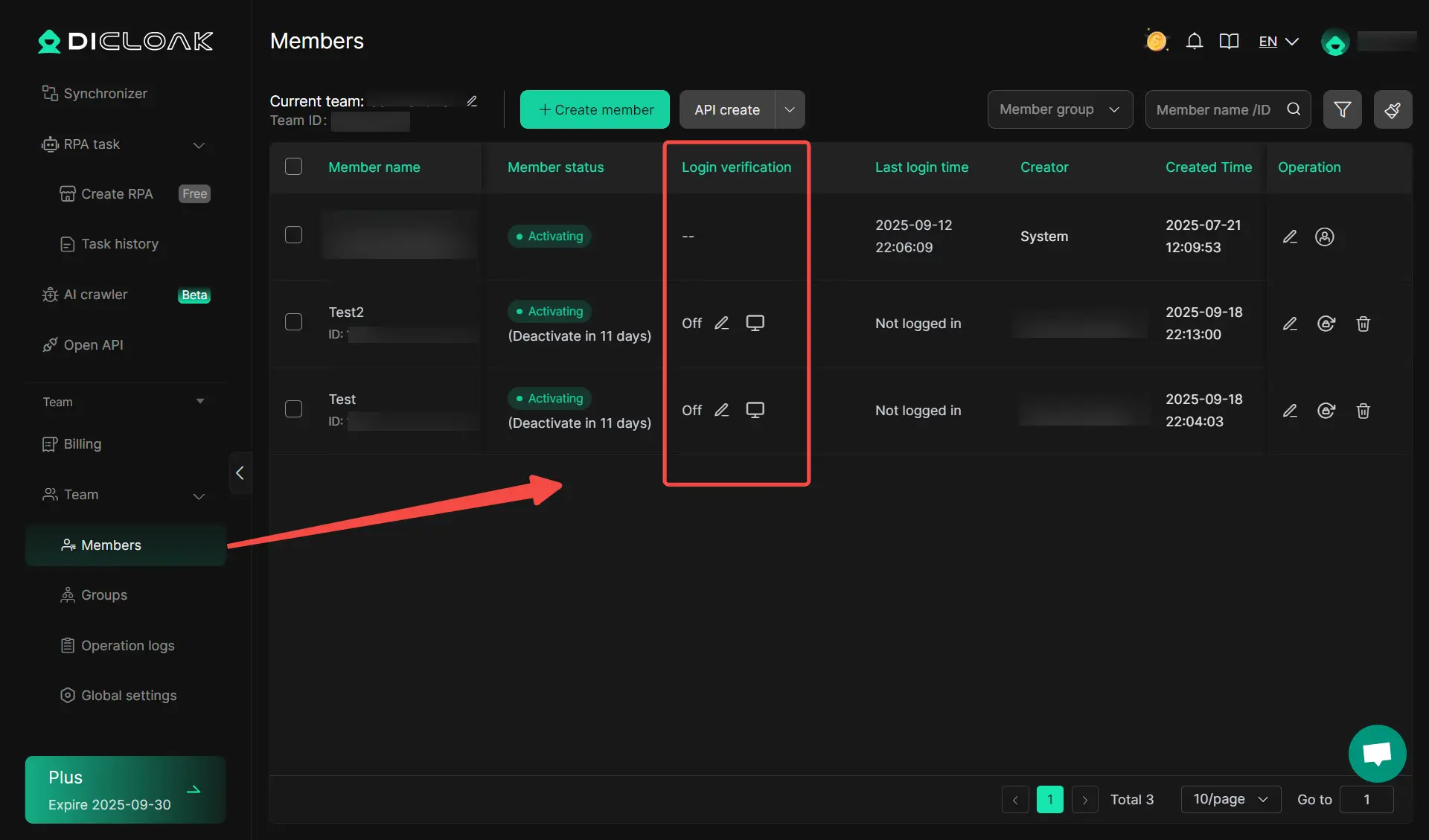
When people handle different search tasks on X, one browser session is often not enough. A researcher may want one profile for brand mentions, another for competitor tracking, and another for topic discovery. With DICloak, users can keep these activities in separate browser profiles instead of mixing everything together in one window.
This setup is useful for teamwork management as well. One team member may watch customer complaints, while another checks campaign keywords or trending posts. By keeping searches in separate profiles, users can manage different logins, cookies, and settings more clearly. This makes repeated X advanced search work easier to organize and easier to repeat over time.
Using Custom Proxies for Precise Location-Based Searches
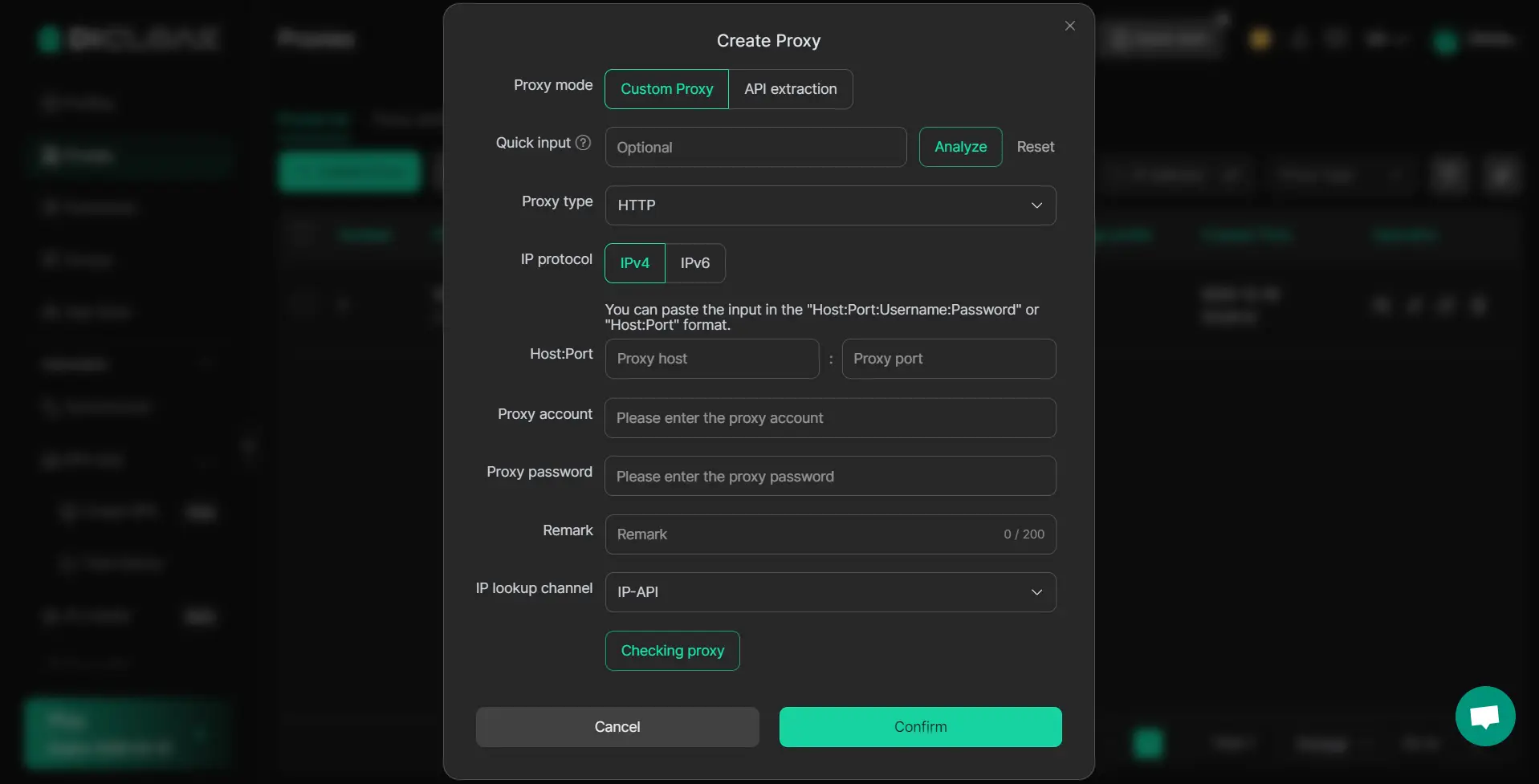
Location can affect what users see on X. For this reason, people doing local research often need a setup that matches a specific market or region. With DICloak, users can configure proxy for each browser profile, which gives them more control when they want a location-based search environment.
Streamlining Advanced Search with RPA Automation Tools
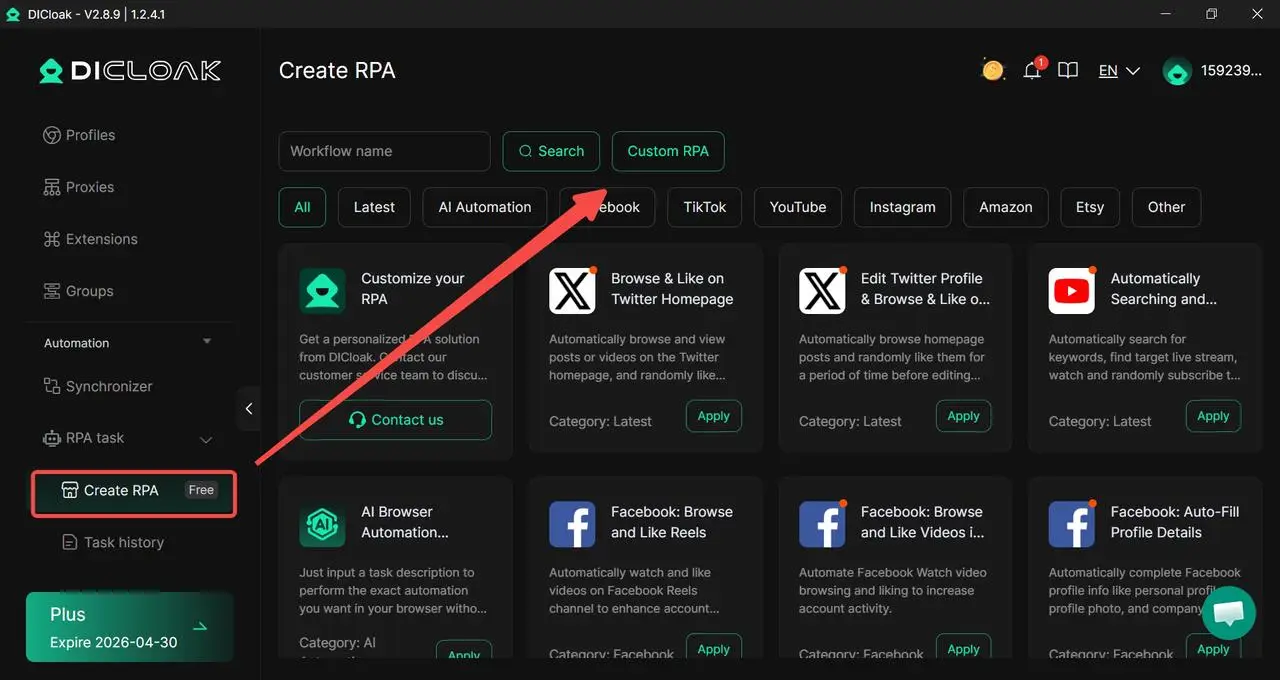
People who use X Advanced Search may search the same keywords every day, switch between Top and Latest, compare date ranges, or review multiple profiles in one session. Doing all of that by hand can take a lot of time.
With DICloak’s RPA and synchronizer tools, users can reduce some of that repeated work. For example, a researcher can set up a more consistent process for checking the same search terms each morning across multiple profiles. This does not replace human judgment, but it helps users work faster and keep their search steps more consistent.
FAQs
What Are the Best Practices for X Advanced Search?
The best way to use X Advanced Search is to start with a simple keyword search and then refine it step by step. X lets users narrow results by words, exact phrases, excluded words, hashtags, language, accounts, places, and dates, so it is easy to over-filter too early. Good practice is to begin broad, check the first results, and only then add one filter at a time. This usually gives cleaner and more reliable results.
How Can I Improve My X Advanced Search Results?
You can improve X Advanced Search results by testing different search types instead of relying on one query only. Try broad keywords first, then exact phrases, then switch between Top and Latest results. On desktop, X also lets you refine results by people, location, language, and advanced search fields. If your results look too thin, check whether safe search settings are hiding sensitive content or muted and blocked accounts.
What Features Are Often Overlooked in X Advanced Search?
Many users overlook helpful features like People filters, Place filters, date ranges, saved searches, and the option to switch between result tabs like Top, Latest, People, Photos, and Videos. On desktop, X also allows users to save a search for later, which is useful for repeated research. These small tools can make X Advanced Search much more effective without making the query more complicated.
Can X Advanced Search Be Used for Competitor Analysis?
Yes. X Advanced Search can be useful for competitor analysis because it lets users search posts from a specific account, posts replying to that account, and posts mentioning that account. This makes it easier to review a competitor’s content, check how people respond to it, and compare brand mentions over time. Adding date filters can also help users study campaign periods, product launches, or recent public reactions more clearly.
How Do I Troubleshoot X Advanced Search Errors?
If X Advanced Search seems broken, first check whether the problem is really the query. Empty or weak results often come from overly strict filters, wrong date ranges, or the wrong account field. X also notes that search results can be affected by safe search settings and search-quality rules. In some cases, content may be filtered out because it is sensitive, from muted or blocked accounts, or limited by search policies. A simple fix is to remove filters one by one and test the search again.
Conclusion
X Advanced Search is a useful tool, but good results depend on how you use it. When you start with broad keywords, add filters slowly, and understand the limits of the platform, search becomes much more effective. It also helps to compare different search methods, use built-in X features, and stay consistent when checking results. For users who need to manage repeated searches across different profiles or regions, a more organized browser setup can also make the work easier. With the right method, X Advanced Search can help you find better insights, save time, and get more value from X in 2026.
 Web Proxy Tools
 Free Tools
 Cookie Plugin
 UA Generator
 MAC Address Generator
 IP Generator
 IP Address List
 2FA Code Generator
 World Clock
 Anonymous Check
 WebRTC Leak Test
 UUID Generator
 Free Web Proxy Site
 Proxy Checker
 FB Ad Checker
 AI Web Scraping
 Free SMM Tools
 Twitter Shadowban Checker
 Instagram Name Checker
 UTM Generator
 Username Generator
 AI Hashtag Generator
 LinkedIn Headline Generator
 Social Media Image Resizer