Twitter (now X) search looks simple at first, but finding useful and unbiased results is much harder in 2026. Personalized rankings, search filters, account limits, and detection systems can all affect what you see. For marketers, researchers, and analysts, this means a basic search is often not enough.
In this guide, we will look at how Twitter search really works, how to use advanced search tools and operators, and how to build a safer workflow for large-scale research. We will also explain how isolated browser profiles and tools like DICloak can help make multi-account search more stable and efficient.
Understanding the Mechanics of Twitter Search Personalization
In the landscape of 2026, Twitter’s search architecture is fundamentally optimized for consumer discovery rather than professional data acquisition. This optimization introduces a significant algorithmic bias through the "Top" results filter. This mechanism delivers content curated by the platform’s internal model, which weighs engagement metrics, account behavior, geographic location, and language settings. For a cybersecurity analyst or market researcher, this creates a personalized feedback loop that obscures objective data.
Conversely, "Latest" results prioritize chronological indexing based on the raw timestamp of the post. The technical distinction is critical: the "Top" algorithm is a curation engine that prioritizes content with high velocity and engagement-to-impression ratios, whereas "Latest" is a direct view into the index's raw data stream. Relying on "Top" results during real-time event monitoring can lead to "data blindness," where critical updates with low initial engagement are filtered out in favor of older, high-engagement posts. Switching to "Latest" is the standard industry protocol to ensure data integrity during timeline-sensitive investigations.

Leveraging the Twitter Search Advanced UI for Rapid Discovery
The built-in advanced search interface serves as a functional entry point for precision filtering. It provides dedicated fields to isolate specific parameters without requiring the immediate input of manual syntax. The "Exact Phrase" field is particularly vital for monitoring brand slogans, legal disclaimers, or specific quotes where word order is non-negotiable.
Furthermore, the interface provides "Engagement" filters, allowing analysts to establish minimum thresholds for likes, replies, and reposts. This capability is essential for signal-to-noise ratio optimization.
Pro Tip: For signal-to-noise ratio optimization in competitor research, set engagement filters to a high threshold (e.g., minimum 500 likes). This allows the analyst to bypass high-frequency promotional noise and identify the specific content that triggered meaningful community reaction or brand crisis.
Master Class in Twitter Search Operators and Syntax
Manual operators are the technical "keyboard shortcuts" required for professional-grade data mining. These commands allow for complex, logic-based queries that exceed the capabilities of the standard UI.
| Category |
Operator |
Technical Description |
| Logic |
“phrase” |
Forces an exact match for the quoted string. |
| Logic |
OR |
Combines multiple keywords to return results for either term. |
| Account |
from:[handle] |
Filters content authored by a specific account. |
| Account |
to:[handle] |
Filters posts sent as a reply to a specific account. |
| Account |
@[handle] |
Captures any mention of the target account. |
| Timeframe |
since:YYYY-MM-DD |
Filters results from a specific starting date. |
| Timeframe |
until:YYYY-MM-DD |
Filters results up to a specific end date. |
| Media |
filter:media |
Isolates posts containing images or videos. |
| Media |
filter:links |
Isolates posts containing outbound URLs. |
| Language |
lang:[code] |
Restricts the result set to a specific language (e.g., lang:ja). |
Advanced Syntax for Intent-Based Keyword Filtering
Professional queries utilize negative constraints and boolean logic to refine search intent. A standard query for "Brand Health" monitoring would appear as follows: “Brand Name” (complaint OR issue OR broken OR scam) -filter:links
This syntax identifies organic user dissatisfaction by targeting the exact brand name alongside negative sentiment keywords. By applying -filter:links, the analyst effectively scrubs promotional spam, automated news feeds, and bot-driven marketing that traditionally relies on outbound URL redirection.
Executing Precision Twitter Search by Date for Timeline Audits
"Twitter search by date" is the core methodology for verifying public statements or conducting forensic timeline audits. This can be managed via the UI date pickers or the since: and until: operators.
However, analysts must account for temporal variance. Date boundaries are indexed based on platform timezones, which may not align with the target region's local time. In a "Receipt Audit" scenario—where an analyst must locate a post within a specific 48-hour window—the standard operating procedure for data integrity is to expand the search parameters by 24 hours on either side of the target dates. This 72-hour expanded window mitigates risks associated with indexing lag and global timezone offsets.
Specialized Techniques for Twitter Image Search and Video Discovery
Visual intelligence is gathered through the filter:media operator, which forces the engine to ignore text-only posts. This is exceptionally efficient for auditing a competitor's visual branding or identifying unauthorized asset usage.
To execute an exhaustive audit, an analyst should combine syntax with UI navigation:
- Input the query (e.g.,
from:[competitor] filter:media).
- Once results are rendered, manually navigate to the "Photos" or "Videos" tabs that appear in the interface. This two-step workflow ensures that the search results are not only filtered for media but are also categorized by the specific asset type for rapid review.
Diagnostic Failure Modes and Search Restrictions
Professional search workflows often encounter technical roadblocks. Identifying the specific diagnostic failure mode is necessary for remediation:
- Over-filtering: The use of excessive operators can create a null set where no post satisfies every strict constraint. If zero results appear, remove filters sequentially to restore visibility.
- Rate Limiting: High-frequency, automated-style requests from a single IP or account can trigger platform restrictions. This results in a temporary suspension of search access.
- Log-out Restrictions: Conducting a "Twitter search without an account" is increasingly unstable. Non-authenticated sessions often face login walls, restricted search depth, and lower indexing priority.
Mitigating Search Visibility and Protocol Breaches
Account reputation and "Safe Search" settings can act as invisible filters. If specific content is missing, the analyst must verify that privacy settings are adjusted to allow "sensitive content" and that "Safe Search" is deactivated. Failure to adjust these settings may lead to incomplete data sets during investigations.
Strategic Workflows for Multi-Account Twitter Search at Scale
Scaling market intelligence requires managing hundreds or thousands of profiles to monitor different geographic regions simultaneously. This introduces the risk of "fingerprint collision" or leakage. The platform identifies and links accounts through sophisticated browser fingerprinting, including Canvas, WebGL, and the modern WebGPU parameter. Furthermore, consistency in IP address and screen resolution is used to map multiple accounts to a single operator.
Reducing Detection Risk with Isolated Browser Profiles
To manage 100+ accounts without triggering mass bans, analysts must use isolated digital profiles. This requires masking or customizing specific parameters—including the user agent, geolocation, and WebGPU data—for every individual profile. Utilizing a dedicated antidetect tool prevents the platform from associating different research sessions with the same device.
Pro Tip: To maintain account longevity, implement strict network isolation protocols. Ensure that proxy types (HTTP/SOCKS5) remain consistent for each unique profile; shifting proxy protocols mid-session is a high-risk indicator of automated activity.
Automating Research with RPA and Synchronizer Tools
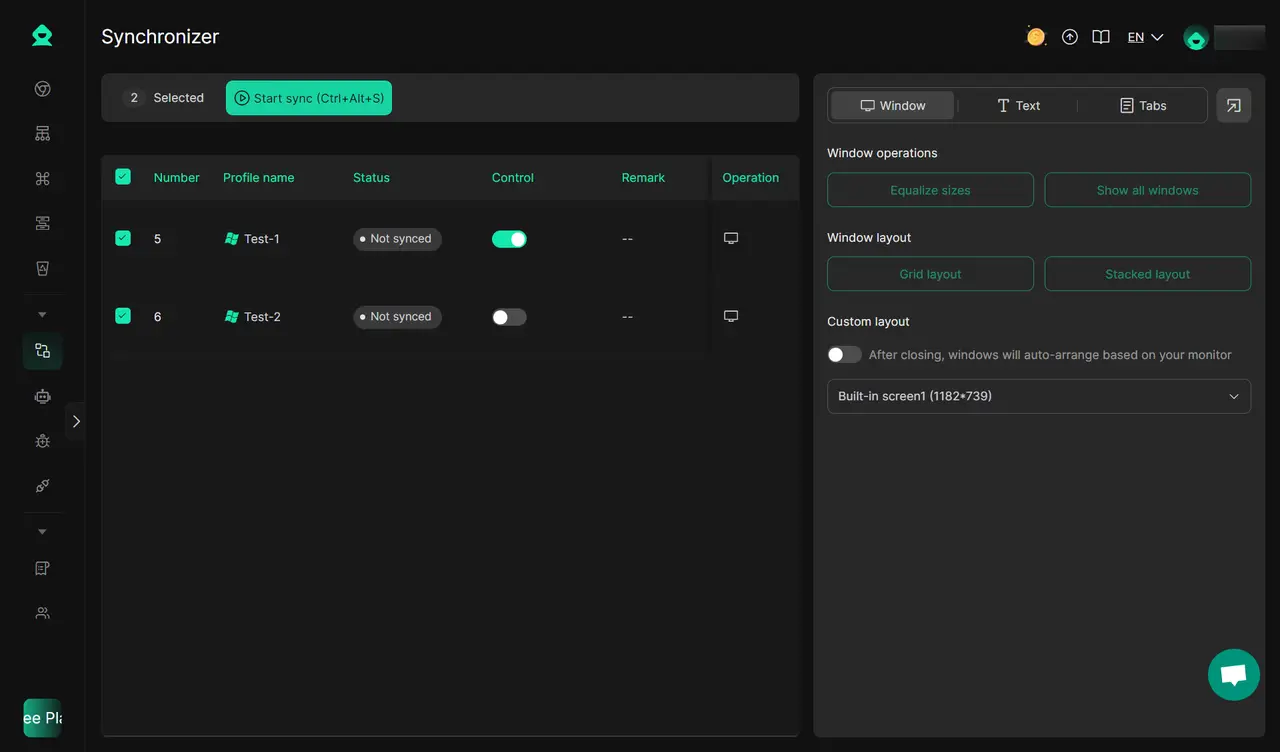
Repetitive monitoring tasks are best handled through Robotic Process Automation (RPA).
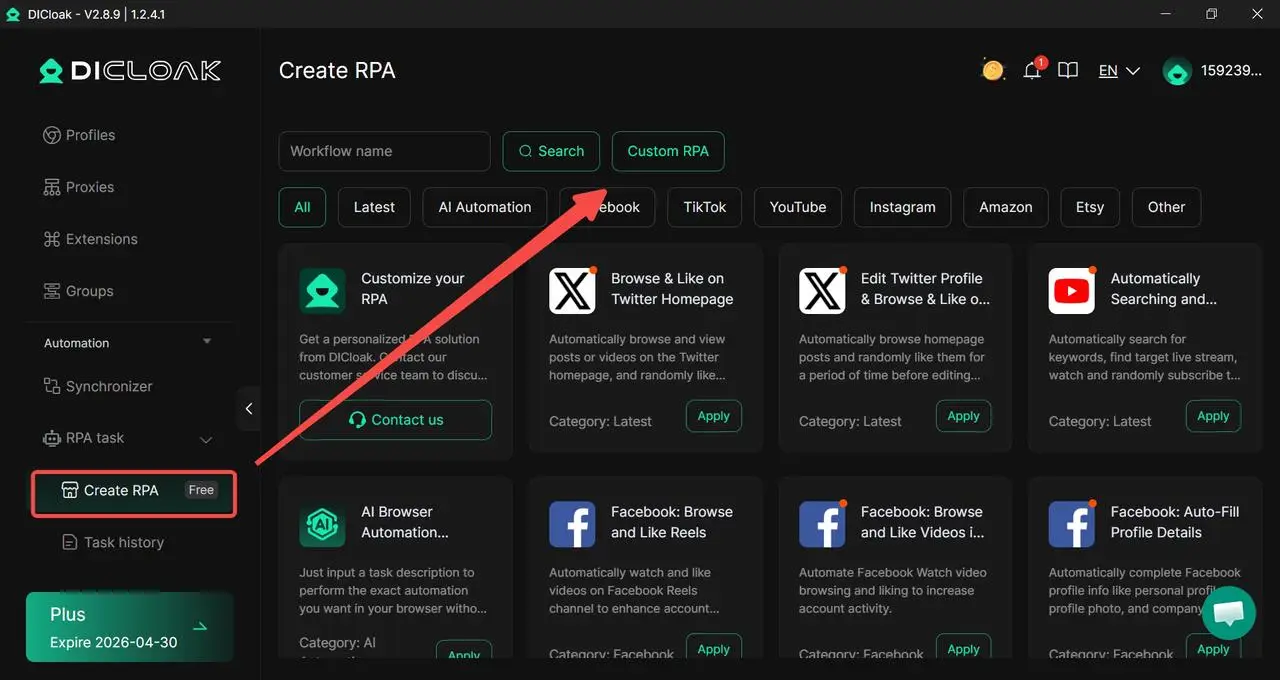
Multi-window synchronizers allow an analyst to execute search and engagement tasks across dozens of profiles in parallel. For example, an affiliate marketer might use RPA to monitor niche hashtags across 50 accounts, using the synchronizer to ensure rapid, simultaneous engagement with potential leads as they emerge.
Evaluating Professional Tools for Twitter Search Infrastructure
Standard browsers are insufficient for large-scale social listening because they leak a unified digital fingerprint across all tabs. Professional infrastructure requires a specialized solution.
| Parameter |
Standard Browser |
DICloak Antidetect Browser |
| Browser Core |
Varied |
Optimized Chrome Core |
| Fingerprint Control |
Fixed/Leaked |
Customizable (Canvas, WebGL, WebGPU) |
| OS Simulation |
Host OS Only |
Windows, Mac, iOS, Android, Linux |
| Proxy Management |
System-wide |
Individual HTTP/HTTPS/SOCKS5 per profile |
| Team Operations |
Manual/Shared Logins |
Permission-based sharing (Unlimited Seats) |
Operational Advantages of DICloak for Digital Growth
DICloak provides the technical infrastructure required for secure, high-volume Twitter intelligence:
- Scale: Support for managing 100+ accounts on a single workstation.
- Team Collaboration: The Share+ Plan offers unlimited seats, allowing teams to share profiles and session progress without credential leakage.
- Simulation Depth: Mimics diverse profiles including Linux, alongside mobile and desktop OS variants.
- Automation: Integrated RPA and AI Crawler templates for market research and data extraction.
Professional Analysis of DICloak Features
- Pros: Based on the reliable Chrome core for maximum compatibility; provides encrypted storage for cookies and credentials; highly cost-efficient by eliminating the need for separate hardware.
- Cons: Requires the sourcing of high-quality proxies; RPA logic requires a baseline technical understanding for custom workflow creation.
Conclusion
The evolution of Twitter search from 2024 to 2026 has transformed it into a complex professional intelligence asset. Success in this environment requires a dual-pronged approach: the mastery of advanced operator logic for precision discovery and the deployment of robust infrastructure like DICloak. By neutralizing algorithmic bias and mitigating fingerprint leakage through isolated browser profiles, researchers can maintain operational security while scaling their market intelligence to a global level.
Frequently Asked Questions About Twitter Search Optimization
Why do search results vary significantly between different accounts?
This is a result of algorithmic bias. Twitter personalizes "Top" results based on your account's specific engagement history, geographic location, and language settings. For objective intelligence, utilize isolated browser profiles with neutral fingerprints.
How can I search for content from a group of competitors at once?
Use the OR logic combined with the from: operator. Example: (from:competitor1 OR from:competitor2) "product launch". This aggregates data from multiple sources into a single stream.
Can I conduct an advanced search without a Twitter account?
While limited search is sometimes possible via the web, the depth of results is severely restricted for logged-out users. Authenticated sessions within isolated profiles provide the most stable data access.
Does clearing my search history change my results?
Clearing history removes local records but does not reset the account's underlying algorithmic personalization. Only using fresh, isolated profiles can guarantee unbiased results.
How can I get more accurate and real-time Twitter search results?
Use the “Latest” tab instead of “Top” to see posts in time order. You can also use advanced operators like since: and until: to narrow results. This helps avoid missing new or low-engagement posts during fast-moving events.
 Web Proxy Tools
 Free Tools
 Cookie Plugin
 UA Generator
 MAC Address Generator
 IP Generator
 IP Address List
 2FA Code Generator
 World Clock
 Anonymous Check
 WebRTC Leak Test
 UUID Generator
 Free Web Proxy Site
 Proxy Checker
 FB Ad Checker
 AI Web Scraping
 Free SMM Tools
 Twitter Shadowban Checker
 Instagram Name Checker
 UTM Generator
 Username Generator
 AI Hashtag Generator
 LinkedIn Headline Generator
 Social Media Image Resizer