Privacy online is no longer a small concern. Every website visit, search, and click can leave a trace. Because of this, many people turn to Tor browser and ask one simple question: Is Tor browser safe?
Tor is often described as a powerful privacy tool, but it is also surrounded by confusion and myths. Some people believe it makes them completely anonymous. Others think it is dangerous or illegal. The truth sits somewhere in between.
This guide explains what Tor browser really does, how safe it is in real life, and when it makes sense to use it. You will learn its strengths, its limits, and the common mistakes that reduce safety. By the end, you will have a clear and practical answer to Is Tor browser safe, and know whether it fits your own privacy needs.
Understanding Tor browser
Before deciding is Tor browser safe, it helps to first understand what Tor browser is and how it works at a basic level. Many safety questions come from confusion about what Tor can protect and what it cannot. This section explains the core idea in simple terms.
What is Tor browser?
Tor browser is a free browser made for privacy. It is built by the Tor Project, a nonprofit group that focuses on online freedom and safety. The browser helps hide your real IP address when you visit websites. Instead of showing where you are, sites see an IP from the Tor network.
When people ask is Tor browser safe, they often expect full protection. Tor browser does one main job very well. It hides your network location and makes tracking harder. It does not control what you share by choice. If you type personal details or log in to a real account, Tor cannot stop that site from knowing who you are.
For example, imagine you are using public Wi-Fi in a café. Without Tor, the network owner can often see which sites you visit. With Tor browser, your traffic is mixed with many other users. This makes it much harder to link those visits back to you. But if you sign in to your main email account, the email service still knows it is you, because you logged in yourself.
This is why Tor browser is often described as a privacy tool, not a magic shield. Your safety depends on how you use it.
How Does Tor Work?
Tor works through a system called onion routing. Your internet traffic does not go straight from your computer to a website. Instead, it passes through several servers, called relays, run by volunteers around the world.
The process has three main steps.
- First, your traffic goes to a guard relay. This relay can see your IP address, but it does not know which website you will visit.
- Next, the traffic moves through a middle relay. This relay only passes data along and has no clear view of who you are or where you are going.
- Finally, the traffic exits through an exit relay. The website sees the exit relay’s IP address, not yours.
A simple way to picture this is sending a message through several locked boxes. Each stop opens only one box and forwards the rest. No single stop can see the full path.
This design is key when asking is Tor browser safe, but there is an important detail. Tor encrypts your data inside its network. The final connection, from the exit relay to the website, depends on the website’s own security.
For example, when you visit a site that uses HTTPS, your data stays encrypted all the way to the site. This protects what you read and send. If you visit an old site that only uses HTTP, the last part of the connection is not encrypted. That is why Tor browser uses HTTPS-Only Mode by default. It helps reduce this risk and makes everyday browsing safer.
Understanding this flow helps set realistic expectations. Tor browser is strong at hiding where you come from, but smart habits are still needed to stay safe.
Who Should Use Tor browser and When Is Tor browser Safe?
After understanding how Tor browser works, it becomes easier to answer is Tor browser safe. The browser is not meant for every task. It works best when privacy is needed and when users know its limits.
Journalists and Whistleblowers
For journalists and whistleblowers, is Tor browser safe depends on careful use. Tor browser helps hide the user’s IP address while researching sensitive topics or communicating with sources. This reduces simple network tracking.
For example, a reporter reviewing public documents on restricted networks may use Tor to avoid linking that activity to a work or home IP. Tor is safest here when personal accounts are not used at the same time.
Users Facing Network Restrictions
Some users turn to Tor when access to websites is limited by local networks. In these cases, is Tor browser safe often means safe access to information.
Tor browser can help reach news, learning platforms, or global websites that are blocked by network rules. It works best for reading and research, not for sharing personal details.
Privacy-Conscious Individuals
Many people ask is Tor browser safe because they want more privacy in daily browsing. Tor helps reduce tracking, especially on public Wi-Fi or shared networks.
For example, someone researching health or financial topics may prefer Tor to keep searches separate from their real location. Tor is safest when used for browsing, not for logging into main email or banking accounts.
Developers and Researchers
Developers and researchers use Tor browser to test privacy protection and network behavior. In these cases, is Tor browser safe depends on separating testing from personal use.
Used with clear purpose and good habits, Tor browser offers strong location privacy. It works best when users understand what it protects and what it does not.
Is Tor browser Safe? Key Security and Anonymity Concerns
After learning who should use Tor browser, it is time to look closer at safety itself. Many readers still ask is Tor browser safe because they hear both praise and warnings. The short answer is that Tor browser can be safe for privacy, but only if you understand its limits and risks.
Anonymity vs. Privacy: What You Need to Know
When people ask is Tor browser safe, they often mix up anonymity and privacy. These are related, but not the same.
Anonymity means hiding who you are and where you connect from. Tor browser does this by masking your IP address. Privacy means protecting what you do and what data you share. Tor helps with privacy, but it cannot control your actions.
For example, Tor can hide your location when you read articles or visit forums. But if you log in with your real email or name, anonymity is lost. You chose to reveal it. This is why Tor browser is strongest for reading, research, and browsing, not for identity-based services.
Advantages and Disadvantages of Tor browser
When users ask is Tor browser safe, they usually want to know both the benefits and the limits. Tor browser has clear strengths, but it also comes with trade-offs.
Advantages of Tor browser
- Stronger anonymity: Tor hides your real IP address. Websites and network providers cannot easily see where you are or link visits together. This makes tracking much harder.
- Reduced tracking and fingerprinting: Tor browser blocks many scripts and fingerprinting methods by default. All users look very similar, which helps protect identity.
- Access across restricted networks: Tor can help reach websites that are blocked by local network rules or regional limits.
- Safer on public Wi-Fi: On shared networks like cafés or hotels, Tor makes traffic analysis more difficult and reduces passive monitoring.
- Free and open source: Tor browser is free to use. Its code is public and reviewed by security experts, which increases trust.
Disadvantages of Tor browser
- Slower browsing speed: Traffic passes through several relays. Pages load more slowly, especially videos or large files.
- Exit node limitations: If a website does not use HTTPS, data leaving the Tor network may not be encrypted. This is why HTTPS-Only Mode is important.
- Risk from user behavior: If users log into personal accounts or share real details, anonymity can be lost. Tor cannot prevent this.
- Website restrictions: Some websites block or limit access from Tor exit IPs. Extra checks or errors are common.
For example, a user reading news on Tor may notice slower loading and occasional access warnings. This is normal. It is the cost of stronger privacy. Understanding these pros and cons helps users decide when is Tor browser safe and when a regular browser may be enough.
Common Vulnerabilities of Tor browser
Even though Tor browser is designed for safety, it is not perfect. Knowing common risks helps users stay realistic when asking is Tor browser safe.
IP and DNS Leaks
Tor browser is built to prevent IP and DNS leaks by default. The Tor Project has designed it to route all traffic through the Tor network. In normal use, leaks are rare.
Problems usually appear when users change settings or install extra software. For example, opening links in another browser or running external apps can expose the real IP address. This is why Tor browser strongly advises users to keep default settings and avoid extra tools.
Risks of Malicious Exit Nodes
Tor traffic leaves the network through exit nodes. These nodes can see traffic sent to non-encrypted websites.
For example, if a user visits a site that does not use HTTPS, data may be visible at the exit point. This does not reveal the user’s identity, but it can expose page content. To reduce this risk, Tor browser uses HTTPS-Only Mode by default. This is a key reason is Tor browser safe depends on using modern, secure websites.
Malware Risks Associated with Tor
Tor browser itself is not malware. It is based on Firefox and maintained by a nonprofit organization. However, risk comes from what users download or open.
For example, downloading files and opening them outside Tor browser can expose real network details. This is why the Tor Project warns against opening downloaded documents while online. Tor is safest when used for browsing, not file handling.
Taken together, these points explain why is Tor browser safe does not have a simple yes or no answer. Tor browser offers strong protection for network identity. But real safety depends on how it is used, what sites are visited, and whether users respect its limits.
Legal and Ethical Considerations
After looking at technical risks, many users also wonder is Tor browser safe from a legal and ethical point of view. These concerns are common, but often misunderstood.
Is Using Tor Legal?
In most countries, using Tor browser is legal. Tor is a privacy tool, not illegal software. People use it to read news, do research, or protect privacy on public Wi-Fi.
For example, using Tor browser in a café or hotel to avoid tracking does not break the law in many regions. However, rules can differ by country. Some places may restrict access to Tor or watch its traffic more closely. This does not make Tor unsafe by default, but users should understand local laws.
Common Misconceptions About Tor browser
Many myths affect how people answer is Tor browser safe.
A common belief is that Tor is only used for harmful activity. In reality, Tor is a neutral tool. Its safety depends on how it is used, just like any browser.
Another misunderstanding is that Tor makes users invisible. Tor hides IP addresses, but it cannot protect users who share personal details or log into real accounts.
Understanding these facts helps users see that Tor browser can be safe and ethical when used responsibly and with clear limits in mind.
Is Tor browser Safe Compared with Other Privacy Tools?
After clearing up legal concerns, many users still ask is Tor browser safe when compared with other privacy tools. The answer depends on how each tool works and what kind of protection you need. Different tools solve different problems.
Tor vs. Proxy: Which is More Secure?
A basic proxy only changes your visible IP address. It sends your traffic through one server. This can help bypass simple blocks, but it offers limited protection.
Tor browser works differently. It sends traffic through several relays and hides your location more effectively. No single relay knows both who you are and where you go. This makes tracking harder than with a single proxy.
For example, if you use a free web proxy on public Wi-Fi, the proxy operator may still see your traffic. With Tor browser, traffic is split across the network. This is why, in many cases, is Tor browser safe has a stronger answer than “is a proxy safe.”
That said, Tor is slower and may not work well for all websites. Proxies are simpler, but they provide less protection.
Alternatives to Tor browser
Tor browser is not the only privacy tool, and it is not always the best fit. When users ask is Tor browser safe, they are often comparing it with other options that balance privacy, speed, and ease of use.
Common alternatives include:
- I2P (Invisible Internet Project): I2P is an anonymous network similar to Tor but designed mainly for internal services and peer-to-peer communication. It offers strong encryption but is less suitable for normal web browsing.
- Freenet: Freenet focuses on anonymous data storage and sharing. It is built to resist content removal, not for everyday browsing. For most users, it is more complex than Tor.
- Privacy-focused browsers: Some browsers block trackers and reduce fingerprinting by default. They are faster and easier than Tor, but they do not hide your IP address in the same way. For light privacy needs, they may be enough.
- Brave with Tor tabs: Brave allows opening private tabs that route traffic through the Tor network. This is convenient for quick use, but it does not offer the same isolation level as Tor browser.
- Antidetect browsers like DICloak: DICloak focuses on browser fingerprint isolation rather than network routing. Each profile has a separate digital identity, which helps prevent cross-account tracking. For example, users who need speed, stable sessions, and strong fingerprint control may prefer DICloak over Tor. In this case, is Tor browser safe becomes less about anonymity and more about whether Tor’s speed limits are acceptable.
In short, Tor browser offers deeper network anonymity, while tools like DICloak focus on fingerprint control and usability. The safest choice depends on your goal, your risk level, and how much speed and convenience you need.
A Practical Alternative: Why Use DICloak Antidetect Browser for Controlled Privacy?
When discussing is Tor browser safe, it becomes clear that Tor browser focuses on hiding network paths. However, some users face a different privacy challenge. They need to keep multiple online sessions separate, stable, and hard to link over time. This is where DICloak antidetect browser fits naturally into the conversation.
DICloak is designed for users who need controlled privacy rather than anonymous routing. Instead of sending traffic through a relay network like Tor, it allows users to work inside isolated browser profiles, each with its own identity. This approach helps reduce tracking that happens through browser fingerprints, cookies, and session data.

How users can use DICloak in practice:
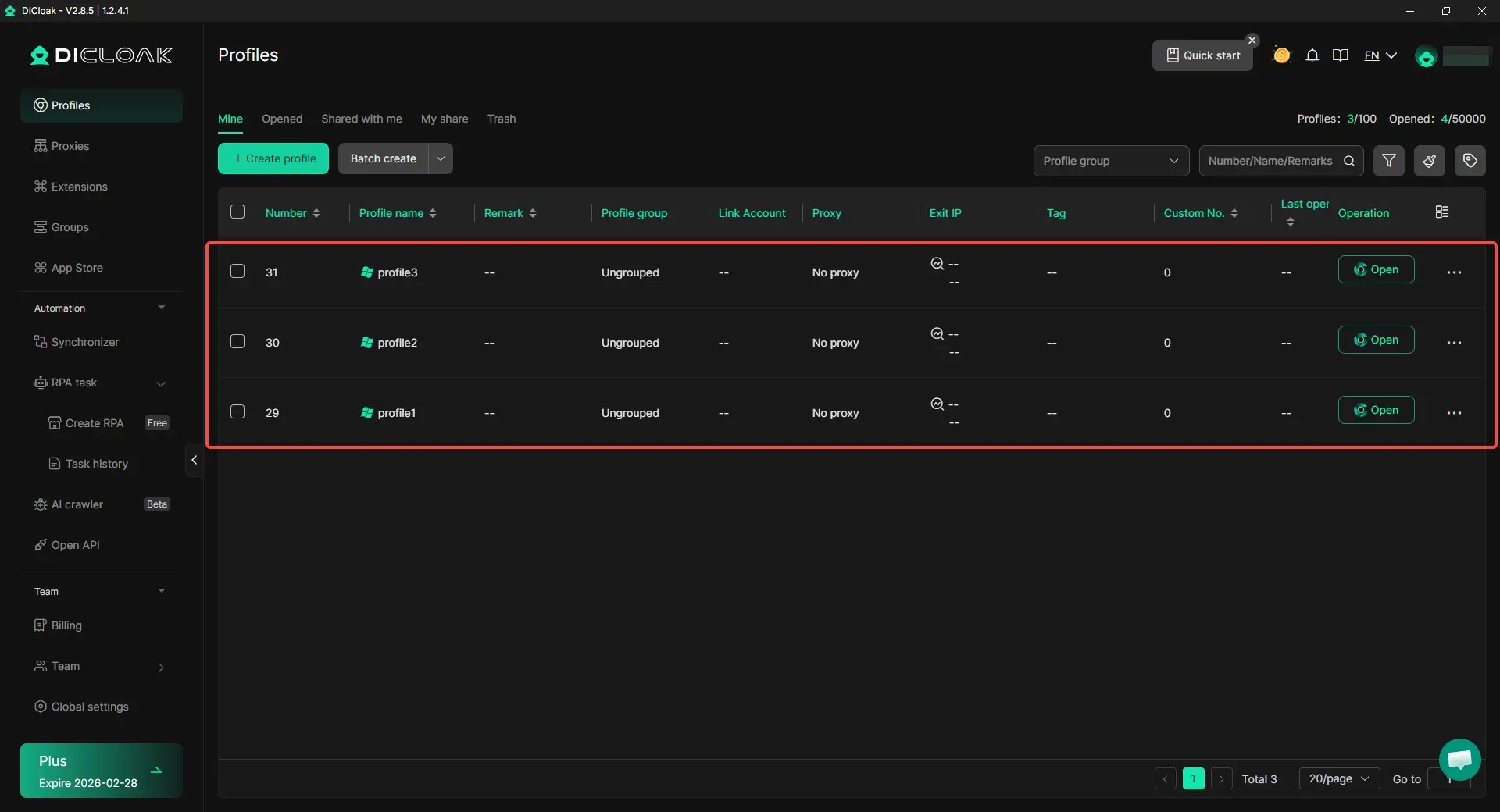
- Profile isolation: Each browser profile runs as a separate environment. Cookies, cache, local storage, and session data do not mix. This helps reduce the risk of websites from linking different accounts or activities together.
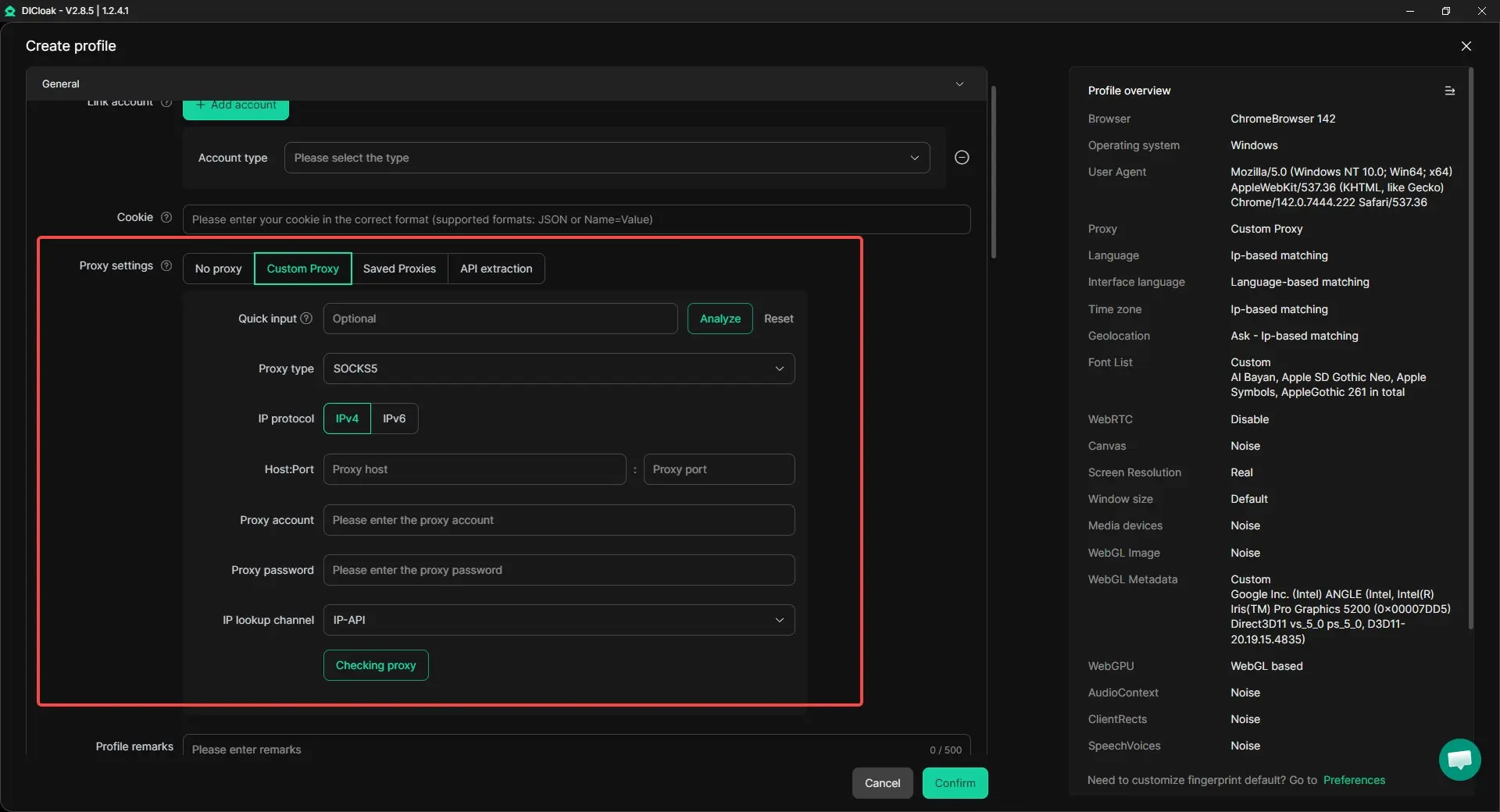
- Custom proxy configuration: Users can assign a different proxy to each profile. This makes the IP address and location consistent within that profile, which is important for long-term account stability.
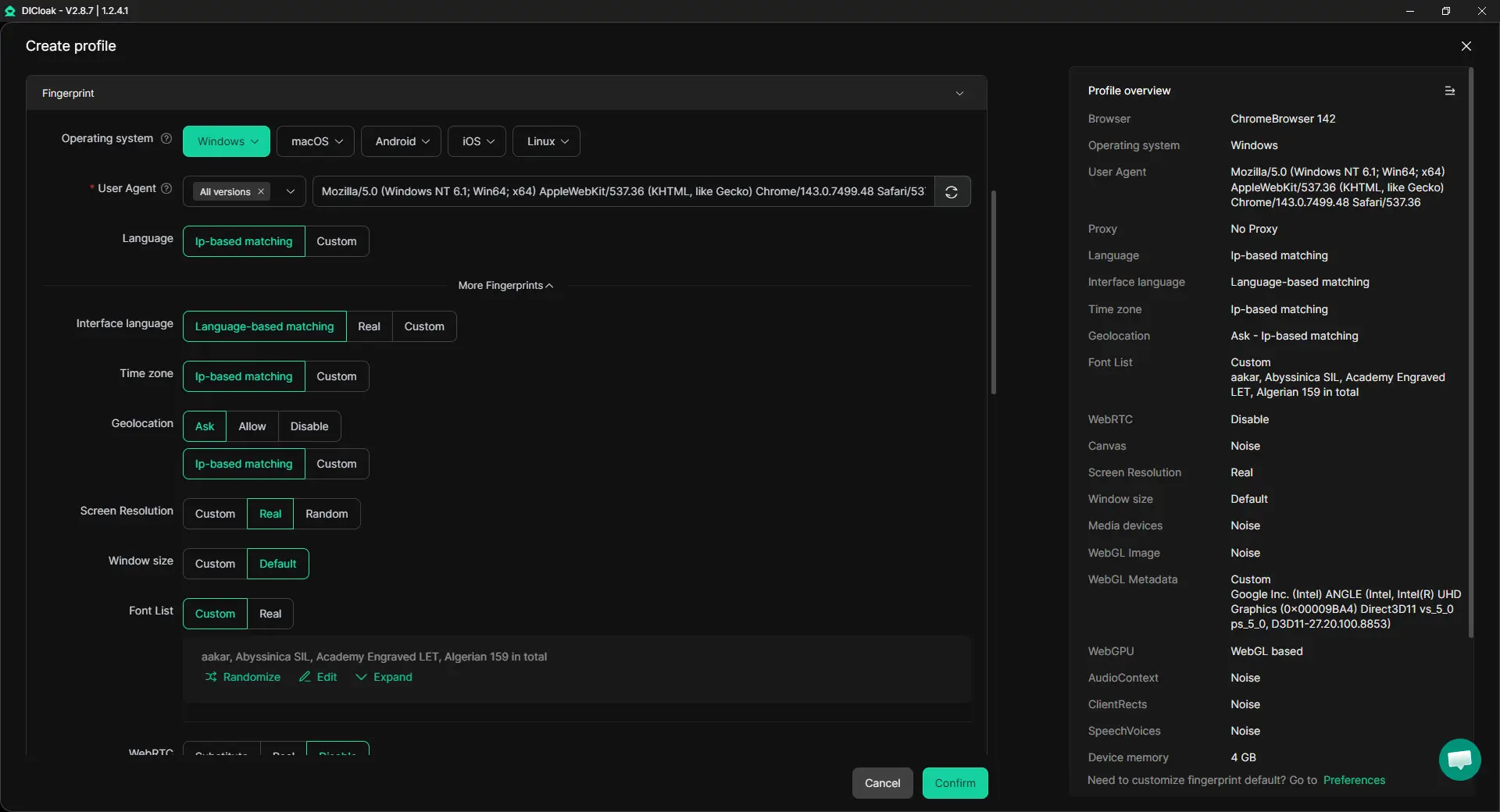
- Independent browser fingerprints: Each profile presents a unique set of browser signals. This reduces cross-profile tracking based on device or browser characteristics.
- Stable and fast sessions: Because traffic is not routed through multiple relays, pages load at normal speeds. Long logins and daily operations remain stable.
- Built-in automation tools for multi-profile workflows: Repetitive actions can be automated across multiple isolated profiles using built-in tools such as workflow automation, window synchronization, and AI-assisted data collection. This reduces manual work while keeping sessions separate and consistent.
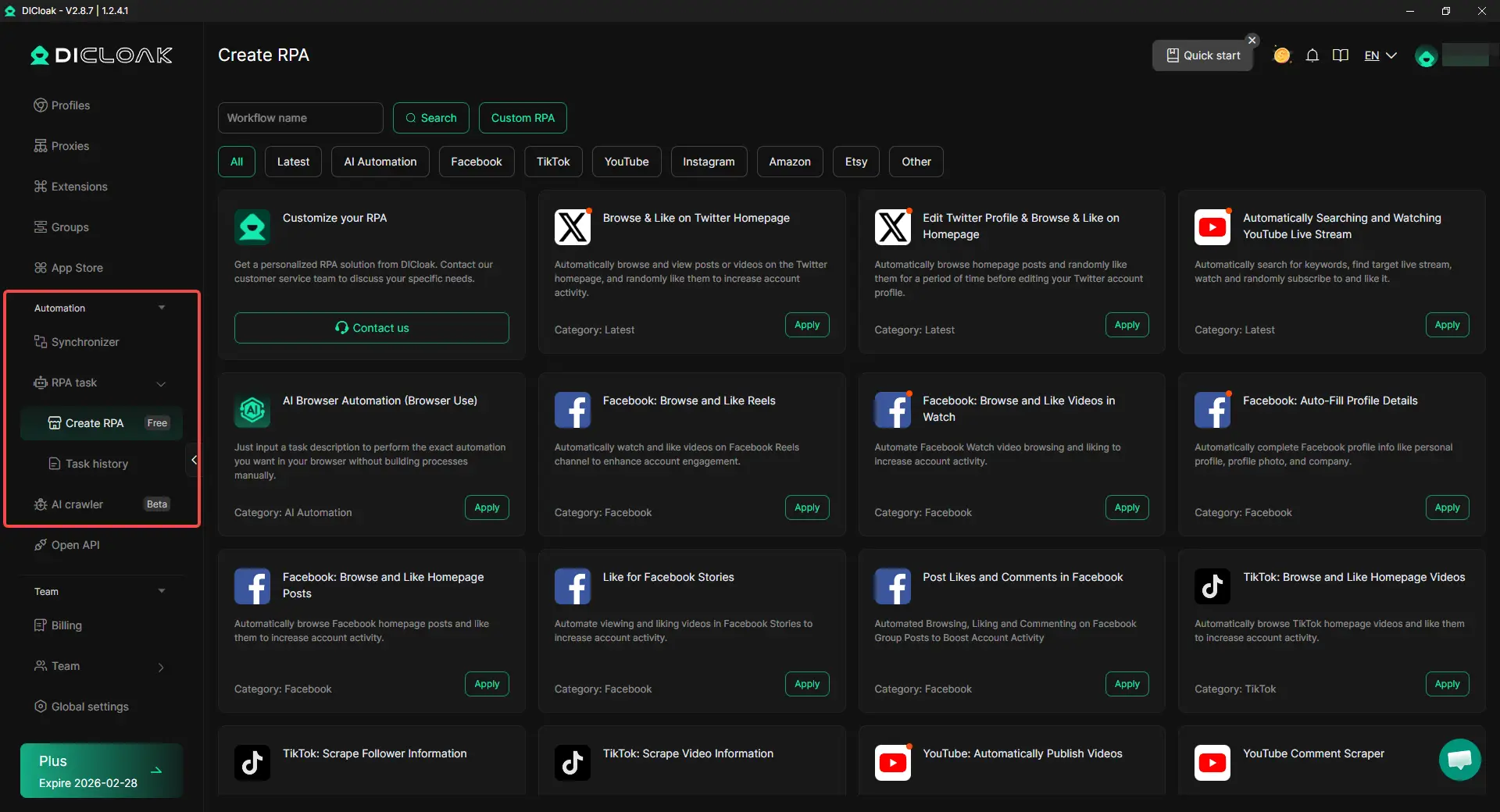
For example, a user managing several online accounts can open each one in a separate isolated profile with its own proxy. Even when accounts are used on the same computer, platforms see them as independent sessions. This reduces accidental linkage that can happen in standard browsers.
In this context, is Tor browser safe becomes a question of purpose. Tor browser remains strong for short-term browsing and hiding network origin. DICloak, on the other hand, supports privacy through identity separation and profile control, which suits users who need speed, consistency, and long-term session management.
Both tools serve privacy, but they solve different problems. Choosing the right one depends on whether the goal is anonymous browsing or structured, isolated online work.
Best Practices for Safe Usage of Tor browser
After comparing different privacy tools, many users still ask is Tor browser safe in real use. The answer depends less on the tool itself and more on how it is used. Simple habits can greatly reduce risk. Tor browser is built for privacy, but user actions still matter.
- Avoiding Personal Accounts: Do not log into personal email, social media, or work accounts. Logging in reveals your identity, even if Tor hides your IP. This is why is Tor browser safe often depends on staying logged out.
- Disabling Browser Plugins: Extra plugins can expose system details and weaken protection. Tor browser blocks most add-ons by default. It is safest to keep it that way.
- Using HTTPS Connections: Tor encrypts traffic inside its network, but websites must also support HTTPS. HTTPS-Only Mode helps protect data at the exit point. This makes a big difference when asking is Tor browser safe.
- Regular Updates for Security: Always use the latest version. Updates fix security issues and reduce known risks.
Used carefully, this approach does not replace Tor’s anonymity. Instead, it strengthens operational safety by reducing exposure before and after the Tor session. For users who want structured privacy and better session control, combining Tor with isolated environments like those provided through DICloak can help maintain safer browsing habits.
Conclusion: Is Tor browser Safe?
Tor browser helps protect privacy by hiding your IP address and reducing online tracking. It is most useful for browsing, research, and using public networks. When used this way, many users find that is Tor browser safe has a positive answer.
However, Tor is not a complete solution. It cannot protect users who log into personal accounts, install plugins, or open downloaded files. Slower speeds and website blocks are also part of the trade-off.
In the end, is Tor browser safe depends on how and why it is used. With clear limits and careful habits, Tor browser can be a safe and effective privacy tool.
Frequently Asked Questions (FAQs)
Is Tor browser Safe for Everyday Browsing?
Is Tor browser safe for everyday browsing depends on how you use it. Tor browser is safe for reading news, doing research, and reducing tracking. It hides your IP address and limits fingerprinting. However, it is not ideal for logging into personal accounts or daily work tools. For normal browsing, Tor is safe when used with care and clear limits.
Is Tor browser Safe on Public Wi-Fi?
Many users ask is Tor browser safe on public Wi-Fi. In most cases, yes. Tor browser can reduce the risk of local network monitoring. It hides your traffic path and makes tracking harder. Still, users should avoid personal logins and always use HTTPS websites. Tor helps, but safe habits matter.
Is Tor browser Safe Compared to a Regular Browser?
Compared to standard browsers, is Tor browser safe often has a positive answer for privacy. Regular browsers share more data by default. Tor browser blocks many trackers and hides location. The trade-off is speed and website compatibility. Tor is safer for privacy, but less convenient for daily tasks.
Can Tor browser Guarantee Complete Anonymity?
No. Is Tor browser safe does not mean total anonymity. Tor hides your IP address, but it cannot protect users who share personal details or log into real accounts. Anonymity depends on behavior. Tor reduces risk, but it does not remove responsibility.
Is Tor browser Safe to Use Long Term?
Is Tor browser safe for long-term use depends on purpose. For long research sessions and privacy-focused browsing, it can be safe. For long-term account management or daily work, Tor may be unstable or slow. In those cases, tools with isolated environments and custom proxy control may be more practical.
 Web Proxy Tools
 Free Tools
 Cookie Plugin
 UA Generator
 MAC Address Generator
 IP Generator
 IP Address List
 2FA Code Generator
 World Clock
 Anonymous Check
 WebRTC Leak Test
 UUID Generator
 Free Web Proxy Site
 Proxy Checker
 FB Ad Checker
 AI Web Scraping
 Free SMM Tools
 Twitter Shadowban Checker
 Instagram Name Checker
 UTM Generator
 Username Generator
 AI Hashtag Generator
 LinkedIn Headline Generator
 Social Media Image Resizer