You start researching a new tool or open a fresh browser tab, and within seconds, the site knows what city you’re in, what device you’re using, and sometimes even links your visit to past sessions. That’s the power, and headache, of ip tracking in 2026. Most platforms log IP addresses as soon as you connect, making it hard to stay anonymous or manage multiple accounts without leaving a digital trail.
But just blocking cookies or switching browsers won’t stop tracking IP addresses. Even if you clear your browser data daily, a basic IP location lookup will still show where your connection comes from and can link your actions across sessions. Some sites go further, using an IP tracker to spot patterns or flag risky logins, especially if your IP jumps countries too fast or rotates in ways that look suspicious.
What trips up most users is thinking that hiding your IP is enough. In practice, the real risk comes from how IP changes interact with browser fingerprints and other session data. Use the wrong type of proxy, or mix up your login routines, and you can end up triggering more red flags than if you’d just stuck with your original address. The right workflow for handling IP tracking isn’t about being invisible, it’s about knowing which signals matter to the sites you use, and how to keep them separate.
Here’s what actually happens when a site tracks your IP, and what you can do to control the story.
What Does IP Tracking Actually Mean in 2026?
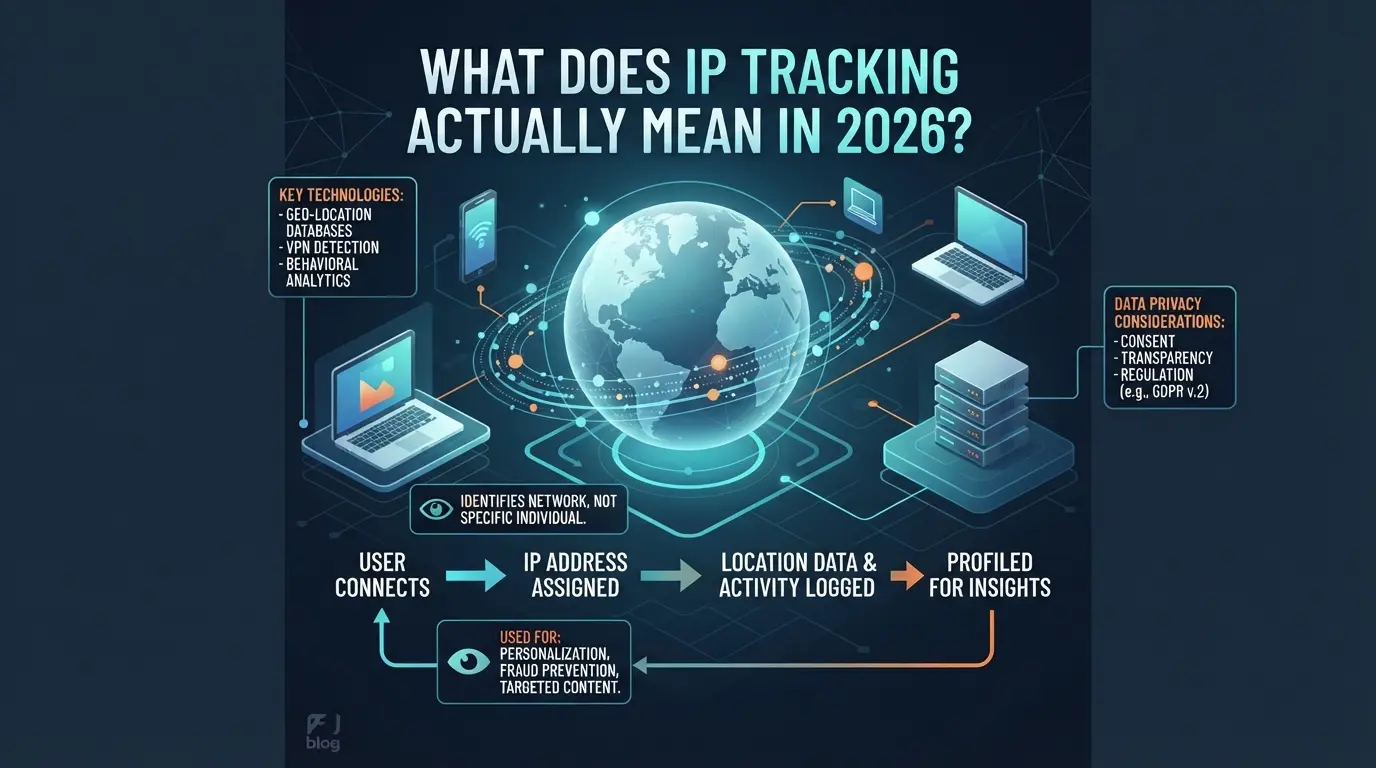
Sites don’t just look at your IP to see where you’re logging in from, they use it as a live signal to connect sessions, spot automation, and filter out patterns that break their rules. The point isn’t about catching “bad actors” in theory, but about linking your activity and making risk judgments every time there’s a mismatch or surprise.
What Information Can Be Revealed by IP Tracking
A single IP check gives away more than just rough location. It shows where your traffic exits, the type of network (home, mobile, corporate), and sometimes the device or service provider. One quick lookup can flag if you’re using a known proxy, if your address jumps between cities too fast, or if your session matches a blocklisted range.
How IP Addresses Are Assigned and Used
Not all IP addresses work the same way. Public IPs are what websites see, each device on your home network usually shares one, assigned by your internet provider. Private IPs only matter internally, like your laptop’s 192.168.x.x at home. Addresses can be static (never changing) or dynamic (shifting every few days or after a router reboot). Most home users get dynamic IPs, which seem safer for privacy but can backfire: if your IP flips mid-session, a site may log you out or block you for “suspicious activity.” Static IPs give you predictable access, but make you easier to track across platforms and over time. The real catch is with mobile data and shared networks, if dozens of users cycle through the same public IP in a day, sites have to rely on extra signals to tell who’s who. That’s why IP alone rarely tells the whole story, but still acts as the front-line filter for most detection systems.
Typical Use Cases for IP Tracking
- Security & Fraud: Spotting impossible logins (like one account accessed from two countries within minutes) or blocking mass registrations from the same address.
- Marketing & Analytics: Building user location heatmaps, tracking campaign reach, or personalizing offers by region.
- Account Management: Enforcing country restrictions, limiting concurrent logins, or flagging bulk actions tied to one address.
Sites use these checks to sort out normal traffic from the rest. But as detection gets smarter, the chance of a false flag rises, especially when your IP changes in ways that don’t match typical user behavior.
The real risk isn’t that your IP “leaks,” but that changes or patterns in your address get cross-referenced with logins, browser fingerprints, and session activity. Next, it’s worth looking at the most common mistakes and privacy pitfalls that come with relying on these signals alone.
Why IP Tracking Gets Risky: Common Mistakes and Privacy Pitfalls
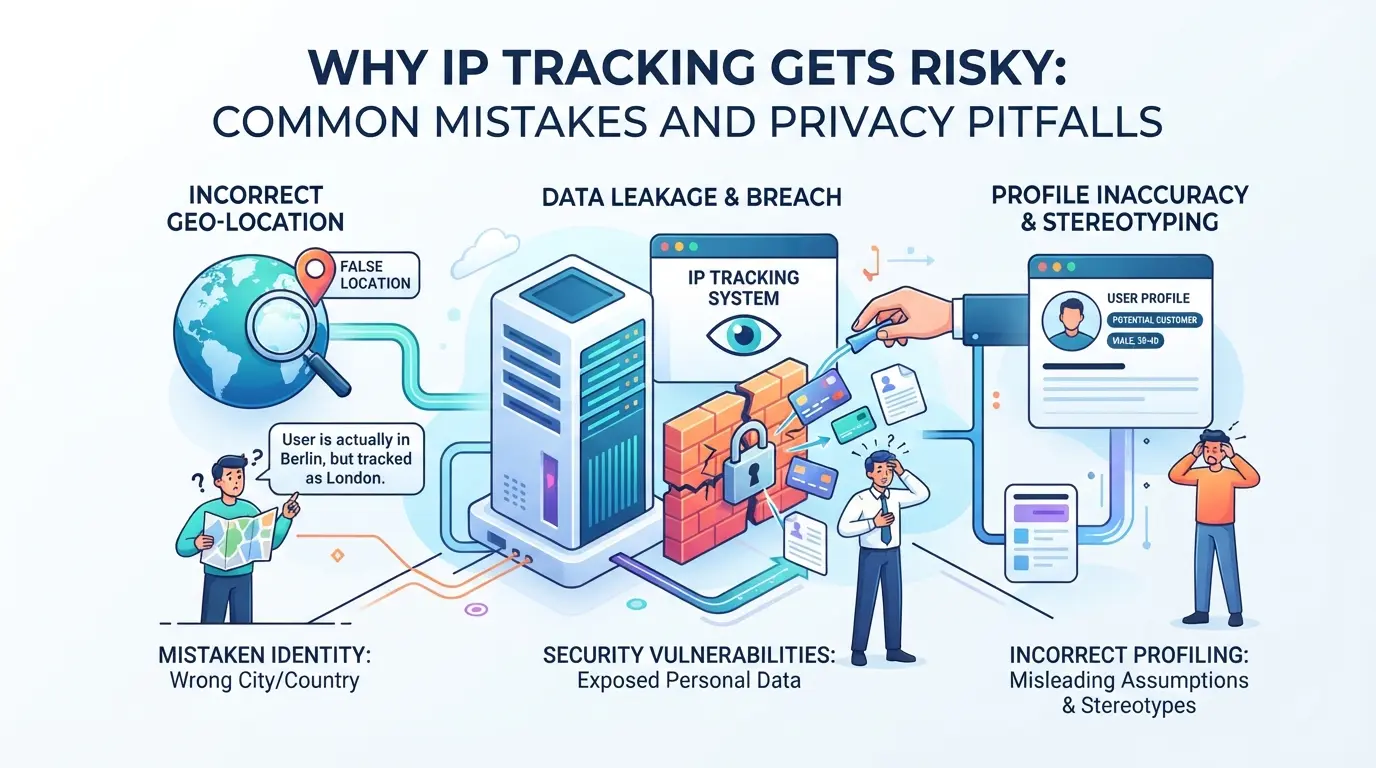
Trying to outsmart IP address tracking often backfires, users end up exposing more than they realize, or trigger restrictions they never see coming. The risks aren’t just about being seen; they come from small mistakes that let sites piece your identity together, even when you think you’re covered.
How IP Tracking Can Lead to Privacy Leaks
Sites can grab more than just your online location. If you log into different accounts from the same home or office IP, many platforms link those accounts together behind the scenes, sometimes even across totally different brands. Just one careless session on a shared network can create a connection you can’t erase.
When IP Location Data Is Misleading
IP location lookups sound precise, but the data is often shaky. GeoIP databases update slowly and can put you in the wrong city, or even the wrong country, if your provider reassigns addresses or if you use mobile data. It’s common for someone using a proxy server to appear “suspicious” simply because the service’s IP block has a bad history or is flagged as datacenter traffic, not home user traffic. Even normal travel can lock you out: log in from Paris today and New York tomorrow (especially without a clear travel pattern), and automated systems may flag your account, thinking it’s a takeover attempt. The real problem isn’t just inaccuracy; it’s that false positives can get you blocked, while clever attackers use the same loopholes to avoid detection, making the system unreliable for both sides.
Mistakes That Trigger Account Restrictions or Security Flags
- Logging into several accounts from the same IP within minutes, sites flag this as bulk activity, especially on social or e-commerce platforms.
- Switching between proxy IPs from unrelated regions too quickly, this pattern looks like “bot” automation, not a real person traveling.
- Forgetting to pair consistent browser fingerprints with each IP, mixing these signals makes your sessions stick out, even if your IP alone seems safe.
Even small errors like these can lead to instant restrictions, forced logouts, or extra verification steps. What feels like a harmless test run can lock you out for days.
The easiest way to avoid these pitfalls is to treat each account as its own “bubble”, don’t share IPs, browsers, or device profiles between them without a clear reason. If you skip this, expect your entire operation to be linked together by platform risk engines by the end of the week.
Now that you know the real risks, a step-by-step look at how tracking works will show why these mistakes are so common, and how they can be avoided.
How IP Tracking Works: Step-by-Step Breakdown for Beginners
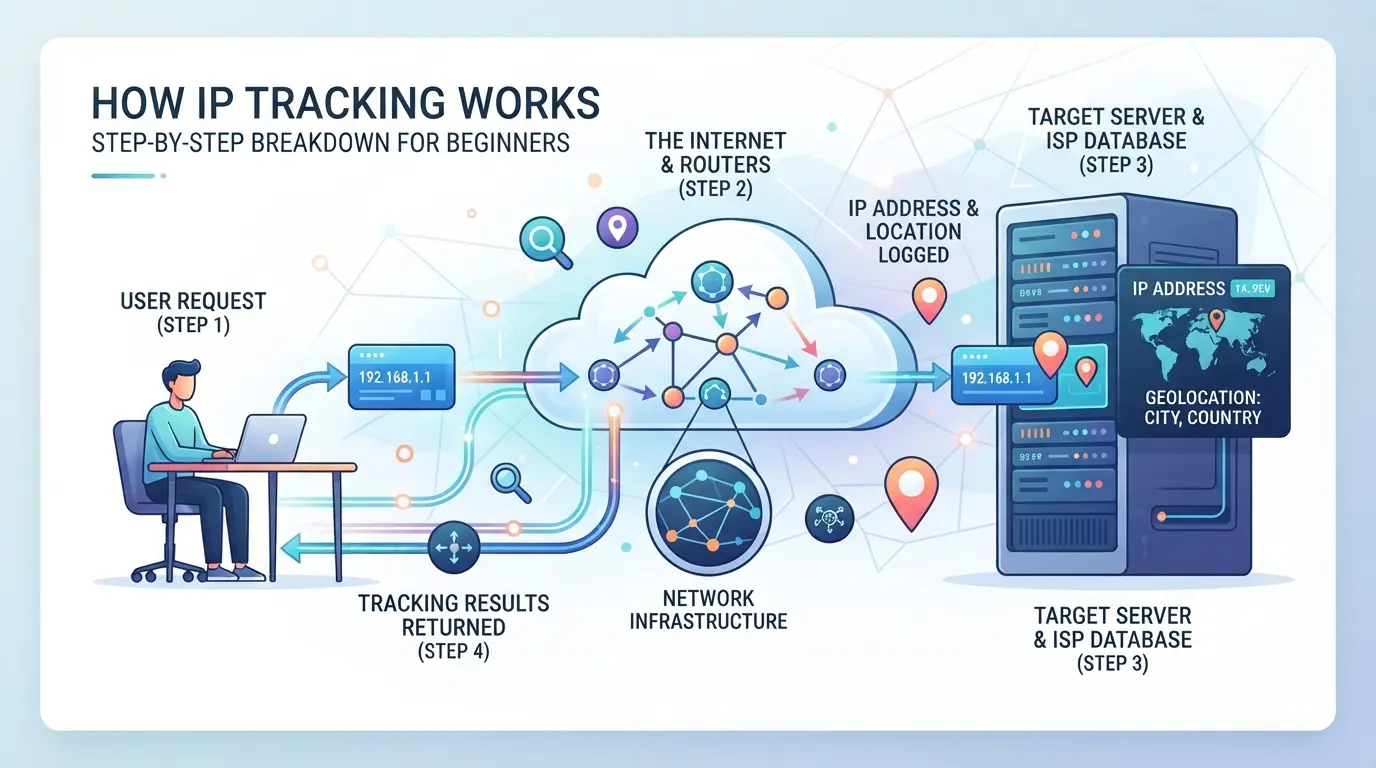
Tracking your IP isn’t just about finding a number. Sites break down your access into steps, each one tells them more about who you are, where you log in from, and how devices connect. Here’s how the process really happens.
How Websites and Services Track IPs
- When you visit a site, the web server logs your IP address with each page request. This happens for every click, not just when you log in.
- Some sites use third-party analytics tools, think Google Analytics or Mixpanel, which collect your IP, timestamp, and device info for every session.
- The server matches your IP with other data, like cookies or login details, to spot patterns. If your IP changes too often or jumps between countries, this usually triggers a review.
How IP Lookup Tools Reveal Location and Network Data
- The site or tool runs your IP against a database, MaxMind or IP2Location are common choices, to map the address to a city, ISP, or even Wi-Fi provider.
- Many lookup services offer APIs. The site sends your IP to the API, and gets back location, network owner, and sometimes company data in real time.
- If a database is outdated or the IP is from a mobile carrier, the lookup can fail or return the wrong location. Always check the data source date before trusting the result.
What Happens When Multiple Devices Share an IP
- Home routers, office networks, and mobile hotspots often share a single public IP (NAT), so dozens of devices can show the same address to the outside.
- Tracking services try to distinguish users by combining IP with browser fingerprints or cookies. If you clear cookies or use a private window, you can appear as a new device, even on the same IP.
- The biggest trap: sharing an IP doesn’t hide your identity if you log in to the same account across devices. Sites can still connect the dots by session tokens or unusual behavior.
This breakdown sets up the questions you need to ask before using IP-based tools or trusting any tracker’s conclusions.
What to Check Before Using IP Tracking: Key Questions and Red Flags
If you trust an IP tracker without asking hard questions, you risk making decisions on bad data, or worse, exposing yourself or others to privacy leaks. Here’s what you should verify before you rely on any tracking tool.
How Accurate Is the IP Location Data?
The true location behind an IP address depends on the freshness of the database and the reliability of the provider. Some tools still use outdated lists, which can show a user in the wrong country by thousands of miles. Always check when the database was last updated and whether the provider is known for accuracy. If the lookup hasn’t been refreshed in months, treat the result as a rough guess.
Does the Tool Respect User Privacy and Compliance?
- Review the privacy policy for details on data storage.
- Confirm the tool doesn’t log or resell IP data.
- Check if the tool follows local laws on tracking.
Are There Signs of IP Manipulation or Masking?
If you only check the address, you’ll miss the bigger picture. Real users leave patterns; masked IPs often don’t.
- Look for sudden jumps in IP country or city with no matching browser fingerprint change.
- Check for proxy, datacenter, or suspiciously fast rotation flags.
- Spot mismatches between network and device metadata.
How to Operate Multiple Platform Accounts More Safely: Browser Profile and Proxy Setup in DICloak
Operators who handle more than one platform account often find that basic IP tracking checks aren't their only problem, browser profile leaks and mixed session data can tie accounts together even when proxies are used. For teams or privacy-focused users, the real challenge is keeping each workflow separate enough that platform risk signals aren't shared by mistake. If you also manage multiple platform logins, browser profile isolation and careful proxy setup matter as much as IP rotation. This workflow shows how to use DICloak for separate browser profiles and custom proxy connections, giving operators direct control over what each account session exposes.
Setting Up Isolated Browser Profiles and Fingerprint Configuration
Keeping accounts apart starts at the browser profile layer. Operators can create a new DICloak profile for each platform account, making sure cookies, cache, and local storage stay separate. This avoids the usual risk where logging into two accounts on the same browser leaks signals like device ID or session state. With DICloak, each profile stores its own fingerprint settings, such as User Agent, time zone, screen size, and language. This means you can adjust these signals to match your operational needs, changing only what actually matters for your workflow. For example, if a platform uses time zone or screen resolution to spot shared devices, operators can set these values per profile instead of leaving them tied to the host machine. The scope here is limited to browser-profile and fingerprint signals; it does not change the way a platform tracks accounts or manages its own review logic.

Configuring User-Owned Proxies for Each Profile
Once the browser profile is separate, the next exposure risk is network exit overlap. Operators can assign their own proxy to each DICloak profile, choosing between No Proxy (local network), Custom Proxy (manual entry), Saved Proxies (from an internal list), or API Extraction (from a remote source). Before opening an account session, operators can test the proxy connection, DICloak shows the detected exit IP, country or region, and time zone so you can confirm the proxy is working as expected. This step matters because an untidy proxy setup, like reusing the same exit IP for several accounts, or picking a proxy whose advertised location doesn't match what the platform sees, can undo all the work of separating browser profiles. Operators are responsible for proxy quality, compliance, and rotation rules. DICloak does not sell or bundle proxies; it just stores and applies the settings you configure. Testing each proxy before live use catches obvious mismatches, such as misconfigured credentials or proxy pool errors, before they turn into account workflow problems. The feature scope here ends at profile-level proxy setup and connection check; it does not affect the platform's own IP detection or access rules.

When this type of workflow is in place, most accidental cross-account leaks can be traced back to mistakes in these two setup layers, not to the proxies or platforms themselves. This sets the stage for evaluating what happens when tracking still fails, or when platforms rely on more than just IP or environment checks.
When IP Tracking Fails: Limits, False Positives, and Safer Alternatives
IP address tracking breaks down in messy situations, shared networks, proxies, and mobile data all blur the lines between users. Relying on IP checks alone can backfire, especially when platforms start flagging normal behavior as suspicious.
Why IP Tracking Can Produce False Positives
- Shared IPs: Cafés, offices, or dorms give dozens of users the same address, so one person’s activity can get others flagged.
- Mobile networks: Carriers often assign the same external IP to thousands of people, location or identity guesses can be wildly off.
- Proxy use: Cheap public proxies get reused, making “unique” IPs anything but. You can inherit someone else’s bad history without knowing.
Safer Alternatives for Account Identification and Privacy
Modern sites rely more on device fingerprinting, session tokens, and strong profile isolation. Fingerprinting checks your browser’s details, not just your IP. Session tokens let platforms spot you even if your address changes. True account separation comes from isolating browser profiles and handling cookies and logins apart, otherwise, a new IP won’t hide your tracks.
Practical Tips to Reduce IP Tracking Risks in Daily Workflows
Sites watch for mismatched signals, not just single address changes. The fastest way to cut risk is to keep browser and network details consistent across your routine.
How to Maintain Consistent Browser and Network Signals
Skip random IP swaps, most platforms spot sudden jumps and flag them. Keeping your browser fingerprint stable matters more than the specific IP. If you switch addresses, match the change with a fresh browser profile. Avoid mixing old cookies or device details with new locations.
When to Use Proxies and Profile Isolation
- Assign one proxy per profile; never reuse across accounts.
- Separate work and personal logins, don’t overlap sessions.
- Check proxy speed before each login; slow connections trigger platform checks.
Common Workflow Mistakes That Increase Risk
Mixing accounts in one session is a classic slip. Bad proxies and lazy profile setup create most traceable patterns.
- Never log in to two accounts from the same browser session.
- Avoid cheap proxies; test for leaks before use.
- Reset browser profiles after every IP change.
Frequently Asked Questions About ip tracking
Is IP tracking legal everywhere in 2026?
IP tracking laws vary by country and region. Some places require consent before collecting or storing IP addresses. Others treat IP data as personal information, protected by privacy rules. Always check your local laws and regulations before using ip tracking tools or storing IP details to avoid legal trouble.
Can IP tracking reveal my exact physical location?
IP address tracking can show a general area, like a city or state, based on ISP data. However, it rarely reveals a precise street address or house. Factors like mobile networks, proxys, and shared connections make exact location lookup unreliable for most users.
How do proxies affect IP tracking results?
When you use a proxy, your real IP address is hidden and replaced by the proxy’s exit IP. Tracking IP addresses in this setup will only show the proxy’s location, not yours. This is common for privacy tools, proxys, and some browsers, making IP tracker results less accurate.
Can multiple users share the same IP address?
Yes, many users can have the same IP address, especially on public Wi-Fi or behind a home router with NAT. This means tracking IP addresses can sometimes link to a group of people, not a single person. It makes user identification harder for trackers.
What are the best practices for minimizing IP tracking risks?
To reduce risks, keep your online profiles separate and use unique proxies for each account. Avoid logging into several accounts in one browser session. These steps help prevent cross-tracking and make it harder for IP trackers to connect your activities across sites.
As you weigh the benefits and privacy implications of tracking technologies, consider tools that help you maintain control over your online footprint. Taking steps to protect your digital identity is easier than ever with solutions designed for privacy-conscious users. Try DICloak For Free
 Web Proxy Tools
 Free Tools
 Cookie Plugin
 UA Generator
 MAC Address Generator
 IP Generator
 IP Address List
 2FA Code Generator
 World Clock
 Anonymous Check
 WebRTC Leak Test
 UUID Generator
 Free Web Proxy Site
 Proxy Checker
 FB Ad Checker
 AI Web Scraping
 Free SMM Tools
 Twitter Shadowban Checker
 Instagram Name Checker
 UTM Generator
 Username Generator
 AI Hashtag Generator
 LinkedIn Headline Generator
 Social Media Image Resizer