Highlights
- Put your notes and slides in one place so you can study anywhere.
- Get short summaries you can read quickly on your phone.
- Make practice questions in minutes to test yourself.
- Use shared study docs to understand topics you missed.
We live in a world that is constantly in motion, between commuting to campus, balancing part-time jobs, and maintaining a social life, the idea of sitting at a desk for six uninterrupted hours to study is becoming a luxury few students can afford.
The modern student needs agility; this is the era of "microlearning", breaking down complex information into bite-sized chunks that fit into the pockets of your day. It’s a trend backed by data: a 2025 report from AppsAnywhere on US student habits reveals that 52% of teens now use their smartphones specifically for homework, shifting away from the traditional desk-bound setup.
But how do you carry a whole semester of notes without carrying a whole bag? A simple answer is to make a digital study kit you can open anywhere. Here’s a simple way to use Studocu to build a quick exam prep setup in minutes.
The Problem: Studying Feels Stuck in One Place
For a long time, studying meant being in one place; you needed your book, your notes, and your laptop. If you forgot something, studying was harder.
This lack of flexibility leads to a common problem: Lost Time. Those 30 minutes on the bus or the 15 minutes waiting for a friend are usually wasted. In high-pressure academic environments like Brazil, where 2025 data from the National Library of Medicine indicates students face some of the highest pre-exam anxiety rates globally (over 80%), reclaiming this lost time for low-stress review can be a game-changer.
What helps is one place for your materials; it also helps when your notes turn into tools you can use, not just PDFs you scroll through.
Step 1: Put Everything in One Place
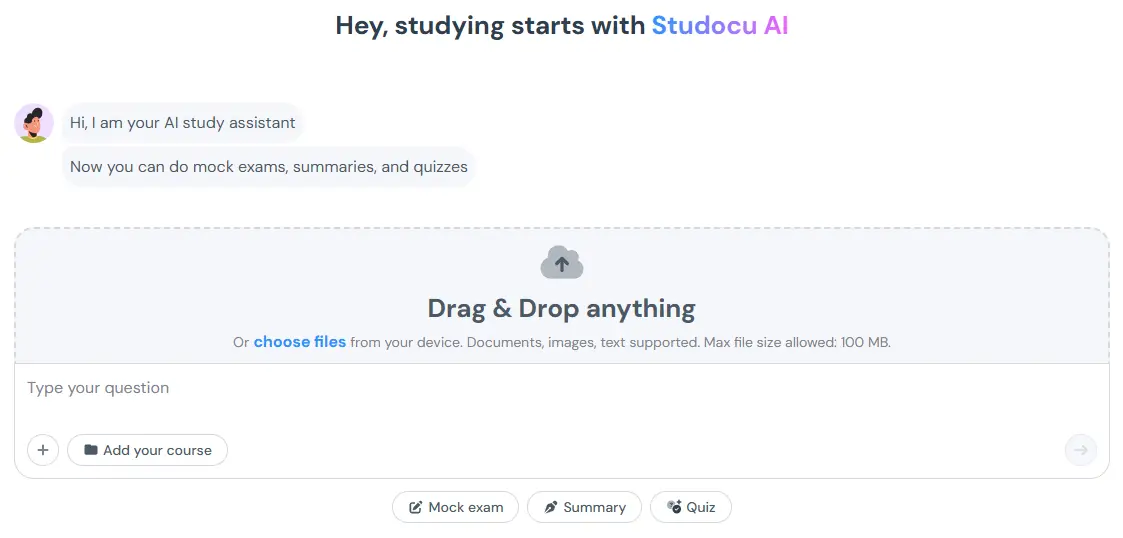
The first step to building your portable station is gathering your raw materials. Studocu is more than just a place to find other people's notes; it is a secure cloud library for your own content.
Try this: Take a photo of your handwritten notes, or upload your lecture slides to Studocu AI.
Once uploaded, these documents are no longer just files on a hard drive. They become part of a living ecosystem. You can access them from any device, laptop, tablet, or phone. But access is just the beginning. The real magic happens when you apply AI to these documents.
Step 2: Turn Notes Into Study Tools
Reading a PDF on a phone screen is painful. It’s small, hard to navigate, and passive. This is where Studocu’s AI features bridge the gap between "reading" and "learning."
If you’re on the go, use summaries: Imagine you have a 40-page reading assignment for your History class. Trying to read that on a shaking bus is a recipe for a headache. Instead, use Studocu AI to generate a summary. In seconds, the tool scans the document and extracts the core arguments, key dates, and essential definitions.
The Result: You get a clean, bulleted list that is easy to read on a mobile screen. You can review the main points of the lecture in 5 minutes while waiting for your coffee.
If you want to remember more, quiz yourself: We know from cognitive science that Active Recall (testing yourself) is far more effective than re-reading. With one click, you can turn your uploaded notes into a Quiz.
The Use Case: You can do this anywhere, for example, while you’re waiting in line, open a short quiz, and answer a few questions. That small moment can still move your studying forward.
Step 3: Do a Quick Mock Exam
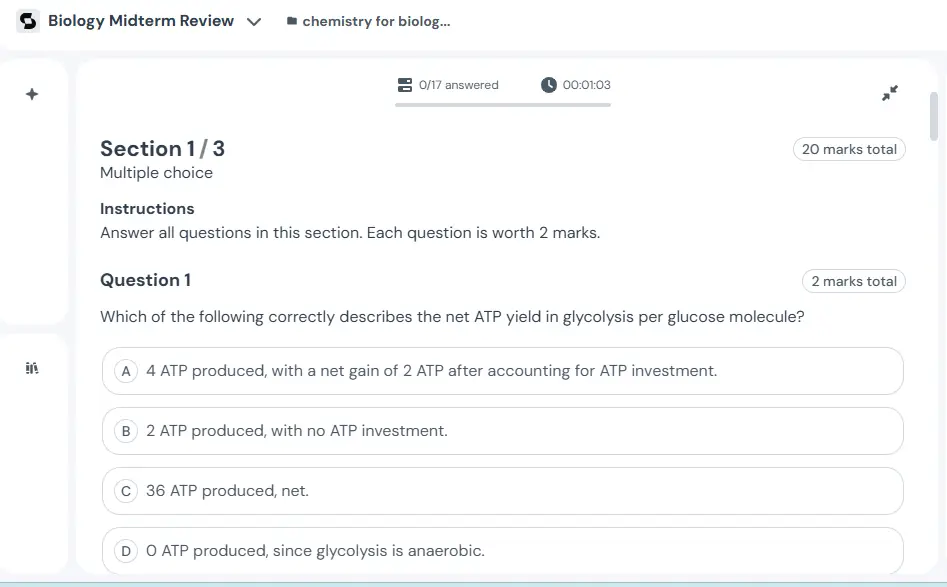
A great way to check if you’re ready is a mock exam, and you don’t always need printouts to do that. You can create one from your notes in minutes.
How to do it:
- Pick your notes or a chapter you uploaded.
- Choose Mock Exam.
- Let the AI generate questions from your material.
Now you have a practice test you can take anywhere. You can take the time-based mock exam, and when you submit, the AI gives you instant feedback, explaining why an answer is right or wrong. This immediate correction is crucial for learning, preventing you from reinforcing bad habits.
Use Shared Study Docs When You’re Stuck
Sometimes, your own notes aren't enough. Maybe you missed a class, or maybe your professor’s explanation just didn't click. Shared study docs can help you see it in a new way.
With over 50 million study resources shared by students from universities worldwide, you can likely find notes, summaries, and past exams for your specific course or subject.
- Example: You’re studying Intro to Psychology, and “cognitive dissonance” isn’t clicking.
- Search the library and find a clear summary, and add it to your study set. Then use AI to make a quick quiz, and you get another explanation and more practice, fast.
Study Anywhere, One Small Session at a Time
Building a portable exam prep station isn't about working harder; it is about reclaiming your time. By digitizing your notes and using AI to make them interactive, you free yourself from the desk.
You can study effectively in the small, in-between moments of your life. Whether you are on a train, in a waiting room, or just lounging on the couch, your exam prep is ready when you are.
So, lighten your backpack. Upload your materials, generate your quizzes, and turn the world into your classroom.
Frequently Asked Questions (FAQs)
Q. Can I use Studocu AI on my phone?
A. Yes! You can access summaries, notes, and quizzes directly from your smartphone via the app or mobile web.
Q. How do the Mock Exams work?
A. The AI builds a timed practice test using your uploads or shared study materials. After you submit, you receive immediate, detailed feedback and explanations for every question to help you improve.
Q. Can I use documents other students uploaded for my courses?
A. Yes! Search by your university and course to find notes from students who've taken the same class. You can even make mock exams from their documents to practice from different angles.
Q. What if I don't have notes to upload to Studocu AI?
A. You can search the library to find notes and summaries uploaded by other students from your university who took the same class. You can and add them to your Studocu AI project to generate summaries, quizzes, and mock exams directly from those shared resources.
 Web Proxy Tools
 Free Tools
 Cookie Plugin
 UA Generator
 MAC Address Generator
 IP Generator
 IP Address List
 2FA Code Generator
 World Clock
 Anonymous Check
 WebRTC Leak Test
 UUID Generator
 Free Web Proxy Site
 Proxy Checker
 FB Ad Checker
 AI Web Scraping
 Free SMM Tools
 Twitter Shadowban Checker
 Instagram Name Checker
 UTM Generator
 Username Generator
 AI Hashtag Generator
 LinkedIn Headline Generator
 Social Media Image Resizer