Every time you open a website, your browser quietly shares details about you. It tells the site what browser you use, what device you are on, and sometimes even your system version. Most people never notice this. But websites do. Over time, this small piece of data can help track your behavior and build a profile of you.
This is where a random user agent becomes useful. By changing how your browser identifies itself, you can reduce tracking, protect your privacy, and gain more control over how websites see you. Many developers, testers, and privacy-focused users already use this simple method in their daily work and browsing.
In this guide, you will learn what a random user agent is, how it works, and when it makes sense to use one. You will also see clear, real examples and step-by-step methods that anyone can follow. If you care about online privacy or want more control over your browsing experience, this article will help you get started the right way.
What is a Random User Agent
When your browser opens a website, it sends a small label called a User-Agent. This label is part of the web request and tells the site what app you are using, what system you are on, and often the version. For example, it might say you're using Chrome on Windows 10. This helps websites give you the right content.
A random user agent means you do not use the same label every time. Instead, it changes on purpose. It could change with every new session, tab, or even web request. The goal is to make your User-Agent less predictable and harder to link to the same browser over time. This helps with privacy and can be useful for testing.
Think of it like this: If you always wear the same bright jacket, people can spot you fast. But if you change jackets often, you blend in more. A random user agent works in a similar way, by changing your browser identity to make it harder for websites to track you based on a stable, consistent string.
How Random User Agents Work
Most tools do the same basic job.
1.They keep a list of common User-Agent strings, like Chrome on Windows, Safari on iPhone, or Firefox on macOS.
2.Before your browser sends a request, the tool picks one from the list.
3.The website receives that User-Agent value in the request header.
A real example you can try.
- Open a site that forces a “mobile view” on your laptop.
- Switch your User-Agent to a desktop one.
- Refresh the page. Many sites will change the layout, menus, or even the content they show. This is because servers often use the User-Agent to tailor responses.
One important note is that big browsers are also trying to reduce how much detail the User-Agent shows, to protect privacy. Chrome calls this User-Agent reduction, and it connects with User-Agent Client Hints.
So your “random user agent” is often about controlling consistency, not just hiding everything.
Use Cases for Random User Agents
A random user agent is useful in many scenarios. It can help with testing, privacy, and overcoming restrictions. Here are some key use cases where changing your user agent can make a big difference.
Testing and Development Scenarios
For developers and testers, switching user agents can simulate how different browsers or devices will display a website. For example, you might be working on a website and want to see how it behaves on different operating systems or browsers. By using a random user agent, you can quickly switch between common devices and browsers without needing to manually change settings each time. This helps speed up the testing process and ensures that your website works well for users across different platforms.
Web Scraping
Web scraping is the process of extracting data from websites. However, many websites try to block scraping tools by detecting consistent patterns in requests, like the same user agent being used repeatedly. By rotating random user agents, scrapers can disguise their activity and avoid being blocked. This makes it easier to collect data from websites without raising suspicion. A random user agent helps to make each request appear as if it's coming from a different browser or device, which reduces the chance of being flagged as a scraper.
Enhancing Privacy and Security
Privacy is one of the key reasons people use random user agents. Every time you visit a website, your browser sends its user agent string, which can be used to track you. Websites can collect these user agents to build a "fingerprint" of your browsing activity. Changing your user agent randomly makes it harder for websites to track you because your browser’s identity is constantly changing. This adds a layer of protection, especially when browsing on public networks or when trying to avoid being tracked across multiple visits to the same site.
Bypassing Geo or Device Restrictions
Some websites limit access to content based on your location or the type of device you are using. For instance, certain streaming services only allow access to content in specific countries or require a certain type of device. By using a random user agent, you can trick the website into thinking you are accessing it from a different device or location. This can help you bypass restrictions and access content that might otherwise be unavailable. For example, by switching to a mobile user agent, you could view mobile-optimized content or bypass restrictions meant for desktop users.
In each of these scenarios, a random user agent offers a simple but effective way to enhance privacy, improve testing, and overcome various restrictions. By changing the way your browser is identified, you can have more control over your online experience.
Methods to Change Your User Agent
Now that we understand the use cases for random user agents, let’s dive into the methods you can use to change your user agent. Changing your user agent is not difficult, and there are several ways to do it across different browsers. Below, we’ll walk through how to change your user agent in Chrome and Firefox, as well as how to use browser extensions to make this process easier.
Changing User Agent in Chrome
Changing your user agent in Google Chrome is simple and quick. Follow this step-by-step guide to get started:
- Open Chrome and click on the three dots in the top right corner to open the menu.
- From the menu, go to More tools and select Developer tools (or press
Ctrl + Shift + I on Windows or Cmd + Option + I on Mac).
- Once the Developer Tools panel opens, click on the Network conditions tab at the bottom. If you don’t see this tab, click the three vertical dots in the top right of the panel, then choose More tools > Network conditions.
- Under the User agent section, uncheck the box labeled Select automatically.
- You will now see a list of common user agents. Choose the one you want, or if you need a custom user agent, you can paste it into the text box.
- Refresh the page to apply for the new user agent.
By following these steps, you can test your website or browse anonymously using a random user agent in Chrome.
Changing User Agent in Firefox
Firefox also allows you to change the user agent, but the process is slightly different from Chrome. Here’s how to do it:
- Open Firefox and type
about:config into the address bar, then press Enter.
- You’ll see a warning page. Click on Accept the Risk and Continue to proceed.
- In the search bar, type
general.useragent.override. If this preference doesn’t exist, right-click anywhere on the page, select New > String, and name it general.useragent.override.
- Now, type the user agent string you want to use. You can find a list of common user agent strings online or use a random one.
- Hit OK, then refresh the page to see the change in action.
By following these steps, you can change your user agent in Firefox and browse as if you are using a different device or browser.
Using Browser Extensions for User Agent Switching
If you want a more convenient way to switch user agents without digging into developer tools, browser extensions are a great option. Here are some recommended extensions that can help:
- User-Agent Switcher for Chrome
This extension makes it easy to change your user agent with just a few clicks. You can quickly select from a list of popular user agents or add your own. It’s perfect for developers and privacy-conscious users.
- User-Agent Switcher and Manager for Firefox
This Firefox extension allows you to change your user agent with ease. It offers the ability to save multiple user agents, which is useful for switching between different browsers or devices during testing.
- Random User-Agent Extension
This extension rotates your user agent randomly, making it a great tool for increasing privacy and reducing tracking. It works with both Chrome and Firefox.
By using these extensions, you can automatically switch user agents without needing to go into the developer tools or settings. This is especially useful for regular browsing or when you want to test your website on different devices.
In summary, changing your user agent is a useful technique that can enhance privacy, aid in testing, and help you overcome geo-restrictions. Whether you are using developer tools in Chrome or Firefox, or opting for an extension, you have several options to use random user agents effectively.
Top Random User Agent Generator Tools
Now that we know how to change your user agent, let's explore some of the best tools available for generating random user agents. These tools can make the process quicker and easier, and they’re perfect for developers, testers, or anyone looking to increase their online privacy.
The User-Agent Switcher for Chrome is one of the most popular tools for quickly changing your user agent in Google Chrome. This extension allows you to switch between various user agents with just a few clicks.
Features:
- Choose from a list of common user agents, like Chrome on Windows or Safari on iPhone.
- Add your own custom user agents if you need more flexibility.
- Perfect for developers who need to test how websites appear on different browsers and devices.
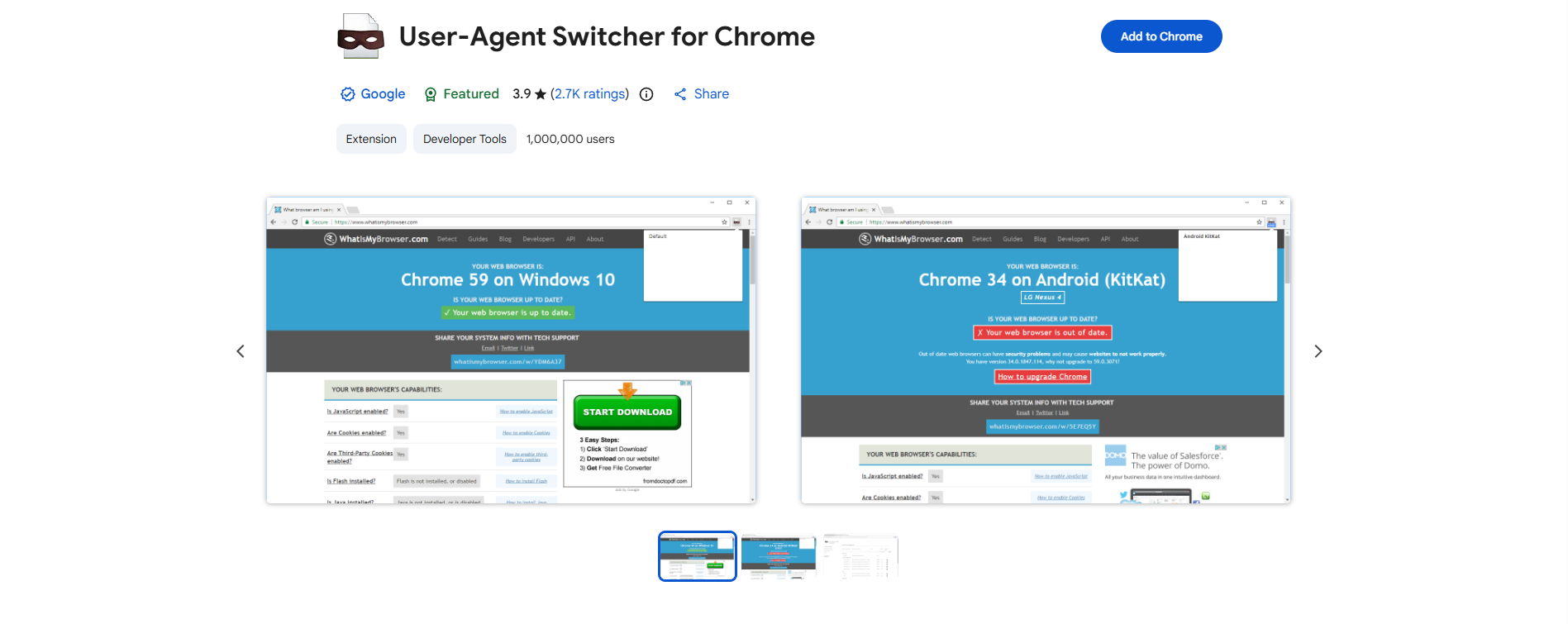
This extension is also very user-friendly, making it ideal for people who don’t want to dig into browser settings or developer tools. Just click the icon in the toolbar and select a new user agent from the dropdown list. It’s quick, easy, and efficient.
2.Random User-Agent Generator
The Random User-Agent Generator is a tool designed to generate a new, random user agent string for each web request. This is particularly useful for web scraping, as it reduces the risk of being detected by websites that track and block scrapers based on consistent user agents.
Features:
- Automatically generates a random user agent every time a new request is made.
- Great for increasing privacy and hiding your browsing patterns from websites.
- Works well with automated scripts or when browsing regularly.
If you are looking to disguise your browsing activity or prevent websites from recognizing you, this tool can help maintain anonymity. It’s also a useful tool for people who want to make sure their web scraping activity stays under the radar.
The DICloak Generator is a part of the DICloak Antidetect Browser, a tool that specializes in multi-account management and browser fingerprinting protection. This generator is built to give you a wide range of user agent options, and it’s especially useful for those who need to manage multiple profiles and avoid being tracked.
Features:
- Supports a wide array of user agent strings, from common browsers to rare devices.
- It can be used with DICloak to manage multiple accounts safely and securely.
- Helps prevent your browser fingerprint from being tracked by constantly changing the user agent.

This tool is ideal for advanced users who need more than just a simple user agent switch. With DICloak’s random user agent generator, you can easily rotate user agents to mask your identity and keep your online activities private.
4.Scraper API
Scraper API is a robust solution for web scraping that automatically handles rotating user agents, IPs, and proxies to ensure smooth scraping without detection. It is particularly useful for developers or businesses that rely on collecting large amounts of data from websites.
Features:
- Automatically rotates user agents and proxies with each request.
- Designed to bypass anti-bot measures and CAPTCHAs.
- Provides high success rates for large-scale data scraping projects.
This tool is perfect for those looking to automate web scraping tasks while keeping their activities under the radar. By changing your user agent with each request, Scraper API ensures that your scraping activity remains undetected by the websites you're targeting.
In conclusion, whether you are testing websites, scraping data, or just looking to improve your privacy, these random user agent tools offer a variety of options to suit your needs. From simple browser extensions to powerful scraping APIs, each tool provides unique features that can help you switch or rotate your user agent with ease. Choose the one that fits your workflow, and enjoy a more private, flexible browsing experience.
Why choose DICloak Antidetect Browsers for your business?
⚡The DICloak Antidetect Browser has become a global favorite for its unparalleled ability to efficiently and securely manage multiple accounts. Designed for professionals in social media management and more, DICloak offers powerful features like RPA automation, bulk operations, and a synchronizer. Additionally, it allows you to customize fingerprints and integrate proxies for each profile, ensuring top-level security and operational efficiency. It’s the ultimate tool for seamless, secure, and scalable operations.

What Makes DICloak Stand Out?
✅ Manage 1,000+ Accounts on One Device:
Stop wasting money on extra hardware! DICloak allows you to manage multiple accounts on a single device, cutting costs and boosting efficiency.
✅ Guaranteed Account Safety, No Ban Risks:
Every account gets its own isolated browser profile with custom fingerprints and IPs, drastically reducing the risk of bans. Your accounts, your control!
✅ Flexible Proxy Configuration for Maximum Performance:
Seamlessly integrate with all major proxy protocols (HTTP/HTTPS, SOCKS5) and manage your proxy pool with bulk operations. No more struggling with IP management—DICloak has you covered.
✅ Streamlined Team Collaboration for Better Results:
Easily manage your team with advanced tools like profile sharing, permission settings, data isolation, and operation logs. Your team works smarter, not harder.
✅ Automate the Grind with RPA:
DICloak's built-in RPA saves you hours of manual work. Automate repetitive tasks, streamline workflows, and focus on what really matters—growing your business.
✅ Powerful Bulk Tools to Scale Your Operations:
Create, import, and launch multiple browser profiles in one click. DICloak makes scaling your business as easy as it gets.
✅ Compatible with All Major Operating Systems:
Based on the Chrome core, DICloak supports simulating Windows, Mac, iOS, Android, and Linux operating systems. No matter what platform you need, DICloak has you covered.
🔗 Ready to Get Started?
Visit the DICloak website to explore more details and choose the plan that’s right for you. Start for free today and experience the power of secure, efficient, and scalable multi-account management!
Conclusion
A random user agent helps change your browser's identity, making it harder for websites to track your activities. It is useful for enhancing privacy, web scraping, and testing. By rotating user agents, you can reduce the risk of detection and avoid restrictions based on device or location. Methods to change your user agent include using developer tools in Chrome and Firefox, as well as browser extensions like User-Agent Switcher or Random User-Agent Extension. Additionally, tools like the DICloak Generator and Scraper API provide more advanced features for privacy and web scraping. Whether you’re testing websites, scraping data, or simply protecting your privacy, using a random user agent gives you greater control over your online presence.
FAQs about Using a Random User Agent
What is a random user agent, and how does it improve privacy?
A random user agent changes your browser's identification with each request. By rotating your user agent, you make it more difficult for websites to track your browsing habits, enhancing your privacy and preventing long-term tracking across sessions.
Why should I use a random user agent for web scraping?
Using a random user agent in web scraping helps avoid detection by websites. When scraping data, websites often detect patterns in user agents, which can lead to blocks. Rotating user agents reduces the chance of being flagged as a bot.
Can I change my user agent to Chrome and Firefox?
Yes, you can change your random user agent in both Chrome and Firefox. In Chrome, use the Developer Tools to switch user agents. In Firefox, you can adjust the user agent through the browser’s configuration settings or use a dedicated extension for convenience.
How do random user agents help bypass geo-restrictions?
A random user agent can trick websites into thinking you're browsing from a different device or location, helping you bypass geo-restrictions. For example, switching to a mobile user agent can give you access to mobile-optimized content or allow you to bypass device-based restrictions.
What are the best tools for generating random user agents?
Some of the top tools for generating a random user agent include User-Agent Switcher for Chrome, the Random User-Agent Generator, DICloak Generator, and Scraper API. These tools let you easily rotate user agents for testing, privacy, or web scraping purposes.
 Web Proxy Tools
 Free Tools
 Cookie Plugin
 UA Generator
 MAC Address Generator
 IP Generator
 IP Address List
 2FA Code Generator
 World Clock
 Anonymous Check
 WebRTC Leak Test
 UUID Generator
 Free Web Proxy Site
 Proxy Checker
 FB Ad Checker
 AI Web Scraping
 Free SMM Tools
 Twitter Shadowban Checker
 Instagram Name Checker
 UTM Generator
 Username Generator
 AI Hashtag Generator
 LinkedIn Headline Generator
 Social Media Image Resizer