Getting banned from eBay often means more than just losing one store, your details, devices, and even payment methods can get blacklisted. Sellers who try to make eBay accounts after getting banned usually hit a wall with new accounts getting suspended within days, even when using new emails and phone numbers. The real headache starts when eBay links your new account to your old one, and the ban comes down again.
But it’s not just about signing up with fresh info. The real risk is that eBay’s detection systems look for digital fingerprints, browser data, IP address history, and cookies. If you rush to create a new eBay account after suspension without changing your setup, you’re likely to get flagged fast. This can turn into a cycle of wasted time, lost listings, and money down the drain.
That’s why sellers ask how to open eBay account after ban, or search for eBay stealth account setup 2026 tips. The problem isn’t just having a new login. It’s building a workflow that keeps your new identity truly separate, with the right browser profile, proxy setup, and payment methods that don’t trigger eBay’s checks. The difference between staying live and getting banned again often comes down to details most guides skip.
Here’s what you need to check before trying again.
Why eBay Bans Accounts and What Triggers a Permanent Suspension
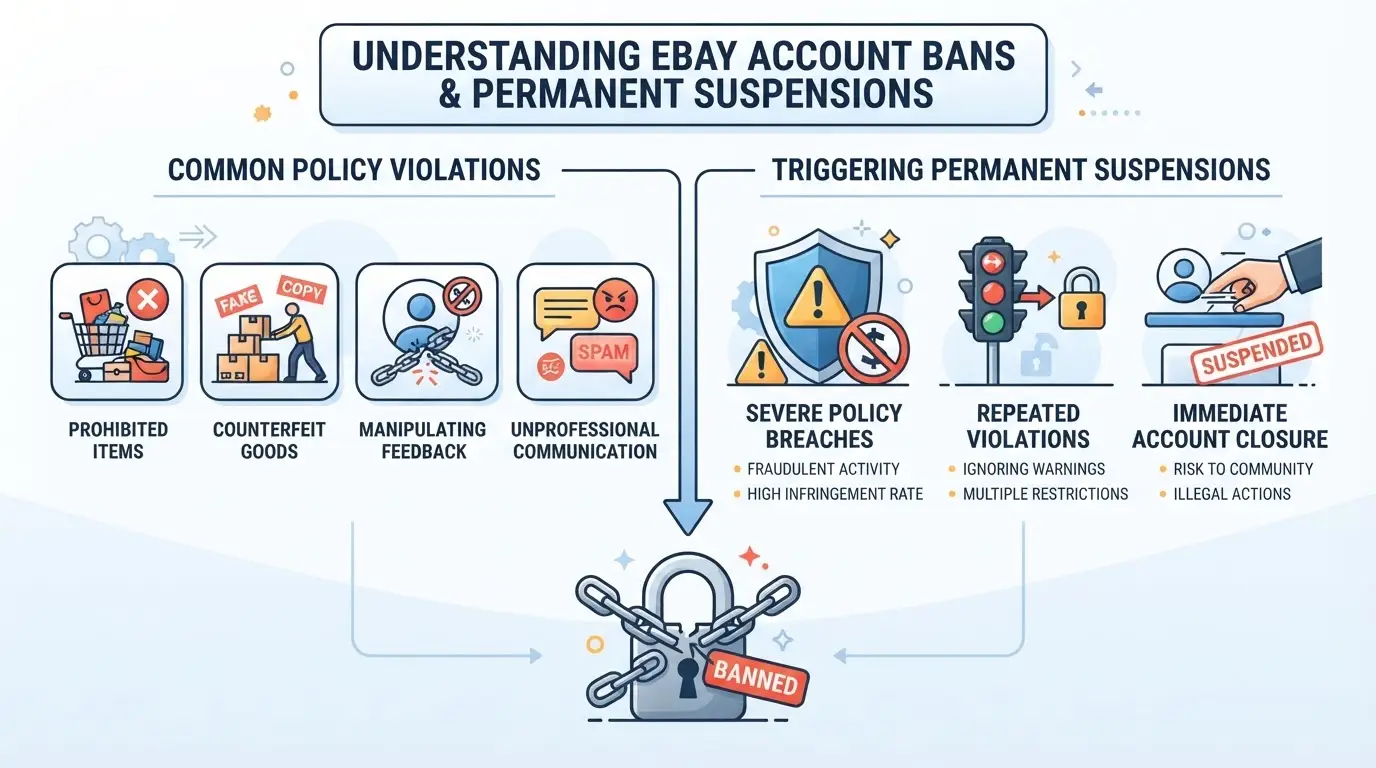
Most sellers searching “make eBay accounts after getting banned” want a straight answer, eBay bans accounts because it sees a pattern of risky or rule-breaking behavior, not just a single slip. The biggest trigger is eBay connecting your new account to old problems or seeing red flags in what you sell, how you act, or who you are on paper.
Top Policy Violations That Lead to Bans
Before worrying about technical traces, get clear on what actually sets off eBay’s alarms:
- Selling items on the prohibited or restricted list (think fake branded goods, weapons, recalled products).
- High rates of buyer complaints, returns, or chargebacks, especially when they pile up over just a few weeks.
- Dodging eBay fees, manipulating feedback, or creating false listings.
Miss one of these, and you’re already halfway to a permanent block.
Performance and Identity Issues
Even if you avoid the obvious policy traps, eBay’s system keeps a close eye on performance and identity signals. The biggest risk comes from linked accounts and device fingerprinting, if your new login shares an IP address, browser fingerprint, or cookies with a banned account, eBay’s detection tools often catch it within days. That’s why people find their new seller account restricted before they’ve even made a sale. Unusual activity, like a sudden spike in listings or mismatched personal information (address, phone, payment details), also gets flagged fast. For example, if you register with the same phone number or use a payment card that’s ever been tied to a suspended account, expect an instant review or block. The most overlooked failure point is not the new account itself, but the hidden links, old Wi-Fi networks, recycled device IDs, or even browser autofill data can connect you to your past ban without warning.
When eBay locks you out, they rarely say which exact signal triggered the block. All you’ll see is a generic suspension message. If you try to open eBay account after ban using the same home setup, you often get banned again within hours. That’s why planning your next move takes more than just a fresh email or a new credit card.
Knowing these triggers gives you something solid to check before trying again. Next, see what you should weigh before making another attempt, missing any step can send you right back to square one.
What to Consider Before Trying to Make a New eBay Account After a Ban
Trying to make eBay accounts after getting banned isn’t just about starting over, it’s about avoiding a fast repeat ban that can lock you out for good. Missing one detail in your setup or breaking eBay’s rules again can get every new account linked and suspended, sometimes within minutes.
eBay’s Detection Methods and Linkage Risks
eBay tracks returning users aggressively. They don’t just look for your name or email, systems cross-check device fingerprints, browser settings, and payment sources. If your new account looks even slightly connected to your banned one, you’ll get flagged.
- eBay looks at IP address history, browser cookies, and device ID. Using the same Wi-Fi or not clearing cookies means instant risk.
- Payment info, shipping addresses, and even phone numbers from old accounts can trigger a link.
- If caught, eBay usually bans the new account, sometimes all accounts tied to that fingerprint, even if you haven’t listed or sold yet.
Legal and Policy Considerations
Even if you find a way to open a new eBay account after ban, you’re not just sidestepping technical hurdles, you’re running up against eBay’s Terms of Service. Their rules state that once you’re permanently suspended, creating a new account is forbidden. eBay’s enforcement isn’t just technical; it’s policy-driven. If they decide you’re breaking the rules again, they can block every account they believe you control, sometimes based on a single shared data point. For example, sellers who reused a PayPal account or delivery address found all their new accounts suspended in one sweep, with no appeal.
Getting caught isn’t just a reset, it can mean being permanently excluded from the platform. That means any funds left in PayPal, pending sales, or even associated buyer accounts can be frozen or disabled. Some users try to argue that their new account is for a family member or business partner, but eBay’s support rarely reverses these bans when evidence of linkage is strong. The real risk is that you may lose access to the entire marketplace, not just a single account, and eBay doesn’t have to review your case again.
If you skip reading the policies or rush the process, you’re likely to trip the same security checks that got you banned in the first place. Most sellers only realize this after burning through several new accounts, each one getting banned faster than the last. The next section breaks down where people most often slip up and what traps catch repeat offenders almost immediately.
Common Mistakes That Get New eBay Accounts Banned Again
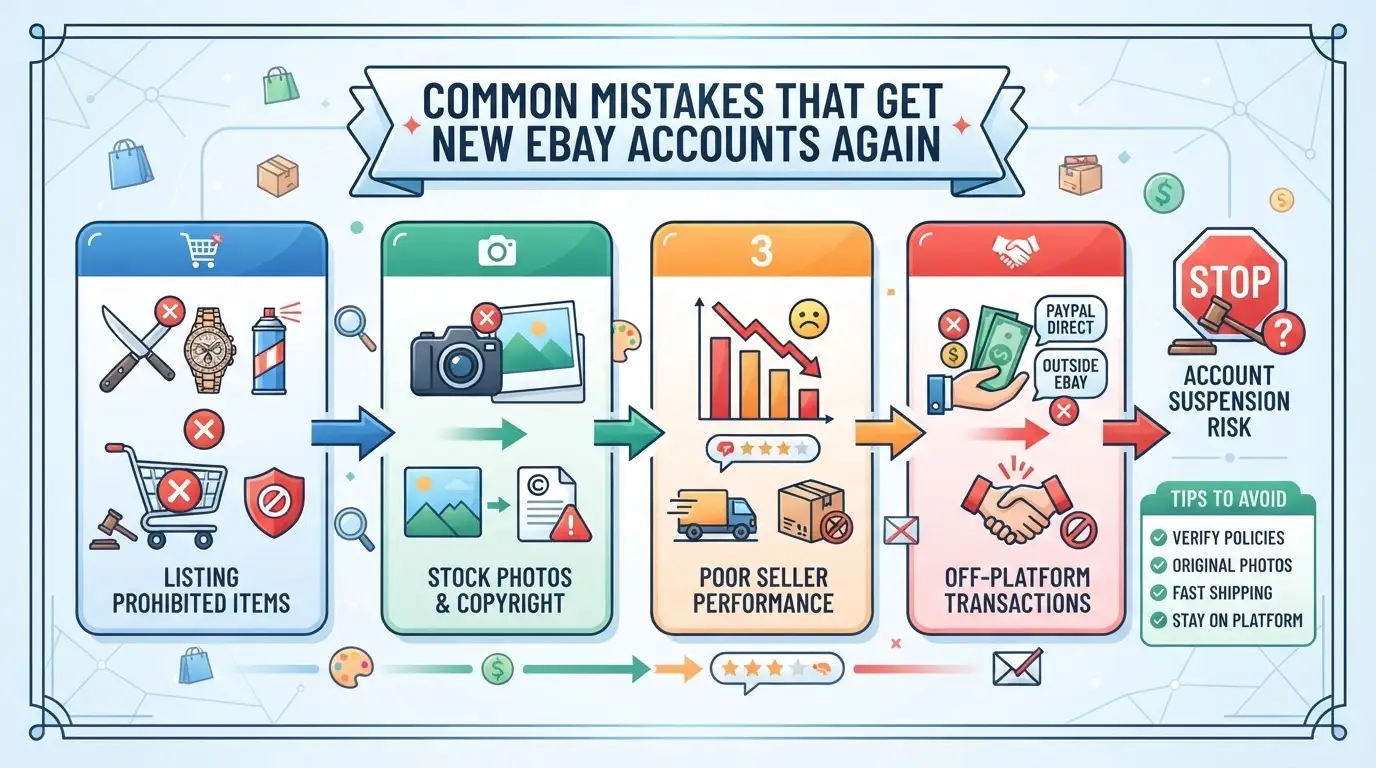
Trying to make eBay accounts after getting banned usually ends with another suspension, unless you fix what got you flagged before. Most sellers repeat the same mistakes, so knowing these can save you days of wasted effort.
Reusing Old Information or Devices
If you use the same phone number, email, or physical address from your banned account, eBay’s system can link your new account in minutes. Device fingerprints, like browser profiles and hardware IDs, are even riskier. Many guides gloss over this, but the detection runs deeper than just login details. Reusing any old identifier is the fastest way to trigger a repeat ban.
Skipping Environment Separation Steps
- Always clear all cookies and browser cache before registration.
- Use a fresh browser profile for each new account.
- Switch to a new IP address that’s never touched eBay.
Ignoring Payment and Verification Triggers
Trying to use the same PayPal, card, or even banking info will almost always get your new account flagged. Mismatched names or addresses on payment methods also raise suspicion and can prompt instant review.
- Register with a genuinely new payment method, never reuse the old one.
- Double-check that all registration details match and look plausible.
- Avoid copy-pasting info from previous accounts, even if it looks safe.
If you miss any of these steps, your new account usually won’t last past the first listing. Next up: the real process sellers use to start over after a ban.
Step-by-Step: How People Attempt to Make a New eBay Account After Getting Banned
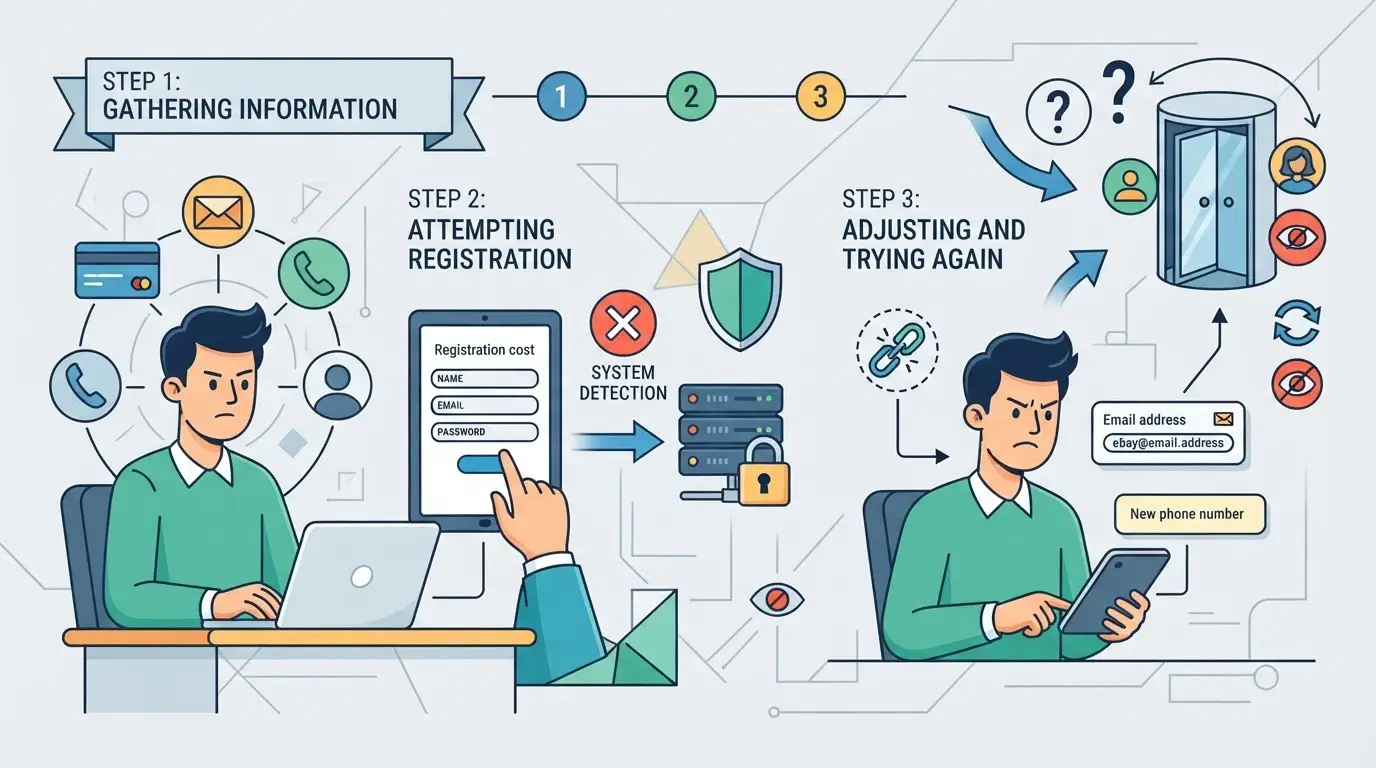
Most people trying to make eBay accounts after getting banned are not just making a new login, they’re rebuilding their setup from scratch to avoid eBay’s tracking. Here’s the real workflow people follow when they want another shot at selling, with the biggest pitfalls along the way.
Preparing a Clean Environment
- Wipe all browser cookies, cache, and saved logins from your device. Skipping this step means eBay can still spot your old digital fingerprints.
- Use a fresh device, virtual machine, or an isolated browser profile to separate the new session. Trying to open a new eBay account on the same old browser almost always triggers a quick ban.
- Check that no leftover files, autofill data, or hidden browser history remains. Even one missed trace can link your new account back to the banned one.
Setting Up New Identity and Contact Information
- Register a new email address, never re-use any email or phone from a suspended account.
- Use a fresh phone number and mailing address. Do not pick random fake details; mismatched info often triggers manual review.
- Double-check that payment profiles, names, and recovery contacts don’t overlap with any old data. If eBay finds a match, suspension can happen before you even finish setup.
Network and Payment Setup
- Connect using a clean, residential IP address or a reliable proxy. Re-using an IP linked to a banned account is the fastest way to get flagged.
- Add a payment method that’s never been used on eBay. This includes credit cards and PayPal, sharing even one payment link with a banned account can get the new one restricted.
- Confirm your billing info matches the new identity. Mismatched billing often leads to instant suspensions or failed payment setup.
Registering and Warming Up the New Account
- Register the account and complete basic profile info, then wait at least 24 hours before doing anything else, immediate selling or listing is a red flag.
- Make small, regular actions: browse, watch items, or buy a low-cost product. Sudden high-volume activity almost always draws attention.
- Only try to list items or sell after the account has normal browsing and buying history. Jumping straight to selling is the main reason new accounts get banned quickly.
How Teams Use DICloak to Manage Multiple eBay Accounts With Separate Profiles and Proxies
Handling multiple eBay accounts after a ban isn’t just about making a new login, it’s about keeping every session and data trail separate. When teams try to make eBay accounts after getting banned, the real challenge is stopping one account’s fingerprint or network history from leaking into another. Even a small slip, like reusing a browser or proxy, can trigger eBay’s detection. That’s where DICloak steps in: it gives operators fine-grained control over browser profiles and proxies, so accounts don’t overlap at the technical layer. The scope is limited to browser-profile and proxy setup; DICloak does not manage eBay accounts or guarantee platform outcomes.
Using Profile Isolation and Fingerprint Configuration in DICloak
Operators handling multiple eBay accounts need each login session to run in a truly separate browser profile with its own device and environment signals. In DICloak, a team member creates a new profile for each account and configures fingerprint details, like operating system, user agent, time zone, and interface language, so nothing from an old session crosses over. This setup means every DICloak profile stores its own cookies, cache, and browser history, with no overlap. If you skip profile isolation and just use incognito or clear your cache, you risk old identifiers sticking around, which can link your new attempt to the banned account. The focus stays on profile and fingerprint configuration; DICloak does not promise account acceptance or platform review results.

Configuring User-Owned Proxies for Each Profile
After setting up a separate browser profile, teams need to make sure network traffic from each eBay account doesn’t mix. In DICloak, operators assign a user-owned proxy (HTTP, HTTPS, or SOCKS5) to each profile, entering the proxy’s host, port, and credentials. Before signing in, the built-in proxy check tests if the proxy is reachable and shows the detected exit IP and region. This way, every account session can run through a different connection, avoiding obvious IP overlaps. If a proxy fails or isn’t unique, the session might still be flagged, so teams have to double-check every proxy’s quality and avoid shortcuts like sharing one proxy for several accounts. DICloak stores the settings but does not supply proxies or control their reliability; users are responsible for proxy selection and compliance.

Done right, this workflow gives sellers and teams a cleaner break between accounts, making it less likely for technical evidence to link a new session to a banned history. The next section covers when creating new eBay accounts carries too much risk and what alternatives teams often consider.
When Making New eBay Accounts Is Not Worth the Risk, and Safer Alternatives
If your last eBay account was permanently suspended, jumping right into a new signup can backfire. The risk isn’t just another ban, it’s losing access for good, or even facing account-hopping charges if you’re flagged for policy abuse.
High-Risk Scenarios to Avoid
| Scenario |
What Actually Happens |
Safer Move |
| Creating new accounts after each ban |
Permanent marketplace lockout; all linked accounts get banned |
Stop, review your setup |
| Reusing IDs, addresses, or payment info |
Immediate flagging; possible legal notice |
Use truly fresh details or reconsider |
| Ignoring ban appeal options |
No chance for recovery; risk escalates |
Appeal or negotiate first |
Trying to make eBay accounts after getting banned can lead to a situation where every new attempt shortens the time before the next restriction, sometimes to under 48 hours.
Safer Alternatives to Making New Accounts
Most sellers should start by appealing their ban or negotiating with eBay support, even if the odds seem low. If eBay is a dead end, look at other marketplaces or shift to a business model that doesn’t depend on a single platform.
Sticking with high-risk tactics often burns more resources than it saves. When in doubt, step back and weigh your options before risking another cycle of bans.
What to Do If Your New eBay Account Gets Restricted or Flagged Again
Getting flagged again means something in your setup or activity still links back to your old ban. Acting fast can sometimes recover the account, but repeating the same process usually leads to more blocks.
Immediate Actions to Take
- Read the restriction notice, eBay sometimes lists the cause (linked info, payment mismatch, risky listing).
- Gather documents (ID, address, invoices) before contacting support, missing proof makes appeals pointless.
- Message eBay support with facts, not stories; if they ask for more info, reply within 24 hours or the case may close.
Long-Term Account Management Tips
- Change your approach, keep browser, IP, and payment data separate for every account.
- Track all emails and phone numbers used, repeating old details almost always triggers flags.
- If new attempts keep failing, stop and reassess before you make eBay accounts after getting banned again.
Frequently Asked Questions About make eBay accounts after getting banned
Is it legal to make a new eBay account after getting banned?
Making a new eBay account after getting banned can violate eBay’s terms of service. While it’s not a crime, eBay may close your new account if they catch you. In some cases, repeated attempts could lead to permanent bans or loss of funds. Always review eBay’s user agreement to understand the risks before trying to return.
Can I use the same PayPal or payment method for a new eBay account?
No, using the same PayPal or payment details links your new account to the banned one. eBay checks payment information to spot linked accounts. If you reuse old payment methods, your new account is likely to get suspended quickly. Always use unique payment options when you create a new eBay account after suspension.
How many new eBay accounts can I safely operate at once?
Running several new eBay accounts is risky. eBay tracks IP addresses, browser fingerprints, and payment info. If you don’t keep each account totally separate, eBay may close them all. Most sellers who operate multiple accounts use different devices, emails, and payment methods for each one to avoid detection.
What is a stealth eBay account, and is it safe to use in 2026?
A stealth eBay account is a new profile made with fake or altered personal info to hide your identity. In 2026, using stealth accounts is riskier because eBay’s detection tools keep getting better. Even with careful setup, stealth accounts can get suspended if you make mistakes or eBay updates its security checks.
Can I use a proxy to make a new eBay account after a ban?
A proxy changes your IP address, which can help mask your identity. However, proxies alone do not guarantee safety. eBay also looks at device info, cookies, browser settings, and payment methods. If these match your banned account, your new account could still get closed, even if you use a proxy.
If you’re considering returning to eBay after a suspension, weigh your options carefully and prioritize privacy tools to help protect your identity and new account. Taking the right steps now can help you avoid future bans and maintain consistent access to the marketplace. Try DICloak For Free
 Web Proxy Tools
 Free Tools
 Cookie Plugin
 UA Generator
 MAC Address Generator
 IP Generator
 IP Address List
 2FA Code Generator
 World Clock
 Anonymous Check
 WebRTC Leak Test
 UUID Generator
 Free Web Proxy Site
 Proxy Checker
 FB Ad Checker
 AI Web Scraping
 Free SMM Tools
 Twitter Shadowban Checker
 Instagram Name Checker
 UTM Generator
 Username Generator
 AI Hashtag Generator
 LinkedIn Headline Generator
 Social Media Image Resizer