Dealing with the "We had a server error. Please try again later" message on Reddit can be a frustrating experience, abruptly halting your browsing, commenting, or posting. This guide is designed to help you understand the common causes behind this persistent error and provide a comprehensive set of solutions. We will walk you through everything from simple, quick fixes to advanced strategies, empowering you to resolve the issue and get back to browsing without interruption.
What Does the "Reddit Server Error" Message Actually Mean?
Understanding this error is the first step toward fixing it. It is a generic notification from Reddit indicating that its servers failed to process your request. The root cause can range from a major, site-wide outage affecting millions of users to a highly specific issue with your device, network connection, or even your account's reputation. Think of this error not just as a technical fault, but as a communication from Reddit's systems—and understanding that communication is key to solving it for good. Identifying the potential source of the problem is crucial for finding the correct solution.
Deconstructing the Error
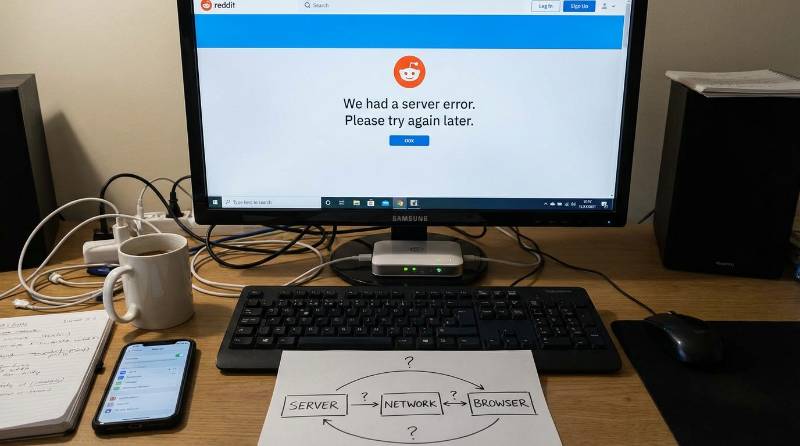
While the exact wording may vary, these error messages all point toward a disruption between you and Reddit's servers. Users commonly report seeing the following notifications:
We had a server error. Please try again later.Sorry, something went wrong.Reddit is under heavy load right now.Error 503: Service unavailable
Although these messages are intentionally vague, they often correspond to specific categories of problems related to server health, your connection, or your account's standing.
Common Causes for the Reddit Server Error
The reddit server error is not caused by a single issue but can be triggered by a wide array of problems originating from Reddit's infrastructure, your own device and connection, or even as a result of automated security measures. Understanding these potential triggers will help you diagnose the problem more effectively and apply the right fix.
Issues on Reddit's End
Sometimes, the problem is entirely out of your hands and originates from Reddit's own servers.
- Server Overload: Massive traffic spikes, often caused by viral events or popular "Ask Me Anything" (AMA) sessions, can overwhelm Reddit's servers.
- Scheduled Maintenance: Regular updates and system upgrades are necessary to keep the platform running, which can cause brief, planned downtimes.
- Technical Glitches: Unexpected software bugs or backend misconfigurations can disrupt service for some or all users.
- Content Delivery Network (CDN) Issues: A glitch in the CDN, which helps deliver content to users globally, can block access and trigger a server error.
Problems with Your Connection or Device
The issue could also be local, related to your personal hardware or network configuration.
- Network and DNS Problems: An unstable internet connection or incorrect Domain Name System (DNS) settings can prevent your device from properly communicating with Reddit.
- Corrupted Browser Cache and Cookies: Old or corrupted data stored in your browser can interfere with Reddit's functionality and cause loading errors.
Account and Security-Related Flags
In some cases, the error is a deliberate, automated response from Reddit's security systems designed to prevent spam and malicious activity.
- Rate Limiting: Making too many requests in a short period—such as rapidly refreshing pages or upvoting—can trigger a temporary block.
- Suspicious Activity: Actions like data scraping, using automation bots, or switching between multiple accounts too frequently can get your IP address or account flagged.
- Bad IP Reputation: Reddit actively blocks IPs from known datacenters or blacklisted proxies to combat spam and abuse.
- Browser Fingerprint Detection: Reddit’s advanced bot detection systems may flag unusual or inconsistent browser configurations (e.g., mismatched timezones) and serve an error.
- Account Restrictions: A suspended or "shadowbanned" account can manifest as a persistent server error, silently preventing you from interacting with the site.
By understanding these potential causes, you can now move on to a structured approach for troubleshooting and resolving the error.
Quick Fixes for the Reddit Server Error
Before diving into complex troubleshooting, it's best to start with simple, effective steps that resolve the majority of temporary glitches. These fixes are easy to perform and can often get you back to browsing Reddit in just a few minutes.
Step-by-Step Basic Troubleshooting
Follow these steps in order to rule out the most common issues.
- Check if Reddit is Actually Down: The problem might not be on your end. Visit Reddit's official status page or a third-party outage tracker like DownDetector to see if the platform is experiencing a widespread issue. If it is, the only solution is to wait for Reddit's team to resolve it.
- Refresh the Page: The simplest fix is often the most effective. Press F5 or click the refresh button in your browser to reload the page. This can clear temporary loading glitches that caused the error.
- Clear Browser Cache and Cookies: Outdated or corrupted browser data is a frequent cause of website conflicts. Clearing your cache and cookies removes this old data, forcing your browser to load a fresh version of Reddit. This option is typically found in your browser's "Privacy and Security" settings.
- Try a Different Browser or Device: To determine if the issue is specific to your primary setup, try accessing Reddit from a different browser (e.g., switch from Chrome to Firefox) or use your mobile device. If Reddit works elsewhere, the problem is likely with your original browser's configuration.
- Restart Your Network Connection: Restarting your router can resolve lingering network errors and may assign you a new IP address. Unplug your router and modem for at least 30 seconds before plugging them back in.
If these basic steps don't resolve the issue, the error may be more persistent, requiring the advanced troubleshooting steps outlined below.
Advanced Troubleshooting for a Persistent Reddit Server Error
If the quick fixes didn't work, the persistent error may point to deeper issues with your digital reputation, such as network configuration problems or silent account restrictions. These problems require more specific actions to diagnose and resolve.
Technical Steps to Resolve Stubborn Errors
- Flush Your DNS Cache: Your computer stores a cache of DNS lookups, which can become corrupted over time. Flushing it forces your system to get fresh data. On Windows, open Command Prompt and run the command
ipconfig /flushdns.
- Switch to a Different Network: Try switching from your Wi-Fi connection to your mobile data, or vice versa. This can help you determine if the issue is with your Internet Service Provider (ISP) or your local network configuration.
- Use the Old Reddit Interface: The classic Reddit interface, accessible at old.reddit.com, is a lighter and often more stable version of the site. It can sometimes bypass errors that specifically affect the newer design. Bookmark it as a reliable fallback.
Understanding Silent Bans and IP Blocks
If you've tried everything and the reddit server error still appears, you may be experiencing a "silent ban." This is often an IP block, where Reddit's systems have flagged your IP address as suspicious. If a simple IP change from restarting your router doesn't work, it's a strong indicator that Reddit has flagged more than just your IP address. They have likely flagged your browser fingerprint, a unique digital signature created by your device's configuration. This is where basic troubleshooting ends and advanced identity management begins.
Why a Reddit Server Error Could Point to Browser Fingerprinting
Browser fingerprinting is a sophisticated tracking method used by platforms like Reddit for advanced bot detection. It involves collecting a wide range of data points from your browser—such as your operating system, installed fonts, and screen resolution—to create a unique digital "fingerprint." More advanced techniques also analyze technical details like WebGL, WebGPU, and canvas fingerprinting, which are graphic-rendering details that are surprisingly unique to your device.
If your browser setup looks unusual, inconsistent, or is identical to one used by another flagged account, Reddit's security system may preemptively block your access by showing a generic server error. This is a protective measure to stop bots and spam. For users who require stable access, especially those managing multiple accounts for marketing or research, understanding and managing this digital fingerprint is crucial to avoiding these blocks.
The Ultimate Solution to Avoid Detection: Using DICloak Antidetect Browser
For users who face persistent errors due to IP blocks, browser fingerprinting, or the need to manage multiple accounts, a tool like DICloak offers a powerful and preventative solution. It is designed to provide the control, security, and anonymity needed to prevent the root causes of many security-related server errors.
What is DICloak and How Does It Work?
DICloak is an antidetect browser built specifically to manage multiple online accounts securely. It works by creating completely isolated browser profiles for each account. Each profile created within DICloak has a unique and authentic digital identity, which includes its own browser fingerprint, cookies, and IP address (via proxy integration). To a website like Reddit, each profile appears to be a separate, genuine user operating from a different device.

What Makes DICloak Stand Out?
✅ Manage 1,000+ Accounts on One Device: Stop wasting money on extra hardware! DICloak allows you to manage multiple accounts on a single device, cutting costs and boosting efficiency.
✅ Guaranteed Account Safety, No Ban Risks: Every account gets its own isolated browser profile with custom fingerprints and IPs, drastically reducing the risk of bans. Your accounts, your control!
✅ Flexible Proxy Configuration for Maximum Performance: Seamlessly integrate with all major proxy protocols (HTTP/HTTPS, SOCKS5) and manage your proxy pool with bulk operations. No more struggling with IP management—DICloak has you covered.
✅ Streamlined Team Collaboration for Better Results: Easily manage your team with advanced tools like profile sharing, permission settings, data isolation, and operation logs. Your team works smarter, not harder.
✅ Automate the Grind with RPA: DICloak's built-in RPA saves you hours of manual work. Automate repetitive tasks, streamline workflows, and focus on what really matters—growing your business.
✅ Powerful Bulk Tools to Scale Your Operations: Create, import, and launch multiple browser profiles in one click. DICloak makes scaling your business as easy as it gets.
✅ Compatible with All Major Operating Systems: Based on the Chrome core, DICloak supports simulating Windows, Mac, iOS, Android, and Linux operating systems. No matter what platform you need, DICloak has you covered.
How DICloak Prevents the Reddit Server Error and Account Suspensions
By tackling the root causes of security-related flags, DICloak acts as a preventative tool. It's not just about fixing an error after it happens, but about creating a browsing environment where these errors are far less likely to occur in the first place.
Managing Multiple Accounts Safely
Without a tool like DICloak, websites can easily link all of your accounts to the same browser fingerprint. If one account gets flagged for suspicious activity, all other associated accounts are put at risk. DICloak prevents this by ensuring each account profile is completely isolated, meaning a penalty on one account will not affect the others.
Bypassing Unfair IP and Fingerprint Blocks
As discussed, the reddit server error is often a silent IP or fingerprint ban. By allowing you to manage different proxies and customize the browser fingerprint for each profile, DICloak enables you to cleanly bypass these blocks and maintain stable, uninterrupted access to the platform.
Choosing the Right DICloak Plan
DICloak offers several plans tailored to different needs:
- Free Plan: Perfect for individual users to test the core features. Includes 1 member and allows for the creation of up to 5 profiles.
- Base Plan: Ideal for small teams focused on collaboration, offering more profiles and team-oriented features like data sync and batch operations.
- Plus & Share+ Plans: Designed for larger teams and agencies with advanced needs. The Plus plan offers full feature access and RPA automation, while the Share+ plan provides unlimited seats, making it the top choice for scaling operations without restriction.
🔗 Ready to Get Started?
Visit the DICloak website to explore more details and choose the plan that’s right for you. Start for free today and experience the power of secure, efficient, and scalable multi-account management!
Best Practices to Keep Your Reddit Account Safe
In addition to using the right tools, following Reddit's rules and maintaining good digital hygiene are essential for avoiding errors and account penalties.
Proactive Steps for All Users
- Follow Reddit's Community Guidelines: Always adhere to Reddit's site-wide rules and, just as importantly, the specific rules of the individual subreddits you participate in.
- Keep Your Browser and Device Updated: Using the latest versions of your browser and operating system ensures you have the most recent security patches and improves compatibility with web platforms.
- Use the Official Reddit App: For mobile users, the official app is optimized for Reddit's platform and often provides a more stable experience than a mobile browser.
- Avoid Aggressive or Spammy Behavior: Refrain from mass-posting, sending bulk messages, or using obvious automation bots that can easily trigger Reddit's spam filters.
Stop Fighting the Reddit Server Error and Browse Smarter
The Reddit server error is often more than a minor inconvenience, but it is almost always fixable. The solution begins with checking for site-wide outages, proceeding with simple local fixes like clearing your cache, and for more persistent issues, investigating deeper causes like IP blocks. For power users whose activities require robust account separation, the solution lies in advanced identity management tools like antidetect browsers, which prevent these security-triggered errors from happening in the first place. By taking a proactive approach, you can take control of your browsing experience and enjoy a more stable, error-free connection to Reddit.
Frequently Asked Questions About the Reddit Server Error
Here are answers to some of the most common questions users have about this error.
Does "We had a server error" mean my Reddit account is banned?
Not always. It is usually a temporary technical issue. However, it can be a sign of an account restriction like a suspension or shadowban, especially if the error only appears when you're logged in or persists across multiple days.
Why does the Reddit server error happen so often?
This can be due to Reddit's massive daily traffic, frequent backend updates, or issues on the user's end like an unstable internet connection, a bad IP reputation, or corrupted browser cache.
Can I use DICloak for free to fix my Reddit issues?
Yes, DICloak offers a Free Plan that allows you to create up to 5 browser profiles. This is a great way to test how an antidetect browser can help you manage accounts safely and avoid fingerprint-related errors without any initial cost.
What's the difference between DICloak and a regular browser?
DICloak is specifically designed for multi-account management. It offers advanced features that regular browsers lack, such as browser fingerprint modification, completely isolated profiles, and streamlined proxy configuration to enhance privacy and prevent platforms from linking your accounts together.
If Reddit's servers are down for everyone, will DICloak help me access it?
No. If Reddit is experiencing a major, site-wide outage, no tool or browser can bypass it. DICloak is designed to solve problems related to your specific connection, IP address, browser fingerprint, or account management, not a universal server failure on Reddit's end.
 Web Proxy Tools
 Free Tools
 Cookie Plugin
 UA Generator
 MAC Address Generator
 IP Generator
 IP Address List
 2FA Code Generator
 World Clock
 Anonymous Check
 WebRTC Leak Test
 UUID Generator
 Free Web Proxy Site
 Proxy Checker
 FB Ad Checker
 AI Web Scraping
 Free SMM Tools
 Twitter Shadowban Checker
 Instagram Name Checker
 UTM Generator
 Username Generator
 AI Hashtag Generator
 LinkedIn Headline Generator
 Social Media Image Resizer