Have you ever tried to watch a YouTube video, only to be met with a frustrating "Access Denied" message? Whether you're at school, work, or on public Wi-Fi, YouTube blocks are a common issue. But don't worry — there are several ways to bypass these restrictions and enjoy your favorite videos with ease. In this article, we'll show you 10 effective methods to unblock YouTube in any environment.
From simple solutions like using proxy servers and browser extensions, to more advanced techniques such as mobile hotspots and custom DNS settings, we cover everything you need to know. Plus, we’ll explore how tools like the DICloak Antidetect Browser can help you securely access YouTube unblocked with custom proxies and isolated profiles.
Whether you're a student, a professional, or someone who just wants to watch YouTube freely, this guide will provide practical tips for you to get YouTube unblocked safely and effectively.
Why is YouTube Blocked?
Many people try to access YouTube, but get a “blocked” message. This happens often in schools, workplaces, or public Wi‑Fi. There are good reasons for that. Below we explain three main reasons why networks block YouTube — and why it matters if you want unblocked YouTube.
Network policies in schools and workplaces
Schools and workplaces often set strict network rules. They may block YouTube completely. The reason is that they want people to stay focused. For instance, some teachers say their class time becomes messy if students watch funny or random videos instead of lessons.
At my friend’s school, every computer had YouTube permanently blocked. Even for research or class video. That means no student could open YouTube at all. Many schools in the U.S. use network filters or firewalls to block sites like YouTube to match rules from laws like Children’s Internet Protection Act (CIPA).
Because of this, if you are on school Wi‑Fi or a company network, you may need special steps to get to youtube unblocked.
Content filtering for safety
Another big reason is safety. Schools worry about videos with bad content — violence, adult themes, hate speech, or other harmful material. They want to protect students from seeing them.
Some schools use software to scan every site visit. If a site is flagged, it gets blocked. Sometimes, this filtering is wide — not just for adult or violent videos, but also entertainment, social media, or any non‑educational content.
So even though YouTube has plenty of good educational videos, the filter sees “video streaming site” and blocks everything. That’s why many students and workers see “Access Denied” when they hope for unblocked YouTube.
Bandwidth management concerns
Video streaming uses a lot of data. When many users watch YouTube at the same time, it can slow down the whole network. For a school or office with many users, this is a real problem.
One report from 2025 shows that web filters help schools keep their network working smoothly by limiting video streaming and “bandwidth hogs.”
Imagine dozens of students all streaming videos at once. The school internet might lag. To avoid that, administrators block YouTube. That way, the internet stays fast for essential school tasks — research, assignments, online tools — and not slowed by entertainment traffic.
What does this mean if you try to get YouTube unblocked
Because of these reasons — network policy, safety, and bandwidth — many places block YouTube by default. If you want unblocked YouTube, you must understand where and why it is blocked first. Then you can pick a method (like a proxy, or other) that matches your situation.
In short, the block is not random. It is often a rule or protection by the network owner. Knowing the reasons helps you choose the right method to get unblocked safely.
Methods to Unblock YouTube
If YouTube is blocked on your network, there are many ways to try to get YouTube unblocked. Choose a method that fits your situation — a school computer, work network, or public Wi‑Fi.
Using Proxy Servers or Antidetect Browsers
A proxy server acts as a middle-man. Your computer sends a request to the proxy, which then forwards it to YouTube. YouTube sees the proxy’s IP address, not yours. This helps bypass networks that block YouTube by masking your real IP.
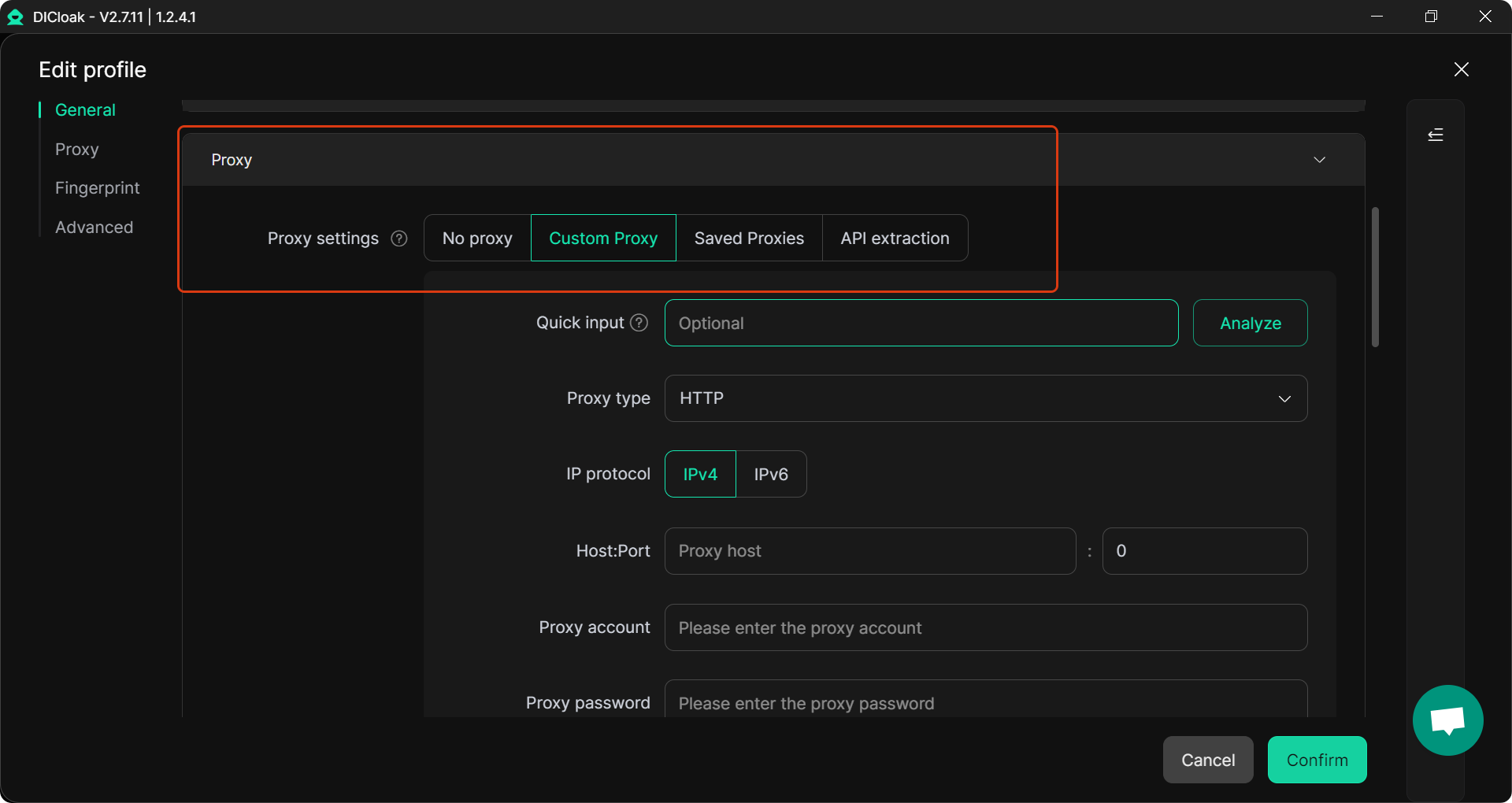
DICloak goes a step further. Unlike regular proxies, DICloak is an antidetect browser that allows you to set up custom proxy configurations for each of your browser profiles. Each profile works as an isolated environment, making it ideal for managing multiple YouTube accounts or tasks without triggering detection. This means you can assign a different proxy to each profile, helping you access unblocked YouTube content from various regions while keeping each session completely separate. For example, one profile can use a U.S. proxy to watch region‑blocked content, while another profile can be used for regular browsing or a different account.
As an antidetect browser, DICloak provides the added benefit of fingerprint isolation. Every profile has its own unique fingerprint — including separate cookies, local storage, user agents, and other data — which helps prevent websites from tracking or linking your accounts. This feature makes DICloak an excellent choice for anyone who needs to manage multiple YouTube accounts securely while bypassing network restrictions.
Pros:
- Easy to set up with custom proxies for each profile.
- Isolated profiles prevent cross‑linking and help manage multiple YouTube accounts.
- Protects privacy with fingerprint isolation and customizable settings.
Cons:
- Requires setup and configuration.
- Learning curve for new users, but offers powerful functionality for long-term use.
- Proxy servers, if not carefully selected, can be slow or insecure, and free proxies may leak data or be blocked again.
With DICloak, you get a powerful, flexible solution to access YouTube unblocked while maintaining security, privacy, and the ability to manage multiple accounts across various regions.
For those who need unblocked YouTube and efficient multi‑account management, DICloak is an excellent choice. With its custom proxy system and isolated profiles, you can access YouTube securely and manage accounts with ease.
Browser Extensions
Browser extensions are small add‑ons for your browser. Some help you bypass blocks and reach YouTube. They reroute your traffic through servers outside your network.
To use: install a trusted extension, enable it, then open YouTube. If it loads, you get unblocked. This method is quick and needs no big changes.
Pros: Fast install, no heavy software.
Cons: Might stop working after browser updates; may not work for strong blocks.
Mobile Hotspots
If Wi‑Fi blocks YouTube, you can try mobile data. Turn on your phone hotspot, then connect your computer or tablet to your phone’s network. This bypasses Wi‑Fi restrictions entirely. Many users find this useful when public Wi‑Fi blocks streaming.
Pros: Simple, works without setup or extra tools.
Cons: Uses mobile data — might be slow or costly depending on your plan.
Download YouTube Videos for Offline Viewing
If you can access YouTube at some time (perhaps at home), you can download videos ahead of time. Then, even if the network blocks YouTube later, you can still watch it. This works for lectures, tutorials, or any important video you want to keep.
Pros: No need to bypass block each time.
Cons: Requires prior access; uses storage space.
Changing DNS Settings
Some networks block YouTube by manipulating DNS (the system that converts site names into IP addresses). Changing your DNS to a public one — for example, Google DNS (8.8.8.8) or Cloudflare DNS (1.1.1.1) — can sometimes bypass such blocks.
How to do it: open your network settings → find DNS settings → replace default DNS with public DNS → reconnect → try YouTube again.
Pros: Fast, no extra software.
Cons: Only works for DNS‑based blocks; does not hide your identity or location.
Try the Tor Browser
The Tor Browser can help when networks use stronger restrictions. It sends your internet traffic through multiple encrypted servers. This hides your real location. Many users report that Tor can access YouTube when other methods fail.
Pros: Good for privacy and bypassing blocks.
Cons: Can be slow — streaming video may lag or buffer a lot.
URL Tricks
Some simple tricks may help when filters only block known URLs. For example: use a URL shortener, use a direct video link (if known), or switch from “http://” to “https://”.
These tricks don’t need tools. Just copy and paste URLs. They may work temporarily.
Pros: Easiest method, no setup needed.
Cons: Often unreliable; filters may soon catch the new URLs.
Using Developer Tools to Unblock YouTube
If a network filter blocks YouTube by script or page-level filtering, you can try using browser developer tools. Sometimes removing or disabling certain page elements helps bypass the block. This method needs more technical skill. It is not guaranteed, but can work in some light‑filtering cases.
Using Google Translate
As a simple trick, you can paste a blocked YouTube URL into Google Translate, then click the translated link — sometimes the request bypasses the network filter. Some users report this worked when other methods failed.
Pros: Very easy, no software needed.
Cons: Not reliable; page layout may break; it only works if block is light.
Use YouTube‑Unblocked Sites
There are third‑party websites that act as “middle‑men.” You paste a YouTube link on their site, they fetch the video and show it through their server. This can bypass restrictions because you don’t connect to YouTube directly. Some people use this for quick access.
Pros: Quick and simple for casual use.
Cons: Risky — these sites may have ads, malware, or unstable streaming. Video quality may be low.
If you often need unblocked YouTube and manage many online accounts or switch between different profiles, then using DICloak can be a smart choice. DICloak is not just a simple proxy or extension — it gives you proxy configuration and profiles isolation.
Here is why DICloak stands out:
- Custom Proxy Configuration — With DICloak, you can set up any proxy you like (HTTP, HTTPS, SOCKS) for each profile. That means you can choose an IP address from a location where YouTube is not blocked. This helps you bypass network restrictions more reliably than many free proxies or extensions.
- Isolated Browser Profiles (profile Isolation) — Each DICloak “profile” acts like a separate browser machine with its own fingerprint (IP, device info, screen resolution, cookies, WebRTC settings, etc.). Because each profile is fully isolated, you can run multiple sessions — even multiple YouTube sessions — without risk of cross‑linking or triggering platform detection.
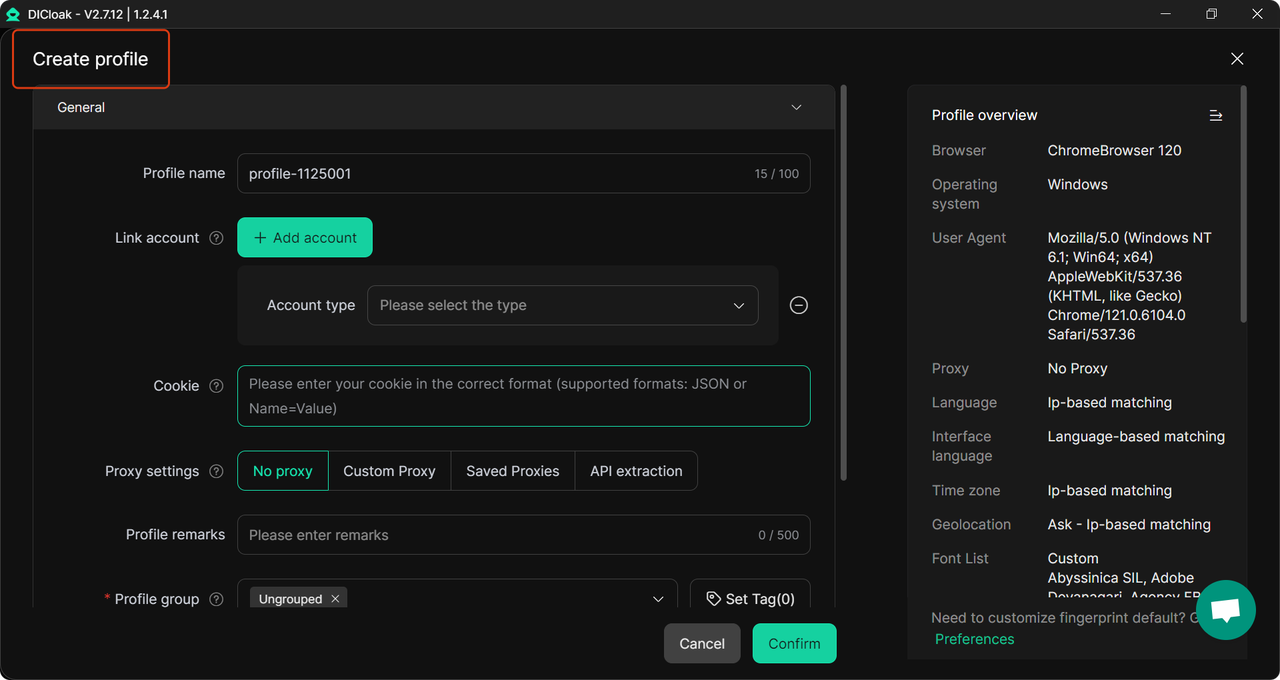
- Flexibility for Many Situations — Whether you’re just browsing, doing social‑media work, managing many accounts, or testing from different regions — DICloak gives you a flexible, secure profile. This can be especially useful if your regular network blocks YouTube or you need to manage multiple identities while keeping them separate.
For example, if you are on a work or school network that blocks YouTube, you can create a new DICloak profile, assign it a proxy from a country without restrictions, and open YouTube inside that profile. The rest of your browser stays unchanged. You get access without messing up your main browser — and you reduce the risk of detection.
In short, DICloak combines the benefits of proxy, isolation and multi‑account management. For anyone who needs stable, flexible access to YouTube (and other blocked sites) in diverse profiles — it’s a practical, powerful choice.
Conclusion
YouTube is often blocked in schools, workplaces, and public networks due to various restrictions. However, methods like using proxy servers, browser extensions, mobile hotspots, changing DNS settings, and downloading videos can help you access unblocked YouTube. For a more reliable solution, DICloak stands out. With custom proxy configuration and isolated browser profiles, DICloak allows you to safely bypass YouTube blocks, manage multiple accounts, and maintain privacy.
FAQ
How can I get YouTube unblocked at school?
If YouTube is blocked at school, you can try using methods like proxy servers, browser extensions, or mobile hotspots. Proxy servers and antidetect browsers help by masking your IP, while mobile hotspots provide an easy way to bypass school Wi-Fi restrictions using your phone’s data connection. Each method has its pros and cons, but they can be effective for unblocking YouTube on restricted networks.
What are the best ways to get YouTube unblocked at work?
At work, YouTube is often blocked for productivity reasons. You can try using browser extensions or changing DNS settings to bypass network restrictions. Browser extensions are easy to install, while DNS changes can help if the block is based on DNS filtering. You can also use a mobile hotspot if you need access without affecting your work network.
Are proxy servers safe for accessing YouTube unblocked?
Proxy servers can be effective for unblocking YouTube, but not all proxies are secure. Free proxies can be slow and may put your data at risk. It’s important to choose a reliable proxy service that encrypts your traffic to protect your privacy. Antidetect browsers like DICloak offer added security by providing custom proxy configurations and isolated browsing environments, which can help you access YouTube unblocked securely.
Can changing my DNS settings help with YouTube unblocked access?
Yes, changing your DNS settings can help unblock YouTube if the restriction is based on DNS filtering. By using public DNS servers like Google DNS or Cloudflare DNS, you can bypass local network restrictions and access YouTube unblocked. This method is quick and simple but may not work if the block is more complex.
How can I access YouTube unblocked using Google Translate?
One simple trick to access YouTube unblocked is using Google Translate. Paste the YouTube URL into Google Translate, then click on the translated link to open the video. This method works in some cases, especially if the block is light, but it may not always be effective for stronger network restrictions. It’s a quick and easy option, though it comes with limitations.
 Web Proxy Tools
 Free Tools
 Cookie Plugin
 UA Generator
 MAC Address Generator
 IP Generator
 IP Address List
 2FA Code Generator
 World Clock
 Anonymous Check
 WebRTC Leak Test
 UUID Generator
 Free Web Proxy Site
 Proxy Checker
 FB Ad Checker
 AI Web Scraping
 Free SMM Tools
 Twitter Shadowban Checker
 Instagram Name Checker
 UTM Generator
 Username Generator
 AI Hashtag Generator
 LinkedIn Headline Generator
 Social Media Image Resizer