Many people want to leave Facebook, but they do not want to lose Messenger. Maybe you still need family chats, customer messages, or old group conversations. This makes one question very common: can you use Messenger without Facebook in 2026? The answer is not as simple as old guides make it sound. Messenger no longer works like a phone-only chat app for most new users. But you can still deactivate your Facebook profile and keep Messenger active. This guide explains what still works, what may be limited, and how to keep your Messenger access safe.
Can You Use Messenger Without Facebook in 2026?
Many users still ask, can you use Messenger without Facebook in 2026? The honest answer is yes, but not in the old way. You usually still need a Facebook login to start using Messenger. After that, you can deactivate your Facebook profile and keep using Messenger.
This is important because many old guides still talk about phone-only Messenger sign-up. That worked in the past, but it is not the normal path today. If you search can you use Messenger without Facebook or phone number, the answer is more limited now. Messenger may let you log in with the phone number or email linked to your Facebook account, but new users should not expect a clean Messenger-only sign-up with just a phone number.
What "without Facebook" really means today
Today, "without Facebook" does not always mean "without a Facebook account." In most cases, it means using Messenger without an active Facebook profile. Your Facebook profile can be deactivated, but your Messenger access can stay active if you keep Messenger turned on during the deactivation process.
For example, someone may want to stop using Facebook because they no longer post updates or browse the feed. They may still need Messenger to talk with family, old classmates, or buyers from Marketplace. In that case, they are not fully leaving Meta's account system. They are simply hiding their Facebook profile while keeping Messenger available.
Can new users sign up with only a phone number?
New users should be careful with old advice about phone-only sign-up. In 2015, Messenger allowed people to sign up with a name, phone number, and photo. That is why some older articles still make it sound easy. But in 2026, that method is no longer the safe answer for most users.
If you are new to Messenger, the more realistic path is to create a Facebook account first. Then you can use Messenger with that login. Later, if you do not want an active Facebook profile, you can deactivate Facebook and keep using Messenger. This also explains why some users search using Messenger without Facebook account was recently disabled after they fail to create a Messenger-only account.
Why deactivating Facebook is different from deleting Facebook
Deactivation and deletion are very different. Deactivation is temporary. It can hide your Facebook profile, but Messenger can still work if you choose to keep it active. This is the best option for people who want less Facebook, but still need their chats.
Deletion is much more serious. If you delete your Facebook account, you may lose access to Messenger and the account data linked to it. For instance, a user who only wants fewer social feeds should not delete the account right away. Deactivating first gives them a safer way to test messenger login without Facebook app while keeping a path back if they need old chats or contacts later.
How to Use Messenger After Deactivating Facebook
After you understand the difference between deactivation and deletion, the next step is knowing how to keep Messenger working. This matters for anyone asking can you use Messenger without Facebook but still wants to keep old chats, family contacts, or work messages. In 2026, the safer path is not to remove Facebook fully. It is to deactivate the Facebook profile while keeping Messenger active.
Step-by-step guide to keep Messenger active
Before you start, make sure you can still log in to the Facebook account linked to Messenger. Open Facebook, go to your account settings, and choose the option to deactivate your Facebook profile. During the process, look for the choice that lets you keep using Messenger. Do not choose permanent deletion if your goal is to keep chatting.
After Facebook is deactivated, open the Messenger app or Messenger web. Log in with the same account details you used before. Your Facebook profile should stay hidden, but Messenger can still work. This is the normal answer for users who want messenger login without Facebook app, because they can use Messenger directly without browsing the Facebook feed.
What to check before you deactivate Facebook
Before you deactivate Facebook, check your email, phone number, and password. These details matter if Messenger asks you to confirm your identity later. You should also review your recovery options, because old phone numbers or lost emails can make login harder.
For example, a small business owner may use Messenger to talk with customers but no longer want an active Facebook profile. If they deactivate first without checking recovery details, they may get stuck when Messenger asks for a code. This is why users searching can you use Messenger without Facebook or phone number should be careful. You may not need a phone-only Messenger account, but you still need a working way to recover the account linked to Messenger.
What to do if Messenger asks you to log in again
If Messenger asks you to log in again, use the same email, phone number, or username linked to your Facebook account. Do not create a new account too quickly, because that can make old chats harder to find. If Messenger shows a warning or says the account is not available, check whether you deleted Facebook instead of deactivating it.
Some users search how to reactivate Messenger without Facebook after they lose access. In most cases, Messenger access depends on the same account system, so you may need to log back in and confirm your identity. If your Facebook profile becomes active again during login, review the deactivation settings and repeat the process carefully. Facebook's Messenger help page also notes that using Messenger with a deactivated Facebook account should not reactivate your Facebook account by itself.
What Features Still Work When You Use Messenger Without Facebook
Once Messenger is active after Facebook deactivation, most daily chat features can still feel the same. This is why the answer to can you use Messenger without Facebook is not only about login. It is also about what you can still do after your Facebook profile is no longer active. For many users, Messenger can still cover the main reason they stayed connected in the first place: private conversations.
Can you send messages, photos, and voice notes?
Yes, you can still use Messenger for normal chats after deactivating Facebook. You can send text messages, photos, links, stickers, and voice notes from the Messenger app. Your Facebook profile may be hidden, but your Messenger conversations can stay available if Messenger remains active during deactivation.
For instance, someone may deactivate Facebook before exams because the news feed feels distracting. They can still message classmates, send a photo of notes, or reply to a family group in Messenger. This is different from old searches like can you use Messenger without Facebook or phone number, because the working setup still depends on the account linked to Messenger, not a fresh phone-only account.
Do group chats and video calls still work?
Group chats and video calls can still work when you keep Messenger active after deactivating Facebook. You can reply in existing groups, join calls, and keep talking with people who already have your Messenger contact. This is helpful for families, school teams, or small work groups that use Messenger more than Facebook itself.
For example, a parent may leave Facebook but still need a Messenger group for school updates. They do not need to scroll Facebook to join a video call or answer a group message. In this case, messenger login without Facebook app simply means using Messenger directly through the Messenger app or supported web access, rather than using the Facebook feed.
Can you still message Facebook friends?
You can still message Facebook friends if the conversation is available in Messenger and your account can still log in. Your friends may still see your name in their chat list, and old messages may remain visible. This can feel confusing because your Facebook profile is deactivated, but your Messenger identity is still active.
For instance, if you deactivate Facebook after a busy holiday season, your cousin may still send you a Messenger message as usual. You can reply from Messenger without fully returning to Facebook. But if you deleted the Facebook account instead, the situation can change, and you may later search how to reactivate Messenger without Facebook because old chats or contacts no longer work the same way.
What Are the Limits of Using Messenger Without Facebook?
Messenger can still handle normal chats after Facebook deactivation, but it may not work exactly like a full Facebook account. This is where many users get confused after asking can you use Messenger without Facebook. The answer is still yes in many cases, but some features depend on your Facebook profile, your contact settings, and your recovery details.
Why some Facebook-linked features may not work
Some Messenger features connect closely with Facebook. Friend lists, profile discovery, Marketplace messages, Facebook groups, and some account settings may not feel the same after deactivation. You may still chat in Messenger, but you are no longer using Facebook as a full social profile.
For example, someone may deactivate Facebook but still use Messenger to talk with family. That part can work. But if they expect people to find them through an active Facebook profile, comment on their posts, or click into their profile from a group, they may run into limits. This is also why messenger login without Facebook app does not mean Messenger becomes a fully separate service. It still uses the same account system behind the scenes.
What happens to friend suggestions and contact sync?
Friend suggestions and contact sync may also change when you use Messenger without an active Facebook profile. Messenger can use uploaded contacts if contact uploading is turned on, but users can manage this from Messenger settings and Accounts Center. If contact syncing is off, Messenger may have less information to suggest people you know.
For instance, a user may deactivate Facebook, turn off contact uploading, and then wonder why fewer people appear in Messenger search. That does not always mean the account is broken. It may simply mean Messenger has fewer signals to match phone contacts, Facebook friends, and past conversations. This is a better way to explain searches like can you use Messenger without Facebook or phone number: you may not need a phone-only sign-up, but phone and contact details can still affect discovery and recovery.
Can you recover old chats without an active Facebook profile?
Old chats may still appear in Messenger if your account is active in Messenger and you did not delete the conversations. You can also request a copy of Messenger information through the export tools. This can help if you need a record of your messages before making account changes.
Still, recovery is not always perfect. If you deleted your Facebook account, removed chats, lost access to your login email, or skipped secure message storage, old conversations may be harder to get back. A user who deleted Facebook by mistake may later search how to reactivate Messenger without Facebook, but reactivation depends on whether the account is still recoverable. This is why deactivation is safer than deletion for people who only want less Facebook, not less Messenger.
Privacy and Security When Using Messenger Without Facebook
After looking at the limits, privacy is the next thing most users worry about. If you ask can you use Messenger without Facebook, you may also want to know whether your data becomes more private after Facebook is deactivated. Deactivation can hide your Facebook profile, but Messenger still works through the same account system. So it is better to treat Messenger as a separate chat space, not as a fully separate identity.
What information Messenger may still use
Messenger may still use account details that help you log in, find contacts, and keep chats working. This can include your name, profile photo, login details, device information, contacts you choose to upload, and activity inside Messenger. If you use messenger login without Facebook app, the login may feel more direct, but the account is still linked to Meta's system.
For example, a user may deactivate Facebook because they do not want people to see their profile. They may still keep Messenger open for family chats. In that case, Messenger can still need basic account and device information to keep messages, calls, and security checks working. Messenger also offers privacy controls for active status, story audience, encrypted chats, and who can reach you.
How to adjust Messenger privacy settings
Open Messenger settings and review the Privacy & safety area. You can control message delivery, active status, blocked accounts, contact uploading, and encrypted chat storage. These settings matter more when your Facebook profile is deactivated, because Messenger becomes your main way for people to reach you.
For instance, if unknown people keep sending message requests, you can change who can message you and where those requests go. If you do not want Messenger to match more people from your phone book, you can review contact upload settings. This helps users who search can you use Messenger without Facebook or phone number understand one point clearly: even if Messenger access depends on a Facebook-linked login, you can still limit how much your phone contacts shape your Messenger experience.
How to keep your Messenger account secure
Security starts with account access. Use a strong password, keep your email and phone number updated, and turn on extra login protection when available. You should also set up secure storage or a PIN for encrypted chats, because this can help restore chat history when you change devices. Meta's Messenger encryption update explains that secure storage can protect encrypted chat history and make it easier to access messages on another device.
For example, someone may get a new phone and suddenly lose older encrypted chats because secure storage was not set up. Another user may search how to reactivate Messenger without Facebook after being locked out, but recovery is much easier when the account details are current. Before deactivating Facebook, check your recovery email, phone number, password, and Messenger PIN. That small step can prevent a lot of stress later.
Common Problems When Using Messenger Without Facebook
Even with the right setup, Messenger can still feel confusing after Facebook deactivation. Some problems come from login checks. Others come from deleted chats, old recovery details, or the difference between deactivation and deletion. This is why users who ask can you use Messenger without Facebook should also know what can go wrong before they make account changes.
Messenger keeps asking you to reactivate Facebook
Sometimes Messenger may ask you to log in again after you deactivate Facebook. This does not always mean you must fully return to Facebook. Try logging in with the same email, phone number, or username linked to the account, then check whether Messenger opens without turning your Facebook profile back on.
For example, a user may deactivate Facebook on a laptop, then open Messenger on a new phone. Messenger may ask for a code because the device is new. This is a normal security check in many cases. If the login loop keeps happening, review your deactivation settings and make sure you did not start permanent deletion by mistake. Messenger can still work with a deactivated Facebook account, and using Messenger alone should not reactivate Facebook by itself.
You cannot find old contacts or chats
Another common issue is missing contacts or old chats. This can happen if contact uploading is off, the other person changed their account, or the chat was deleted before. It can also happen when you move to a new device without setting up encrypted chat storage.
For instance, someone may use messenger login without Facebook app on a new phone and expect every old chat to appear at once. Normal chats may still show, but end-to-end encrypted chats can depend on secure storage, a PIN, or another restore option. If secure storage was never set up, some message history may be harder to restore. Messenger offers restore options such as a PIN, Apple account, Google account, one-time code, or 40-character code for encrypted messages.
You lose access after deleting Facebook
The biggest mistake is deleting Facebook when you only meant to stop using it. Deactivation is temporary. Deletion is meant to remove the account, and it can also affect the Messenger access tied to that account. This is why the answer to can you use Messenger without Facebook or phone number should not push users toward removing the account fully.
A real case may look like this: a user wants fewer social media distractions, deletes Facebook, then later needs an old Messenger thread with a client or family member. They may search how to reactivate Messenger without Facebook, but recovery depends on whether the account is still within the allowed recovery period and whether the login details still work. If your goal is to keep Messenger, deactivate Facebook instead of deleting it, and check your message storage before changing anything.
Safer Ways to Manage Messenger Access Across Devices
The problems above often happen when people change devices, forget recovery details, or mix too many Messenger sessions in one place. So, before asking can you use Messenger without Facebook for the long term, it helps to think about access. Messenger may keep working after Facebook deactivation, but your login setup still needs to be clean and easy to recover.
Keep login details and recovery options updated
Make sure your account email, phone number, password, and recovery options are still current. This is especially important before you deactivate Facebook or switch to a new phone. If Messenger asks for a code later, old recovery details can slow everything down.
For example, someone may keep Messenger on an old phone for years, then lose the phone and try to log in on a new device. If the linked email is no longer active, recovery can become stressful. This is why how to reactivate Messenger without Facebook is often the wrong question. The better goal is to keep the Messenger-linked account recoverable before anything goes wrong. Messenger also lets users restore encrypted chats with options such as a PIN, Apple account, Google account, one-time code, or 40-character code.
Avoid mixing personal and work Messenger sessions
If you use Messenger for both personal chats and work messages, try to keep the sessions separate. This can reduce wrong-account replies, missed customer messages, and login confusion. It also makes daily use feel calmer, especially if your Facebook profile is deactivated but Messenger remains active.
For instance, a small seller may use Messenger for family chats and customer questions. If both accounts are open in the same browser, it is easy to reply from the wrong place. In this case, messenger login without Facebook app can be useful through Messenger.com, but the user still needs a clear routine for which account is used for which purpose. Messenger can continue working with a deactivated Facebook account, so the main risk is often poor account organization, not the deactivation itself.
Use separate browser profiles for different Messenger accounts
When you manage more than one Messenger account, separate browser profiles can help keep sessions cleaner. Each profile can store its own cookies, login state, cache, and local storage. This helps reduce mix-ups between a personal Messenger account, a work account, and a test account.
For example, a support team may use one Messenger account for customer replies and another for internal communication. Opening both in one normal browser can create confusion, especially when people switch tabs quickly. Separate browser profiles make it easier to keep each Messenger login in its own space. This also gives a more practical answer to searches like can you use Messenger without Facebook or phone number, because long-term Messenger use is not only about sign-up. It is also about keeping access stable, recoverable, and easy to manage.
How Manage Messenger Accounts More Safely with DICloak?
If you only use one personal Messenger account, normal login may be enough. But for social media teams, customer support staff, e-commerce sellers, or agencies, Messenger access can become harder to manage. Different accounts may be used for different clients, stores, or regions. In that case, users can use DICloak to keep each Messenger account in a cleaner and more separate browser profile.
Create isolated browser profiles for each Messenger account
Users can create a separate browser profile for every Messenger account in DICloak. Each profile can have its own cookies, sessions, local storage, cache, and browser fingerprint settings. This helps reduce account mix-ups when several Messenger accounts are used on the same device.
For example, a small e-commerce team may use one Messenger account for customer service and another for supplier chats. If both accounts stay in the same normal browser, the wrong account may be opened by mistake. With separate profiles, each Messenger login stays in its own space, which makes daily work easier to control.

Set custom proxies for more stable account environments
For teams that manage Messenger accounts across different markets, users can configure custom proxies inside each DICloak profile. This helps keep each account tied to a more consistent login environment. It is useful when a team handles accounts for different regions or clients and wants to reduce the risk of sudden changes in access signals.
This does not mean users can ignore Messenger or Facebook rules. It simply gives each account a more organized setup. When the browser profile, cookies, fingerprint settings, and proxy configuration stay consistent, account management becomes more stable and less messy.

Manage team access without sharing raw passwords
When several team members need to work on Messenger accounts, password sharing can create security risks. In DICloak, users can share browser profiles with team members and set permissions based on each person's role. This allows a support member to open the needed Messenger profile without receiving the raw password directly.
For example, a manager can assign one Messenger profile to a customer service member and another profile to a sales member. Operation logs and permission settings can also make team work easier to review. This is helpful for agencies or stores that need clear account ownership and safer access control.

Use Synchronizer for simple repeated Messenger tasks
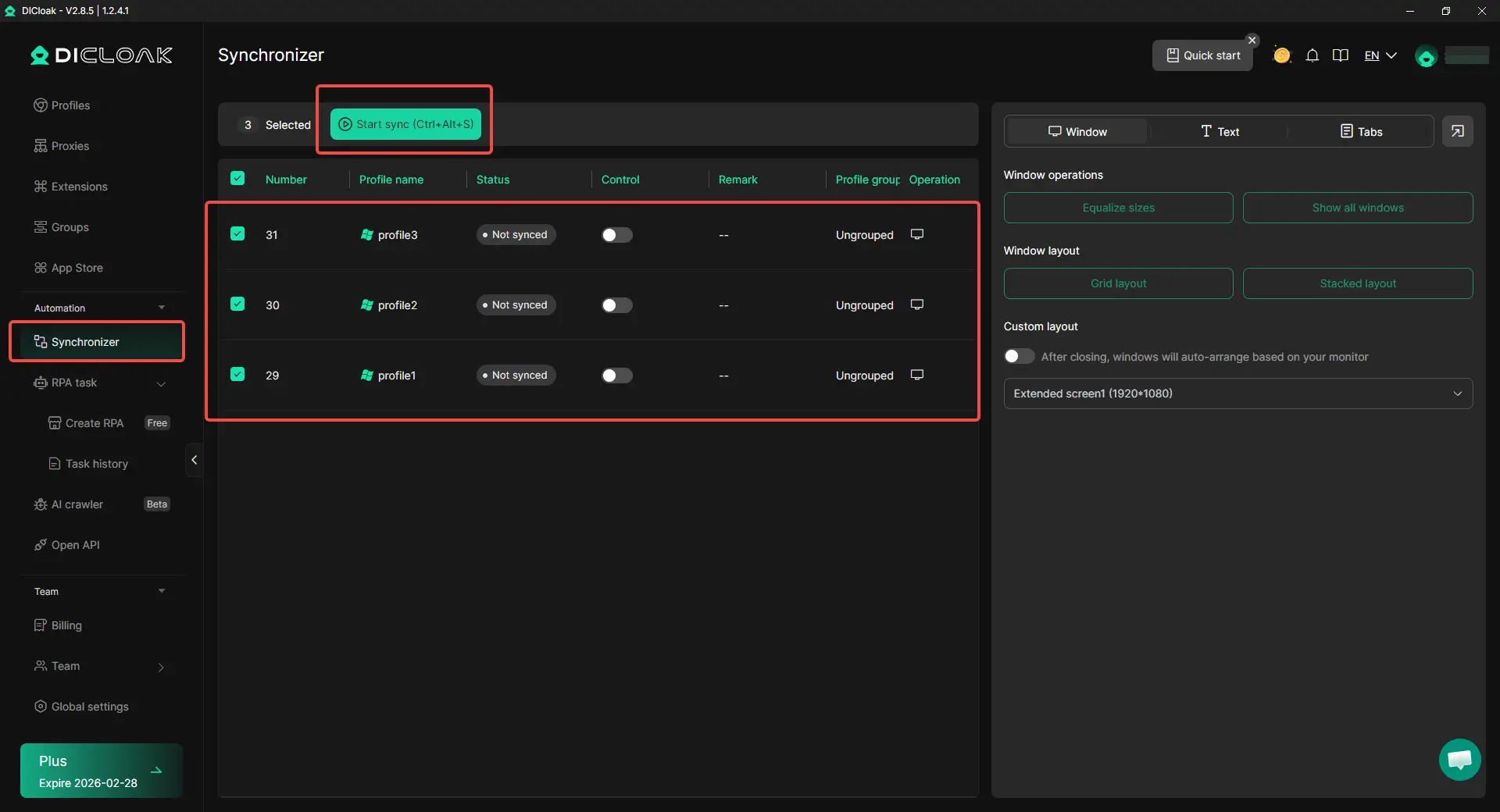
For repeated actions across several Messenger-related profiles, users can use the Synchronizer feature in DICloak. It can mirror simple actions across selected browser windows, which may save time when checking account status, opening similar pages, or handling basic setup steps. For teams that manage many Messenger accounts, this feature can reduce repetitive clicking and make routine account checks more efficient.
Frequently Asked Questions about Can You Use Messenger Without Facebook in 2026?
Can you use Messenger without Facebook in 2026?
Yes, you can use Messenger without an active Facebook profile in 2026, but you still need a Facebook-linked login. The common way is to deactivate your Facebook profile and keep Messenger active. This lets you chat on Messenger without using the Facebook feed.
Can you create a Messenger account without Facebook in 2026?
In most cases, no. New users usually cannot create a fresh Messenger-only account with just a phone number. If you want to use Messenger, you normally need to create or use a Facebook-linked account first.
Can you delete Facebook and still use Messenger?
Deleting Facebook is different from deactivating it. If you delete your Facebook account, you may lose access to Messenger because both are tied to the same account system. If your goal is to keep Messenger, deactivation is the safer choice.
Can you use Messenger without the Facebook app?
Yes. You can use the Messenger app or Messenger web without opening the Facebook app. This is helpful if you want Messenger for chats but do not want to browse Facebook posts, groups, or feeds.
How do you recover Messenger without Facebook?
Start by logging in with the email, phone number, or username linked to your account. If your Facebook profile was only deactivated, Messenger access may still work after identity checks. If the account was deleted, recovery may be harder or impossible after the recovery period ends.
Conclusion
In 2026, the answer to can you use Messenger without Facebook is yes, but only in a limited way. You usually still need a Facebook-linked login, but you can deactivate your Facebook profile and keep using Messenger for chats, calls, photos, and group messages.
The safest choice is to deactivate Facebook instead of deleting it. Before doing that, check your email, phone number, password, and chat recovery settings. This helps you keep Messenger access stable, even if you use it across devices or manage more than one account.
 Web Proxy Tools
 Free Tools
 Cookie Plugin
 UA Generator
 MAC Address Generator
 IP Generator
 IP Address List
 2FA Code Generator
 World Clock
 Anonymous Check
 WebRTC Leak Test
 UUID Generator
 Free Web Proxy Site
 Proxy Checker
 FB Ad Checker
 AI Web Scraping
 Free SMM Tools
 Twitter Shadowban Checker
 Instagram Name Checker
 UTM Generator
 Username Generator
 AI Hashtag Generator
 LinkedIn Headline Generator
 Social Media Image Resizer