Many people who use PayPal for daily payments or online business eventually ask the same question: can I have two PayPal accounts? The answer is not always obvious. Some users want one account for personal spending and another for business payments. Others run online stores, freelance services, or side projects and need a clear way to separate their money.
PayPal is one of the world’s most widely used digital payment platforms, with hundreds of millions of active accounts. Because it handles real financial transactions, the platform has strict policies about account ownership, identity verification, and security. This means creating or managing multiple accounts without understanding the rules can sometimes lead to account reviews or temporary limitations.
In this guide, we will explain whether you can have two PayPal accounts, how PayPal’s policies work, and when multiple accounts are allowed. You will also learn the differences between Personal and Business accounts, how to create them correctly, common problems users face, and practical ways to manage multiple accounts safely. By the end of this article, you will clearly understand how to organize your PayPal accounts while staying within PayPal’s official guidelines.
Types of PayPal Accounts
To understand the question “can I have two PayPal accounts?”, you first need to know that PayPal offers two main account types: Personal and Business accounts. Each account type is designed for different financial activities. Because their purposes are different, PayPal allows many users to operate one Personal account and one Business account at the same time. Understanding the differences between these two accounts can help you choose the right setup and avoid account restrictions.
Differences Between Personal and Business Accounts
A PayPal Personal account is made for individual use. People usually open this type of account to send money to friends, receive small payments, or shop online. It can also be used to pay for subscriptions, book travel, or buy products from online stores. The account is registered under your legal name, and it is mainly designed for personal spending rather than large commercial activity.
For example, a student might use a Personal account to split rent with roommates, send money to family members, or buy items online. Some users also keep funds in their PayPal balance and manage their money through financial tools connected to the account, such as features related to a PayPal savings account, which allows eligible users in the U.S. to earn interest on stored balances.
A PayPal Business account, on the other hand, is designed for companies, merchants, and entrepreneurs. This account can be opened under a business name instead of a personal name, which helps businesses look more professional when receiving payments. Business accounts allow users to accept payments for products or services, create invoices, manage customer payments, and pay suppliers.
For instance, an online store owner selling handmade clothing might connect a PayPal Business account to an ecommerce platform like Shopify. This integration allows customers to pay directly through PayPal during checkout. Business accounts also include additional tools such as tax reporting features, payment tracking, and the ability to give limited account access to employees.
Because these two account types serve very different purposes, the answer to “can I have two PayPal accounts?” is often yes—as long as one account is Personal and the other is Business.
Account Requirements for Each Type
Both account types require users to provide basic identity and financial information. When opening a PayPal account, users must register with a valid email address, provide their legal name, and link a payment method such as a bank account or debit card. PayPal may also request identity verification to comply with financial regulations.
- For Personal accounts, the requirements are simple. The account must be opened under the user’s real name, and PayPal may request additional verification if transaction activity increases. In the United States, users may also be asked to provide a Social Security Number (SSN) for tax reporting when payment thresholds are reached.
- For Business accounts, the requirements are more detailed because the account represents a company. PayPal may ask for information such as the business name, business address, and tax identification number, such as an Employer Identification Number (EIN). This information helps PayPal confirm that the business is legitimate and ensures compliance with tax rules.
For example, a freelance photographer might begin with a Personal account when working with a few clients. As their business grows and they start selling prints online or accepting payments through an ecommerce website, they may open a Business account to handle professional transactions. This structure allows them to separate personal expenses from business income.
By understanding how these two account types work, users can better answer the common question “can I have two PayPal accounts?” and set up their accounts in a way that follows PayPal’s policies while supporting both personal and business financial needs.
Understanding PayPal's Policies: Can I Have Two PayPal Accounts Under One Name?
Many users ask the same question when they begin managing online payments: can I have two PayPal accounts? The answer depends on how the accounts are set up and whether they follow PayPal’s official policies. PayPal allows some flexibility, but the company also enforces strict rules to prevent fraud, tax problems, and identity misuse.
Before creating another account, it is important to understand how PayPal structures account ownership, what information must remain unique, and why the platform monitors account activity carefully. The following sections explain when multiple accounts are allowed and what rules users must follow to stay compliant.
Yes, in most cases it is allowed—but only in a specific structure. PayPal’s terms state that a single individual can normally hold one Personal account and one Business account at the same time. This setup is common for freelancers, small business owners, and online sellers.
For example, a graphic designer might use a Personal account to shop online or manage everyday payments. At the same time, they can open a Business account to receive payments from clients and send invoices. This separation helps keep personal spending separate from business income, which is useful for accounting and tax reporting.
However, creating two Personal accounts or two Business accounts under the same name is generally not allowed. Even if someone tries to use different email addresses or bank accounts, PayPal may detect the duplicate ownership during verification checks. In many cases, this leads to account reviews or temporary restrictions until the situation is clarified.
Users should also remember that certain PayPal financial features, such as managing balances or using services related to a PayPal savings account, are linked to the main account holder. This means the account identity must remain consistent and verified.
PayPal’s Rules Regarding Multiple Accounts
PayPal’s rules for account ownership include several key requirements that users should understand before opening more than one account.
1. One Personal Account and One Business Account PayPal allows one Personal and one Business account per person. This rule helps keep the platform organized and prevents users from creating multiple accounts to bypass limits or policies.
2. Unique Financial Information PayPal recommends linking different financial information to each account. For example, users often attach separate bank accounts to their Personal and Business accounts. Using identical financial details across multiple accounts can sometimes trigger account reviews.
3. Identity Verification Requirements In the United States, PayPal may require identity verification for compliance reasons. Personal accounts are usually verified with a Social Security Number (SSN), while Business accounts often require an Employer Identification Number (EIN). The same SSN generally cannot be used to verify multiple Personal accounts.
4. Country of Residence Rules PayPal expects users to open accounts in the country where they live or operate a registered business. Creating accounts in countries where the user does not legally reside can violate PayPal’s terms of service.
Understanding these rules helps prevent accidental policy violations. For instance, many entrepreneurs who run online stores follow a simple structure: a Personal account for private spending and a Business account for customer payments. By following PayPal’s policies, they can manage transactions smoothly while avoiding unnecessary account limitations.
How to Create Multiple PayPal Accounts?
After learning PayPal’s rules, many users want to know the practical side of the question: can I have two PayPal accounts and how can I create them correctly? The good news is that opening a PayPal account is usually simple if you follow the platform’s requirements. However, users must make sure that every account has unique information and serves a clear purpose.
In most cases, people create one Personal account and one Business account. This structure is common for freelancers, online sellers, and small business owners. For instance, a freelance developer might keep a Personal account to pay for everyday expenses and manage personal funds, including features related to a PayPal savings account. At the same time, the developer can use a Business account to receive payments from clients and send invoices. The process of creating these accounts is straightforward, but it must follow PayPal’s policies carefully.
If you are asking “can I have two PayPal accounts?”, the safest way is to open them properly and use them for different purposes. The steps below explain how many users create their accounts.
Prepare unique account information
Before signing up, make sure you have a unique email address, a phone number, and a payment method such as a bank account or card. PayPal requires these details to create and verify your account.
Create a Personal PayPal account
Go to the PayPal website and choose the Personal account option. During the sign-up process, you will need to:
- Enter a valid and unique email address
- Set a password
- Select your country of residence
- Add your legal name, address, and phone number
- Link a bank account or debit/credit card
Once the account is created, PayPal will send a verification email. After confirming your email, you can begin sending and receiving money. It is also recommended to complete identity verification, enable two-factor authentication, and upload ID documents if requested. These steps help strengthen account security and reduce the risk of restrictions.
Create a Business PayPal account if needed
If you run a business or sell products online, you can open a Business account using another email address. This account allows you to receive payments under your business name and connect PayPal to ecommerce platforms such as Shopify.
During Business account registration, PayPal may ask for additional information, including:
- Your legal business name
- Type of business
- Business address
- Tax or registration information (such as EIN in the United States or VAT ID in other regions)
After verification, the Business account can be used to send invoices, accept online payments, and manage transactions for your company.
What's more, users should remember that creating accounts is only part of the process. Operating several PayPal accounts from the same device or environment may trigger security checks because PayPal’s systems monitor login activity to detect suspicious behavior.
By following these steps and keeping account information separate, users can better understand the practical answer to “can I have two PayPal accounts?” and manage their finances in a safe and organized way.
Common Problems to Expect If You Ask “Can I Have Two PayPal Accounts?”
Even after setting up accounts correctly, users may still run into practical issues. Many people first ask “can I have two PayPal accounts?”, but the real challenge often begins after the accounts are created. Managing more than one account requires careful organization, consistent activity, and clear separation between personal and business use.
When accounts are not managed properly, PayPal may review them for security reasons. This does not always mean something is wrong. PayPal simply monitors account activity to prevent fraud and protect users. However, certain situations can trigger extra checks.
Account Linking When Using the Same Device
One common problem happens when multiple PayPal accounts are operated from the same device or environment. PayPal’s security systems track several signals during login and activity. These signals help the platform identify suspicious activity and protect accounts from fraud.
Some of the main factors that PayPal systems may monitor include:
IP address Every internet connection uses an IP address. When you log into PayPal, that IP address becomes part of the account’s login history. If several accounts are frequently accessed from the same IP address, PayPal may review the activity to make sure the accounts are legitimate.
Browser fingerprint Websites can also recognize devices through a “browser fingerprint.” This fingerprint may include details such as the operating system, browser version, screen resolution, time zone, language settings, and installed extensions. When multiple accounts repeatedly use the same device profile, the system may notice similarities.
Cookies and local storage PayPal also stores cookies in the browser to keep users logged in and maintain secure sessions. When accounts are frequently switched in the same browser, some data from previous sessions may remain. This can sometimes make it easier for systems to recognize connections between accounts.
For example, imagine a small online agency that manages payments for several projects. If the team logs into different PayPal accounts from the same laptop throughout the day, PayPal may temporarily review those accounts to confirm they belong to legitimate users.
Account Reviews and Temporary Limitations
When PayPal detects unusual patterns, the platform may place a temporary limitation on the account. This usually means that certain actions—such as sending or withdrawing money—are paused until the account owner completes verification.
In many cases, PayPal simply asks for documents to confirm identity or business activity. These documents might include a government ID, proof of address, or business registration details. Once the information is verified, normal account activity is usually restored.
For example, a freelance designer who receives a sudden increase in client payments may be asked to provide proof of services or invoices. This helps PayPal confirm that the transactions are legitimate.
Financial Tracking and Account Confusion
Another challenge when running multiple accounts is financial confusion. When payments are spread across different accounts, it becomes harder to track balances, refunds, and fees.
A good example is a small online store owner. The store owner might receive customer payments through a Business account but accidentally pay suppliers through a Personal account. Over time, this mix of transactions can make accounting difficult.
A better approach is to keep the roles clear. The Personal account can handle everyday spending and personal money management, including services like a PayPal savings account for eligible users. The Business account should handle all customer payments, invoices, and supplier transactions.
In the end, the question “can I have two PayPal accounts?” is only the first step. The real key is managing those accounts responsibly. By understanding how PayPal monitors activity and by keeping personal and business finances clearly separated, most users can avoid common problems and operate their accounts smoothly.
A Smarter Way to Manage Multiple PayPal Accounts with DICloak
As discussed earlier, many users eventually move from asking “can I have two PayPal accounts?” to a more practical question: how can these accounts be managed safely and efficiently over time?
This becomes especially important for freelancers, agencies, and online sellers who handle several accounts for different projects or clients. Managing everything in a normal browser can quickly become confusing because cookies, sessions, and login environments may overlap.
In these situations, many professionals use specialized multi-account browsers to keep each account organized and independent. One example is DICloak, which is designed to help teams manage multiple accounts while keeping each environment separated and consistent.
Profile Isolation for Each Account
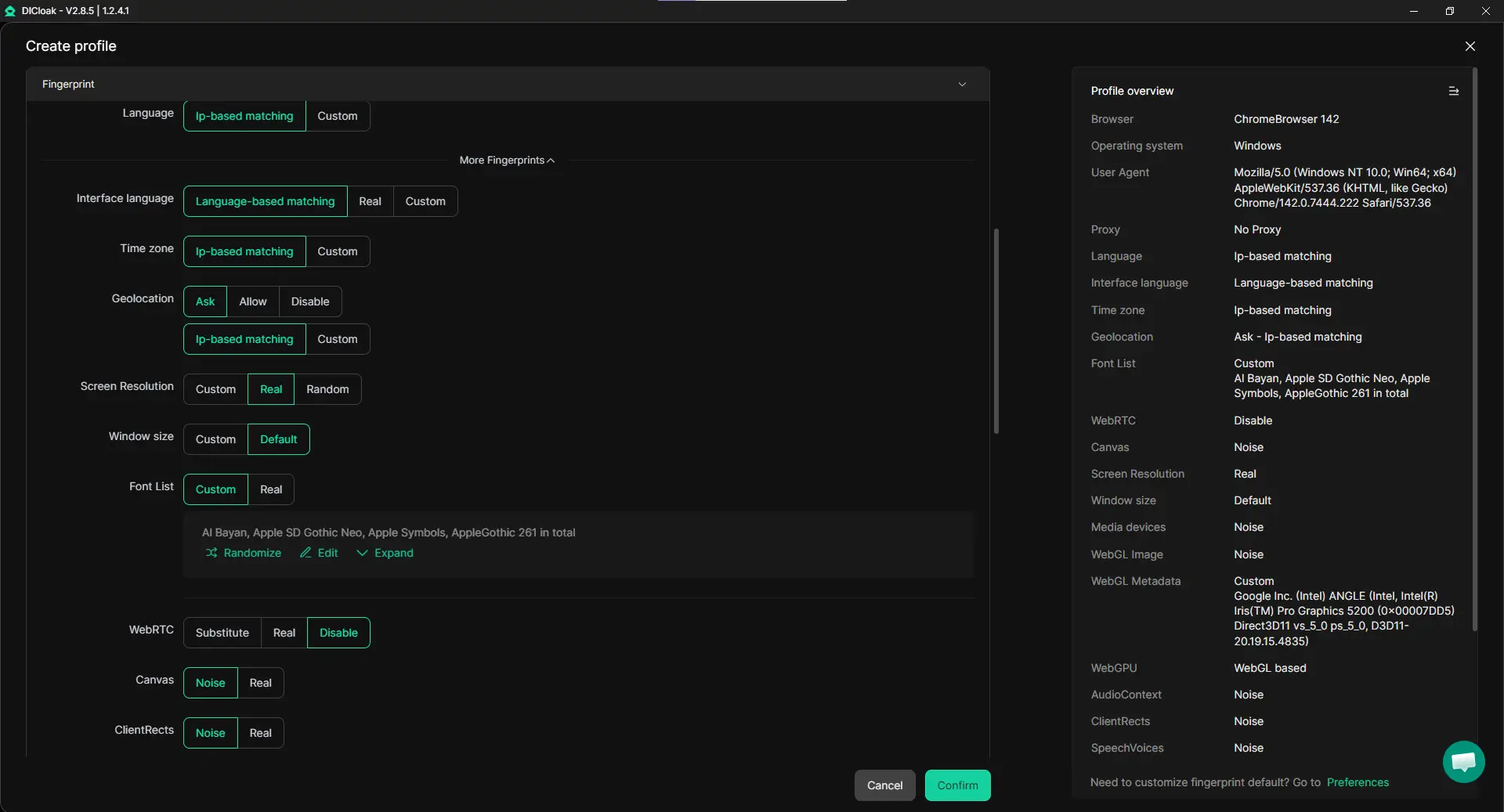
When managing multiple PayPal accounts, one common concern is that accounts may appear connected if they share the same browser profile. With DICloak, users can create separate browser profiles, and each profile runs in its own isolated environment. That means every profile has its own cookies, local storage, and browser settings. In practice, this helps keep activities clearly separated.
For example, a freelancer might run one profile for a Personal PayPal account used for everyday spending or features like a PayPal savings account, and another profile for a Business account used for client payments. Because each profile operates independently, it is easier to keep transactions organized.
Flexible Proxy Configuration for Stable Logins
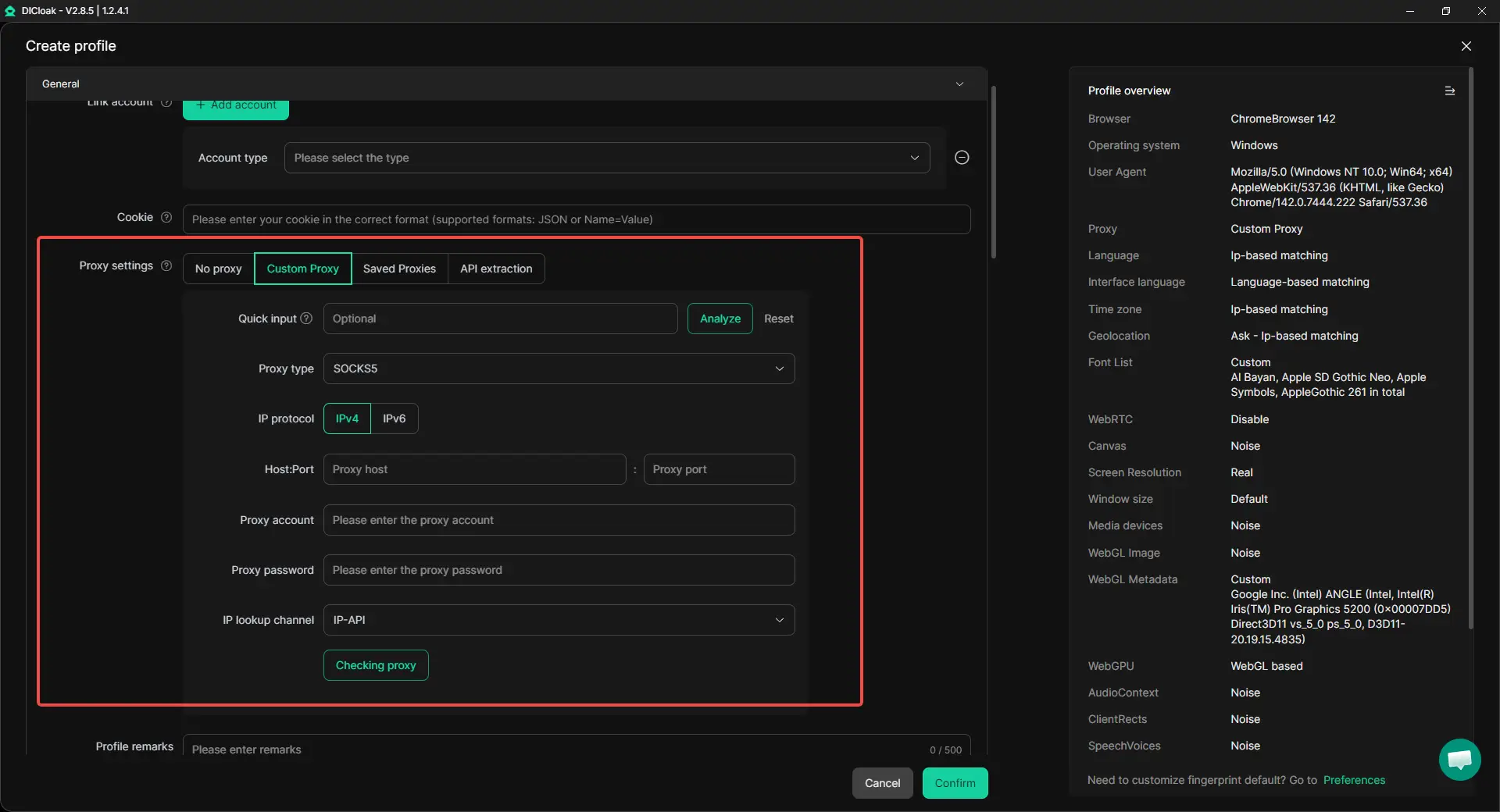
Another challenge when handling multiple accounts is maintaining a consistent login environment. PayPal and other financial platforms often monitor login locations and network information for security reasons. With DICloak, users can assign a different proxy to each browser profile. It supports common proxy protocols such as HTTP, HTTPS, and SOCKS5, making it easier to manage multiple network identities across profiles.
For example, an e-commerce seller operating several online stores may assign a separate proxy to each account profile. This keeps account environments stable and reduces confusion when switching between accounts.
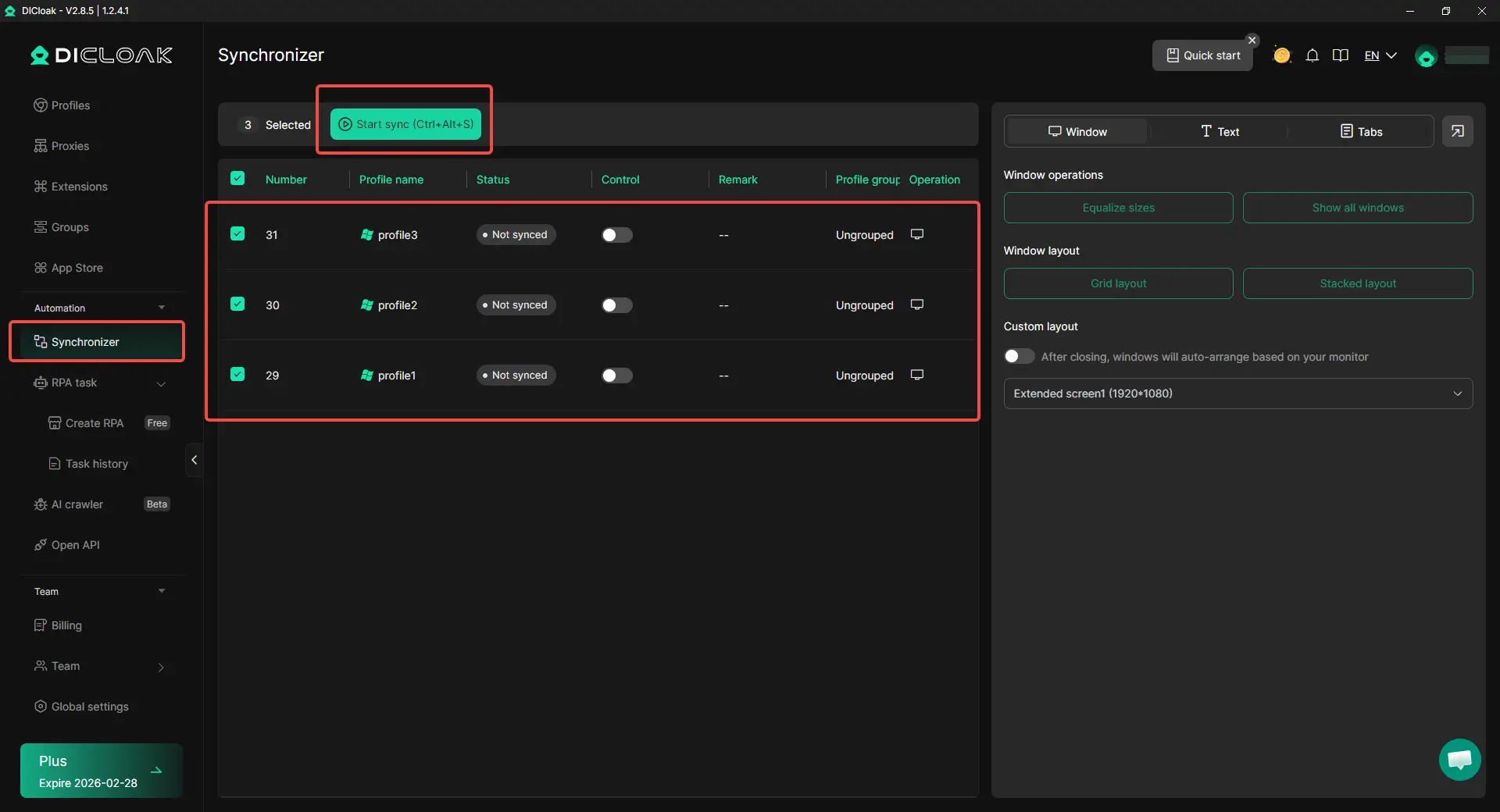
Handling several accounts can also become time-consuming when repetitive actions are required. Tasks such as checking payments, updating account information, or reviewing activity logs often need to be repeated in multiple accounts. DICloak includes a multi-window Synchronizer, which allows actions performed in one window to be mirrored in other profiles. This feature can save time when managing many accounts at once.
For instance, a small team managing client payments may open several browser profiles at the same time and review account activity in parallel. With synchronized windows, routine operations can be completed much faster.
Team Collaboration and Account Management
Many businesses do not manage PayPal accounts alone. Marketing teams, finance staff, or virtual assistants may need access to different accounts during daily operations. With DICloak's collaboration features, teams can work together safely. Profiles can be shared with team members while maintaining permission control, data isolation, and activity logs. This means multiple people can access the same account profile without sharing passwords directly.
For example, an agency handling payments for several clients can assign different team members to different profiles. Each member works within the same isolated browser profile, which helps keep workflows organized.

Scalable Multi-Account Operations
Professionals in industries such as social media management, affiliate marketing, e-commerce, traffic operations, and digital services often manage large numbers of online accounts. Tools like DICloak help simplify these operations by supporting:
- Bulk profile creation and management
- Automated tasks through built-in RPA tools
- Cross-platform environment simulation (Windows, macOS, iOS, Android, and Linux)
- Efficient management of hundreds or even thousands of browser profiles from one device
This makes it easier to scale operations without needing multiple computers or complex setups.
In short, the question “can I have two PayPal accounts?” is only the starting point. The real challenge is keeping those accounts organized and secure over time. By using structured workflows and specialized multi-account tools like DICloak, professionals can manage multiple PayPal accounts more efficiently while keeping their account environments clearly separated.
Managing Multiple PayPal Accounts Effectively
After setting up your accounts and organizing them with tools like DICloak, the next step is learning how to run them responsibly over time. Many people first ask “can I have two PayPal accounts?”, but the long-term success comes from how those accounts are used and managed every day.
Whether you are a freelancer, an online seller, or a small agency, keeping accounts organized helps avoid mistakes and unnecessary security checks. The following practices can help you manage multiple PayPal accounts in a stable and professional way.
Best Practices for Managing Multiple PayPal Accounts
The most important rule is clear separation of purpose. Each PayPal account should have its own role and should not mix activities.
- Use one account for personal payments and another for business transactions. For example, a freelance designer may use a Personal PayPal account for everyday purchases, online subscriptions, or saving funds using features connected to a PayPal savings account. Meanwhile, the Business account handles client invoices and service payments.
- Keep financial records organized. Export PayPal transaction reports regularly. Many businesses connect their PayPal Business account to accounting software. This helps track income, fees, and refunds more accurately.
- Enable security settings. PayPal recommends enabling two-factor authentication (2FA) and setting strong passwords. These steps protect both accounts from unauthorized access.
- Respond quickly to verification requests. If PayPal asks for documents, submit them promptly. This may include ID verification, proof of address, or business registration details. Quick responses help prevent long account restrictions.
For example, a small Shopify store owner often separates customer payments in a Business account while keeping personal spending in a Personal account. This structure keeps tax reporting simple and reduces financial confusion.
Tips for Safe Operation
PayPal uses automated systems to monitor accounts for unusual behavior. These systems look at login patterns, device environments, and transaction activity. The goal is not to “avoid detection” in a deceptive way, but rather to operate accounts in a normal and consistent manner.
- Maintain stable login environments. Switching devices or locations frequently can trigger extra security checks. Many professionals keep consistent login environments to maintain account stability.
- Avoid mixing account sessions. Running multiple PayPal accounts in the same browser can sometimes create cookie conflicts. Using separate browser profiles, such as those mentioned earlier, helps keep account sessions independent.
- Use consistent transaction behavior. Large, sudden payment spikes or unusual activity can trigger reviews. Gradual account growth and normal transaction patterns are safer.
For instance, an online marketing agency that manages payments for several clients may keep each account in its own browser profile and maintain stable login patterns. This helps PayPal recognize each account as a legitimate and separate operation.
In simple terms, the question “can I have two PayPal accounts?” is only the first step. What truly matters is managing those accounts responsibly. By separating personal and business use, maintaining clear records, and operating accounts with consistent behavior, users can run multiple PayPal accounts smoothly while keeping their finances organized.
Conclusion: Can I Have Two PayPal Accounts and Stay Compliant?
So, can I have two PayPal accounts? In most cases, yes—if you follow PayPal’s rules. PayPal typically allows one Personal account and one Business account per person, and each account must use a different email address. A Personal account is for everyday spending and may include features linked to a PayPal savings account in eligible regions, while a Business account is for selling, invoices, and customer payments.
The key is to keep the accounts separate and accurate. Use each account for its purpose, keep your details consistent, and respond fast if PayPal asks for verification. When you stay organized and avoid mixing sessions, managing two PayPal accounts can be smooth and safe.
Frequently Asked Questions
Can I have two PayPal accounts under the same name?
Yes, in most cases you can have two PayPal accounts under the same name, but only in a specific structure. PayPal usually allows one Personal account and one Business account per person. Each account must use a different email address and should serve a different purpose. For example, a freelancer might use a Personal account for everyday purchases and a Business account to receive client payments. However, creating two Personal accounts or two Business accounts under the same name can violate PayPal’s policies and may lead to account reviews or restrictions.
Can I have two PayPal accounts with the same email address?
No. If you are wondering can I have two PayPal accounts with the same email, the answer is no. PayPal requires a unique email address for every account. The email works as the main login ID, so it cannot be shared between accounts. For instance, if you already have a Personal PayPal account using one email, you must use a different email to create a Business account.
Can I have two PayPal accounts for personal use?
Generally, no. Even though many users ask can I have two PayPal accounts for personal use, PayPal normally allows only one Personal account per individual. If someone creates multiple Personal accounts to separate payments or bypass limits, PayPal may review or restrict the accounts. The recommended setup is one Personal account and one Business account if you need separate payment purposes.
Can I have two PayPal accounts on the same device?
Yes, technically you can log into multiple accounts on the same computer or phone. However, users often ask can I have two PayPal accounts on the same device safely, and the answer depends on how they are managed. PayPal monitors login patterns, device environments, and IP addresses to protect users from fraud. If several accounts are frequently accessed from the same browser session, it can sometimes trigger security checks. Keeping account sessions separate and maintaining consistent login behavior helps avoid confusion.
Can I have two PayPal accounts if I run an online business?
Yes. In fact, many entrepreneurs ask can I have two PayPal accounts if I run a business, and the answer is usually yes. A common setup is:
- Personal account for everyday spending, subscriptions, or savings features like a PayPal balance or PayPal savings account
- Business account for customer payments, invoices, and ecommerce sales
For example, a Shopify store owner might receive customer payments through a Business PayPal account while using their Personal account for personal purchases.
 Web Proxy Tools
 Free Tools
 Cookie Plugin
 UA Generator
 MAC Address Generator
 IP Generator
 IP Address List
 2FA Code Generator
 World Clock
 Anonymous Check
 WebRTC Leak Test
 UUID Generator
 Free Web Proxy Site
 Proxy Checker
 FB Ad Checker
 AI Web Scraping
 Free SMM Tools
 Twitter Shadowban Checker
 Instagram Name Checker
 UTM Generator
 Username Generator
 AI Hashtag Generator
 LinkedIn Headline Generator
 Social Media Image Resizer