In the high-stakes world of professional streaming, an account flag can end a career overnight. For streamers and agencies, the threat of an IP ban on Twitch is a constant worry. Losing access to your community means a total loss of revenue and brand equity. While Twitch moderation is complex, most people don't realize that traditional IP bans are actually quite rare.
To navigate this landscape safely, professionals use enterprise-grade tools like DICloak. These tools provide the account isolation necessary to manage a growing digital footprint. In this guide, we will break down how Twitch tracks users and why modern streamers are moving toward professional identity management.
Understanding the IP ban on Twitch in 2026
Identifying What a Twitch IP Ban Actually Is
A Twitch IP ban is a severe enforcement action where the platform blocks a specific internet address from reaching its servers. If this happens, no one on that specific network can use Twitch. While Twitch has the technical power to do this, it is usually a last resort reserved for extreme violations of the Terms of Service.
Why Twitch Considers IP Bans Ineffective
Twitch has publicly stated that relying on an IP address is "highly ineffective" for modern moderation. There are three main reasons why:
- Dynamic IPs: Most home internet providers change your address regularly. A ban today might block a stranger tomorrow.
- Shared Networks: Thousands of students at a university or dozens of customers in a coffee shop often share one IP. Banning that IP would cause massive collateral damage by blocking hundreds of innocent users.
- Easy Bypasses: Technical users can easily change their IP address by simply restarting their router or switching to mobile data.
Why an IP ban on Twitch Is Rarer Than You Think
The Problem with Dynamic and Shared IP Addresses
Internet Service Providers (ISPs) move IP addresses around like musical chairs. In addition, mobile users often share addresses through "carrier-grade NAT." This means one IP could represent thousands of different phones. For example, if Twitch banned a mobile IP, they might accidentally kick thousands of viewers off the site at once. Twitch avoids this to protect its growth and user experience.
Better Enforcement Alternatives Used by Twitch
Therefore, Twitch has developed much more accurate ways to identify "bad actors" without relying on unstable IP addresses:
- Phone and Email Verification: Requiring a confirmed phone number is the "gold standard" for moderation because phone numbers are harder to replace than IPs.
- Behavioral Analysis: Twitch uses AI to watch how accounts act. If a user chat-spams like a bot, they are flagged instantly.
- Device Fingerprinting: Twitch looks at your browser type, screen resolution, and hardware to create a unique "fingerprint" of your computer.
Comparing Channel Bans vs. a Platform-Wide IP ban on Twitch
How Channel-Level Bans Work for Viewers
A channel ban is a local action taken by a streamer or their mods. If you are banned from one channel, you can no longer chat there, though you can usually still watch. These bans are permanent unless the streamer chooses to forgive you. In addition, you can still use your account to chat in any other channel on the site.
The Severity of Platform-Wide Account Suspensions
A platform-wide suspension is much more serious because it comes from Twitch itself. This happens when an account violates Community Guidelines. Common reasons include:
- Hate speech or harassment.
- Copyright violations (DMCA).
- Account farming or viewbotting.
- Coordinated attacks on other users. When this happens, your channel is hidden, and you cannot log in or particIPate anywhere on the platform.
How to Tell If You Have Received an IP ban on Twitch
Signs of a Channel-Specific Ban
If you see a message saying "You are permanently banned from talking" in one specific room, that is a channel ban. You will still be able to use the rest of Twitch. This is the most common type of restriction.
Identifying an Actual IP ban on Twitch
A true IP ban is identified by how the network behaves across multiple devices. If you create a new account and it is suspended within minutes—and then you try a different laptop on the same Wi-Fi and the same thing happens—you are likely facing an IP-level restriction. However, if you switch to mobile data and everything works fine, the block is definitely tied to your home network.
Streamer Tools That Go Beyond an IP ban on Twitch
Using Phone and Email Verification Modes
Streamers use "Verification Modes" to add friction for trolls. For example, by requiring a verified phone number, a streamer ensures that a banned user cannot just create ten new accounts in five minutes. This protection is much more reliable than an IP ban.
Suspicious User Detection and AutoMod Features
Twitch’s AI-powered tools provide a shield for the community. Suspicious User Detection flags accounts that have no profile history or show unusual patterns. In addition, AutoMod catches harmful messages before they even appear in the chat. These tools help maintain a professional environment without the need for messy IP-level blocks.
Best Practices to Avoid an IP ban on Twitch
Guidelines for Viewers and Chatters
- Respect the Guidelines: Stick to the Community Guidelines to protect your long-term access to the platform.
- Avoid Ban Evasion: If you are banned from a channel, do not use a different account to return. This is the fastest way to get a platform-wide suspension.
- No Automation: Avoid using bots to automate follows or messages, as Twitch's AI will flag this as "account farming."
Essential TIPs for Professional Streamers
- Moderate Proactively: Use AutoMod and trusted moderators to keep your chat clean.
- Respect DMCA: Only use music you have the rights to, as repeated copyright strikes can lead to a permanent ban.
- Avoid Viewbotting: Buying followers or viewers is a high-risk activity. Twitch monitors these metrics closely, and a sudden spike in fake users can lead to immediate account termination.
The Right Way to Use Multiple Twitch Accounts
Twitch allows you to have multiple accounts as long as you use them for different content or personal reasons. However, you must keep these identities distinct. Using multiple accounts to inflate your own numbers or avoid a ban is strictly forbidden.
Why Professionals Choose DICloak for Account Isolation
For agencies and professionals managing many accounts, DICloak antidetect browser is the industry standard. It prevents "data leakage" between profiles. Each account you manage inside DICloak looks like it is running on a completely different computer. This isolation is crucial because it mimics the natural behavior Twitch's AI looks for, preventing accounts from being linked and banned together.

Why DICloak is the Best Tool to Prevent an IP ban on Twitch
Key Features of DICloak for Twitch Users
DICloak offers a professional-grade solution for scaling your operations safely:
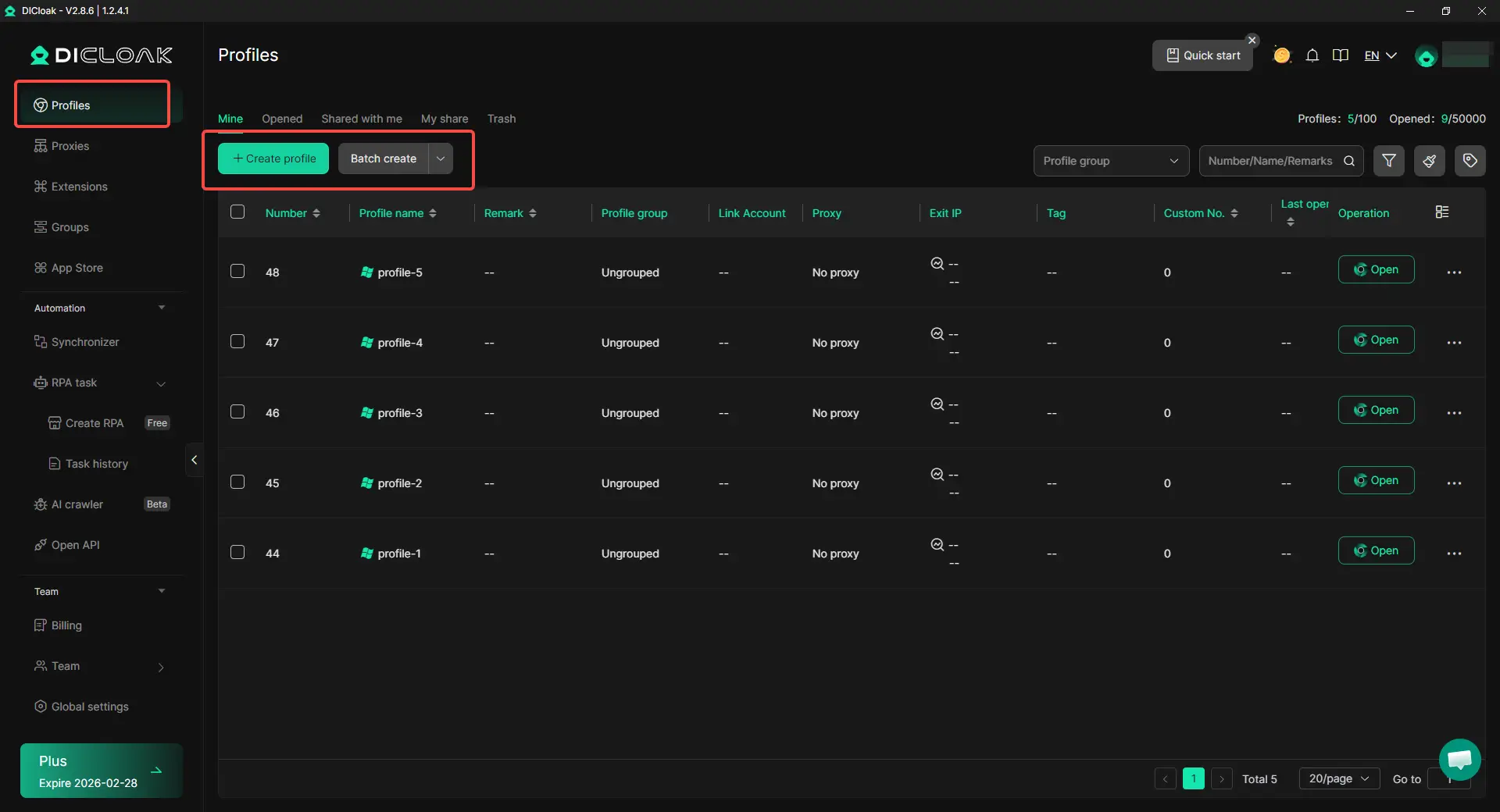
- Massive Account Management: Manage 1,000+ accounts on one device. Instead of buying dozens of laptops, you can run everything from one dashboard.
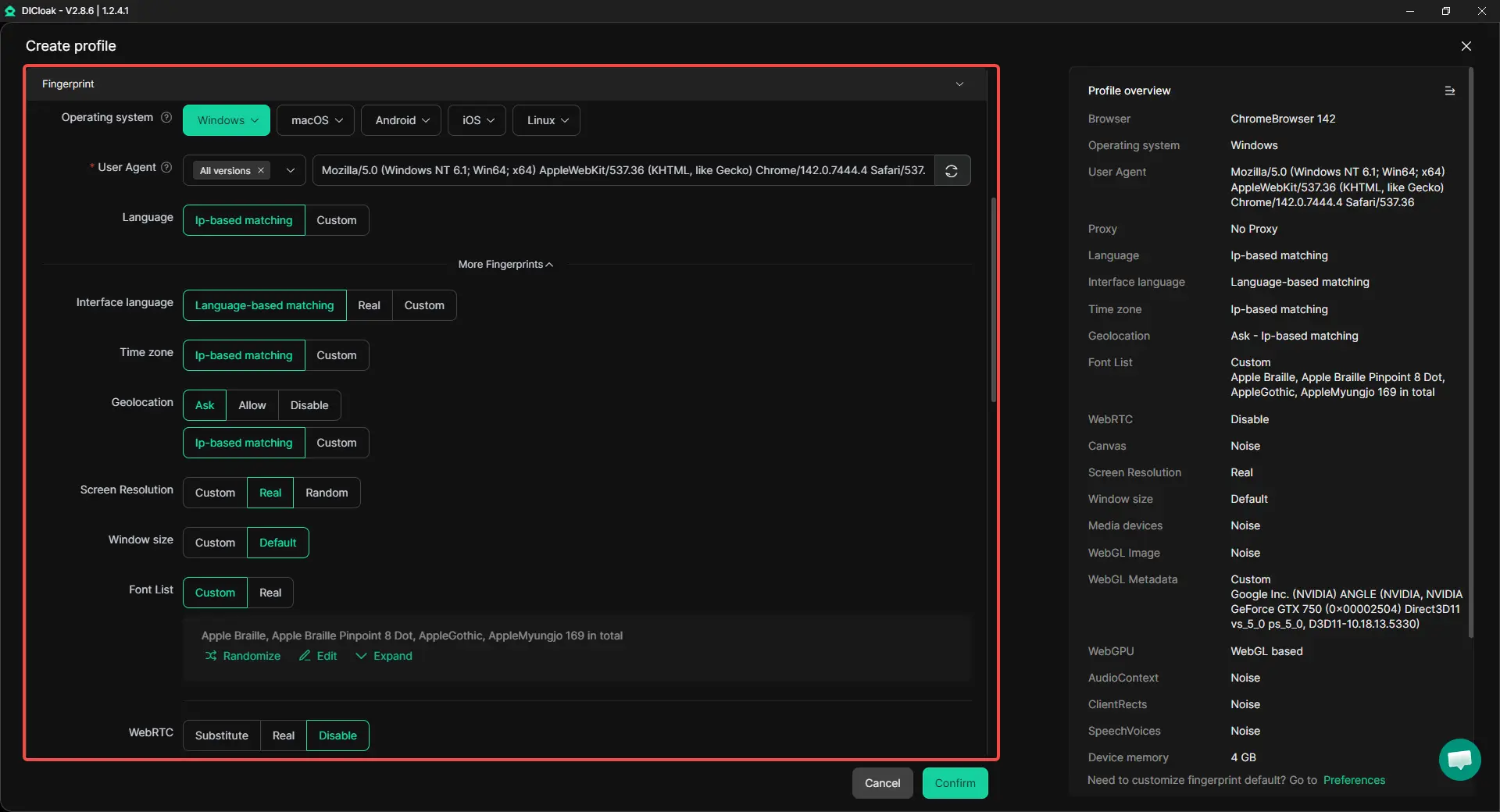
- Custom Fingerprinting: Each profile maintains an isolated browser fingerprint. DICloak’s WebRTC configuration helps align IP-related data with the assigned proxy, exposing the proxy location instead of the real network environment and reducing cross-account linkage on Twitch.
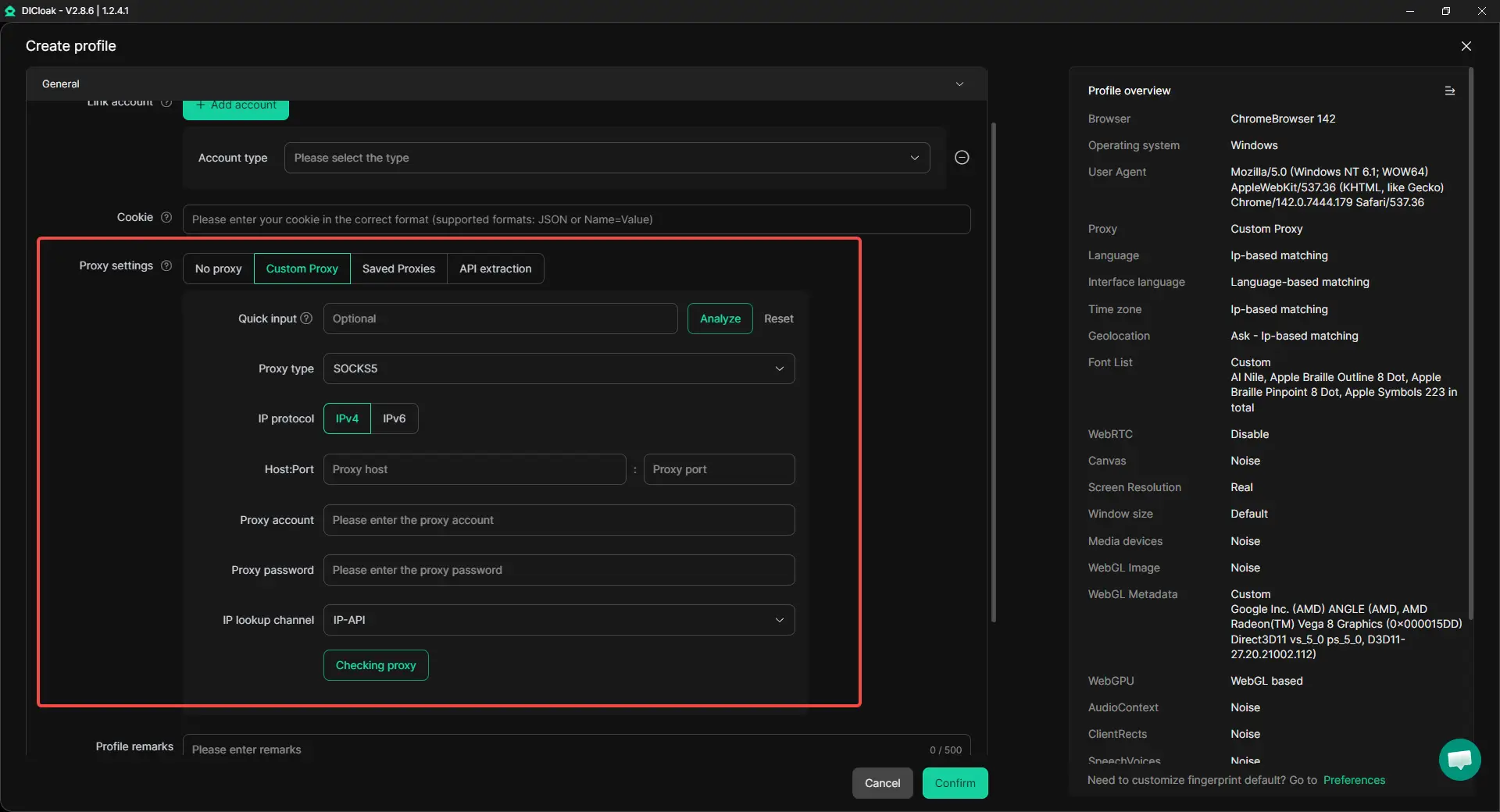
- Flexible Proxy Configuration: Supports HTTP/HTTPS and SOCKS5 proxies with efficient bulk management.
Conclusion: Staying Secure on Twitch
While the traditional IP ban on Twitch is less common than it used to be, Twitch is getting much smarter at tracking user identity through fingerprinting and behavior. Therefore, it is more important than ever to manage your digital footprint with care. Acting responsibly and following the rules is the best way to grow a long-term presence.
For those managing professional accounts or scaling an agency, DICloak is the ultimate tool. By providing enterprise-grade account protection and unique browser fingerprints, it allows you to manage your business without the constant fear of being flagged by automated systems. Protect your career and your community by using the right professional tools.
Frequently Asked Questions About IP ban on Twitch
Can Twitch IP ban you?
Twitch can technically do this, but it is rare. They prefer to ban specific accounts because IP bans are often ineffective.
How long does a Twitch IP ban last?
There is no set time. Depending on the offense, a suspension could last from 24 hours to forever.
Can streamers see my IP address?
No. Streamers and moderators cannot see your IP. Only Twitch employees have access to that information for privacy reasons.
How do I bypass an IP ban?
While switching networks can technically work, the only sustainable professional path is to manage accounts legitimately through tools like DICloak to avoid the ban in the first place.
Is it legal to have two Twitch accounts?
Yes, it is perfectly legal and allowed by Twitch, as long as you don't use them to break the rules or manIPulate stats.
 Web Proxy Tools
 Free Tools
 Cookie Plugin
 UA Generator
 MAC Address Generator
 IP Generator
 IP Address List
 2FA Code Generator
 World Clock
 Anonymous Check
 WebRTC Leak Test
 UUID Generator
 Free Web Proxy Site
 Proxy Checker
 FB Ad Checker
 AI Web Scraping
 Free SMM Tools
 Twitter Shadowban Checker
 Instagram Name Checker
 UTM Generator
 Username Generator
 AI Hashtag Generator
 LinkedIn Headline Generator
 Social Media Image Resizer





