Bingle Proxy is a simple online tool that helps users access websites blocked by school, work, or public networks. With no software to install, it works directly in your browser and offers a quick way to browse the web with basic privacy.
In this guide, you’ll learn what Bingle Proxy is, how it works, and when it makes sense to use it. We’ll also explain its benefits, limits, and safety considerations, so you can decide if Bingle Proxy is the right choice for your online needs.
What is Bingle Proxy?
Bingle Proxy (https://www.bingle.pw) is a free online tool that helps you visit websites your normal connection can’t reach. It works like a bridge between your browser and a blocked site. Instead of your computer going straight to a website, it goes through Bingle’s server first. This means the website only sees the Bingle server, not your real address or location.
For example, imagine your school blocks a site like YouTube. Normally, you cannot open it on the school Wi-Fi. But if you open YouTube through Bingle Proxy, the request goes through Bingle’s system. The school network sees the site as a harmless address and lets it load.
Simple to use, bingle proxy lets you get past basic network filters or blocks without installing software or paying fees. Just open it in your browser, type the site you want, and go.
Overview of Its Functionality
Bingle proxy acts as an intermediary between you and the internet. Imagine it like a mail sorter. When you want to open a blocked site, your computer sends the request to Bingle first. Then the Bingle server asks the blocked site for the content and sends it back to you. The blocked site never sees your private details—only Bingle’s address.
Here’s a real-world example:
- You want to open youtube.com at school.
- You go to bingle.pw in your web browser.
- You type youtube.com into the box and hit enter.
- Bingle Proxy loads YouTube for you through its server.
- Your school’s network sees only Bingle’s URL, not the blocked site.
This function makes bingle proxy useful for students, travelers, or anyone on a network with strict limits. It hides your real IP from the site you visit, helping protect your privacy in basic ways.
How Bingle Proxy Works?
Now that you know what bingle proxy is, the next step is understanding what happens behind the scenes when you type a link into bingle and hit “Go.”
Technical Architecture of Bingle Proxy
Bingle proxy works as a middle step between you and the website you want to open. Your browser does not talk to the target site first. It talks to bingle proxy. Then bingle proxy fetches the page for you and sends it back. This is why many sites only see the proxy server, not your direct connection.
A simple way to picture it is like this
- Step 1: You open bingle in your browser and enter a website address.
- Step 2: Bingle proxy sends the request from its own server to that website.
- Step 3: The website responds to bingle proxy.
- Step 4: Bingle proxy shows the page to you inside its web interface.
Here is a real example you can relate to. Say a workplace network blocks social sites. If you try to open the site directly, the network filter stops it. With bingle proxy, your browser mainly connects to the bingle page first. Then the proxy loads the site through its own system and returns the content in your tab.
One more important detail for privacy. The bingle proxy privacy policy says it uses log files. That can include IP address, browser type, ISP, timestamps, and referral pages. It also says this data is not linked to personally identifiable info. This is common for many sites, but it is still worth knowing before you use bingle for sensitive browsing.
User Interface and Experience
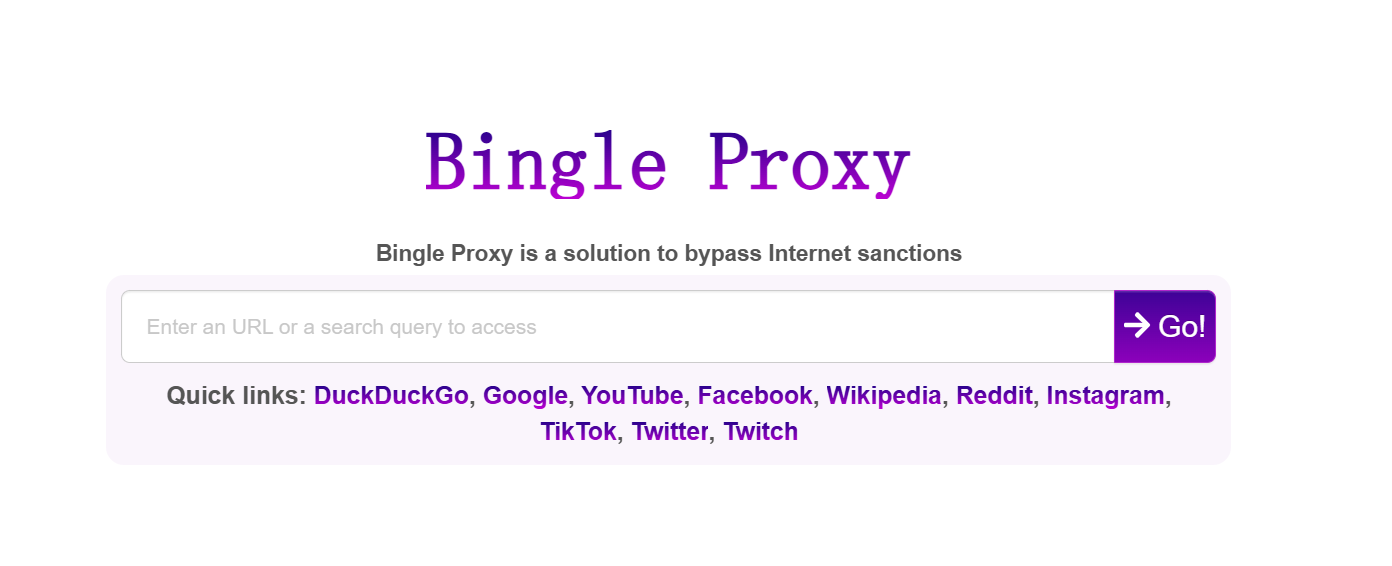
The bingle proxy experience is made to feel simple. You land on the homepage, see a URL box, and a “Go” button. You can also use quick links for popular sites. This helps first-time users move fast without guessing what to do.
A practical “first use” flow looks like this
- Step 1: Open the bingle proxy homepage.
- Step 2: Paste the site link into the box.
- Step 3: Click Go and browse in the same tab.
If something breaks, bingle also provides a user support form and asks you to include the current page URL when reporting a proxy issue. That is helpful when a page does not load right or looks incomplete.
Overall, bingle proxy is designed for quick access and low effort. You do not need special setup skills. You just use the web page, test a site, and see if it loads.
Benefits of Using Bingle Proxy
Enhanced Privacy and Anonymity
When you browse through bingle proxy, the website you visit mainly sees the proxy server, not your real IP address. This gives you basic privacy for everyday browsing.
For example, on public Wi-Fi at a café or airport, bingle can reduce direct exposure of your home IP when opening forums or news sites. It is simple privacy, not full anonymity, but helpful for light use.
Cost-Effectiveness
One clear benefit of bingle proxy is cost. It works directly in your browser. No downloads. No payment to get started.
If you only need to open a blocked page once or twice, bingle saves time and money compared to long-term tools.
Bypassing Internet Restrictions
Bingle proxy is often used to bypass basic network blocks.
For example, if a school or office blocks certain websites, you can paste the link into bingle and load the page through its server. This is useful for quick research or reading a single article without changing system settings.
Web Scraping and Data Collection
Some users use bingle proxy to view public pages without sending repeated requests from the same IP.
For instance, checking public product pages or comparing prices may work more smoothly through a proxy. Still, bingle proxy is best for light checks. For large-scale scraping, dedicated tools are usually a better choice.
Overall, bingle proxy works best as a fast, browser-based solution. It offers simple privacy, easy access, and low effort for everyday online needs.
Bingle Proxy vs. Dedicated Proxy Services
After the benefits, it helps to ask one honest question. When is bingle proxy “good enough,” and when do you need a dedicated proxy provider?
Performance and Usability
Bingle proxy is a browser-first web proxy. You open bingle, paste a link, and browse. That’s great for quick tasks and casual reading.
Dedicated proxy services are different. They give you specific proxy IPs and settings you can control. Many also offer dedicated or rotating options, which matters for long sessions and repeat work.
A simple example:
- If you just need to open one blocked article, bingle proxy is fast and easy.
- If you run a daily SEO check, do repeated research, or collect public data at scale, dedicated proxy services are usually smoother and more stable.
Security Considerations
Here is the key trade-off. With a web proxy like bingle proxy, you are routing traffic through someone else’s server. That means the service can see some requested details. Bingle’s own privacy page says it uses log files and lists items like IP address, browser type, ISP, and timestamps.
So, a practical rule
- Use bingle for low-risk browsing, like reading public pages.
- Avoid using bingle proxy for sensitive logins or private accounts, because any proxy service can become a privacy weak point if logs exist or if the connection is handled poorly. Reading the terms and privacy policy is part of safe use.
Dedicated proxy services do not automatically mean “more private,” but they often give you clearer control. You can pick proxy type (like residential vs datacenter) and choose what fits your risk level and performance needs.
Safety and Privacy Considerations of Bingle Proxy
After comparing bingle proxy with other services, it is important to look closely at safety and privacy. Knowing the limits helps you use bingle in the right situations.
Is Bingle Proxy Safe to Use?
Bingle proxy works by loading websites through its own server. This means the sites you visit may not see your real IP address. For light browsing, this can add a basic layer of privacy.
For example, if you are on public Wi-Fi and want to read news or open a forum page, using bingle proxy can reduce direct exposure of your home or mobile IP. This is one of the main reasons people choose bingle for casual use.
However, bingle proxy also states in its privacy policy that it collects standard log data. This can include IP address, browser type, time of access, and referral pages. This data is used for service operation and analysis. It is not linked to personal identity, but it still exists. Because of this, bingle proxy is better suited for low-risk browsing, not sensitive activity.
Potential Risks and Vulnerabilities
Like many free web-based proxy tools, bingle proxy has some limits you should understand:
- Logged connection data Basic connection details may be recorded for maintenance and security reasons.
- No full traffic protection The proxy only handles traffic inside its web page. It does not protect everything your device does online.
- Third-party content Ads or external scripts may appear, which can add tracking elements.
A simple rule helps. If you use bingle proxy to read public content, risks stay low. If you enter passwords, private messages, or payment details, risks increase. In those cases, it is safer to avoid any free proxy service.
Legal Implications of Using Bingle Proxy
Using bingle proxy itself is generally legal in many regions. Proxy tools are common internet utilities. Problems usually come from how they are used, not from the tool itself.
Bingle clearly states in its terms that users must follow local laws and the rules of the websites they visit. The service is provided “as is,” and users are responsible for their actions.
For example, using bingle proxy to read an article blocked on a school network is very different from using it to access accounts you do not own or content that violates site rules. The second case can lead to legal or account issues.
Data Protection Regulations
Data protection laws like GDPR in Europe or similar rules in other regions control how user data is handled. Bingle proxy explains user rights related to stored data, such as access or deletion requests, where required by law.
If privacy laws apply in your country, you may have the right to ask how your data is used or request its removal. Understanding these rights helps you make informed choices when using bingle.
Compliance and Ethical Considerations
Using bingle proxy responsibly means respecting both the service rules and the websites you access. Ethical use focuses on reading public information, learning, or basic access needs.
For example, using bingle to check a blocked research page is reasonable. Using it to bypass rules, collect private data, or misuse services is not. Staying within legal and ethical boundaries protects both you and others.
Overall, bingle proxy can be safe for casual browsing when you understand its limits. Use it wisely, avoid sensitive actions, and follow local laws and website terms for the best experience.
Limitations and Risks of Bingle Proxy
After understanding the safety and privacy side, it helps to clearly list the main limits and risks. Bingle proxy works for simple tasks, but it is not designed for everything.
Common Limitations
Bingle proxy is free and shared by many users. When traffic is high, pages may load slowly or fail to open. For example, image-heavy news sites often take longer to load during busy hours.
- Limited access to some websites
Many modern websites can detect proxy traffic. If a site blocks proxies, bingle may show an error page, endless loading, or broken content. This often happens on secure platforms and media sites.
- Not suitable for long sessions
Bingle proxy is best for short visits. If you keep a page open for a long time or refresh often, the connection may drop or reset.
Potential Security Risks
According to its privacy policy, bingle collects basic log data such as IP address, browser type, timestamps, and referring pages. This data is used for service operation but still exists.
- Traffic passes through a third party
When using bingle proxy, your browsing traffic goes through the proxy server. This means the service can see request details, even if it does not see personal identity.
- Higher risk for sensitive actions
Using bingle proxy to read public pages is usually low risk. Using it to log into accounts, submit forms, or view private data increases the chance of exposure.
In short, bingle proxy is best treated as a quick and simple access tool. Use it for public content. Avoid sensitive activity. Understanding these limits helps you stay safer and avoid problems.
Best Practices for Using Bingle Proxy
Now that you know the limits and risks of bingle proxy, it’s useful to learn how to use it well. Good habits help you get the most out of bingle while staying safe.
Configuration Tips
- Start at the Official Page
Always open bingle proxy from its official site (bingle.pw). This makes sure you are using the real tool and not a fake copy.
When you type a web address into bingle, choose sites that begin with “https://”. HTTPS adds extra security on top of the proxy’s basic privacy.
For example, if you load a secure news page via bingle, the connection has two layers of protection: the secure site’s own encryption and bingle proxy’s masking of your direct IP. This helps reduce risk during casual use.
- Check Support Links When Needed
If a site does not load right through bingle, use the support or feedback form on the bingle page. Sending the URL helps the team understand issues specific to certain content.
Usage Guidelines for Optimal Performance
- Keep It Simple for Quick Tasks
Bingle proxy works best for short visits. If you only need to see one blocked page or a specific piece of information, enter the URL and review the content quickly.
For example, if a school network blocks a research resource, you can paste that link into bingle and read the text you need without trying to stream heavy content.
- Avoid Heavy Sites With Many Elements
Sites with lots of videos, animations, or large files may load slowly through bingle proxy. This is because the tool handles all data through the proxy server, which can get busy with many users at once.
- Do Not Enter Personal Logins
Avoid signing into accounts like email or banking inside bingle proxy. While it masks your IP, connection details and logs might still be recorded for analytics and service upkeep. This helps reduce risk of unintended exposure.
- Use Quick Links When You Can
On the bingle homepage, there are fast links to popular sites like Google, YouTube, Reddit, Instagram, and more. Clicking these saves time and helps you reach common pages with one click.
- Try Refresh and Time of Day
If a page loads slowly, try refreshing or using bingle proxy at a different time. Because many users share the service, speed can vary throughout the day. Waiting for a quieter time can help pages load faster.
By following these simple tips, bingle proxy can be a better tool for everyday browsing needs. Always remember that it is most useful for quick, public content access rather than heavy or sensitive tasks.
Why Choose DICloak Antidetect Browser for Your Business?
After learning best practices for tools like bingle proxy, many professionals want a more powerful solution for business tasks. DICloak Antidetect Browser is one such tool that helps teams and businesses manage complex online operations safely and efficiently.
⚡The DICloak Antidetect Browser has become a global favorite for its unparalleled ability to efficiently and securely manage multiple accounts. Designed for professionals in social media management, affiliate marketing, traffic arbitrage, e-commerce, account farming, airdrops, and more, DICloak offers powerful features like RPA automation, bulk operations, and synchronizer. Additionally, it allows you to customize fingerprints and integrate proxies for each profile, ensuring top-level security and operational efficiency. It’s the ultimate tool for seamless, secure, and scalable operations.

What Makes DICloak Stand Out?
✅ Manage 1,000+ Accounts on One Device: Stop wasting money on extra hardware! DICloak allows you to manage multiple accounts on a single device, cutting costs and boosting efficiency.
✅ Guaranteed Account Safety, No Ban Risks: Every account gets its own isolated browser profile with custom fingerprints and IPs, drastically reducing the risk of bans. Your accounts, your control!
✅ Flexible Proxy Configuration for Maximum Performance: Seamlessly integrate with all major proxy protocols (HTTP/HTTPS, SOCKS5) and manage your proxy pool with bulk operations. No more struggling with IP management—DICloak has you covered.
✅ Streamlined Team Collaboration for Better Results: Easily manage your team with advanced tools like profile sharing, permission settings, data isolation, and operation logs. Your team works smarter, not harder.
✅ Automate the Grind with RPA: DICloak's built-in RPA saves you hours of manual work. Automate repetitive tasks, streamline workflows, and focus on what really matters—growing your business.
✅ Powerful Bulk Tools to Scale Your Operations: Create, import, and launch multiple browser profiles in one click. DICloak makes scaling your business as easy as it gets.
✅ Compatible with All Major Operating Systems: Based on the Chrome core, DICloak supports simulating Windows, Mac, iOS, Android, and Linux operating systems. No matter what platform you need, DICloak has you covered.
🔗 Ready to Get Started?
Visit the DICloak website to explore more details and choose the plan that’s right for you. Start for free today and experience the power of secure, efficient, and scalable multi-account management!
Frequently Asked Questions (FAQs) About Bingle Proxy
What is Bingle Proxy mainly used for?
Bingle Proxy is mainly used to access websites that are blocked by local networks, such as school or office filters. It helps users open public web pages through a browser without installing extra software. Bingle Proxy is best for quick access and casual browsing.
Is Bingle Proxy safe for everyday browsing?
Bingle Proxy can be safe for low-risk activities like reading news, blogs, or public forums. However, it is not recommended for logging into personal accounts or handling sensitive data, since basic connection data may be logged as part of normal service operation.
What is the difference between Bingle Proxy and a regular proxy?
The main difference is ease of use. Bingle Proxy is a web-based proxy that works directly in your browser. A regular proxy often requires manual setup or software configuration. Bingle Proxy is simpler but offers less control and stability than dedicated proxy services.
Can Bingle Proxy be used for streaming websites?
In most cases, Bingle Proxy is not ideal for streaming. Many streaming platforms block proxy traffic or require strong session stability. Users may experience slow loading, errors, or blocked access when trying to stream video through Bingle Proxy.
Why does Bingle Proxy sometimes load pages slowly or fail?
Bingle Proxy is a free and shared service. When many users access it at the same time, server speed can drop. Some websites also block proxy traffic or rely on scripts that do not work well through web proxies, causing loading issues or broken pages.
Conclusion
Bingle Proxy is a simple, browser-based tool for quick access to blocked websites. It works well for light browsing, reading public content, and bypassing basic network restrictions without installation.
However, Bingle Proxy has clear limits. Speed may vary, some sites may not load, and it is not suitable for sensitive or long-term use. Knowing when and how to use Bingle Proxy helps reduce risks and avoid problems.
In short, Bingle Proxy is best for short, low-risk tasks. When you need stronger control, stability, or business-level usage, a more advanced solution is often the better choice.
 Web Proxy Tools
 Free Tools
 Cookie Plugin
 UA Generator
 MAC Address Generator
 IP Generator
 IP Address List
 2FA Code Generator
 World Clock
 Anonymous Check
 WebRTC Leak Test
 UUID Generator
 Free Web Proxy Site
 Proxy Checker
 FB Ad Checker
 AI Web Scraping
 Free SMM Tools
 Twitter Shadowban Checker
 Instagram Name Checker
 UTM Generator
 Username Generator
 AI Hashtag Generator
 LinkedIn Headline Generator
 Social Media Image Resizer