Being a student in 2026 often means doing most of your learning on a computer. Whether you are typing a history essay or working on a science project, the internet is your primary classroom tool. However, school Wi-Fi networks can be very strict. They block many popular websites, and sometimes they accidentally block useful sites you need for research.
Because of these tight filters, many students look for the best proxy websites for school. A proxy can help you bypass these digital roadblocks. However, using a proxy comes with important privacy and safety rules. In this detailed guide, we will explore everything you need to know about finding, setting up, and using school proxies safely and responsibly.
Why Do Students Need Proxy Websites at School?
What Restrictions Do Schools Typically Impose?
Schools want to keep students safe and focused during class hours. To do this, school IT departments install powerful network firewalls and web filters. They typically block social media platforms like Instagram or TikTok, online gaming hubs, and video streaming sites like YouTube or Netflix.
In 2026, automated filters are smarter than ever. Unfortunately, they can also be overly aggressive. For example, if you are researching a medical topic for biology class or a political event for social studies, the school filter might flag words like "virus" or "war" and block the page instantly. This blocks legitimate homework resources and slows down your study time.
How Proxies Help Bypass School Internet Filters
Think of a proxy website as a helpful middleman. Normally, when you type a web address into your browser, your school computer talks directly to that website. The school filter reads the destination address, recognizes that it is blocked, and stops the connection.
When you use a proxy website, your browser talks to the proxy server first. The school filter only sees that you are connecting to the proxy's server address. The proxy then goes out to the blocked website, fetches the information, and displays it back to you. Because the school filter never sees the final web address, the proxy helps you bypass school internet filters smoothly.
Are There Legal Concerns with Using Proxies in Schools?
Using a web proxy is generally not illegal. You will not break federal or state laws simply by browsing through a proxy. However, it almost certainly breaks your school’s Acceptable Use Policy (AUP).
When you or your parents sign the technology agreement at the beginning of the school year, you promise to follow the school's digital rules. Bypassing network filters violates that contract. Therefore, using a proxy is not a crime, but it is a serious school policy violation that can lead to disciplinary action.
What Risks Are Involved with Using Proxy Websites?
Can Using Proxies Compromise Student Privacy?
Yes, using an untrusted proxy can severely compromise your personal privacy. Free proxy websites for school are rarely run out of charity. Running a server costs money. To make a profit, many free proxy owners log your internet activity.
If you log into your personal email, social media accounts, or online bank through an unencrypted free proxy, the owner of that proxy can see your usernames, passwords, and private messages. In short, trading school network restrictions for a total loss of privacy is a dangerous deal.
How to Identify Unsafe Proxy Websites
You can easily spot a dangerous or sketchy proxy website if you know what to look for:
- Heavy Pop-Up Ads: If opening the site triggers endless pop-up ads or redirects you to suspicious websites, leave immediately.
- Lack of HTTPS Encryption: Check the address bar. If the web address starts with "http://" instead of "https://", your connection is not secure.
- Forced Downloads: A real web proxy operates entirely inside your browser. If a site asks you to download an executable file, browser extension, or software update to continue, it is likely malware.
What Are the Consequences of Getting Caught?
School IT administrators monitor network traffic every day. If they catch you using a proxy, the consequences will depend on your school's disciplinary rules:
- First Offense: A formal warning, a conversation with the principal, or a phone call home to your parents.
- Second Offense: Loss of computer privileges. The school may lock your Chromebook profile so you can only access pre-approved educational portals.
- Severe Offense: In-school suspension or losing internet access on campus for the rest of the school year, which makes completing classwork much harder.
How to Choose a Reliable Proxy Website for School Use
What Features Should a Good School Proxy Have?
If you decide to use a proxy for research, you must choose one with strong security standards. A good, reliable proxy should feature:
- End-to-End SSL Encryption: Look for the lock icon in your browser address bar.
- A Strict No-Logs Policy: The service should explicitly state that it does not record your browsing history or track your personal information.
- Fast Connection Speeds: The proxy should have enough bandwidth so that pages load quickly without lagging.
- Script Blocking Options: High-quality proxies allow you to disable scripts (like JavaScript) to protect your device from hidden ad malware.
How to Compare Free vs. Paid Proxy Services
Free proxies are very easy to find, but they come with big drawbacks. They are usually extremely slow because thousands of people use them at once. They also crash often and carry high privacy risks.
Paid proxy services, on the other hand, offer dedicated servers, fast gigabit speeds, and active customer support. They cost a small monthly fee, but they provide significantly better protection for your personal data. For casual, one-time research, a well-known free proxy might work, but for consistent speed and privacy, paid options are vastly superior.
Which Proxies Offer the Best Speed and Security?
There are two primary types of proxies you will encounter when looking for speed and safety:
| Proxy Type |
Main Advantage |
Main Disadvantage |
| Residential Proxy |
Looks like real residential internet; almost never blocked by school firewalls. |
Usually costs more money; slightly slower than datacenter servers. |
| Datacenter Proxy |
Extremely fast connection speeds; cheap or free to access. |
Easier for school firewalls and network filters to detect and blacklist. |
Steps to Set Up a Proxy on School Devices
How to Configure Proxies on School Chromebooks
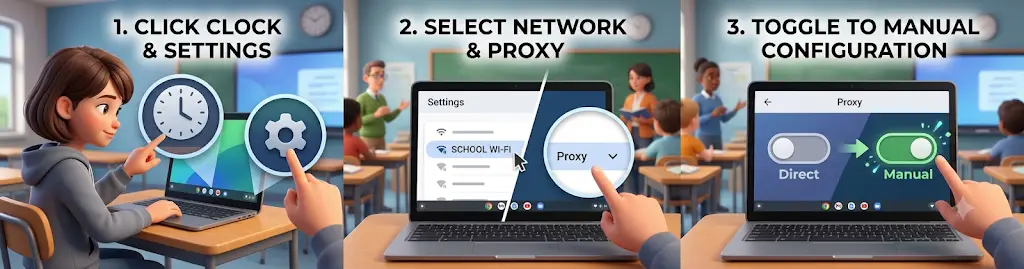
Many schools issue Chromebooks to students. If your school allows you to adjust network settings, configuring a manual proxy is straightforward:
- Click on the bottom-right corner of your Chromebook screen where the clock is located.
- Select the Settings gear icon.
- Under the Network section, click on your school's Wi-Fi network name.
- Expand the Proxy menu tab.
- Toggle the setting from "Direct Internet Connection" to Manual proxy configuration.
What Settings Need to Be Adjusted for Optimal Use?
Once you enable manual configuration, you must fill in two key text boxes:
- Proxy Host Name (IP Address): This is a series of numbers separated by dots (for example,
192.168.1.50) provided by your proxy service.
- Port Number: This is a 4-digit or 5-digit number (such as
8080 or 3128) that dictates where the traffic flows.
Make sure to check the box that says "Use the same proxy for all protocols". This ensures that both HTTP and secure HTTPS websites route through the proxy correctly.
How to Troubleshoot Common Setup Issues
If your web pages refuse to load after setup, do not panic. Try these simple troubleshooting steps:
- Check Your Typing: A single misplaced period or wrong digit in the IP address or Port number will completely disconnect your internet.
- Clear Browser Cache: Go to your Chrome history settings and clear your temporary cache and cookies.
- Server Blacklisted: If your settings are correct but sites still will not load, the school firewall has likely already blocked that specific proxy IP. You will need to obtain a fresh IP address from your proxy provider.
How to Ensure Safe Use of Proxy Websites in Schools
What Precautions Should Students Take?
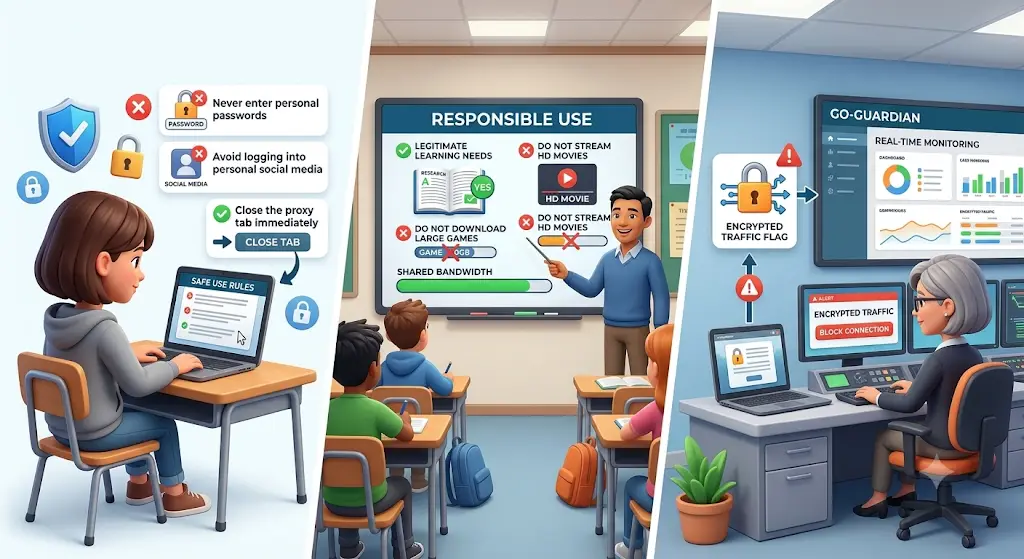
To keep your accounts safe while using proxy websites at school, follow these golden security rules:
- Never enter sensitive information: Do not type in credit card numbers, home addresses, or personal passwords.
- Avoid personal logins: Do not log into personal social media, personal Gmail, or online banking portals.
- Close the proxy tab immediately: As soon as you finish reading your research article, close the proxy tab and return to a normal connection.
How to Educate Students on Responsible Proxy Use
School Wi-Fi networks share bandwidth among hundreds of students and teachers. If you use a proxy to stream high-definition movies or download large video games during school hours, you hog the network speed. This causes lag for teachers giving presentations and students trying to do classwork. Responsible use means using digital tools only for legitimate learning needs and respecting shared community resources.
What Tools Can Help Monitor Proxy Usage?
In 2026, modern school IT departments use sophisticated monitoring tools such as GoGuardian, Lightspeed Systems, and Securly. These platforms do not just check website names; they monitor system behavior in real time.
For example, if your Chromebook starts sending large amounts of encrypted traffic to an unknown IP address, the monitoring software flags your computer automatically. The IT administrator receives an alert, allowing them to inspect your screen remotely or block the connection within seconds.
What Are the Alternatives to Proxy Websites for School?
Are There Built-In Browser Options That Work?
If you are trying to access a safe research site that is blocked by mistake, you do not always need an external proxy website. Here are a few simpler tricks:
- Use the IP Address: Sometimes, typing a website's numerical IP address directly into the search bar bypasses simple domain filters.
- Use Mobile Data Hotspots: If you have a personal smartphone with a cellular data plan, you can turn on your personal Wi-Fi hotspot. Connecting your laptop to your own mobile data bypasses the school Wi-Fi entirely and does not break school computer rules as severely as installing unauthorized proxy software.
What Role Do Parental Controls Play?
Parents can also help students manage their educational internet needs. If a student frequently needs special online tools for homework or extracurricular projects, parents can contact the school IT department directly. School administrators can white-list specific educational domains for student accounts. This eliminates the need for students to search for risky proxy workarounds in the first place.
How to Make an Informed Decision on Using Proxies
What Questions Should Students Ask Before Using a Proxy?
Before you open a proxy page on a school computer, stop and ask yourself these three quick questions:
- Is this website essential for my schoolwork right now?
- Is the proxy service I am using secure, private, and well-reviewed?
- Am I prepared to face detention or lose my computer privileges if the IT system flags my account?
If the site is just for entertainment, it is much wiser to wait until you get home.
How to Assess the Long-Term Implications of Proxy Use
Using shady or unverified web proxies can leave a lasting digital footprint. If an unsafe proxy infects your school device with spyware or adware, that virus can stay on the device even after you log off. In severe cases, malicious code can spread across the school network, causing system crashes. Getting linked to a network-wide malware infection can lead to permanent loss of school computer access and disciplinary marks on your academic record.
What Are the Signs of a Reliable Proxy Service?
A trustworthy proxy service is transparent and professional. It clearly posts its privacy policy on its homepage. It provides encrypted connections by default, maintains clean servers without spammy ad pop-ups, and offers clear instructions on how it handles user data. If a proxy site looks clean, transparent, and established, it is much safer than a random site found on a forum.
Simplify Proxy Configuration for School Networks
When you need to manage proxy connections smoothly across different devices, managing technical settings one by one can be confusing. You can use DICloak to manage your proxy pool efficiently with bulk operations. You can seamlessly integrate with all major proxy protocols, including HTTP, HTTPS, and SOCKS5. This allows you to configure your preferred proxy settings quickly and keep your browsing setup organized and reliable.
Standard web browsers leave unique digital traces known as browser fingerprints. You can use DICloak to create isolated browser profiles, giving every single profile its own custom digital fingerprint and dedicated IP address. By customizing fingerprints and integrating proxies for each profile, you ensure top-level operational efficiency and data security. This advanced fingerprint masking prevents third-party tracking scripts from linking your browsing activity back to your personal device.

Frequently Asked Questions About Proxy Websites for School
Can Proxy Websites for School Be Used on Mobile Devices?
Yes, you can use proxy websites for school on mobile devices like smartphones and tablets. You simply open your mobile browser (such as Safari or Chrome) and type in the proxy website address. However, if your mobile device is connected to your personal cellular data instead of the school Wi-Fi, you do not need to use a proxy at all because your data does not pass through the school filter.
Are There Reliable School Proxies Designed for Educational Use?
There are no official proxy websites created specifically for schools, as school districts actively work to block proxy tools. However, paid residential proxies are widely considered the most reliable school proxies for legitimate research. They provide clean, ad-free connections and strong HTTPS encryption, making them much safer for students accessing blocked educational resources.
How Often Should Students Change Their Safe Proxies for Students?
You should update or rotate your proxy settings regularly to maintain a stable connection. School IT firewalls constantly update their blacklists to block newly discovered proxy IP addresses. Switching to a fresh safe proxy for students every few weeks helps ensure that your connection remains fast, stable, and unblocked.
What Happens if a Proxy to Unblock Websites at School Is Blocked?
If your current proxy to unblock websites at school stops working suddenly, it means the school firewall has detected and blacklisted that server's IP address. When this happens, your browser will display a connection error. You will need to clear your browser cache and switch to a new proxy URL or configure a different IP address from your proxy provider.
Are There Legal Proxy Websites for School Recommended by Teachers?
No, teachers and school administrators will never formally recommend proxy websites for school. Schools spend significant budget dollars on web filters to keep students safe and focused. If you need to access a specific website that is blocked by mistake for a class project, talk to your teacher so they can submit an official request to the IT department to unblock that site.
Conclusion
Finding the best proxy websites for school in 2026 can help you bypass overly strict network filters and access important research materials when you need them most. However, freedom comes with responsibility. Always prioritize your personal digital privacy, avoid logging into sensitive personal accounts over free proxies, and respect your school's technology guidelines. By staying informed and choosing secure proxy configurations, you can navigate the web safely and effectively throughout the school year.
 Web Proxy Tools
 Free Tools
 Cookie Plugin
 UA Generator
 MAC Address Generator
 IP Generator
 IP Address List
 2FA Code Generator
 World Clock
 Anonymous Check
 WebRTC Leak Test
 UUID Generator
 Free Web Proxy Site
 Proxy Checker
 FB Ad Checker
 AI Web Scraping
 Free SMM Tools
 Twitter Shadowban Checker
 Instagram Name Checker
 UTM Generator
 Username Generator
 AI Hashtag Generator
 LinkedIn Headline Generator
 Social Media Image Resizer