Let’s face it: encountering the “Verify your phone number” prompt when setting up a new Google account can be downright annoying. Whether you're a marketer juggling multiple projects or just someone who wants to avoid linking your personal number to yet another online service, the urge to bypass this step is totally understandable. In today’s world, where personal data is constantly being collected, handing over your phone number feels like giving away another piece of your digital identity.
The internet is full of "easy tricks" to avoid this step, but many of them just don’t work. This guide goes beyond those hit-or-miss methods to explore some surprising and effective ways to make a Gmail account without a phone number. By understanding why Google requests your phone number in the first place, you can learn how to create accounts efficiently while safeguarding your privacy.
Takeaway 1: Google's "Optional" Phone Number Isn't Really Optional
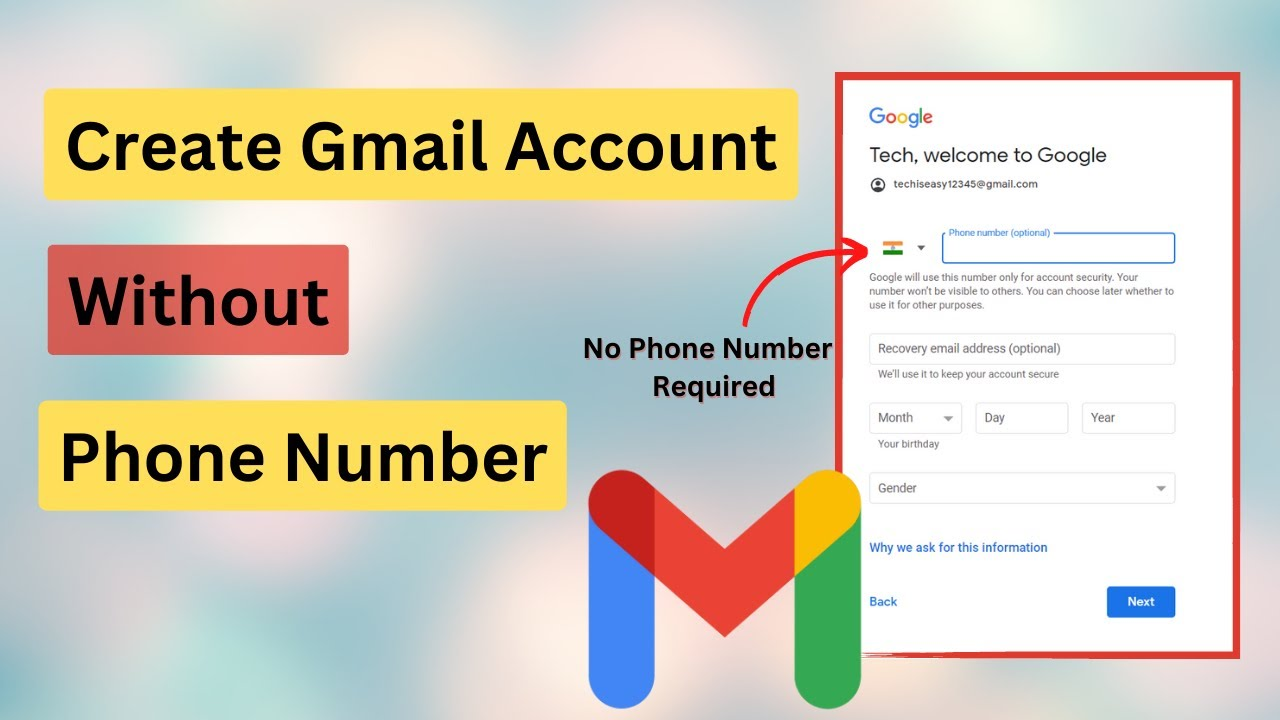
Here lies the central paradox: Google's guidelines may suggest that providing a phone number is optional, but in reality, their security algorithms often make it a requirement. The reason behind this is that Google uses your phone number for several important purposes, and understanding these reasons is key to navigating the system effectively.
Google requests a phone number for:
- Spam and bot prevention: It acts as a simple verification step to ensure that a real person is creating the account, which helps stop bots from flooding the platform with fraudulent accounts.
- Account recovery: In case you forget your password or get locked out, a linked phone number is one of the primary methods Google uses to verify your identity and help you regain access.
- Two-factor authentication (2FA): Your phone number often serves as the second layer of security in 2FA, where Google sends a code to your device to verify your identity during login.
The critical insight here is that the “optional” field can quickly become a requirement if Google's algorithms detect what they consider “unusual activity.” This can happen when you create multiple accounts from the same device or IP address, which can flag your activity as potentially suspicious.
That said, if you're looking to make a Gmail account without a phone number, knowing these nuances can help you understand how to work around the system while still maintaining a secure and functional account.
Takeaway 2: The Simple Tricks Are a High-Risk Gambit
You've likely encountered some of the "simple tricks" to bypass phone verification. Think of these as a gamble with a low and unpredictable success rate—sometimes they work, but they’re far from reliable when it comes to consistently making a Gmail account without a phone number.
Here are a few common methods people try:
- Hitting the "Skip" button: The most straightforward approach is to leave the phone number field blank and look for a "Skip" button. This usually only works if Google’s system doesn't detect anything unusual about your sign-up attempt.
- Using Incognito or a new browser profile: By hiding cookies and session data, the idea here is to appear as a completely new user. While it may help, it’s not a guaranteed method.
- Signing up via a mobile device's settings menu (Android/iOS): Some users have had success creating accounts directly through their device's settings (Settings > Accounts > Add Account > Google). Google tends to trust this process more because it’s tied to a verified hardware ID, which can sometimes bypass phone verification.
- Creating an account through another service like YouTube: Starting the sign-up process through another Google service may trigger different verification protocols, potentially bypassing the phone number request.
The main issue with all these methods is that they are hit-or-miss. If your IP address has already been used for other Google account sign-ups, it could raise a red flag for Google's security system, causing these tricks to fail. So, while these methods may sometimes help you make a Gmail account without a phone number, they're not foolproof.
Takeaway 3: Using a "Burner" Number Can Burn You, Too
When the simple tricks fail, many people turn to using alternative or temporary phone numbers as a workaround to make a Gmail account without a phone number. However, these methods come with their own set of risks and reliability issues.
- Virtual phone services (e.g., Google Voice, TextNow): These services provide secondary numbers, but Google is well aware of them. As a result, the platform may flag or block these numbers from being used for verification.
- Temporary/Prepaid SIM cards: Prepaid SIM cards give you a real, legitimate phone number for verification purposes. The risk here is that Google might request re-verification later, long after you've discarded the temporary SIM card, potentially locking you out of your account.
- Public SMS websites: These sites offer free, disposable numbers to receive SMS messages. However, they’re a privacy nightmare—anyone can access these numbers, which means your verification code could be exposed to anyone. Additionally, Google actively blocks numbers from these known services, making them unreliable for account creation.
For more consistent and secure results in making a Gmail account without a phone number, a more advanced approach that tackles the root cause of the issue is necessary.
Takeaway 4: The Real Pro-Level Solution is a Digital Disguise
The most reliable and robust solution for bypassing phone verification when you want to make a Gmail account without a phone number is to use a tool called an antidetect browser. In simple terms, this software allows you to simulate multiple, fully separate devices on your single machine.
Every time you go online, your device shares a unique "digital fingerprint" with the websites you visit. This fingerprint is made up of various data points, such as your browser type, screen resolution, operating system, and installed fonts. Antidetect browsers work by creating isolated browsing profiles, each with its own unique digital fingerprint. When you pair these profiles with different IP addresses (using proxies), it appears to Google as if each account is being created by a separate person on a completely different device.
A leading antidetect browser like DICloak offers several key advantages:
- It generates unique device fingerprints for each profile, ensuring that Google cannot link your accounts.
- It seamlessly integrates a different IP address (proxy) for each profile.
- Unlike Incognito mode, it retains cookies and session data within each isolated profile, which helps build a trust history with Google over time. This reduces the likelihood of phone verification prompts in the future.
- It effectively prevents Google from associating your accounts with each other, which is the main reason for triggering mandatory phone verification.
By using an antidetect browser like DICloak, you can make a Gmail account without a phone number more securely and reliably.
Why Choose DICloak Antidetect Browsers for Your Business?
⚡The DICloak Antidetect Browser has become a global favorite for its unparalleled ability to efficiently and securely manage multiple accounts. Designed for professionals in social media management, and more, DICloak offers powerful features like RPA automation, bulk operations, and synchronizer function. Additionally, it allows you to customize fingerprints and integrate proxies for each profile, ensuring top-level security and operational efficiency. It’s the ultimate tool for seamless, secure, and scalable operations.

What Makes DICloak Stand Out?
✅ Manage 1,000+ Accounts on One Device: Stop wasting money on extra hardware! DICloak allows you to manage multiple accounts on a single device, cutting costs and boosting efficiency.
✅ Guaranteed Account Safety, No Ban Risks: Every account gets its own isolated browser profile with custom fingerprints and IPs, drastically reducing the risk of bans. Your accounts, your control!
✅ Flexible Proxy Configuration for Maximum Performance: Seamlessly integrate with all major proxy protocols (HTTP/HTTPS, SOCKS5) and manage your proxy pool with bulk operations. No more struggling with IP management—DICloak has you covered.
✅ Streamlined Team Collaboration for Better Results: Easily manage your team with advanced tools like profile sharing, permission settings, data isolation, and operation logs. Your team works smarter, not harder.
✅ Automate the Grind with RPA: DICloak's built-in RPA saves you hours of manual work. Automate repetitive tasks, streamline workflows, and focus on what really matters—growing your business.
✅ Powerful Bulk Tools to Scale Your Operations: Create, import, and launch multiple browser profiles in one click. DICloak makes scaling your business as easy as it gets.
✅ Compatible with All Major Operating Systems: Based on the Chrome core, DICloak supports simulating Windows, Mac, iOS, Android, and Linux operating systems. No matter what platform you need, DICloak has you covered.
🔗 Ready to Get Started?
Visit the DICloak website to explore more details and choose the plan that’s right for you. Start for free today and experience the power of secure, efficient, and scalable multi-account management!
Takeaway 5: Your Digital "Location" Can Change Google's Rules
Here's one of the most surprising and counterintuitive strategies: your perceived digital location can significantly impact Google's phone verification requirements. In certain countries, where SMS services are known to be unreliable, Google is far less likely to ask for phone verification during account creation.
Two commonly cited examples are Mongolia and Colombia.
The practical takeaway is powerful: by using an antidetect browser configured with a high-quality proxy from one of these regions, you can greatly increase the chances that the "Skip" option will appear and work. This makes it seem as if you’re signing up from a location where Google recognizes phone verification is less reliable, allowing you to make a Gmail account without a phone number with greater ease.
Takeaway 6: If You Skip the Phone, You Cannot Skip This
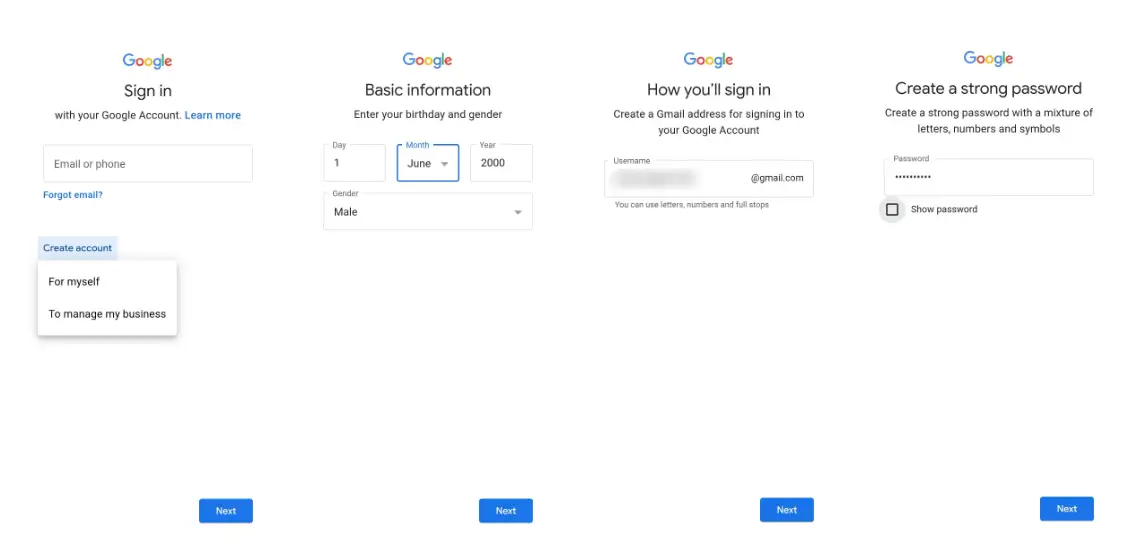
Creating a Google account without a phone number means that one other security feature becomes absolutely essential: setting up a recovery email.
Whether you skipped the phone number or used a temporary one, a recovery email is non-negotiable. This recovery email becomes your primary method for regaining access to your account if you forget your password or get locked out. Without a linked phone number, the recovery email is your only way back into your account. Be sure it’s an address you control and can access reliably, especially if you're looking to make a Gmail account without a phone number securely.
Conclusion: Taking Control of Your Digital Identity
Creating a Google account without a phone number is definitely possible, but achieving reliable success goes beyond simple tricks. It’s about understanding why Google requires verification in the first place. The most effective approach is to use tools that make each sign-up appear as a unique, legitimate user, satisfying Google's security protocols without compromising your personal information.
By understanding how the system works and using the right tools, you can take control of the account creation process. The real question isn't just about convenience; it's about how much of our privacy we’re willing to give up in exchange for access. With the right methods, you can make a Gmail account without a phone number and maintain your privacy.
 Web Proxy Tools
 Free Tools
 Cookie Plugin
 UA Generator
 MAC Address Generator
 IP Generator
 IP Address List
 2FA Code Generator
 World Clock
 Anonymous Check
 WebRTC Leak Test
 UUID Generator
 Free Web Proxy Site
 Proxy Checker
 FB Ad Checker
 AI Web Scraping
 Free SMM Tools
 Twitter Shadowban Checker
 Instagram Name Checker
 UTM Generator
 Username Generator
 AI Hashtag Generator
 LinkedIn Headline Generator
 Social Media Image Resizer