When Reddit suddenly shows a message saying you've been blocked by network security, it can feel confusing and even stressful. Many users worry that their account is banned or that something is wrong with their device. In reality, this message is often linked to how your network or browser looks to Reddit’s security systems. To understand what is really happening and how to fix it, we first need to break down what this message means and why it appears.
Understanding the Message
What Does "You've Been Blocked by Network Security" Mean on Reddit?
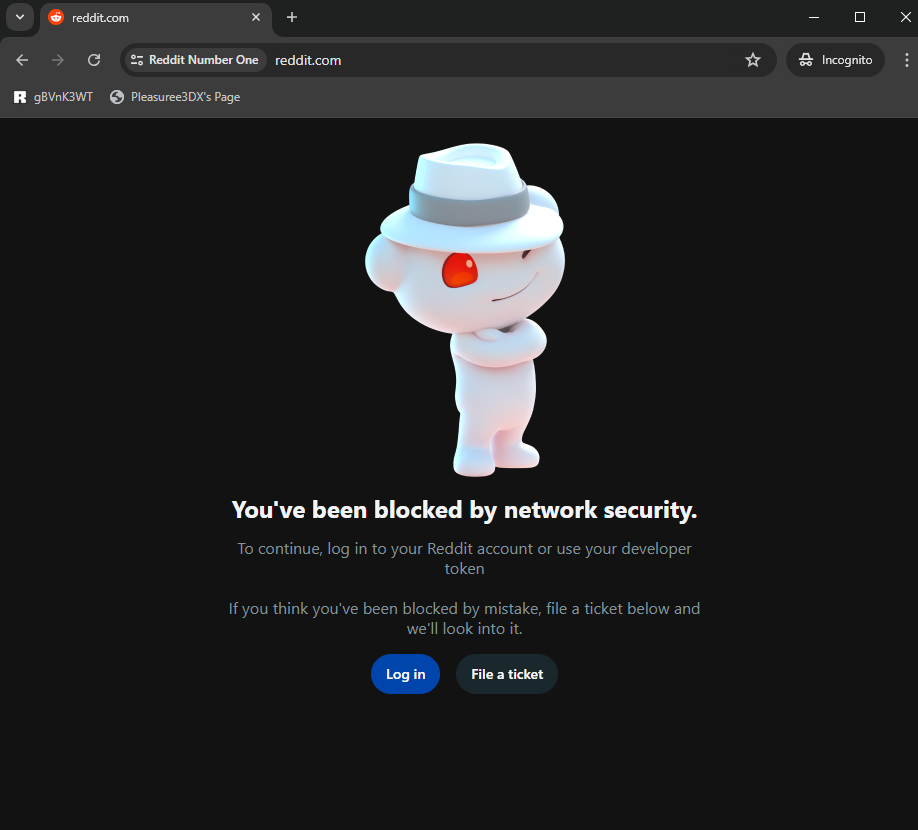
When you see you've been blocked by network security, it means a security system stopped your request before the website fully opened. This block is usually automatic. It is not done by a real person.
Most modern websites use security tools to protect themselves. These tools watch incoming traffic. If something looks unusual, the system may block it. This can happen even to normal users.
There are two very common situations.
The first is website security protection. Many sites use firewalls that check how visitors connect. If your connection looks risky, the system may stop it. For example, if you refresh a page many times in a short time, the site may think you are a bot.
The second is network-level security. This is common on office networks, school Wi-Fi, hotels, or public Wi-Fi. These networks often block certain sites or traffic types. If a rule is triggered, you may see you've been blocked by network security, even if the website itself is safe.
Here is a simple example. A user tries to open a forum from a company laptop. The page loads, but then shows a block message. When the same user switches to mobile data, the site works fine. This usually means the company network, not the website, caused the block.
So in short, you've been blocked by network security means your connection did not pass a security check. It does not always mean you did something wrong.
Implications of Being Blocked on Different Platforms
The effect of being blocked can change based on the platform you use.
On social media or community sites, you may still see the homepage, but actions fail. You may not be able to log in, post, comment, or load content. This often happens when the site limits traffic that looks automated or too fast.
On work or school networks, the block is often rule-based. Some platforms are blocked by category, not by risk. For example, forums or video sites may be blocked during work hours. If the site opens on another network, the issue is likely the network policy.
On shopping or banking websites, the block feels more serious. You may be stopped while logging in or paying. This can happen when the site detects unusual login behavior, such as switching locations too quickly or using an unfamiliar browser setup.
On apps or tools that use web access, the block may not show a clear message. The app may just fail to load data or return an error. In many cases, the website blocks the request type, not the whole site.
The key thing to remember is this. you've been blocked by network security does not mean your account is gone or your device is unsafe. It means a security system made a quick decision. In the next section, we will explain the most common reasons this happens and how to fix them step by step.
Common Causes of Network Security Blocks
After understanding what the message means and how it affects different platforms, the next step is to know why it happens. In most cases, you've been blocked by network security appears because one or more common triggers were detected. These triggers are usually automatic and rule-based.
One of the most common reasons for you've been blocked by network security is an IP address problem.
Every device online uses an IP address. Websites and networks track IP behavior. If an IP sends too many requests, switches locations too fast, or has a bad history, it may be blocked.
A common example is shared IPs. Public Wi-Fi, office networks, and some mobile networks use shared IP addresses. If another user on the same IP abused a website, everyone on that IP may be blocked. You may do nothing wrong, but still see the block message.
Another example is frequent refresh or repeated actions. A user tries to log in many times in a short period. The system may think it is an attack. The IP is then limited or blocked for safety.
In these cases, you've been blocked by network security and it is linked to how the IP looks, not who you are.
Network Policies
Network rules are another major cause.
Workplaces, schools, and public networks often control what users can access. They use filters to block certain sites or traffic types. This is done to protect users and follow internal rules.
For example, a student tries to open a forum from school Wi-Fi. The page shows you've been blocked by network security. When the same site opens fine on mobile data, the reason is clear. The school network blocked it by policy.
Office networks work the same way. Some block social media, file sharing, or unknown platforms. The block does not mean the site is unsafe. It only means the network does not allow it.
Software Conflicts
Sometimes the issue is inside your own device.
Security software, firewalls, or browser extensions can interfere with normal traffic. An ad blocker, privacy tool, or script blocker may change how your browser connects to a site. This can look suspicious to security systems.
For example, a user installs several privacy extensions. After that, some websites stop loading and show you've been blocked by network security. When the extensions are disabled, the site works again.
Antivirus software can also scan or rewrite traffic. This can break secure connections and trigger blocks. These conflicts are common and often overlooked.
Account Issues
In some cases, the block is tied to your account, not just your network.
If an account shows unusual behavior, the platform may limit access. This can include too many login attempts, fast actions, or sudden changes in location or device. The system may block access to protect the account.
For example, a user logs in from a new device while traveling. The platform pauses access and shows a block message. This feels alarming, but it is often temporary.
Here, you've been blocked by network security acts as a safety warning. It does not always mean the account is banned. It means the system wants to reduce risk.
5 Ways to Get Your Reddit Unblocked
In the last section, we explained why blocks happen. Many Reddit blocks come from IP issues, network rules, software conflicts, or account behavior. Now let’s look at practical ways to fix the problem when you see you've been blocked by network security on Reddit.These methods are simple. Start from the easiest one.
Wait It Out (The Easiest Fix)
Sometimes, the best solution is to do nothing.Reddit often uses temporary limits. If your IP sent too many requests, refreshed too fast, or triggered an automatic rule, the block may last minutes or hours. After that, access returns on its own.
For example, a user refreshes Reddit many times while comments fail to load. Reddit blocks the connection. After waiting one hour, the site works again without any changes.
If you see you've been blocked by network security and nothing urgent is needed, waiting is often enough.
Restart Your Router or Modem
Restarting your router can help with IP-related blocks.Many home networks use dynamic IP addresses. When you restart the router, your internet provider may assign a new IP. This can remove the block if the old IP was flagged.
A common case is home Wi-Fi. Reddit works on mobile data but not on Wi-Fi. After restarting the router, Reddit loads again. This shows the block was tied to the IP, not the account.This step is quick and safe. It is often overlooked.
Clear Your Browser Cache and Cookies
Old browser data can cause problems.Cookies store login details and session data. If this data becomes outdated or corrupted, Reddit may reject the request and show you've been blocked by network security.
For example, a user logs in and out many times. Reddit stops responding. After clearing cookies and cache, the login works again.Clearing data forces a fresh connection. This helps when the block is linked to browser history, not your identity.
Try a Different Browser or Incognito/Private Mode
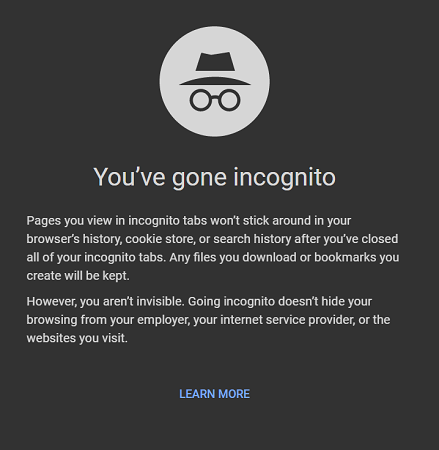
This step helps test browser-related issues.Incognito or private mode loads pages without extensions and saved data. If Reddit works there, the problem is likely your main browser setup.
A simple example. Reddit fails in Chrome. The same user opens Reddit in private mode or another browser. Reddit loads normally. This shows that extensions or settings caused the block.
If you see you've been blocked by network security in one browser only, this test gives a clear answer.
Use an Antidetect Browser with a Trusted Proxy
If Reddit blocks you again and again, the issue may be deeper.Reddit checks more than IP addresses. It also looks at browser signals. These signals include settings, behavior patterns, and consistency. When something looks unusual, access may be limited.
An antidetect browser creates a clean and isolated browser profile. Each profile looks like a normal, stable user. This reduces false triggers.
For example, marketers or researchers who open Reddit many times a day may face repeated blocks. After switching to an antidetect browser, their access becomes stable. They no longer see you've been blocked by network security during normal use.This option is best for users who need long-term, reliable access, not just a one-time fix.
Why Choose DICloak Antidetect Browser with Proxies for Unblocking?
⚡The DICloak Antidetect Browser has become a global favorite for its unparalleled ability to efficiently and securely manage multiple accounts. Designed for professionals in social media management, and more, DICloak offers powerful features like RPA automation, bulk operations, and a synchronizer. Additionally, it allows you to customize fingerprints and integrate proxies for each profile, ensuring top-level security and operational efficiency. It’s the ultimate tool for seamless, secure, and scalable operations.

What Makes DICloak Stand Out?
✅ Manage 1,000+ Accounts on One Device: Stop wasting money on extra hardware! DICloak allows you to manage multiple accounts on a single device, cutting costs and boosting efficiency.
✅ Guaranteed Account Safety, No Ban Risks: Every account gets its own isolated browser profile with custom fingerprints and IPs, drastically reducing the risk of bans. Your accounts, your control!
✅ Flexible Proxy Configuration for Maximum Performance: Seamlessly integrate with all major proxy protocols (HTTP/HTTPS, SOCKS5) and manage your proxy pool with bulk operations. No more struggling with IP management—DICloak has you covered.
✅ Streamlined Team Collaboration for Better Results: Easily manage your team with advanced tools like profile sharing, permission settings, data isolation, and operation logs. Your team works smarter, not harder.
✅ Automate the Grind with RPA: DICloak's built-in RPA saves you hours of manual work. Automate repetitive tasks, streamline workflows, and focus on what really matters—growing your business.
✅ Powerful Bulk Tools to Scale Your Operations: Create, import, and launch multiple browser profiles in one click. DICloak makes scaling your business as easy as it gets.
✅ Compatible with All Major Operating Systems: Based on the Chrome core, DICloak supports simulating Windows, Mac, iOS, Android, and Linux operating systems. No matter what platform you need, DICloak has you covered.
🔗 Ready to Get Started?
Visit the DICloak website to explore more details and choose the plan that’s right for you. Start for free today and experience the power of secure, efficient, and scalable multi-account management!
Preventative Measures
In the last section, we covered how to fix Reddit blocks. Now let’s focus on how to avoid seeing “you’ve been blocked by network security” again. Prevention is often easier than fixing the problem after it happens.
How to Avoid Being Blocked by Network Security
The first step is to keep a clean IP reputation.
Websites watch how an IP behaves. If an IP sends too many requests, refreshes pages too fast, or repeats the same action many times, it can look suspicious. This often leads to you’ve been blocked by network security.
A simple example is refreshing Reddit again and again when posts fail to load. Slowing down usually stops the block from happening.
You should also pay attention to where you connect from. Work and school networks often block sites by rule, not by risk. If Reddit or another platform works on mobile data but not on Wi-Fi, the network policy is the cause. In that case, following the network rules is the safest choice.
Another good habit is to keep your browsing setup stable. Avoid changing devices, locations, and browsers too often in a short time. Sudden changes can trigger security systems.
Using Reliable Proxies
For users who access Reddit often, a reliable proxy can help prevent repeated blocks.
A proxy gives you a different IP address. This is useful if your current IP has a bad history. But quality matters. Free or low-quality proxies are often already flagged. They can cause you’ve been blocked by network security even faster.
A better choice is a trusted service that offers clean and stable IPs. Residential or rotating proxies usually work better because they look more like normal user traffic.
For example, a user who managed multiple Reddit sessions kept getting blocked on a single IP. After switching to a reliable proxy with clean IPs, the blocks stopped during normal use.
The key idea is simple. Act like a real user. Use stable connections. Choose tools carefully. This greatly reduces the chance of seeing you’ve been blocked by network security again.
FAQs
1.Does Being Blocked Indicate a Ban?
In most cases, no. When Reddit shows you've been blocked by network security, it usually means a temporary security limit, not a permanent ban on your Reddit account. A real ban is clearly stated by Reddit and is tied to account rule violations. For example, a user may refresh pages too often and get blocked for a short time, but the account works again later or on another network, which confirms it was not a ban.
2.How Can I Contact Reddit Support for Help?
If the block does not clear after basic fixes, contacting Reddit support is the right step. Log in to the Reddit Help Center with your Reddit account and submit a request related to access or security issues. Include when the block appeared and what action triggered it. Many users receive confirmation that the block was automatic and temporary.
3.Is My Reddit Account at Risk After a Block?
Usually, it is not. A network security block is designed to reduce risk, not punish normal users. If your Reddit account shows no warnings and works on another connection, it is likely safe. This often happens after logging in from a new device or location, and access returns once activity looks normal again.
4.Can This Happen Again?
Yes, but it can often be avoided. Repeated use of shared Wi-Fi, unstable IPs, or browsers with heavy extensions increases the chance of seeing you've been blocked by network security again. Using a stable network and consistent browsing setup helps keep your Reddit account accessible.
Conclusion and Final Thoughts
If you see you've been blocked by network security, it is usually a temporary protection step, not a ban. In most cases, the block is caused by IP issues, network rules, browser conflicts, or unusual activity on platforms like Reddit. Many users fix the problem by waiting, restarting their router, clearing browser data, or switching to a more stable setup. Instead of worrying, take it as a signal to adjust how you connect and browse. With simple, proactive habits, you can reduce repeat blocks and keep your access stable over time.
 Web Proxy Tools
 Free Tools
 Cookie Plugin
 UA Generator
 MAC Address Generator
 IP Generator
 IP Address List
 2FA Code Generator
 World Clock
 Anonymous Check
 WebRTC Leak Test
 UUID Generator
 Free Web Proxy Site
 Proxy Checker
 FB Ad Checker
 AI Web Scraping
 Free SMM Tools
 Twitter Shadowban Checker
 Instagram Name Checker
 UTM Generator
 Username Generator
 AI Hashtag Generator
 LinkedIn Headline Generator
 Social Media Image Resizer